
自定義view仿寫今日頭條點贊動畫!
作者:honglei92 https://blog.csdn.net/wanghonglei01/article/details/113843317
前言
平時喜歡看今日頭條,上面的財經(jīng)、科技和NBA欄目都很喜歡,無意中發(fā)現(xiàn)他的點贊動畫還不錯,一下子就吸引到了我。遂即想要不自己實現(xiàn)一下。
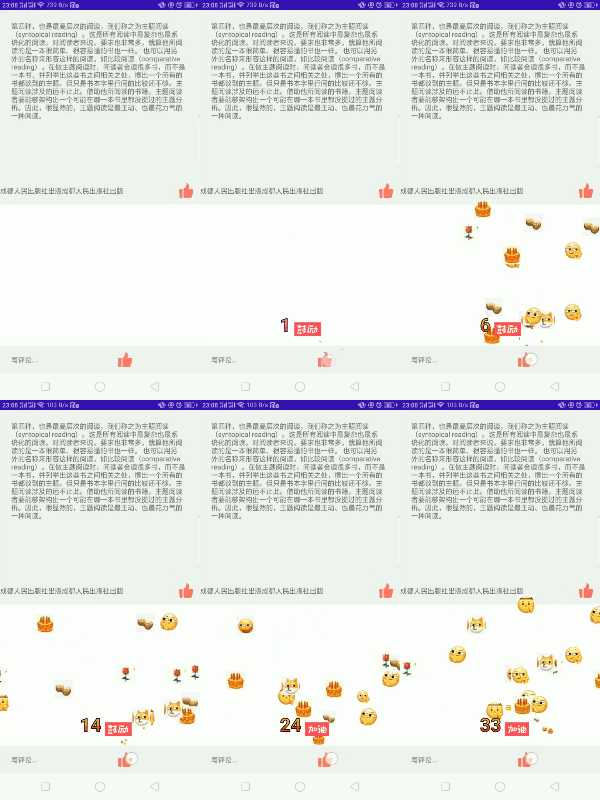
最終效果對比如下:
頭條:

仿寫效果:
一、導(dǎo)讀
學(xué)習(xí)的過程中發(fā)現(xiàn),每個知識點都是一個小小的體系。比如Glide源碼解析,我看到有作者寫了10篇文章一個系列來解析(Glide源碼解析 https://www.jianshu.com/nb/45157164),掌握一個知識點里面的知識體系還是需要下一些功夫的。
二、效果分析
1 點擊一次會撒出五個隨機表情和點擊音效; 2 連續(xù)點擊會連續(xù)撒出表情并播放音效; 3 長按會一直撒; 4 連續(xù)撒時會出現(xiàn)次數(shù)和標(biāo)語(0-20 鼓勵,20-40加油,>40太棒了);
三、實現(xiàn)過程
3.1 外層布局
因為今日頭條里面底部評論框和資訊列表頁都會有點贊按鈕,那么點贊效果的表情機會滿屏幕都存在,所以最外層繼承了RelativeLayout。然后寬高都設(shè)置match_parent。在點擊按鈕的時候觸發(fā)OnTouch事件:
        ivThumbBottom.setOnTouchListener(new View.OnTouchListener() {
            @Override
            public boolean onTouch(View v, MotionEvent event) {
                if (event.getAction() == MotionEvent.ACTION_DOWN) {
                    lastDownTime = System.currentTimeMillis();
                    //獲取到 x y的坐標(biāo)來確定動畫撒表情的起點
                    x = (int) event.getRawX();
                    y = (int) event.getRawY();
                    Log.i("aaa", (System.currentTimeMillis() - lastDownTime) + "");
                    handler.postDelayed(mLongPressed, 100);
                }
                if (event.getAction() == MotionEvent.ACTION_UP) {
                    Log.i("aaa", (System.currentTimeMillis() - lastDownTime) + "");
                    if (System.currentTimeMillis() - lastDownTime < 100) {//判斷為單擊事件
                        articleThumbRl.setVisibility(View.VISIBLE);
                        articleThumbRl.setThumb(true, x, y, articleThumbRl);
                        handler.removeCallbacks(mLongPressed);
                    } else {//判斷為長按事件后松開
                        handler.removeCallbacks(mLongPressed);
                    }
                }
                return true;
            }
        });
其中通過如下方式實現(xiàn),長按循環(huán)撒表情。
    final Runnable mLongPressed = new Runnable() {
        @Override
        public void run() {
            articleThumbRl.setVisibility(View.VISIBLE);
            articleThumbRl.setThumb(x, y, articleThumbRl);
            handler.postDelayed(mLongPressed, 100);
        }
    };
3.2 setThumb方法 處理點擊事件
    public void setThumb(float x, float y, ArticleRl articleThumbRl) {
        //這里處理音效播放
        if (mMediaPlayer.isPlaying()) {
            mMediaPlayer.seekTo(0);//重復(fù)點擊時,從頭開始播放
        } else {
            mMediaPlayer.start();
        }
        if (System.currentTimeMillis() - lastClickTime > 800) {//單次點擊
            addThumbImage(mContext, x, y, this);
            lastClickTime = System.currentTimeMillis();
            for (int i = getChildCount() - 5; i < getChildCount(); i++) {
                if (getChildAt(i) instanceof ThumbEmoji) {
                    ((ThumbEmoji) getChildAt(i)).setThumb(true, articleThumbRl);
                }
            }
            currentNumber = 0;
            if (thumbNumber != null) {
                removeView(thumbNumber);
                thumbNumber = null;
            }
        } else {//連續(xù)點擊
            lastClickTime = System.currentTimeMillis();
            Log.i(TAG, "當(dāng)前動畫化正在執(zhí)行");
            addThumbImage(mContext, x, y, this);
            for (int i = getChildCount() - 5; i < getChildCount(); i++) {
                if (getChildAt(i) instanceof ThumbEmoji) {
                    ((ThumbEmoji) getChildAt(i)).setThumb(true, articleThumbRl);
                }
            }
            currentNumber++;
            //這里添加數(shù)字連擊view
            LayoutParams layoutParams = new LayoutParams(ViewGroup.LayoutParams.MATCH_PARENT, ViewGroup.LayoutParams.WRAP_CONTENT);
            DisplayMetrics metrics = mContext.getResources().getDisplayMetrics();
            layoutParams.setMargins(600, (int) (y) - 300, 0, 150);
            if (thumbNumber == null) {
                thumbNumber = new ThumbNumber(mContext);
                addView(thumbNumber, layoutParams);//第二個參數(shù) 讓數(shù)字連擊始終保持在最上層
            }
            thumbNumber.setNumber(currentNumber);
        }
    }
其中,數(shù)字連擊view中的數(shù)字有一個顏色漸變和描邊效果,顏色漸變用LinearGradient(扔物線課程里面有),描邊用重疊繪制方式。
textPaint = new Paint();
        textPaint.setTextSize(TEXT_SIZE);
        textPaint.setTextAlign(Paint.Align.LEFT);
        textPaint.setStrokeWidth(STROKE_WIDTH);
        textPaint.setStyle(Paint.Style.FILL);
        textPaint.setTypeface(Typeface.DEFAULT_BOLD);
        //這里為了做成上面和下面顏色各一半
        LinearGradient mLinearGradient = new LinearGradient(0, 0, 0, 90f,
                new int[]{0xFFFF9641, 0xFFFF9641, 0xFFFF9641, 0xFFFF9641, 0xFFff0000, 0xFFff0000},
                null, Shader.TileMode.CLAMP);
        textPaint.setShader(mLinearGradient);
        //描邊畫筆
        textPaintStroke = new Paint();
        textPaintStroke.setColor(Color.BLACK);
        textPaintStroke.setTextSize(TEXT_SIZE);
        textPaintStroke.setTextAlign(Paint.Align.LEFT);
        textPaintStroke.setStrokeWidth(4);
        textPaintStroke.setStyle(Paint.Style.STROKE);
        textPaintStroke.setTypeface(Typeface.DEFAULT_BOLD);
3.3 添加表情的自定義view ThumbEmoji
     private void addThumbImage(Context context, float x, float y, ThumbEmoji.AnimatorListener animatorListener) {
        List<Integer> list = new ArrayList<>();
        for (int i = 0; i < 8; i++) {
            list.add(i);
        }
        Collections.shuffle(list);//打亂順序
        for (int i = 0; i < 5; i++) {
            LayoutParams layoutParams = new LayoutParams(100, 100);
            layoutParams.setMargins((int) x, (int) y - 50, 0, 0);
            ThumbEmoji articleThumb = new ThumbEmoji(context);
            articleThumb.setEmojiType(list.get(i));
            articleThumb.setmAnimatorListener(animatorListener);
            if (getChildCount() > 1)
                this.addView(articleThumb, getChildCount() - 1, layoutParams);
            else {
                this.addView(articleThumb, layoutParams);
            }
        }
    }
其中這里的addview方法給他設(shè)置index為 childcount-1后,就可以讓它保持在數(shù)字連擊view的下方,但是我設(shè)置成1會出現(xiàn)bug,的原因我還得再去看看。
 if (getChildCount() > 1)
                this.addView(articleThumb, getChildCount() - 1, layoutParams);
            else {
                this.addView(articleThumb, layoutParams);
            }
3.4 撒花效果的動畫(也就是拋物線動畫)的實現(xiàn)
拋物線動畫 分為上升和下降兩部分, 上升時,x軸勻速左移或右移,y軸減速向上,表情圖片寬高從0變到100;下降時,x變?yōu)?.2倍x,高度變?yōu)樽罡咛幍?.8,透明度在最后1/8時間段里從1變?yōu)?。
       private void showThumbDownAni(ArticleRl articleThumbRl) {
        float topX = -(1080 - 200) + (float) ((2160 - 400) * Math.random());
        float topY = -300 + (float) (-700 * Math.random());
        //上升動畫
        //拋物線動畫 x方向
        ObjectAnimator translateAnimationX = ObjectAnimator.ofFloat(this, "translationX",
                0, topX);
        translateAnimationX.setDuration(DURATION);
        translateAnimationX.setInterpolator(new LinearInterpolator());
        //y方向
        ObjectAnimator translateAnimationY = ObjectAnimator.ofFloat(this, "translationY",
                0, topY);
        translateAnimationY.setDuration(DURATION);
        translateAnimationY.setInterpolator(new DecelerateInterpolator());
        //表情圖片的大小變化
        ObjectAnimator translateAnimationRightLength = ObjectAnimator.ofInt(this, "rightLength",
                0, 100, 100, 100, 100, 100);
        translateAnimationRightLength.setDuration(DURATION);
        ObjectAnimator translateAnimationBottomLength = ObjectAnimator.ofInt(this, "bottomLength",
                0, 100, 100, 100, 100, 100);
        translateAnimationBottomLength.setDuration(DURATION);
        translateAnimationRightLength.addUpdateListener(new ValueAnimator.AnimatorUpdateListener() {
            @Override
            public void onAnimationUpdate(ValueAnimator animation) {
                invalidate();//ondraw會在什么情況下執(zhí)行?
            }
        });
        //動畫集合
        AnimatorSet animatorSet = new AnimatorSet();
        animatorSet.play(translateAnimationX).with(translateAnimationY).with(translateAnimationRightLength).with(translateAnimationBottomLength);

        //下降動畫
        //拋物線動畫,原理:兩個位移動畫,一個橫向勻速移動,一個縱向變速移動,兩個動畫同時執(zhí)行,就有了拋物線的效果。
        ObjectAnimator translateAnimationXDown = ObjectAnimator.ofFloat(this, "translationX", topX, topX * 1.2f);
        translateAnimationXDown.setDuration(DURATION / 5);
        translateAnimationXDown.setInterpolator(new LinearInterpolator());

        ObjectAnimator translateAnimationYDown = ObjectAnimator.ofFloat(this, "translationY", topY, topY * 0.8f);
        translateAnimationYDown.setDuration(DURATION / 5);
        translateAnimationYDown.setInterpolator(new AccelerateInterpolator());
        //透明度
        ObjectAnimator alphaAnimation = ObjectAnimator.ofFloat(this, "alpha", 1f, 1f, 1f, 1f, 1f, 1f, 1f, 0f);
        alphaAnimation.setDuration(DURATION / 5);
        AnimatorSet animatorSetDown = new AnimatorSet();//設(shè)置動畫播放順序
        //播放上升動畫
        animatorSet.start();
        animatorSet.addListener(new Animator.AnimatorListener() {

            @Override
            public void onAnimationEnd(Animator animation) {
                animatorSetDown.play(translateAnimationXDown).with(translateAnimationYDown).with(alphaAnimation);
                animatorSetDown.start();
            }
        });
        animatorSetDown.addListener(new Animator.AnimatorListener() {

            @Override
            public void onAnimationEnd(Animator animation) {
                articleThumbRl.removeView(ThumbEmoji.this);
                mAnimatorListener.onAnimationEmojiEnd();
            }
        });
    }
四、總結(jié)
項目github地址:https://github.com/honglei92/toutiaothumb view是應(yīng)用開發(fā)時常會接觸得的東西,從使用概念原理幾個方面我們需要深學(xué)細(xì)悟、研機析理,做到融會貫通。apk地址:https://github.com/honglei92/toutiaothumb/blob/master/app/release/app-release.apk
五、參考文獻
[1]https://mp.weixin.qq.com/s/PlNtRiowKe9jUXhzPA-CNg [2]https://github.com/arvinljw/ThumbUpSample [3]https://mp.weixin.qq.com/s/JjeYAESAI8NnwFdJJUXqQA
推薦閱讀
? 耗時2年,Android進階三部曲第三部《Android進階指北》出版!
? 『BATcoder』做了多年安卓還沒編譯過源碼?一個視頻帶你玩轉(zhuǎn)!
BATcoder技術(shù)群,讓一部分人先進大廠
你好,我是劉望舒,騰訊云最具價值專家TVP,著有暢銷書《Android進階之光》《Android進階解密》《Android進階指北》,蟬聯(lián)四屆電子工業(yè)出版社年度優(yōu)秀作者,谷歌開發(fā)者社區(qū)特邀講師。
前華為面試官,現(xiàn)大廠技術(shù)負(fù)責(zé)人。
想要加入 BATcoder技術(shù)群,公號回復(fù)Android 即可。
為了防止失聯(lián),歡迎關(guān)注我的小號
更文不易,點個“在看”支持一下??