Shell 命令執(zhí)行可視化和告警工具
點擊藍色“Python交流圈”關(guān)注我丫
加個“星標(biāo)”,每天一起進步一點點
Sampler是一個用于shell命令執(zhí)行,可視化和告警的工具。其配置使用的是一個簡單的YAML文件。
1、為什么我需要它?
你可以直接從終端對任意動態(tài)進程進行采樣 – 觀察數(shù)據(jù)庫中的更改,監(jiān)控MQ動態(tài)消息(in-flight messages),觸發(fā)部署腳本并在完成后獲取通知。
如果有一種方法可以使用shell命令獲取指標(biāo)(metric),那么可以使用Sampler立即對其進行可視化。
2、安裝
macOS
brew?cask?install?sampler或
sudo?curl?-Lo?/usr/local/bin/sampler?https://github.com/sqshq/sampler/releases/download/v1.0.3/sampler-1.0.3-darwin-amd64
sudo?chmod?+x?/usr/local/bin/sampler
Linux
sudo?wget?https://github.com/sqshq/sampler/releases/download/v1.0.3/sampler-1.0.3-linux-amd64?-O?/usr/local/bin/sampler
sudo?chmod?+x?/usr/local/bin/sampler注意:需要為Sampler安裝libasound2-dev系統(tǒng)庫用以播放觸發(fā)器聲音。通常庫已安裝在相應(yīng)位置,但如果沒有 – 你可以使用你習(xí)慣的包管理器進行安裝,例如apt install libasound2-dev
Windows(實驗)
建議在高級控制臺模擬器下使用,如Cmder
Download .exe
3、使用
指定shell命令,Sampler會相應(yīng)的速率執(zhí)行這些命令。輸出用于可視化。
使用Sampler基本上的三步過程:
在YAML配置文件中定義shell命令
運行sampler -c config.yml
在UI上調(diào)整組件大小和位置
市面早已有許多監(jiān)控系統(tǒng)
Sampler絕不是監(jiān)控系統(tǒng)的替代品,而是易于設(shè)置的開發(fā)工具。
如果spinning up和使用Grafana配置Prometheus是完全多余的任務(wù),那么Sampler可能是正確的解決方案。沒有服務(wù)器,沒有數(shù)據(jù)庫,不需要部署 – 你指定了shell命令,它就可以工作了。
我監(jiān)控的每臺服務(wù)器上都需要安裝嗎?
不,你可以在本地運行Sampler,但仍然可以從多臺遠程計算機上收集遙測數(shù)據(jù)。任何可視化都可能具有init命令,你可以在其中ssh到遠程服務(wù)器。請參閱SSH example
4、組件
以下是每種組件類型的配置示例列表,其中包含與macOS兼容的采樣腳本。
Runchart
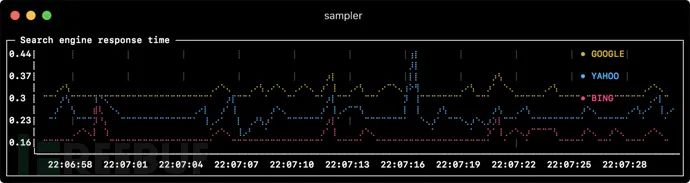
runcharts:
??-?title:?Search?engine?response?time
????rate-ms:?500????????#?sampling?rate,?default?=?1000
????scale:?2????????????#?number?of?digits?after?sample?decimal?point,?default?=?1
????legend:
??????enabled:?true?????#?enables?item?labels,?default?=?true
??????details:?false????#?enables?item?statistics:?cur/min/max/dlt?values,?default?=?true
????items:
??????-?label:?GOOGLE
????????sample:?curl?-o?/dev/null?-s?-w?'%{time_total}'??https://www.google.com
????????color:?178??????#?8-bit?color?number,?default?one?is?chosen?from?a?pre-defined?palette
??????-?label:?YAHOO
????????sample:?curl?-o?/dev/null?-s?-w?'%{time_total}'??https://search.yahoo.com
??????-?label:?BING
????????sample:?curl?-o?/dev/null?-s?-w?'%{time_total}'??https://www.bing.com
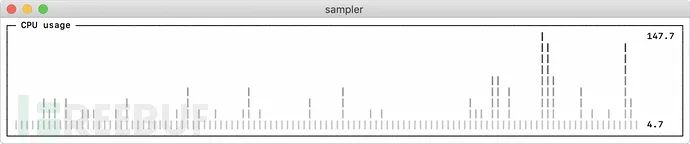
Sparkline

sparklines:
??-?title:?CPU?usage
????rate-ms:?200
????scale:?0
????sample:?ps?-A?-o?%cpu?|?awk?'{s+=$1}?END?{print?s}'
??-?title:?Free?memory?pages
????rate-ms:?200
????scale:?0
????sample:?memory_pressure?|?grep?'Pages?free'?|?awk?'{print?$3}'
Barchart
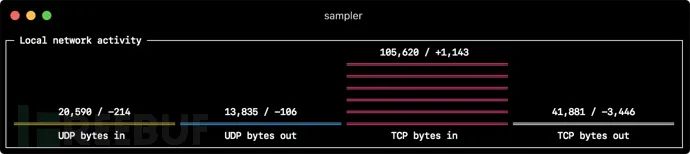
barcharts:
??-?title:?Local?network?activity
????rate-ms:?500????????#?sampling?rate,?default?=?1000
????scale:?0????????????#?number?of?digits?after?sample?decimal?point,?default?=?1
????items:
??????-?label:?UDP?bytes?in
????????sample:?nettop?-J?bytes_in?-l?1?-m?udp?|?awk?'{sum?+=?$4}?END?{print?sum}'
??????-?label:?UDP?bytes?out
????????sample:?nettop?-J?bytes_out?-l?1?-m?udp?|?awk?'{sum?+=?$4}?END?{print?sum}'
??????-?label:?TCP?bytes?in
????????sample:?nettop?-J?bytes_in?-l?1?-m?tcp?|?awk?'{sum?+=?$4}?END?{print?sum}'
??????-?label:?TCP?bytes?out
????????sample:?nettop?-J?bytes_out?-l?1?-m?tcp?|?awk?'{sum?+=?$4}?END?{print?sum}'
Gauge

gauges:
??-?title:?Minute?progress
????rate-ms:?500????????#?sampling?rate,?default?=?1000
????scale:?2????????????#?number?of?digits?after?sample?decimal?point,?default?=?1
????percent-only:?false?#?toggle?display?of?the?current?value,?default?=?false
????color:?178??????????#?8-bit?color?number,?default?one?is?chosen?from?a?pre-defined?palette
????cur:
??????sample:?date?+%S??#?sample?script?for?current?value
????max:
??????sample:?echo?60???#?sample?script?for?max?value
????min:
??????sample:?echo?0????#?sample?script?for?min?value
??-?title:?Year?progress
????cur:
??????sample:?date?+%j
????max:
??????sample:?echo?365
????min:
??????sample:?echo?0
Textbox

textboxes:
??-?title:?Local?weather
????rate-ms:?10000??????#?sampling?rate,?default?=?1000
????sample:?curl?wttr.in?0ATQF
????border:?false???????#?border?around?the?item,?default?=?true
????color:?178??????????#?8-bit?color?number,?default?is?white
??-?title:?Docker?containers?stats
????rate-ms:?500
????sample:?docker?stats?--no-stream?--format?"table?{{.Name}}\t{{.CPUPerc}}\t{{.MemUsage}}\t{{.PIDs}}"
Asciibox

asciiboxes:
??-?title:?UTC?time
????rate-ms:?500????????#?sampling?rate,?default?=?1000
????font:?3d????????????#?font?type,?default?=?2d
????border:?false???????#?border?around?the?item,?default?=?true????
????color:?43???????????#?8-bit?color?number,?default?is?white
????sample:?env?TZ=UTC?date?+%r
5、額外功能
Triggers
觸發(fā)器允許執(zhí)行條件操作,如視覺/聲音告警或任意shell命令。以下示例說明了此概念。
Clock gauge,從開始的每分鐘顯示時間進度和當(dāng)前時間
gauges:
??-?title:?MINUTE?PROGRESS
????position:?[[0,?18],?[80,?0]]??
????cur:
??????sample:?date?+%S
????max:
??????sample:?echo?60
????min:
??????sample:?echo?0
????triggers:
??????-?title:?CLOCK?BELL?EVERY?MINUTE
????????condition:?'[?$label?==?"cur"?]?&&?[?$cur?-eq?0?]?&&?echo?1?||?echo?0'??#?expects?"1"?as?TRUE?indicator
????????actions:
??????????terminal-bell:?true??#?standard?terminal?bell,?default?=?false
??????????sound:?true????#?NASA?quindar?tone,?default?=?false
??????????visual:?false??#?notification?with?current?value?on?top?of?the?component?area,?default?=?false
??????????script:?say?-v?samantha?`date?+%I:%M%p`??#?an?arbitrary?script,?which?can?use?$cur,?$prev?and?$label?variables
搜索引擎延遲圖表,在延遲超過閾值時向用戶發(fā)出告警
runcharts:
??-?title:?SEARCH?ENGINE?RESPONSE?TIME?(sec)
????rate-ms:?200
????items:
??????-?label:?GOOGLE
????????sample:?curl?-o?/dev/null?-s?-w?'%{time_total}'??https://www.google.com
??????-?label:?YAHOO
????????sample:?curl?-o?/dev/null?-s?-w?'%{time_total}'??https://search.yahoo.com?????
????triggers:
??????-?title:?Latency?threshold?exceeded
????????condition:?echo?"$prev??0.3"?|bc?-l??#?expects?"1"?as?TRUE?indicator
????????actions:
??????????terminal-bell:?true??#?standard?terminal?bell,?default?=?false
??????????sound:?true???#?NASA?quindar?tone,?default?=?false
??????????visual:?true??#?visual?notification?on?top?of?the?component?area,?default?=?false
??????????script:?'say?alert:?${label}?latency?exceeded?${cur}?second'?#?an?arbitrary?script,?which?can?use?$cur,?$prev?and?$label?variables
交互式 shell 支持
除了sample命令之外,還可以指定init命令(在采樣前僅執(zhí)行一次)和transform命令(后處理采樣命令輸出)。這包括交互式shell用例,例如僅建立與數(shù)據(jù)庫的連接一次,然后在交互式shell會話中執(zhí)行輪詢。
Basic mode
textboxes:
??-?title:?MongoDB?polling
????rate-ms:?500
????init:?mongo?--quiet?--host=localhost?test?#?executes?only?once?to?start?the?interactive?session
????sample:?Date.now();???????????????????????#?executes?with?a?required?rate,?in?scope?of?the?interactive?session
????transform:?echo?result?=?$sample??????????#?executes?in?scope?of?local?session,?$sample?variable?is?available?for?transformation
PTY mode
在某些情況下,交互式shell將無法工作,因為它的stdin不是終端。這種情況下我們可以使用PTY模式:
textboxes:
??-?title:?Neo4j?polling
????pty:?true??#?enables?pseudo-terminal?mode,?default?=?false
????init:?cypher-shell?-u?neo4j?-p?pwd?--format?plain
????sample:?RETURN?rand();
????transform:?echo?"$sample"?|?tail?-n?1
??-?title:?Top?on?a?remote?server
????pty:?true??#?enables?pseudo-terminal?mode,?default?=?false
????init:?ssh?-i?~/user.pem?ec2-user@1.2.3.4
????sample:?top
init 命令逐步執(zhí)行
在開始采樣之前,還可以逐個執(zhí)行多個init命令。
textboxes:
??-?title:?Java?application?uptime
????multistep-init:
??????-?java?-jar?jmxterm-1.0.0-uber.jar
??????-?open?host:port?#?or?local?PID
??????-?bean?java.lang:type=Runtime
????sample:?get?Uptime
變量
如果配置文件包含重復(fù)的模式,則可以將它們提取到變量部分。此外,還可以在啟動時使用-v/–variable標(biāo)志指定變量,并且任意的系統(tǒng)環(huán)境變量也可以在腳本中使用。
variables:
????mongoconnection:?mongo?--quiet?--host=localhost?test
barcharts:
??-?title:?MongoDB?documents?by?status
????items:
??????-?label:?IN_PROGRESS
????????init:?$mongoconnection
????????sample:?db.getCollection('events').find({status:'IN_PROGRESS'}).count()
??????-?label:?SUCCESS
????????init:?$mongoconnection
????????sample:?db.getCollection('events').find({status:'SUCCESS'}).count()
??????-?label:?FAIL
????????init:?$mongoconnection
????????sample:?db.getCollection('events').find({status:'FAIL'}).count()
顏色主題
theme:?light?#?default?=?dark
sparklines:
??-?title:?CPU?usage
????sample:?ps?-A?-o?%cpu?|?awk?'{s+=$1}?END?{print?s}'
6、真實場景
數(shù)據(jù)庫
以下是不同的數(shù)據(jù)庫連接示例。建議使用交互式shell(init腳本)僅建立一次連接,然后在采樣期間重用即可。
MySQL
#?prerequisite:?installed?mysql?shell
variables:
??mysql_connection:?mysql?-u?root?-s?--database?mysql?--skip-column-names
sparklines:??
??-?title:?MySQL?(random?number?example)
????pty:?true
????init:?$mysql_connection
????sample:?select?rand();
PostgreSQL
#?prerequisite:?installed?psql?shell
variables:
??PGPASSWORD:?pwd
??postgres_connection:?psql?-h?localhost?-U?postgres?--no-align?--tuples-only
sparklines:
??-?title:?PostgreSQL?(random?number?example)
????init:?$postgres_connection
????sample:?select?random();
MongoDB
#?prerequisite:?installed?mongo?shell
variables:
??mongo_connection:?mongo?--quiet?--host=localhost?test
sparklines:
??-?title:?MongoDB?(random?number?example)
????init:?$mongo_connection
????sample:?Math.random();
Neo4j
#?prerequisite:?installed?cypher?shell
variables:
??neo4j_connection:?cypher-shell?-u?neo4j?-p?pwd?--format?plain
sparklines:
??-?title:?Neo4j?(random?number?example)
????pty:?true
????init:?$neo4j_connection
????sample:?RETURN?rand();
????transform:?echo?"$sample"?|?tail?-n?1
Kafka
檢查kafka lag值,計算每個隊列l(wèi)ag值的和,高于閾值報警,多consumergroup,多topic。
variables:
??kafka_connection:?$KAFKA_HOME/bin/kafka-consumer-groups?--bootstrap-server?localhost:9092
runcharts:
??-?title:?Kafka?lag?per?consumer?group
????rate-ms:?5000
????scale:?0
????items:
??????-?label:?A->B
????????sample:?$kafka_connection?--group?group_a?--describe?|?awk?'NR>1?{sum?+=?$5}?END?{print?sum}'
??????-?label:?B->C
????????sample:?$kafka_connection?--group?group_b?--describe?|?awk?'NR>1?{sum?+=?$5}?END?{print?sum}'
??????-?label:?C->D
????????sample:?$kafka_connection?--group?group_c?--describe?|?awk?'NR>1?{sum?+=?$5}?END?{print?sum}'
Docker
Docker容器統(tǒng)計信息(CPU,MEM,O/I)
textboxes:
??-?title:?Docker?containers?stats
????sample:?docker?stats?--no-stream?--format?"table?{{.Name}}\t{{.CPUPerc}}\t{{.MemPerc}}\t{{.MemUsage}}\t{{.NetIO}}\t{{.BlockIO}}\t{{.PIDs}}"
SSH
遠程服務(wù)器上的TOP命令
variables:
??sshconnection:?ssh?-i?~/[email protected]
textboxes:
??-?title:?SSH
????pty:?true
????init:?$sshconnection
????sample:?top
JMX
Java應(yīng)用程序的正常運行示例
#?prerequisite:?download?[jmxterm?jar?file](https://docs.cyclopsgroup.org/jmxterm)
textboxes:
??-?title:?Java?application?uptime
????multistep-init:
??????-?java?-jar?jmxterm-1.0.0-uber.jar
??????-?open?host:port?#?or?local?PID
??????-?bean?java.lang:type=Runtime
????sample:?get?Uptime
????transform:?echo?$sample?|?tr?-dc?'0-9'?|?awk?'{printf?"%.1f?min",?$1/1000/60}'作者:secist
鏈接:https://www.freebuf.com/sectool/212820.html
--End--
近期熱門推薦? 1、打馬賽克就安全了嗎?AI消除馬賽克,GitHub開源項目上線三天收獲近7000星
2、垃圾分類的正確姿勢?用 OpenCV 人工智能圖像識別技術(shù)來進行
3、Python 游戲編程之實現(xiàn)飛機大戰(zhàn)(含源代碼)
4、用 Hypothesis 快速測試你的 Python 代碼
9、大廠的 404 頁面都長啥樣?看到最后一個,我笑了。。。
10、爬取QQ音樂全部歌曲
關(guān)注公眾號,回復(fù)“001” 領(lǐng)取Python入門+進階+實戰(zhàn)開發(fā)92天全套視頻教程
點贊最大的支持?