
520女神說她很熱,我用React寫了個夏日空調(diào)給她
點擊上方?前端陽光,關(guān)注公眾號
回復(fù)加群,加入技術(shù)交流群交流群
摘要
當(dāng)520來臨而又恰逢夏日時節(jié),暗戀女神多日的我決定今晚把她約出去看電影,一想到晚上的甜蜜時光,我直接拿起手機直接給女神發(fā)消息,掘友們等著吃狗糧吧,管飽。

既然女神這么熱,我身為一個react使者怎能甘心呢,不行,要給女神寫個空調(diào),說不定今晚可以出去二人世界了呢。要寫個夏日空調(diào)可真難,倒不是代碼繁瑣,只是這夏日空調(diào)得蘸上四分春風(fēng),三分月色,兩分微醺,還有一分她的眉眼才好。咱們話不多說,上號。

創(chuàng)建項目
>?create-react-app?air-condition
組件劃分
無論寫react還是vue,最重要的一點永遠都有如何確定組件分工,組件就是分而治之的思想,它就像一個備胎,哪里需要哪里搬!因為這個React夏日空調(diào)并不算復(fù)雜,甚至有點簡單,所以html、css部分不多贅述,我們直接來看怎么劃分組件。如下圖所示,App組件為根組件,包裹Panel、CopyWriting、Button、Audio組件,Panel組件中又包含Temp組件,我們將狀態(tài)(空調(diào)當(dāng)前溫度)、行為(調(diào)節(jié)按鈕、聲音的播放與暫停)統(tǒng)統(tǒng)放在App組件中,因為Panel、Button、Audio組件之間需要共享數(shù)據(jù),而最方便的方法無疑是將共有數(shù)據(jù)存放在其共同的父組件中,這種方式React稱之為狀態(tài)提升。
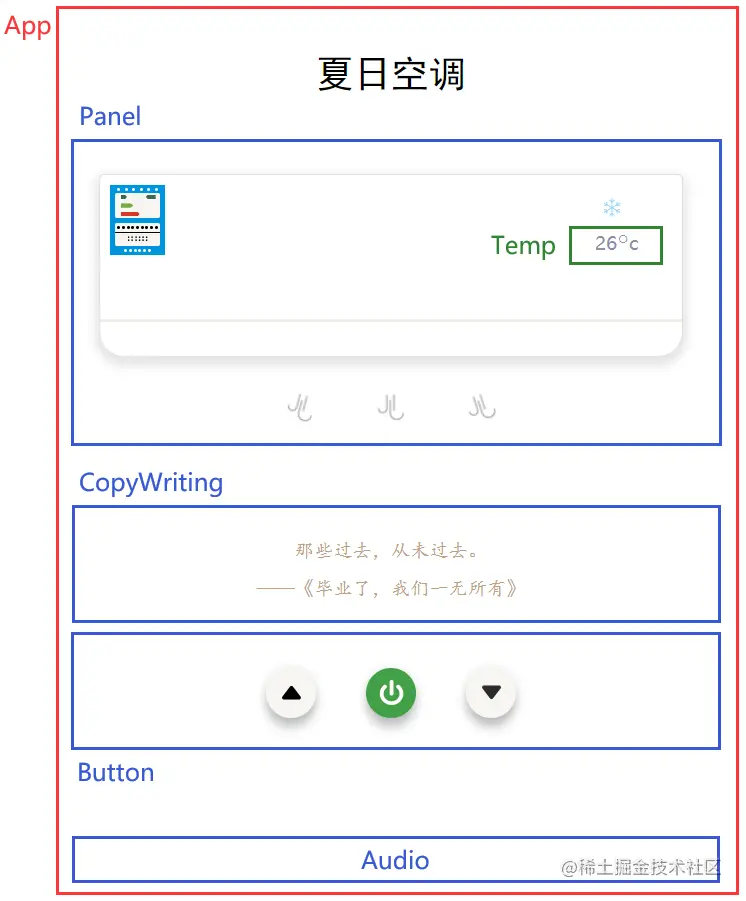
組件分工
index
import?React?from?'react'
import?ReactDOM?from?'react-dom/client'

import?App?from?'./App'

const?root?=?ReactDOM.createRoot(document.querySelector('#root'))
root.render(
??<React.StrictMode>
????<App?/>
??React.StrictMode>
)
App
import?{?useState,?useRef,?useCallback?}?from?'react'

import?Panel?from?'./component/Panel'
import?CopyWriting?from?'./component/CopyWriting'
import?Button?from?'./component/Button'
import?Audio?from?'./component/Audio'

const?App?=?()?=>?{
??//?使用useRef得到Audio組件的實例
??const?ref?=?useRef()
??//?temp為存儲的空調(diào)溫度,默認(rèn)為26
??const?[temp,?setTemp]?=?useState(26)
??//?調(diào)高溫度
??const?up?=?useCallback(()?=>?{
????const?result?=?temp?+?1
????ref.current.playTip()
????//?溫度最高為31
????if?(result?>?31)?{?return?false?}
????setTemp(result)
??},?[temp])
??//?調(diào)低溫度
??const?down?=?useCallback(()?=>?{
????const?result?=?temp?-?1
????ref.current.playTip()
????//?溫度最低為16
????if?(result?16)?{?return?false?}
????setTemp(result)
??},?[temp])
??//?開關(guān)按鈕
??const?toSwitch?=?useCallback(()?=>?{
????ref.current.playTip()
????ref.current.playRun()
??},?[temp])

??return?(
????<>
??????<section?className="title">
????????<h1?style={{?fontWeight:?400?}}>夏日空調(diào)h1>
??????section>
??????<section?className="panel">
????????<Panel?temp={temp}?/>
??????section>
??????<section?className="copywriting">
????????<CopyWriting?/>
??????section>
??????<section?className="button">
????????<Button?up={up}?down={down}?toSwitch={toSwitch}?/>
??????section>
??????<section?style={{?display:?'none'?}}>
????????<Audio?ref={ref}?/>
??????section>
????
??)
}

export?default?App
App組件中我們使用useRef繼而得到子組件Audio中的方法。up、down、toSwitch方法通過props傳遞給Button組件,為了引起B(yǎng)utton組件的不必要渲染,我們使用useCallback包裹住傳遞的方法,同時Button組件自身使用React.memo進行包裹。
###?Panel
import?Temp?from?'../Temp'

//?生成div
const?productDiv?=?length?=>?Array.from({?length?}).map((_,?i)?=>?<div?key={i}>div>)

const?Panel?=?({?temp?})?=>?{
????return?(
????????<div?className="air-condition">
????????????<div?className="a-tag">
????????????????<div?className="a-t-header">
????????????????????{productDiv(6)}
????????????????div>
????????????????<div?className="a-t-content-1">
????????????????????<div?className="c-l">
????????????????????????<div?className="c-l-1">div>
????????????????????????<div?className="c-l-2">div>
????????????????????????<div?className="c-l-3">div>
????????????????????div>
????????????????????<div?className="c-r">
????????????????????????<p?className="c-r-grade">p>
????????????????????div>
????????????????div>
????????????????<div?className="a-t-content-2">
????????????????????<div?className="c-2-title">
????????????????????????{productDiv(9)}
????????????????????div>
????????????????????<div?className="c-2">
????????????????????????<div?className="c-2-1">
????????????????????????????{productDiv(6)}
????????????????????????div>
????????????????????????<div?className="c-2-2">
????????????????????????????{productDiv(6)}
????????????????????????div>
????????????????????div>
????????????????div>
????????????????<div?className="a-t-footer">
????????????????????{productDiv(6)}
????????????????div>
????????????div>
????????????<div?className="a-screen">
????????????????<div?className="s-icon">
????????????????????<img?src={snowflake}?className="img-100"?alt=""?/>
????????????????div>
????????????????<div?className="s-temp">
????????????????????<Temp?temp={temp}?/>
????????????????div>
????????????div>
????????????<div?className="a-line">div>
????????????<div?className="a-wind">
????????????????<img?src={wind}?alt="failed"?className="img-l"?/>
????????????????<img?src={wind}?alt="failed"?className="img-c"?/>
????????????????<img?src={wind}?alt="failed"?className="img-r"?/>
????????????div>
????????div>
????)
}

export?default?Panel
我們也可以選擇不使用Temp組件,而是將溫度直接顯示在Panel組件中,這種方式同樣可以實現(xiàn)效果,但是為了數(shù)據(jù)和頁面更好的分離,我們的Panel組件只負責(zé)接收數(shù)據(jù),Temp組件只負責(zé)顯示數(shù)據(jù),這樣如果后期需要對Panel組件添加一些復(fù)雜交互、功能,我們只需要對Panel組件進行修改,如果需要對空調(diào)溫度的顯示界面進行修改時,我們只需要修改Temp組件即可。
Temp
import?React?from?'react'

const?Temp?=?({?temp?})?=>?{
????return?(
????????<>
????????????<span>{temp}span>
????????????<span?className="s-t-symbol">○span>
????????????<span>cspan>
????????
????)
}

export?default?React.memo(Temp)
Temp組件只是用來展示UI,不進行其它任何操作,無論Temp組件后期修改后多么花里胡哨,溫度(temp)我們已經(jīng)拿到了,無論怎么修改均不影響其它功能。同樣,為了引起Temp組件的不必要渲染,我們依然使用React.memo對組件自身進行包裹。
CopyWriting
import?{?useState,?useEffect?}?from?"react"

//?獲取文案
const?getContent?=?async?()?=>?{
????try?{
????????const?connect?=?await?fetch('https://v1.hitokoto.cn?c=d')
????????const?data?=?await?connect.json()
????????return?data
????}?catch?(e)?{?return?false?}
}

const?CopyWriting?=?()?=>?{
????//?存儲獲取到的文案
????const?[text,?setText]?=?useState({?hitokoto:?'',?quote:?''?})
????useEffect(()?=>?{
????????const?update?=?async?()?=>?{
????????????const?data?=?await?getContent()
????????????const?from_who?=?data.from_who???data.from_who?:?''
????????????data.quote?=?`——${from_who}《${data.from}》`
????????????setText(data)
????????}
????????const?token?=?setInterval(update,?6000)
????????update()
????????//?組件卸載時清除定時器
????????return?()?=>?clearInterval(token)
????},?[])
????return?(
????????<>
????????????<p>{text.hitokoto}p>
????????????<p>{text.quote}p>
????????
????)
}

export?default?CopyWriting
因為本項目相對較小,無需其它復(fù)雜功能,所以getContent采用fetch獲取文案,如果非要使用xhr、axios倒顯得有些冗余了。我們此處將獲取到的文案存放在了useState中,還有一種方式,此處并未采用。即使用useRef來存儲數(shù)據(jù),當(dāng)獲取到數(shù)據(jù)后,使用useState刷新頁面。例如
const?Comp?=?()?=>?{
????const?ref?=?useRef(1)
????const?[force,?setForce]?=?useState()
????const?handle?=?()?=>?{
????????const?result?=?ref.current
????????ref.current?=?result?+?1
????????setForce(result)
????}
????return?(
????????<>
????????????<span>{ref.current}span>
????????????<button?onClick={handle}>自增button>
????????
????)
}
Button
import?React,?{?useState?}?from?'react'

const?Button?=?({?up,?down,?toSwitch?})?=>?{
????//?存儲開關(guān)按鈕的背景顏色
????const?[bg,?setBg]?=?useState({?open:?'#f33531',?off:?'#43a047',?flag:?false?})
????//?播放聲音、切換狀態(tài)
????const?switchState?=?()?=>?{
????????toSwitch()
????????setBg({?...bg,?flag:?!bg.flag?})
????}
????return?(
????????<>
????????????<div?className="b-inc"?onClick={()?=>?up()}>
????????????????<img?src={upArrow}?className="img-5"?alt="failed"?/>
????????????div>
????????????<div
????????????????className="b-switch"
????????????????onClick={()?=>?switchState()}
????????????????style={{?backgroundColor:?bg.flag???bg.open?:?bg.off?}}
????????????>
????????????????<img?src={switchBtns}?className="img-5"?alt="failed"?/>
????????????div>
????????????<div?className="b-dec"?onClick={()?=>?down()}>
????????????????<img?src={downArrow}?className="img-5"?alt="failed"?/>
????????????div>
????????
????)
}

export?default?React.memo(Button)
Button組件自身使用React.memo進行包裹,一般情況下,React.memo與useCallback、useMemo搭配使用,使用useCallback、useMemo的原因是無論父組件如何操作,始終保證傳遞給Button組件的props不變,使用React.memo是為了對props做比較,這樣才不會引起B(yǎng)utton組件的重新渲染。React.memo類似于類式組件的PureComponent。
Audio
import?React,?{?useRef,?useImperativeHandle?}?from?'react'

const?Audio?=?(_,?ref)?=>?{
????const?tipRef?=?useRef()
????const?runRef1?=?useRef()
????//?要傳遞給父組件的方法
????useImperativeHandle(ref,?()?=>?({
????????playTip:?()?=>?{
????????????tipRef.current.play()
????????},
????????playRun:?()?=>?{
????????????const?flag?=?runRef1.current.paused
????????????if?(flag)?return?setTimeout(()?=>?runRef1.current.play(),?300);
????????????runRef1.current.pause()
????????},
????}))
????return?(
????????<>
????????????<audio?src={tip}?ref={tipRef}?>audio>
????????????<audio?src={run}?ref={runRef1}?loop>audio>
????????
????)
}

//?使用React.forwardRef將子組件ref轉(zhuǎn)發(fā)給父組件
export?default?React.forwardRef(Audio)
Audio組件中,我們使用React.forwardRef與useImperativeHandle讓父組件可以操作子組件。注意,類式組件并不需要這么做,只需要在使用子組件時直接ref即可,顯然,hooks并不支持這種寫法。
//?son
class?Son?extends?React.Component?{
??constructor()?{
????super()
????this.state?=?{?value:?1?}
????this.inc?=?()?=>?this.setState({?value:?this.state.value?+?1?})
??}
??render()?{
????const?{?value?}?=?this.state
????const?{?inc?}?=?this
????return?(
??????<>
????????<span>{value}span>
????????<button?onClick={inc}>加1button>
??????
????)
??}
}
//?father
//?father可以是函數(shù)式組件也可以是類式組件
class?Father?extends?React.Component?{
??constructor()?{
????super()
????this.ref?=?React.createRef()
????this.inc?=?()?=>?this.ref.current.inc()
??}
??render()?{
????const?{?ref,?inc?}?=?this
????return?(
??????<>
????????<Son?ref={ref}?/>
????????<button?onClick={inc}>加21button>
??????
????)
??}
}
項目完成
>?npm?start
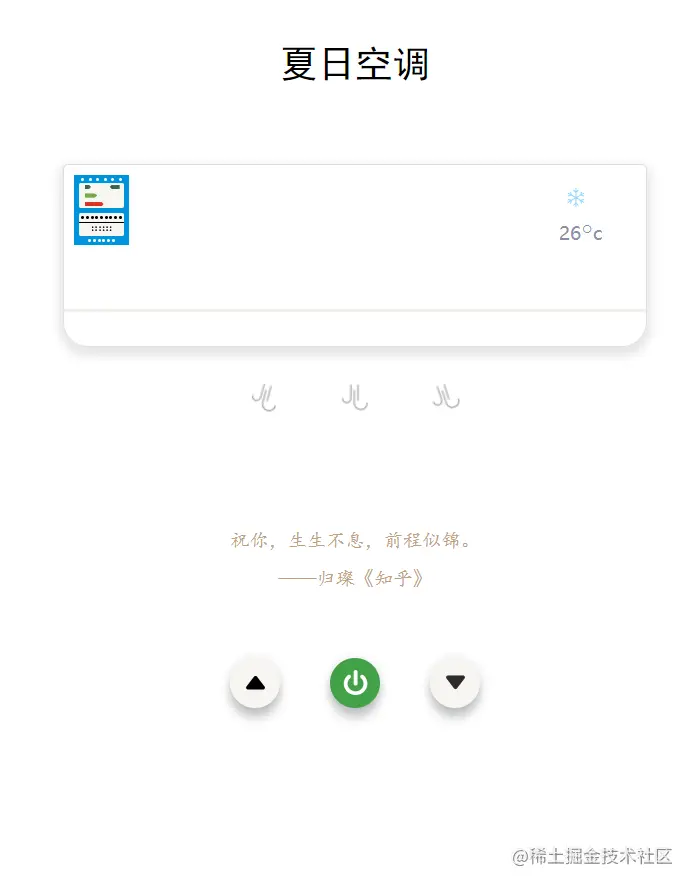
在線演示地址 1.在線演示https://link.juejin.cn/?target=http%3A%2F%2Fzhangbenjin.cn%2F
項目到這里就已經(jīng)大功告成了,另外給大家推薦一下我自己寫的原創(chuàng)文章https://github.com/Sunny-lucking/blog,我相信技術(shù)肯定會得到提升的。兄弟們回見了,我要去拿給女神看看了。

我心想,女神一定高興壞了吧,今晚應(yīng)該去看什么電影呢,聽說520檔期有《可不可以不要離開我》、《暗戀:橘生淮南》,我相信有她陪我,每一天都是不重復(fù)的電影。

女神為什么這樣啊,難道我的空調(diào)不夠好嗎?思來想去,可能兔兔去睡覺了不希望被人打擾罷了。
作者:FuncJin 鏈接:https://juejin.cn/post/7100478900673150989

往期推薦
我組建了技術(shù)交流群,里面有很多?大佬,歡迎進來交流、學(xué)習(xí)、共建。回復(fù)?加群?即可。后臺回復(fù)「電子書」即可免費獲取?27本?精選的前端電子書!回復(fù)內(nèi)推,可內(nèi)推各廠內(nèi)推碼
???“分享、點贊、在看” 支持一波??