
工作中常用CSS基礎(chǔ)知識整理匯總

來源? |?https://www.mdeditor.tw/pl/pSGX
一、文本樣式
1、文字超出部分顯示省略號
單行文本的溢出顯示省略號(一定要有寬度)
p{width:200rpx;overflow: hidden;text-overflow:ellipsis;white-space: nowrap;}
2、多行文本溢出顯示省略號
p {display: -webkit-box;-webkit-box-orient: vertical;-webkit-line-clamp: 3;overflow: hidden;}
二、 文字垂直居中
1、單行文字的垂直居中
.box{width:200px;height:100px;line-height:100px;}
2、多行文字的垂直居中
解決方案:vertical-align 方法
.box{width:500px;height:100px;vertical-align:middle;display:table-cell;}
3、首行縮進(jìn)
這是一段內(nèi)容文字,這是一段內(nèi)容文字 4、首字下沉
p:first-letter{font-size:40px;float: left;color:red;}
5、中英文自動(dòng)換行
word-break:break-all;只對英文起作用,以字母作為換行依據(jù)
word-wrap:break-word; 只對英文起作用,以單詞作為換行依據(jù)
white-space:pre-wrap; 只對中文起作用,強(qiáng)制換行
white-space:nowrap; 強(qiáng)制不換行,都起作用
p{word-wrap: break-word;white-space: normal;word-break: break-all;}
6、文字陰影
text-shadow 為網(wǎng)頁字體添加陰影,通過對text-shadow屬性設(shè)置相關(guān)的屬性值。
屬性與值的說明如下:
text-shadow: [X-offset,Y-offset,Blur,Color];
X-offset:指陰影居于字體水平偏移的位置。
Y-offset:指陰影居于字體垂直偏移的位置。
Blur:指陰影的模糊值。
color:指陰影的顏色;
h1{text-shadow: 5px 5px 5px #FF0000;}
7、設(shè)置 input 中 placeholder 的字體樣式
input::-webkit-input-placeholder { /* Chrome/Opera/Safari */color: red;}input::-moz-placeholder { /* Firefox 19+ */color: red;}input:-ms-input-placeholder { /* IE 10+ */color: red;}input:-moz-placeholder { /* Firefox 18- */color: red;}
二、布局樣式
1、div 垂直居中
固定高寬 div 垂直居中
.box{position: absolute;top: 50%;left: 50%;background-color: red;width: 100px;height: 100px;margin: -50px 0 0 -50px;??}
不固定高寬 div 垂直居中的方法
方法一:偽元素和 inline-block / vertical-align(兼容 IE8)
.box-wrap:before {content: '';display: inline-block;height: 100%;vertical-align: middle;margin-right: -0.25em; //微調(diào)整空格}.box {display: inline-block;vertical-align: middle;???}
方法二:flex(不兼容 ie8 以下)
.box-wrap {height: 300px;justify-content:center;align-items:center;display:flex;background-color:#666;???}
方法三:transform(不兼容 ie8 以下)
.box-wrap {width:100%;height:300px;background:rgba(0,0,0,0.7);position:relative;}.box{position:absolute;left:50%;top:50%;transform:translateX(-50%) translateY(-50%);-webkit-transform:translateX(-50%) translateY(-50%);??}
方法四:設(shè)置 margin:auto(該方法得嚴(yán)格意義上的非固定寬高,而是 50%的父級的寬高。)
.box-wrap {position: relative;width:100%;height:300px;background-color:#f00;}.box-content{position: absolute;top:0;left:0;bottom:0;right:0;width:50%;height:50%;margin:auto;background-color:#ff0;}
2、清除浮動(dòng)
方法一:父級 div 定義 height
原理:父級 div 手動(dòng)定義 height,就解決了父級 div 無法自動(dòng)獲取到高度的問題。
優(yōu)點(diǎn):簡單,代碼少,容易掌握
缺點(diǎn):只適合高度固定的布局,要給出精確的高度,如果高度和父級 div 不一樣時(shí),會(huì)產(chǎn)生問題
建議:不推薦使用,只建議高度固定的布局時(shí)使用。
div2
方法二:結(jié)尾處加空 div 標(biāo)簽 clear:both
原理:添加一個(gè)空 div,利用 css 提高的 clear:both 清除浮動(dòng),讓父級 div 能自動(dòng)獲取到高度
優(yōu)點(diǎn):簡單,代碼少,瀏覽器支持好,不容易出現(xiàn)怪問題
缺點(diǎn):不少初學(xué)者不理解原理;如果頁面浮動(dòng)布局多,就要增加很多空 div,讓人感覺很不爽
建議:不推薦使用,但此方法是以前主要使用的一種清除浮動(dòng)方法
div2
方法三:父級 div 定義 overflow:hidden
原理:必須定義 width 或 zoom:1,同時(shí)不能定義 height,使用 overflow:hidden 時(shí),瀏覽器會(huì)自動(dòng)檢查浮動(dòng)區(qū)域的高度
優(yōu)點(diǎn):簡單,代碼少,瀏覽器支持好
缺點(diǎn):不能和 position 配合使用,因?yàn)槌龅某叽绲臅?huì)被隱藏。
建議:只推薦沒有使用 position 或?qū)?overflow:hidden 理解比較深的朋友使用。
div2
1、IOS 頁面滑動(dòng)卡頓
body,html{-webkit-overflow-scrolling: touch;}
2、CSS滾動(dòng)條仿 ios
::-webkit-scrollbar{width: 5px;height: 5px;}::-webkit-scrollbar-thumb{border-radius: 1em;background-color: rgba(50,50,50,.3);}::-webkit-scrollbar-track{border-radius: 1em;background-color: rgba(50,50,50,.1);??}
3、實(shí)現(xiàn)隱藏滾動(dòng)條同時(shí)又可以滾動(dòng)
.demo::-webkit-scrollbar {display: none; /* Chrome Safari */}.demo {scrollbar-width: none; /* firefox */-ms-overflow-style: none; /* IE 10+ */overflow-x: hidden;overflow-y: auto;}
4、CSS 繪制三角形
實(shí)現(xiàn)一個(gè)簡單的三角形
div {width: 0;height: 0;border-width: 0 40px 40px;border-style: solid;border-color: transparent transparent red;}
效果如下: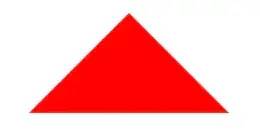
實(shí)現(xiàn)帶邊框的三角形
#blue { position:relative; width: 0; height: 0; border-width: 0 40px 40px; border-style: solid; border-color: transparent transparent blue;}#blue:after { content: ""; position: absolute; top: 1px; left: -38px; border-width: 0 38px 38px; border-style: solid; border-color: transparent transparent yellow;}效果如下: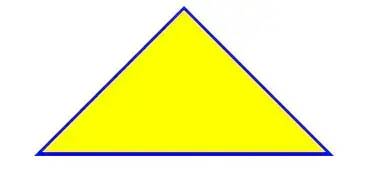
注: 如果想繪制右直角三角,則將左 border 設(shè)置為 0;如果想繪制左直角三角,將右 border 設(shè)置為 0 即可(其它情況同理)。
5、表格邊框合并
table,tr,td{ border: 1px solid #666;}table{ border-collapse: collapse;}
6、 CSS 選取第 n 個(gè)標(biāo)簽元素
first-child first-child 表示選擇列表中的第一個(gè)標(biāo)簽。
last-child last-child 表示選擇列表中的最后一個(gè)標(biāo)簽
nth-child(3) 表示選擇列表中的第 3 個(gè)標(biāo)簽
nth-child(2n) 這個(gè)表示選擇列表中的偶數(shù)標(biāo)簽
nth-child(2n-1) 這個(gè)表示選擇列表中的奇數(shù)標(biāo)簽
nth-child(n+3) 這個(gè)表示選擇列表中的標(biāo)簽從第 3 個(gè)開始到最后。
nth-child(-n+3) 這個(gè)表示選擇列表中的標(biāo)簽從 0 到 3,即小于 3 的標(biāo)簽。
nth-last-child(3) 這個(gè)表示選擇列表中的倒數(shù)第 3 個(gè)標(biāo)簽。
使用方法:
li:first-child{}
7、?onerror 處理圖片異常
使用 onerror 異常處理時(shí),若 onerror 的圖片也出現(xiàn)問題,則圖片顯示會(huì)陷入死循環(huán),所以要在賦值異常圖片之后,將地址置空。
8、移動(dòng)端軟鍵盤變?yōu)樗阉鞣绞?/strong>
默認(rèn)情況下軟鍵盤上該鍵位為前往或者確認(rèn)等文字,要使其變?yōu)樗阉魑淖郑枰?input 上加上 type 聲明:
需要一個(gè) form 標(biāo)簽套起來,并且設(shè)置 action 屬性,這樣寫完之后輸入法的右下角就會(huì)自動(dòng)變成搜索。 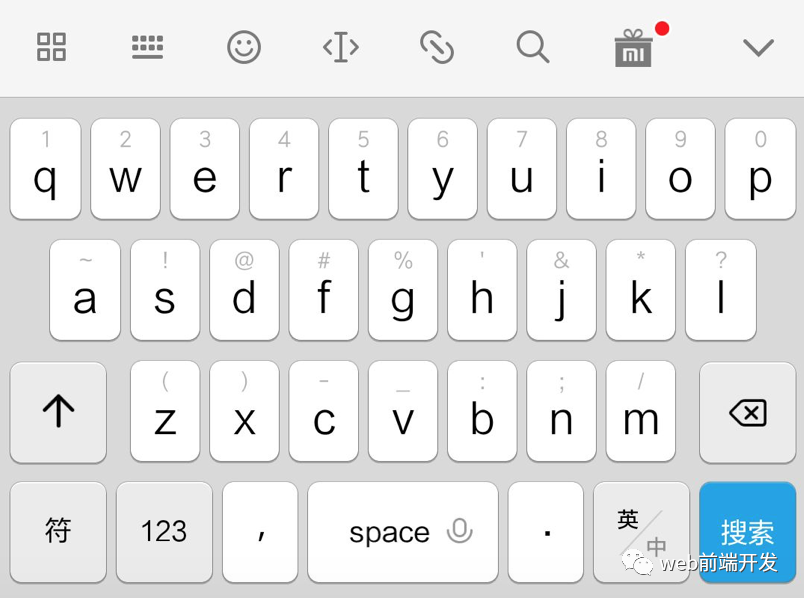
同時(shí),使用了 search 類型后,搜索框上會(huì)默認(rèn)自帶刪除按鈕 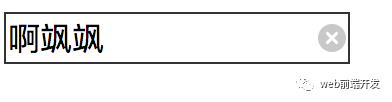
如需屏蔽,可以使用如下方式:
input[type="search"]::-webkit-search-cancel-button{ -webkit-appearance: none; }
CSS常用屬性
一、字體屬性:(font)
1. 大小 {font-size: x-large;}(特大) xx-small;(極小) 一般中文用不到,只要用數(shù)值就可以,單位:PX、PD 2.?樣式 {font-style: oblique;}(偏斜體) italic;(斜體) normal;(正常) 3. 行高 {line-height: normal;}(正常) 單位:PX、PD、EM 4.?粗細(xì) {font-weight: bold;}(粗體) lighter;(細(xì)體) normal;(正常) 5.?變體 {font-variant: small-caps;}(小型大寫字母) normal;(正常) 6.?大小寫 {text-transform: capitalize;}(首字母大寫) uppercase;(大寫) lowercase;(小寫) none;(無) 7.?修飾 {text-decoration: underline;}(下劃線) overline;(上劃線) line-through;(刪除線) blink;(閃爍) 二、常用字體:(font-family)
"Courier New", Courier, monospace, "Times New Roman", Times, serif, Arial, Helvetica, sans-serif, Verdana 三、背景屬性:(background)
色彩 {background-color: #FFFFFF;}
圖片 {background-image: none;}
重復(fù) {background-repeat: no-repeat;}
?滾動(dòng) {background-attachment: fixed;}(固定) scroll;(滾動(dòng))
位置 {background-position: left;}(水平) top(垂直);
簡寫方法 {background:#000 url(..) repeat fixed left top;} /*簡寫·這個(gè)在閱讀代碼中經(jīng)常出現(xiàn)。 四、區(qū)塊屬性:(Block)
字間距 {letter-spacing: normal;} 數(shù)值?
對齊 {text-align: justify;}(兩端對齊) left;(左對齊) right;(右對齊) center;(居中)
?縮進(jìn) {text-indent: 數(shù)值px;}
垂直對齊 {vertical-align: baseline;}(基線) sub;(下標(biāo)) sup;(上標(biāo)) top; text-top; middle; bottom; text-bottom;
?詞間距word-spacing: normal; 數(shù)值
空格white-space: pre;(保留) nowrap;(不換行)
顯示 {display:block;}(塊) inline;(內(nèi)嵌) list-item;(列表項(xiàng)) run-in;(追加部分) compact;(緊湊) marker;(標(biāo)記) table; inline-table; table-raw-group; table-header-group; table-footer-group; table-raw; table-column-group; table-column; table-cell; table-caption;(表格標(biāo)題) /*display 屬性的了解很模糊*/
五、方框?qū)傩裕?Box)
1width:; height:; float:; clear:both; margin:; padding:; 順序:上右下左
六、邊框?qū)傩裕?Border)
border-style: dotted;(點(diǎn)線) dashed;(虛線) solid; double;(雙線) groove;(槽線) ridge;(脊?fàn)? inset;(凹陷) outset;?border-width:; 邊框?qū)挾?/span>
border-color:#;
簡寫方法border:width style color; /*簡寫*/
七、列表屬性:(List-style)
類型list-style-type: disc;(圓點(diǎn)) circle;(圓圈) square;(方塊) decimal;(數(shù)字) lower-roman;(小羅碼數(shù)字) upper-roman; lower-alpha; upper-alpha;
位置list-style-position: outside;(外) inside;
圖像list-style-image: url(..);
八、定位屬性:(Position)
Position: absolute; relative; static;
visibility: inherit; visible; hidden;
overflow: visible; hidden; scroll; auto;
clip: rect(12px,auto,12px,auto) (裁切)
九、CSS文字屬性:
color : #999999; /*文字顏色*/
font-family : 宋體,sans-serif; /*文字字體*/
font-size : 9pt; /*文字大小*/
font-style:itelic; /*文字斜體*/
font-variant:small-caps; /*小字體*/
letter-spacing : 1pt; /*字間距離*/
line-height : 200%; /*設(shè)置行高*/
font-weight:bold; /*文字粗體*/
vertical-align:sub; /*下標(biāo)字*/
vertical-align:super; /*上標(biāo)字*/
text-decoration:line-through; /*加刪除線*/
text-decoration: overline; /*加頂線*/
text-decoration:underline; /*加下劃線*/
text-decoration:none; /*刪除鏈接下劃線*/
text-transform : capitalize; /*首字大寫*/
text-transform : uppercase; /*英文大寫*/
text-transform : lowercase; /*英文小寫*/
text-align:right; /*文字右對齊*/
text-align:left; /*文字左對齊*/
text-align:center; /*文字居中對齊*/
text-align:justify; /*文字分散對齊*/
vertical-align屬性
vertical-align:top; /*垂直向上對齊*/
vertical-align:bottom; /*垂直向下對齊*/
vertical-align:middle; /*垂直居中對齊*/
vertical-align:text-top; /*文字垂直向上對齊*/
vertical-align:text-bottom; /*文字垂直向下對齊*/
十、CSS邊框空白
?padding-top:10px; /*上邊框留空白*/
padding-right:10px; /*右邊框留空白*/
padding-bottom:10px; /*下邊框留空白*/
padding-left:10px; /*左邊框留空白*/
頁面布局常用詞匯
header 頭部/頁眉;
index 首頁/索引;
logo 標(biāo)志;
nav/sub_nav 導(dǎo)航/子導(dǎo)航;
banner 橫幅廣告;
main/content 主體/內(nèi)容;
container/con 容器;
wrapper/wrap 包裹(類似于container);
menu 菜單;
sub_menu/second_menu 子菜單/二級菜單;
list 列表;
section 分區(qū)/分塊(類似于div);
article 文章;
aside 側(cè)邊欄/廣告;
footer 頁腳/底部;
title/sub_title 標(biāo)題/副標(biāo)題;
news 新聞;
hot 熱點(diǎn);
pro 產(chǎn)品(product);
company 公司;
msg/info 信息(message)/消息;
ads 廣告(advertisements);
icon 小圖標(biāo);
img 圖片(image);
copyright 版權(quán);
contact_us 聯(lián)系我們;
friend_link 友情鏈接;
tel 聯(lián)系電話(telephone);
address 地址;
& nbsp; ?空格(&和n之間的空格去掉,不要忘記分號);
(文字末尾添加)換行;
CSS樣式(style) CSS 層疊樣式表 (Cascading Style Sheets) ;
background 背景;
background: -webkit-gradient(top red orange yellow green lightblue blue purple) 顏色漸變;
position 位置/定位;
relative/absolute/fixed 相對定位/絕對定位/固定定位;
float 浮動(dòng);
clear 清除;
vertical-align: middle/top/bottom; 垂直居中/上/下;
line-height 行高;
margin 外邊距;
padding 內(nèi)邊距;
border 邊框;
solid/dashed/dotted 實(shí)線/線虛線/點(diǎn)虛線;
border-radius 圓角;
shadow 陰影;
display 展示;
hidden 隱藏;
block/inline-block 塊元素/行內(nèi)塊;
overflow 溢出;
cursor 光標(biāo);
cursor:pointer; 鼠標(biāo)移上變?yōu)樾∈郑?/span>
animation 動(dòng)畫;
css sprites 雪碧圖/圖片精靈;
column 分列;
flex 彈性(布局);
表單(form)與表格(table)
form 表單;
action 行為;
method 方式/方法;
input 輸入框;
label 標(biāo)簽;
password 密碼;
radio 單選框;
checkbox 復(fù)選框;
btn 按鈕(button);
submit/reset 提交/重置;
textarea 文本域;
select/option 選擇框/選擇項(xiàng);
placeholder 占位符(起提示作用);
search 搜索;
icon 小圖標(biāo);
autofocus 自動(dòng)聚焦;
disabled 禁用;
checked 選中(單選框/復(fù)選框);
selected 默認(rèn)選擇項(xiàng)(下拉選擇框);
required 必填項(xiàng);
readonly 只讀;
table 表格;
thead/tbody/tfoot 表格標(biāo)題/主體/底部;
colspan 跨列;
rowspan 跨行;
cellspacing 單元格間距(類似于margin);
cellpadding 單元格邊距(類似于padding);
border-collapse: collapse; 邊框合并(用于table上)。
本文完?

<b id="afajh"><abbr id="afajh"></abbr></b>