
Rust 勸退系列 02:第一個(gè) Rust 程序
閱讀本文大概需要 10 分鐘。
大家好,我是站長 polarisxu。
上節(jié)我們準(zhǔn)備好了 Rust 環(huán)境,現(xiàn)在開始我們的第一個(gè) Rust 程序。
01 Hello World
在終端執(zhí)行如下命令,創(chuàng)建相關(guān)目錄結(jié)構(gòu):
$ mkdir ~/rust-learning
$ cd ~/rust-learning
$ mkdir hello
$ cd hello
啟動(dòng) VSCode,在 Welcome 頁面選擇打開文件夾:~/rust-learning,在 hello 目錄下創(chuàng)建 main.rs 文件,輸入如下代碼:
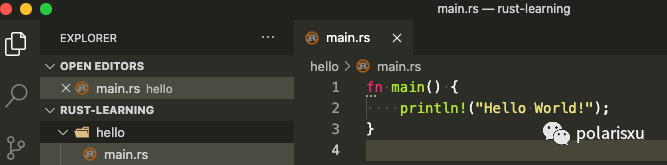
細(xì)心的讀者可能看到了 fn 下面的三個(gè)點(diǎn),鼠標(biāo)放上去提示:
file not included in module tree rust-analyzer(unlinked-file)
這個(gè)提示的詳細(xì)說明見鏈接:https://rust-analyzer.github.io/manual.html#unlinked-file。大意是,當(dāng)前文件不在任何 crate 中。也就是說,rust-analyzer 插件要求標(biāo)準(zhǔn)的 cargo 目錄。因此,編譯運(yùn)行該程序得通過終端:
$ rustc main.rs
$ ./main
Hello World!
這就是你的第一個(gè) Rust 程序。關(guān)于 rustc,目前我們只需要知道它是 Rust 的編譯器即可,因?yàn)閷?shí)際中很少直接使用它。
02 cargo 版 Hello World
上文說,編譯 Rust 項(xiàng)目,很少直接使用 rustc 這個(gè) Rust 編譯器,那應(yīng)該用什么呢?
簡單的程序(比如上面的單個(gè)文件)可能偶爾會(huì)用 rustc,但絕大部分時(shí)候,特別是項(xiàng)目中,我們應(yīng)該一直使用 Rust 的生成工具和依賴管理器 Cargo。
現(xiàn)在就介紹下 Cargo 這個(gè)工具。
Cargo
在安裝完 rustup 后,Rust 工具鏈會(huì)默認(rèn)安裝上,這包括 Cargo 這個(gè)工具。
因?yàn)檫@個(gè)工具很重要,官方直接提供了一個(gè) Cargo 的手冊:https://doc.rust-lang.org/cargo/index.html。
Cargo 是 Rust 的包管理器。它能夠下載 Rust 包的依賴,編譯包,制作可分發(fā)的包,并將它們上傳到 crates.io 上(這是 Rust 社區(qū)的包注冊中心)。
這個(gè)手冊內(nèi)容較多,有興趣可以通讀下,后續(xù)也可以用于查閱。我們這里只介紹經(jīng)常使用的相關(guān)命令。先看一眼 Cargo 命令的相關(guān)幫助:
$ cargo
Rust's package manager

USAGE:
    cargo [+toolchain] [OPTIONS] [SUBCOMMAND]

OPTIONS:
    -V, --version           Print version info and exit
        --list              List installed commands
        --explain <CODE>    Run `rustc --explain CODE`
    -v, --verbose           Use verbose output (-vv very verbose/build.rs output)
    -q, --quiet             No output printed to stdout
        --color <WHEN>      Coloring: auto, always, never
        --frozen            Require Cargo.lock and cache are up to date
        --locked            Require Cargo.lock is up to date
        --offline           Run without accessing the network
    -Z <FLAG>...            Unstable (nightly-only) flags to Cargo, see 'cargo -Z help' for details
    -h, --help              Prints help information

Some common cargo commands are (see all commands with --list):
    build, b    Compile the current package
    check, c    Analyze the current package and report errors, but don't build object files
    clean       Remove the target directory
    doc         Build this package's and its dependencies' documentation
    new         Create a new cargo package
    init        Create a new cargo package in an existing directory
    run, r      Run a binary or example of the local package
    test, t     Run the tests
    bench       Run the benchmarks
    update      Update dependencies listed in Cargo.lock
    search      Search registry for crates
    publish     Package and upload this package to the registry
    install     Install a Rust binary. Default location is $HOME/.cargo/bin
    uninstall   Uninstall a Rust binary

See 'cargo help <command>' for more information on a specific command.
常用的命令如下:
使用 cargo new創(chuàng)建新的 package(包),包括可執(zhí)行的和普通包。使用 cargo build構(gòu)建你的包。使用 cargo run生成和運(yùn)行包。使用 cargo test測試你的包。使用 cargo check進(jìn)行包分析,并報(bào)告錯(cuò)誤。使用 cargo doc為你的包(以及依賴包)生成文檔。使用 cargo publish將包發(fā)布到 crates.io。使用 cargo install安裝 Rust 可執(zhí)行程序。
借助 VSCode,很多命令不需要我們手動(dòng)輸入執(zhí)行。
注:幫助說明中,都是 package,你可以理解成項(xiàng)目,下文有時(shí)會(huì)用項(xiàng)目的說法。
Cargo 使用
使用 Cargo 創(chuàng)建一個(gè)新項(xiàng)目:
$ cd ~/rust-learning
$ cargo new hello-cargo
     Created binary (application) `hello-cargo` package
生成了 hello-cargo 目錄,其中包含如下文件:
$ tree hello-cargo
hello-cargo
├── Cargo.toml
└── src
    └── main.rs
其中 Cargo.toml 是 Rust 的清單文件(toml 格式,這種格式和 ini 文件有點(diǎn)像,但更強(qiáng)大),用于保存項(xiàng)目和依賴的元數(shù)據(jù)信息,類似 Go Module 中的 go.mod 文件。看下其中的內(nèi)容:
[package]
name = "hello-cargo"
version = "0.1.0"
authors = ["xuxinhua <[email protected]>"]
edition = "2018"

# See more keys and their definitions at https://doc.rust-lang.org/cargo/reference/manifest.html

[dependencies]
其中,edition 字段目前可以是 2015 和 2018,默認(rèn)是 2018,具體什么區(qū)別,可以認(rèn)為 2018 是一個(gè) Rust 大版本(雖然向下兼容)。
關(guān)于 authors 字段怎么獲取的,可以參考 https://doc.rust-lang.org/cargo/commands/cargo-new.html,里面有詳細(xì)的解釋。(也可以通過 cargo help new 幫助中查到)
因?yàn)槲覀兊捻?xiàng)目還沒有依賴,所以 dependencies 項(xiàng)是空的。
除了看到的文件,Cargo 還生成了 git 相關(guān)的隱藏文件和文件夾:.git 和 .gitignore。也就是說,默認(rèn)情況下,該項(xiàng)目就通過 git 進(jìn)行版本控制,可以通過 --vcs 選項(xiàng)控制。
最后是 Rust 源代碼。Cargo 要求,源代碼必須在 src 目錄下,現(xiàn)在 main.rs 中就是一個(gè)簡單的 Hello World:
fn main() {
    println!("Hello, world!");
}
在 VSCode 中打開會(huì)發(fā)現(xiàn)頂部多出了兩個(gè)按鈕:
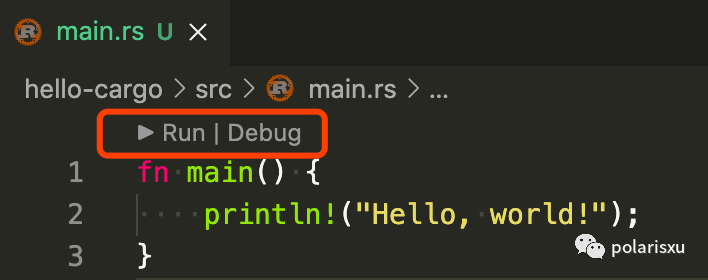
點(diǎn)就 「Run」,會(huì)在 VSCode 下方 Terminal 窗口輸出類似如下信息:
> Executing task: cargo run --package hello-cargo --bin hello-cargo <

   Compiling hello-cargo v0.1.0 (/Users/xuxinhua/rust-learning/hello-cargo)
    Finished dev [unoptimized + debuginfo] target(s) in 1.61s
     Running `target/debug/hello-cargo`
Hello, world!

Terminal will be reused by tasks, press any key to close it.
這里用的是 cargo run 這個(gè)命令:先編譯,顯示編譯完成相關(guān)信息,然后運(yùn)行。--package 指定要運(yùn)行的目標(biāo)包名, --bin 指定要運(yùn)行的目標(biāo)二進(jìn)制文件名。(實(shí)際上,針對當(dāng)前 hello-cargo 項(xiàng)目,執(zhí)行運(yùn)行 cargo run 效果是一樣的)
這時(shí),項(xiàng)目根目錄會(huì)生成一個(gè) target 目錄,你可以 tree target 看看,里面的文件很多,具體每個(gè)文件的作用我現(xiàn)在也不知,一般也不用去知曉,別勸退~
你可以在終端輸入如下命令:
$ cargo run --release

   Compiling hello-cargo v0.1.0 (/Users/xuxinhua/rust-learning/hello-cargo)
    Finished release [optimized] target(s) in 1.28s
     Running `target/release/hello-cargo`
Hello, world!
生產(chǎn)環(huán)境運(yùn)行的程序應(yīng)該始終使用 --release 選項(xiàng)。這時(shí),在 target 目錄下會(huì)生成一個(gè) release 目錄,而不是 debug 目錄。
在上面和 「Run」一起的還有一個(gè) 「Debug」按鈕。點(diǎn)擊它會(huì)提示你需要安裝 CodeLLDB 或 MS C++ tools 擴(kuò)展。本系列后續(xù)介紹調(diào)試相關(guān)知識(shí)。
03 小結(jié)
從上面的介紹中可以看到,cargo 命令很強(qiáng)大。Go 語言中,基本上一個(gè) go 命令搞定一切(這也是很多人覺得 Go 工具鏈很強(qiáng)大的原因)。而 Rust 中,你基本上不需要知道 rustc 命令的存在,只需要掌握 cargo 即可。話說,為啥叫 cargo 呢?crate + go?讓人以為和 Go 語言相關(guān)呢。。。
本節(jié)的 Hello World 應(yīng)該不會(huì)勸退,而且可能會(huì)喜歡上它。不過我們沒有對 Rust 語法做任何講解,有些人看到 Hello World 的代碼可能有一些奇怪,包括 fn、println!。下一節(jié)開始,就該講解 Rust 的語法了。
歡迎關(guān)注我
都看到這里了,隨手點(diǎn)個(gè)贊支持下唄!