
#Uiautomation# 基于Uiautomation的微信自動化
“ 文章所涉及內(nèi)容更多來自網(wǎng)絡(luò),在此聲明,并感謝知識的貢獻者!”
UI編程包括但不限于UI界面的開發(fā),UI界面的測試。而本系列文章的主要側(cè)重于UI界面的自動化操作。通過一段代碼實現(xiàn)電腦自行點擊、打開某文件或者修改某進程的操作。
—
UiSpy 下載
(23條消息) windows 技術(shù)篇 - uispy 工具獲取和使用,windows窗口屬性快捷查看工具_掙扎的藍藻的博客-CSDN博客_uispy
https://blog.csdn.net/qq_38161040/article/details/105491034
FlatUInspect 源碼下載
https://github.com/FlaUI/FlaUInspect
FlatUInspect編譯運行
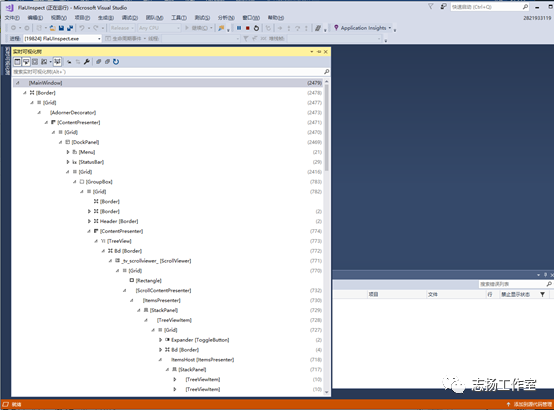
FlatUInspect 使用說明
https://zhuanlan.zhihu.com/p/563909940?utm_id=0
FlatUInspect 微信控件層次
控件識別工具Inspect.exe下載
https://www.shuzhiduo.com/A/6pdDZNkDJw/
Window Inspector 下載
https://www.jb51.net/softs/457644.html
—
import locale
#獲取系統(tǒng)語言
if (locale.getdefaultlocale()[0] == "zh_CN"):
pass
—
啟動程序
import subprocess
subprocess.Popen("3dmark-setup.exe")
—
查找物件:
1、WindowContrl(searchDepth,ClassName,SubName) 查找窗口中的程序,如果有中文則需用Unicode;可用window.Exists(maxSearchSeconds)來判斷此窗口是否存在;
2、EditControl(searchFromControl) 查找編輯位置,找到后可用DoubleClick()來改變電腦的focus;edit.SetValue("string")輸入值;
3、MenuItemControl(searchFromControl,Name) 查找菜單按鈕;
4、ComboBoxControl(searchFromControl,AutomationI) 查找下拉框,然后在此基礎(chǔ)上用Select("name")方法來選擇需要的選項;
5、BottonControl(searchFromControl,Name,SubName) 查找按鈕;
6、automation.FindControl(firefoxWindow,
lambda c:(isinstance(c, automation.EditControl) or isinstance(c, automation.ComboBoxControl)) and c.Name == 'Enter your search term') 按條件搜索handle
點擊操作:
單擊:.Click()
雙擊:.DoubleClick()
Click() 點擊;
RighClik() 右鍵點擊;
DoubleClick()
SendKeys() 發(fā)送字符;
SetValue() 傳值,一般對EditControl用;
Win32API.SendKeys("string") 如果已在編輯位置,則可用此方法來輸入值,{Ctrl}為ctrl鍵,其他類似;{@ 8}格式可輸入8個@,對于數(shù)字也可實現(xiàn)此功能,但對于字母不能...;
切換窗口
import uiautomation as auto
window=auto.WindowControl(ClassName="CabinetWClass",searchDepth=1) #控制面板窗口
window.SwitchToThisWindow() # 切換窗口
窗口最大化:
window = auto.WindowControl(ClassName="CabinetWClass", searchDepth=1)
window.Maximize()
窗口操作
subprocess.Popen('Name') 用進程打開程序;
window.Close() 關(guān)閉窗口;
window.SetActive() 使用;
window.SetTopMost() 設(shè)置為頂層
window.ShowWindow(uiautomation.ShowWindow.Maximize) 窗口最大化
window.CaptureToImage('Notepad.png') 截圖;
uiautomation.Win32API.PressKey(uiautomation.Keys.VK_CONTROL) 按住Ctrl鍵
uiautomation.Win32API.ReleaseKey(uiautomation.Keys.VK_CONTROL)釋放Ctrl鍵
automation.GetConsoleWindow() #return console window that runs python,打開控制臺
automation.Logger.ColorfulWriteLine('\nI will open <Color=Green>Notepad</Color> and <Color=Yellow>automate</Color> it. Please wait for a while.') 控制臺傳值(彩色字體),普通傳值用WriteLine;
automation.ShowDesktop() 顯示桌面;
—
獲取好友列表
https://zhuanlan.zhihu.com/p/474166048
獲取微信好友名單,可指定標簽 & 全部
https://gitcode.net/mirrors/Frica01/Wechat_mass_msg?utm_source=csdn_github_accelerator
微信好友列表獲取(存儲到txt中)
https://blog.csdn.net/m0_67391377/article/details/126065428
python基于pywinauto實現(xiàn)PC端自動化 python操作微信自動化
https://blog.51cto.com/u_15354476/3767938
微信群發(fā)消息,獲取群通訊錄名單
https://www.fdsml.com/zh/438398.html
Python 實現(xiàn)獲取微信好友信息
https://www.cnblogs.com/swjian/p/10597690.html
微信好友列表獲取
https://www.pudn.com/news/62e3f4b5864d5c73ac26b03a.html
自動發(fā)送微信消息
—
(23條消息) Python UI自動化 編程(一) UIAutomation_OKKLES的博客-CSDN博客_uiautomation
https://blog.csdn.net/weixin_43393800/article/details/119105108
Python使用uiautomation實現(xiàn)Windows平臺自動化 - ooops! - 博客園 (cnblogs.com)
https://www.cnblogs.com/jyang/p/11679828.html
(23條消息) python UIAutomator2使用教程_Jepson2017的博客-CSDN博客_uiautomator2
https://blog.csdn.net/d1240673769/article/details/113809889
開源自己用python封裝的一個Windows GUI(UI Automation)自動化工具,支持MFC,Windows Forms,WPF,Metro,Qt - YinKaisheng - 博客園 (cnblogs.com)
https://www.cnblogs.com/Yinkaisheng/p/3444132.html
桌面應(yīng)用自動化python——uiautomation API 如何找元素 - 白灰 - 博客園 (cnblogs.com)
https://www.cnblogs.com/baihuitestsoftware/articles/9340462.html
UIAutomation使用(一) -蝸牛學苑 (woniuxy.cn)
https://www.woniuxy.cn/article/253
用開源uiautomation自動化操作火狐 - 知乎 (zhihu.com)
https://zhuanlan.zhihu.com/p/30409594
Python下編寫Windows自動化測試軟件 - 簡書 (jianshu.com)
https://www.jianshu.com/p/be3c46c7a905
python:獲取微信好友列表信息(二)進行導出微信好友到csv數(shù)據(jù)讀取與處理
https://blog.csdn.net/seoyundu/article/details/81543756