
執(zhí)行webpack發(fā)生了什么?

本文主要介紹 webpack 和 webpack-cli 模塊的關(guān)系和部分源碼分析。
webpack4.0 以后,似乎執(zhí)行方式就發(fā)生了改變,不再是 webpack 一波流,而是多了一個(gè) webpack-cli。webpack3 中 webpack-cli 是合在 webpack 中。所以在命令行運(yùn)行 webpack 命令的同時(shí),會(huì)提示讓你再裝一個(gè) webpack-cli。
執(zhí)行腳本到打包結(jié)束流程
1、當(dāng)我們安裝了webpack 模塊后,就會(huì)在 node_modules/.bin 目錄下生成一個(gè) webpack。
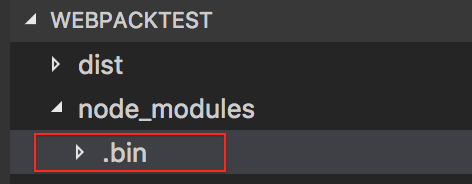
在本地環(huán)境下,可執(zhí)行文件放在 node_modules 下的 .bin 文件夾中,npm 為 scripts 字段中的腳本路徑自動(dòng)添加了 node_modules/.bin 前綴,所以可以直接寫(xiě)。
"scripts": {"start": "webpack"}
而不是
"scripts": {"start": "node_modules/.bin webpack"}
2、執(zhí)行 node_modules/.bin/webpack 首先會(huì)判斷是否安裝了 webpack-cli 模塊,如果沒(méi)有安裝 webpack-cli 模塊就會(huì)引導(dǎo)用戶(hù)去安裝,如果已經(jīng)安裝了 webpack-cli 模塊,就會(huì)去執(zhí)行 node_modules/webpack-cli/bin/cli 文件。
// node_modules/webpack-cli/bin/cliconst runCLI = require('../lib/bootstrap');runCLI(process.argv, originalModuleCompile);
node_modules/webpack-cli/bin/cli?使用了 node_modules/webpack-cli/lib/bootstrap
// node_modules/webpack-cli/lib/bootstrapconst runCLI = async (args, originalModuleCompile) => {try {// Create a new instance of the CLI objectconst cli = new WebpackCLI();cli._originalModuleCompile = originalModuleCompile;await cli.run(args);} catch (error) {utils.logger.error(error);process.exit(2);}};
然后 node_modules/webpack-cli/lib/webpack-cli 會(huì)導(dǎo)入?webpack,使用?node_modules/webpack/lib/index 模塊,在此模塊中會(huì)真正創(chuàng)建 compiler 編譯對(duì)象。
// node_modules/webpack-cli/lib/webpack-cliclass WebpackCLI {constructor() {this.webpack = require('webpack');}async createCompiler(options, callback) {let compiler;try {compiler = this.webpack(????????????config.options,);} catch (error) {if (this.isValidationError(error)) {this.logger.error(error.message);} else {this.logger.error(error);}process.exit(2);}return compiler;}}
執(zhí)行 node_modules/webpack/lib/index 文件,會(huì)再執(zhí)行 node_modules/webpack/lib/weback 模塊。
然后會(huì)調(diào)用 node_modules/webpack/lib/Compiler 得到一個(gè) Compiler 函數(shù),運(yùn)行 Compiler 函數(shù),返回一個(gè) compiler 對(duì)象,執(zhí)行 compiler 中的 run 方法,開(kāi)始編譯。
//?node_modules/webpack/lib/webackconst Compiler = require("./Compiler");const compiler = new Compiler(options.context);compiler.run((err, stats) => {compiler.close(err2 => {callback(err || err2, stats);});});