
基于 gRPC 和 .NET Core 的服務(wù)器流

原文:https://bit.ly/3lpz8Ll
作者:Chandan Rauniyar
翻譯:精致碼農(nóng)-王亮
早在 2019 年,我寫過《用 Mapbox 繪制位置數(shù)據(jù)》一文,詳細(xì)介紹了我如何通過簡(jiǎn)單的文件上傳,用 Mapbox 繪制約 230 萬個(gè)位置點(diǎn)。本文介紹我是如何通過使用 gRPC 和 .NET Core 的服務(wù)器流來快速獲取所有位置歷史數(shù)據(jù)的。
https://chandankkrr.medium.com/mapping-location-data-with-mapbox-9b256f64d569什么是 gRPC
gRPC 是一個(gè)現(xiàn)代開源的高性能 RPC 框架,可以在任何環(huán)境下運(yùn)行。它可以有效地連接數(shù)據(jù)中心內(nèi)和跨數(shù)據(jù)中心的服務(wù),并對(duì)負(fù)載平衡、跟蹤、健康檢查和認(rèn)證提供可插拔的支持。gRPC 最初是由谷歌創(chuàng)建的,該公司使用一個(gè)名為 Stubby 的單一通用 RPC 基礎(chǔ)設(shè)施來連接其數(shù)據(jù)中心內(nèi)和跨數(shù)據(jù)中心運(yùn)行的大量微服務(wù),使用已經(jīng)超過十年。2015 年 3 月,谷歌決定建立 Stubby 的下一個(gè)版本,并將其開源,結(jié)果就是現(xiàn)在的 gRPC,被許多企業(yè)或組織使用。
https://grpc.io/gRPC 服務(wù)器流
服務(wù)器流式(Server Streaming)RPC,客戶端向服務(wù)器發(fā)送請(qǐng)求,并獲得一個(gè)流來讀取一連串的消息。客戶端從返回的流中讀取信息,直到?jīng)]有消息為止。gRPC 保證在單個(gè) RPC 調(diào)用中的信息是有序的。
rpc GetLocationData (GetLocationRequest) returns (stream GetLocationResponse);協(xié)議緩沖區(qū)(Protobuf)
gRPC 使用協(xié)議緩沖區(qū)(protocol buffers)作為接口定義語言(IDL)來定義客戶端和服務(wù)器之間的契約。在下面的 proto 文件中,定義了一個(gè) RPC 方法 GetLocations,它接收 GetLocationsRequest 消息類型并返回 GetLocationsResponse 消息類型。響應(yīng)消息類型前面的 stream 關(guān)鍵字表示響應(yīng)是流類型,而不是單個(gè)響應(yīng)。
syntax = "proto3";

option csharp_namespace = "GPRCStreaming";

package location_data;

service LocationData {
  rpc GetLocations (GetLocationsRequest) returns (stream GetLocationsResponse);
}

message GetLocationsRequest {
  int32 dataLimit = 1;
}

message GetLocationsResponse {
  int32 latitudeE7 = 1;
  int32 longitudeE7 = 2;
}
創(chuàng)建 gRPC 服務(wù)
我們可以使用 dotnet new grpc -n threemillion 命令輕松創(chuàng)建一個(gè) .NET gRPC 服務(wù)。更多關(guān)于在 ASP.NET Core 中創(chuàng)建 gRPC 服務(wù)器和客戶端的信息可在微軟文檔中找到。
Create a gRPC client and server in ASP.NET Core
https://docs.microsoft.com/en-us/aspnet/core/tutorials/grpc/grpc-start?view=aspnetcore-5.0&tabs=visual-studio-code
在添加了 proto 文件并生成了 gRPC 服務(wù)資源文件后,接下來我添加了 LocationService 類。在下面的代碼片段中,我有一個(gè) LocationService 類,它繼承了從 Location.proto 文件中生成的 LocationDataBase 類型。客戶端可以通過 Startup.cs 文件中 Configure 方法中的 endpoints.MapGrpcService<LocationService>() 來訪問 LocationService。當(dāng)服務(wù)器收到 GetLocations 請(qǐng)求時(shí),它首先通過 GetLocationData 方法調(diào)用讀取 Data 文件夾中 LocationHistory.json 文件中的所有數(shù)據(jù)(未包含在源代碼庫)。該方法返回 RootLocation 類型,其中包含 List<Location> 類型的 Location 屬性。Location 類由兩個(gè)內(nèi)部屬性 Longitude 和 Latitude 組成。接下來,我循環(huán)瀏覽每個(gè)位置,然后將它們寫入 responseStream 中,返回給客戶端。服務(wù)器將消息寫入流中,直到客戶在 GetLocationRequest 對(duì)象中指定的 dataLimit。
using System.Threading.Tasks;
using Grpc.Core;
using Microsoft.Extensions.Logging;
using System.IO;
using System;
using System.Linq;

namespace GPRCStreaming
{
    public class LocationService : LocationData.LocationDataBase
    {
        private readonly FileReader _fileReader;
        private readonly ILogger<LocationService> _logger;

        public LocationService(FileReader fileReader, ILogger<LocationService> logger)
        {
            _fileReader = fileReader;
            _logger = logger;
        }

        public override async Task GetLocations(
          GetLocationsRequest request,
          IServerStreamWriter<GetLocationsResponse> responseStream,
          ServerCallContext context)
        {
            try
            {
                _logger.LogInformation("Incoming request for GetLocationData");

                var locationData = await GetLocationData();
                var locationDataCount = locationData.Locations.Count;

                var dataLimit = request.DataLimit > locationDataCount ? locationDataCount : request.DataLimit;

                for (var i = 0; i <= dataLimit - 1; i++)
                {
                   var item = locationData.Locations[i];

                    await responseStream.WriteAsync(new GetLocationsResponse
                    {
                        LatitudeE7 = item.LatitudeE7,
                        LongitudeE7 = item.LongitudeE7
                    });
                }
            }
            catch (Exception exception)
            {
                _logger.LogError(exception, "Error occurred");
                throw;
            }
        }

        private async Task<RootLocation> GetLocationData()
        {
            var currentDirectory = Directory.GetCurrentDirectory();
            var filePath = $"{currentDirectory}/Data/Location_History.json";

            var locationData = await _fileReader.ReadAllLinesAsync(filePath);

            return locationData;
        }
    }
}
現(xiàn)在,讓我們運(yùn)行該服務(wù)并發(fā)送一個(gè)請(qǐng)求。我將使用一個(gè)叫 grpcurl 的命令行工具,它可以讓你與 gRPC 服務(wù)器交互。它基本上是針對(duì) gRPC 服務(wù)器的 curl。
https://github.com/fullstorydev/grpcurl通過 grpcurl 與 gRPC 端點(diǎn)(endpoint)交互只有在 gRPC 反射服務(wù)被啟用時(shí)才可用。這允許服務(wù)可以被查詢,以發(fā)現(xiàn)服務(wù)器上的 gRPC 服務(wù)。擴(kuò)展方法 MapGrpcReflectionService 需要引入 Microsoft.AspNetCore.Builder 的命名空間:
public void Configure(IApplicationBuilder app, IWebHostEnvironment env)
{
    app.UseEndpoints(endpoints =>
    {
        endpoints.MapGrpcService<LocationService>();

        if (env.IsDevelopment())
        {
            endpoints.MapGrpcReflectionService();
        }

        endpoints.MapGet("/", async context =>
        {
            await context.Response.WriteAsync("Communication with gRPC endpoints must be made through a gRPC client. To learn how to create a client, visit: https://go.microsoft.com/fwlink/?linkid=2086909");
        });
    });
}
grpcurl -plaintext -d '{"dataLimit": "100000"}' localhost:80 location_data.LocationData/GetLocations一旦服務(wù)器收到請(qǐng)求,它就會(huì)讀取文件,然后在位置列表中循環(huán),直到達(dá)到 dataLimit 計(jì)數(shù),并將位置數(shù)據(jù)返回給客戶端。
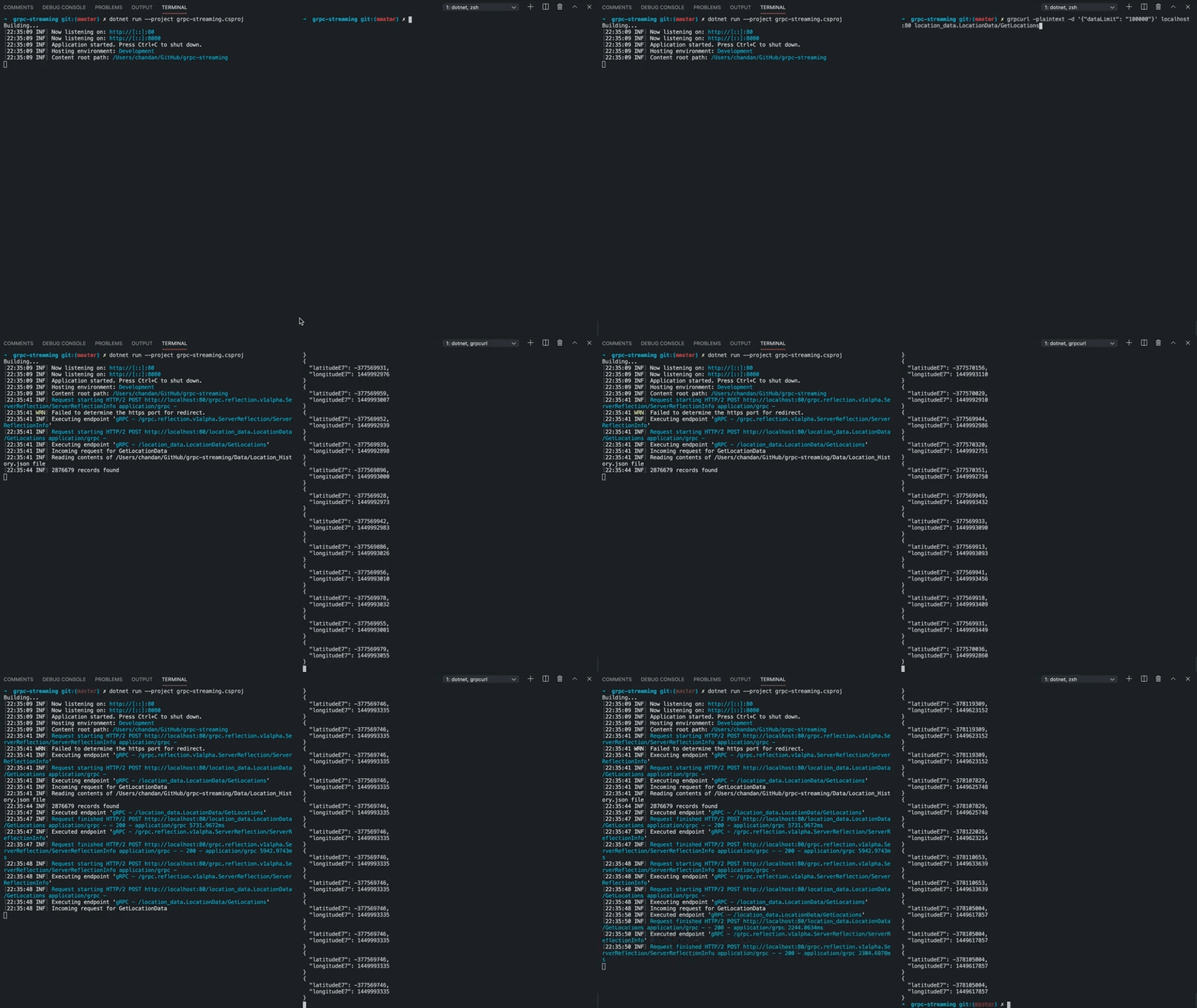
接下來,讓我們創(chuàng)建一個(gè) Blazor 客戶端來調(diào)用 gRPC 服務(wù)。我們可以使用 IServiceCollection 接口上的 AddGrpcClient 擴(kuò)展方法設(shè)置一個(gè) gRPC 客戶端:
public void ConfigureServices(IServiceCollection services)
{
    services.AddRazorPages();
    services.AddServerSideBlazor();
    services.AddSingleton<WeatherForecastService>();

    services.AddGrpcClient<LocationData.LocationDataClient>(client =>
    {
        client.Address = new Uri("http://localhost:80");
    });
}
我使用 Virtualize Blazor 組件來渲染這些位置。Virtualize 組件不是一次性渲染列表中的每個(gè)項(xiàng)目,只有當(dāng)前可見的項(xiàng)目才會(huì)被渲染。
ASP.NET Core Blazor component virtualization
https://docs.microsoft.com/en-us/aspnet/core/blazor/components/virtualization?view=aspnetcore-5.0
相關(guān)代碼:
@page "/locationdata"

@using Grpc.Core
@using GPRCStreaming
@using threemillion.Data
@using System.Diagnostics
@using Microsoft.AspNetCore.Components.Web.Virtualization

@inject IJSRuntime JSRuntime;
@inject System.Net.Http.IHttpClientFactory _clientFactory
@inject GPRCStreaming.LocationData.LocationDataClient _locationDataClient

<table class="tableAction">
    <tbody>
        <tr>
            <td>
                <div class="data-input">
                    <label for="dataLimit">No of records to fetch</label>
                    <input id="dataLimit" type="number" @bind="_dataLimit" />
                    <button @onclick="FetchData" class="btn-submit">Call gRPC</button>
                </div>
            </td>
            <td>
                <p class="info">
                    Total records: <span class="count">@_locations.Count</span>
                </p>
                <p class="info">
                    Time taken: <span class="time">@_stopWatch.ElapsedMilliseconds</span> milliseconds
                </p>
            </td>
        </tr>
    </tbody>
</table>

<div class="tableFixHead">
    <table class="table">
        <thead>
            <tr>
                <th>Longitude</th>
                <th>Latitude</th>
            </tr>
        </thead>
        <tbody>
            <Virtualize Items="@_locations" Context="locations">
                <tr>
                    <td>@locations.LongitudeE7</td>
                    <td>@locations.LatitudeE7</td>
                </tr>
            </Virtualize>
        </tbody>
    </table>
</div>

@code {
    private int _dataLimit = 1000;

    private List<Location> _locations = new List<Location>();

    private Stopwatch _stopWatch = new Stopwatch();

    protected override async Task OnInitializedAsync()
    {
        await FetchData();
    }

    private async Task FetchData()
    {
        ResetState();

        _stopWatch.Start();

        using (var call = _locationDataClient.GetLocations(new GetLocationsRequest { DataLimit = _dataLimit }))
        {
            await foreach (var response in call.ResponseStream.ReadAllAsync())
            {
                _locations.Add(new Location { LongitudeE7 = response.LongitudeE7, LatitudeE7 = response.LatitudeE7 });

                StateHasChanged();
            }
        }

        _stopWatch.Stop();
    }

    private void ResetState()
    {
        _locations.Clear();

        _stopWatch.Reset();

        StateHasChanged();
    }
}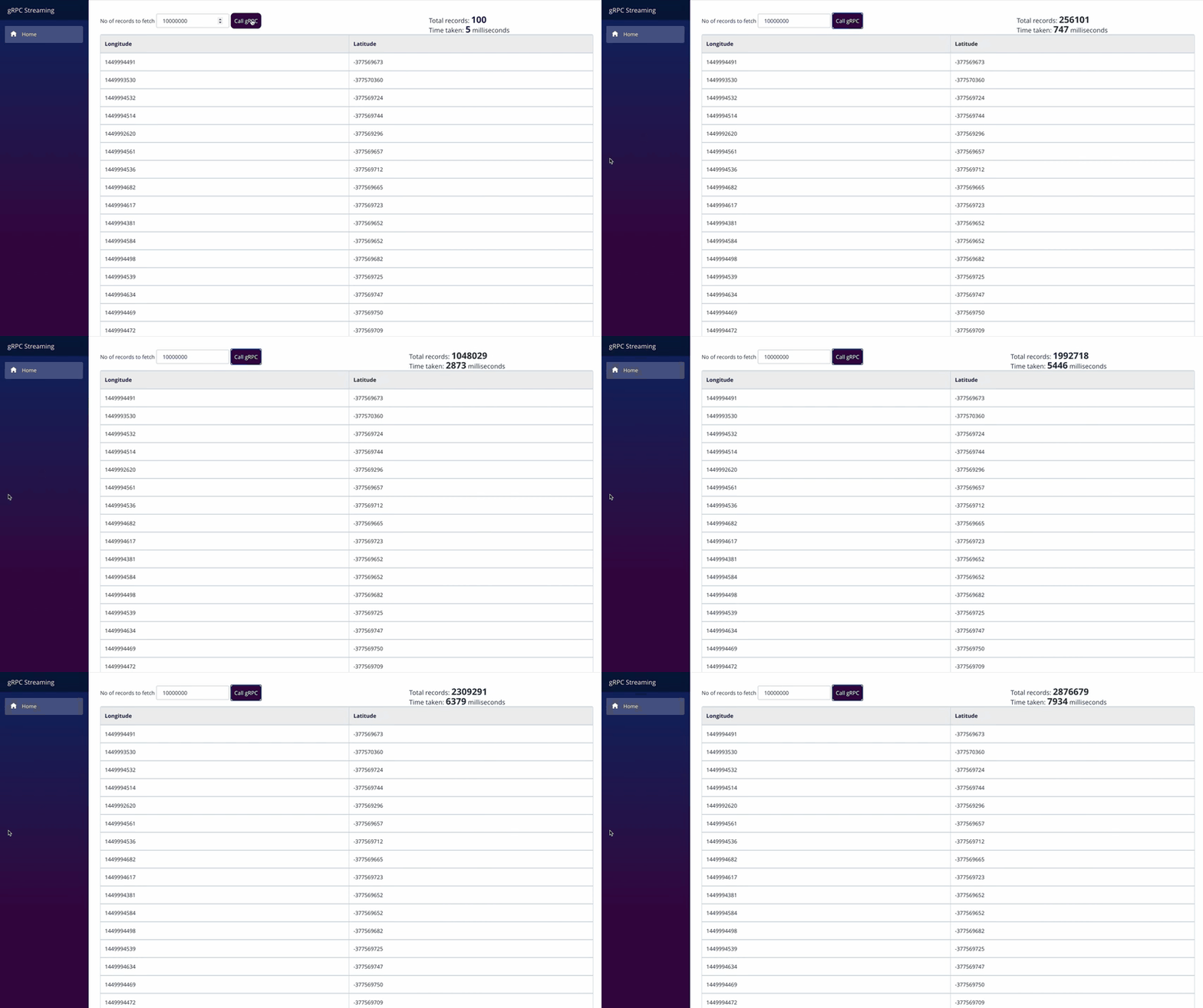
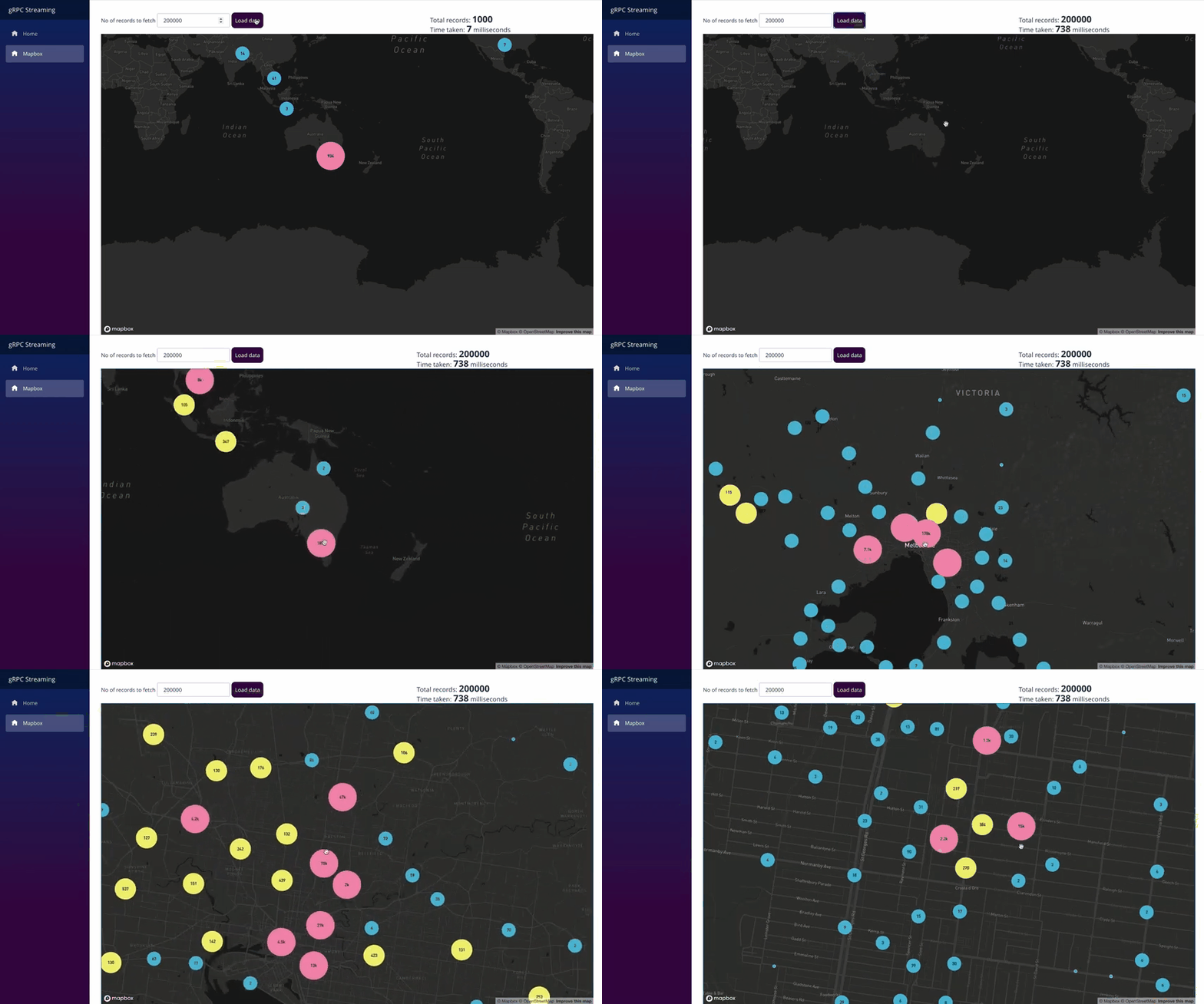
通過在本地運(yùn)行的流調(diào)用,從 gRPC 服務(wù)器接收 2,876,679 個(gè)單獨(dú)的響應(yīng)大約需要 8 秒鐘。讓我們也在 Mapbox 中加載數(shù)據(jù):
@page "/mapbox"

@using Grpc.Core
@using GPRCStreaming
@using System.Diagnostics

@inject IJSRuntime JSRuntime;
@inject System.Net.Http.IHttpClientFactory _clientFactory
@inject GPRCStreaming.LocationData.LocationDataClient LocationDataClient

<table class="tableAction">
    <tbody>
        <tr>
            <td>
                <div class="data-input">
                    <label for="dataLimit">No of records to fetch</label>
                    <input id="dataLimit" type="number" @bind="_dataLimit" />
                    <button @onclick="LoadMap" class="btn-submit">Load data</button>
                </div>
            </td>
            <td>
                <p class="info">
                    Total records: <span class="count">@_locations.Count</span>
                </p>
                <p class="info">
                    Time taken: <span class="time">@_stopWatch.ElapsedMilliseconds</span> milliseconds
                </p>
            </td>
        </tr>
    </tbody>
</table>

<div id='map' style="width: 100%; height: 90vh;"></div>

@code {
    private int _dataLimit = 100;

    private List<object> _locations = new List<object>();

    private Stopwatch _stopWatch = new Stopwatch();

    protected override async Task OnAfterRenderAsync(bool firstRender)
    {
        if (!firstRender)
        {
            return;
        }

        await JSRuntime.InvokeVoidAsync("mapBoxFunctions.initMapBox");
    }

    private async Task LoadMap()
    {
        ResetState();

        _stopWatch.Start();

        using (var call = LocationDataClient.GetLocations(new GetLocationsRequest { DataLimit = _dataLimit }))
        {

            await foreach (var response in call.ResponseStream.ReadAllAsync())
            {
                var pow = Math.Pow(10, 7);
                var longitude = response.LongitudeE7 / pow;
                var latitude = response.LatitudeE7 / pow;

                _locations.Add(new
                {
                    type = "Feature",
                    geometry = new
                    {
                        type = "Point",
                        coordinates = new double[] { longitude, latitude }
                    }
                });

                StateHasChanged();
            }

            _stopWatch.Stop();

            await JSRuntime.InvokeVoidAsync("mapBoxFunctions.addClusterData", _locations);
        }
    }

    private void ResetState()
    {
        JSRuntime.InvokeVoidAsync("mapBoxFunctions.clearClusterData");

        _locations.Clear();

        _stopWatch.Reset();

        StateHasChanged();
    }
}
源代碼在我的 GitHub 上 ??:
https://github.com/Chandankkrr/threemillion【推薦】.NET Core開發(fā)實(shí)戰(zhàn)視頻課程 ★★★
.NET Core實(shí)戰(zhàn)項(xiàng)目之CMS 第一章 入門篇-開篇及總體規(guī)劃
【.NET Core微服務(wù)實(shí)戰(zhàn)-統(tǒng)一身份認(rèn)證】開篇及目錄索引
Redis基本使用及百億數(shù)據(jù)量中的使用技巧分享(附視頻地址及觀看指南)
.NET Core中的一個(gè)接口多種實(shí)現(xiàn)的依賴注入與動(dòng)態(tài)選擇看這篇就夠了
10個(gè)小技巧助您寫出高性能的ASP.NET Core代碼
用abp vNext快速開發(fā)Quartz.NET定時(shí)任務(wù)管理界面
在ASP.NET Core中創(chuàng)建基于Quartz.NET托管服務(wù)輕松實(shí)現(xiàn)作業(yè)調(diào)度
現(xiàn)身說法:實(shí)際業(yè)務(wù)出發(fā)分析百億數(shù)據(jù)量下的多表查詢優(yōu)化