
功能強大、值得關(guān)注的CSS Houdini API
概念
CSS Houdini API是CSS引擎暴露出來的一套api,通過這套API,開發(fā)者可以直接觸及CSSOM,告訴瀏覽器如何去解析CSS,從而影響瀏覽器的渲染過程,實現(xiàn)很多炫酷的功能。
Properties and Values API
該API允許開發(fā)者自定義CSS屬性,并告訴瀏覽器該如何解析。細想發(fā)現(xiàn),這與Web Components有異曲同工之妙,只不過Web Components允許我們自定義HTML標簽,而Properties and Values API允許我們自定義CSS屬性。由此可以看出Web發(fā)展的一個重要趨勢是,瀏覽器會越來越多地暴露底層能力給開發(fā)者。?Properties and Values API有兩種書寫形式,一種是js寫法:
CSS.registerProperty({
??name:?'--my-prop',
??syntax:?'' ,
??inherits:?false,
??initialValue:?'#c0ffee',
});
復(fù)制代碼
另一種是CSS寫法:
@property?--my-prop?{
??syntax:?'<color>';
??inherits:?false;
??initial-value:?#c0ffee;
}
復(fù)制代碼
這兩種寫法是等價的。它做了以下幾件事:
name:定義了屬性名(--my-prop);syntax:約定了屬性的類型(*;inherits:規(guī)定是否可以繼承父元素的屬性,默認為true;initialValue:初始值、出錯時兜底的值。
當我們將屬性定義為height屬性,比如:
#app?{
??width:?200px;
??height:?var(--my-prop);?/*?無效,高度為0?*/
}
復(fù)制代碼
但可以賦值給background-color
#app?{
??width:?200px;
??height:?200px;
??--my-prop:?red;
??background-color:?var(--my-prop);?/*?紅色?*/
}
復(fù)制代碼
說了這么多,好像只說了Properties and Values API是什么,怎么用。但它如果沒有好處,我為什么要用它呢?不錯。這里就舉一個??吧。我們知道,如果background是純色的話,顏色切換的動畫是很容易實現(xiàn)的,具體查看例子:CodePen[2]。但如果background是漸變色,然后用transition實現(xiàn)背景色切換,CSS就無能為力了,CodePen[3]上可以看到?jīng)]有動畫效果。不過,Properties and Values API可以輕松解決這個問題。
<head>
??<title>cssPropertyValueApititle>
??<script>
????CSS.registerProperty({
??????name:?'--my-color',
??????syntax:?'' ,
??????inherits:?false,
??????initialValue:?'red',
????});
??script>
??<style>
????.box?{
??????width:?400px;
??????height:?60px;
??????--my-color:?#c0ffee;
??????background:?linear-gradient(to?right,?#fff,?var(--my-color));
??????transition:?--my-color?1s?ease-in-out;
????}
????.box:hover?{
??????--my-color:?#b4d455;
????}
??style>
head>
<body>
??<div?class="box">div>
body>
復(fù)制代碼
效果可以查看CodePen[4]。瀏覽器不知道如何處理漸變的轉(zhuǎn)換,但知道如何處理顏色的轉(zhuǎn)換。registerProperty方法告訴瀏覽器--my-color是transition能夠處理--my-color的轉(zhuǎn)換,從而實現(xiàn)漸變背景的動畫效果。
Typed Object Model API
過去很長時間,我們用js操作CSSOM都是這么寫:
//?Element?styles.
el.style.opacity?=?0.3;

//?或者
//?Stylesheet?rules.
document.styleSheets[0].cssRules[0].style.opacity?=?0.3;
復(fù)制代碼
好像很正常額,但是,如果我們打印一下opacity的類型:
el.style.opacity?=?0.3;
console.log(typeof?el.style.opacity);?//?string
復(fù)制代碼
很多問號吧,類型竟然是string。再來看看新的Typed Object Model API怎么寫:
//?Element?styles.
el.attributeStyleMap.set('opacity',?0.3);
typeof?el.attributeStyleMap.get('opacity').value?===?'number'?//?true

//?Stylesheet?rules.
const?stylesheet?=?document.styleSheets[0];
stylesheet.cssRules[0].styleMap.set('background',?'blue');
復(fù)制代碼
直接賦值變成函數(shù)操作,更清晰了。除了set方法,還有has、delete、clear等方法。更詳盡的api介紹可以到MDN[5]網(wǎng)站上閱讀。元素上多了兩個很重要的屬性:attributeStyleMap和computedStyleMap,用來代替之前直接在style對象上的操作,后面會詳細講。而且可以看到,這時opacity的類型是正確的。再看一個例子:
el.attributeStyleMap.set('margin-top',?CSS.px(10));
el.attributeStyleMap.set('margin-top',?'10px');?//?string寫法也沒問題,向下兼容
el.attributeStyleMap.get('margin-top').value??//?10
el.attributeStyleMap.get('margin-top').unit?//?'px'

el.attributeStyleMap.set('display',?new?CSSKeywordValue('initial'));
el.attributeStyleMap.get('display').value?//?'initial'
el.attributeStyleMap.get('display').unit?//?undefined
復(fù)制代碼
Typed Object Model API增加了很多的類:
CSSKeywordValue; CSSNumericValue; CSSTransformValue; ...
還增加了很多有用的方法,如CSS.px、CSS.em等,效果跟使用CSSUnitValue類是一樣的,就是更友好的一種形式而已。屬性值是一個對象,包含value和unit,當我們只想要數(shù)值而不想要單位時,可以減少解析這一步的處理。總的來說,Typed Object Model API的設(shè)計讓我們對樣式的操作更明確了,也更像java了。
attributeStyleMap vs computedStyleMap
attributeStyleMap和computedStyleMap都是用來存放樣式的對象,但兩者有一些區(qū)別。?attributeStyleMap是一個對象,而computedStyleMap是一個函數(shù)。另外,computedStyleMap返回一個只讀對象,只能執(zhí)行get、has、entities、forEach等操作。為什么要設(shè)計兩個map?因為我們設(shè)置的樣式不一定完全符合約定,attributeStyleMap是原始輸入的樣式,而computedStyleMap經(jīng)過瀏覽器轉(zhuǎn)換最后實際應(yīng)用的樣式。
el.attributeStyleMap.set('opacity',?3);
el.attributeStyleMap.get('opacity').value?===?3??//?沒有收緊
el.computedStyleMap().get('opacity').value?===?1?//?計算樣式會收緊opacity

el.attributeStyleMap.set('z-index',?CSS.number(15.4));
el.attributeStyleMap.get('z-index').value??===?15.4?//?原始值
el.computedStyleMap().get('z-index').value?===?15?//?四舍五入
復(fù)制代碼
小結(jié)
Typed Object Model API帶來了很多好處:
更少的心智負擔和bug:比如上面說的opacity的類型問題,可以避免`opacity + 0.5`變成`0.30.5`。又比如,過去樣式屬性既可以駝峰寫法也可以是橫桿連接寫法,現(xiàn)在只能是橫桿連接寫法(與CSS一致),我們再也不用在寫法上糾結(jié)了。
el.style['background-color']?=?'red';?//?ok
//?等同于
el.style['backgroundColor']?=?'red';?//?ok

el.attributeStyleMap.set('background-color',?'red');
復(fù)制代碼
強大的數(shù)學(xué)操作和單位轉(zhuǎn)換:我們可以將px單位的值轉(zhuǎn)成cm(厘米),這可能在某些場景下有用。值的自動修正。錯誤處理,可以用try catch語句捕獲錯誤:
try?{
??const?css?=?CSSStyleValue.parse('transform',?'translate4d(bogus?value)');
??//?use?css
}?catch?(err)?{
??console.error(err);
}
復(fù)制代碼
性能更佳:js對象轉(zhuǎn)成C++底層對象要比序列化、反序列化string再轉(zhuǎn)C++底層對象快。
Worklet
Houdini worlets是一套類似于web workers的輕量級接口,允許用戶使用瀏覽器渲染階段的底層能力。使用方式有點類似service worker,需要引入js文件,并注冊模塊。Houdini worlets只能運行在https或者localhost上。Houdini worlets按功能分主要有4類:PaintWorklet、LayoutWorklet、AnimationWorklet和AudioWorklet,這里只會介紹前3類。每種worklet對應(yīng)著特定的api和特定的渲染階段(cascade -> layout -> paint -> composite):
Paint Worklet - Paint API - paint Layout Worklet - Layout API - layout AnimationWorklet - Animation API - composite
Paint API
Paint Api允許我們使用類似于canvas 2D的api定義如何繪制image,主要用在一些可以設(shè)置image的CSS屬性上,比如background-image、border-image、list-style-image等。主要步驟分為3步:
`registerPaint`定義如何繪制;`CSS.paintWorklet.addModule`注冊模塊;在CSS里調(diào)用全局的`paint`方法繪制指定模塊。
//?path/to/worklet/file.js
registerPaint('paint-color-example',?class?{
??static?get?inputProperties()?{?
????return?['--my-color'];
??}
??
??static?get?inputArguments()?{?
????return?['' ];
??}
??
??static?get?contextOptions()?{?
????return?{alpha:?true};
??}
??paint(ctx,?size,?properties,?args)?{
????ctx.fillStyle?=?properties.get('--my-color');
????ctx.beginPath();
????...
});
//?html或者main?js
CSS.paintWorklet.addModule('path/to/worklet/file.js');
//?或者引用外部url,但需要https
//?CSS.paintWorklet.addModule("https://url/to/worklet/file.js");
復(fù)制代碼
registerPaint里的類有幾個方法:
inputProperties,要使用哪些CSS屬性;inputArguments,CSS中使用paint函數(shù)除了模塊名外的其他參數(shù),指定其類型;contextOptions,由于使用的是canvas的2D render context繪制,所以可能會設(shè)置一些canvas上下文的選項;paint:最關(guān)鍵的方法,定義繪制行為。ctx的使用和canvas一致,size表示繪制的大小,包括width、height等信息,properties就是inputProperties靜態(tài)方法里定義的屬性,args就是paint的入?yún)ⅲ?code style="font-size: 14px;font-family: "Operator Mono", Consolas, Monaco, Menlo, monospace;padding: 3px;border-radius: 4px;margin: 3px;color: rgb(155, 110, 35);background-color: rgb(255, 245, 227);word-break: break-all;">inputArguments定義的對應(yīng)。
CSS.paintWorklet.addModule注冊模塊,可以是本地路徑,也可以是外部的url。最后,在CSS里使用
.example?{
??background-image:?paint(paint-color-example,?blue);
}
復(fù)制代碼
Houdini.how[6]網(wǎng)站上有很多使用Paint API實現(xiàn)的炫酷效果,大家可以去看看。
Layout API
Layput API擴展了瀏覽器layout的能力,主要作用于CSS的display屬性。基本寫法如下:
registerLayout('layout-api-example',?class?{
??static?get?inputProperties()?{?return?['--exampleVariable'];?}

??static?get?childrenInputProperties()?{?return?['--exampleChildVariable'];?}

??static?get?layoutOptions()?{
????return?{
??????childDisplay:?'normal',
??????sizing:?'block-like'
????};
??}

??intrinsicSizes(children,?edges,?styleMap)?{
????/*?...?*/
??}

??layout(children,?edges,?constraints,?styleMap,?breakToken)?{
????/*?...?*/
??}
});
復(fù)制代碼
inputProperties,父布局元素使用的屬性childrenInputProperties,子布局元素使用的屬性layoutOptionschildDisplay,預(yù)定義子元素的display值,block或者normalsizing,值為block-like或者manual,告訴瀏覽器是否要預(yù)先計算大小intrinsicSizes,定義盒子或者內(nèi)容如何適配布局children,子元素edges,盒子邊緣styleMap,盒子的Typed Object Modellayout,布局實現(xiàn)的主要函數(shù)children,子元素edges,盒子邊緣constraints,父布局的約束styleMap,盒子的Typed Object ModelbreakToken,分頁或者打印時使用的分割符
定義好之后使用,跟Paint Api類似
//?注冊模塊
CSS.layoutWorklet.addModule('path/to/worklet/file.js');
復(fù)制代碼
.example?{
??display:?layout(layout-api-example);?/*?作為一種自定義的dislay?*/
}
復(fù)制代碼
目前CSS已經(jīng)有很多種布局方式了,我們還需要Layout API嗎?當然需要,做過移動端開發(fā)的同學(xué)應(yīng)該知道,瀑布流布局(Masonry)是很常見的。如果我們根據(jù)業(yè)務(wù)定義好這Masonry布局,下次再遇到同樣的需求,就可以直接復(fù)用了。網(wǎng)上已經(jīng)有人實現(xiàn)了Masonry布局,大家可以參考[7]一下。
Animation API
擴展瀏覽器動畫的能力,能夠監(jiān)聽scroll、hover、click等事件,提供流暢的動畫效果。基本用法:
//?定義動畫
registerAnimator("animation-api-example",?class?{
??constructor(options)?{
????/*?...?*/
??}
??animate(currentTime,?effects)?{
????/*?...?*/
??}
});
復(fù)制代碼
amimate:動畫的主要實現(xiàn)邏輯
currentTime,時間線上當前的時間;effects,動效的集合。
//?注冊,異步函數(shù)
await?CSS.animationWorklet.addModule("path/to/worklet/file.js");;

//?動畫要作用的元素
const?elementExample?=?document.getElementById("elementExample");

//?定義關(guān)鍵幀動畫
const?effectExample?=?new?KeyframeEffect(
??elementExample,
??[?/*?...?*/?],???/*?關(guān)鍵幀?*/
??{?/*?...?*/?},???/*?duration,?delay,?iterations等選項?*/
);

/*?創(chuàng)建WorkletAnimation實例并運行?*/
new?WorkletAnimation(
??"animation-api-example"?//?前面定義的動畫名
??effectExample,??????????????//?動畫
??document.timeline,??????????//?輸入時間線
??{},?????????????????????????//?constructor的參數(shù)
).play();?
復(fù)制代碼
動畫的知識點非常多,不是本文所能涵蓋的。網(wǎng)上有人用Animation API實現(xiàn)了以下的動畫效果,具體可以參看這里[8]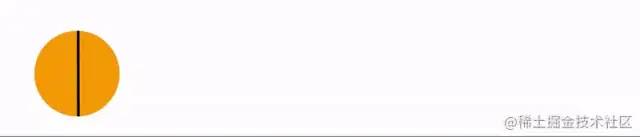
可以用了嗎
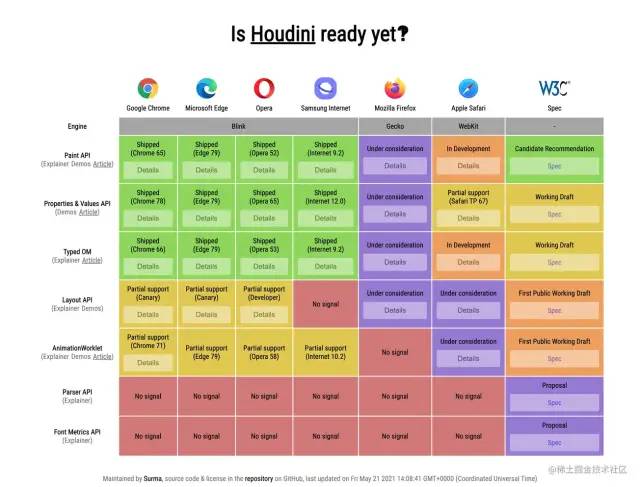 目前只是部分主流瀏覽器實現(xiàn)了部分API,要謹慎使用,最好判斷瀏覽器是否支持再使用,或者借助polyfill。
總結(jié)
Houdini API是一套功能強大,暴露CSS引擎能力的方案;優(yōu)勢明顯,比如:更友好的API、輕松突破以往CSS有限的能力范圍、性能提升; 瀏覽器實現(xiàn)程度不是很好,很多API還在草案當中,有些API的使用需要借助polyfill。本文并沒有提及 Parser API和Font Metrics API,這兩個還在提案階段,以后變數(shù)太大;Houdini API還是很值得期待的,大家可以持續(xù)關(guān)注下。
關(guān)于本文
作者:前端斟茶兵
https://juejin.cn/post/7100506454238429215