
<kbd id="afajh"><form id="afajh"></form></kbd>
<strong id="afajh"><dl id="afajh"></dl></strong>
    <del id="afajh"><form id="afajh"></form></del>
        1. <th id="afajh"><progress id="afajh"></progress></th>
          <b id="afajh"><abbr id="afajh"></abbr></b>
          <th id="afajh"><progress id="afajh"></progress></th>

          使用ImageAI快速構(gòu)建常見對(duì)象檢測應(yīng)用

          共 2706字,需瀏覽 6分鐘

           ·

          2021-08-25 11:29

          點(diǎn)擊上方小白學(xué)視覺”,選擇加"星標(biāo)"或“置頂

          重磅干貨,第一時(shí)間送達(dá)

          本文轉(zhuǎn)自|OpenCV學(xué)堂

          ImageAI介紹

          純Python的快速對(duì)象檢測訓(xùn)練與測試平臺(tái),基于tensorflow+opencv構(gòu)建,支持

          • RetinaNet

          • YOLOv3

          • TinyYOLOv3

          在COCO數(shù)據(jù)集上預(yù)訓(xùn)練模型的調(diào)用,同時(shí)支持自定義對(duì)象訓(xùn)練與導(dǎo)出。支持

          • 圖像分類

          • 對(duì)象檢測

          • 視頻對(duì)象檢測與跟蹤

          安裝ImageAI

          ImageAI的后臺(tái)依賴tensorflow框架與keras,所以需要首先安裝tensoflow,當(dāng)前還不支持tensorflow2.0版本

          • tensorflow 1.4.x以上版本

          • opencv-python

          安裝imageai,只需要執(zhí)行如下命令行即可

          pip install imageai

          代碼演示

          1. 圖像分類

          from imageai.Prediction import ImagePrediction
          import os

          execution_path = os.getcwd()

          prediction = ImagePrediction()
          prediction.setModelTypeAsResNet()
          prediction.setModelPath(os.path.join(execution_path, "resnet50_weights_tf_dim_ordering_tf_kernels.h5"))
          prediction.loadModel()

          predictions, probabilities = prediction.predictImage(os.path.join(execution_path, "1.jpg"), result_count=5 )
          for eachPrediction, eachProbability in zip(predictions, probabilities):
              print(eachPrediction , " : " , eachProbability)

          圖像
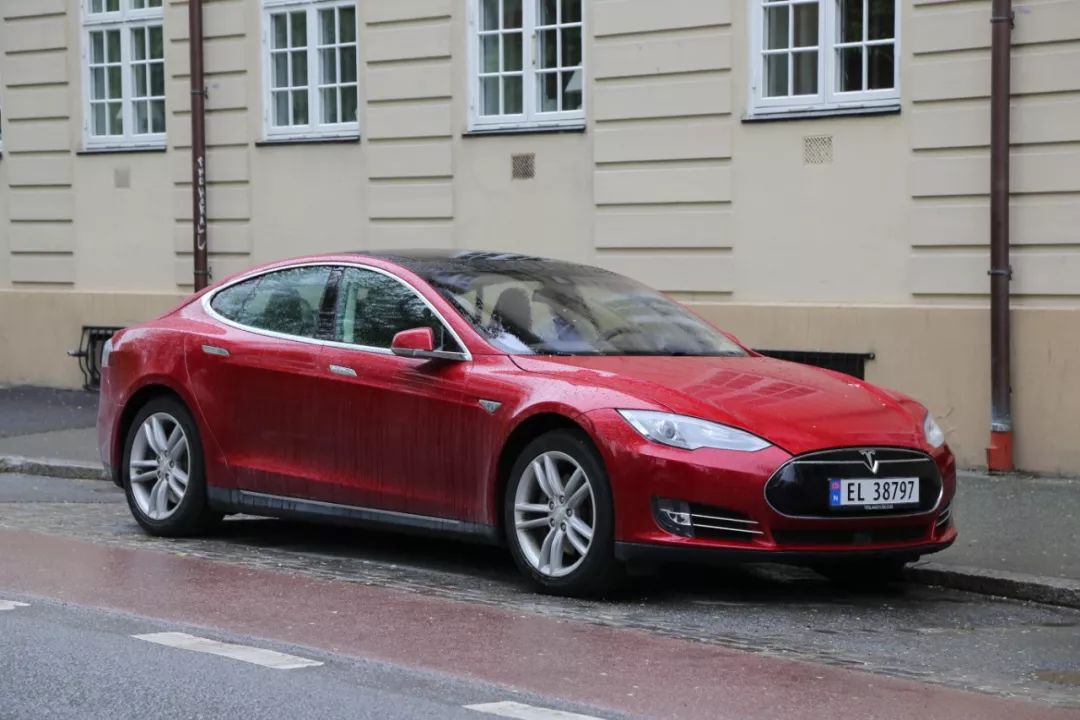
          運(yùn)行輸出:

          convertible : 52.459555864334106
          sports_car : 37.61284649372101
          pickup : 3.1751200556755066
          car_wheel : 1.817505806684494
          minivan : 1.7487050965428352

          2. 對(duì)象檢測

          from imageai.Detection import ObjectDetection
          import os

          execution_path = os.getcwd()

          detector = ObjectDetection()
          detector.setModelTypeAsYOLOv3()
          detector.setModelPath( os.path.join(execution_path , "yolo.h5"))
          detector.loadModel()
          detections = detector.detectObjectsFromImage(input_image=os.path.join(execution_path , "image2.jpg"), output_image_path=os.path.join(execution_path , "image2new.jpg"), minimum_percentage_probability=30)

          for eachObject in detections:
              print(eachObject["name"] , " : ", eachObject["percentage_probability"], " : ", eachObject["box_points"] )
              print("--------------------------------")

          運(yùn)行輸出:
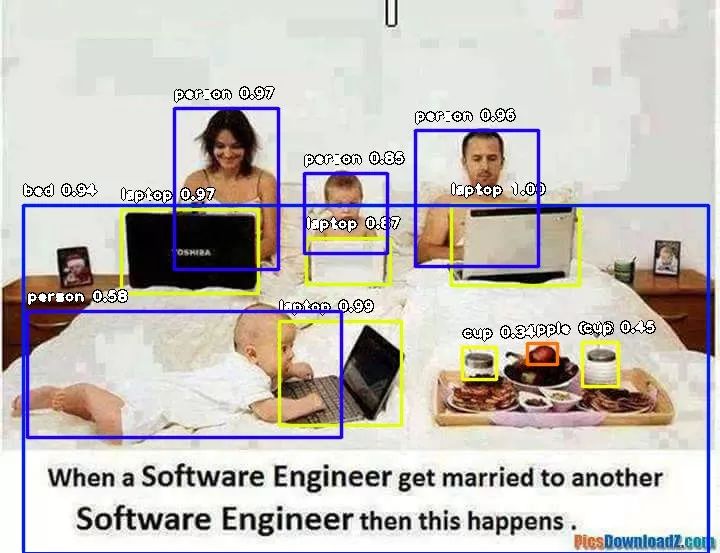
          github地址

          https://github.com/OlafenwaMoses/ImageAI/


          下載1:OpenCV-Contrib擴(kuò)展模塊中文版教程
          在「小白學(xué)視覺」公眾號(hào)后臺(tái)回復(fù):擴(kuò)展模塊中文教程即可下載全網(wǎng)第一份OpenCV擴(kuò)展模塊教程中文版,涵蓋擴(kuò)展模塊安裝、SFM算法、立體視覺、目標(biāo)跟蹤、生物視覺、超分辨率處理等二十多章內(nèi)容。

          下載2:Python視覺實(shí)戰(zhàn)項(xiàng)目52講
          小白學(xué)視覺公眾號(hào)后臺(tái)回復(fù):Python視覺實(shí)戰(zhàn)項(xiàng)目即可下載包括圖像分割、口罩檢測、車道線檢測、車輛計(jì)數(shù)、添加眼線、車牌識(shí)別、字符識(shí)別、情緒檢測、文本內(nèi)容提取、面部識(shí)別等31個(gè)視覺實(shí)戰(zhàn)項(xiàng)目,助力快速學(xué)校計(jì)算機(jī)視覺。

          下載3:OpenCV實(shí)戰(zhàn)項(xiàng)目20講
          小白學(xué)視覺公眾號(hào)后臺(tái)回復(fù):OpenCV實(shí)戰(zhàn)項(xiàng)目20講即可下載含有20個(gè)基于OpenCV實(shí)現(xiàn)20個(gè)實(shí)戰(zhàn)項(xiàng)目,實(shí)現(xiàn)OpenCV學(xué)習(xí)進(jìn)階。

          交流群


          歡迎加入公眾號(hào)讀者群一起和同行交流,目前有SLAM、三維視覺、傳感器自動(dòng)駕駛、計(jì)算攝影、檢測、分割、識(shí)別、醫(yī)學(xué)影像、GAN算法競賽等微信群(以后會(huì)逐漸細(xì)分),請(qǐng)掃描下面微信號(hào)加群,備注:”昵稱+學(xué)校/公司+研究方向“,例如:”張三 + 上海交大 + 視覺SLAM“。請(qǐng)按照格式備注,否則不予通過。添加成功后會(huì)根據(jù)研究方向邀請(qǐng)進(jìn)入相關(guān)微信群。請(qǐng)勿在群內(nèi)發(fā)送廣告,否則會(huì)請(qǐng)出群,謝謝理解~


          瀏覽 67
          點(diǎn)贊
          評(píng)論
          收藏
          分享

          手機(jī)掃一掃分享

          分享
          舉報(bào)
          評(píng)論
          圖片
          表情
          推薦
          點(diǎn)贊
          評(píng)論
          收藏
          分享

          手機(jī)掃一掃分享

          分享
          舉報(bào)
          <kbd id="afajh"><form id="afajh"></form></kbd>
          <strong id="afajh"><dl id="afajh"></dl></strong>
            <del id="afajh"><form id="afajh"></form></del>
                1. <th id="afajh"><progress id="afajh"></progress></th>
                  <b id="afajh"><abbr id="afajh"></abbr></b>
                  <th id="afajh"><progress id="afajh"></progress></th>
                  手机AV网站在线观看 | 直接看的网址 | 欧美成人高潮一二区在线看 | 五月丁香久久婷婷网 | 亚洲婷婷日日综合婷婷噜噜噜 |
