
前端工程化中的自動(dòng)化部署
作者:bilibili
來(lái)源:SegmentFault 思否社區(qū)
前言
快速部署
準(zhǔn)備工作
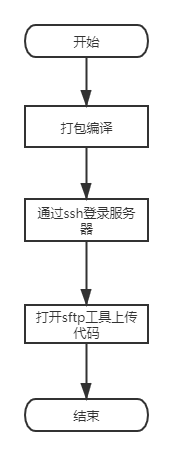
因此,通過(guò)代碼實(shí)現(xiàn)自動(dòng)化部署腳本,主要需要實(shí)現(xiàn)如下,下面以vue項(xiàng)目來(lái)為工程項(xiàng)目來(lái)具體講解:
實(shí)現(xiàn)本地代碼編譯;可直接配置npm run build即可進(jìn)行相關(guān)的打包 實(shí)現(xiàn)本地編譯的代碼壓縮 通過(guò)ssh連接遠(yuǎn)程服務(wù)器 檢查對(duì)應(yīng)的遠(yuǎn)程部署路徑是否存在,不存在需要?jiǎng)?chuàng)建 上傳本地的壓縮包 解壓上傳的壓縮包 刪除上傳的壓縮包 關(guān)閉ssh連接 刪除本地的壓縮包
具體實(shí)現(xiàn)
chalk:格式化輸出日志的插件,可以通過(guò)配置不同的顏色來(lái)顯示不同的日志打印。https://www.npmjs.com/package/chalk child_process:nodejs的一個(gè)子進(jìn)程模塊,可以用來(lái)創(chuàng)建一個(gè)子進(jìn)程,并執(zhí)行一些任務(wù),可以直接在js里面調(diào)用shell命令。http://nodejs.cn/api/child_process.html jszip:一個(gè)輕量級(jí)的zip壓縮庫(kù),用于壓縮編譯后的腳本。https://stuk.github.io/jszip/ ssh2:用于通過(guò)ssh來(lái)連接遠(yuǎn)程服務(wù)器的插件。https://github.com/mscdex/ssh2
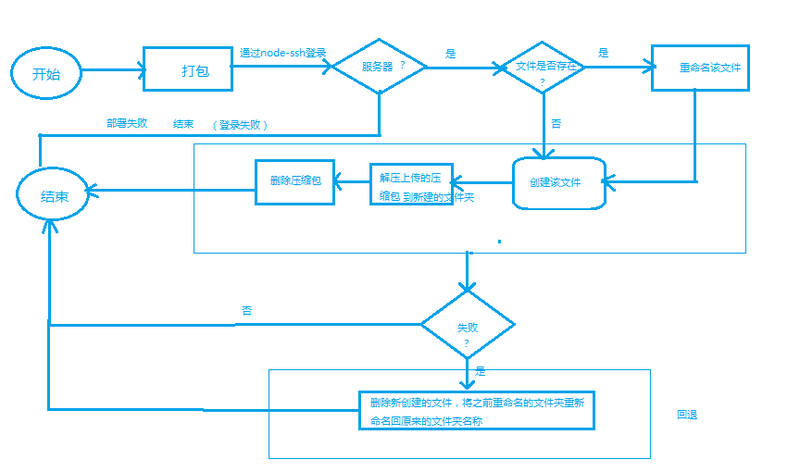
基本配置
const config = {// 開(kāi)發(fā)環(huán)境dev: {host: '',username: 'root',password: '',catalog: '', // 前端文件壓縮目錄port: 22, // 服務(wù)器ssh連接端口號(hào)privateKey: null // 私鑰,私鑰與密碼二選一},// 測(cè)試環(huán)境test: {host: '', // 服務(wù)器ip地址或域名username: 'root', // ssh登錄用戶password: '', // 密碼catalog: '', // 前端文件壓縮目錄port: 22, // 服務(wù)器ssh連接端口號(hào)privateKey: null // 私鑰,私鑰與密碼二選一},// 線上環(huán)境pro: {host: '', // 服務(wù)器ip地址或域名username: 'root', // ssh登錄用戶password: '', // 密碼,請(qǐng)勿將此密碼上傳至git服務(wù)器catalog: '', // 前端文件壓縮目錄port: 22, // 服務(wù)器ssh連接端口號(hào)privateKey: null // 私鑰,私鑰與密碼二選一}}module.exports = {// publishEnv: pro,publishEnv: config.pro, // 發(fā)布環(huán)境buildDist: 'dist', // 前端文件打包之后的目錄,默認(rèn)distbuildCommand: 'npm run build', // 打包前端文件的命令readyTimeout: 20000, // ssh連接超時(shí)時(shí)間deleteFile: true, // 是否刪除線上上傳的dist壓縮包isNeedBuild: true // s是否需要打包}
壓縮打包內(nèi)容
遞歸讀取打包文件 // 讀取文件readDir (obj, nowPath) {const files = fs.readdirSync(nowPath) // 讀取目錄中的所有文件及文件夾(同步操作)files.forEach((fileName, index) => {// 遍歷檢測(cè)目錄中的文件// console.log(fileName, index) // 打印當(dāng)前讀取的文件名const fillPath = nowPath + '/' + fileNameconst file = fs.statSync(fillPath) // 獲取一個(gè)文件的屬性if (file.isDirectory()) {// 如果是目錄的話,繼續(xù)查詢const dirlist = zip.folder(fileName) // 壓縮對(duì)象中生成該目錄this.readDir(dirlist, fillPath) // 重新檢索目錄文件} else {obj.file(fileName, fs.readFileSync(fillPath)) // 壓縮目錄添加文件}})}壓縮文件夾下的所有文件// 壓縮文件夾下的所有文件zipFile (filePath) {return new Promise((resolve, reject) => {let desc ='*******************************************\n' +'*** 正在壓縮 ***\n' +'*******************************************\n'console.log(chalk.blue(desc))this.readDir(zip, filePath)zip.generateAsync({// 設(shè)置壓縮格式,開(kāi)始打包type: 'nodebuffer', // nodejs用compression: 'DEFLATE', // 壓縮算法compressionOptions: {// 壓縮級(jí)別level: 9}}).then(content => {fs.writeFileSync(path.join(rootDir, '/', this.fileName),content,'utf-8')desc ='*******************************************\n' +'*** 壓縮成功 ***\n' +'*******************************************\n'console.log(chalk.green(desc))resolve({success: true})}).catch(err => {console.log(chalk.red(err))reject(err)})})}使用child_process的exec來(lái)運(yùn)行npm run build腳本打包// 打包本地前端文件buildProject () {return new Promise((resolve, reject) => {exec(Config.buildCommand, async (error, stdout, stderr) => {if (error) {console.error(error)reject(error)} else if (stdout) {resolve({stdout,success: true})} else {console.error(stderr)reject(stderr)}})})}連接ssh服務(wù)器通過(guò)ssh2的client來(lái)創(chuàng)建ssh連接 // 連接服務(wù)器connectServer () {return new Promise((resolve, reject) => {const conn = this.connconn.on('ready', () => {resolve({success: true})}).on('error', (err) => {reject(err)}).on('end', () => {const desc ='*******************************************\n' +'*** SSH連接已結(jié)束 ***\n' +'*******************************************\n'console.log(chalk.green(desc))}).on('close', () => {const desc ='*******************************************\n' +'*** SSH連接已關(guān)閉 ***\n' +'*******************************************\n'console.log(chalk.green(desc))}).connect(this.server)})}上傳壓縮的工程文件判斷上傳路徑是否存在// 判斷文件是否存在,如果不存在則進(jìn)行創(chuàng)建文件夾await sshCon.execSsh(`if [[ ! -d ${sshConfig.catalog} ]]; thenmkdir -p ${sshConfig.catalog}fi`)通過(guò)client的sftp講本地的壓縮包上傳到指定的服務(wù)器的對(duì)應(yīng)地址 // 上傳文件uploadFile ({ localPath, remotePath }) {return new Promise((resolve, reject) => {return this.conn.sftp((err, sftp) => {if (err) {reject(err)} else {sftp.fastPut(localPath, remotePath, (err, result) => {if (err) {reject(err)}resolve({success: true,result})})}})})}解壓上傳的工程文件通過(guò)exec來(lái)執(zhí)行ssh命令的 // 執(zhí)行ssh命令execSsh (command) {return new Promise((resolve, reject) => {return this.conn.exec(command, (err, stream) => {if (err || !stream) {reject(err)} else {stream.on('close', (code, signal) => {resolve({success: true})}).on('data', function (data) {}).stderr.on('data', function (data) {resolve({success: false,error: data.toString()})})}})})}解壓上傳的壓縮文件desc ='*******************************************\n' +'*** 上傳文件成功,開(kāi)始解壓文件 ***\n' +'*******************************************\n'console.log(chalk.green(desc))const zipRes = await sshCon.execSsh(`unzip -o ${sshConfig.catalog + '/' + fileName} -d ${sshConfig.catalog}`).catch((e) => {})if (!zipRes || !zipRes.success) {console.error('----解壓文件失敗,請(qǐng)手動(dòng)解壓zip文件----')console.error(`----錯(cuò)誤原因:${zipRes.error}----`)return false} else if (Config.deleteFile) {desc ='*******************************************\n' +'*** 解壓文件成功,開(kāi)始刪除上傳的壓縮包 ***\n' +'*******************************************\n'console.log(chalk.green(desc))刪除上傳的工程文件刪除對(duì)應(yīng)的壓縮包 desc ='*******************************************\n' +'*** 解壓文件成功,開(kāi)始刪除上傳的壓縮包 ***\n' +'*******************************************\n'console.log(chalk.green(desc))// 注意:rm -rf為危險(xiǎn)操作,請(qǐng)勿對(duì)此段代碼做其他非必須更改const deleteZipRes = await sshCon.execSsh(`rm -rf ${sshConfig.catalog + '/' + fileName}`).catch((e) => {})if (!deleteZipRes || !deleteZipRes.success) {console.log(chalk.pink('----刪除文件失敗,請(qǐng)手動(dòng)刪除zip文件----'))console.log(chalk.red(`----錯(cuò)誤原因:${deleteZipRes.error}----`))return false}關(guān)閉ssh連接封裝關(guān)閉的服務(wù)器連接 // 結(jié)束連接endConn () {this.conn.end()if (this.connAgent) {this.connAgent.end()}}刪除本地的壓縮包文件封裝刪除本地的壓縮包 // 刪除本地文件deleteLocalFile () {return new Promise((resolve, reject) => {fs.unlink(path.join(rootDir, '/', this.fileName), function (error) {if (error) {const desc ='*******************************************\n' +'*** 本地文件刪除失敗 ***\n' +'*******************************************\n'console.log(chalk.yellow(desc))reject(error)} else {const desc ='*******************************************\n' +'*** 刪除成功 ***\n' +'*******************************************\n'console.log(chalk.blue(desc))resolve({success: true})}})})}腳本命令的配置在項(xiàng)目的package.json中配置命令"ssh": "node ./build/ssh.js"完整的實(shí)現(xiàn)ssh流程// SSH連接,上傳,解壓,刪除等相關(guān)操作async function sshUpload (sshConfig, fileName) {const sshCon = new SSH(sshConfig)const sshRes = await sshCon.connectServer().catch((e) => {console.error(e)})if (!sshRes || !sshRes.success) {const desc ='*******************************************\n' +'*** ssh連接失敗 ***\n' +'*******************************************\n'console.log(chalk.red(desc))return false}let desc ='*******************************************\n' +'*** 連接服務(wù)器成功,開(kāi)始上傳文件 ***\n' +'*******************************************\n'console.log(chalk.green(desc))// 判斷文件是否存在,如果不存在則進(jìn)行創(chuàng)建文件夾await sshCon.execSsh(`if [[ ! -d ${sshConfig.catalog} ]]; thenmkdir -p ${sshConfig.catalog}fi`)const uploadRes = await sshCon.uploadFile({localPath: path.join(rootDir, '/', fileName),remotePath: sshConfig.catalog + '/' + fileName}).catch((e) => {console.error(e)})if (!uploadRes || !uploadRes.success) {console.error('----上傳文件失敗,請(qǐng)重新上傳----')return false}desc ='*******************************************\n' +'*** 上傳文件成功,開(kāi)始解壓文件 ***\n' +'*******************************************\n'console.log(chalk.green(desc))const zipRes = await sshCon.execSsh(`unzip -o ${sshConfig.catalog + '/' + fileName} -d ${sshConfig.catalog}`).catch((e) => {})if (!zipRes || !zipRes.success) {console.error('----解壓文件失敗,請(qǐng)手動(dòng)解壓zip文件----')console.error(`----錯(cuò)誤原因:${zipRes.error}----`)return false} else if (Config.deleteFile) {desc ='*******************************************\n' +'*** 解壓文件成功,開(kāi)始刪除上傳的壓縮包 ***\n' +'*******************************************\n'console.log(chalk.green(desc))// 注意:rm -rf為危險(xiǎn)操作,請(qǐng)勿對(duì)此段代碼做其他非必須更改const deleteZipRes = await sshCon.execSsh(`rm -rf ${sshConfig.catalog + '/' + fileName}`).catch((e) => {})if (!deleteZipRes || !deleteZipRes.success) {console.log(chalk.pink('----刪除文件失敗,請(qǐng)手動(dòng)刪除zip文件----'))console.log(chalk.red(`----錯(cuò)誤原因:${deleteZipRes.error}----`))return false}}// 結(jié)束ssh連接sshCon.endConn()return true}實(shí)際運(yùn)行腳本// 執(zhí)行前端部署;(async () => {const file = new File()let desc ='*******************************************\n' +'*** 開(kāi)始編譯 ***\n' +'*******************************************\n'if (Config.isNeedBuild) {console.log(chalk.green(desc))// 打包文件const buildRes = await file.buildProject().catch((e) => {console.error(e)})if (!buildRes || !buildRes.success) {desc ='*******************************************\n' +'*** 打包出錯(cuò),請(qǐng)檢查錯(cuò)誤 ***\n' +'*******************************************\n'console.log(chalk.red(desc))return false}console.log(chalk.blue(buildRes.stdout))desc ='*******************************************\n' +'*** 編譯成功 ***\n' +'*******************************************\n'console.log(chalk.green(desc))}// 壓縮文件const res = await file.zipFile(path.join(rootDir, '/', Config.buildDist)).catch(() => {})if (!res || !res.success) return falsedesc ='*******************************************\n' +'*** 開(kāi)始部署 ***\n' +'*******************************************\n'console.log(chalk.green(desc))const bol = await sshUpload(Config.publishEnv, file.fileName)if (bol) {desc ='\n******************************************\n' +'*** 部署成功 ***\n' +'******************************************\n'console.log(chalk.green(desc))file.stopProgress()} else {process.exit(1)}})()完整的ssh.js代碼const { exec } = require('child_process')const path = require('path')const JSZIP = require('jszip')const fs = require('fs')const Client = require('ssh2').Clientconst Config = require('./config.js')const chalk = require('chalk')const zip = new JSZIP()// 前端打包文件的目錄const rootDir = path.resolve(__dirname, '..')/*** ssh連接*/class SSH {constructor ({ host, port, username, password, privateKey }) {this.server = {host,port,username,password,privateKey}this.conn = new Client()}// 連接服務(wù)器connectServer () {return new Promise((resolve, reject) => {const conn = this.connconn.on('ready', () => {resolve({success: true})}).on('error', (err) => {reject(err)}).on('end', () => {const desc ='*******************************************\n' +'*** SSH連接已結(jié)束 ***\n' +'*******************************************\n'console.log(chalk.green(desc))}).on('close', () => {const desc ='*******************************************\n' +'*** SSH連接已關(guān)閉 ***\n' +'*******************************************\n'console.log(chalk.green(desc))}).connect(this.server)})}// 上傳文件uploadFile ({ localPath, remotePath }) {return new Promise((resolve, reject) => {return this.conn.sftp((err, sftp) => {if (err) {reject(err)} else {sftp.fastPut(localPath, remotePath, (err, result) => {if (err) {reject(err)}resolve({success: true,result})})}})})}// 執(zhí)行ssh命令execSsh (command) {return new Promise((resolve, reject) => {return this.conn.exec(command, (err, stream) => {if (err || !stream) {reject(err)} else {stream.on('close', (code, signal) => {resolve({success: true})}).on('data', function (data) {}).stderr.on('data', function (data) {resolve({success: false,error: data.toString()})})}})})}// 結(jié)束連接endConn () {this.conn.end()if (this.connAgent) {this.connAgent.end()}}}/** 本地操作* */class File {constructor () {this.fileName = this.formateName()}// 刪除本地文件deleteLocalFile () {return new Promise((resolve, reject) => {fs.unlink(path.join(rootDir, '/', this.fileName), function (error) {if (error) {const desc ='*******************************************\n' +'*** 本地文件刪除失敗 ***\n' +'*******************************************\n'console.log(chalk.yellow(desc))reject(error)} else {const desc ='*******************************************\n' +'*** 刪除成功 ***\n' +'*******************************************\n'console.log(chalk.blue(desc))resolve({success: true})}})})}// 讀取文件readDir (obj, nowPath) {const files = fs.readdirSync(nowPath) // 讀取目錄中的所有文件及文件夾(同步操作)files.forEach((fileName, index) => {// 遍歷檢測(cè)目錄中的文件// console.log(fileName, index) // 打印當(dāng)前讀取的文件名const fillPath = nowPath + '/' + fileNameconst file = fs.statSync(fillPath) // 獲取一個(gè)文件的屬性if (file.isDirectory()) {// 如果是目錄的話,繼續(xù)查詢const dirlist = zip.folder(fileName) // 壓縮對(duì)象中生成該目錄this.readDir(dirlist, fillPath) // 重新檢索目錄文件} else {obj.file(fileName, fs.readFileSync(fillPath)) // 壓縮目錄添加文件}})}// 壓縮文件夾下的所有文件zipFile (filePath) {return new Promise((resolve, reject) => {let desc ='*******************************************\n' +'*** 正在壓縮 ***\n' +'*******************************************\n'console.log(chalk.blue(desc))this.readDir(zip, filePath)zip.generateAsync({// 設(shè)置壓縮格式,開(kāi)始打包type: 'nodebuffer', // nodejs用compression: 'DEFLATE', // 壓縮算法compressionOptions: {// 壓縮級(jí)別level: 9}}).then(content => {fs.writeFileSync(path.join(rootDir, '/', this.fileName),content,'utf-8')desc ='*******************************************\n' +'*** 壓縮成功 ***\n' +'*******************************************\n'console.log(chalk.green(desc))resolve({success: true})}).catch(err => {console.log(chalk.red(err))reject(err)})})}// 打包本地前端文件buildProject () {return new Promise((resolve, reject) => {exec(Config.buildCommand, async (error, stdout, stderr) => {if (error) {console.error(error)reject(error)} else if (stdout) {resolve({stdout,success: true})} else {console.error(stderr)reject(stderr)}})})}// 停止程序之前需刪除本地壓縮包文件stopProgress () {this.deleteLocalFile().catch((e) => {console.log(chalk.red('----刪除本地文件失敗,請(qǐng)手動(dòng)刪除----'))console.log(chalk.red(e))process.exit(1)}).then(() => {const desc ='*******************************************\n' +'*** 已刪除本地壓縮包文件 ***\n' +'*******************************************\n'console.log(chalk.green(desc))process.exitCode = 0})}// 格式化命名文件名稱formateName () {// 壓縮包的名字const date = new Date()const year = date.getFullYear()const month = date.getMonth() + 1const day = date.getDate()const timeStr = `${year}_${month}_${day}`return `${Config.buildDist}-${timeStr}-${Math.random().toString(16).slice(2)}.zip`}}// SSH連接,上傳,解壓,刪除等相關(guān)操作async function sshUpload (sshConfig, fileName) {const sshCon = new SSH(sshConfig)const sshRes = await sshCon.connectServer().catch((e) => {console.error(e)})if (!sshRes || !sshRes.success) {const desc ='*******************************************\n' +'*** ssh連接失敗 ***\n' +'*******************************************\n'console.log(chalk.red(desc))return false}let desc ='*******************************************\n' +'*** 連接服務(wù)器成功,開(kāi)始上傳文件 ***\n' +'*******************************************\n'console.log(chalk.green(desc))// 判斷文件是否存在,如果不存在則進(jìn)行創(chuàng)建文件夾await sshCon.execSsh(`if [[ ! -d ${sshConfig.catalog} ]]; thenmkdir -p ${sshConfig.catalog}fi`)const uploadRes = await sshCon.uploadFile({localPath: path.join(rootDir, '/', fileName),remotePath: sshConfig.catalog + '/' + fileName}).catch((e) => {console.error(e)})if (!uploadRes || !uploadRes.success) {console.error('----上傳文件失敗,請(qǐng)重新上傳----')return false}desc ='*******************************************\n' +'*** 上傳文件成功,開(kāi)始解壓文件 ***\n' +'*******************************************\n'console.log(chalk.green(desc))const zipRes = await sshCon.execSsh(`unzip -o ${sshConfig.catalog + '/' + fileName} -d ${sshConfig.catalog}`).catch((e) => {})if (!zipRes || !zipRes.success) {console.error('----解壓文件失敗,請(qǐng)手動(dòng)解壓zip文件----')console.error(`----錯(cuò)誤原因:${zipRes.error}----`)return false} else if (Config.deleteFile) {desc ='*******************************************\n' +'*** 解壓文件成功,開(kāi)始刪除上傳的壓縮包 ***\n' +'*******************************************\n'console.log(chalk.green(desc))// 注意:rm -rf為危險(xiǎn)操作,請(qǐng)勿對(duì)此段代碼做其他非必須更改const deleteZipRes = await sshCon.execSsh(`rm -rf ${sshConfig.catalog + '/' + fileName}`).catch((e) => {})if (!deleteZipRes || !deleteZipRes.success) {console.log(chalk.pink('----刪除文件失敗,請(qǐng)手動(dòng)刪除zip文件----'))console.log(chalk.red(`----錯(cuò)誤原因:${deleteZipRes.error}----`))return false}}// 結(jié)束ssh連接sshCon.endConn()return true}// 執(zhí)行前端部署;(async () => {const file = new File()let desc ='*******************************************\n' +'*** 開(kāi)始編譯 ***\n' +'*******************************************\n'if (Config.isNeedBuild) {console.log(chalk.green(desc))// 打包文件const buildRes = await file.buildProject().catch((e) => {console.error(e)})if (!buildRes || !buildRes.success) {desc ='*******************************************\n' +'*** 打包出錯(cuò),請(qǐng)檢查錯(cuò)誤 ***\n' +'*******************************************\n'console.log(chalk.red(desc))return false}console.log(chalk.blue(buildRes.stdout))desc ='*******************************************\n' +'*** 編譯成功 ***\n' +'*******************************************\n'console.log(chalk.green(desc))}// 壓縮文件const res = await file.zipFile(path.join(rootDir, '/', Config.buildDist)).catch(() => {})if (!res || !res.success) return falsedesc ='*******************************************\n' +'*** 開(kāi)始部署 ***\n' +'*******************************************\n'console.log(chalk.green(desc))const bol = await sshUpload(Config.publishEnv, file.fileName)if (bol) {desc ='\n******************************************\n' +'*** 部署成功 ***\n' +'******************************************\n'console.log(chalk.green(desc))file.stopProgress()} else {process.exit(1)}})()

評(píng)論
圖片
表情