
爬蟲解析提取數(shù)據(jù)的四種方法
一、分析網(wǎng)頁(yè)
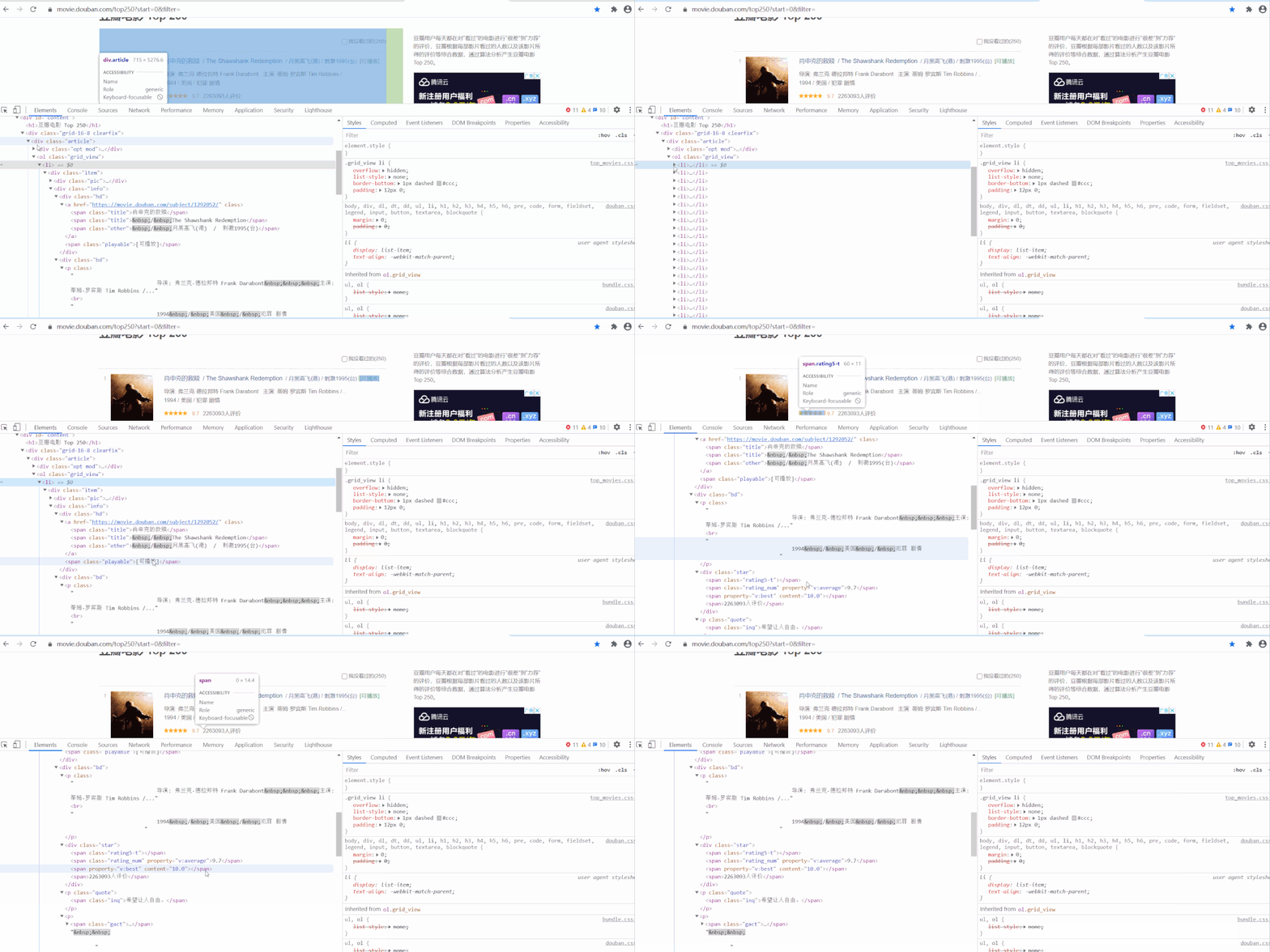 以經(jīng)典的爬取豆瓣電影 Top250 信息為例。每條電影信息在 ol class 為 grid_view 下的 li 標(biāo)簽里,獲取到所有 li 標(biāo)簽的內(nèi)容,然后遍歷,就可以從中提取出每一條電影的信息。
第1頁(yè):https://movie.douban.com/top250?start=0&filter=
第2頁(yè):https://movie.douban.com/top250?start=25&filter=
第3頁(yè):https://movie.douban.com/top250?start=50&filter=
第10頁(yè):https://movie.douban.com/top250?start=225&filter=
start參數(shù)控制翻頁(yè),start = 25 * (page - 1)
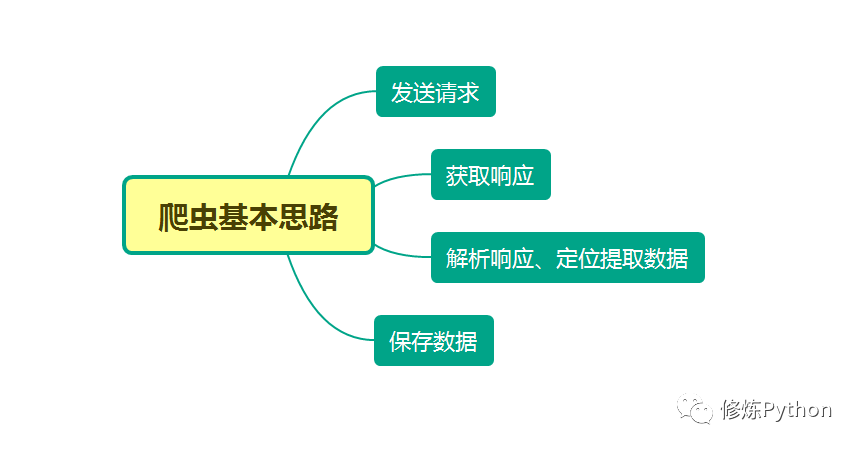 本文分別利用正則表達(dá)式、BeautifulSoup、PyQuery、Xpath來(lái)解析提取數(shù)據(jù),并將豆瓣電影 Top250 信息保存到本地。
二、正則表達(dá)式
正則表達(dá)式是一個(gè)特殊的字符序列,它能幫助你方便地檢查一個(gè)字符串是否與某種模式匹配,常用于數(shù)據(jù)清洗,也可以順便用于爬蟲,從網(wǎng)頁(yè)源代碼文本中匹配出我們想要的數(shù)據(jù)。
re.findall
在字符串中找到正則表達(dá)式所匹配的所有子串,并返回一個(gè)列表,如果沒(méi)有找到匹配的,則返回空列表。 注意:match和 search 是匹配一次;而 findall 匹配所有。 語(yǔ)法格式為:findall(string[, pos[, endpos]]) string : 待匹配的字符串;pos : 可選參數(shù),指定字符串的起始位置,默認(rèn)為 0;endpos : 可選參數(shù),指定字符串的結(jié)束位置,默認(rèn)為字符串的長(zhǎng)度。
import re
text = """
<div class="box picblock col3" style="width:186px;height:264px">
<img src2="http://pic2.sc.chinaz.com/Files/pic/pic9/202007/apic26584_s.jpg" 123nfsjgnalt="山水風(fēng)景攝影圖片">
<a target="_blank"

pattern = re.compile(r'\d+')  # 查找所有數(shù)字
result1 = pattern.findall('me 123 rich 456 money 1000000000000')
print(result1)
img_info = re.findall('<img src2="(.*?)" .*alt="(.*?)">', text)  # 匹配src2 alt里的內(nèi)容

for src, alt in img_info:
    print(src, alt)

['123', '456', '1000000000000']
http://pic2.sc.chinaz.com/Files/pic/pic9/202007/apic26584_s.jpg 山水風(fēng)景攝影圖片
http://pic2.sc.chinaz.com/Files/pic/pic9/202007/apic26518_s.jpg 山脈湖泊山水風(fēng)景圖片
http://pic2.sc.chinaz.com/Files/pic/pic9/202006/apic26029_s.jpg 旅游景點(diǎn)山水風(fēng)景圖片
# -*- coding: UTF-8 -*-
"""
@Author :葉庭云
@公眾號(hào) :修煉Python
@CSDN :https://yetingyun.blog.csdn.net/
"""
import requests
import re
from pandas import DataFrame
from fake_useragent import UserAgent
import logging
# 日志輸出的基本配置
logging.basicConfig(level=logging.INFO, format='%(asctime)s - %(levelname)s: %(message)s')
# 隨機(jī)產(chǎn)生請(qǐng)求頭
ua = UserAgent(verify_ssl=False, path='fake_useragent.json')
def random_ua():
headers = {
"Accept-Encoding": "gzip",
"Connection": "keep-alive",
"User-Agent": ua.random
}
return headers
def scrape_html(url):
resp = requests.get(url, headers=random_ua())
# print(resp.status_code, type(resp.status_code))
if resp.status_code == 200:
return resp.text
else:
logging.info('請(qǐng)求網(wǎng)頁(yè)失敗')
def get_data(page):
url = f"https://movie.douban.com/top250?start={25 * page}&filter="
html_text = scrape_html(url)
# 電影名稱 導(dǎo)演 主演
name = re.findall('<img width="100" alt="(.*?)" src=".*"', html_text)
director_actor = re.findall('(.*?)<br>', html_text)
director_actor = [item.strip() for item in director_actor]
# 上映時(shí)間 上映地區(qū) 電影類型信息 去除兩端多余空格
info = re.findall('(.*) / (.*) / (.*)', html_text)
time_ = [x[0].strip() for x in info]
area = [x[1].strip() for x in info]
genres = [x[2].strip() for x in info]
# 評(píng)分 評(píng)分人數(shù)
rating_score = re.findall('<span class="rating_num" property="v:average">(.*)</span>', html_text)
rating_num = re.findall('<span>(.*?)人評(píng)價(jià)</span>', html_text)
# 一句話引言
quote = re.findall('<span class="inq">(.*)</span>', html_text)
data = {'電影名': name, '導(dǎo)演和主演': director_actor,
'上映時(shí)間': time_, '上映地區(qū)': area, '電影類型': genres,
'評(píng)分': rating_score, '評(píng)價(jià)人數(shù)': rating_num, '引言': quote}
df = DataFrame(data)
if page == 0:
df.to_csv('movie_data2.csv', mode='a+', header=True, index=False)
else:
df.to_csv('movie_data2.csv', mode='a+', header=False, index=False)
logging.info(f'已爬取第{page + 1}頁(yè)數(shù)據(jù)')
if __name__ == '__main__':
for i in range(10):
get_data(i)
結(jié)果如下: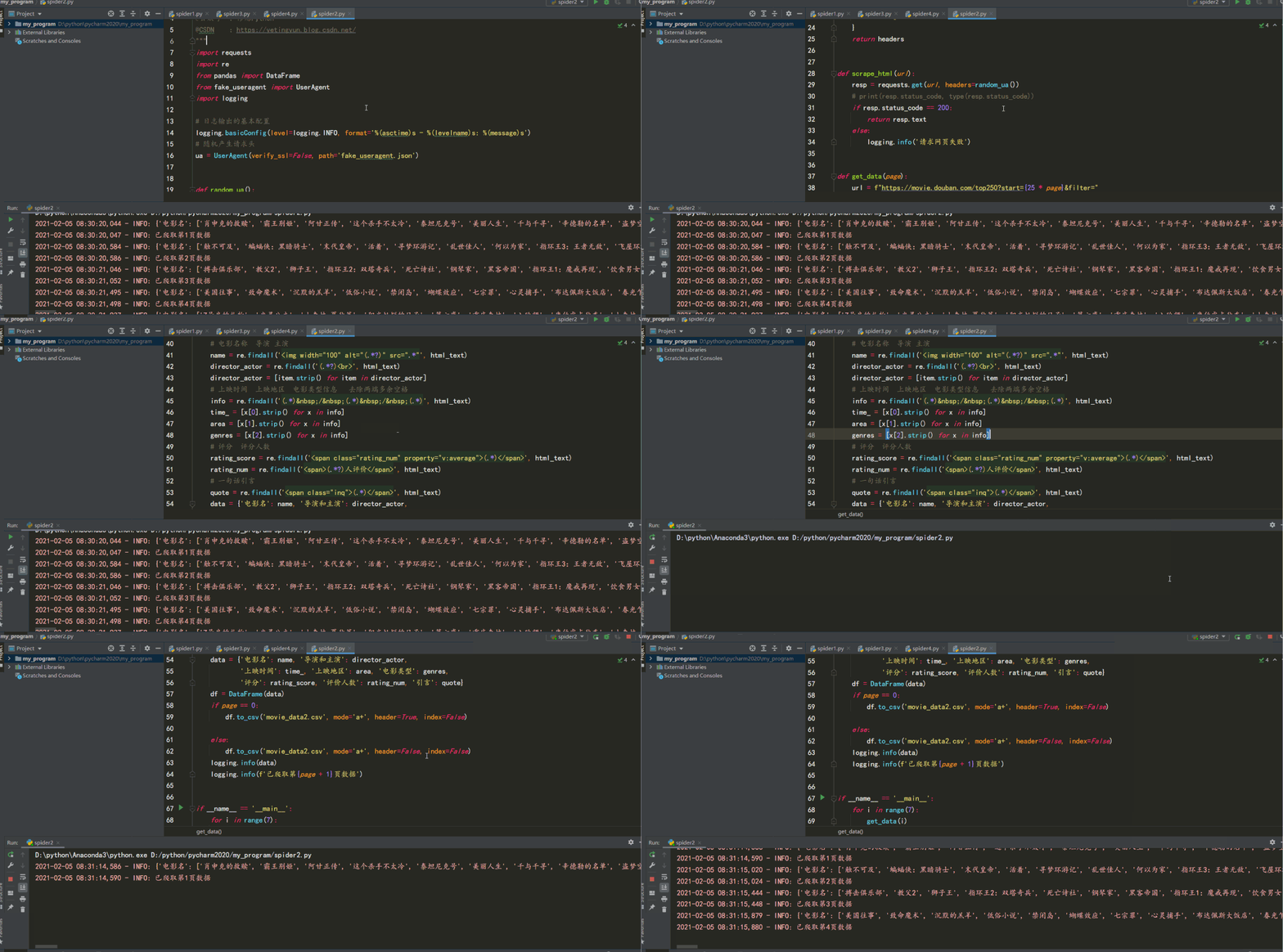
三、BeautifulSoup
find( )與 find_all( ) 是 BeautifulSoup 對(duì)象的兩個(gè)方法,它們可以匹配 html 的標(biāo)簽和屬性,把 BeautifulSoup 對(duì)象里符合要求的數(shù)據(jù)都提取出來(lái):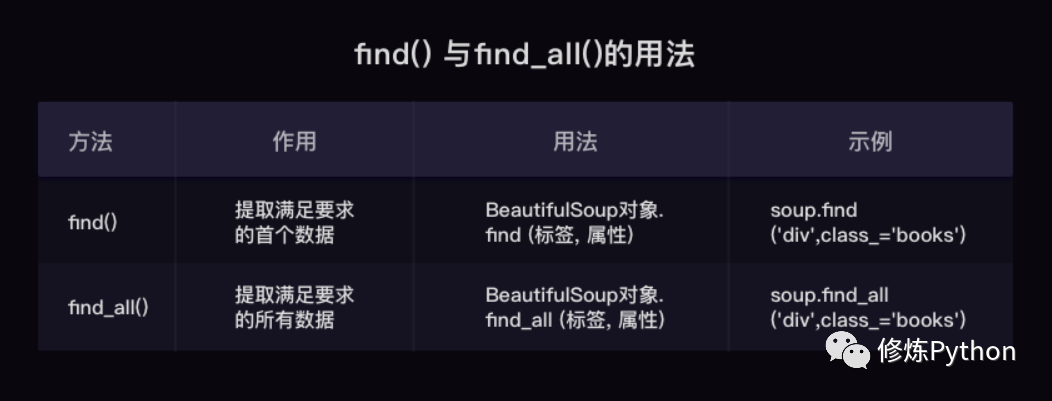
find( )只提取首個(gè)滿足要求的數(shù)據(jù) find_all( )提取出的是所有滿足要求的數(shù)據(jù) find( ) 或 find_all( ) 括號(hào)中的參數(shù):標(biāo)簽和屬性可以任選其一,也可以兩個(gè)一起使用,這取決于我們要在網(wǎng)頁(yè)中提取的內(nèi)容。括號(hào)里的class_,這里有一個(gè)下劃線,是為了和 python 語(yǔ)法中的類 class 區(qū)分,避免程序沖突。當(dāng)然,除了用 class 屬性去匹配,還可以使用其它屬性,比如 style 屬性等;只用其中一個(gè)參數(shù)就可以準(zhǔn)確定位的話,就只用一個(gè)參數(shù)檢索。如果需要標(biāo)簽和屬性同時(shí)滿足的情況下才能準(zhǔn)確定位到我們想找的內(nèi)容,那就兩個(gè)參數(shù)一起使用。 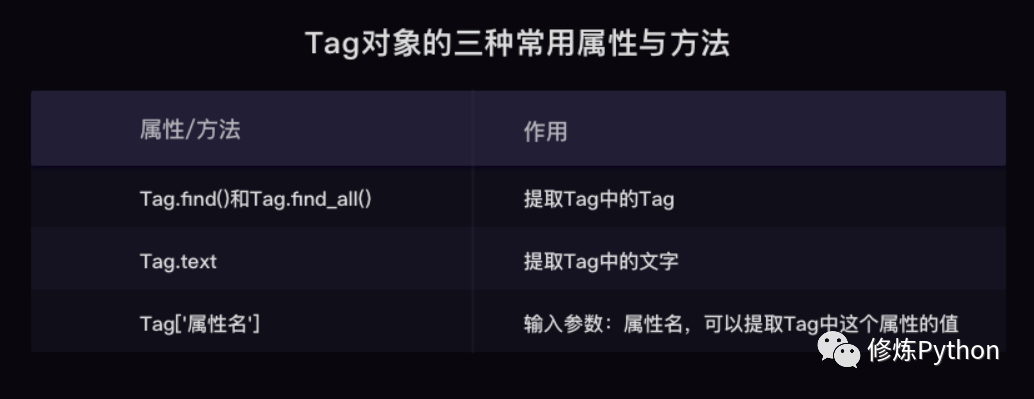
# -*- coding: UTF-8 -*-
"""
@Author  :葉庭云
@公眾號(hào)  :修煉Python
@CSDN    :https://yetingyun.blog.csdn.net/
"""
import requests
from bs4 import BeautifulSoup
import openpyxl
from fake_useragent import UserAgent
import logging

# 日志輸出的基本配置
logging.basicConfig(level=logging.INFO, format='%(asctime)s - %(levelname)s: %(message)s')
# 隨機(jī)產(chǎn)生請(qǐng)求頭
ua = UserAgent(verify_ssl=False, path='fake_useragent.json')
wb = openpyxl.Workbook()    # 創(chuàng)建工作簿對(duì)象
sheet = wb.active           # 獲取工作簿的活動(dòng)表
sheet.title = "movie"       # 工作簿重命名
sheet.append(["排名", "電影名", "導(dǎo)演和主演", "上映時(shí)間", "上映地區(qū)", "電影類型", "評(píng)分", "評(píng)價(jià)人數(shù)", "引言"])


def random_ua():
    headers = {
        "Accept-Encoding": "gzip",
        "Connection": "keep-alive",
        "User-Agent": ua.random
    }
    return headers


def scrape_html(url):
    resp = requests.get(url, headers=random_ua())
    # print(resp.status_code, type(resp.status_code))
    if resp.status_code == 200:
        return resp.text
    else:
        logging.info('請(qǐng)求網(wǎng)頁(yè)失敗')


def get_data(page):
    global rank
    url = f"https://movie.douban.com/top250?start={25 * page}&filter="
    html_text = scrape_html(url)
    soup = BeautifulSoup(html_text, 'html.parser')
    lis = soup.find_all('div', class_='item')
    for li in lis:
        name = li.find('div', class_='hd').a.span.text
        temp = li.find('div', class_='bd').p.text.strip().split('\n')
        director_actor = temp[0]
        temp1 = temp[1].rsplit('/', 2)
        time_, area, genres = [item.strip() for item in temp1]
        quote = li.find('p', class_='quote')
        # 有些電影信息沒(méi)有一句話引言
        if quote:
            quote = quote.span.text
        else:
            quote = None
        rating_score = li.find('span', class_='rating_num').text
        rating_num = li.find('div', class_='star').find_all('span')[-1].text
        sheet.append([rank, name, director_actor, time_, area, genres, rating_score, rating_num, quote])
        logging.info([rank, name, director_actor, time_, area, genres, rating_score, rating_num, quote])
        rank += 1


if __name__ == '__main__':
    rank = 1
    for i in range(10):
        get_data(i)
    wb.save(filename='movie_info4.xlsx')
結(jié)果如下: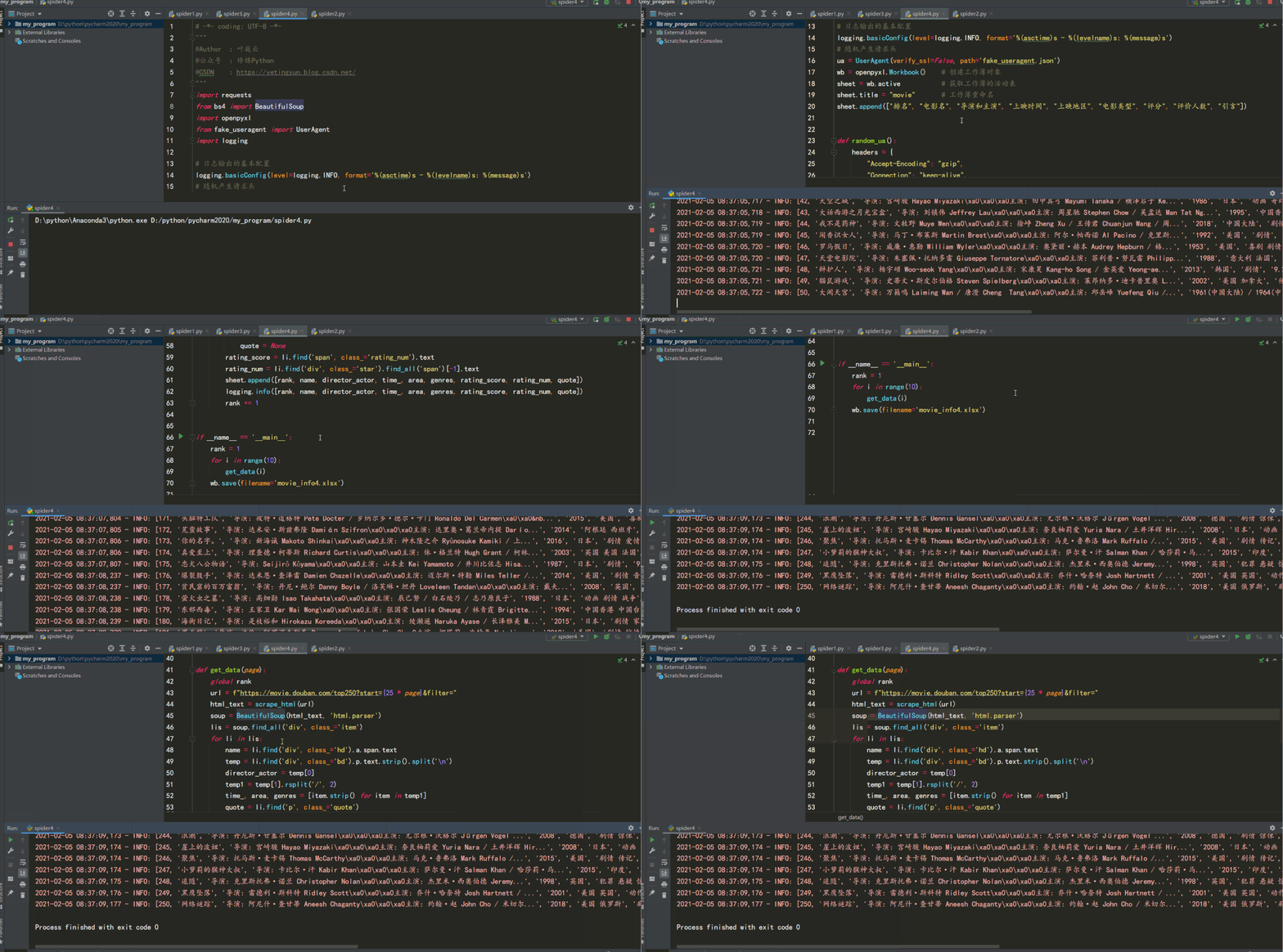
四、PyQuery
每個(gè)網(wǎng)頁(yè),都有一定的特殊結(jié)構(gòu)和層級(jí)關(guān)系,并且很多節(jié)點(diǎn)都有 id 或 class 作為區(qū)分,我們可以借助它們的結(jié)構(gòu)和屬性來(lái)提取信息。 強(qiáng)大的 HTML 解析庫(kù):pyquery,利用它,我們可以直接解析 DOM 節(jié)點(diǎn)的結(jié)構(gòu),并通過(guò) DOM 節(jié)點(diǎn)的一些屬性快速進(jìn)行內(nèi)容提取。
如下示例:在解析 HTML 文本的時(shí)候,首先需要將其初始化為一個(gè) pyquery 對(duì)象。它的初始化方式有多種,比如直接傳入字符串、傳入 URL、傳入文件名等等。
from pyquery import PyQuery as pq

html = '''
<div>
    <ul class="clearfix">
        <li class="item-0">first item</li>
        <li class="item-1"><a href="link2.html">second item</a></li>
        <li><img src="http://pic.netbian.com/uploads/allimg/210107/215736-1610027856f6ef.jpg"></li>
        <li><img src="http://pic.netbian.com//uploads/allimg/190902/152344-1567409024af8c.jpg"></li>
    </ul>
</div>
'''

doc = pq(html)
print(doc('li'))
結(jié)果如下:
<li class="item-0">first item</li>
<li class="item-1"><a href="link2.html">second item</a></li>
<li><img src="http://pic.netbian.com/uploads/allimg/210107/215736-1610027856f6ef.jpg"/></li>
<li><img src="http://pic.netbian.com//uploads/allimg/190902/152344-1567409024af8c.jpg"/></li>
首先引入 pyquery 這個(gè)對(duì)象,取別名為 pq,然后定義了一個(gè)長(zhǎng) HTML 字符串,并將其當(dāng)作參數(shù)傳遞給 pyquery 類,這樣就成功完成了初始化。接下來(lái),將初始化的對(duì)象傳入 CSS 選擇器。在這個(gè)實(shí)例中,我們傳入 li 節(jié)點(diǎn),這樣就可以選擇所有的 li 節(jié)點(diǎn)。
# -*- coding: UTF-8 -*-
"""
@Author  :葉庭云
@公眾號(hào)  :修煉Python
@CSDN    :https://yetingyun.blog.csdn.net/
"""
import requests
from pyquery import PyQuery as pq
import openpyxl
from fake_useragent import UserAgent
import logging

# 日志輸出的基本配置
logging.basicConfig(level=logging.INFO, format='%(asctime)s - %(levelname)s: %(message)s')
# 隨機(jī)產(chǎn)生請(qǐng)求頭
ua = UserAgent(verify_ssl=False, path='fake_useragent.json')
wb = openpyxl.Workbook()    # 創(chuàng)建工作簿對(duì)象
sheet = wb.active           # 獲取工作簿的活動(dòng)表
sheet.title = "movie"       # 工作簿重命名
sheet.append(["排名", "電影名", "導(dǎo)演和主演", "上映時(shí)間", "上映地區(qū)", "電影類型", "評(píng)分", "評(píng)價(jià)人數(shù)", "引言"])


def random_ua():
    headers = {
        "Accept-Encoding": "gzip",
        "Connection": "keep-alive",
        "User-Agent": ua.random
    }
    return headers


def scrape_html(url):
    resp = requests.get(url, headers=random_ua())
    # print(resp.status_code, type(resp.status_code))
    if resp.status_code == 200:
        return resp.text
    else:
        logging.info('請(qǐng)求網(wǎng)頁(yè)失敗')


def get_data(page):
    global rank
    url = f"https://movie.douban.com/top250?start={25 * page}&filter="
    html_text = scrape_html(url)
    doc = pq(html_text)
    lis = doc('.grid_view li')
    for li in lis.items():
        name = li('.hd a span:first-child').text()
        temp = li('.bd p:first-child').text().split('\n')
        director_actor = temp[0]
        temp1 = temp[1].rsplit('/', 2)
        time_, area, genres = [item.strip() for item in temp1]
        quote = li('.quote span').text()
        rating_score = li('.star .rating_num').text()
        rating_num = li('.star span:last-child').text()
        sheet.append([rank, name, director_actor, time_, area, genres, rating_score, rating_num, quote])
        logging.info([rank, name, director_actor, time_, area, genres, rating_score, rating_num, quote])
        rank += 1


if __name__ == '__main__':
    rank = 1
    for i in range(10):
        get_data(i)
    wb.save(filename='movie_info3.xlsx')
結(jié)果如下: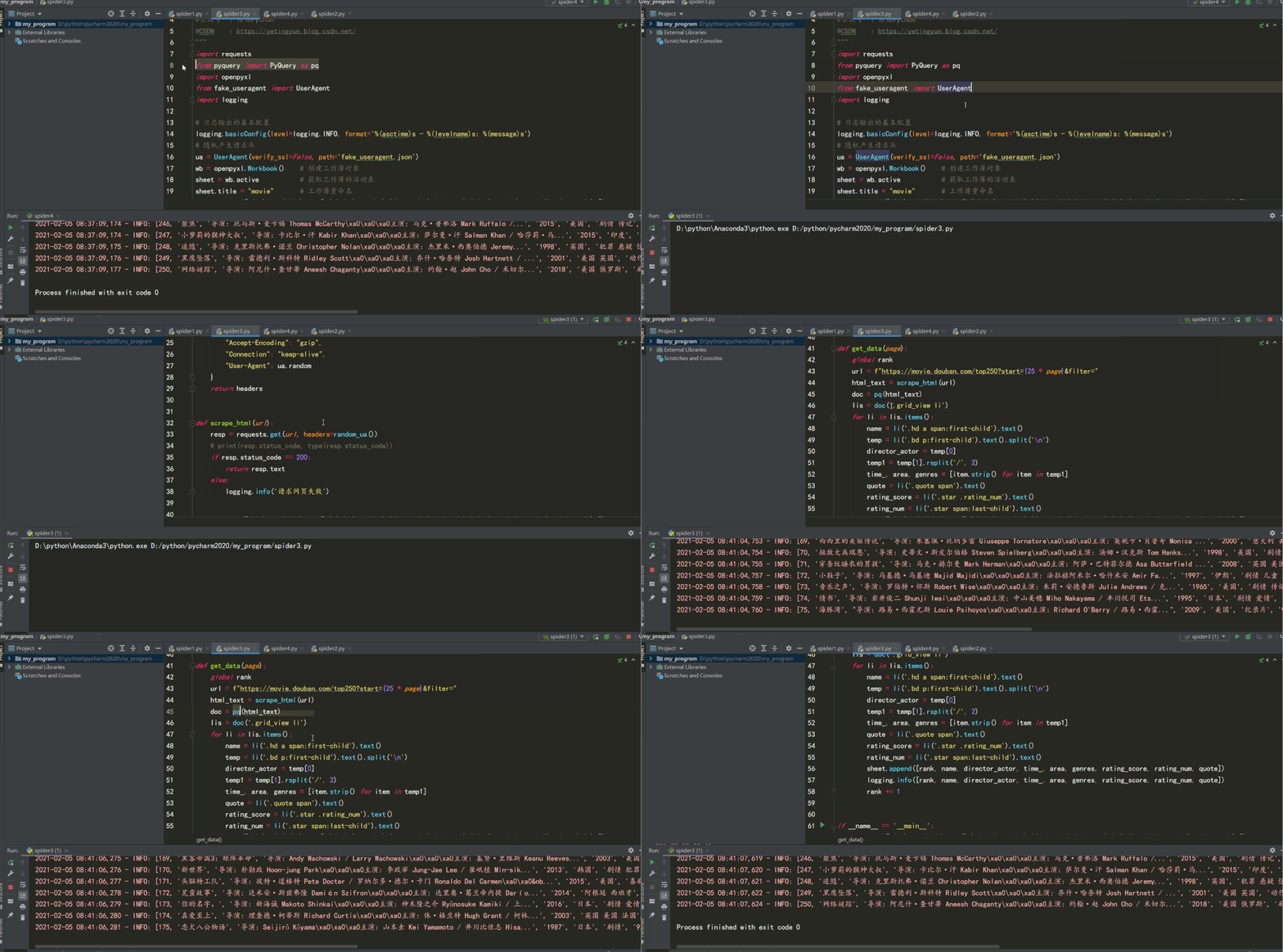
五、Xpath
Xpath是一個(gè)非常好用的解析方法,同時(shí)也作為爬蟲學(xué)習(xí)的基礎(chǔ),在后面的 Selenium 以及 Scrapy 框架中也會(huì)涉及到這部分知識(shí)。
首先我們使用 lxml 的 etree 庫(kù),然后利用 etree.HTML 初始化,然后我們將其打印出來(lái)。其中,這里體現(xiàn)了 lxml 的一個(gè)非常實(shí)用的功能就是自動(dòng)修正 html 代碼,大家應(yīng)該注意到了,最后一個(gè) li 標(biāo)簽,其實(shí)我把尾標(biāo)簽刪掉了,是不閉合的。不過(guò),lxml 因?yàn)槔^承了 libxml2 的特性,具有自動(dòng)修正 HTML 代碼的功能,通過(guò) xpath 表達(dá)式可以提取標(biāo)簽里的內(nèi)容,如下所示:
from lxml import etree
text = '''
<div>
    <ul>
         <li class="item-0"><a href="link1.html">first item</a></li>
         <li class="item-1"><a href="link2.html">second item</a></li>
         <li class="item-inactive"><a href="link3.html">third item</a></li>
         <li class="item-1"><a href="link4.html">fourth item</a></li>
         <li class="item-0"><a href="link5.html">fifth item</a>
     </ul>
 </div>
'''
html = etree.HTML(text)
result = etree.tostring(html)
result1 = html.xpath('//li/@class')   # xpath表達(dá)式
print(result1)
print(result)
['item-0', 'item-1', 'item-inactive', 'item-1', 'item-0']
<html><body>
<div>
    <ul>
         <li class="item-0"><a href="link1.html">first item</a></li>
         <li class="item-1"><a href="link2.html">second item</a></li>
         <li class="item-inactive"><a href="link3.html">third item</a></li>
         <li class="item-1"><a href="link4.html">fourth item</a></li>
         <li class="item-0"><a href="link5.html">fifth item</a></li>
    </ul>
</div>
</body></html>
代碼如下:
# -*- coding: UTF-8 -*-
"""
@Author  :葉庭云
@公眾號(hào)  :修煉Python
@CSDN    :https://yetingyun.blog.csdn.net/
"""
import requests
from lxml import etree
import openpyxl
from fake_useragent import UserAgent
import logging

# 日志輸出的基本配置
logging.basicConfig(level=logging.INFO, format='%(asctime)s - %(levelname)s: %(message)s')
# 隨機(jī)產(chǎn)生請(qǐng)求頭
ua = UserAgent(verify_ssl=False, path='fake_useragent.json')
wb = openpyxl.Workbook()    # 創(chuàng)建工作簿對(duì)象
sheet = wb.active           # 獲取工作簿的活動(dòng)表
sheet.title = "movie"       # 工作簿重命名
sheet.append(["排名", "電影名", "導(dǎo)演和主演", "上映時(shí)間", "上映地區(qū)", "電影類型", "評(píng)分", "評(píng)價(jià)人數(shù)", "引言"])


def random_ua():
    headers = {
        "Accept-Encoding": "gzip",
        "Connection": "keep-alive",
        "User-Agent": ua.random
    }
    return headers


def scrape_html(url):
    resp = requests.get(url, headers=random_ua())
    # print(resp.status_code, type(resp.status_code))
    if resp.status_code == 200:
        return resp.text
    else:
        logging.info('請(qǐng)求網(wǎng)頁(yè)失敗')


def get_data(page):
    global rank
    url = f"https://movie.douban.com/top250?start={25 * page}&filter="
    html = etree.HTML(scrape_html(url))
    lis = html.xpath('//ol[@class="grid_view"]/li')
    # 每個(gè)li標(biāo)簽里有每部電影的基本信息
    for li in lis:
        name = li.xpath('.//div[@class="hd"]/a/span[1]/text()')[0]
        director_actor = li.xpath('.//div[@class="bd"]/p/text()')[0].strip()
        info = li.xpath('.//div[@class="bd"]/p/text()')[1].strip()
        # 按"/"切割成列表
        _info = info.split("/")
        # 得到 上映時(shí)間  上映地區(qū)  電影類型信息   去除兩端多余空格
        time_, area, genres = _info[0].strip(), _info[1].strip(), _info[2].strip()
        # print(time, area, genres)
        rating_score = li.xpath('.//div[@class="star"]/span[2]/text()')[0]
        rating_num = li.xpath('.//div[@class="star"]/span[4]/text()')[0]
        quote = li.xpath('.//p[@class="quote"]/span/text()')
        # 有些電影信息沒(méi)有一句話引言  加條件判斷  防止報(bào)錯(cuò)
        if len(quote) == 0:
            quote = None
        else:
            quote = quote[0]
        sheet.append([rank, name, director_actor, time_, area, genres, rating_score, rating_num, quote])
        logging.info([rank, name, director_actor, time_, area, genres, rating_score, rating_num, quote])
        rank += 1


if __name__ == '__main__':
    rank = 1
    for i in range(10):
        get_data(i)
    wb.save(filename='movie_info1.xlsx')
結(jié)果如下: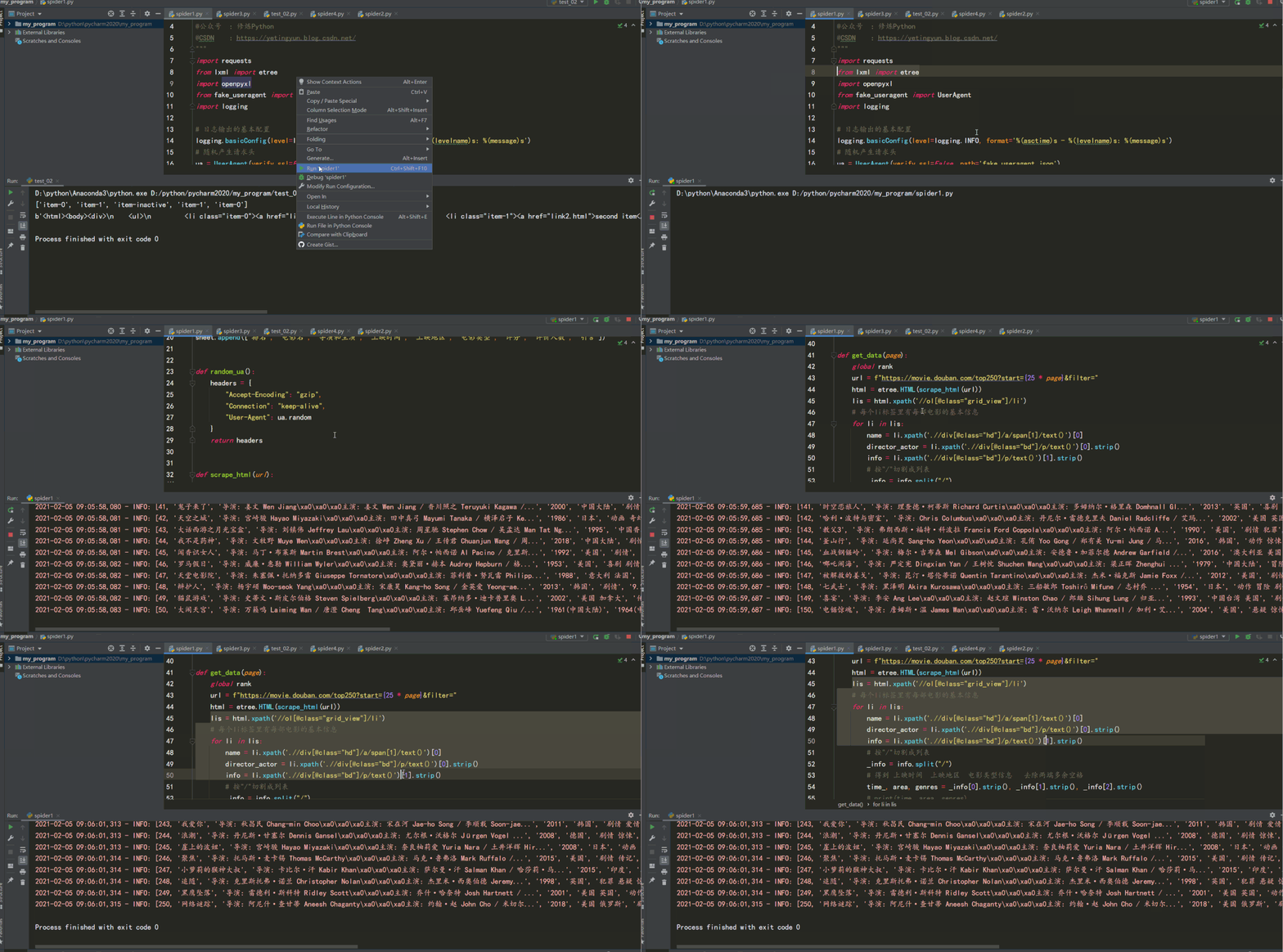
六、總結(jié)
爬取網(wǎng)頁(yè)數(shù)據(jù)用正則表達(dá)式的話,可以直接從網(wǎng)頁(yè)源代碼文本中匹配,但出錯(cuò)率較高,且熟悉正則表達(dá)式的使用也比較難,需要經(jīng)常翻閱文檔。 實(shí)際爬取數(shù)據(jù)大多基于 HTML 結(jié)構(gòu)的 Web 頁(yè)面,網(wǎng)頁(yè)節(jié)點(diǎn)較多,各種層級(jí)關(guān)系。可以考慮使用 Xpath 解析器、BeautifulSoup解析器、PyQuery CSS解析器抽取結(jié)構(gòu)化數(shù)據(jù),使用正則表達(dá)式抽取非結(jié)構(gòu)化數(shù)據(jù)。 Xpath:可在 XML 中查找信息;支持 HTML 的查找 ;通過(guò)元素和屬性進(jìn)行導(dǎo)航,查找效率很高。在學(xué)習(xí) Selenium 以及 Scrapy 框架中也都會(huì)用到。 BeautifulSoup:依賴于 lxml 的解析庫(kù),也可以從 HTML 或 XML 文件中提取數(shù)據(jù)。 PyQuery:Python仿照 jQuery 嚴(yán)格實(shí)現(xiàn),可以直接解析 DOM 節(jié)點(diǎn)的結(jié)構(gòu),并通過(guò) DOM 節(jié)點(diǎn)的一些屬性快速進(jìn)行內(nèi)容提取。
from fake_useragent import UserAgent

# 隨機(jī)產(chǎn)生請(qǐng)求頭
ua = UserAgent(verify_ssl=False, path='fake_useragent.json')

def random_ua():
    headers = {
        "Accept-Encoding": "gzip",
        "User-Agent": ua.random
    }
    return headers
偽裝請(qǐng)求頭,并可以隨機(jī)切換,封裝為函數(shù),便于復(fù)用。
def scrape_html(url):
    resp = requests.get(url, headers=random_ua())
    # print(resp.status_code, type(resp.status_code))
    # print(resp.text)
    if resp.status_code == 200:
        return resp.text
    else:
        logging.info('請(qǐng)求網(wǎng)頁(yè)失敗')
請(qǐng)求網(wǎng)頁(yè),返回狀態(tài)碼為 200 說(shuō)明能正常請(qǐng)求,并返回網(wǎng)頁(yè)源代碼文本。
參考資料:
https://docs.python.org/3/library/re.html
https://pyquery.readthedocs.io/en/latest/
https://shimo.im/docs/Gw3GTP8JrTqrCrKQ/
更多閱讀
特別推薦

點(diǎn)擊下方閱讀原文加入社區(qū)會(huì)員