Three.js實(shí)現(xiàn)3D推箱子小游戲
最近一直在學(xué) Three.js ,看到別人做出那么多炫酷的效果,覺得太厲害了,于是決定從一些簡(jiǎn)單的效果開始做。所以打算借這個(gè) 小游戲[1] 來認(rèn)真學(xué)習(xí)一下 Three.js 。
在線預(yù)覽
https://liamwu50.github.io/three-sokoban-live/
游戲介紹
"推箱子" 游戲最早是由日本游戲開發(fā)者Hiroyuki Imabayashi 于1982年開發(fā)和發(fā)布的。這款游戲的日本名為 "Sokoban"(倉庫番),意為 "倉庫管理員"。"推箱子" 游戲的目標(biāo)是在游戲區(qū)域內(nèi)將箱子移動(dòng)到指定的位置,通常通過推箱子來完成。游戲邏輯并不復(fù)雜,正好可以用來練練手。
代碼實(shí)現(xiàn)
基礎(chǔ)場(chǎng)景
初始化場(chǎng)景
游戲場(chǎng)景主要分為四個(gè)部分:場(chǎng)景底部面板、倉庫邊界、箱子、推箱子的人。首先肯定是初始化場(chǎng)景,需要完成場(chǎng)景、相機(jī)、燈光、控制器的創(chuàng)建。場(chǎng)景、渲染器都是常規(guī)創(chuàng)建就行,相機(jī)的話因?yàn)槲覀冇螒驁?chǎng)景的范圍是 10*10 ,所以相機(jī)需要稍微調(diào)整一下。
          const fov = 60
    const aspect = this.sizes.width / this.sizes.height
    this.camera = new PerspectiveCamera(fov, aspect, 0.1)
    this.camera.position.copy(
      new Vector3(
        this.gridSize.x / 2 - 2,
        this.gridSize.x / 2 + 4.5,
        this.gridSize.y + 1.7
      )
    )
gridSize 表示游戲場(chǎng)景的范圍,暫時(shí)設(shè)置為 10*10 的網(wǎng)格,后面隨著游戲關(guān)數(shù)不同,復(fù)雜度的變化,整體游戲范圍肯定會(huì)越來越大。燈光我們需要?jiǎng)?chuàng)建兩個(gè)燈光,一個(gè)平行光,一個(gè)環(huán)境光,光的顏色都設(shè)置為白色就行,平行光需要添加一些陰影的參數(shù)。
      const ambLight = new AmbientLight(0xffffff, 0.6)
const dirLight = new DirectionalLight(0xffffff, 0.7)

dirLight.position.set(20, 20, 20)
dirLight.target.position.set(this.gridSize.x / 2, 0, this.gridSize.y / 2)
dirLight.shadow.mapSize.set(1024, 1024)
dirLight.shadow.radius = 7
dirLight.shadow.blurSamples = 20
dirLight.shadow.camera.top = 30
dirLight.shadow.camera.bottom = -30
dirLight.shadow.camera.left = -30
dirLight.shadow.camera.right = 30

dirLight.castShadow = true

this.scene.add(ambLight, dirLight)
底部平面
Three.js 的場(chǎng)景初始完之后,接著需要?jiǎng)?chuàng)建游戲場(chǎng)景的底部平面。
游戲場(chǎng)景平面我們用 PlaneGeometry 來創(chuàng)建,接著將平面沿著x軸旋轉(zhuǎn)90度,調(diào)整為水平方向,并且給平面添加網(wǎng)格輔助 AxesHelper ,方便我們?cè)谟螒蛞苿?dòng)的過程中找準(zhǔn)位置。
      private createScenePlane() {
    const { x, y } = this.gridSize
    const planeGeometry = new PlaneGeometry(x * 50, y * 50)
    planeGeometry.rotateX(-Math.PI * 0.5)
    const planMaterial = new MeshStandardMaterial({ color: theme.groundColor })
    const plane = new Mesh(planeGeometry, planMaterial)
    plane.position.x = x / 2 - 0.5
    plane.position.z = y / 2 - 0.5
    plane.position.y = -0.5
    plane.receiveShadow = true
    this.scene.add(plane)
  }

  private createGridHelper() {
    const gridHelper = new GridHelper(
      this.gridSize.x,
      this.gridSize.y,
      0xffffff,
      0xffffff
    )
    gridHelper.position.set(
      this.gridSize.x / 2 - 0.5,
      -0.49,
      this.gridSize.y / 2 - 0.5
    )
    gridHelper.material.transparent = true
    gridHelper.material.opacity = 0.3
    this.scene.add(gridHelper)
  }
人物
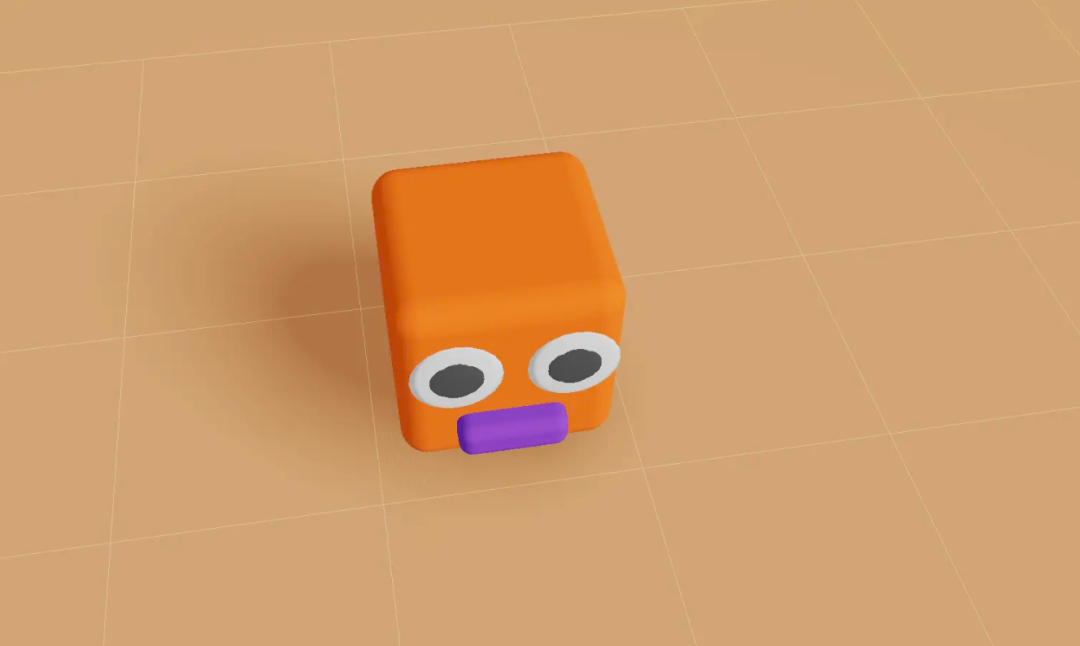
接著我們創(chuàng)建一個(gè)可以推動(dòng)箱子的人物,我們用 RoundedBoxGeometry 來創(chuàng)建身體,再創(chuàng)建兩個(gè) SphereGeometry 當(dāng)做眼睛,最后再用 RoundedBoxGeometry 創(chuàng)建一個(gè)嘴巴,就簡(jiǎn)單的完成了一個(gè)人物。
      export default class PlayerGraphic extends Graphic {
  constructor() {
    const NODE_GEOMETRY = new RoundedBoxGeometry(0.8, 0.8, 0.8, 5, 0.1)
    const NODE_MATERIAL = new MeshStandardMaterial({
      color: theme.player
    })
    const headMesh = new Mesh(NODE_GEOMETRY, NODE_MATERIAL)
    headMesh.name = PLAYER

    const leftEye = new Mesh(
      new SphereGeometry(0.16, 10, 10),
      new MeshStandardMaterial({
        color: 0xffffff
      })
    )
    leftEye.scale.z = 0.1
    leftEye.position.x = 0.2
    leftEye.position.y = 0.16
    leftEye.position.z = 0.46

    const leftEyeHole = new Mesh(
      new SphereGeometry(0.1, 100, 100),
      new MeshStandardMaterial({ color: 0x333333 })
    )

    leftEyeHole.position.z += 0.08
    leftEye.add(leftEyeHole)

    const rightEye = leftEye.clone()
    rightEye.position.x = -0.2

    const mouthMesh = new Mesh(
      new RoundedBoxGeometry(0.4, 0.15, 0.2, 5, 0.05),
      new MeshStandardMaterial({
        color: '#5f27cd'
      })
    )
    mouthMesh.position.x = 0.0
    mouthMesh.position.z = 0.4
    mouthMesh.position.y = -0.2

    headMesh.add(leftEye, rightEye, mouthMesh)
    headMesh.lookAt(headMesh.position.clone().add(new Vector3(0, 0, 1)))

    super(headMesh)
  }
}
創(chuàng)建出來的人物長(zhǎng)這樣:
游戲場(chǎng)景
搭建場(chǎng)景
游戲的所有內(nèi)容都是通過 Three.js 的立體幾何來創(chuàng)建的,整個(gè)場(chǎng)景分為了游戲區(qū)域以及環(huán)境區(qū)域,游戲區(qū)域一共有五種類型:人物、圍墻、箱子、目標(biāo)點(diǎn)、空白區(qū)域。首先定義五種類型:
      export const EMPTY = 'empty'
export const WALL = 'wall'
export const TARGET = 'TARGET'
export const BOX = 'box'
export const PLAYER = 'player'
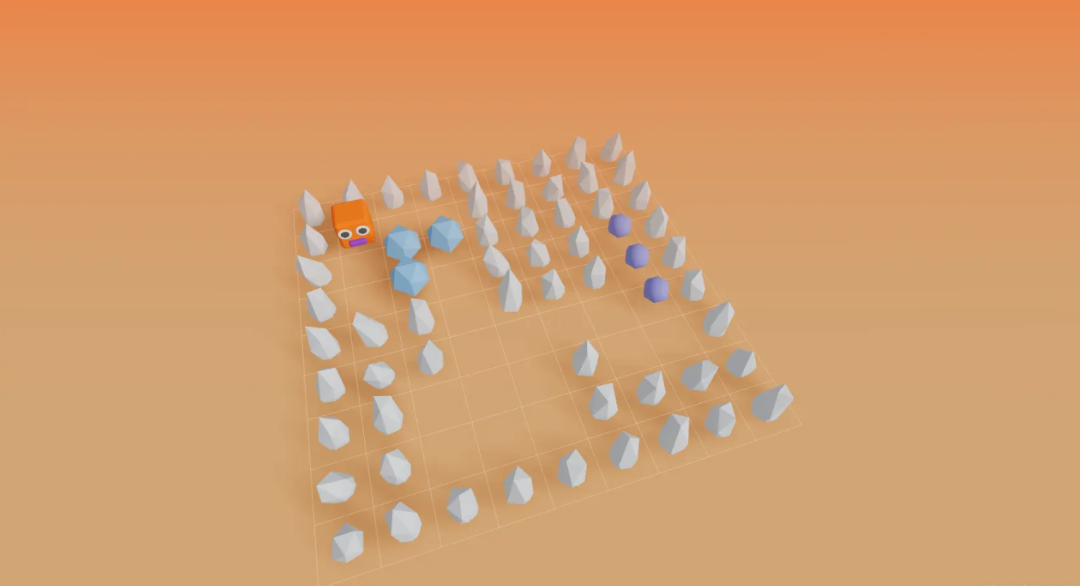
類型定義好之后,我們需要定義整個(gè)游戲關(guān)卡的布局,推箱子的游戲掘金上也有很多,我看了設(shè)置布局的方式多種多樣,我選擇一種比較容易理解也比較簡(jiǎn)單的數(shù)據(jù)結(jié)構(gòu),就是用雙層數(shù)組結(jié)構(gòu)來表示每一種元素對(duì)應(yīng)所在的位置。并且我把目標(biāo)點(diǎn)的位置沒有放在整個(gè)游戲的布局?jǐn)?shù)據(jù)里面,而是單獨(dú)存起來,這樣做是因?yàn)閜layer移動(dòng)之后我們需要實(shí)時(shí)的去維護(hù)這個(gè)布局?jǐn)?shù)據(jù),所以少一種類型的話我們會(huì)簡(jiǎn)化很多判斷邏輯。
      export const firstLevelDataSource: LevelDataSource = {
  layout: [
    [WALL, WALL, WALL, WALL, WALL, WALL, WALL, WALL, WALL],
    [WALL, PLAYER, EMPTY, EMPTY, WALL, WALL, WALL, WALL, WALL],
    [WALL, EMPTY, BOX, BOX, WALL, WALL, WALL, WALL, WALL],
    [WALL, EMPTY, BOX, EMPTY, WALL, WALL, WALL, EMPTY, WALL],
    [WALL, WALL, WALL, EMPTY, WALL, WALL, WALL, EMPTY, WALL],
    [WALL, WALL, WALL, EMPTY, EMPTY, EMPTY, EMPTY, EMPTY, WALL],
    [WALL, WALL, EMPTY, EMPTY, EMPTY, WALL, EMPTY, EMPTY, WALL],
    [WALL, WALL, EMPTY, EMPTY, EMPTY, WALL, WALL, WALL, WALL],
    [WALL, WALL, WALL, WALL, WALL, WALL, WALL, WALL, WALL]
  ],
  targets: [
    [3, 7],
    [4, 7],
    [5, 7]
  ]
}
layout就表示游戲的布局?jǐn)?shù)據(jù),后面我們循環(huán)加載的時(shí)候按照類型來對(duì)應(yīng)加載就行了。接著我們開始加載游戲的基本數(shù)據(jù)。
      /**
 * 創(chuàng)建類型網(wǎng)格
 */
private createTypeMesh(cell: CellType, x: number, y: number) {
  if (cell === WALL) {
    this.createWallMesh(x, y)
  } else if (cell === BOX) {
    this.createBoxMesh(x, y)
  } else if (cell === PLAYER) {
    this.createPlayerMesh(x, y)
  }
}
這里的x,y實(shí)際就對(duì)應(yīng)當(dāng)前幾何體所在的位置,需要注意的就是在加載箱子的時(shí)候,需要判斷一下,當(dāng)前箱子的位置是不是在目標(biāo)點(diǎn)上,如果在目標(biāo)點(diǎn)上的話就需要把箱子的顏色設(shè)置為激活的顏色。
      private createBoxMesh(x: number, y: number) {
  const isTarget = this.elementManager.isTargetPosition(x, y)
  const color = isTarget ? theme.coincide : theme.box
  const boxGraphic = new BoxGraphic(color)
  boxGraphic.mesh.position.x = x
  boxGraphic.mesh.position.z = y
  this.entities.push(boxGraphic)
  this.scene.add(boxGraphic.mesh)
}
這里我還創(chuàng)建了一個(gè) elementManager 管理工具,專門用來存當(dāng)前關(guān)卡的布局?jǐn)?shù)據(jù)以及用來移動(dòng)幾何體的位置。創(chuàng)建出來的基礎(chǔ)游戲場(chǎng)景就是這樣。
基礎(chǔ)布局創(chuàng)建完之后,添加上鍵盤事件,主要用來控制人物和箱子的移動(dòng)。
      private bindKeyboardEvent() {
  window.addEventListener('keyup', (e: KeyboardEvent) => {
    if (!this.isPlaying) return

    const keyCode = e.code
    const playerPos = this.elementManager.playerPos

    const nextPos = this.getNextPositon(playerPos, keyCode) as Vector3
    const nextTwoPos = this.getNextPositon(nextPos, keyCode) as Vector3
    const nextElement = this.elementManager.layout[nextPos.z][nextPos.x]

    const nextTwoElement =
      this.elementManager.layout[nextTwoPos.z][nextTwoPos.x]

    if (nextElement === EMPTY) {
      this.elementManager.movePlayer(nextPos)
    } else if (nextElement === BOX) {
      if (nextTwoElement === WALL || nextTwoElement === BOX) return
      this.elementManager.moveBox(nextPos, nextTwoPos)
      this.elementManager.movePlayer(nextPos)
    }
  })
}
這里主要做了兩件事,首先把下個(gè)和下下個(gè)的位置和位置所在的 mesh 類型查找出來,計(jì)算位置很簡(jiǎn)單,用當(dāng)前 player 所在的位置加上鍵盤按下的方向計(jì)算出來就行。
      if (newDirection) {
   const mesh = this.sceneRenderManager.playerMesh
   mesh.lookAt(mesh.position.clone().add(newDirection))
   return position.clone().add(newDirection)
 }
查找坐標(biāo)所在的 mesh 直接用當(dāng)前位置所在的坐標(biāo)x,y,就能在 elementManager 上獲取到。
const nextElement = this.elementManager.layout[nextPos.z][nextPos.x]
然后我們接著判斷下個(gè)坐標(biāo)以及下下個(gè)坐標(biāo)的類型,來決定 player 和箱子是否可以移動(dòng)。
      if (nextElement === EMPTY) {
  this.elementManager.movePlayer(nextPos)
} else if (nextElement === BOX) {
  if (nextTwoElement === WALL || nextTwoElement === BOX) return
  this.elementManager.moveBox(nextPos, nextTwoPos)
  this.elementManager.movePlayer(nextPos)
}
在 elementManager 里面更新 mesh 的位置,首先是根據(jù)坐標(biāo)把對(duì)應(yīng)的mesh查找出來,然后把 mesh 坐標(biāo)設(shè)置為下一個(gè)坐標(biāo),并且還需要維護(hù) this.levelDataSource.layout 布局?jǐn)?shù)據(jù),因?yàn)檫@個(gè)數(shù)據(jù)是隨著玩家的操作實(shí)時(shí)更新的。
      /**
 * 更新實(shí)體位置
 */
private updateEntityPosotion(curPos: Vector3, nextPos: Vector3) {
  const entity = this.scene.children.find(
    (mesh) =>
      mesh.position.x === curPos.x &&
      mesh.position.y === curPos.y &&
      mesh.position.z === curPos.z &&
      mesh.name !== TARGET
  ) as Mesh

  if (entity) {
    const position = new Vector3(nextPos.x, entity.position.y, nextPos.z)
    entity.position.copy(position)
  }
  // 如果實(shí)體是箱子,需要判斷是否是目標(biāo)位置
  if (entity?.name === BOX) this.updateBoxMaterial(nextPos, entity)
}
最后在每一步鍵盤操作之后都需要判斷當(dāng)前游戲是否結(jié)束,只需要判斷所有的box所在的位置是否全部都在目標(biāo)點(diǎn)的位置上就行。
      /**
* 判斷游戲是否結(jié)束
*/
public isGameOver() {
 // 第一步找出所有箱子的位置,然后判斷箱子的位置是否全部在目標(biāo)點(diǎn)上
 const boxPositions: Vector3[] = []
 this.layout.forEach((row, y) => {
   row.forEach((cell, x) => {
     if (cell === BOX) boxPositions.push(new Vector3(x, 0, y))
   })
 })
 return boxPositions.every((position) =>
   this.isTargetPosition(position.x, position.z)
 )
}
源碼: https://github.com/LiamWu50/three-sokoban-live
作者:Liam_wu
鏈接:https://juejin.cn/post/7296658371214016553
感謝您的閱讀
在看點(diǎn)贊 好文不斷