
#VS# VS連接到linux遠(yuǎn)程編譯C++
“ ?文章所涉及內(nèi)容更多來(lái)自網(wǎng)絡(luò),在此聲明,并感謝知識(shí)的貢獻(xiàn)者!”
情景說(shuō)明
—
日常在 Windows 平臺(tái)上開(kāi)發(fā)程序,但是項(xiàng)目中涉及到了 Linux 的服務(wù)器,所以需要編譯 Linux 代碼。Visual Studio 提供了遠(yuǎn)程編譯的功能,配置完成后編譯非常方便。
配置Linux
—
Linux虛擬機(jī)配置
安裝C/C++編譯程序模塊
yum -y install gcc gcc-c++ kernel-devel
參考資料: https://blog.csdn.net/GENGXINGGUANG/article/details/126231518
查看c++編譯環(huán)境
which gcc
which g++
編輯 main.cpp 測(cè)試文件
#include
int main()
{
?? std::cout<<"Hello"<
}
生成linux下可執(zhí)行文件
g++ -o test main.cpp
運(yùn)行可執(zhí)行文件
./test
參考資料:https://blog.csdn.net/qq_44878985/article/details/129890941
升級(jí) g++
#由于紅帽將已編譯好的高版本 GCC 放在了 scl,因此需要安裝 scl
yum install -y centos-release-scl
#列出 GCC 所有可安裝的版本
yum list | grep devtoolset | grep gcc.x86_64
#安裝更高版本的GCC/G++
yum -y install devtoolset-11-gcc devtoolset-11-gcc-c++
#將gcc改為想要啟用的 GCC 版本,例如 x=11(這條指令的執(zhí)行只能在當(dāng)前終端生效,下一次打開(kāi)終端必須重新執(zhí)行這條指令)
source /opt/rh/devtoolset-11/enable
#將gcc最新版本設(shè)置為自動(dòng)啟動(dòng)
vi ~/.bashrc
#添加啟動(dòng)最新gcc命令
source /opt/rh/devtoolset-11/enable
常見(jiàn)問(wèn)題:Centos編譯顯示:錯(cuò)誤:‘put_time’不是‘std’的成員
原因很簡(jiǎn)單,g++編譯器版本低,升級(jí)高版本就行了
參考資料:
https://blog.csdn.net/weixin_43272766/article/details/97825811
https://blog.csdn.net/m0_62171658/article/details/128701231
https://blog.csdn.net/qq_40430360/article/details/128675250
安裝rsync
1.安裝
yum -y install rsync
2.啟動(dòng)服務(wù)
systemctl start rsyncd.service
3.加入開(kāi)機(jī)啟動(dòng)
systemctl enable rsyncd.service
4.查看服務(wù)狀態(tài)
systemctl status rsyncd.service
5.從啟動(dòng)服務(wù)
systemctl restart rsyncd.service
參考資料:
https://blog.51cto.com/u_64214/5586481
https://blog.csdn.net/weixin_65690979/article/details/128950478
安裝gdb
yum -y install gdb
查看是否有g(shù)db
參考資料:
https://blog.csdn.net/weixin_64647426/article/details/129452823
安裝git
yum -y install git
安裝wget
yum -y install wget
安裝cmake
Cmake下載地址:
https://cmake.org/download/
https://cmake.org/files/
#下載
wget https://cmake.org/files/v3.6/cmake-3.6.2.tar.gz
#解壓縮
tar -zxvf cmake-3.6.2.tar.gz
#進(jìn)入目錄
cd cmake-3.6.2
#編譯安裝
./bootstrap && make -j4 && sudo make install
#查看版本號(hào)
cmake --version
參考資料:
https://blog.csdn.net/qq_19734597/article/details/104200371
https://blog.csdn.net/lxystar2003/article/details/129057293
https://www.fke6.com/html/73379.html
https://cloud.tencent.com/developer/article/2234223
其實(shí),centos 環(huán)境下僅需要安裝gcc,g++,gdb,gdb-sever
gcc(用于編譯和鏈接C程序)
g++(用于編譯和鏈接C++程序,g++的安裝依賴gcc)
gdb(用于本地調(diào)試C/C++代碼)
gdbserver(用于遠(yuǎn)程調(diào)試C/C++代碼)
在線安裝:
yum install gcc(在線安裝gcc)
yum install g++(在線安裝g++)
yum install gdb(在線安裝gdb)
yum install gdb-gdbserver(在線安裝gdbserver)
配置Visual Studio
—
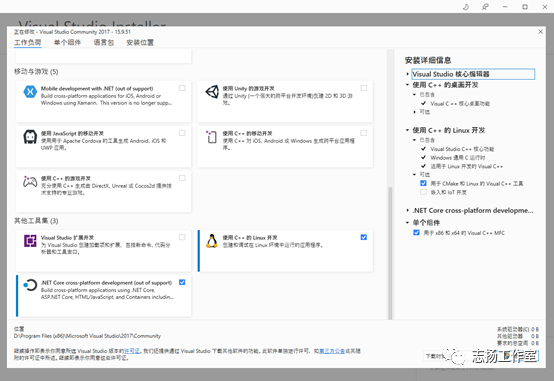
Visual studio 安裝
Visual studio 工具擴(kuò)展
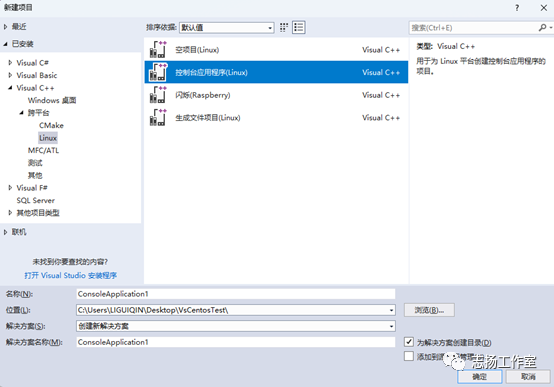
創(chuàng)建項(xiàng)目
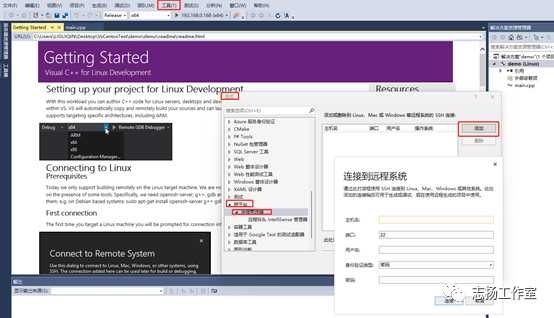
vs 配置 linux虛擬機(jī)登錄信息
工具》選項(xiàng)》跨平臺(tái)》連接管理器》添加
?
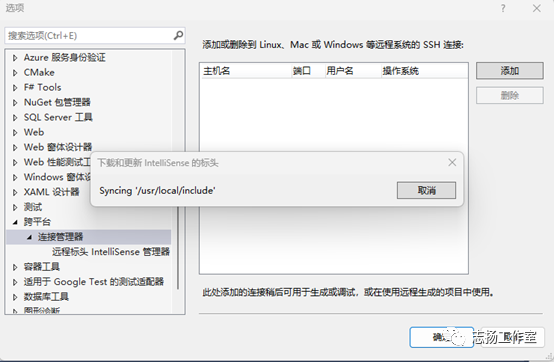
添加完成后,點(diǎn)擊連接
?
進(jìn)行項(xiàng)目的初期編譯測(cè)試
?
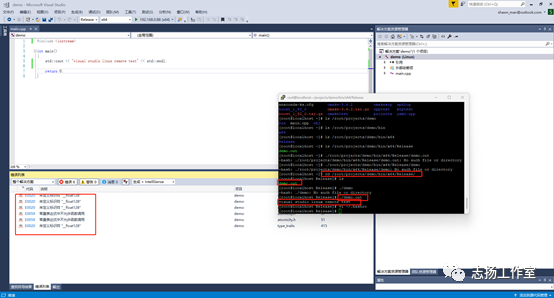
Linux系統(tǒng)默認(rèn)的生成目錄: /root/projects
添加項(xiàng)目源代碼文件所在目錄
?
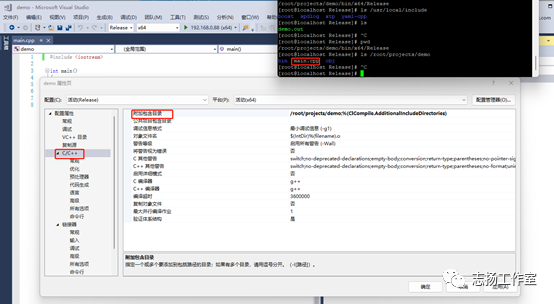
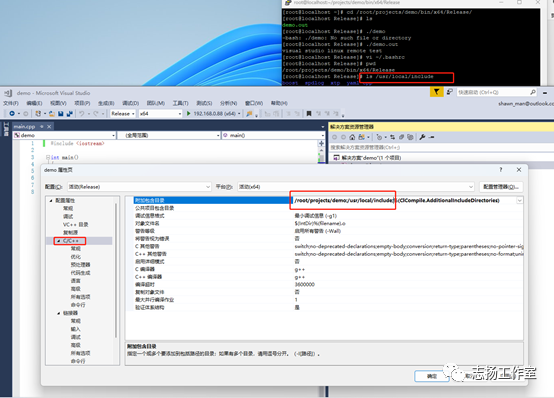
添加第三方的頭文件所在目錄
?
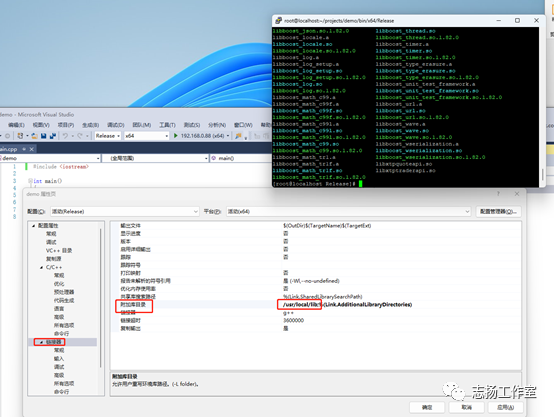
添加共享庫(kù)所在目錄,即so文件所在目錄
?
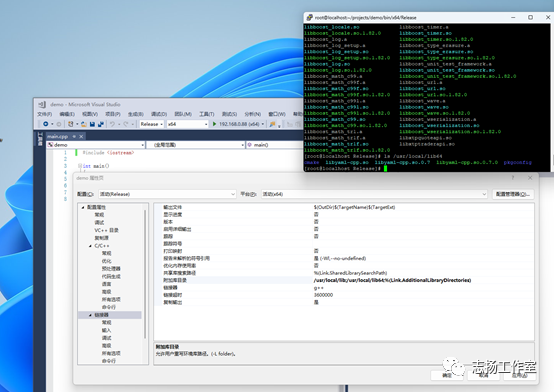
添加共享庫(kù)具體的文件名
名稱需要去除前綴“l(fā)ib”和后綴“.so”
?
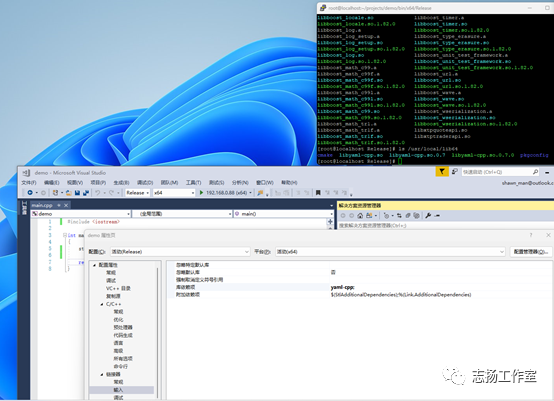
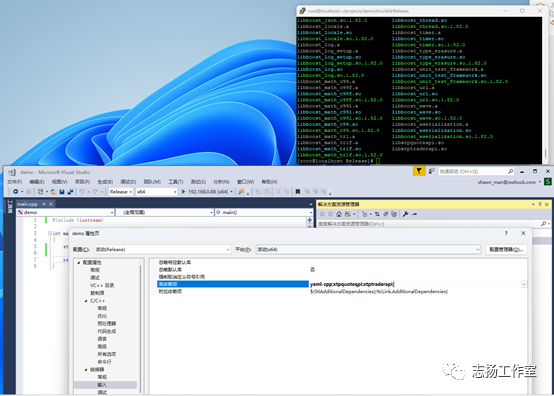
編輯代碼
—
編輯測(cè)試代碼
#include "xtp/xtp_quote_api.h"
#include "xtp/xtp_trader_api.h"
#include "spdlog/spdlog.h"
#include "spdlog/sinks/daily_file_sink.h"
#include
#include
#include
#include
using std::cout;
using std::endl;
#include
using namespace std;
using namespace boost::placeholders;
int fun(int x, int y) {return x+y;}
int main()
{
?? ?
?? ?int m=1, n=2;
??? cout << boost::bind(fun, _1, _2)(m, n) << endl;
??? cout << "boost test" << endl;?????????????? //控制臺(tái)輸出
?? ?// 創(chuàng)建文件名類似于:daily_log_2020_05-28.txt,如果程序不退出的話,就是每天2:30 am創(chuàng)建新的文件
??? auto logger = spdlog::daily_logger_mt("spdlog", "daily_log.txt", 2, 20);
??? // 設(shè)置日志級(jí)別,默認(rèn)是info
??? spdlog::set_level(spdlog::level::trace);
??? // 寫(xiě)入log文件
??? string s="success";
??? logger->info("test s ={}",s);??????????? //{}可以表示變量,跟printf的語(yǔ)法類似
??? logger->trace("this is trace log");
??? logger->debug("this is debug log");
??? logger->info("this is info log");
??? logger->warn("this is warning log");
??? logger->error("this is a error log");? ?
??? logger->critical("this is critical log");
??? cout << "spdlog success" << endl;?????????????? //控制臺(tái)輸出
?? ?YAML::Node config = YAML::LoadFile("/home/zhqb_trader/build/bin/config.yaml");
??? if (config["lastLogin"]) {
????????? std::cout << "Last logged in: " << config["lastLogin"].as
??? }
??? const std::string username = config["username"].as
??? const std::string password = config["password"].as
??? config["lastLogin"] = "2020-09-19 11:17:40";
??? std::ofstream fout("config.yaml");
??? fout << config;
?? ?std::cout << "Yaml-cpp test" << std::endl;
?? ?//行情請(qǐng)求對(duì)象
?? ?XTP::API::QuoteApi* m_quote_api;
?? ?int m_client = 1;
?? ?std::string m_file="/home/zhqb_trader";
?? ?m_quote_api = XTP::API::QuoteApi::CreateQuoteApi(m_client, m_file.c_str(), XTP_LOG_LEVEL_DEBUG);
?? ?std::cout << "XTP API test" << std::endl;
?? ?
?? ?
?? ?return 0;
}
Visual studio 點(diǎn)擊編譯運(yùn)行
?
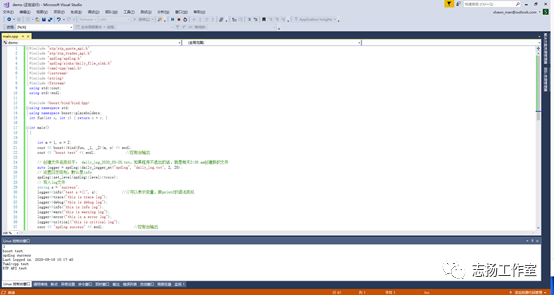
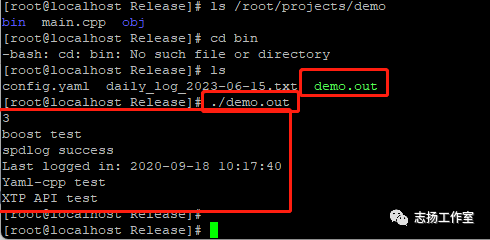
在linux環(huán)境下運(yùn)行生成的可執(zhí)行文件
?
參考資料
—
參考資料:
https://blog.csdn.net/qq_42067550/article/details/126542804
https://blog.csdn.net/endurehero/article/details/81206398?spm=1001.2101.3001.6661.1&utm_medium=distribute.pc_relevant_t0.none-task-blog-2%7Edefault%7ECTRLIST%7ERate-1-81206398-blog-126542804.235%5Ev38%5Epc_relevant_sort_base1&depth_1-utm_source=distribute.pc_relevant_t0.none-task-blog-2%7Edefault%7ECTRLIST%7ERate-1-81206398-blog-126542804.235%5Ev38%5Epc_relevant_sort_base1&utm_relevant_index=1
https://www.jianshu.com/p/df3d6971b8dd