
JS如何判斷文字被ellipsis了?
前言
如果想要文本超出寬度后用省略號省略,只需要加上以下的 css 就行了。
.ellipsis {overflow: hidden;text-overflow: ellipsis;white-space: nowrap;}
3 行 css 搞定,但是問題來了:
如果我們想要當(dāng)文本被省略的時候,也就是當(dāng)文本超出指定的寬度后,鼠標(biāo)懸浮在文本上面才展示popper,應(yīng)該怎么實現(xiàn)呢?
CSS幫我們搞定了省略,但是 JS 并不知道文本什么時候被省略了,所以我們得通過JS來計算。
接下來,我將介紹幾種方法來實現(xiàn) JS 計算省略。
createRange我發(fā)現(xiàn)Element-plus表格組件已經(jīng)實現(xiàn)了這個功能,所以就先來學(xué)習(xí)一下它的源碼。
源碼地址:
https://github.com/element-plus/element-plus/blob/dev/packages/components/table/src/table-body/events-helper.ts
// 僅僅粘貼相關(guān)的const cellChild = (event.target as HTMLElement).querySelector('.cell')const range = document.createRange()range.setStart(cellChild, 0)range.setEnd(cellChild, cellChild.childNodes.length)let rangeWidth = range.getBoundingClientRect().widthlet rangeHeight = range.getBoundingClientRect().height/** detail: https://github.com/element-plus/element-plus/issues/10790* What went wrong?* UI > Browser > Zoom, In Blink/WebKit, getBoundingClientRect() sometimes returns inexact values, probably due to lostprecision during internal calculations. In the example above:* - Expected: 188* - Actual: 188.00000762939453*/const offsetWidth = rangeWidth - Math.floor(rangeWidth)if (offsetWidth < 0.001) {rangeWidth = Math.floor(rangeWidth)}const offsetHeight = rangeHeight - Math.floor(rangeHeight)if (offsetHeight < 0.001) {rangeHeight = Math.floor(rangeHeight)}
const { top, left, right, bottom } = getPadding(cellChild) // 見下方const horizontalPadding = left + rightconst verticalPadding = top + bottomif (rangeWidth + horizontalPadding > cellChild.offsetWidth ||rangeHeight + verticalPadding > cellChild.offsetHeight ||cellChild.scrollWidth > cellChild.offsetWidth) {createTablePopper(parent?.refs.tableWrapper,cell,cell.innerText || cell.textContent,nextZIndex,tooltipOptions)}
// 上面代碼17行中的getPadding函數(shù)const getPadding = (el: HTMLElement) => {const style = window.getComputedStyle(el, null)const paddingLeft = Number.parseInt(style.paddingLeft, 10) || 0const paddingRight = Number.parseInt(style.paddingRight, 10) || 0const paddingTop = Number.parseInt(style.paddingTop, 10) || 0const paddingBottom = Number.parseInt(style.paddingBottom, 10) || 0return {left: paddingLeft,right: paddingRight,top: paddingTop,bottom: paddingBottom,}}
document.createRange() 是 JavaScript 中的一個方法,用于創(chuàng)建一個 Range 對象,表示文檔中的一個范圍。Range 對象通常用于選擇文檔中的一部分內(nèi)容,然后對其進(jìn)行操作。
它可以:
-
設(shè)置選中文本范圍:可以使用
document.createRange()方法創(chuàng)建一個 Range 對象,并使用setStart()和setEnd()方法設(shè)置選中文本的起始和結(jié)束位置。 -
插入新元素:可以使用
document.createRange()方法創(chuàng)建一個 Range 對象,并使用insertNode()方法將新元素插入到文檔中的指定位置。 -
獲取特定元素的位置:可以使用
document.createRange()方法創(chuàng)建一個 Range 對象,并使用getBoundingClientRect()方法獲取元素在文檔中的位置和大小信息。
這邊 element 就是使用 range 對象的 getBoundingClientRect 獲取到元素的寬高,同時因為得到的寬高值有很多位的小數(shù),所以 element-plus 做了一個判斷,如果小數(shù)值小于 0.001 就舍棄小數(shù)部分。
接下來,就讓我們進(jìn)行一下復(fù)刻吧,可以通過調(diào)整盒子的寬度,在頁面中看到是否有省略號的判斷。
<div class="ellipsis box">Lorem ipsum dolor sit amet consectetur adipisicing elit.</div>
<style>.ellipsis {overflow: hidden;text-overflow: ellipsis;white-space: nowrap;}
.box {border: 1px solid gray;padding: 10px;}</style>
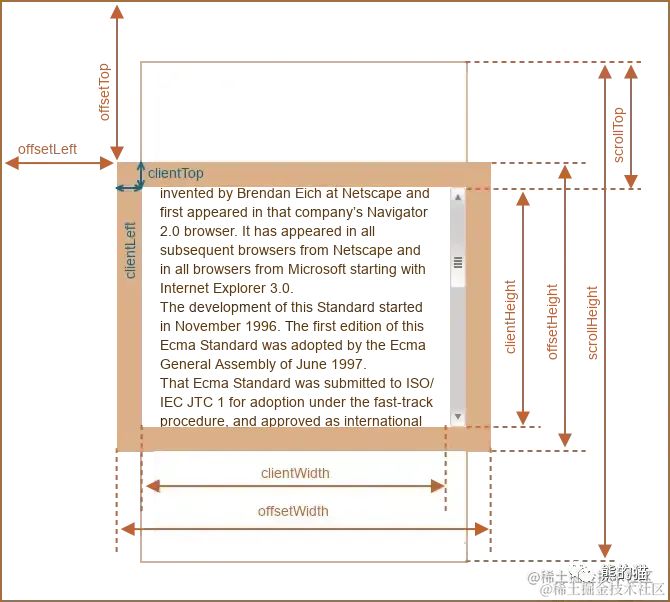
注意這里,我們需要區(qū)分clientWidth和offsetWidth,因為我們現(xiàn)在給了 box 加了1px 的邊框,所以 offsetWidth = 1 * 2 (左右兩邊的border寬度) + clientWidth,所以我們這邊使用 clientWidth 來代表 box 的實際寬度。
const checkEllipsis = () => {const range = document.createRange();range.setStart(box, 0)range.setEnd(box, box.childNodes.length)let rangeWidth = range.getBoundingClientRect().widthlet rangeHeight = range.getBoundingClientRect().heightconst contentWidth = rangeWidth - Math.floor(rangeWidth)const { pLeft, pRight } = getPadding(box)const horizontalPadding = pLeft + pRightif (rangeWidth + horizontalPadding > box.clientWidth) {result.textContent = '存在省略號'} else {result.textContent = '容器寬度足夠,沒有省略號了'}}
這種方法 div 里面放的元素和樣式是不受限制的,比如 html 這樣寫還是能夠正確計算的。
創(chuàng)建一個div來獲取模擬寬度<div class="ellipsis box">Lorem ipsum dolor sit amet consectetur adipisicing elit.<span style="font-size: large;">hello world</span><span style="letter-spacing: 20px;">hello world</span></div>
我們可以還可以通過創(chuàng)建一個幾乎相同的div來獲取沒有overflow:hidden時元素的實際寬度。
<div class="ellipsis box">Lorem ipsum dolor sit amet consectetur adipisicing elit.</div>
<style>.ellipsis {overflow: hidden;text-overflow: ellipsis;white-space: nowrap;}
.box {border: 1px solid gray;padding: 10px;}</style>
const checkEllipsis = () => {const elementWidth = box.clientWidth;const tempElement = document.createElement('div');const style = window.getComputedStyle(box, null)tempElement.style.cssText = `position: absolute;top: -9999px;left: -9999px;white-space: nowrap;padding-left:${style.paddingLeft};padding-right:${style.paddingRight};font-size: ${style.fontSize};font-family: ${style.fontFamily};font-weight: ${style.fontWeight};letter-spacing: ${style.letterSpacing};`;tempElement.textContent = box.textContent;document.body.appendChild(tempElement);if (tempElement.clientWidth >= elementWidth) {result.textContent = '存在省略號'} else {result.textContent = '容器寬度足夠,沒有省略號了'}document.body.removeChild(tempElement);}
當(dāng)box元素里面存在多個dom元素的時候,還得進(jìn)行一個遞歸創(chuàng)建dom,或者也可以試試cloneNode(true)來試試克隆。
這種方法從acro design vue中學(xué)到的,應(yīng)該是最簡單的辦法。要點就是外層一定是block元素,內(nèi)層是inline元素
<div class="ellipsis box"><span class="content">Lorem ipsum dolor sit amet consectetur adipisicing elit. Lorem ipsum dolor sit amet consectetur adipisicingelit.</span></div>
<style>.ellipsis {overflow: hidden;text-overflow: ellipsis;white-space: nowrap;}
.box {border: 1px solid gray;padding: 10px;}</style>
通過上面對css和html做的處理,我們可以實現(xiàn)讓box元素里面的文字進(jìn)行ellipisis,同時由于并沒有 對span.content進(jìn)行任何overflow的處理,所以該 span 的offsetWidth還是保持不變。
const checkEllipsis = () => {const { pLeft, pRight } = getPadding(box)const horizontalPadding = pLeft + pRightif (box.clientWidth <= content.offsetWidth+horizontalPadding ) {result.textContent = '存在省略號'} else {result.textContent = '容器寬度足夠,沒有省略號了'}}
同樣,只要滿足外層元素是block,內(nèi)層元素是inline的話,里面的dom元素其實是隨便放的
方法比較<div class="ellipsis box"><span class="content">Lorem ipsum dolor sit amet consectetur adipisicing elit. Lorem ipsum dolor sit amet consectetur adipisicingelit.<span style="font-size: large;">hello world</span><span style="letter-spacing: 20px;">hello world</span></span></div>
-
性能(個人主觀判斷)3>1>2
-
省心程度(個人主觀判斷):1>3>2
-
精確度(個人主觀判斷):3種方法精確度幾乎相同,如果硬要比較我覺得是3>1>2
之后我在看看其他組件庫有什么好的方法,然后再補充上來,前端總是在做這些很小很小的點,哈哈。
作者:嘉琪coder
鏈接:https://juejin.cn/post/7262280335978741797