
【CSS】1049- 深入了解::before 和 ::after 偽元素

本文從最簡單的開始,解釋如何理解和使用::before和::after。然后再在實際使用場景中去應(yīng)用它。
::before和::after是什么?
::before和::after可以添加到選擇器以創(chuàng)建偽元素的關(guān)鍵字。偽元素被插入到與選擇器匹配的元素內(nèi)容之前或之后。
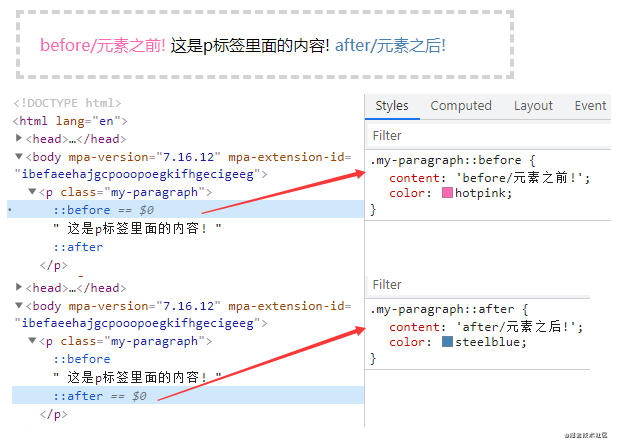
content屬性
1)::before和::after下特有的content,用于在css渲染中向元素邏輯上的頭部或尾部添加內(nèi)容。
2)::before和::after必須配合content屬性來使用,content用來定義插入的內(nèi)容,content必須有值,至少是空
3)這些添加不會出現(xiàn)在DOM中,不會改變文檔內(nèi)容,不可復(fù)制,僅僅是在css渲染層加入。所以不要用:before或:after展示有實際意義的內(nèi)容,盡量使用它們顯示修飾性內(nèi)容
content可取以下值:
string
使用引號包一段字符串,將會向元素內(nèi)容中添加字符串
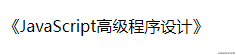
 p::before{
    content: "《";
    color: #000000;
}
p::after{
    content: "》";
    color:#000000;
}

<p>JavaScript高級程序設(shè)計</p>

復(fù)制代碼
attr()
通過attr()調(diào)用當(dāng)前元素的屬性,比如將圖片alt提示文字或者鏈接的href地址顯示出來。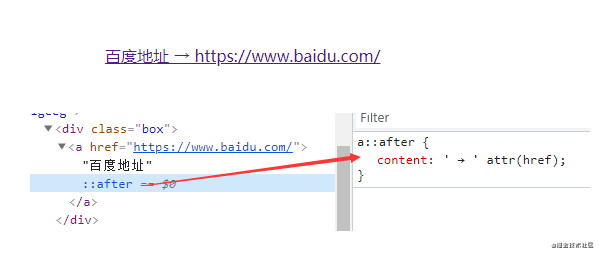
a::after {
    content: ' → ' attr(href); /* 在 href 前顯示一個箭頭 */
}

 <a href="https://www.baidu.com/">百度地址</a>
復(fù)制代碼
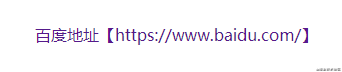
 a::after{
    content: "【" attr(href) "】";
}

<a href="https://www.baidu.com/">百度地址</a>
復(fù)制代碼
url()/uri()
用于引用媒體文件。比如:“百度”前面給出一張圖片,后面給出href屬性。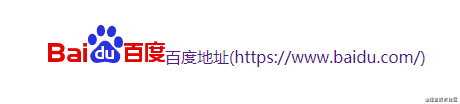
a::before{
    content: url("img/baidu_jgylogo3.gif");
}
a::after{
    content:"("attr(href)")";
}

<a href="https://www.baidu.com/">百度地址</a>
復(fù)制代碼
注意
1)URL不能使用引號。如果你將URL用引號括起來,那么它會變成一個字符串和插入文本“url(image.jpg)”作為其內(nèi)容,插入的而不是圖像本身。
2)content屬性,直接使用圖片,即使寫width,height也無法改變圖片大小;
解決方案:如果要解決這個問題,可以把content:''寫成空,使用background:url()來添加圖片
/*偽元素添加圖片:*/
.wrap:after{
    /*內(nèi)容置為空*/
    content:"";
    /*設(shè)置背景圖,并拉伸*/
    background:url("img/06.png") no-repeat center;
    /*必須設(shè)置此偽元素display*/
    display:inline-block;
    /*必須設(shè)置此偽元素大小(不會被圖片撐開)*/
    background-size:100%;
    width:100px;
    height:100px;
}
復(fù)制代碼
3)蘋果端偽元素不生效,img、input和其他的單標(biāo)簽是沒有:after和:before偽元素的(在部分瀏覽器中沒有,如:蘋果端會發(fā)現(xiàn)無效),因為單標(biāo)簽本身不能有子元素。
解決方案:給img包一個div可以解決
4)想要動態(tài)改變偽元素的圖片,可以給當(dāng)前元素添加偽元素圖片的基礎(chǔ)樣式,再動態(tài)class來寫偽元素的圖片。
::before和::after的應(yīng)用
配合quotes 屬性使用
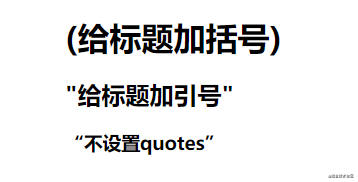 加括號
加括號
 h1{
    quotes:"(" ")";  /*利用元素的quotes屬性指定文字符號*/
}
h1::before{
    content:open-quote;
}
h1::after{
    content:close-quote;
}

<h1>給標(biāo)題加括號</h1>
復(fù)制代碼
加引號
 h2{
    quotes:"\"" "\"";  /*添加雙引號要轉(zhuǎn)義*/
}
h2::before{
    content:open-quote;
}
h2::after{
    content:close-quote;
}

<h2>給標(biāo)題加引號</h2>
復(fù)制代碼
不指定,默認(rèn)
 h3::before{
    content:open-quote;
}
h3::after{
    content:close-quote;
}

<h3>不設(shè)置quotes</h3>
復(fù)制代碼
裝飾標(biāo)題

h1 {
    display: grid;
    grid-template-columns: minmax(50px, 1fr) auto minmax(50px, 1fr);
    align-items: center;
    text-align: center;
    gap: 40px;
}

h1::before, h1::after {
    content: '';
    border-top: 6px double;
}

<h1>標(biāo)題</h1>
復(fù)制代碼
布局是通過將
<h1>元素變成 3 列來實現(xiàn)的。左列和右列是雙線,寬度均為minmax(50px, 1fr),這意味著它們的匹配寬度始終不小于50px。標(biāo)題文本整齊地居中居中。
彩帶標(biāo)題
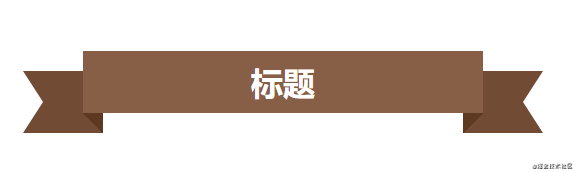
 h1 {
    position: relative;
    margin: 0 auto 20px;
    padding: 10px 40px;
    text-align: center;
    background-color: #875e46;
}

h1::before, h1::after {
    content: '';
    width: 80px;
    height: 100%;
    background-color: #724b34;

    /* 定位彩帶兩端形狀的位置,并且放在最底層 */
    position: absolute;
    z-index: -1;
    top: 20px;

    /* 彩帶兩端的形狀 */
    clip-path: polygon(0 0, 100% 0, 100% 100%, 0 100%, 25% 50%);

    /* 繪制并定位彩帶的陰影三角形 */
    background-image: linear-gradient(45deg, transparent 50%, #5d3922 50%);
    background-size: 20px 20px;
    background-repeat: no-repeat;
    background-position: bottom right;
}

h1::before {
    left: -60px;
}

h1::after {
    right: -60px;
    transform: scaleX(-1); /* 水平翻轉(zhuǎn) */
}
---------------------------
 <h1>標(biāo)題</h1>
復(fù)制代碼
實現(xiàn)更逼真的陰影
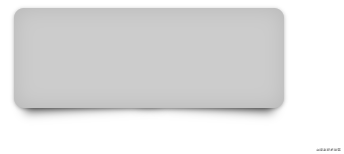
.box{margin:10px;width:300px;height:100px;border-radius:10px;background:#ccc}
.shadow{position:relative;max-width:270px;box-shadow:0 1px 4px rgba(0,0,0,.3),0 0 20px rgba(0,0,0,.1) inset}
.shadow::after,.shadow::before{position:absolute;z-index:-1;content:""}
.shadow::after,.shadow::before{position:absolute;bottom:15px;left:10px;z-index:-1;width:50%;height:20%;content:""}
.shadow::after,.shadow::before{position:absolute;bottom:15px;left:10px;z-index:-1;width:50%;height:20%;box-shadow:0 15px 10px rgba(0,0,0,.7);content:"";transform:rotate(-3deg)}
.shadow::after{right:10px;left:auto;transform:rotate(3deg)}


<div class="box shadow"></div>
復(fù)制代碼
替換內(nèi)容
有些情況下content可以不使用::before或::after。如果content設(shè)置為單個圖像,那么你可以直接在元素上使用它來替換該元素的 HTML 內(nèi)容。
如頁面上分別有以下三個內(nèi)容:
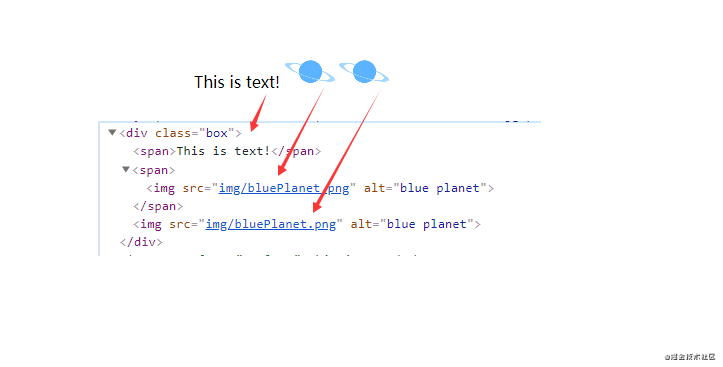
加了replace類之后
.replace {
    content: url(img/replace.png);
}
復(fù)制代碼

1)具有簡單文本的元素。它會被取代。
2)一個包含<img>在其中的元素。它也會被取代。
3)<img>直接一個元素。Firefox不會取代它,但其他瀏覽器會。
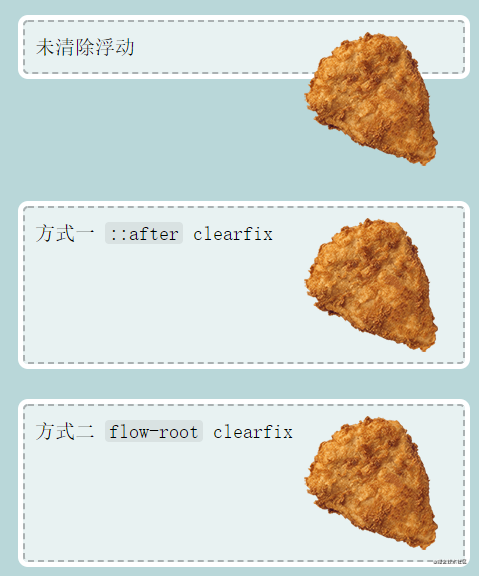
清除浮動
方式一:
.classic-clearfix::after {
    content: '';
    display: block;
    clear: both;
}
復(fù)制代碼
方式二:
.modern-clearfix {
    display: flow-root;
}
復(fù)制代碼
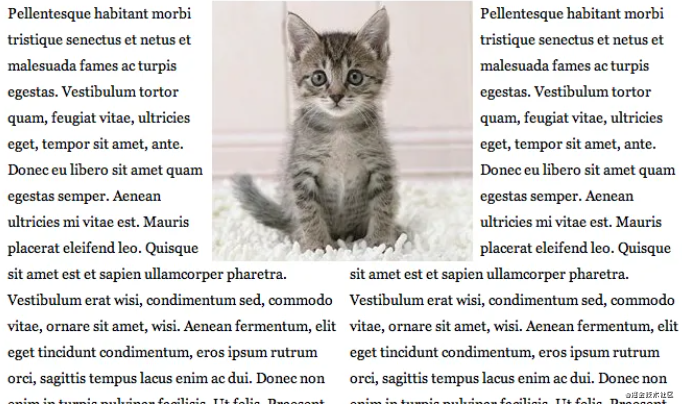
模擬float:center的效果
float沒有center這個取值,但是可以通過偽類來模擬實現(xiàn)。
原理:左右通過::before float各自留出一半圖片的位置,再把圖片絕對定位上去。
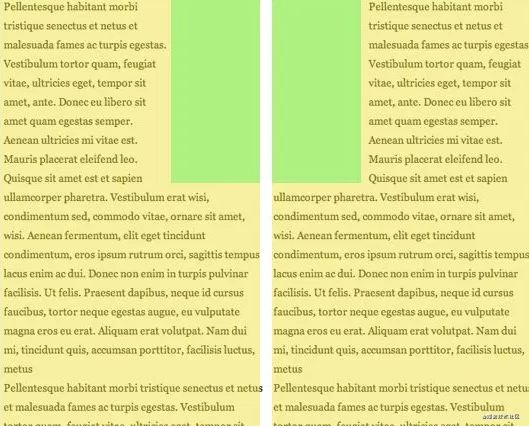
body { font: 14px/1.8 Georgia, serif;}
#page-wrap { width: 60%; margin: 40px auto; position: relative; }
#logo { position: absolute; top: 0; left: 50%; margin-left: -125px; }
#l, #r { width: 49%; }
#l { float: left; }
#r { float: right; }
#l:before, #r:before { content: ""; width: 125px; height: 250px; }
#l:before { float: right; }
#r:before { float: left; }

<div id="page-wrap">
    <img src="img/cat.jpg" id="logo">
    <div id="l">
        <p>
            Pellentesque habitant morbi tristique senectus et netus et malesuada fames ac turpis egestas. Vestibulum tortor quam, feugiat vitae, ultricies eget, tempor sit amet, ante. Donec eu libero sit amet quam egestas semper. Aenean ultricies mi vitae est. Mauris placerat eleifend leo. Quisque sit amet est et sapien ullamcorper pharetra. Vestibulum erat wisi, condimentum sed, commodo vitae, ornare sit amet, wisi. Aenean fermentum, elit eget tincidunt condimentum, eros ipsum rutrum orci, sagittis tempus lacus enim ac dui. Donec non enim in turpis pulvinar facilisis. Ut felis. Praesent dapibus, neque id cursus faucibus, tortor neque egestas augue, eu vulputate magna eros eu erat. Aliquam erat volutpat. Nam dui mi, tincidunt quis, accumsan porttitor, facilisis luctus, metus
        </p>
    </div>
    <div id="r">
        <p>
            Pellentesque habitant morbi tristique senectus et netus et malesuada fames ac turpis egestas. Vestibulum tortor quam, feugiat vitae, ultricies eget, tempor sit amet, ante. Donec eu libero sit amet quam egestas semper. Aenean ultricies mi vitae est. Mauris placerat eleifend leo. Quisque sit amet est et sapien ullamcorper pharetra. Vestibulum erat wisi, condimentum sed, commodo vitae, ornare sit amet, wisi. Aenean fermentum, elit eget tincidunt condimentum, eros ipsum rutrum orci, sagittis tempus lacus enim ac dui. Donec non enim in turpis pulvinar facilisis. Ut felis. Praesent dapibus, neque id cursus faucibus, tortor neque egestas augue, eu vulputate magna eros eu erat. Aliquam erat volutpat. Nam dui mi, tincidunt quis, accumsan porttitor, facilisis luctus, metus
        </p>
    </div>
</div>
復(fù)制代碼
引用參考:
W3C官方文檔[2]
Diving into the ::before and ::after Pseudo-Elements[3]
Faking ‘float: center’ with Pseudo Elements[4]
小可愛看完就點個贊再走吧!??????
關(guān)于本文
來源:Axjy
https://juejin.cn/post/6986629782666477599
今天是情人節(jié),送兩本新書《實戰(zhàn)低代碼》,掃碼參與哈~