
Dapr 入門教程
Dapr(Distributed Application Runtime) 是微軟于 2019 年 10 月 16 日 首次發(fā)布[1] 的分布式程序運(yùn)行時,到現(xiàn)在已經(jīng)過去1年多,從最初的v0.1.0 到現(xiàn)在的 v1.0.0-rc2,加入了好多新的功能。支持的中間件越來越多,基本上主流的中間件(本地版和各云提供商的托管版)都可以被支持。Dapr 運(yùn)行時也從原來的只支持單 Instance變成了v1.0.0-rc1以后的支持多 Instance(HA mode),讓我們一起進(jìn)入精彩的 Dapr 的世界。
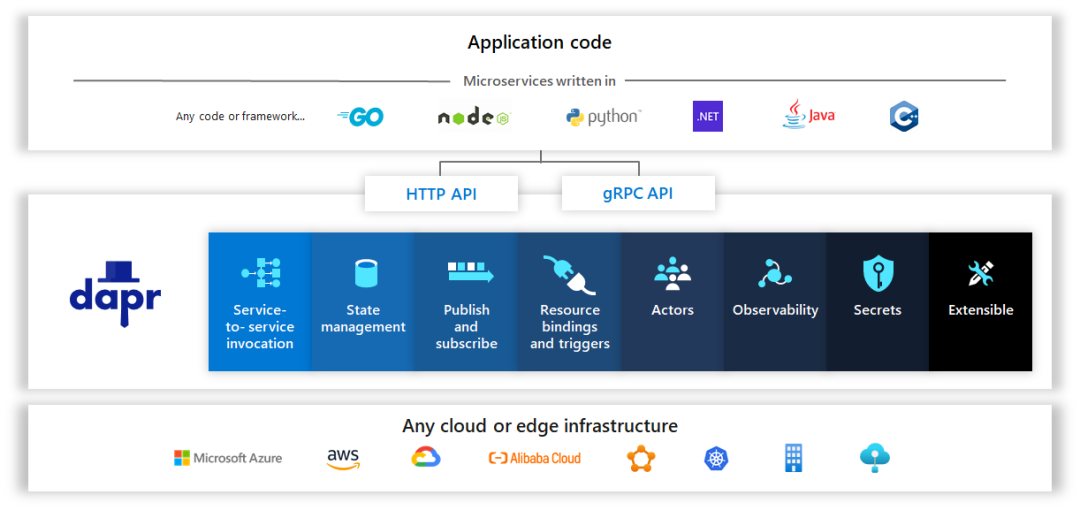
Dapr 是什么?
參考 Dapr 官方網(wǎng)站[2] ,"An event-driven, portable runtime for building microservices on cloud and edge",或者復(fù)雜點(diǎn)說,"Dapr is a portable, event-driven runtime that makes it easy for any developer to build resilient, stateless and stateful applications that run on the cloud and edge and embraces the diversity of languages and developer frameworks"。翻譯過來就是,Dapr 是一個在云和邊緣構(gòu)建微服務(wù)用的事件驅(qū)動的,可移植的運(yùn)行時。更復(fù)雜的來說,"Dapr 是一個可移植的,事件驅(qū)動的運(yùn)行時,使開發(fā)人員可以輕松創(chuàng)建在云和邊緣上運(yùn)行的有彈性,無狀態(tài)和有狀態(tài)的應(yīng)用程序,支持語言和開發(fā)人員框架的多樣性"。聽起來讓人一頭霧水,讓我解釋一下它到底是什么意思。
分布式程序(Distributed Application)指的是什么? 跟微服務(wù)是一個意思。大的系統(tǒng)分成彼此獨(dú)立的小的模塊,模塊和模塊之間通過API互相通信,這樣每個模塊可以用不同的語言開發(fā),一個模塊升級的時候不會影響到別的模塊。 云和邊緣(cloud and edge)指的是什么? 這里的云和邊緣指的是 Dapr 的 App 可以跑在 AWS,Azure,GCP 等云服務(wù)器上,也可以跑在本地的服務(wù)器上。 事件驅(qū)動(event-driven)指的是什么? 可以理解成 Dapr 在沒有監(jiān)聽(Listening)到請求到來的時候會一直處于待機(jī)的狀態(tài),什么也不做,只有監(jiān)聽到請求事件來了才開始處理。 可移植(portable)指的是什么? 就是說寫的程序和運(yùn)行的環(huán)境,用的中間件無關(guān)。比如說原來跑在 AWS 上,現(xiàn)在想跑在 Azure 上,Nosql 數(shù)據(jù)庫原來用 DynamoDB,現(xiàn)在想用 CosmosDB,消息中間件原來用 SNS/SQS,現(xiàn)在想用 Service Bus,沒問題,只要在 Dapr 設(shè)定這邊做一下切換,程序無需改動。 運(yùn)行時(runtime)指的是什么? 運(yùn)行時指的是 Dapr 的運(yùn)行環(huán)境。Dapr 的 Control Plane(不知道怎么翻譯,直接用英文,就是 Dapr 管理用的模塊)會單獨(dú)啟動,同時你的程序在啟動的時候 Dapr 會在你的程序上掛一個 Sidecar(所謂的邊車模式),你的程序就可以通過 Sidecar 和 Dapr 的 Control Plane 聯(lián)系上。所有掛有 Dapr Sidecar 的各個微服務(wù)之間就可以互相調(diào)用了,也可以通過 Dapr 調(diào)用各種中間件。 有彈性(resilient)指的是什么? 指的是可以從故障中自動恢復(fù)的能力,比如說超時、重試等。不會卡住或陷入一種死循環(huán)。 無狀態(tài)和有狀態(tài)(stateless and stateful)指的是什么? 無狀態(tài)指的是一個微服務(wù)經(jīng)過計(jì)算得到結(jié)果,返回給調(diào)用者以后這個值在微服務(wù)這邊是不保存的(DB,內(nèi)存等)。有狀態(tài)指的是在微服務(wù)這邊要把這個結(jié)果保存起來。 支持語言的多樣性(the diversity of languages)指的是什么? 指的是 Dapr 有各種語言的 SDK,比如 java,python,go,.net 等都支持。 開發(fā)人員框架(developer frameworks)指的是什么? 指的是 Dapr 跟框架無關(guān),你可以把各種語言的各種框架(比如 java 的 spring boot 框架)和 Dapr(API 或者 SDK)混合使用。 說了這么多,Dapr 到底是個什么東西? 我的理解是 Dapr 就是一個代理。什么意思呢,就是說它把不同組件的接口隱藏了起來,給你提供一個統(tǒng)一的接口讓你來通信。這樣做的好處不言而喻,不管你的組件怎么變,平臺怎么變,我 Dapr 這邊只要接口是不變的,你程序就不用變。所以它是 Makes it easy for any developer。從程序來看我只是把數(shù)據(jù)交給 Dapr 就可以了,由 Dapr 來處理,這塊的邏輯不寫在我的程序邏輯里。所以通過 Dapr 可以做到平臺無關(guān),中間件無關(guān)。打個比方,如果你不用 Dapr,而是用 springboot redis 庫來實(shí)現(xiàn)的 Message Queue,忽然有一天讓你不用 redis 而是 RebbitMQ,你怎么辦,是不是只能用 springboot rebbitmq 重寫程序。不同于工作在網(wǎng)絡(luò)層的 Service Mesh(如 Istio 和 Linkerd),Dapr 算是一個 App Mesh,工作于 APP 層,專注于提供構(gòu)建模塊(Building blocks),使開發(fā)人員更容易構(gòu)建微服務(wù)。可以說 Dapr 以開發(fā)人員為中心,而 Service Mesh 則以基礎(chǔ)架構(gòu)為中心。兩者可以共存。
Dapr 能為我做什么?
Dapr 提供如下的 Building blocks:
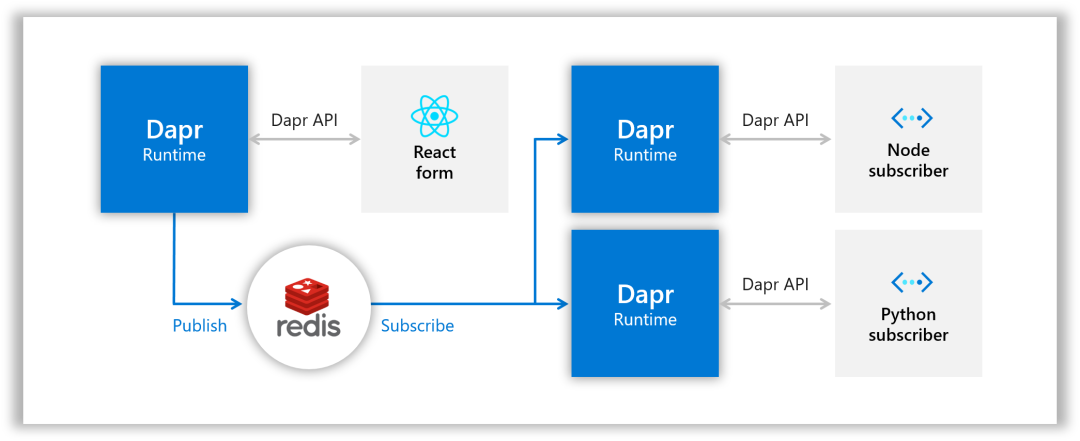
Service-to-service invocation,服務(wù)間調(diào)用,指的是一個微服務(wù)可以通過 Dapr 調(diào)用另一個微服務(wù)。 State management,狀態(tài)管理,指的是一個微服務(wù)通過 Dapr 把狀態(tài)數(shù)據(jù)保存到某個地方(PostgreSQL,Redis,DynamoDB 等等)。 Publish and subscribe,就是所謂的消息總線(Message Bus),或者說發(fā)布者/訂閱者模式。一個微服務(wù)把消息通過 Dapr 發(fā)布(Publish)給某個 Topic,所有訂閱(Subscribe)這個 Topic 的微服務(wù)都能通過 Dapr 收到這個消息。
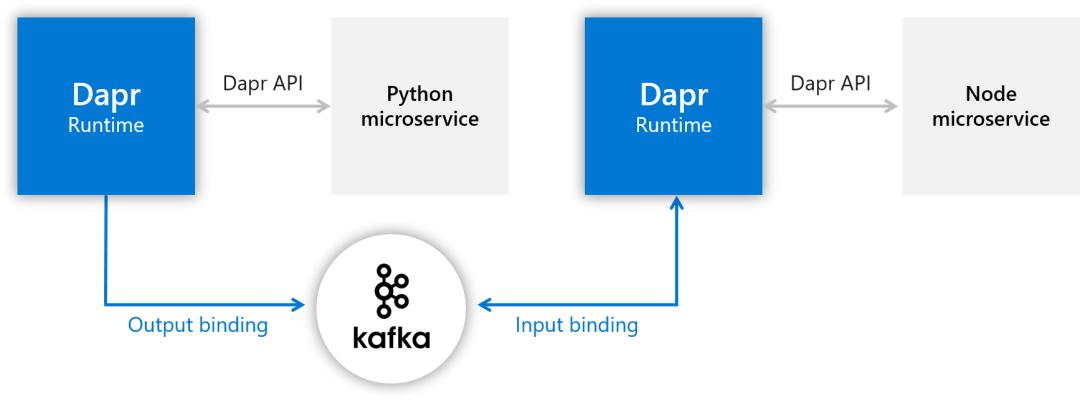
Resource bindings,就是所謂的消息隊(duì)列(Message Queue,或者叫消息代理,Message Broker),分為兩種綁定,一種是輸出綁定(Output Binding),一種是輸入綁定(Input Binding)。出和入是看數(shù)據(jù)的流向,輸出綁定就是作為 Producer 的 App 把消息通過 Dapr 傳給消息隊(duì)列,輸入綁定就是作為 Consumer 的 App 通過 Dapr 從消息隊(duì)列里得到消息。補(bǔ)充一點(diǎn),這里的消息隊(duì)列和 Pub/Sub 里的消息總線有什么區(qū)別呢?可以這樣理解:一個消息進(jìn)入消息總線的話,所有訂閱者都能得到這個消息。而一個消息進(jìn)入消息隊(duì)列的話,由 Consumer 來取,一次只有一個人能得到。此外,消息總線是不要求處理順序的,兩個消息進(jìn)入消息總線,誰先被拿到順序是不一定的,而消息隊(duì)列可以保證是先入先出的。
Actors,實(shí)現(xiàn)了 Actor Model[3] 。 Observability, 可觀測性,就是 Dapr 提供了模板讓你方便地進(jìn)行觀測,比如說用 Prometheus+Grafana 來看系統(tǒng)的 Metrics,用 Zipkin 來進(jìn)行分布鏈路追蹤,用 Elasticsearch+Fluentd+Kibana(俗稱 EFK)來對日志進(jìn)行檢索。 Secrets,就是密鑰,指的是一個微服務(wù)通過 Dapr 從 Secret Store 取得密鑰。
安裝 Dapr
安裝 CLI
在安裝 Dapr runtime 之前需要先安裝 Dapr 的 CLI。有兩個原因,第一,如果你以后不是用 Helm 來安裝 Dapr 的話,需要用 Dapr CLI 來執(zhí)行 dapr init。第二,即使你不用 Dapr CLI,而是用 Helm 來安裝,以后查看 Dapr 系統(tǒng)狀態(tài)的時候還是要用到 Dapr CLI,比如查看 Runtime 的狀態(tài)(dapr status -k)、查看 Components 狀態(tài)(dapr components -k)、查看 Configurations 狀態(tài)(dapr configurations -k),甚至啟動 Dashboard 的時候還是要執(zhí)行(dapr dashboard -k)。你可以在很多 OS 上安裝 Dapr CLI,比如 Windows,Linux,Mac OS,我用的是 Windows10 系統(tǒng),可以選擇在 Windows 上直接裝,也可以在 WSL(Windows Subsystem for Linux)上裝,這里選擇在 WSL 上安裝(沒有 WSL 的話在 windows 商店里選一個免費(fèi)的 Linux 裝上。我選的是 Ubuntu)。參考官方文檔 How-To: Install Dapr CLI[4] ,在Ubuntu里執(zhí)行:
$ wget -q https://raw.githubusercontent.com/dapr/cli/master/install/install.sh -O - | /bin/bash
Your system is linux_amd64
Installing Dapr CLI...

Getting the latest Dapr CLI...
Installing v0.11.0 Dapr CLI...
Downloading https://github.com/dapr/cli/releases/download/v0.11.0/dapr_linux_amd64.tar.gz ...
[sudo] password for ubuntu:
dapr installed into /usr/local/bin successfully.
CLI version: 0.11.0
Runtime version: n/a

To get started with Dapr, please visit https://docs.dapr.io/getting-started/
安裝完成。看看版本號:
$ dapr --version
CLI version: 0.11.0
Runtime version: n/a
CLI 是 0.11.0 版的,Runtime 因?yàn)檫€沒裝,所以顯示 n/a。因?yàn)榻酉聛硪惭b 1.0.0-rc.2 的 Runtime,1.x 相對于 0.x 版有了重大的改進(jìn)(比如多 Instance 模式),為了版本的統(tǒng)一性(低版本的 CLI 操作高版本的 Runtime 可能會出問題),把 CLI 升級到 v1.0.0-rc.2 版的吧。
curl -LO https://github.com/dapr/cli/releases/download/v1.0.0-rc.2/dapr_linux_amd64.tar.gz
tar -xzf dapr_linux_amd64.tar.gz
sudo cp dapr /usr/local/bin/dapr
再看一下版本:
$ dapr --version
CLI version: 1.0.0-rc.2
Runtime version: n/a
CLI 安裝完畢。接下來安裝 Runtime。
安裝 Runtime
這里有兩種選擇,一個是 Standalone mode,一個是 Kubernetes mode。我們兩個都試一下。
安裝 Docker Engine
Dapr Runtime 安裝的前提條件是要先安裝 Docker。不然安裝 Dapr 的時候會報"could not connect to Docker. Docker may not be installed or running"的錯。這里參考 Docker 的官方文檔 Install Docker Engine on Ubuntu[5] 來安裝Docker Engine。
$ sudo apt-get update
$ sudo apt-get install \
    apt-transport-https \
    ca-certificates \
    curl \
    gnupg-agent \
    software-properties-common
$ curl -fsSL https://download.docker.com/linux/ubuntu/gpg | sudo apt-key add -
$ sudo apt-key fingerprint 0EBFCD88
$ sudo add-apt-repository \
   "deb [arch=amd64] https://download.docker.com/linux/ubuntu \
   $(lsb_release -cs) \
   stable"
$ sudo apt-get update
$ sudo apt-get install docker-ce docker-ce-cli containerd.io
安裝完成。把 docker 的 service 啟動:
$ sudo service docker start看看 service 是否啟動:
$ service docker status
 * Docker is running
OK,Docker Engine 安裝完成。
安裝 Standalone 版的 Runtime
用 dapr init 來安裝單機(jī)版,可以指定版本號。目前最新的是 1.0.0-rc.2。
$ dapr init --runtime-version=1.0.0-rc.2
?  Making the jump to hyperspace...
←↑→↓←↑→↓←↑→↓←↑→↓←↑→↓←↑→↓←↑→↓←↑→↓←↑→↓←↑→↓←↑→↓←↑→↓←↑→↓←↑→↓←↑→↓←↑→↓←↑→↓←↑→↓←↑→↓←↑→↓←↑→↓←↑↗  Downloading binaries and setting up components...
Dapr runtime installed to /root/.dapr/bin, you may run the following to add it to your path if you want to run daprd directly:
    export PATH=$PATH:/root/.dapr/bin
→↓←↑→↓←↑→↓←↑→↓←↑→↓←↑→↓←↑→↓←↑→↓←↑→↓←↑→↓←↑→↓←↑→↓←↑→↓←↑→↓←↑→↓←↑→↓←↑→↓←↑→↓←↑→↓←↑→↓←↑→↓←↑→↓←↑→↓←↑→↓←↑→↓←↑→↓←↑→↓←↑→↓←↑→↓←↑→↓←↑→↓←↑→↓←↑→↓←↑→↓←↑→↓←↑→↓←↑→↓←↑→↓←↑→↓←↑→↓←↑→↓←↑→↓←↑→↓←↑→↓←↑→↓←↑→↓←?  Downloaded binaries and completed components set up.
??  daprd binary has been installed to /root/.dapr/bin.
??  dapr_placement container is running.
??  dapr_redis container is running.
??  dapr_zipkin container is running.
??  Use `docker ps` to check running containers.
?  Success! Dapr is up and running. To get started, go here: https://aka.ms/dapr-getting-started
export PATH=$PATH:/root/.dapr/bin
完成。看看都裝了什么東西。
$ docker ps
CONTAINER ID   IMAGE               COMMAND                  CREATED         STATUS                   PORTS                              NAMES
293b479ed26c   openzipkin/zipkin   "start-zipkin"           5 minutes ago   Up 4 minutes (healthy)   9410/tcp, 0.0.0.0:9411->9411/tcp   dapr_zipkin
a07696221fd2   daprio/dapr         "./placement"            5 minutes ago   Up 4 minutes             0.0.0.0:50005->50005/tcp           dapr_placement
c475c415332b   redis               "docker-entrypoint.s…"   6 minutes ago   Up 6 minutes             0.0.0.0:6379->6379/tcp             dapr_redis
跑起來三個 Container。一個 dapr_zipkin,一個 dapr_placement,一個 dapr_redis。看看版本號:
$ dapr --version
CLI version: 1.0.0-rc.2
Runtime version: 1.0.0-rc.2
至此單機(jī)版的 Dapr Runtime 安裝完成。dapr list 一下看看,什么也沒有。因?yàn)槲覀冞€沒有啟動 App。
安裝 Kubernetes 版的 Runtime
安裝之前需要先有 Kubernetes 環(huán)境,minikube,AWS 托管的 EKS,Azure 托管的 AKS,GCP 托管的 GKE 等等。這里選擇在本地安裝 minikube。參考 官方文檔[6]
$ curl -LO https://storage.googleapis.com/minikube/releases/latest/minikube-linux-amd64
$ sudo install minikube-linux-amd64 /usr/local/bin/minikube
看看版本:
$ minikube version
minikube version: v1.16.0
commit: 9f1e482427589ff8451c4723b6ba53bb9742fbb1
先執(zhí)行
$ sudo usermod -aG docker $USER && newgrp docker
不然 minikube 啟動的時候會報錯。然后啟動 minikube 環(huán)境:
$ minikube start
??  minikube v1.16.0 on Ubuntu 20.04
?  Automatically selected the docker driver
??  Starting control plane node minikube in cluster minikube
??  Pulling base image ...
??  Downloading Kubernetes v1.20.0 preload ...
    > preloaded-images-k8s-v8-v1....: 491.00 MiB / 491.00 MiB  100.00% 2.56 MiB

??  Creating docker container (CPUs=2, Memory=3100MB) ...
??  Preparing Kubernetes v1.20.0 on Docker 20.10.0 ...
    ? Generating certificates and keys ...
    ? Booting up control plane ...
    ? Configuring RBAC rules ...
??  Verifying Kubernetes components...
??  Enabled addons: storage-provisioner, default-storageclass
??  kubectl not found. If you need it, try: 'minikube kubectl -- get pods -A'
??  Done! kubectl is now configured to use "minikube" cluster and "default" namespace by default
看看 docker ps 的結(jié)果:
$ docker ps
CONTAINER ID   IMAGE                                           COMMAND                  CREATED          STATUS                    PORTS                                                                                                      NAMES
cc47e6e56d32   gcr.io/k8s-minikube/kicbase:v0.0.15-snapshot4   "/usr/local/bin/entr…"   4 minutes ago    Up 4 minutes              127.0.0.1:49156->22/tcp, 127.0.0.1:49155->2376/tcp, 127.0.0.1:49154->5000/tcp, 127.0.0.1:49153->8443/tcp   minikube
fedf3508c0f4   daprio/dapr:1.0.0-rc.2                          "./placement"            43 minutes ago   Up 43 minutes             0.0.0.0:50005->50005/tcp                                                                                   dapr_placement
c52f4a72abc4   redis                                           "docker-entrypoint.s…"   44 minutes ago   Up 44 minutes             0.0.0.0:6379->6379/tcp                                                                                     dapr_redis
af7b8dd7dcf3   openzipkin/zipkin                               "start-zipkin"           44 minutes ago   Up 44 minutes (healthy)   9410/tcp, 0.0.0.0:9411->9411/tcp                                                                           dapr_zipkin
多了個 minikube 的 Container。接下來安裝 kubectl:
$ curl -LO "https://storage.googleapis.com/kubernetes-release/release/$(curl -s https://storage.googleapis.com/kubernetes-release/release/stable.txt)/bin/linux/amd64/kubectl"
$ chmod +x ./kubectl
$ sudo mv ./kubectl /usr/local/bin/kubectl
看看版本:
$ kubectl version --client
Client Version: version.Info{Major:"1", Minor:"20", GitVersion:"v1.20.1", GitCommit:"c4d752765b3bbac2237bf87cf0b1c2e307844666", GitTreeState:"clean", BuildDate:"2020-12-18T12:09:25Z", GoVersion:"go1.15.5", Compiler:"gc", Platform:"linux/amd64"}
安裝 Dapr Runtime 可以用 Dapr CLI 也可以用 Helm。我們選擇用 Helm 來安裝:
$ curl https://baltocdn.com/helm/signing.asc | sudo apt-key add -
$ sudo apt-get install apt-transport-https --yes
$ echo "deb https://baltocdn.com/helm/stable/debian/ all main" | sudo tee /etc/apt/sources.list.d/helm-stable-debian.list
$ sudo apt-get update
$ sudo apt-get install helm
看下版本:
$ helm version
version.BuildInfo{Version:"v3.4.2", GitCommit:"23dd3af5e19a02d4f4baa5b2f242645a1a3af629", GitTreeState:"clean", GoVersion:"go1.14.13"}
終于可以安裝 Dapr 了。這里指定目前最新的版本號 1.0.0-rc.2。
$ helm repo add dapr https://dapr.github.io/helm-charts/
$ helm repo update
$ kubectl create namespace dapr-system
$ helm install dapr dapr/dapr --version 1.0.0-rc.2 --namespace dapr-system
看下版本號:
$ dapr status -k
  NAME                   NAMESPACE    HEALTHY  STATUS   REPLICAS  VERSION     AGE  CREATED
  dapr-dashboard         dapr-system  True     Running  1         0.5.0       1m   2020-12-26 02:22.08
  dapr-sidecar-injector  dapr-system  True     Running  1         1.0.0-rc.2  1m   2020-12-26 02:22.08
  dapr-sentry            dapr-system  True     Running  1         1.0.0-rc.2  1m   2020-12-26 02:22.08
  dapr-operator          dapr-system  True     Running  1         1.0.0-rc.2  1m   2020-12-26 02:22.08
  dapr-placement-server  dapr-system  True     Running  1         1.0.0-rc.2  1m   2020-12-26 02:22.08
我們看看啟動了什么 Pod:
$ kubectl get pods -n dapr-system
NAME                                     READY   STATUS    RESTARTS   AGE
dapr-dashboard-6f749469dd-z7hzx          1/1     Running   0          3m45s
dapr-operator-699cd79686-nndhd           1/1     Running   0          3m45s
dapr-placement-server-0                  1/1     Running   0          3m45s
dapr-sentry-7c4fb54fb7-xsx5q             1/1     Running   0          3m45s
dapr-sidecar-injector-6bdbc588fc-tzpm4   1/1     Running   0          3m45s
啟動了 5 個 Pod:dapr-dashboard、dapr-operator、dapr-placement、dapr-sentry、dapr-sidecar-injector。
dapr-dashboard負(fù)責(zé)顯示 Dapr Dashboarddapr-operator負(fù)責(zé)管理 Dapr Component 的更新和 Kubernetes Service Endpoint(State stores,pub/sub 等)dapr-sidecar-injector負(fù)責(zé)將 Dapr 的 sidecar 注入帶 Dapr 注釋的 Pod(如果 App 的 Deploy 里有dapr.io/app-id、dapr.io/app-port之類的 annotation,就會被注入 Dapr sidecar。這時你會發(fā)現(xiàn) Pod 里有兩個 Container)。dapr-placement用于 Actor,創(chuàng)建將 Actor 實(shí)例映射到 Pod 的映射表。dapr-sentry負(fù)責(zé)管理服務(wù)之間的 mTLS 并充當(dāng)證書頒發(fā)機(jī)構(gòu)。
把 Dapr Dashboard 起來看看:
$ dapr dashboard -k
效果和 kubectl port-forward svc/dapr-dashboard 8080:8080 -n dapr-system 是一樣的。在瀏覽器里輸入 http://localhost:8080。
恭喜,Dapr Runtime 終于安裝完成了!
下面我們來部署一個 Dapr 的微服務(wù)的例子。
Dapr 程序的部署(Standalone 模式)
上面 Dapr 的運(yùn)行時環(huán)境已經(jīng)安裝完成。今天我們在 Standalone 模式部署第一個 Dapr 程序。程序來自 Dapr 官方的 quickstarts 教程里的 Hello World[7] ,我們用目前的最新版本v1.0.0-rc.2。
$ git clone -b v1.0.0-rc.2 https://github.com/dapr/quickstarts.git
$ cd quickstarts
hello-world 下面是 Standalone 版的,進(jìn)去看看。程序很簡單,一個 Node 的程序,提供 3 個 Endpoint(在 StateStore 里保存,取得,刪除發(fā)過來的 OrderId)。還有一個 Python 的程序,每秒發(fā) 1 個 HTTP Request 給 Node 程序。
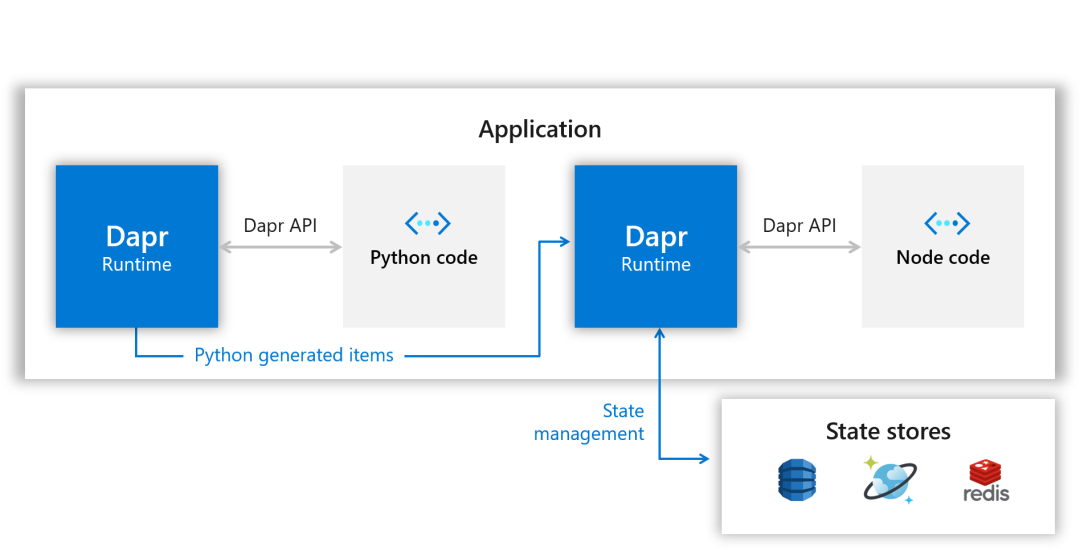
下面開始部署。Standalone 模式下首先要先安裝 Node 和 Python 的運(yùn)行環(huán)境。不然 dapr run 的時候會報錯。Node 的運(yùn)行環(huán)境:
$ sudo apt update
$ sudo apt install nodejs
$ sudo apt install npm
$ sudo npm install
$ npm list
里面有 express 和 body-parser 的話就可以用 Dapr 啟動 node 的程序了。
$ dapr run --app-id nodeapp --app-port 3000 --dapr-http-port 3500 node app.js
??  Starting Dapr with id nodeapp. HTTP Port: 3500. gRPC Port: 43509
INFO[0000] starting Dapr Runtime -- version 1.0.0-rc.2 -- commit 196483d  app_id=nodeapp instance=PC57-064 scope=dapr.runtime type=log ver=1.0.0-rc.2
INFO[0000] log level set to: info                        app_id=nodeapp instance=PC57-064 scope=dapr.runtime type=log ver=1.0.0-rc.2
INFO[0000] metrics server started on :37057/             app_id=nodeapp instance=PC57-064 scope=dapr.metrics type=log ver=1.0.0-rc.2
INFO[0000] standalone mode configured                    app_id=nodeapp instance=PC57-064 scope=dapr.runtime type=log ver=1.0.0-rc.2
INFO[0000] app id: nodeapp                               app_id=nodeapp instance=PC57-064 scope=dapr.runtime type=log ver=1.0.0-rc.2
INFO[0000] mTLS is disabled. Skipping certificate request and tls validation  app_id=nodeapp instance=PC57-064 scope=dapr.runtime type=log ver=1.0.0-rc.2
INFO[0000] local service entry announced: nodeapp -> 172.17.183.23:44399  app_id=nodeapp instance=PC57-064 scope=dapr.contrib type=log ver=1.0.0-rc.2
INFO[0000] Initialized name resolution to standalone     app_id=nodeapp instance=PC57-064 scope=dapr.runtime type=log ver=1.0.0-rc.2
INFO[0000] component loaded. name: pubsub, type: pubsub.redis  app_id=nodeapp instance=PC57-064 scope=dapr.runtime type=log ver=1.0.0-rc.2
INFO[0000] waiting for all outstanding components to be processed  app_id=nodeapp instance=PC57-064 scope=dapr.runtime type=log ver=1.0.0-rc.2
INFO[0000] component loaded. name: statestore, type: state.redis  app_id=nodeapp instance=PC57-064 scope=dapr.runtime type=log ver=1.0.0-rc.2
INFO[0000] all outstanding components processed          app_id=nodeapp instance=PC57-064 scope=dapr.runtime type=log ver=1.0.0-rc.2
INFO[0000] enabled gRPC tracing middleware               app_id=nodeapp instance=PC57-064 scope=dapr.runtime.grpc.api type=log ver=1.0.0-rc.2
INFO[0000] enabled gRPC metrics middleware               app_id=nodeapp instance=PC57-064 scope=dapr.runtime.grpc.api type=log ver=1.0.0-rc.2
INFO[0000] API gRPC server is running on port 43509      app_id=nodeapp instance=PC57-064 scope=dapr.runtime type=log ver=1.0.0-rc.2
INFO[0000] enabled metrics http middleware               app_id=nodeapp instance=PC57-064 scope=dapr.runtime.http type=log ver=1.0.0-rc.2
INFO[0000] enabled tracing http middleware               app_id=nodeapp instance=PC57-064 scope=dapr.runtime.http type=log ver=1.0.0-rc.2
INFO[0000] http server is running on port 3500           app_id=nodeapp instance=PC57-064 scope=dapr.runtime type=log ver=1.0.0-rc.2
INFO[0000] enabled gRPC tracing middleware               app_id=nodeapp instance=PC57-064 scope=dapr.runtime.grpc.internal type=log ver=1.0.0-rc.2
INFO[0000] enabled gRPC metrics middleware               app_id=nodeapp instance=PC57-064 scope=dapr.runtime.grpc.internal type=log ver=1.0.0-rc.2
INFO[0000] internal gRPC server is running on port 44399  app_id=nodeapp instance=PC57-064 scope=dapr.runtime type=log ver=1.0.0-rc.2
INFO[0000] application host: 127.0.0.1. application protocol: http. waiting on port 3000.  This will block until the app is listening on that port.  app_id=nodeapp instance=PC57-064 scope=dapr.runtime type=log ver=1.0.0-rc.2
== APP == Node App listening on port 3000!

INFO[0000] application discovered on port 3000           app_id=nodeapp instance=PC57-064 scope=dapr.runtime type=log ver=1.0.0-rc.2
INFO[0000] application configuration loaded              app_id=nodeapp instance=PC57-064 scope=dapr.runtime type=log ver=1.0.0-rc.2
INFO[0000] actor runtime started. actor idle timeout: 1h0m0s. actor scan interval: 30s  app_id=nodeapp instance=PC57-064 scope=dapr.runtime.actor type=log ver=1.0.0-rc.2
INFO[0000] dapr initialized. Status: Running. Init Elapsed 418.37829999999997ms  app_id=nodeapp instance=PC57-064 scope=dapr.runtime type=log ver=1.0.0-rc.2
INFO[0000] placement tables updated, version: 0          app_id=nodeapp instance=PC57-064 scope=dapr.runtime.actor.internal.placement type=log ver=1.0.0-rc.2
??  Updating metadata for app command: node app.js
?  You're up and running! Both Dapr and your app logs will appear here.
log 顯示 Node 程序已經(jīng)跑起來了。APP 自己的 HTTP Endpoint 端口是 3000,Dapr(Sidecar)的 HTTP 端口是 3500。現(xiàn)在再開另一個窗口,用 Dapr CLI 執(zhí)行:
$ dapr invoke --app-id nodeapp --method neworder --data '{"data": { "orderId": "42" } }'
?  App invoked successfully
成功了。再看看原來的窗口,多了下面兩條:
== APP == Got a new order! Order ID: 42

== APP == Successfully persisted state.
顯示持久化成功。用 Node 程序的 GET API 確認(rèn)一下:
$ curl http://localhost:3000/order
{"orderId":42}
用 Dapr 的 API 確認(rèn)一下:
$ curl http://localhost:3500/v1.0/invoke/nodeapp/method/order
{"orderId":"42"}
我們看看數(shù)據(jù)存在了哪里。用 docker ps 看看 redis 跑在哪個 Container 里:
$ docker ps
CONTAINER ID   IMAGE               COMMAND                  CREATED          STATUS                    PORTS                              NAMES
a51c086c8bbe   daprio/dapr         "./placement"            31 minutes ago   Up 31 minutes             0.0.0.0:50005->50005/tcp           dapr_placement
fdca40421094   redis               "docker-entrypoint.s…"   31 minutes ago   Up 31 minutes             0.0.0.0:6379->6379/tcp             dapr_redis
9dc60b00db4d   openzipkin/zipkin   "start-zipkin"           31 minutes ago   Up 31 minutes (healthy)   9410/tcp, 0.0.0.0:9411->9411/tcp   dapr_zipkin
Container 名是 dapr_redis。進(jìn)去看看:
$ docker exec -it dapr_redis redis-cli
127.0.0.1:6379>
看看有什么 Key:
127.0.0.1:6379> keys *
1) "nodeapp||order"
127.0.0.1:6379> type nodeapp||order
hash
127.0.0.1:6379> hgetall nodeapp||order
1) "data"
2) "{\"orderId\":\"42\"}"
3) "version"
4) "3"
OK,剛才的 orderId(42)找到了。除了用 Dapr CLI 保存 OrderId,我們還可以用 Dapr 的 API。
$ curl -XPOST -d @sample.json -H "Content-Type:application/json" http://localhost:3500/v1.0/invoke/nodeapp/method/neworder
其中 sample.json 的內(nèi)容如下。調(diào)用 Dapr 的 invoke API 可以起到 Dapr CLI(dapr invoke)一樣的效果。
{"data":{"orderId":"42"}}
當(dāng)然我們也可以用 Node 程序自己的 Endpoint,這樣不通過 Dapr Sidecar。
$ curl -XPOST -d @sample.json -H "Content-Type:application/json" http://localhost:3000/neworder
你也許會問,為什么 Redis 直接就能用了呢?答案就是 Dapr Runtime 安裝的時候,自動就跑起來了 Redis 的服務(wù)用的 Docker Container(配置文件在~/.dapr/components/下面的 statestore.yaml 和 pubsub.yaml),所以基于 Redis 的 statestore 和 pubsub 是開箱即用的。
OK。接下來部署 Python 的程序。Python 也得先裝運(yùn)行環(huán)境:
$ sudo apt install python3-pip
用 Dapr CLI 啟動 Python 程序:
$ dapr run --app-id pythonapp --dapr-http-port 3501 python3 app.py
??  Starting Dapr with id pythonapp. HTTP Port: 3501. gRPC Port: 34093
??  Checking if Dapr sidecar is listening on HTTP port 3501
INFO[0000] starting Dapr Runtime -- version 1.0.0-rc.2 -- commit 196483d  app_id=pythonapp instance=PC57-064 scope=dapr.runtime type=log ver=1.0.0-rc.2
INFO[0000] log level set to: info                        app_id=pythonapp instance=PC57-064 scope=dapr.runtime type=log ver=1.0.0-rc.2
INFO[0000] metrics server started on :37435/             app_id=pythonapp instance=PC57-064 scope=dapr.metrics type=log ver=1.0.0-rc.2
INFO[0000] standalone mode configured                    app_id=pythonapp instance=PC57-064 scope=dapr.runtime type=log ver=1.0.0-rc.2
INFO[0000] app id: pythonapp                             app_id=pythonapp instance=PC57-064 scope=dapr.runtime type=log ver=1.0.0-rc.2
INFO[0000] mTLS is disabled. Skipping certificate request and tls validation  app_id=pythonapp instance=PC57-064 scope=dapr.runtime type=log ver=1.0.0-rc.2
INFO[0000] local service entry announced: pythonapp -> 172.17.183.23:44129  app_id=pythonapp instance=PC57-064 scope=dapr.contrib type=log ver=1.0.0-rc.2
INFO[0000] Initialized name resolution to standalone     app_id=pythonapp instance=PC57-064 scope=dapr.runtime type=log ver=1.0.0-rc.2
INFO[0000] component loaded. name: pubsub, type: pubsub.redis  app_id=pythonapp instance=PC57-064 scope=dapr.runtime type=log ver=1.0.0-rc.2
INFO[0000] waiting for all outstanding components to be processed  app_id=pythonapp instance=PC57-064 scope=dapr.runtime type=log ver=1.0.0-rc.2
INFO[0000] component loaded. name: statestore, type: state.redis  app_id=pythonapp instance=PC57-064 scope=dapr.runtime type=log ver=1.0.0-rc.2
INFO[0000] all outstanding components processed          app_id=pythonapp instance=PC57-064 scope=dapr.runtime type=log ver=1.0.0-rc.2
INFO[0000] enabled gRPC tracing middleware               app_id=pythonapp instance=PC57-064 scope=dapr.runtime.grpc.api type=log ver=1.0.0-rc.2
INFO[0000] enabled gRPC metrics middleware               app_id=pythonapp instance=PC57-064 scope=dapr.runtime.grpc.api type=log ver=1.0.0-rc.2
INFO[0000] API gRPC server is running on port 34093      app_id=pythonapp instance=PC57-064 scope=dapr.runtime type=log ver=1.0.0-rc.2
INFO[0000] enabled metrics http middleware               app_id=pythonapp instance=PC57-064 scope=dapr.runtime.http type=log ver=1.0.0-rc.2
INFO[0000] enabled tracing http middleware               app_id=pythonapp instance=PC57-064 scope=dapr.runtime.http type=log ver=1.0.0-rc.2
INFO[0000] http server is running on port 3501           app_id=pythonapp instance=PC57-064 scope=dapr.runtime type=log ver=1.0.0-rc.2
INFO[0000] enabled gRPC tracing middleware               app_id=pythonapp instance=PC57-064 scope=dapr.runtime.grpc.internal type=log ver=1.0.0-rc.2
INFO[0000] enabled gRPC metrics middleware               app_id=pythonapp instance=PC57-064 scope=dapr.runtime.grpc.internal type=log ver=1.0.0-rc.2
INFO[0000] internal gRPC server is running on port 44129  app_id=pythonapp instance=PC57-064 scope=dapr.runtime type=log ver=1.0.0-rc.2
INFO[0000] actor runtime started. actor idle timeout: 1h0m0s. actor scan interval: 30s  app_id=pythonapp instance=PC57-064 scope=dapr.runtime.actor type=log ver=1.0.0-rc.2
WARN[0000] failed to read from bindings: app channel not initialized   app_id=pythonapp instance=PC57-064 scope=dapr.runtime type=log ver=1.0.0-rc.2
INFO[0000] dapr initialized. Status: Running. Init Elapsed 4.716900000000001ms  app_id=pythonapp instance=PC57-064 scope=dapr.runtime type=log ver=1.0.0-rc.2
INFO[0000] placement tables updated, version: 0          app_id=pythonapp instance=PC57-064 scope=dapr.runtime.actor.internal.placement type=log ver=1.0.0-rc.2
??  Checking if Dapr sidecar is listening on GRPC port 34093
??  Dapr sidecar is up and running.
??  Updating metadata for app command: python3 app.py
?  You're up and running! Both Dapr and your app logs will appear here.
啟動成功了。因?yàn)?Python 自己不提供服務(wù),所以--app-port 不用指定。--dapr-http-port 是 3501,這是自己的 Sidecar 用的端口,不能跟別人的重了。再看看剛才 Node 的窗口,不停的有新的 Request 過來,就是 Python 程序來的每隔一秒的 Request。最后看一下 dapr list 的結(jié)果:
$ dapr list
  APP ID     HTTP PORT  GRPC PORT  APP PORT  COMMAND         AGE  CREATED              PID
  nodeapp    3500       35485      3000      node app.js     41m  2020-12-27 00:54.54  18395
  pythonapp  40175      33349      0         python3 app.py  1m   2020-12-27 01:36.27  31185
要結(jié)束這兩個 APP,在各自窗口里 Ctrl+c 就可以。如果在別的窗口,可以用 Dapr CLI 的命令:
$ dapr stop --app-id nodeapp
$ dapr stop --app-id pythonapp
至此在 Standalone 模式下的第一個 Dapr 程序部署成功!下一篇講講在 Kubernetes 模式下部署的方法。
Dapr 程序的部署(Kubernetes 模式)
上一篇我們在 Standalone 模式部署了第一個 Dapr 程序。這一次我們換成在 Kubernetes 模式下部署同樣的程序。程序來自 Dapr 官方的 quickstarts 教程里的 Hello Kubernetes[8] ,我們用目前的最新版本v1.0.0-rc.2。
$ git clone -b v1.0.0-rc.2 https://github.com/dapr/quickstarts.git
$ cd quickstarts/hello-kubernetes
里面包括一個 Python 的程序,每秒發(fā) 1 個 HTTP Request 給 Node 程序。一個 Node 程序,用來在 StateStore 里保存發(fā)過來的 OrderId。

首先要先部署 Redis。跟 Standalone 模式不同,Kubernetes 模式的 Dapr Runtime 安裝的時候不會自動安裝 Redis,需要手動安裝。
$ helm repo add bitnami https://charts.bitnami.com/bitnami
$ helm repo update
$ helm install redis bitnami/redis

NAME: redis
LAST DEPLOYED: Sun Jan  3 12:42:17 2021
NAMESPACE: default
STATUS: deployed
REVISION: 1
TEST SUITE: None
NOTES:
** Please be patient while the chart is being deployed **
Redis can be accessed via port 6379 on the following DNS names from within your cluster:

redis-master.default.svc.cluster.local for read/write operations
redis-slave.default.svc.cluster.local for read-only operations

To get your password run:

    export REDIS_PASSWORD=$(kubectl get secret --namespace default redis -o jsonpath="{.data.redis-password}" | base64 --decode)

To connect to your Redis server:

1. Run a Redis pod that you can use as a client:
   kubectl run --namespace default redis-client --rm --tty -i --restart='Never' \
    --env REDIS_PASSWORD=$REDIS_PASSWORD \
   --image docker.io/bitnami/redis:6.0.9-debian-10-r38 -- bash

2. Connect using the Redis CLI:
   redis-cli -h redis-master -a $REDIS_PASSWORD
   redis-cli -h redis-slave -a $REDIS_PASSWORD

To connect to your database from outside the cluster execute the following commands:

    kubectl port-forward --namespace default svc/redis-master 6379:6379 &
    redis-cli -h 127.0.0.1 -p 6379 -a $REDIS_PASSWORD
安裝完成。看一下 Pod 里多了什么:
$ kubectl get pods
NAME             READY   STATUS    RESTARTS   AGE
redis-master-0   1/1     Running   0          2m5s
redis-slave-0    1/1     Running   0          2m5s
redis-slave-1    1/1     Running   0          1m7s
接下來部署 Statestore。
$ cd quickstarts/hello-kubernetes/deploy
$ kubectl apply -f redis.yaml
component.dapr.io/statestore created
redis.yaml 的內(nèi)容如下:
apiVersion: dapr.io/v1alpha1
kind: Component
metadata:
  name: statestore
spec:
  type: state.redis
  metadata:
  # These settings will work out of the box if you use `helm install
  # bitnami/redis`.  If you have your own setup, replace
  # `redis-master:6379` with your own Redis master address, and the
  # Redis password with your own Secret's name. For more information,
  # see https://docs.dapr.io/operations/components/component-secrets .
  - name: redisHost
    value: redis-master:6379
  - name: redisPassword
    secretKeyRef:
      name: redis
      key: redis-password
auth:
  secretStore: kubernetes
意思是部署一個名字叫 statestore 的 Component,類型為 state.redis。
用 dapr cli 看一下 components:
$ dapr components -k
  NAME        TYPE         VERSION  SCOPES  CREATED              AGE
  statestore  state.redis                   2021-01-03 12:50.41  58s
接下來部署 Node 的 APP。
$ kubectl apply -f node.yaml
service/nodeapp created
deployment.apps/nodeapp created
其中 node.yaml 的內(nèi)容如下:
kind: Service
apiVersion: v1
metadata:
  name: nodeapp
  labels:
    app: node
spec:
  selector:
    app: node
  ports:
  - protocol: TCP
    port: 80
    targetPort: 3000
  type: LoadBalancer

---
apiVersion: apps/v1
kind: Deployment
metadata:
  name: nodeapp
  labels:
    app: node
spec:
  replicas: 1
  selector:
    matchLabels:
      app: node
  template:
    metadata:
      labels:
        app: node
      annotations:
        dapr.io/enabled: "true"
        dapr.io/app-id: "nodeapp"
        dapr.io/app-port: "3000"
    spec:
      containers:
      - name: node
        image: dapriosamples/hello-k8s-node:latest
        ports:
        - containerPort: 3000
        imagePullPolicy: Always
看一下 service:
$ kubectl get svc
NAME             TYPE           CLUSTER-IP       EXTERNAL-IP   PORT(S)                               AGE
kubernetes       ClusterIP      10.96.0.1        <none>        443/TCP                               83m
nodeapp          LoadBalancer   10.96.83.185     <pending>     80:31324/TCP                          49m
nodeapp-dapr     ClusterIP      None             <none>        80/TCP,50001/TCP,50002/TCP,9090/TCP   49m
redis-headless   ClusterIP      None             <none>        6379/TCP                              60m
redis-master     ClusterIP      10.109.27.202    <none>        6379/TCP                              60m
redis-slave      ClusterIP      10.103.201.158   <none>        6379/TCP                              60m
啟動了一個 nodeap 的 service 和一個 nodeapp-dapr(就是 sidecar)的 service。
因?yàn)槭沁\(yùn)行在 minikube 上,所以 nodeapp 的 service 沒有 EXTERNAL IP(顯示為 pending)。看一下 pod:
$ kubectl get pods
NAME                       READY   STATUS    RESTARTS   AGE
nodeapp-5d5dc88584-kqr2v   2/2     Running   0          13m
redis-master-0             1/1     Running   0          142m
redis-slave-0              1/1     Running   0          142m
redis-slave-1              1/1     Running   0          141m
看一下 nodeapp 的 log:
$ kubectl logs nodeapp-5d5dc88584-kqr2v -c node
Node App listening on port 3000!
DAPR_HTTP_PORT: 3500
DAPR_GRPC_PORT: 50001
下面部署 python 的 APP:
$ kubectl apply -f python.yaml
deployment.apps/pythonapp created
python.yaml 的內(nèi)容如下:
apiVersion: apps/v1
kind: Deployment
metadata:
  name: pythonapp
  labels:
    app: python
spec:
  replicas: 1
  selector:
    matchLabels:
      app: python
  template:
    metadata:
      labels:
        app: python
      annotations:
        dapr.io/enabled: "true"
        dapr.io/app-id: "pythonapp"
    spec:
      containers:
      - name: python
        image: dapriosamples/hello-k8s-python:latest
看一下 pod 里多了什么:
$ kubectl get pods
NAME                       READY   STATUS    RESTARTS   AGE
nodeapp-5d5dc88584-kqr2v   2/2     Running   0          16m
pythonapp-fcb4f49b-n6ltf   2/2     Running   0          49s
redis-master-0             1/1     Running   0          145m
redis-slave-0              1/1     Running   0          145m
redis-slave-1              1/1     Running   0          144m
看一下 nodeapp 的 log:
$ kubectl logs nodeapp-5d5dc88584-kqr2v -c node
Node App listening on port 3000!
DAPR_HTTP_PORT: 3500
DAPR_GRPC_PORT: 50001
Got a new order! Order ID: 5
Successfully persisted state.
Got a new order! Order ID: 6
Successfully persisted state.
Got a new order! Order ID: 7
Successfully persisted state.
Got a new order! Order ID: 8
Successfully persisted state.
用 kubernetes 的端口映射查看最新的 orderid:
$ kubectl port-forward nodeapp-5d5dc88584-kqr2v 8080:3000
把 pod 里的 nodeapp 的 http 端口 3000 映射到 localhost 的 8080。另開一個窗口,執(zhí)行:
$ curl http://localhost:8080/order
或者
$ kubectl port-forward nodeapp-5d5dc88584-kqr2v 8080:3500
把 pod 里的 dapr sidecar 的 http 端口 3500 映射到 localhost 的 8080。另開一個窗口,執(zhí)行:
$ curl http://127.0.0.1:8080/v1.0/invoke/nodeapp/method/order/
如果想在 redis 里查看最新的 orderid,執(zhí)行下面的命令:
$ export REDIS_PASSWORD=$(kubectl get secret --namespace default redis -o jsonpath="{.data.redis-password}" | base64 --decode)
$ kubectl run --namespace default redis-client --rm --tty -i --restart='Never' \
     --env REDIS_PASSWORD=$REDIS_PASSWORD \
    --image docker.io/bitnami/redis:6.0.9-debian-10-r38 -- bash
If you don't see a command prompt, try pressing enter.
I have no name!@redis-client:/$ redis-cli -h redis-master -a $REDIS_PASSWORD
Warning: Using a password with '-a' or '-u' option on the command line interface may not be safe.
redis-master:6379> hgetall nodeapp||order
原文鏈接:https://www.cnblogs.com/thrillcattle/category/1906168.html
參考資料
Dapr首次發(fā)布: https://cloudblogs.microsoft.com/opensource/2019/10/16/announcing-dapr-open-source-project-build-microservice-applications/
[2]Dapr 官方網(wǎng)站: https://dapr.io/
[3]Actor Model: https://zh.wikipedia.org/wiki/演員模型
[4]How-To: Install Dapr CLI: https://docs.dapr.io/getting-started/install-dapr-cli/
[5]Install Docker Engine on Ubuntu: https://docs.docker.com/engine/install/ubuntu/
[6]minikube官方文檔: https://minikube.sigs.k8s.io/docs/start/
[7]Hello World: https://github.com/dapr/quickstarts/tree/v1.0.0-rc.2/hello-world
[8]Hello Kubernetes: https://github.com/dapr/quickstarts/tree/v1.0.0-rc.2/hello-kubernetes