
.Net微服務(wù)實(shí)戰(zhàn)之Kubernetes的搭建與使用
前言
說(shuō)到微服務(wù)就得扯到自動(dòng)化運(yùn)維,然后別人就不得不問(wèn)你用沒(méi)用上K8S。K8S的門(mén)檻比Docker Compose、Docker Swarm高了不少,無(wú)論是概念上還是在實(shí)施搭建時(shí)。我自己也經(jīng)過(guò)了多次的實(shí)踐,整理出一套順利部署的流程。
我這次搭建花了一共整整4個(gè)工作實(shí)踐與一個(gè)工作日寫(xiě)博客,中間有一個(gè)網(wǎng)絡(luò)問(wèn)題導(dǎo)致reset了集群重新搭了一次,完成后結(jié)合了Jenkins使用,還是成就感滿(mǎn)滿(mǎn)的。如果對(duì)大家有用,還請(qǐng)點(diǎn)個(gè)推薦于關(guān)注。
基本概念
Kubectl
kubectl用于運(yùn)行Kubernetes集群命令的管理工具,Kubernetes kubectl 與 Docker 命令關(guān)系可以查看這里
http://docs.kubernetes.org.cn/70.htmlKubeadm
kubeadm 是 kubernetes 的集群安裝工具,能夠快速安裝 kubernetes 集群,相關(guān)命令有以下:
kubeadm init

kubeadm join
Kubelet
kubelet是主要的節(jié)點(diǎn)代理,它會(huì)監(jiān)視已分配給節(jié)點(diǎn)的pod,具體功能:
安裝Pod所需的volume。
下載Pod的Secrets。
Pod中運(yùn)行的 docker(或experimentally,rkt)容器。
定期執(zhí)行容器健康檢查。
Pod
Pod是Kubernetes創(chuàng)建或部署的最小(最簡(jiǎn)單)的基本單位,一個(gè)Pod代表集群上正在運(yùn)行的一個(gè)進(jìn)程,它可能由單個(gè)容器或多個(gè)容器共享組成的資源。
一個(gè)Pod封裝一個(gè)應(yīng)用容器(也可以有多個(gè)容器),存儲(chǔ)資源、一個(gè)獨(dú)立的網(wǎng)絡(luò)IP以及管理控制容器運(yùn)行方式的策略選項(xiàng)。
Pods提供兩種共享資源:網(wǎng)絡(luò)和存儲(chǔ)。
網(wǎng)絡(luò)
每個(gè)Pod被分配一個(gè)獨(dú)立的IP地址,Pod中的每個(gè)容器共享網(wǎng)絡(luò)命名空間,包括IP地址和網(wǎng)絡(luò)端口。Pod內(nèi)的容器可以使用localhost相互通信。當(dāng)Pod中的容器與Pod 外部通信時(shí),他們必須協(xié)調(diào)如何使用共享網(wǎng)絡(luò)資源(如端口)。
存儲(chǔ)
Pod可以指定一組共享存儲(chǔ)volumes。Pod中的所有容器都可以訪(fǎng)問(wèn)共享volumes,允許這些容器共享數(shù)據(jù)。volumes?還用于Pod中的數(shù)據(jù)持久化,以防其中一個(gè)容器需要重新啟動(dòng)而丟失數(shù)據(jù)。
Service
一個(gè)應(yīng)用服務(wù)在Kubernetes中可能會(huì)有一個(gè)或多個(gè)Pod,每個(gè)Pod的IP地址由網(wǎng)絡(luò)組件動(dòng)態(tài)隨機(jī)分配(Pod重啟后IP地址會(huì)改變)。為屏蔽這些后端實(shí)例的動(dòng)態(tài)變化和對(duì)多實(shí)例的負(fù)載均衡,引入了Service這個(gè)資源對(duì)象。
Kubernetes ServiceTypes 允許指定一個(gè)需要的類(lèi)型的 Service,默認(rèn)是 ClusterIP 類(lèi)型。
Type 的取值以及行為如下:
ClusterIP:通過(guò)集群的內(nèi)部 IP 暴露服務(wù),選擇該值,服務(wù)只能夠在集群內(nèi)部可以訪(fǎng)問(wèn),這也是默認(rèn)的 ServiceType。
NodePort:通過(guò)每個(gè) Node 上的 IP 和靜態(tài)端口(NodePort)暴露服務(wù)。NodePort 服務(wù)會(huì)路由到 ClusterIP 服務(wù),這個(gè) ClusterIP 服務(wù)會(huì)自動(dòng)創(chuàng)建。通過(guò)請(qǐng)求?
: ,可以從集群的外部訪(fǎng)問(wèn)一個(gè) NodePort 服務(wù)。 LoadBalancer:使用云提供商的負(fù)載局衡器,可以向外部暴露服務(wù)。外部的負(fù)載均衡器可以路由到 NodePort 服務(wù)和 ClusterIP 服務(wù)。
ExternalName:通過(guò)返回 CNAME 和它的值,可以將服務(wù)映射到 externalName 字段的內(nèi)容(例如, foo.bar.example.com)。沒(méi)有任何類(lèi)型代理被創(chuàng)建,這只有 Kubernetes 1.7 或更高版本的 kube-dns 才支持。
其他詳細(xì)的概念請(qǐng)移步到?http://docs.kubernetes.org.cn/227.html
物理部署圖
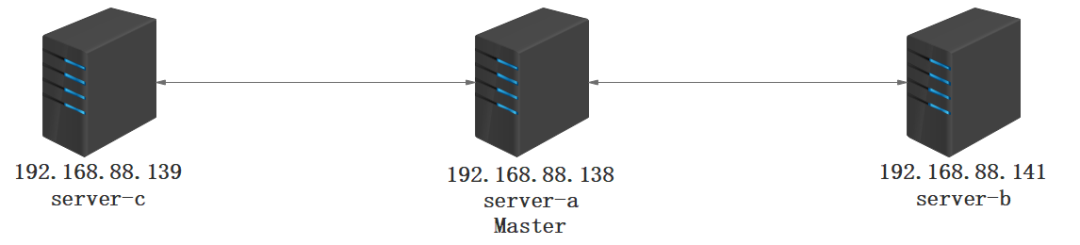
Docker-ce 1.19安裝
在所有需要用到kubernetes服務(wù)器上安裝docker-ce
卸載舊版本 docker
yum remove docker docker-common docker-selinux dockesr-engine -y升級(jí)系統(tǒng)軟件
yum upgrade -y安裝必要的一些系統(tǒng)工具
sudo yum install -y yum-utils device-mapper-persistent-data lvm2
添加docker-ce軟件源
yum-config-manager --add-repo https://mirrors.aliyun.com/docker-ce/linux/centos/docker-ce.repo
更新并安裝 docker-ce
yum makecache fast
yum install docker-ce-19.03.12 -y
添加docker國(guó)內(nèi)鏡像源
vim /etc/docker/daemon.json

{
"exec-opts": ["native.cgroupdriver=systemd"],
"registry-mirrors" : [
    "http://ovfftd6p.mirror.aliyuncs.com",
    "http://registry.docker-cn.com",
    "http://docker.mirrors.ustc.edu.cn",
    "http://hub-mirror.c.163.com"
  ],
  "insecure-registries" : [
    "registry.docker-cn.com",
    "docker.mirrors.ustc.edu.cn"
  ],
  "debug" : true,
  "experimental" : true
}
啟動(dòng)服務(wù)
systemctl start docker
systemctl enable docker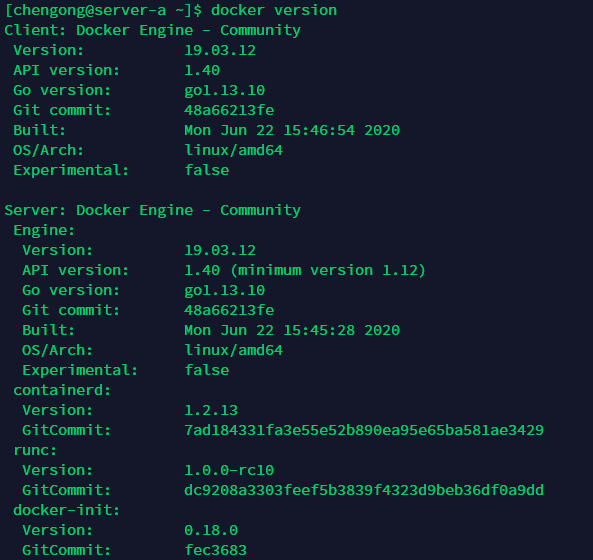
安裝kubernetes-1.18.3
所有需要用到kubernetes的服務(wù)器都執(zhí)行以下指令。
添加阿里kubernetes源
cat </etc/yum.repos.d/kubernetes.repo
[kubernetes]
name=Kubernetes
baseurl=https://mirrors.aliyun.com/kubernetes/yum/repos/kubernetes-el7-x86_64/
enabled=1
gpgcheck=1
repo_gpgcheck=1
gpgkey=https://mirrors.aliyun.com/kubernetes/yum/doc/yum-key.gpg https://mirrors.aliyun.com/kubernetes/yum/doc/rpm-package-key.gpg
EOF
安裝并啟動(dòng)
yum install kubeadm-1.18.3 kubectl-1.18.3 kubelet-1.18.3
啟動(dòng)kubelet
systemctl enable kubelet
systemctl start kubelet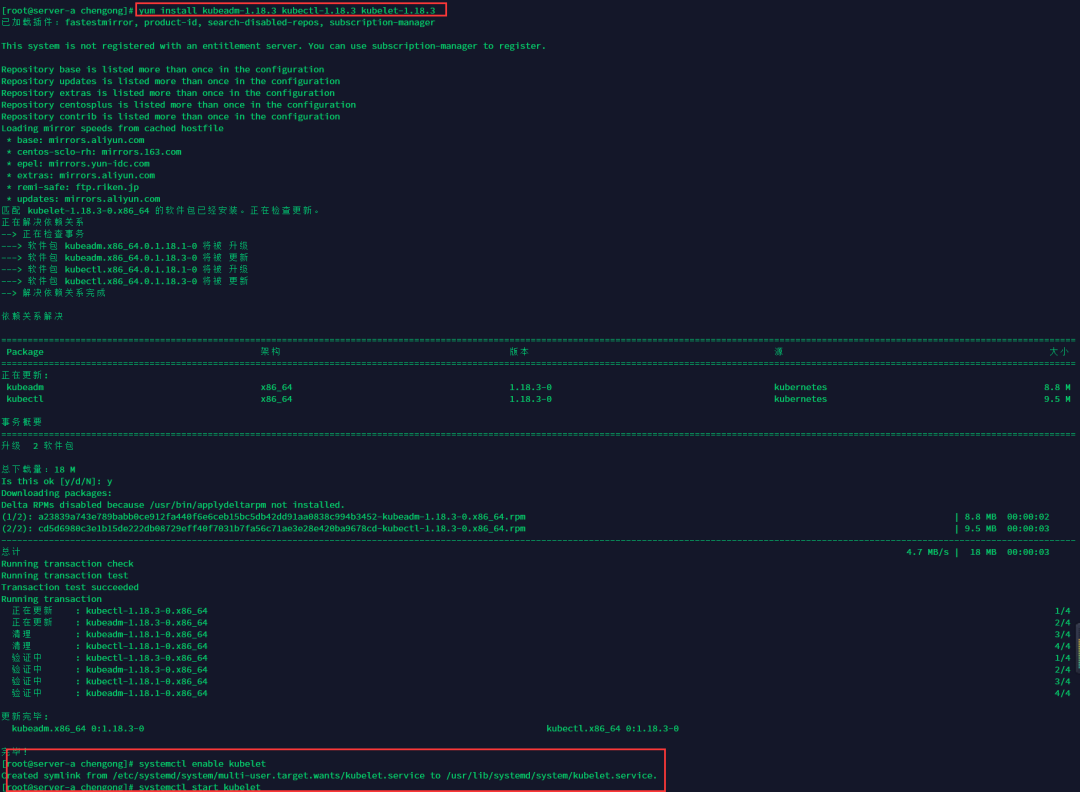
在Master設(shè)置環(huán)境變量,在/etc/profile中配置
vim /etc/profile
在最后添加如下配置
export KUBECONFIG=/etc/kubernetes/admin.conf
執(zhí)行命令使其起效
source /etc/profile
初始化k8s集群
在master節(jié)點(diǎn)(server-a)進(jìn)行初始化集群
開(kāi)放端口
firewall-cmd --permanent --zone=public --add-port=6443/tcp
firewall-cmd --permanent --zone=public --add-port=10250/tcp
firewall-cmd --reload
關(guān)閉swap
vim /etc/fstab
#注釋swap那行

swapoff -a
設(shè)置iptables規(guī)則
echo 1 > /proc/sys/net/bridge/bridge-nf-call-iptables
echo 1 > /proc/sys/net/bridge/bridge-nf-call-ip6tables
初始化
kubeadm init?--kubernetes-version=1.18.3? --apiserver-advertise-address=192.168.88.138? ?--image-repository registry.aliyuncs.com/google_containers? --service-cidr=10.10.0.0/16 --pod-network-cidr=10.122.0.0/16 --ignore-preflight-errors=Swappod-network-cidr參數(shù)的為pod網(wǎng)段:,apiserver-advertise-address參數(shù)為本機(jī)IP。
如果中途執(zhí)行有異常可以通過(guò) kubeadm reset 后重新init。
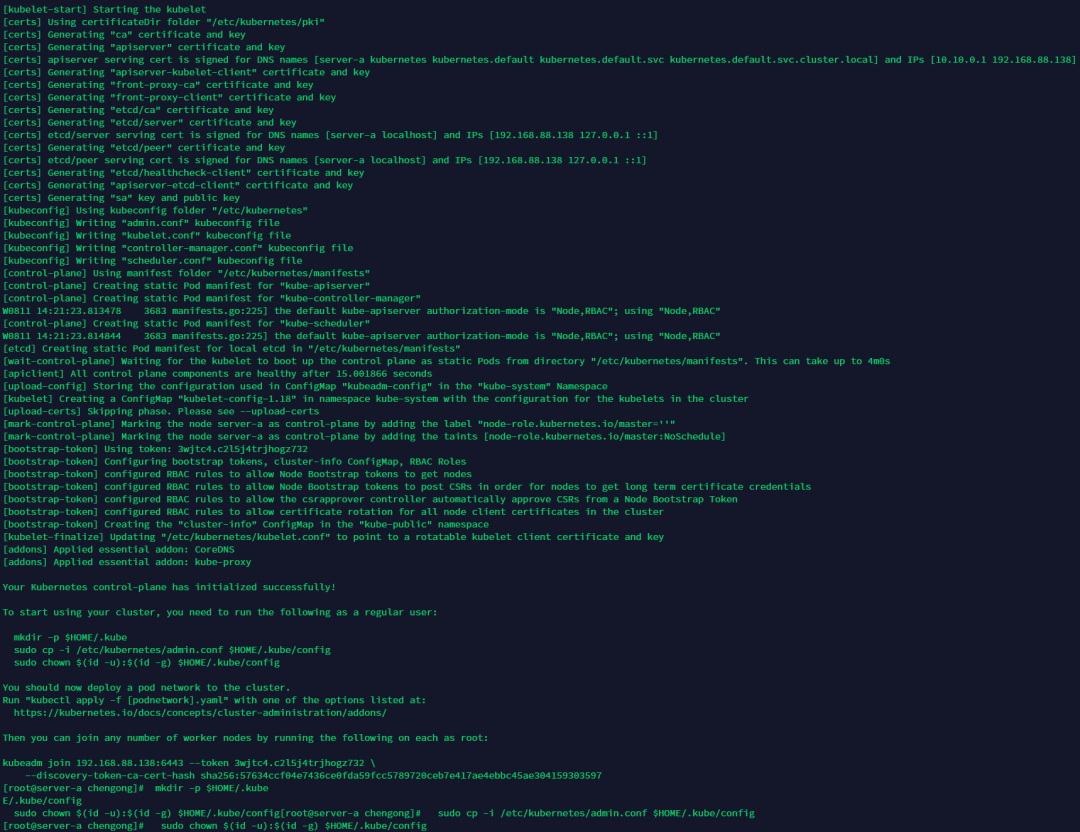
初始化成功執(zhí)行下面指令
 mkdir -p $HOME/.kube
 sudo cp -i /etc/kubernetes/admin.conf $HOME/.kube/config
 sudo chown $(id -u):$(id -g) $HOME/.kube/config
查看node和pod信息
kubectl get node
kubectl get pod --all-namespaces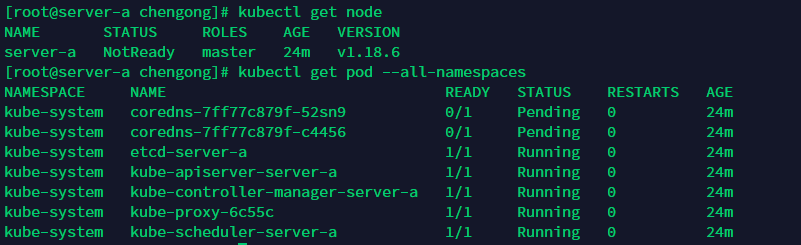
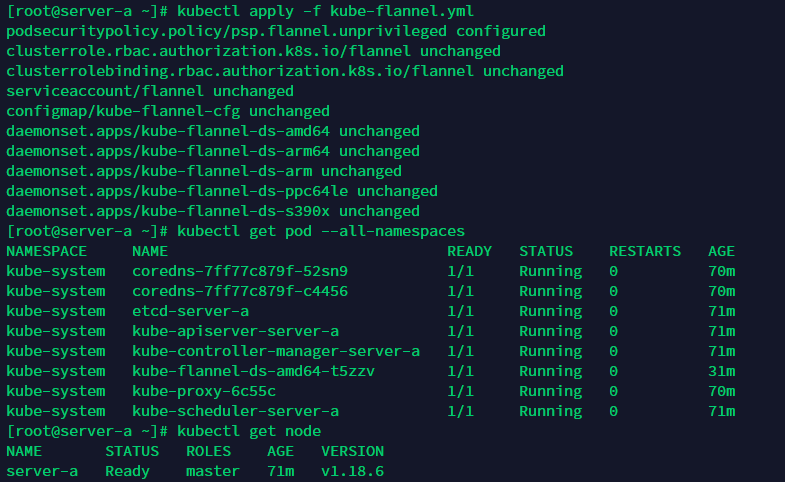
安裝flannel組件
在master節(jié)點(diǎn)(server-a)安裝flannel組件
找個(gè)梯子下載kube-flannel.yml文件
https://raw.githubusercontent.com/coreos/flannel/master/Documentation/kube-flannel.yml
下載不了也沒(méi)關(guān)系,我復(fù)制給到大家:

---
apiVersion: policy/v1beta1
kind: PodSecurityPolicy
metadata:
  name: psp.flannel.unprivileged
  annotations:
    seccomp.security.alpha.kubernetes.io/allowedProfileNames: docker/default
    seccomp.security.alpha.kubernetes.io/defaultProfileName: docker/default
    apparmor.security.beta.kubernetes.io/allowedProfileNames: runtime/default
    apparmor.security.beta.kubernetes.io/defaultProfileName: runtime/default
spec:
  privileged: false
  volumes:
    - configMap
    - secret
    - emptyDir
    - hostPath
  allowedHostPaths:
    - pathPrefix: "/etc/cni/net.d"
    - pathPrefix: "/etc/kube-flannel"
    - pathPrefix: "/run/flannel"
  readOnlyRootFilesystem: false
  # Users and groups
  runAsUser:
    rule: RunAsAny
  supplementalGroups:
    rule: RunAsAny
  fsGroup:
    rule: RunAsAny
  # Privilege Escalation
  allowPrivilegeEscalation: false
  defaultAllowPrivilegeEscalation: false
  # Capabilities
  allowedCapabilities: ['NET_ADMIN', 'NET_RAW']
  defaultAddCapabilities: []
  requiredDropCapabilities: []
  # Host namespaces
  hostPID: false
  hostIPC: false
  hostNetwork: true
  hostPorts:
  - min: 0
    max: 65535
  # SELinux
  seLinux:
    # SELinux is unused in CaaSP
    rule: 'RunAsAny'
---
kind: ClusterRole
apiVersion: rbac.authorization.k8s.io/v1beta1
metadata:
  name: flannel
rules:
  - apiGroups: ['extensions']
    resources: ['podsecuritypolicies']
    verbs: ['use']
    resourceNames: ['psp.flannel.unprivileged']
  - apiGroups:
      - ""
    resources:
      - pods
    verbs:
      - get
  - apiGroups:
      - ""
    resources:
      - nodes
    verbs:
      - list
      - watch
  - apiGroups:
      - ""
    resources:
      - nodes/status
    verbs:
      - patch
---
kind: ClusterRoleBinding
apiVersion: rbac.authorization.k8s.io/v1beta1
metadata:
  name: flannel
roleRef:
  apiGroup: rbac.authorization.k8s.io
  kind: ClusterRole
  name: flannel
subjects:
- kind: ServiceAccount
  name: flannel
  namespace: kube-system
---
apiVersion: v1
kind: ServiceAccount
metadata:
  name: flannel
  namespace: kube-system
---
kind: ConfigMap
apiVersion: v1
metadata:
  name: kube-flannel-cfg
  namespace: kube-system
  labels:
    tier: node
    app: flannel
data:
  cni-conf.json: |
    {
      "name": "cbr0",
      "cniVersion": "0.3.1",
      "plugins": [
        {
          "type": "flannel",
          "delegate": {
            "hairpinMode": true,
            "isDefaultGateway": true
          }
        },
        {
          "type": "portmap",
          "capabilities": {
            "portMappings": true
          }
        }
      ]
    }
  net-conf.json: |
    {
      "Network": "10.244.0.0/16",
      "Backend": {
        "Type": "vxlan"
      }
    }
---
apiVersion: apps/v1
kind: DaemonSet
metadata:
  name: kube-flannel-ds-amd64
  namespace: kube-system
  labels:
    tier: node
    app: flannel
spec:
  selector:
    matchLabels:
      app: flannel
  template:
    metadata:
      labels:
        tier: node
        app: flannel
    spec:
      affinity:
        nodeAffinity:
          requiredDuringSchedulingIgnoredDuringExecution:
            nodeSelectorTerms:
              - matchExpressions:
                  - key: kubernetes.io/os
                    operator: In
                    values:
                      - linux
                  - key: kubernetes.io/arch
                    operator: In
                    values:
                      - amd64
      hostNetwork: true
      priorityClassName: system-node-critical
      tolerations:
      - operator: Exists
        effect: NoSchedule
      serviceAccountName: flannel
      initContainers:
      - name: install-cni
        image: quay.io/coreos/flannel:v0.12.0-amd64
        command:
        - cp
        args:
        - -f
        - /etc/kube-flannel/cni-conf.json
        - /etc/cni/net.d/10-flannel.conflist
        volumeMounts:
        - name: cni
          mountPath: /etc/cni/net.d
        - name: flannel-cfg
          mountPath: /etc/kube-flannel/
      containers:
      - name: kube-flannel
        image: quay.io/coreos/flannel:v0.12.0-amd64
        command:
        - /opt/bin/flanneld
        args:
        - --ip-masq
        - --kube-subnet-mgr
        resources:
          requests:
            cpu: "100m"
            memory: "50Mi"
          limits:
            cpu: "100m"
            memory: "50Mi"
        securityContext:
          privileged: false
          capabilities:
            add: ["NET_ADMIN", "NET_RAW"]
        env:
        - name: POD_NAME
          valueFrom:
            fieldRef:
              fieldPath: metadata.name
        - name: POD_NAMESPACE
          valueFrom:
            fieldRef:
              fieldPath: metadata.namespace
        volumeMounts:
        - name: run
          mountPath: /run/flannel
        - name: flannel-cfg
          mountPath: /etc/kube-flannel/
      volumes:
        - name: run
          hostPath:
            path: /run/flannel
        - name: cni
          hostPath:
            path: /etc/cni/net.d
        - name: flannel-cfg
          configMap:
            name: kube-flannel-cfg
---
apiVersion: apps/v1
kind: DaemonSet
metadata:
  name: kube-flannel-ds-arm64
  namespace: kube-system
  labels:
    tier: node
    app: flannel
spec:
  selector:
    matchLabels:
      app: flannel
  template:
    metadata:
      labels:
        tier: node
        app: flannel
    spec:
      affinity:
        nodeAffinity:
          requiredDuringSchedulingIgnoredDuringExecution:
            nodeSelectorTerms:
              - matchExpressions:
                  - key: kubernetes.io/os
                    operator: In
                    values:
                      - linux
                  - key: kubernetes.io/arch
                    operator: In
                    values:
                      - arm64
      hostNetwork: true
      priorityClassName: system-node-critical
      tolerations:
      - operator: Exists
        effect: NoSchedule
      serviceAccountName: flannel
      initContainers:
      - name: install-cni
        image: quay.io/coreos/flannel:v0.12.0-arm64
        command:
        - cp
        args:
        - -f
        - /etc/kube-flannel/cni-conf.json
        - /etc/cni/net.d/10-flannel.conflist
        volumeMounts:
        - name: cni
          mountPath: /etc/cni/net.d
        - name: flannel-cfg
          mountPath: /etc/kube-flannel/
      containers:
      - name: kube-flannel
        image: quay.io/coreos/flannel:v0.12.0-arm64
        command:
        - /opt/bin/flanneld
        args:
        - --ip-masq
        - --kube-subnet-mgr
        resources:
          requests:
            cpu: "100m"
            memory: "50Mi"
          limits:
            cpu: "100m"
            memory: "50Mi"
        securityContext:
          privileged: false
          capabilities:
             add: ["NET_ADMIN", "NET_RAW"]
        env:
        - name: POD_NAME
          valueFrom:
            fieldRef:
              fieldPath: metadata.name
        - name: POD_NAMESPACE
          valueFrom:
            fieldRef:
              fieldPath: metadata.namespace
        volumeMounts:
        - name: run
          mountPath: /run/flannel
        - name: flannel-cfg
          mountPath: /etc/kube-flannel/
      volumes:
        - name: run
          hostPath:
            path: /run/flannel
        - name: cni
          hostPath:
            path: /etc/cni/net.d
        - name: flannel-cfg
          configMap:
            name: kube-flannel-cfg
---
apiVersion: apps/v1
kind: DaemonSet
metadata:
  name: kube-flannel-ds-arm
  namespace: kube-system
  labels:
    tier: node
    app: flannel
spec:
  selector:
    matchLabels:
      app: flannel
  template:
    metadata:
      labels:
        tier: node
        app: flannel
    spec:
      affinity:
        nodeAffinity:
          requiredDuringSchedulingIgnoredDuringExecution:
            nodeSelectorTerms:
              - matchExpressions:
                  - key: kubernetes.io/os
                    operator: In
                    values:
                      - linux
                  - key: kubernetes.io/arch
                    operator: In
                    values:
                      - arm
      hostNetwork: true
      priorityClassName: system-node-critical
      tolerations:
      - operator: Exists
        effect: NoSchedule
      serviceAccountName: flannel
      initContainers:
      - name: install-cni
        image: quay.io/coreos/flannel:v0.12.0-arm
        command:
        - cp
        args:
        - -f
        - /etc/kube-flannel/cni-conf.json
        - /etc/cni/net.d/10-flannel.conflist
        volumeMounts:
        - name: cni
          mountPath: /etc/cni/net.d
        - name: flannel-cfg
          mountPath: /etc/kube-flannel/
      containers:
      - name: kube-flannel
        image: quay.io/coreos/flannel:v0.12.0-arm
        command:
        - /opt/bin/flanneld
        args:
        - --ip-masq
        - --kube-subnet-mgr
        resources:
          requests:
            cpu: "100m"
            memory: "50Mi"
          limits:
            cpu: "100m"
            memory: "50Mi"
        securityContext:
          privileged: false
          capabilities:
             add: ["NET_ADMIN", "NET_RAW"]
        env:
        - name: POD_NAME
          valueFrom:
            fieldRef:
              fieldPath: metadata.name
        - name: POD_NAMESPACE
          valueFrom:
            fieldRef:
              fieldPath: metadata.namespace
        volumeMounts:
        - name: run
          mountPath: /run/flannel
        - name: flannel-cfg
          mountPath: /etc/kube-flannel/
      volumes:
        - name: run
          hostPath:
            path: /run/flannel
        - name: cni
          hostPath:
            path: /etc/cni/net.d
        - name: flannel-cfg
          configMap:
            name: kube-flannel-cfg
---
apiVersion: apps/v1
kind: DaemonSet
metadata:
  name: kube-flannel-ds-ppc64le
  namespace: kube-system
  labels:
    tier: node
    app: flannel
spec:
  selector:
    matchLabels:
      app: flannel
  template:
    metadata:
      labels:
        tier: node
        app: flannel
    spec:
      affinity:
        nodeAffinity:
          requiredDuringSchedulingIgnoredDuringExecution:
            nodeSelectorTerms:
              - matchExpressions:
                  - key: kubernetes.io/os
                    operator: In
                    values:
                      - linux
                  - key: kubernetes.io/arch
                    operator: In
                    values:
                      - ppc64le
      hostNetwork: true
      priorityClassName: system-node-critical
      tolerations:
      - operator: Exists
        effect: NoSchedule
      serviceAccountName: flannel
      initContainers:
      - name: install-cni
        image: quay.io/coreos/flannel:v0.12.0-ppc64le
        command:
        - cp
        args:
        - -f
        - /etc/kube-flannel/cni-conf.json
        - /etc/cni/net.d/10-flannel.conflist
        volumeMounts:
        - name: cni
          mountPath: /etc/cni/net.d
        - name: flannel-cfg
          mountPath: /etc/kube-flannel/
      containers:
      - name: kube-flannel
        image: quay.io/coreos/flannel:v0.12.0-ppc64le
        command:
        - /opt/bin/flanneld
        args:
        - --ip-masq
        - --kube-subnet-mgr
        resources:
          requests:
            cpu: "100m"
            memory: "50Mi"
          limits:
            cpu: "100m"
            memory: "50Mi"
        securityContext:
          privileged: false
          capabilities:
             add: ["NET_ADMIN", "NET_RAW"]
        env:
        - name: POD_NAME
          valueFrom:
            fieldRef:
              fieldPath: metadata.name
        - name: POD_NAMESPACE
          valueFrom:
            fieldRef:
              fieldPath: metadata.namespace
        volumeMounts:
        - name: run
          mountPath: /run/flannel
        - name: flannel-cfg
          mountPath: /etc/kube-flannel/
      volumes:
        - name: run
          hostPath:
            path: /run/flannel
        - name: cni
          hostPath:
            path: /etc/cni/net.d
        - name: flannel-cfg
          configMap:
            name: kube-flannel-cfg
---
apiVersion: apps/v1
kind: DaemonSet
metadata:
  name: kube-flannel-ds-s390x
  namespace: kube-system
  labels:
    tier: node
    app: flannel
spec:
  selector:
    matchLabels:
      app: flannel
  template:
    metadata:
      labels:
        tier: node
        app: flannel
    spec:
      affinity:
        nodeAffinity:
          requiredDuringSchedulingIgnoredDuringExecution:
            nodeSelectorTerms:
              - matchExpressions:
                  - key: kubernetes.io/os
                    operator: In
                    values:
                      - linux
                  - key: kubernetes.io/arch
                    operator: In
                    values:
                      - s390x
      hostNetwork: true
      priorityClassName: system-node-critical
      tolerations:
      - operator: Exists
        effect: NoSchedule
      serviceAccountName: flannel
      initContainers:
      - name: install-cni
        image: quay.io/coreos/flannel:v0.12.0-s390x
        command:
        - cp
        args:
        - -f
        - /etc/kube-flannel/cni-conf.json
        - /etc/cni/net.d/10-flannel.conflist
        volumeMounts:
        - name: cni
          mountPath: /etc/cni/net.d
        - name: flannel-cfg
          mountPath: /etc/kube-flannel/
      containers:
      - name: kube-flannel
        image: quay.io/coreos/flannel:v0.12.0-s390x
        command:
        - /opt/bin/flanneld
        args:
        - --ip-masq
        - --kube-subnet-mgr
        resources:
          requests:
            cpu: "100m"
            memory: "50Mi"
          limits:
            cpu: "100m"
            memory: "50Mi"
        securityContext:
          privileged: false
          capabilities:
             add: ["NET_ADMIN", "NET_RAW"]
        env:
        - name: POD_NAME
          valueFrom:
            fieldRef:
              fieldPath: metadata.name
        - name: POD_NAMESPACE
          valueFrom:
            fieldRef:
              fieldPath: metadata.namespace
        volumeMounts:
        - name: run
          mountPath: /run/flannel
        - name: flannel-cfg
          mountPath: /etc/kube-flannel/
      volumes:
        - name: run
          hostPath:
            path: /run/flannel
        - name: cni
          hostPath:
            path: /etc/cni/net.d
        - name: flannel-cfg
          configMap:
            name: kube-flannel-cfg
先拉取依賴(lài)鏡像
docker pull quay.io/coreos/flannel:v0.12.0-amd64把上面文件保存到服務(wù)器然后執(zhí)行下面命令
kubectl apply -f kube-flannel.yml
?
安裝dashboard
在master節(jié)點(diǎn)(server-a)安裝dashboard組件
繼續(xù)用梯子下載recommended.yml文件
https://raw.githubusercontent.com/kubernetes/dashboard/v2.0.3/aio/deploy/recommended.yaml
沒(méi)梯子的可以復(fù)制下方原文件
# Copyright 2017 The Kubernetes Authors.
#
# Licensed under the Apache License, Version 2.0 (the "License");
# you may not use this file except in compliance with the License.
# You may obtain a copy of the License at
#
#     http://www.apache.org/licenses/LICENSE-2.0
#
# Unless required by applicable law or agreed to in writing, software
# distributed under the License is distributed on an "AS IS" BASIS,
# WITHOUT WARRANTIES OR CONDITIONS OF ANY KIND, either express or implied.
# See the License for the specific language governing permissions and
# limitations under the License.

apiVersion: v1
kind: Namespace
metadata:
  name: kubernetes-dashboard

---

apiVersion: v1
kind: ServiceAccount
metadata:
  labels:
    k8s-app: kubernetes-dashboard
  name: kubernetes-dashboard
  namespace: kubernetes-dashboard

---

kind: Service
apiVersion: v1
metadata:
  labels:
    k8s-app: kubernetes-dashboard
  name: kubernetes-dashboard
  namespace: kubernetes-dashboard
spec:
  ports:
    - port: 443
      targetPort: 8443
  selector:
    k8s-app: kubernetes-dashboard

---

apiVersion: v1
kind: Secret
metadata:
  labels:
    k8s-app: kubernetes-dashboard
  name: kubernetes-dashboard-certs
  namespace: kubernetes-dashboard
type: Opaque

---

apiVersion: v1
kind: Secret
metadata:
  labels:
    k8s-app: kubernetes-dashboard
  name: kubernetes-dashboard-csrf
  namespace: kubernetes-dashboard
type: Opaque
data:
  csrf: ""

---

apiVersion: v1
kind: Secret
metadata:
  labels:
    k8s-app: kubernetes-dashboard
  name: kubernetes-dashboard-key-holder
  namespace: kubernetes-dashboard
type: Opaque

---

kind: ConfigMap
apiVersion: v1
metadata:
  labels:
    k8s-app: kubernetes-dashboard
  name: kubernetes-dashboard-settings
  namespace: kubernetes-dashboard

---

kind: Role
apiVersion: rbac.authorization.k8s.io/v1
metadata:
  labels:
    k8s-app: kubernetes-dashboard
  name: kubernetes-dashboard
  namespace: kubernetes-dashboard
rules:
  # Allow Dashboard to get, update and delete Dashboard exclusive secrets.
  - apiGroups: [""]
    resources: ["secrets"]
    resourceNames: ["kubernetes-dashboard-key-holder", "kubernetes-dashboard-certs", "kubernetes-dashboard-csrf"]
    verbs: ["get", "update", "delete"]
    # Allow Dashboard to get and update 'kubernetes-dashboard-settings' config map.
  - apiGroups: [""]
    resources: ["configmaps"]
    resourceNames: ["kubernetes-dashboard-settings"]
    verbs: ["get", "update"]
    # Allow Dashboard to get metrics.
  - apiGroups: [""]
    resources: ["services"]
    resourceNames: ["heapster", "dashboard-metrics-scraper"]
    verbs: ["proxy"]
  - apiGroups: [""]
    resources: ["services/proxy"]
    resourceNames: ["heapster", "http:heapster:", "https:heapster:", "dashboard-metrics-scraper", "http:dashboard-metrics-scraper"]
    verbs: ["get"]

---

kind: ClusterRole
apiVersion: rbac.authorization.k8s.io/v1
metadata:
  labels:
    k8s-app: kubernetes-dashboard
  name: kubernetes-dashboard
rules:
  # Allow Metrics Scraper to get metrics from the Metrics server
  - apiGroups: ["metrics.k8s.io"]
    resources: ["pods", "nodes"]
    verbs: ["get", "list", "watch"]

---

apiVersion: rbac.authorization.k8s.io/v1
kind: RoleBinding
metadata:
  labels:
    k8s-app: kubernetes-dashboard
  name: kubernetes-dashboard
  namespace: kubernetes-dashboard
roleRef:
  apiGroup: rbac.authorization.k8s.io
  kind: Role
  name: kubernetes-dashboard
subjects:
  - kind: ServiceAccount
    name: kubernetes-dashboard
    namespace: kubernetes-dashboard

---

apiVersion: rbac.authorization.k8s.io/v1
kind: ClusterRoleBinding
metadata:
  name: kubernetes-dashboard
roleRef:
  apiGroup: rbac.authorization.k8s.io
  kind: ClusterRole
  name: kubernetes-dashboard
subjects:
  - kind: ServiceAccount
    name: kubernetes-dashboard
    namespace: kubernetes-dashboard

---

kind: Deployment
apiVersion: apps/v1
metadata:
  labels:
    k8s-app: kubernetes-dashboard
  name: kubernetes-dashboard
  namespace: kubernetes-dashboard
spec:
  replicas: 1
  revisionHistoryLimit: 10
  selector:
    matchLabels:
      k8s-app: kubernetes-dashboard
  template:
    metadata:
      labels:
        k8s-app: kubernetes-dashboard
    spec:
      containers:
        - name: kubernetes-dashboard
          image: kubernetesui/dashboard:v2.0.3
          imagePullPolicy: Always
          ports:
            - containerPort: 8443
              protocol: TCP
          args:
            - --auto-generate-certificates
            - --namespace=kubernetes-dashboard
            # Uncomment the following line to manually specify Kubernetes API server Host
            # If not specified, Dashboard will attempt to auto discover the API server and connect
            # to it. Uncomment only if the default does not work.
            # - --apiserver-host=http://my-address:port
          volumeMounts:
            - name: kubernetes-dashboard-certs
              mountPath: /certs
              # Create on-disk volume to store exec logs
            - mountPath: /tmp
              name: tmp-volume
          livenessProbe:
            httpGet:
              scheme: HTTPS
              path: /
              port: 8443
            initialDelaySeconds: 30
            timeoutSeconds: 30
          securityContext:
            allowPrivilegeEscalation: false
            readOnlyRootFilesystem: true
            runAsUser: 1001
            runAsGroup: 2001
      volumes:
        - name: kubernetes-dashboard-certs
          secret:
            secretName: kubernetes-dashboard-certs
        - name: tmp-volume
          emptyDir: {}
      serviceAccountName: kubernetes-dashboard
      nodeSelector:
        "kubernetes.io/os": linux
      # Comment the following tolerations if Dashboard must not be deployed on master
      tolerations:
        - key: node-role.kubernetes.io/master
          effect: NoSchedule

---

kind: Service
apiVersion: v1
metadata:
  labels:
    k8s-app: dashboard-metrics-scraper
  name: dashboard-metrics-scraper
  namespace: kubernetes-dashboard
spec:
  ports:
    - port: 8000
      targetPort: 8000
  selector:
    k8s-app: dashboard-metrics-scraper

---

kind: Deployment
apiVersion: apps/v1
metadata:
  labels:
    k8s-app: dashboard-metrics-scraper
  name: dashboard-metrics-scraper
  namespace: kubernetes-dashboard
spec:
  replicas: 1
  revisionHistoryLimit: 10
  selector:
    matchLabels:
      k8s-app: dashboard-metrics-scraper
  template:
    metadata:
      labels:
        k8s-app: dashboard-metrics-scraper
      annotations:
        seccomp.security.alpha.kubernetes.io/pod: 'runtime/default'
    spec:
      containers:
        - name: dashboard-metrics-scraper
          image: kubernetesui/metrics-scraper:v1.0.4
          ports:
            - containerPort: 8000
              protocol: TCP
          livenessProbe:
            httpGet:
              scheme: HTTP
              path: /
              port: 8000
            initialDelaySeconds: 30
            timeoutSeconds: 30
          volumeMounts:
          - mountPath: /tmp
            name: tmp-volume
          securityContext:
            allowPrivilegeEscalation: false
            readOnlyRootFilesystem: true
            runAsUser: 1001
            runAsGroup: 2001
      serviceAccountName: kubernetes-dashboard
      nodeSelector:
        "kubernetes.io/os": linux
      # Comment the following tolerations if Dashboard must not be deployed on master
      tolerations:
        - key: node-role.kubernetes.io/master
          effect: NoSchedule
      volumes:
        - name: tmp-volume
          emptyDir: {}
第39行修改,端口范圍30000-32767
spec:
  type: NodePort
  ports:
    - port: 443
      targetPort: 8443
      nodePort: 30221
  selector:
    k8s-app: kubernetes-dashboard
第137行開(kāi)始,修改賬戶(hù)權(quán)限,主要三個(gè)參數(shù),kind: ClusterRoleBinding,roleRef-kind: ClusterRole,roleRef-name: cluster-admin
---

apiVersion: rbac.authorization.k8s.io/v1
kind: ClusterRoleBinding
metadata:
  labels:
    k8s-app: kubernetes-dashboard
  name: kubernetes-dashboard
  namespace: kubernetes-dashboard
roleRef:
  apiGroup: rbac.authorization.k8s.io
  kind: ClusterRole
  name: cluster-admin
subjects:
  - kind: ServiceAccount
    name: kubernetes-dashboard
    namespace: kubernetes-dashboard

---
保存到服務(wù)器后執(zhí)行以下命令
kubectl apply -f recommended.yaml
?等待一段時(shí)間啟動(dòng)成功后,https://ip+nodePort,查看UI
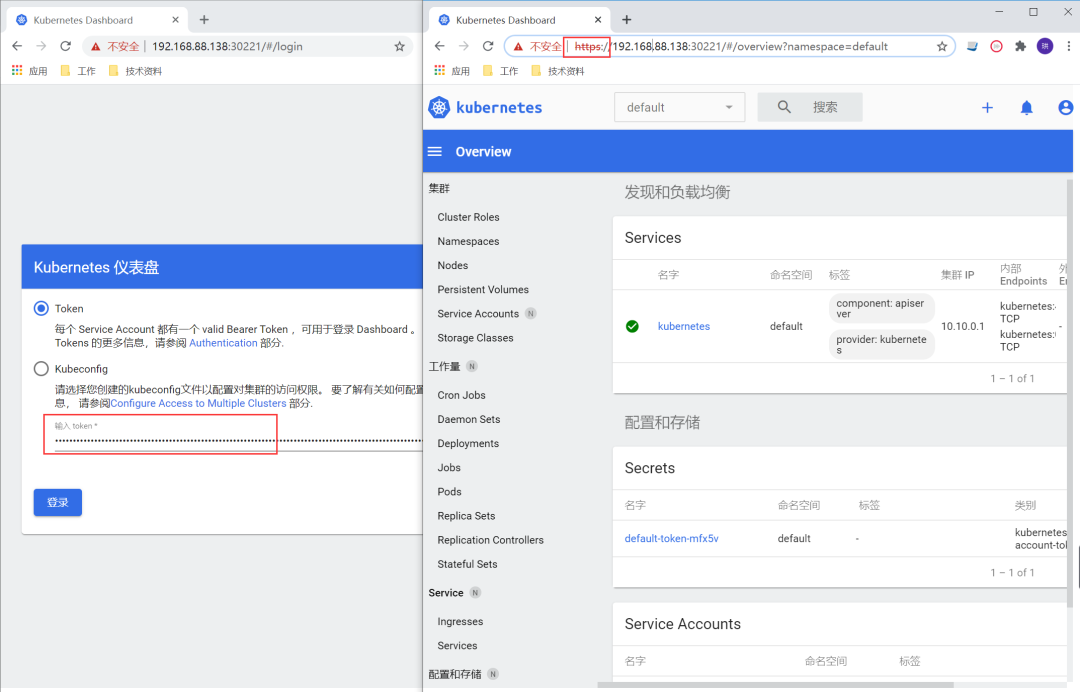
Token通過(guò)下面指令獲取
kubectl -n kubernetes-dashboard get secret

kubectl describe secrets -n kubernetes-dashboard kubernetes-dashboard-token-kfcp2  | grep token | awk 'NR==3{print $2}'

加入Worker節(jié)點(diǎn)
在server-b與server-c執(zhí)行下面操作
把上面init后的那句join拷貝過(guò)來(lái),如果忘記了可以在master節(jié)點(diǎn)執(zhí)行下面指令:
kubeadm token list

openssl x509 -pubkey -in /etc/kubernetes/pki/ca.crt | openssl rsa -pubin -outform der 2>/dev/null | openssl dgst -sha256 -hex | sed 's/^.* //'

通過(guò)返回的數(shù)據(jù)拼裝成下面指令
kubeadm join 192.168.88.138:6443 --token 2zebwy.1549suwrkkven7ow --discovery-token-ca-cert-hash sha256:c61af74d6e4ba1871eceaef4e769d14a20a86c9276ac0899f8ec6b08b89f532b
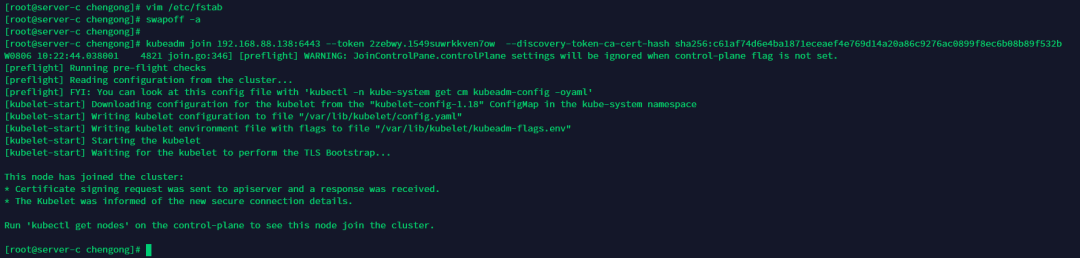
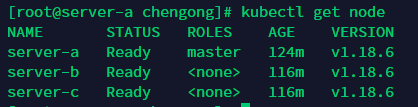
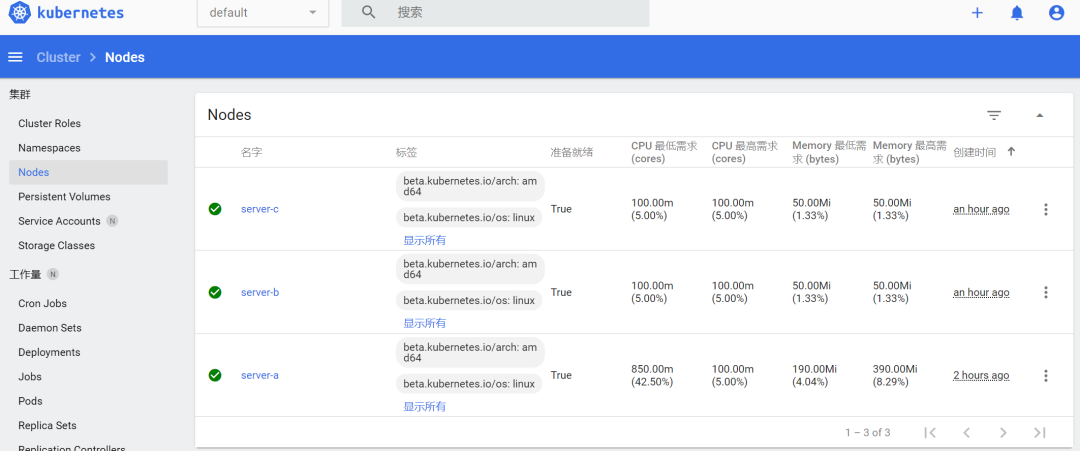
查看節(jié)點(diǎn)信息
kubectl get node
部署Web應(yīng)用
在master節(jié)點(diǎn)(sever-a)執(zhí)行下面操作
部署應(yīng)用前建議有需要的朋友到【.Net微服務(wù)實(shí)戰(zhàn)之CI/CD】看看如何搭建docker私有倉(cāng)庫(kù),后面需要用到,搭建后私有庫(kù)后執(zhí)行下面指令
kubectl create secret docker-registry docker-registry-secret --docker-server=192.168.88.141:6000 --docker-username=admin --docker-password=123456789
docker-server就是docker私有倉(cāng)庫(kù)的地址
下面是yaml模板,注意imagePullSecrets-name與上面的命名的一致,其余的可以查看yaml里的注釋
apiVersion: apps/v1
kind: Deployment # Deployment為多個(gè)Pod副本
metadata:
  name: testdockerswarm-deployment
  labels:
    app: testdockerswarm-deployment
spec:
  replicas: 2 # 實(shí)例數(shù)量
  selector:
    matchLabels: # 定義該部署匹配哪些Pod
      app: testdockerswarm
  minReadySeconds: 3 # 可選,指定Pod可以變成可用狀態(tài)的最小秒數(shù),默認(rèn)是0
  strategy:
    type: RollingUpdate # 部署策略類(lèi)型,使用RollingUpdate可以保證部署期間服務(wù)不間斷
    rollingUpdate:
      maxUnavailable: 1 # 部署時(shí)最大允許停止的Pod數(shù)量
      maxSurge: 1 # 部署時(shí)最大允許創(chuàng)建的Pod數(shù)量
  template: # 用來(lái)指定Pod的模板,與Pod的定義類(lèi)似
    metadata:
      labels: # Pod標(biāo)簽,與上面matchLabels對(duì)應(yīng)
        app: testdockerswarm
    spec:
      imagePullSecrets:
        - name: docker-registry-secret
      containers:
        - name: testdockerswarm
          image: 192.168.88.141:6000/testdockerswarm
          imagePullPolicy: Always # Always每次拉去新鏡像
          ports:
            - containerPort: 80
---
apiVersion: v1
kind: Service
metadata:
  name: testdockerswarm-service
  labels:
    name: testdockerswarm-service
spec:
  selector:
    app: testdockerswarm #與template-labels參數(shù)pod標(biāo)簽一致
  ports:
    - protocol: TCP
      port: 80 #clusterIP開(kāi)放的端口
      targetPort: 80 #container開(kāi)放的端口,與containerPort一致
      nodePort: 31221 # 所有的節(jié)點(diǎn)都會(huì)開(kāi)放此端口,此端口供外部調(diào)用。
  type: NodePort
把yaml文件保存到服務(wù)器后執(zhí)行下面命令
kubectl create -f testdockerswarm.yml

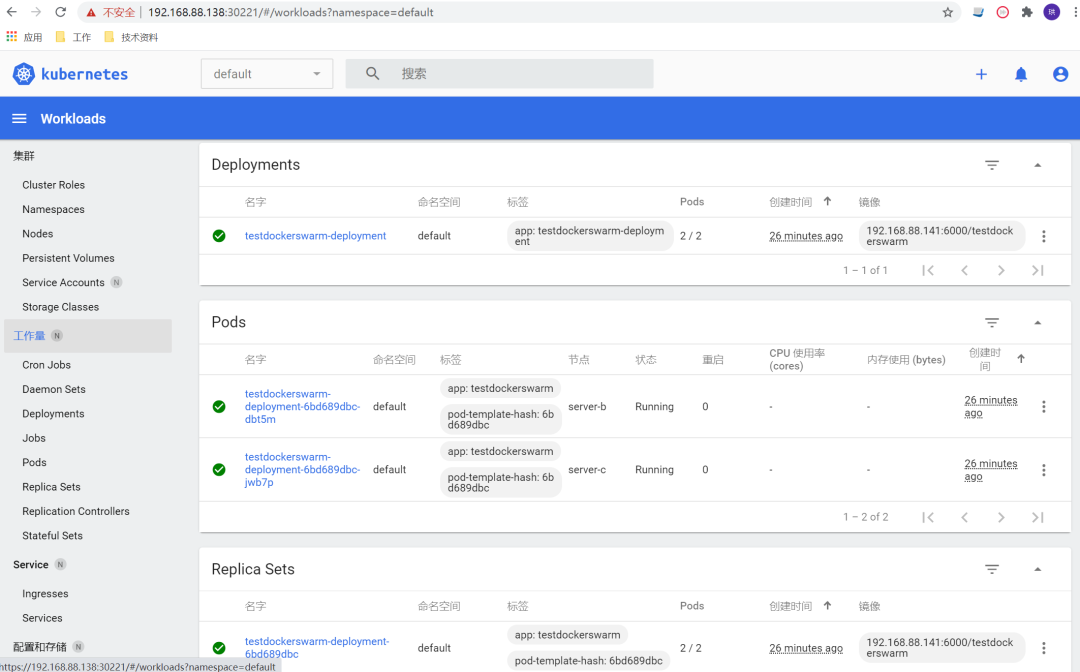
整個(gè)搭建部署的過(guò)程基本上到這里結(jié)束了。
訪(fǎng)問(wèn)
可以通過(guò)指令kubectl get service得到ClusterIP,分別在server-c和sever-b執(zhí)行curl 10.10.184.184

也可以通過(guò)執(zhí)行kubectl get pods -o wide得到pod ip,在server-c執(zhí)行curl 10.122.2.5 和 server-b執(zhí)行curl 10.122.1.7

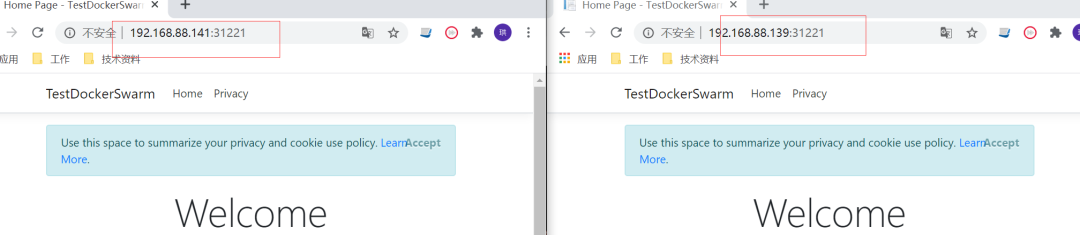
也可以在外部訪(fǎng)問(wèn) server-c和server-b的 ip + 31221
如果節(jié)點(diǎn)有異常可以通過(guò)下面指令排查
journalctl -f -u kubelet.service | grep -i error -C 500
如果Pod無(wú)法正常running可以通過(guò)下面指令查看
kubectl describe pod testdockerswarm-deployment-7bc647d87d-qwvzm