
面試官問如何構(gòu)建動態(tài)線程池應(yīng)對流量洪峰,我們聊了三十分鐘
JAVA前線
歡迎大家關(guān)注公眾號「JAVA前線」查看更多精彩分享,主要包括源碼分析、實際應(yīng)用、架構(gòu)思維、職場分享、產(chǎn)品思考等等,同時也非常歡迎大家加我微信「java_front」一起交流學(xué)習(xí)
0 文章概述
流量洪峰是互聯(lián)網(wǎng)生產(chǎn)環(huán)境經(jīng)常遇到的場景,例如某個時間點進行商品搶購活動,或者某個時間點集中觸發(fā)定時任務(wù),這些場景都有可能引發(fā)流量洪峰,所以如何應(yīng)對流量洪峰是我們必須面對的問題。
縱向維度我們可以從代理層、WEB層、服務(wù)層、緩存層、數(shù)據(jù)層進行思考,橫向維度我們可以從高頻檢測、緩存前置、節(jié)點冗余、服務(wù)降級等方向進行思考。本文我們從服務(wù)層動態(tài)調(diào)節(jié)線程數(shù)這個角度進行思考。
動態(tài)線程池是指我們可以根據(jù)流量的不同調(diào)節(jié)線程池某些參數(shù),例如可以在業(yè)務(wù)低峰期調(diào)低線程數(shù),在業(yè)務(wù)高峰期調(diào)高線程數(shù)增加處理線程從而應(yīng)對流量洪峰。本文我們結(jié)合Apollo和線程池實現(xiàn)一個動態(tài)線程池。
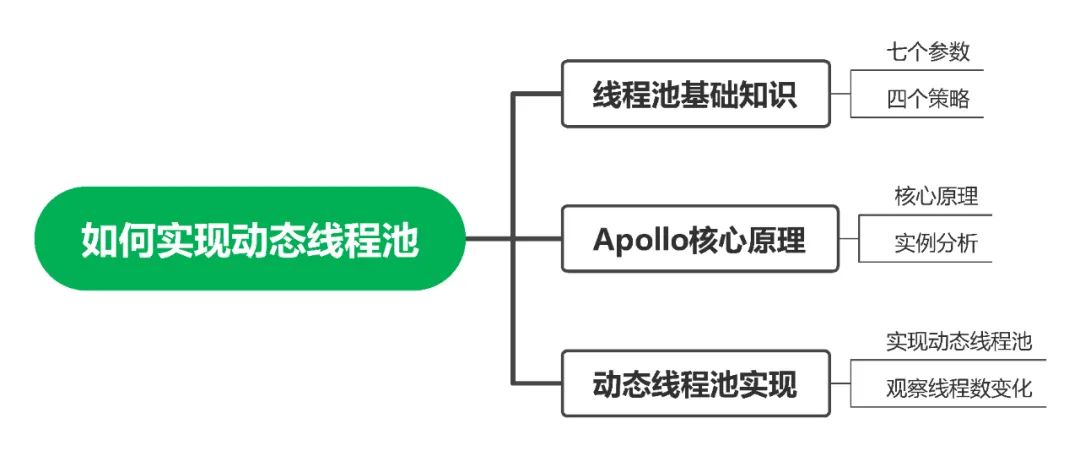
1 線程池基礎(chǔ)
1.1 七個參數(shù)
我們首先回顧一下Java線程池七大參數(shù),查看源碼ThreadPoolExecutor構(gòu)造函數(shù)如下:
public class ThreadPoolExecutor extends AbstractExecutorService {
    public ThreadPoolExecutor(int corePoolSize,
                              int maximumPoolSize,
                              long keepAliveTime,
                              TimeUnit unit,
                              BlockingQueue<Runnable> workQueue,
                              ThreadFactory threadFactory,
                              RejectedExecutionHandler handler) {
        if (corePoolSize < 0 ||
                maximumPoolSize <= 0 ||
                maximumPoolSize < corePoolSize ||
                keepAliveTime < 0)
            throw new IllegalArgumentException();
        if (workQueue == null || threadFactory == null || handler == null)
            throw new NullPointerException();
        this.acc = System.getSecurityManager() == null ?
                   null :
                   AccessController.getContext();
        this.corePoolSize = corePoolSize;
        this.maximumPoolSize = maximumPoolSize;
        this.workQueue = workQueue;
        this.keepAliveTime = unit.toNanos(keepAliveTime);
        this.threadFactory = threadFactory;
        this.handler = handler;
    }
}
(1) corePoolSize
線程池核心線程數(shù),類比業(yè)務(wù)大廳開設(shè)的固定窗口。例如業(yè)務(wù)大廳開設(shè)2個固定窗口,那么這兩個窗口不會關(guān)閉,全天都會進行業(yè)務(wù)辦理
(2) workQueue
存儲已提交但尚未執(zhí)行的任務(wù),類比業(yè)務(wù)大廳等候區(qū)。例如業(yè)務(wù)大廳一開門進來很多顧客,2個固定窗口進行業(yè)務(wù)辦理,其他顧客到等候區(qū)等待
(3) maximumPoolSize
線程池可以容納同時執(zhí)行最大線程數(shù),類比業(yè)務(wù)大廳最大窗口數(shù)。例如業(yè)務(wù)大廳最大窗口數(shù)是5個,業(yè)務(wù)員看到2個固定窗口和等候區(qū)都滿了,可以臨時增加3個窗口
(4) keepAliveTime
非核心線程數(shù)存活時間。當(dāng)業(yè)務(wù)不忙時剛才新增的3個窗口需要關(guān)閉,空閑時間超過keepAliveTime空閑會被關(guān)閉
(5) unit
keepAliveTime存活時間單位
(6) threadFactory
線程工廠可以用來指定線程名
(7) handler
線程池線程數(shù)已達到maximumPoolSize且隊列已滿時執(zhí)行拒絕策略。例如業(yè)務(wù)大廳5個窗口全部處于忙碌狀態(tài)且等候區(qū)已滿,業(yè)務(wù)員根據(jù)實際情況選擇拒絕策略
1.2 四種拒絕策略
(1) AbortPolicy
默認策略直接拋出RejectExecutionException阻止系統(tǒng)正常運行
/**
 * AbortPolicy
 *
 * @author 微信公眾號「JAVA前線」
 *
 */
public class AbortPolicyTest {
    public static void main(String[] args) {
        int coreSize = 1;
        int maxSize = 2;
        int queueSize = 1;
        AbortPolicy abortPolicy = new ThreadPoolExecutor.AbortPolicy();
        ThreadPoolExecutor executor = new ThreadPoolExecutor(coreSize, maxSize, 1, TimeUnit.SECONDS, new LinkedBlockingQueue<Runnable>(queueSize), Executors.defaultThreadFactory(), abortPolicy);
        for (int i = 0; i < 100; i++) {
            executor.execute(new Runnable() {
                @Override
                public void run() {
                    System.out.println(Thread.currentThread().getName() + " -> run");
                }
            });
        }
    }
}
程序執(zhí)行結(jié)果:
pool-1-thread-1 -> run
pool-1-thread-2 -> run
pool-1-thread-1 -> run
Exception in thread "main" java.util.concurrent.RejectedExecutionException: Task com.xy.juc.threadpool.reject.AbortPolicyTest$1@70dea4e rejected from java.util.concurrent.ThreadPoolExecutor@5c647e05[Running, pool size = 2, active threads = 0, queued tasks = 0, completed tasks = 2]
at java.util.concurrent.ThreadPoolExecutor$AbortPolicy.rejectedExecution(ThreadPoolExecutor.java:2063)
at java.util.concurrent.ThreadPoolExecutor.reject(ThreadPoolExecutor.java:830)
at java.util.concurrent.ThreadPoolExecutor.execute(ThreadPoolExecutor.java:1379)
at com.xy.juc.threadpool.reject.AbortPolicyTest.main(AbortPolicyTest.java:21)
(2) CallerRunsPolicy
任務(wù)交給調(diào)用者自己運行
/**
 * CallerRunsPolicy
 *
 * @author 微信公眾號「JAVA前線」
 *
 */
public class CallerRunsPolicyTest {
    public static void main(String[] args) {
        int coreSize = 1;
        int maxSize = 2;
        int queueSize = 1;
        CallerRunsPolicy callerRunsPolicy = new ThreadPoolExecutor.CallerRunsPolicy();
        ThreadPoolExecutor executor = new ThreadPoolExecutor(coreSize, maxSize, 1, TimeUnit.SECONDS, new LinkedBlockingQueue<Runnable>(queueSize), Executors.defaultThreadFactory(), callerRunsPolicy);
        for (int i = 0; i < 10; i++) {
            executor.execute(new Runnable() {
                @Override
                public void run() {
                    System.out.println(Thread.currentThread().getName() + " -> run");
                }
            });
        }
    }
}
程序執(zhí)行結(jié)果:
main -> run
pool-1-thread-1 -> run
pool-1-thread-2 -> run
pool-1-thread-1 -> run
main -> run
main -> run
pool-1-thread-2 -> run
pool-1-thread-1 -> run
main -> run
pool-1-thread-2 -> run
(3) DiscardOldestPolicy
拋棄隊列中等待最久的任務(wù)不會拋出異常
/**
 * DiscardOldestPolicy
 *
 * @author 微信公眾號「JAVA前線」
 *
 */
public class DiscardOldestPolicyTest {
    public static void main(String[] args) {
        int coreSize = 1;
        int maxSize = 2;
        int queueSize = 1;
        DiscardOldestPolicy discardOldestPolicy = new ThreadPoolExecutor.DiscardOldestPolicy();
        ThreadPoolExecutor executor = new ThreadPoolExecutor(coreSize, maxSize, 1, TimeUnit.SECONDS, new LinkedBlockingQueue<Runnable>(queueSize), Executors.defaultThreadFactory(), discardOldestPolicy);
        for (int i = 0; i < 10; i++) {
            executor.execute(new Runnable() {
                @Override
                public void run() {
                    System.out.println(Thread.currentThread().getName() + " -> run");
                }
            });
        }
    }
}
程序執(zhí)行結(jié)果:
pool-1-thread-1 -> run
pool-1-thread-2 -> run
pool-1-thread-1 -> run
(4) DiscardPolicy
直接丟棄任務(wù)不會拋出異常
/**
 * DiscardPolicy
 *
 * @author 微信公眾號「JAVA前線」
 *
 */
public class DiscardPolicyTest {
    public static void main(String[] args) {
        int coreSize = 1;
        int maxSize = 2;
        int queueSize = 1;
        DiscardPolicy discardPolicy = new ThreadPoolExecutor.DiscardPolicy();
        ThreadPoolExecutor executor = new ThreadPoolExecutor(coreSize, maxSize, 1, TimeUnit.SECONDS, new LinkedBlockingQueue<Runnable>(queueSize), Executors.defaultThreadFactory(), discardPolicy);
        for (int i = 0; i < 10; i++) {
            executor.execute(new Runnable() {
                @Override
                public void run() {
                    System.out.println(Thread.currentThread().getName() + " -> run");
                }
            });
        }
    }
}
程序執(zhí)行結(jié)果:
pool-1-thread-1 -> run
pool-1-thread-2 -> run
pool-1-thread-1 -> run
1.3 修改參數(shù)
如果初始化線程池完成后,我們是否可以修改線程池某些參數(shù)呢?答案是可以。我們選擇線程池提供的四個修改方法進行源碼分析。
(1) setCorePoolSize
public class ThreadPoolExecutor extends AbstractExecutorService {
    public void setCorePoolSize(int corePoolSize) {
        if (corePoolSize < 0)
            throw new IllegalArgumentException();
        // 新核心線程數(shù)減去原核心線程數(shù)
        int delta = corePoolSize - this.corePoolSize;
        // 新核心線程數(shù)賦值
        this.corePoolSize = corePoolSize;
        // 如果當(dāng)前線程數(shù)大于新核心線程數(shù)
        if (workerCountOf(ctl.get()) > corePoolSize)
            // 中斷空閑線程
            interruptIdleWorkers();
        // 如果需要新增線程則通過addWorker增加工作線程
        else if (delta > 0) {
            int k = Math.min(delta, workQueue.size());
            while (k-- > 0 && addWorker(null, true)) {
                if (workQueue.isEmpty())
                    break;
            }
        }
    }
}
(2) setMaximumPoolSize
public class ThreadPoolExecutor extends AbstractExecutorService {
    public void setMaximumPoolSize(int maximumPoolSize) {
        if (maximumPoolSize <= 0 || maximumPoolSize < corePoolSize)
            throw new IllegalArgumentException();
        this.maximumPoolSize = maximumPoolSize;
        // 如果當(dāng)前線程數(shù)量大于新最大線程數(shù)量
        if (workerCountOf(ctl.get()) > maximumPoolSize)
            // 中斷空閑線程
            interruptIdleWorkers();
    }
}
(3) setKeepAliveTime
public class ThreadPoolExecutor extends AbstractExecutorService {
    public void setKeepAliveTime(long time, TimeUnit unit) {
        if (time < 0)
            throw new IllegalArgumentException();
        if (time == 0 && allowsCoreThreadTimeOut())
            throw new IllegalArgumentException("Core threads must have nonzero keep alive times");
        long keepAliveTime = unit.toNanos(time);
        // 新超時時間減去原超時時間
        long delta = keepAliveTime - this.keepAliveTime;
        this.keepAliveTime = keepAliveTime;
        // 如果新超時時間小于原超時時間
        if (delta < 0)
            // 中斷空閑線程
            interruptIdleWorkers();
    }
}
(4) setRejectedExecutionHandler
public class ThreadPoolExecutor extends AbstractExecutorService {
    public void setRejectedExecutionHandler(RejectedExecutionHandler handler) {
        if (handler == null)
            throw new NullPointerException();
        // 設(shè)置拒絕策略
        this.handler = handler;
    }
}
現(xiàn)在我們知道上述線程池調(diào)整參數(shù)的方法,但僅僅分析到此是不夠的,因為如果沒有動態(tài)調(diào)整參數(shù)的方法,那么每次修改必須重新發(fā)布才可以生效,那么有沒有方法不用發(fā)布就可以動態(tài)調(diào)整線程池參數(shù)呢?
2 Apollo配置中心
2.1 核心原理
Apollo是攜程框架部門研發(fā)的分布式配置中心,能夠集中化管理應(yīng)用不同環(huán)境、不同集群的配置,配置修改后能夠?qū)崟r推送到應(yīng)用端,并且具備規(guī)范的權(quán)限、流程治理等特性,適用于微服務(wù)配置管理場景,開源地址如下:
https://github.com/ctripcorp/apollo
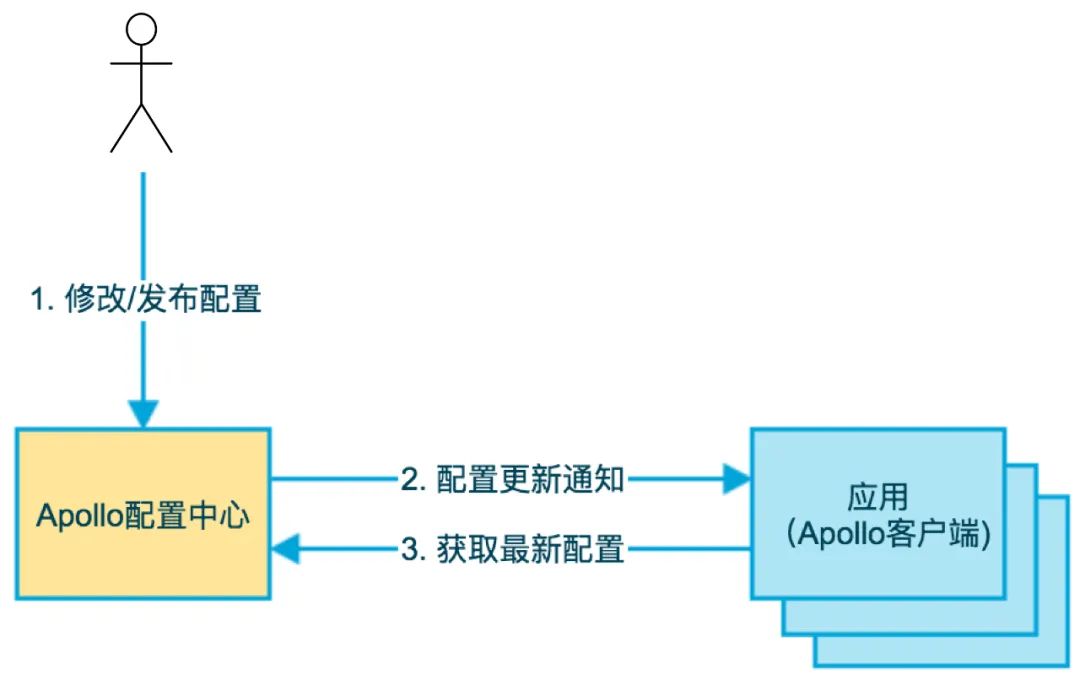
第一步用戶在配置中心修改配置項,第二步配置中心通知Apollo客戶端有配置更新,第三步Apollo客戶端從配置中心拉取最新配置,更新本地配置并通知到應(yīng)用,官網(wǎng)基礎(chǔ)模型圖如下:
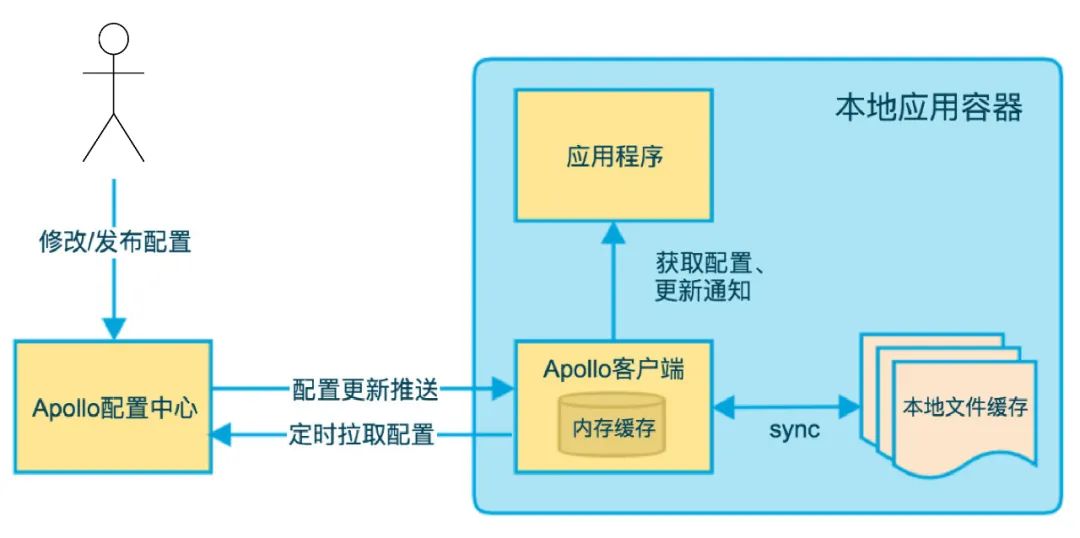
配置中心配置項發(fā)生變化客戶端如何感知呢?分為推和拉兩種方式。推依賴客戶端和服務(wù)端保持了一個長連接,發(fā)生數(shù)據(jù)變化時服務(wù)端推送信息給客戶端,這就是長輪詢機制。拉依賴客戶端定時從配置中心服務(wù)端拉取應(yīng)用最新配置,這是一個fallback機制。官網(wǎng)客戶端設(shè)計圖如下:
本文重點分析配置更新推送方式,我們首先看官網(wǎng)服務(wù)端設(shè)計圖:
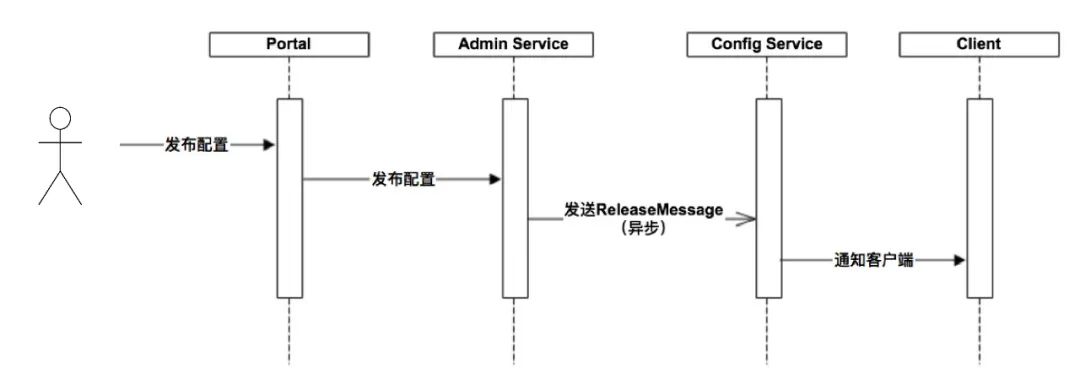
ConfigService模塊提供配置的讀取推送等功能,服務(wù)對象是Apollo客戶端。AdminService模塊提供配置的修改發(fā)布等功能,服務(wù)對象是Portal模塊即管理界面。需要說明Apollo并沒有引用消息中間件,發(fā)送異步消息是指ConfigService定時掃描異步消息數(shù)據(jù)表:
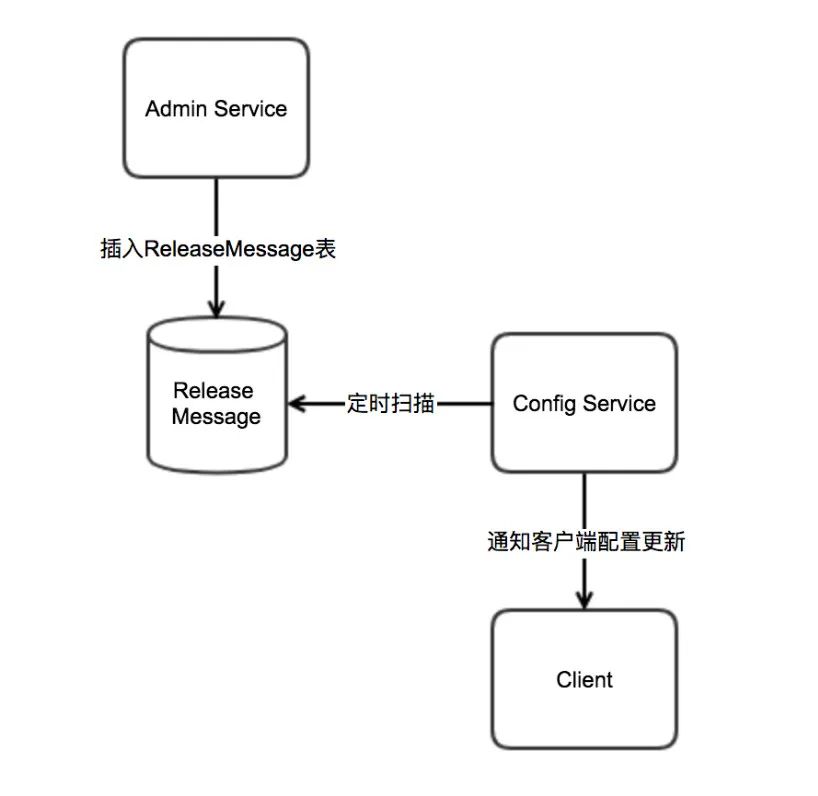
消息數(shù)據(jù)保存在MySQL消息表:
CREATE TABLE `releasemessage` (
  `Id` int(11) unsigned NOT NULL AUTO_INCREMENT COMMENT '自增主鍵',
  `Message` varchar(1024) NOT NULL DEFAULT '' COMMENT '發(fā)布的消息內(nèi)容',
  `DataChange_LastTime` timestamp NOT NULL DEFAULT CURRENT_TIMESTAMP ON UPDATE CURRENT_TIMESTAMP COMMENT '最后修改時間',
  PRIMARY KEY (`Id`),
  KEY `DataChange_LastTime` (`DataChange_LastTime`),
  KEY `IX_Message` (`Message`(191))
) ENGINE=InnoDB AUTO_INCREMENT=1 DEFAULT CHARSET=utf8mb4 COMMENT='發(fā)布消息'
Apollo核心原理本文暫時分析到這里,后續(xù)我將寫文章通過源碼分析Apollo長輪詢機制工作原理請繼續(xù)關(guān)注。
2.2 實例分析
2.2.1 服務(wù)端安裝
服務(wù)端關(guān)鍵步驟是導(dǎo)入數(shù)據(jù)庫和修改端口號,具體步驟請參看官方網(wǎng)站:
https://ctripcorp.github.io/apollo/#/zh/deployment/quick-start
啟動成功后訪問地址:
http://localhost:8070
輸入用戶名apollo、密碼admin:
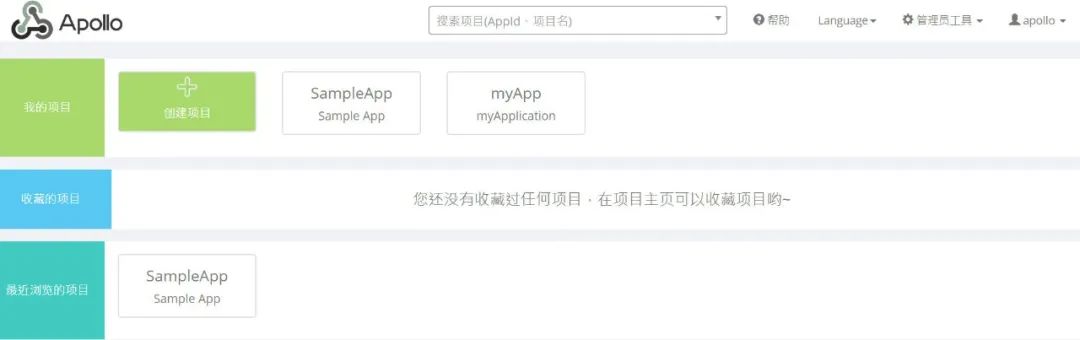
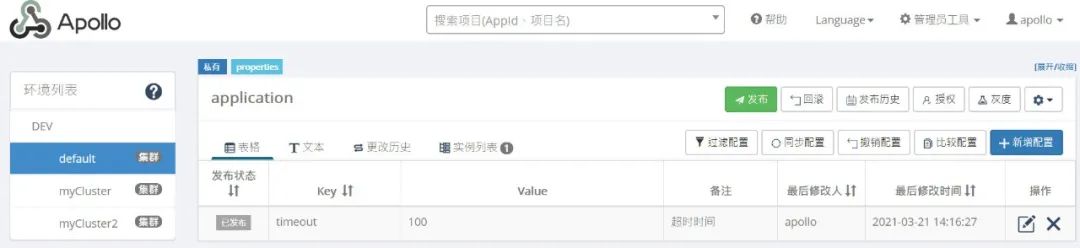
進入我之前創(chuàng)建的myApp項目,我們看到在DEV環(huán)境、default集群、application命名空間包含一個timeout配置項:
2.2.2 應(yīng)用程序
(1) 引入依賴
<dependencies>
  <dependency>
    <groupId>com.ctrip.framework.apollo</groupId>
    <artifactId>apollo-client</artifactId>
    <version>1.7.0</version>
  </dependency>
</dependencies>
(2) 簡單實例
public class GetApolloConfigTest extends BaseTest {

    /**
     * -Dapp.id=myApp -Denv=DEV -Dapollo.cluster=default -Ddev_meta=http://localhost:8080
     *
     * myApp+DEV+default+application
     */
    @Test
    public void testGet() throws InterruptedException {
        Config appConfig = ConfigService.getAppConfig();
        while (true) {
            String value = appConfig.getProperty("timeout", "200");
            System.out.println("timeout=" + value);
            TimeUnit.SECONDS.sleep(1);
        }
    }
}
因為上述程序是通過while(true)不斷讀取配置項的值,所以程序輸出結(jié)果如下:
timeout=100
timeout=100
timeout=100
timeout=100
timeout=100
timeout=100
現(xiàn)在把配置項的值改為200程序輸出結(jié)果如下:
timeout=100
timeout=100
timeout=100
timeout=100
timeout=200
timeout=200
timeout=200
(3) 監(jiān)聽實例
生產(chǎn)環(huán)境我們一般不用while(true)監(jiān)聽變化,而是通過注冊監(jiān)聽器方式感知變化信息:
public class GetApolloConfigTest extends BaseTest {

    /**
     * 監(jiān)聽命名空間變化
     *
     * -Dapp.id=myApp -Denv=DEV -Dapollo.cluster=default -Ddev_meta=http://localhost:8080
     *
     * myApp+DEV+default+application
     */
    @Test
    public void testListen() throws InterruptedException {
        Config config = ConfigService.getConfig("application");
        config.addChangeListener(new ConfigChangeListener() {
            @Override
            public void onChange(ConfigChangeEvent changeEvent) {
                System.out.println("發(fā)生變化命名空間=" + changeEvent.getNamespace());
                for (String key : changeEvent.changedKeys()) {
                    ConfigChange change = changeEvent.getChange(key);
                    System.out.println(String.format("發(fā)生變化key=%s,oldValue=%s,newValue=%s,changeType=%s", change.getPropertyName(), change.getOldValue(), change.getNewValue(), change.getChangeType()));
                }
            }
        });
        Thread.sleep(1000000L);
    }
}
我們把timeout值從200改為300,客戶端可以監(jiān)聽到這個變化,程序輸出結(jié)果如下:
發(fā)生變化命名空間=application
發(fā)生變化key=timeout,oldValue=200,newValue=300,changeType=MODIFIED
3 動態(tài)線程池
現(xiàn)在我們可以把線程池和Apollo結(jié)合起來構(gòu)建動態(tài)線程池。首先我們用默認值構(gòu)建一個線程池,然后線程池會監(jiān)聽Apollo相關(guān)配置項,如果相關(guān)配置有變化則刷新相關(guān)線程池參數(shù)。第一步在Apollo配置中心設(shè)置三個線程池參數(shù)(本文省略拒絕策略設(shè)置):
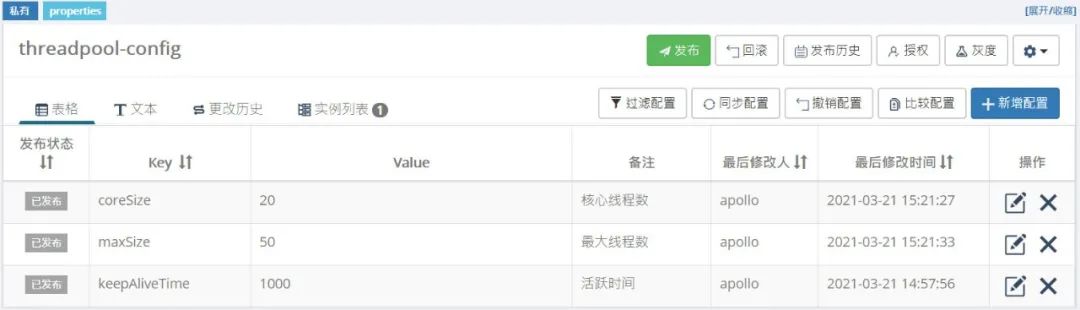
第二步編寫核心代碼:
/**
 * 動態(tài)線程池工廠
 *
 * @author 微信公眾號「JAVA前線」
 *
 */
@Slf4j
@Component
public class DynamicThreadPoolFactory {
    private static final String NAME_SPACE = "threadpool-config";

    /** 線程執(zhí)行器 **/
    private volatile ThreadPoolExecutor executor;

    /** 核心線程數(shù) **/
    private Integer CORE_SIZE = 10;

    /** 最大值線程數(shù) **/
    private Integer MAX_SIZE = 20;

    /** 等待隊列長度 **/
    private Integer QUEUE_SIZE = 2000;

    /** 線程存活時間 **/
    private Long KEEP_ALIVE_TIME = 1000L;

    /** 線程名 **/
    private String threadName;

    public DynamicThreadPoolFactory() {
        Config config = ConfigService.getConfig(NAME_SPACE);
        init(config);
        listen(config);
    }

    /**
     * 初始化
     */
    private void init(Config config) {
        if (executor == null) {
            synchronized (DynamicThreadPoolFactory.class) {
                if (executor == null) {
                    String coreSize = config.getProperty(KeysEnum.CORE_SIZE.getNodeKey(), CORE_SIZE.toString());
                    String maxSize = config.getProperty(KeysEnum.MAX_SIZE.getNodeKey(), MAX_SIZE.toString());
                    String keepAliveTIme = config.getProperty(KeysEnum.KEEP_ALIVE_TIME.getNodeKey(), KEEP_ALIVE_TIME.toString());
                    BlockingQueue<Runnable> queueToUse = new LinkedBlockingQueue<Runnable>(QUEUE_SIZE);
                    executor = new ThreadPoolExecutor(Integer.valueOf(coreSize), Integer.valueOf(maxSize), Long.valueOf(keepAliveTIme), TimeUnit.MILLISECONDS, queueToUse, new NamedThreadFactory(threadName, true), new AbortPolicyDoReport(threadName));
                }
            }
        }
    }

    /**
     * 監(jiān)聽器
     */
    private void listen(Config config) {
        config.addChangeListener(new ConfigChangeListener() {
            @Override
            public void onChange(ConfigChangeEvent changeEvent) {
                log.info("命名空間發(fā)生變化={}", changeEvent.getNamespace());
                for (String key : changeEvent.changedKeys()) {
                    ConfigChange change = changeEvent.getChange(key);
                    String newValue = change.getNewValue();
                    refreshThreadPool(key, newValue);
                    log.info("發(fā)生變化key={},oldValue={},newValue={},changeType={}", change.getPropertyName(), change.getOldValue(), change.getNewValue(), change.getChangeType());
                }
            }
        });
    }

    /**
     * 刷新線程池
     */
    private void refreshThreadPool(String key, String newValue) {
        if (executor == null) {
            return;
        }
        if (KeysEnum.CORE_SIZE.getNodeKey().equals(key)) {
            executor.setCorePoolSize(Integer.valueOf(newValue));
            log.info("修改核心線程數(shù)key={},value={}", key, newValue);
        }
        if (KeysEnum.MAX_SIZE.getNodeKey().equals(key)) {
            executor.setMaximumPoolSize(Integer.valueOf(newValue));
            log.info("修改最大線程數(shù)key={},value={}", key, newValue);
        }
        if (KeysEnum.KEEP_ALIVE_TIME.getNodeKey().equals(key)) {
            executor.setKeepAliveTime(Integer.valueOf(newValue), TimeUnit.MILLISECONDS);
            log.info("修改活躍時間key={},value={}", key, newValue);
        }
    }

    public ThreadPoolExecutor getExecutor(String threadName) {
        return executor;
    }

    enum KeysEnum {

        CORE_SIZE("coreSize", "核心線程數(shù)"),

        MAX_SIZE("maxSize", "最大線程數(shù)"),

        KEEP_ALIVE_TIME("keepAliveTime", "線程活躍時間")

        ;

        private String nodeKey;
        private String desc;

        KeysEnum(String nodeKey, String desc) {
            this.nodeKey = nodeKey;
            this.desc = desc;
        }

        public String getNodeKey() {
            return nodeKey;
        }

        public void setNodeKey(String nodeKey) {
            this.nodeKey = nodeKey;
        }

        public String getDesc() {
            return desc;
        }

        public void setDesc(String desc) {
            this.desc = desc;
        }
    }
}

/**
 * 動態(tài)線程池執(zhí)行器
 *
 * @author 微信公眾號「JAVA前線」
 *
 */
@Component
public class DynamicThreadExecutor {

    @Resource
    private DynamicThreadPoolFactory threadPoolFactory;

    public void execute(String bizName, Runnable job) {
        threadPoolFactory.getExecutor(bizName).execute(job);
    }

    public Future<?> sumbit(String bizName, Runnable job) {
        return threadPoolFactory.getExecutor(bizName).submit(job);
    }
}
第三步運行測試用例:
/**
 * 動態(tài)線程池測試
 *
 * @author 微信公眾號「JAVA前線」
 *
 */
public class DynamicThreadExecutorTest extends BaseTest {

    @Resource
    private DynamicThreadExecutor dynamicThreadExecutor;

    /**
     * -Dapp.id=myApp -Denv=DEV -Dapollo.cluster=default -Ddev_meta=http://localhost:8080
     *
     * myApp+DEV+default+thread-pool
     */
    @Test
    public void testExecute() throws InterruptedException {
        while (true) {
            dynamicThreadExecutor.execute("bizName", new Runnable() {
                @Override
                public void run() {
                    System.out.println("bizInfo");
                }
            });
            TimeUnit.SECONDS.sleep(1);
        }
    }
}
第四步通過VisualVM觀察線程數(shù):
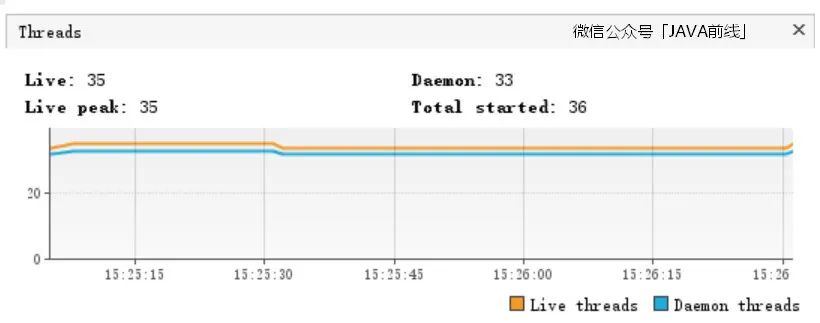
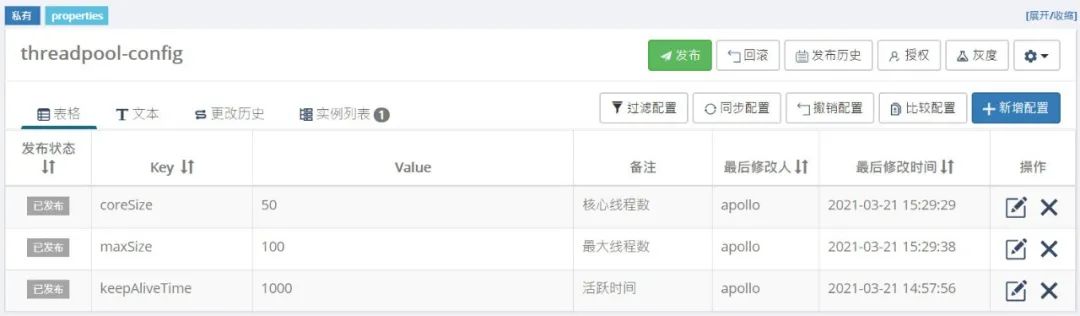
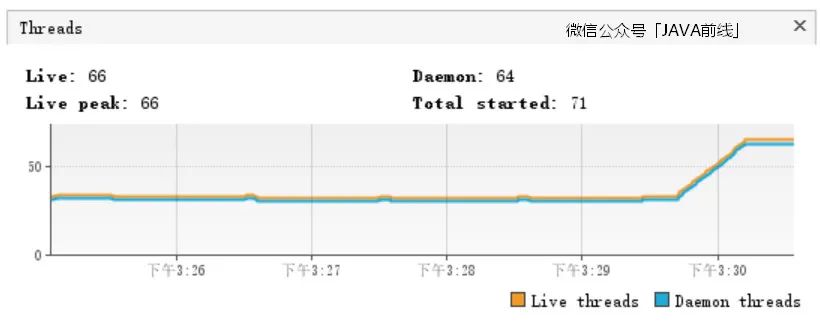
我們在配置中心修改配置項把核心線程數(shù)設(shè)置為50,最大線程數(shù)設(shè)置為100,通過VisualVM可以觀察到線程數(shù)顯著上升:
4 文章總結(jié)
本文我們首先介紹了線程池基礎(chǔ)知識,包括七大參數(shù)和四個拒絕策略,隨后我們介紹了Apollo配置中心的原理和應(yīng)用,最后我們將線程池和配置中心相結(jié)合,實現(xiàn)了動態(tài)調(diào)整線程數(shù)的效果,希望本文對大家有所幫助。
JAVA前線
歡迎大家關(guān)注公眾號「JAVA前線」查看更多精彩分享,主要包括源碼分析、實際應(yīng)用、架構(gòu)思維、職場分享、產(chǎn)品思考等等,同時也非常歡迎大家加我微信「java_front」一起交流學(xué)習(xí)