
App自動(dòng)化測試實(shí)施中的技術(shù)挑戰(zhàn)

美團(tuán)App的頁面特點(diǎn)
自動(dòng)化測試實(shí)施中的技術(shù)挑戰(zhàn)
頁面元素?zé)o法定位
Appium元素定位的原理
AccessibilityNodeInfo和Drawable
頁面視圖可測性改造-XraySDK
定位方案對(duì)比
視圖信息的獲取和存儲(chǔ)-XrayDumper
視圖信息的輸出-XrayServer
SDK整體功能結(jié)構(gòu)
視圖信息的增強(qiáng)
動(dòng)態(tài)布局自動(dòng)化的收益
未來展望
使用視圖解析原理解決WebView元素定位
視圖可測性改造更多的應(yīng)用場景
美團(tuán)App的頁面特點(diǎn)
對(duì)于不同的用戶,美團(tuán)App頁面的呈現(xiàn)方式其實(shí)多種多樣,這就是所謂的“千人千面”。以美團(tuán)首頁的“猜你喜歡”模塊為例,針對(duì)與不同的用戶有單列、Tab、雙列等多種不同形式。這么多不同的頁面樣式需求,如果要在1天內(nèi)時(shí)間內(nèi)完成開發(fā)、測試、上線流程,研發(fā)團(tuán)隊(duì)也面臨著很大的挑戰(zhàn)。所以測試工程師就需要重度依賴自動(dòng)化測試來形成快速的驗(yàn)收機(jī)制。

自動(dòng)化測試實(shí)施中的技術(shù)挑戰(zhàn)
接下來,本文將會(huì)從頁面元素?zé)o法定位、Appium元素定位的原理、AccessibilityNodeInfo和Drawable等三個(gè)維度進(jìn)行闡述。
頁面元素?zé)o法定位

目前,美團(tuán)App客戶端自動(dòng)化主要依托于Appium(一個(gè)開源、跨平臺(tái)的測試框架,可以用來測試原生及混合的移動(dòng)端應(yīng)用)來實(shí)現(xiàn)頁面元素的定位和操作,當(dāng)我們通過Appium Inspector進(jìn)行頁面元素審查時(shí),能通過元素審查找到的信息只有外面的邊框和下方的兩個(gè)按鈕,其他信息均無法識(shí)別(如上圖2所示)。中央位置的圖片、左上角的文本信息都無法通過現(xiàn)有的UI自動(dòng)化方案進(jìn)行定位和解析。不能定位元素,也就無法進(jìn)行頁面的操作和斷言,這就嚴(yán)重影響了自動(dòng)化的實(shí)施工作。
經(jīng)過進(jìn)一步的調(diào)研,我們發(fā)現(xiàn)這些頁面卡片中大量使用Drawable對(duì)象來繪制頁面的信息,從而導(dǎo)致元素?zé)o法進(jìn)行定位。為什么Drawable對(duì)象無法定位呢?下面我們一起研究一下UI自動(dòng)化元素定位的原理。
Appium元素定位的原理
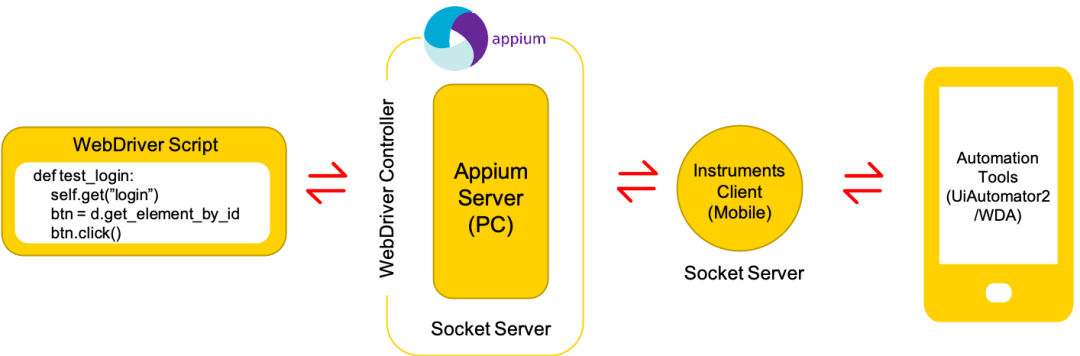
目前的UI自動(dòng)化測試,使用Appium進(jìn)行頁面元素的定位和操作。如下圖所示,AppiumServer和UiAutomator2的手機(jī)端進(jìn)行通信后完成元素的操作。
通過閱讀Appium源碼發(fā)現(xiàn)完成一次定位的流程如下圖所示:
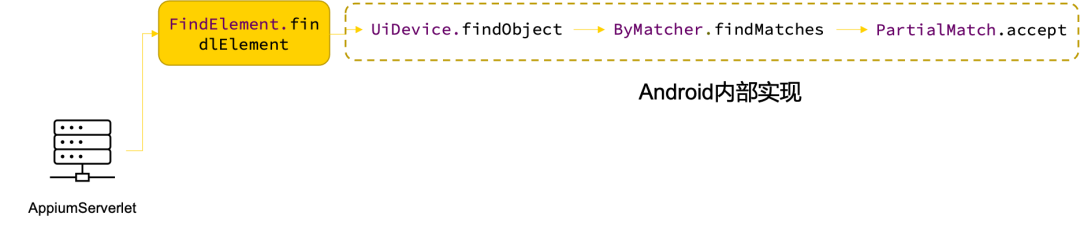
首先,Appium通過調(diào)用 findElement的方式進(jìn)行元素定位。然后,調(diào)用Android提供 UIDevice對(duì)象的findObject方法。最終,通過 PartialMatch.accept完成元素的查找。
接下來我們看一下,這個(gè)PartialMatch.accept到底是如何完成元素定位的。通過對(duì)于源碼的研究,我們發(fā)現(xiàn)元素的信息都是存儲(chǔ)在一個(gè)叫做AccessibilityNodeInfo的對(duì)象里面。源碼中使用大量node.getXXX方法中的信息,大家是否眼熟呢?這些信息其實(shí)就是我們?nèi)粘W詣?dòng)化測試中可以獲取UI元素的屬性。
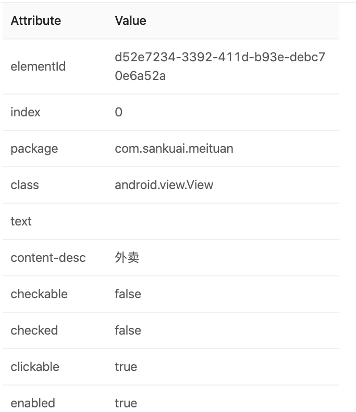
Drawable無法獲取元素信息,是否和AccessibilityNodeInfo相關(guān)?我們進(jìn)一步探究Drawable和AccessibilityNodeInfo的關(guān)系。
AccessibilityNodeInfo和Drawable
通過對(duì)于源碼的研究,我們繪制了如下類圖來解釋AccessibilityNodeInfo和Drawable之間的關(guān)系。
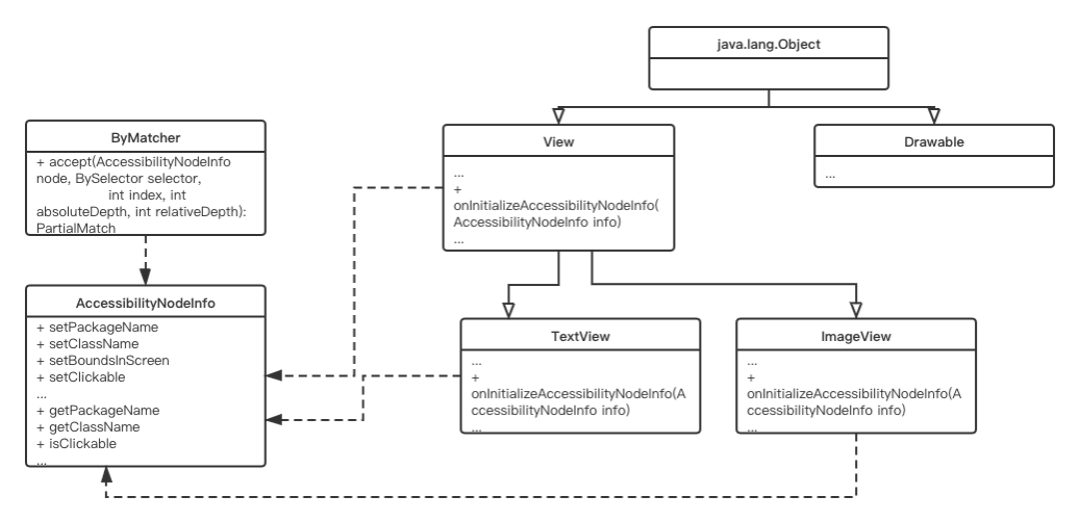
View實(shí)現(xiàn)了AccessibilityEventSource接口并實(shí)現(xiàn)了一個(gè)叫做onInitializeAccessibilityNodeInfo的方法來填充信息。我們也在Android官方文檔中找到了對(duì)于此信息的說明:
onInitializeAccessibilityNodeInfo() :此方法為無障礙服務(wù)提供有關(guān)視圖狀態(tài)的信息。默認(rèn)的
View實(shí)現(xiàn)具有一組標(biāo)準(zhǔn)的視圖屬性,但如果您的自定義視圖提供除了簡單的TextView或Button之外的其他互動(dòng)控件,則您應(yīng)替換此方法并將有關(guān)視圖的其他信息設(shè)置到由此方法處理的AccessibilityNodeInfo對(duì)象中。
而Drawable并沒有實(shí)現(xiàn)對(duì)應(yīng)的方法,所以也就無法被自動(dòng)化測試找到。探究了元素查找原理之后,我們就要開始著手解決問題了。
頁面視圖可測性改造-XraySDK
定位方案對(duì)比
既然知道了Drawable沒有填充AccessibilityNodeInfo,也就說明我無法接入目前的自動(dòng)化測試方案來完成頁面內(nèi)容的獲取。那我們可以想到如下三種方案來解決問題:
| 實(shí)現(xiàn)方案 | 影響范圍 |
|---|---|
| 改造Appium定位方式,讓Drawable可以被識(shí)別 | 需要改動(dòng)底層的AccessibilityNodeInfo obtain(View,int)方法和為Drawable添加AccessibilityNodeInfo這樣就需要對(duì)于所有的Android系統(tǒng)做兼容,影響范圍過大 |
| 使用View替代Drawable | 動(dòng)態(tài)布局卡片使用Drawable進(jìn)行繪制就是因?yàn)镈rawable比View使用資源更少,繪制性能更好,放棄使用Drawable就等于放棄了性能的改進(jìn) |
| 使用圖像識(shí)別進(jìn)行定位 | 動(dòng)態(tài)卡片中有很多圖像中包含文字,還有多行文本都會(huì)對(duì)圖像識(shí)別的準(zhǔn)確性帶來很大的影響 |
上面的三種方案,目前看來都無法有效地解決動(dòng)態(tài)卡片元素定位的問題。如何在影響范圍較小的前提下,達(dá)成獲取視圖信息的目標(biāo)呢?接下來,我們將進(jìn)一步研究動(dòng)態(tài)布局的實(shí)現(xiàn)方案。
視圖信息的獲取和存儲(chǔ)-XrayDumper
我們的應(yīng)用場景非常明確,自動(dòng)化測試通過集成Client來獲得和客戶端交互能力,通過Client向App發(fā)送指令來頁面信息的獲取。那我們可以考慮內(nèi)嵌一個(gè)SDK(XraySDK)來完成視圖的獲取,然后再向自動(dòng)化提供一個(gè)客戶端(XrayClient)來完成這部分功能。

對(duì)于XraySDK的功能劃分,如下表所示:
| 模塊名 | 功能劃分 | 運(yùn)行環(huán)境 | 產(chǎn)品形態(tài) |
|---|---|---|---|
| Xray-Client | 1.和Xray-Server進(jìn)行交互進(jìn)行指令發(fā)送和數(shù)據(jù)的接收 2.暴露對(duì)外的Api給自動(dòng)化或者其他系統(tǒng) | App內(nèi)部 | 客戶端SDK(AAR和Pod-Library) |
| Xray-SDK | 1.進(jìn)行頁面信息的獲取以及結(jié)構(gòu)化(Xray-Dumper) 2.接收用戶指令來進(jìn)行結(jié)構(gòu)化數(shù)據(jù)輸出(Xray-Server) | 自動(dòng)化內(nèi)部或者三方系統(tǒng)內(nèi)部 | JAR包或基于其他語言的依賴包 |
XraySDK如何才能獲取到我們需要的Drawable信息呢?我們先來研究一下動(dòng)態(tài)布局的實(shí)現(xiàn)方案。

動(dòng)態(tài)布局的視圖呈現(xiàn)過程分為:解析模板->綁定數(shù)據(jù)->計(jì)算布局->頁面繪制,計(jì)算布局結(jié)束后,元素在頁面上的位置就已經(jīng)確定了,那么只要攔截這個(gè)階段信息就可以實(shí)現(xiàn)視圖信息的獲取。
通過對(duì)于代碼的研究,我們發(fā)現(xiàn)在com.sankuai.litho.recycler.AdapterCompat這個(gè)類中控制著視圖布局行為,在bindViewHolder中完成視圖的最終的布局和計(jì)算。首先,我們通過在此處插入一個(gè)自定義的監(jiān)聽器來攔截布局信息。
public final void bindViewHolder(BaseViewHolder<Data> viewHolder, int position) {
        if (viewHolder != null) {
            viewHolder.bindView(context, getData(position), position);

            //自動(dòng)化測試回調(diào)
            if (componentTreeCreateListeners != null) {
                if (viewHolder instanceof LithoViewHolder) {
                    DataHolder holder = getData(position);
                    //獲取視圖布局信息
                    LithoView view = ((LithoViewHolder<Data>) viewHolder).lithoView;
                    LayoutController layoutController = ((LithoDynamicDataHolder) holder).getLayoutController(null);
                    VirtualNodeBase node = layoutController.viewNodeRoot;
                    //通過監(jiān)聽器將視圖信息向外傳遞給可測性SDK
                    componentTreeCreateListeners.onComponentTreeCreated(node, view.getRootView(), view.getComponentTree());
                }
            }
        }
    }
然后,通過暴露一個(gè)靜態(tài)方法給可測性SDK,完成監(jiān)聽器的初始化。
public static void setComponentTreeCreateListener(ComponentTreeCreateListener l) {
        AdapterCompat.componentTreeCreateListeners = l;
        try {
            // 兼容mbc的動(dòng)態(tài)布局自動(dòng)化測試,為避免循環(huán)依賴,采用反射調(diào)用
            Class<?> mbcDynamicClass = Class.forName("com.sankuai.meituan.mbc.business.item.dynamic.DynamicLithoItem");
            Method setComponentTreeCreateListener = mbcDynamicClass.getMethod("setComponentTreeCreateListener", ComponentTreeCreateListener.class);
            setComponentTreeCreateListener.invoke(null, l);

        } catch (Exception e) {
            e.printStackTrace();
        }

        try {
            // 搜索新框架動(dòng)態(tài)布局自動(dòng)化測試
            Class<?> searchDynamicClass = Class.forName("com.sankuai.meituan.search.result2.model.DynamicItem");
            Method setSearchComponentTreeCreateListener = searchDynamicClass.getMethod("setComponentTreeCreateListener", ComponentTreeCreateListener.class);
            setSearchComponentTreeCreateListener.invoke(null, l);
        } catch (Exception e) {
            e.printStackTrace();
        }
    }
最后,自動(dòng)化通過設(shè)置自定義的監(jiān)聽器來完成視圖信息的獲取和存儲(chǔ)。
//通過靜態(tài)方法設(shè)置一個(gè)ComponentTreeCreateListener來監(jiān)聽布局事件
AdapterCompat.setComponentTreeCreateListener(new AdapterCompat.ComponentTreeCreateListener() {
            @Override
            public void onComponentTreeCreated(VirtualNodeBase node, View rootView, ComponentTree tree) {
                //將信息存儲(chǔ)到一個(gè)自定義的ViewInfoObserver對(duì)象中
                ViewInfoObserver vif = new ViewInfoObserver();
                vif.update(node, rootView, tree);
            }
        });
我們將視圖信息存儲(chǔ)在ViewInfoObserver這樣一個(gè)對(duì)象中。
public class ViewInfoObserver implements AutoTestObserver{
    public static HashMap<String, View> VIEW_MAP = new HashMap<>();
    public static HashMap<VirtualNodeBase, View> VIEW = new HashMap<>();
    public static HashMap<String, ComponentTree> COMPTREE_MAP = new HashMap<>();
    public static String uri = "http://dashboard.ep.dev.sankuai.com/outter/dynamicTemplateKeyFromJson";

    @Override
    public void update(VirtualNodeBase vn, View view,ComponentTree tree) {
        if (null != vn && null != vn.jsonObject) {
            try {
                String string = vn.jsonObject.toString();
                Gson g = new GsonBuilder().setPrettyPrinting().create();
                JsonParser p = new JsonParser();
                JsonElement e = p.parse(string);

                String templateName = null;
                String name1 = getObject(e,"templateName");
                String name2 = getObject(e,"template_name");
                String name3 = getObject(e,"template");
                templateName = null != name1 ? name1 : (null != name2 ? name2 : (null != name3 ? name3 : null));

                if (null != templateName) {
                //如果已經(jīng)存儲(chǔ)則更新視圖信息
                    if (VIEW_MAP.containsKey(templateName)) {
                        VIEW_MAP.remove(templateName);
                    }
                    //存儲(chǔ)視圖編號(hào)
                    VIEW_MAP.put(templateName, view);
                    if (VIEW.containsKey(templateName)) {
                        VIEW.remove(templateName);
                    }
                    //存儲(chǔ)視圖信息
                    VIEW.put(vn, view);
                    if (COMPTREE_MAP.containsKey(templateName)) {
                        COMPTREE_MAP.remove(templateName);
                    }
                    COMPTREE_MAP.put(templateName, tree);
                    System.out.println("autotestDyn:update success");

                }

            } catch (Exception e) {
                System.out.println(e.toString());
                System.out.println("autotestDyn:templateName not exist!");
            }
        }
    }
當(dāng)需要查詢這些信息的時(shí)候,就可以通過XrayDumper來完成信息的輸出。
public class SubViewInfo {
    public JSONObject getOutData(String template) throws JSONException {
        JSONObject outData = new JSONObject();
        JSONObject componentTouchables = new JSONObject();

        if (!COMPTREE_MAP.isEmpty() && COMPTREE_MAP.containsKey(template) && null != COMPTREE_MAP.get(template)) {
            ComponentTree cpt = COMPTREE_MAP.get(template);
            JSONArray componentArray = new JSONArray();

            ArrayList<View> touchables = cpt.getLithoView().getTouchables();
            LithoView lithoView = cpt.getLithoView();
            int[] ls = new int[2];
            lithoView.getLocationOnScreen(ls);
            int pointX = ls[0];
            int pointY = ls[1];

            for (int i = 0; i < touchables.size(); i++) {
                JSONObject temp = new JSONObject();
                int height = touchables.get(i).getHeight();
                int width = touchables.get(i).getWidth();
                int[] tl = new int[2];
                touchables.get(i).getLocationOnScreen(tl);
                temp.put("height",height);
                temp.put("width",width);
                temp.put("pointX",tl[0]);
                temp.put("pointY",tl[1]);

                String url = "";
                try {
                    EventHandler eh = (EventHandler) getValue(getValue(touchables.get(i), "mOnClickListener"), "mEventHandler");
                    DynamicClickListener listener = (DynamicClickListener) getValue(getValue(eh, "mHasEventDispatcher"), "listener");
                    Uri clickUri = (Uri) getValue(listener, "uri");
                    if (null != clickUri) {
                        url = clickUri.toString();
                    }
                } catch (Exception e) {
                    Log.d("autotest", "get click url error!");
                }

                temp.put("url",url);
                componentArray.put(temp);
            }
            componentTouchables.put("componentTouchables",componentArray);
            componentTouchables.put("componentTouchablesCount", cpt.getLithoView().getTouchables().size());

            View[] root = (View[])getValue(cpt.getLithoView(),"mChildren");
            JSONArray allComponentArray = new JSONArray();
            if (root.length > 0) {
                for (int i = 0; i < root.length; i++) {
                    try {
                        if (null != root[i]) {
                            Object items[] = (Object[]) getValue(getValue(root[i], "mMountItems"), "mValues");
                            componentTouchables.put("componentCount", items.length);
                            for (int itemIndex = 0; itemIndex < items.length; itemIndex++) {
                                getMountItems(allComponentArray, items[itemIndex], pointX, pointY);
                            }
                        }
                    } catch (Exception e) {

                    }
                }
            }
            componentTouchables.put("componentUntouchables",allComponentArray);
        } else {
            Log.d("autotest","COMPTREE_MAP is null!");
        }
        outData.put(template,componentTouchables);
        System.out.println(outData);
        return outData;
    }
    }
}
視圖信息的輸出-XrayServer
我們獲取到了信息,接下來就要考慮如何將視圖信息傳遞給自動(dòng)化測試腳本,我們參考了Appium的設(shè)計(jì)。
Appium通過在手機(jī)上安裝的InstrumentsClient啟動(dòng)了一個(gè)SocketServer通過HTTP協(xié)議來完成自動(dòng)化和底層測試框架的數(shù)據(jù)通信。我們也可以借鑒上述思路,在美團(tuán)App中啟動(dòng)一個(gè)WebServer來完成信息的輸出。
第一步,我們實(shí)現(xiàn)了一個(gè)繼承了Service組件,這樣就可以方便的通過命令行的方式的啟動(dòng)和停止可測性的功能。
public class AutoTestServer extends Service  {
    @Override
    public IBinder onBind(Intent intent) {
        return null;
    }

    @Override
    public int onStartCommand(Intent intent, int flags, int startId) {
    ....
        return super.onStartCommand(intent, flags, startId);
    }
}
第二步,通過HttpServer的方式對(duì)外暴露通信的接口。
public class AutoTestServer extends Service  {
    @Override
    public IBinder onBind(Intent intent) {
        return null;
    }

    @Override
    public int onStartCommand(Intent intent, int flags, int startId) {
        // 創(chuàng)建對(duì)象,端口通過參數(shù)傳入
        if (intent != null) {
            int randNum = intent.getIntExtra("autoTestPort",8999);
            HttpServer myServer = new HttpServer(randNum);
            try {
                // 開啟HTTP服務(wù)
                myServer.start();
                System.out.println("AutoTestPort:" + randNum);
            } catch (IOException e) {
                System.err.println("AutoTestPort:" + e.getMessage());
                myServer = new HttpServer(8999);
                try {
                    myServer.start();
                    System.out.println("AutoTestPort:8999");
                } catch (IOException e1) {
                    System.err.println("Default:" + e.getMessage());
                }
            }
        }
        return super.onStartCommand(intent, flags, startId);
    }
}
第三步,將之前設(shè)置好的監(jiān)聽器進(jìn)行注冊。
public class AutoTestServer extends Service  {
    @Override
    public IBinder onBind(Intent intent) {
        return null;
    }

    @Override
    public int onStartCommand(Intent intent, int flags, int startId) {
    //注冊監(jiān)聽器
        AdapterCompat.setComponentTreeCreateListener(new AdapterCompat.ComponentTreeCreateListener() {
            @Override
            public void onComponentTreeCreated(VirtualNodeBase node, View rootView, ComponentTree tree) {
                ViewInfoObserver vif = new ViewInfoObserver();
                vif.update(node, rootView, tree);
            }
        });

        // 創(chuàng)建對(duì)象,端口通過參數(shù)傳入
        .....
        return super.onStartCommand(intent, flags, startId);
    }
}
最后,在HttpServer中通過不同的路徑來實(shí)現(xiàn)接收不同的指令。
private JSONObject getResponseByUri(@Nonnull IHTTPSession session) throws JSONException {
        String uri = session.getUri();
        if (isFindCommand(uri)) {
            return getResponseByFindUri(uri);
        }
}

@Nonnull
private JSONObject getResponseByFindUri(@Nonnull String uri) throws JSONException {
    String template = uri.split("/")[2];
    String protocol = uri.split("/")[3];
    switch (protocol) {
        case "frame":
            TemplateLayoutFrame tlf = new TemplateLayoutFrame();
            return tlf.getOutData(template);
        case "subview":
            SubViewInfo svi = new SubViewInfo();
            return svi.getOutData(template);
        //省略了部分的代碼處理邏輯
        ....
        default:
            JSONObject errorJson = new JSONObject();
            errorJson.put("success", false);
            errorJson.put("message", "輸入find鏈接地址有誤");
            return errorJson;
    }
}
SDK整體功能結(jié)構(gòu)
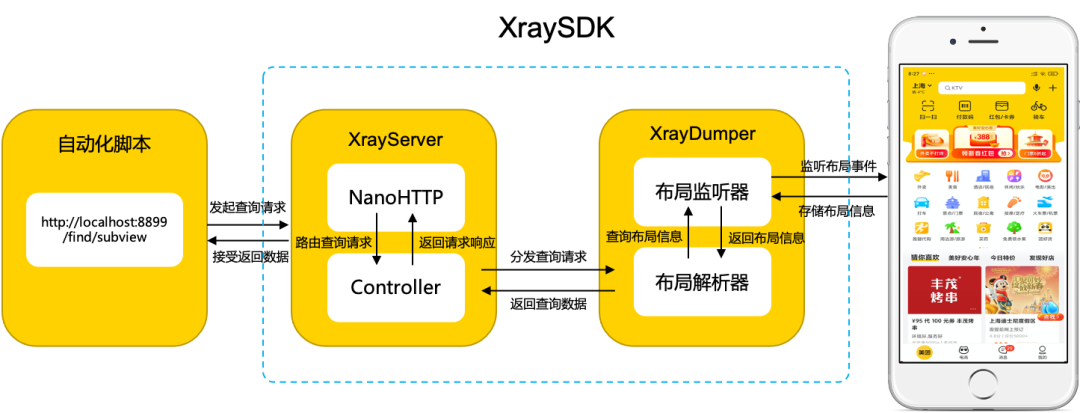
自動(dòng)化腳本通過訪問設(shè)備的特定端口(例如:http://localhost:8899/find/subview),經(jīng)由XrayServer,通過訪問路徑將請求轉(zhuǎn)發(fā)至XrayDumper進(jìn)行信息的提取和輸出。然后布局解析器將布局信息序列化成JSON數(shù)據(jù),再經(jīng)由XrayServer,通過網(wǎng)絡(luò)以HTTP響應(yīng)的方式傳到給自動(dòng)化測試腳本。
視圖信息的增強(qiáng)
除了常規(guī)的位置、內(nèi)容、類型等信息,我們還通過檢查時(shí)間監(jiān)聽器的方式,進(jìn)一步判斷視圖元素是否可以進(jìn)行交互,進(jìn)一步增強(qiáng)了頁面視圖結(jié)構(gòu)的有效信息。
// setGestures
ArrayList<String> gestures = new ArrayList<>();
if (view.isClickable()){
   gestures.add("isClickable");
}
if (view.isLongClickable()){
   gestures.add("isLongClickable");
}
//省略部分代碼
.....
動(dòng)態(tài)布局自動(dòng)化的收益
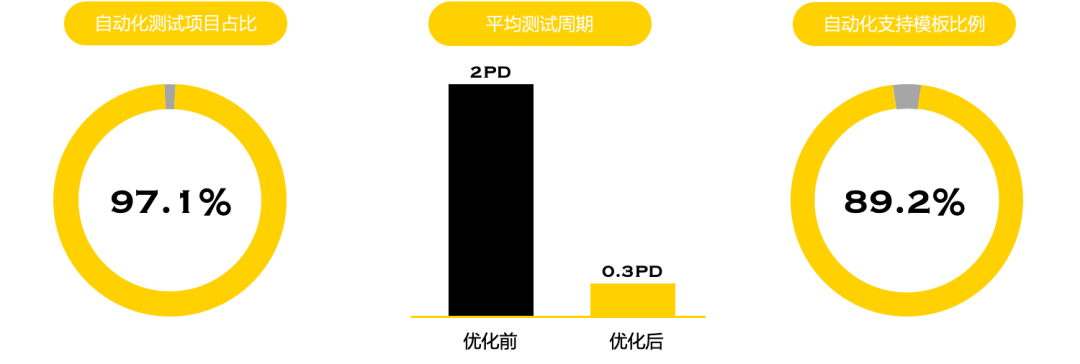
基于視圖可測性的提升,美團(tuán)動(dòng)態(tài)化卡片的自動(dòng)化測試覆蓋度有了大幅的提升,從原來無法做自動(dòng)化測試,到目前80%以上的動(dòng)態(tài)化卡片都實(shí)現(xiàn)了自動(dòng)化測試,而且效率也得到了明顯的提升。
未來展望
頁面視圖信息作為客戶端測試最基礎(chǔ)且重要的屬性之一,是對(duì)用戶視覺信息的一種代碼級(jí)的表示。它對(duì)于機(jī)器識(shí)別頁面元素信息有著非常重要的作用,對(duì)于它的可測性改造將會(huì)給技術(shù)團(tuán)隊(duì)帶來很大的收益。我們會(huì)列舉了幾個(gè)視圖可測性改造的探索方向,僅供大家參考。
使用視圖解析原理解決WebView元素定位
應(yīng)用同樣的思想,我們還可以用來解決WebView元素定位的問題。
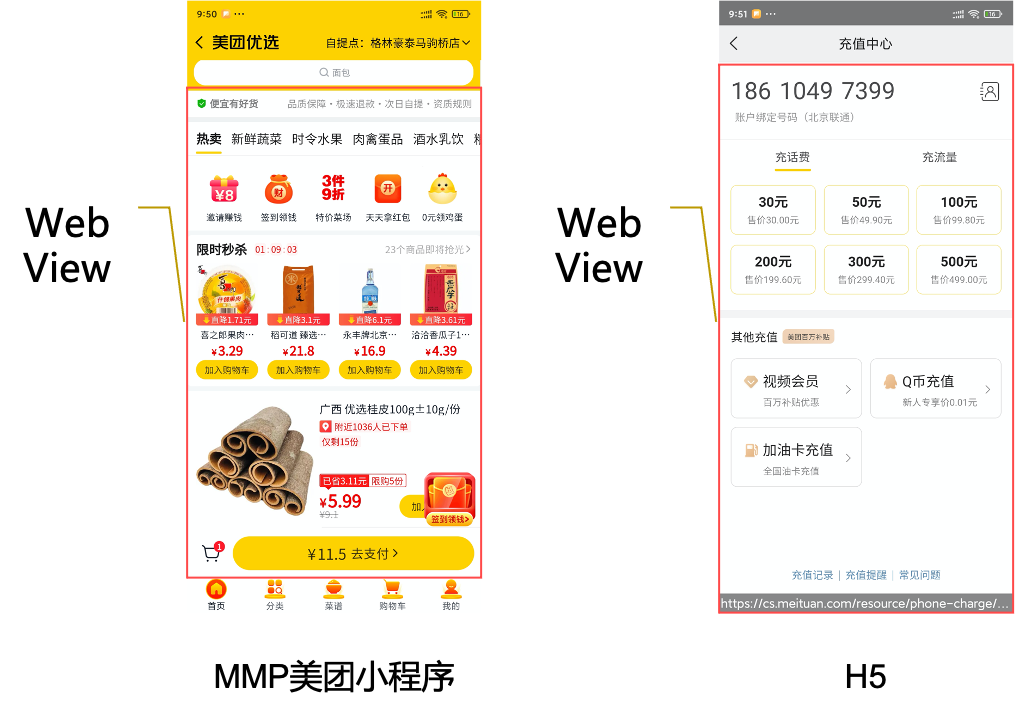
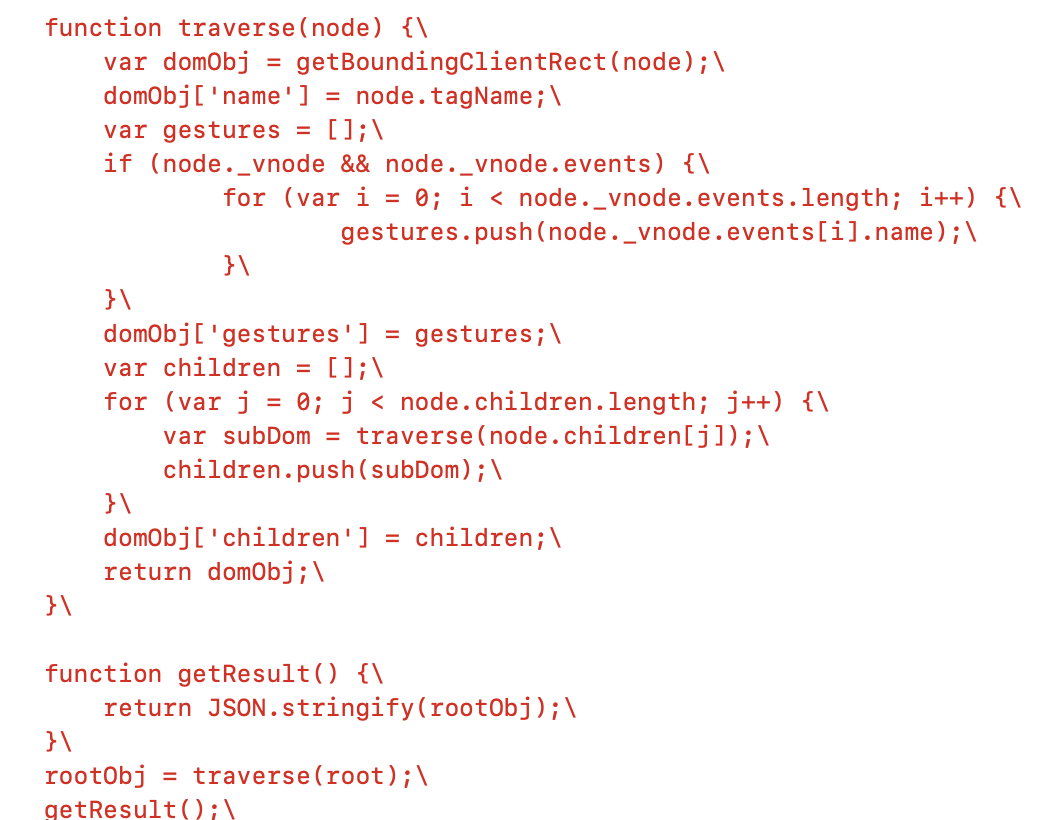
通過運(yùn)行在App內(nèi)部的SDK,可以獲取到對(duì)應(yīng)的WebView實(shí)例。通過獲取到根節(jié)點(diǎn),從根節(jié)點(diǎn)開始進(jìn)行循環(huán)遍歷,同時(shí)把每個(gè)節(jié)點(diǎn)的信息存儲(chǔ)下來就可以得到所有的視圖信息了。
在WebView是否也有同樣合適的根節(jié)點(diǎn)呢?基于對(duì)于HTML的理解,我們可以想到HTML中所有的標(biāo)簽都是掛在BODY標(biāo)簽下面的,BODY標(biāo)簽就是我們需要選取的根節(jié)點(diǎn)。我們可以通過WebElement["attrName"]的方式來進(jìn)行屬性的獲取。
視圖可測性改造更多的應(yīng)用場景
提升功能測試可靠性:在功能測試自動(dòng)化中,通過內(nèi)部更加穩(wěn)定和迅速的視圖信息輸出,可以有效提升自動(dòng)化測試的穩(wěn)定性。避免由于元素?zé)o法獲取或者元素獲取緩慢導(dǎo)致的自動(dòng)化測試失敗。 提升可靠性測試效率:對(duì)于依靠隨機(jī)或者按照視圖信息進(jìn)行頁面隨機(jī)操作的可靠性測試,依賴對(duì)于視圖信息的過濾,也可以只操作可以交互的元素(通過過濾元素事件監(jiān)聽器是否為空)。這樣就可以有效提升可靠性測試的效率,在單位時(shí)間內(nèi)可以完成更多頁面的檢測。 增加兼容性測試檢測手段:在頁面兼容性方面,通過對(duì)頁面組件位置信息和屬性來掃描頁面內(nèi)是否存在不合理的堆疊、空白區(qū)域、形狀異常等UI呈現(xiàn)異常。也可以獲取內(nèi)容信息,例如圖片、文本,來檢查是否存在不適宜內(nèi)容呈現(xiàn)。可以作為圖像對(duì)比方案的有效補(bǔ)充。
招聘信息