
Sqoop 使用shell命令的各種參數(shù)的配置及使用方法
點擊上方藍色字體,選擇“設(shè)為星標”




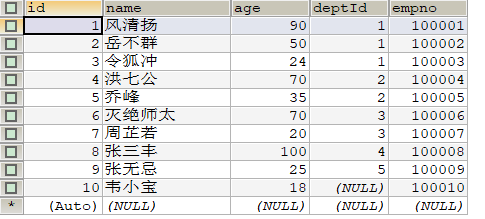
2.1.1 全表導入(部分導入)
bin/sqoop import \##連接的關(guān)系型數(shù)據(jù)庫的url,用戶名,密碼--connect jdbc:mysql://hadoop102:3306/test \--username root \--password 123 \##連接的表--table t_emp \##導出數(shù)據(jù)在hdfs上存放路徑--target-dir /sqoopTest \##如果路徑已存在則先刪除--delete-target-dir \##導入到Hdfs上后,每個字段使用什么參數(shù)進行分割--fields-terminated-by "\t" \##要啟動幾個MapTask,默認4個--num-mappers 2 \##數(shù)據(jù)集根據(jù)哪個字段進行切分,切分后每個MapTask負責一部分--split-by id \##要實現(xiàn)部分導入,加入下面的參數(shù),表示導入哪些列##columns中如果涉及到多列,用逗號分隔,分隔時不要添加空格--columns id,name,age
2.1.2?使用sqoop關(guān)鍵字篩選查詢導入數(shù)據(jù)
bin/sqoop import \--connect jdbc:mysql://hadoop102:3306/test \--username root \--password 123 \--table t_emp \##指定過濾的where語句,where語句最好使用引號包裹--where 'id>6' \--target-dir /sqoopTest \--delete-target-dir \--fields-terminated-by "\t" \--num-mappers 1 \--split-by?id?
2.1.3 使用查詢語句導入
bin/sqoop import \--connect jdbc:mysql://hadoop102:3306/test \--username root \--password 123 \##查詢語句最好使用單引號##如果query后使用的是雙引號,則$CONDITIONS前必須加轉(zhuǎn)移符,防止shell識別為自己的變量--query 'select * from t_emp where id>3 and $CONDITIONS' \--target-dir /sqoopTest \--delete-target-dir \--fields-terminated-by "\t" \--num-mappers 1 \--split-by?id?
bin/sqoop import \--connect jdbc:mysql://hadoop102:3306/test \--username root \--password 123 \--query 'select * from t_emp where id>3 and $CONDITIONS' \--target-dir /sqoopTest \##如果不限定分隔符,那么hive存儲的數(shù)據(jù)將不帶分隔符,之后再想操作很麻煩,所以建議加上--fields-terminated-by "\t" \--delete-target-dir \##導入到hive--hive-import \##是否覆蓋寫,不加這個參數(shù)就是追加寫--hive-overwrite \##指定要導入的hive的表名--hive-table t_emp \--num-mappers 1 \--split-by?id
import_data(){$sqoop import \--connect jdbc:mysql://hadoop102:3306/gmall \--username root \--password 123 \--target-dir /origin_data/gmall/db/$1/$do_date \--delete-target-dir \--query "$2 and \$CONDITIONS" \--num-mappers 1 \--fields-terminated-by '\t' \# 使用壓縮,和指定壓縮格式為lzop--compress \--compression-codec lzop \#將String類型和非String類型的空值替換為\N,方便Hive讀取--null-string '\\N' \--null-non-string '\\N'}
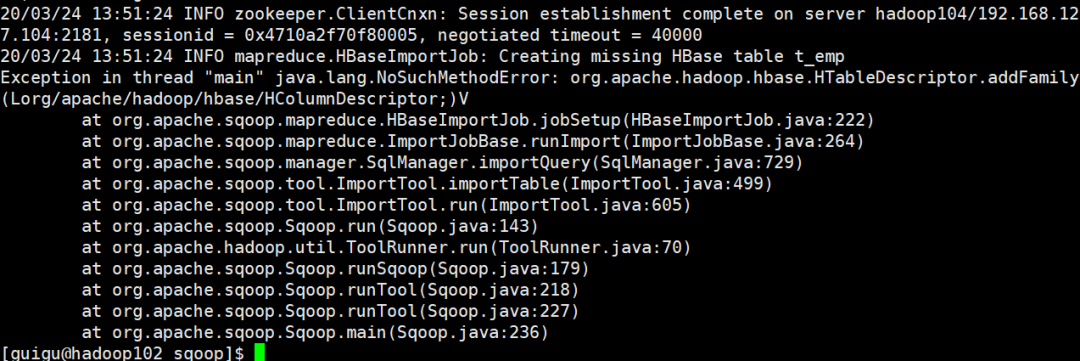
bin/sqoop import \--connect jdbc:mysql://hadoop102:3306/test \--username root \--password 123 \--query 'select * from t_emp where id>3 and $CONDITIONS' \--target-dir /sqoopTest \--delete-target-dir \##表不存在是否創(chuàng)建--hbase-create-table \##hbase中的表名--hbase-table "t_emp" \##將導入數(shù)據(jù)的哪一列作為rowkey--hbase-row-key "id" \##導入的列族--column-family "info" \--num-mappers 2 \--split-by?id
Exception in thread "main" java.lang.NoSuchMethodError: org.apache.hadoop.hbase.HTableDescriptor.addFamily(Lorg/apache/hadoop/hbase/HColumnDescriptor;)V
bin/sqoop export \--connect 'jdbc:mysql://hadoop102:3306/test?useUnicode=true&characterEncoding=utf-8' \--username root \--password 123 \##導出的表名,需要自己提前創(chuàng)建好--table t_emp2 \--num-mappers 1 \##hdfs上導出的數(shù)據(jù)的路徑--export-dir /user/hive/warehouse/t_emp \##hdfs上數(shù)據(jù)的分隔符--input-fields-terminated-by?"\t"
INSERT INTO t_emp2 VALUE(5,'jack',30,3,1111)ON DUPLICATE KEY UPDATE NAME=VALUES(NAME),deptid=VALUES(deptid),empno=VALUES(empno);
3.2.1updateonly模式
bin/sqoop export \--connect 'jdbc:mysql://hadoop103:3306/mydb?useUnicode=true&characterEncoding=utf-8' \--username root \--password 123456 \--table t_emp2 \--num-mappers 1 \--export-dir /hive/t_emp \--input-fields-terminated-by "\t" \--update-key id
3.2.2allowinsert模式
bin/sqoop export \--connect 'jdbc:mysql://hadoop103:3306/mydb?useUnicode=true&characterEncoding=utf-8' \--username root \--password 123456 \--table t_emp2 \--num-mappers 1 \--export-dir /hive/t_emp \--input-fields-terminated-by "\t" \--update-key id \--update-mode??allowinsert
3.3.1配置/etc/my.cnf
bin/sqoop export \--connect 'jdbc:mysql://hadoop103:3306/mydb?useUnicode=true&characterEncoding=utf-8' \--username root \--password 123456 \--table t_emp2 \--num-mappers 1 \--export-dir /hive/t_emp \--input-fields-terminated-by "\t" \--update-key id \--update-mode??allowinsert
3.3.2重啟mysql服務
3.3.3進入/var/lib/mysql,調(diào)用方法
sudo mysqlbinlog mysql-bin.000001
文章不錯?點個【在看】吧!??
評論
圖片
表情