
VBA實(shí)現(xiàn)Excel與CAD表格互轉(zhuǎn)
▎案例需求
最近換了工作,專職給單位做VBA開發(fā)的。很幸運(yùn),領(lǐng)導(dǎo)很重視利用VBA來提高效率,實(shí)現(xiàn)一些辦公流程的自動(dòng)化。其中有一項(xiàng)內(nèi)容就是利用Excel數(shù)據(jù)批量繪制CAD圖紙。
關(guān)于CAD VBA的東西,會(huì)更新幾篇,也是作為自己的備忘。本篇文章更新Excel與CAD表格互相導(dǎo)出導(dǎo)入。
▎具體效果(Excel表格導(dǎo)入CAD)
支持合并單元格,如需更細(xì)致的需求,需要修改代碼相應(yīng)部分。
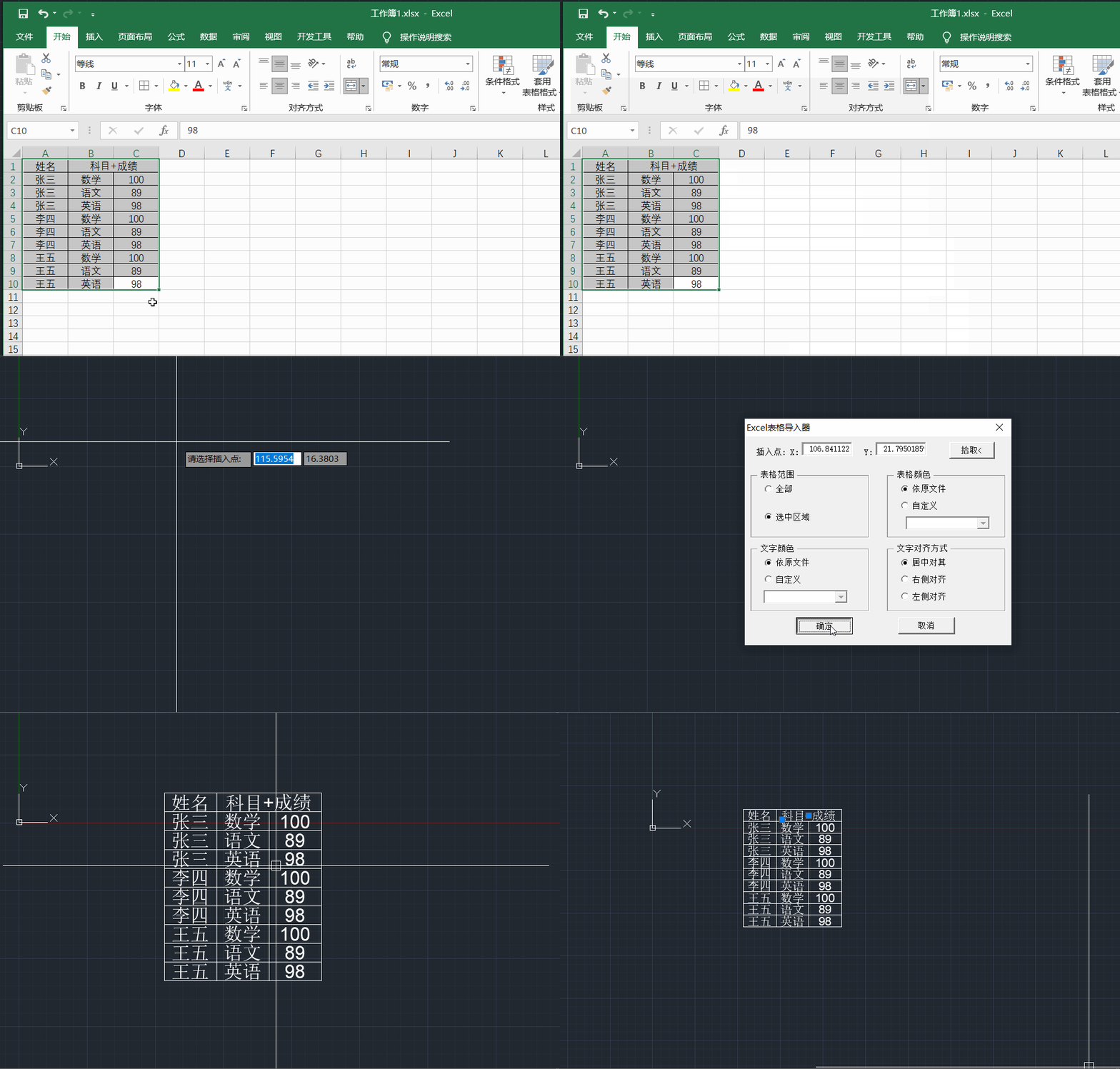
▎詳細(xì)源代碼(Excel表格導(dǎo)入CAD)
窗體源代碼都在這里,源文件我就不放了。VB畫個(gè)窗體還是輕輕松松的。

Option ExplicitPrivate Sub cmdCancel_Click()Unload MeEnd SubPrivate Sub cmdOK_Click()On Error Resume Next'獲取插入點(diǎn)坐標(biāo)Dim ptInsert(2) As DoubleptInsert(0) = txtX.Text: ptInsert(1) = txtY.Text: ptInsert(2) = 0'獲取并連接當(dāng)前但開的excel程序及當(dāng)前表Dim excelApp As ObjectDim excelSheet As ObjectSet excelApp = GetObject(, "excel.application")If Err <> 0 ThenMsgBox "Excel程序未運(yùn)行,請(qǐng)打開Excel程序!"Err.ClearExit SubEnd IfSet excelSheet = excelApp.activesheet'保存要轉(zhuǎn)化的區(qū)域Dim ranges As ObjectIf optAll.Value = True ThenSet ranges = excelSheet.usedrangeElseIf optSelect = True ThenSet ranges = excelApp.SelectionEnd If'對(duì)每個(gè)單元進(jìn)行操作Dim excelRg As ObjectFor Each excelRg In rangesaddTableAndText ranges, excelRg, ptInsertNext excelRg'釋放Excel對(duì)象Set excelSheet = NothingSet excelApp = NothingEnd Sub'轉(zhuǎn)化表格的函數(shù)Public Function addTableAndText(ByVal ranges As Object, ByVal excelRg As Object, ByVal ptInsert As Variant)'聲明一個(gè)AcadLine對(duì)象,以便后續(xù)對(duì)其處理Dim objLine As AcadLine'聲明四個(gè)坐標(biāo)變量Dim ptLT(2) As DoubleDim ptLB(2) As DoubleDim ptRT(2) As DoubleDim ptRB(2) As Double'聲明一個(gè)單元格對(duì)象來求頂點(diǎn)坐標(biāo)Dim rg11 As ObjectSet rg11 = excelRg.Offset(1, 1)'獲取四個(gè)頂點(diǎn)的坐標(biāo)ptLT(0) = ptInsert(0) + excelRg.Left * 0.8 - ranges.Left * 0.8ptLT(1) = ptInsert(1) - (excelRg.top - ranges.top)ptLT(2) = 0ptRB(0) = ptInsert(0) + rg11.Left * 0.8 - ranges.Left * 0.8ptRB(1) = ptInsert(1) - (rg11.top - ranges.top)ptRB(2) = 0ptLB(0) = ptLT(0)ptLB(1) = ptRB(1)ptLB(2) = 0ptRT(0) = ptRB(0)ptRT(1) = ptLT(1)ptRT(2) = 0'左側(cè)線If excelRg.Column = ranges.Column And excelRg.borders.Item(1).linestyle > 0 ThenSet objLine = ThisDrawing.ModelSpace.AddLine(ptLT, ptLB)setTableColor objLine, excelRg.borders.Item(1).colorEnd If'右側(cè)線If excelRg.borders.Item(2).linestyle > 0 ThenSet objLine = ThisDrawing.ModelSpace.AddLine(ptRT, ptRB)setTableColor objLine, excelRg.borders.Item(2).colorEnd If'上邊線If excelRg.row = ranges.row And excelRg.borders.Item(3).linestyle > 0 ThenSet objLine = ThisDrawing.ModelSpace.AddLine(ptLT, ptRT)setTableColor objLine, excelRg.borders.Item(3).colorEnd If'下邊線If excelRg.borders.Item(4).linestyle > 0 ThenSet objLine = ThisDrawing.ModelSpace.AddLine(ptLB, ptRB)setTableColor objLine, excelRg.borders.Item(4).colorEnd If'添加文字Dim objText As AcadTextSet objText = ThisDrawing.ModelSpace.AddText(excelRg.Text, ptLB, excelRg.Font.Size * 0.9)'設(shè)置文字的顏色setTextColor objText, excelRg.Font.color'設(shè)置文字的對(duì)其方式setTextAlignMent objText, ptLT, ptRBEnd Function'改變表格的顏色Public Function setTableColor(ByVal objEntity As AcadEntity, ByVal color As Long)If optTableColor2.Value = True ThenIf cmbTableColor.Text = "By Layer" ThenExit FunctionElseIf cmbTableColor.Text = "紅色" ThenobjEntity.color = acRedElseIf cmbTableColor.Text = "綠色" ThenobjEntity.color = acGreenElseIf cmbTableColor.Text = "藍(lán)色" ThenobjEntity.color = acBlueEnd IfExit FunctionEnd IfDim colorR As LongDim colorG As LongDim colorB As LongIf optTableColor1.Value = True ThenIf color <> 0 ThenDim entityColor As AcadAcCmColorSet entityColor = AcadApplication.GetInterfaceObject("AutoCAD.AcCmColor.19")colorR = color And 255colorG = (color And 65280) / 256colorB = (color And 16711680) / 65536entityColor.SetRGB colorR, colorG, colorBobjEntity.TrueColor = entityColorEnd IfEnd IfEnd Function'改變文字的顏色Public Function setTextColor(ByVal objEntity As AcadEntity, ByVal color As Long)If optTextColor2.Value = True ThenIf cmbTextColor.Text = "By Layer" ThenExit FunctionElseIf cmbTextColor.Text = "紅色" ThenobjEntity.color = acRedElseIf cmbTextColor.Text = "綠色" ThenobjEntity.color = acGreenElseIf cmbTextColor.Text = "藍(lán)色" ThenobjEntity.color = acBlueEnd IfExit FunctionEnd IfDim colorR As LongDim colorG As LongDim colorB As LongIf optTextColor1.Value = True ThenIf color <> 0 ThenDim entityColor As AcadAcCmColorSet entityColor = AcadApplication.GetInterfaceObject("AutoCAD.AcCmColor.19")colorR = color And 255colorG = (color And 65280) / 256colorB = (color And 16711680) / 65536entityColor.SetRGB colorR, colorG, colorBobjEntity.TrueColor = entityColorEnd IfEnd IfEnd Function'文字的對(duì)齊Public Function setTextAlignMent(ByVal objText As AcadText, ByVal ptLT As Variant, ByVal ptRB As Variant)Dim ptMC(2) As DoubleptMC(0) = (ptLT(0) + ptRB(0)) / 2ptMC(1) = (ptLT(1) + ptRB(1)) / 2ptMC(2) = 0If optTextAlignment1.Value = True ThenobjText.Alignment = acAlignmentMiddleCenterobjText.Move objText.TextAlignmentPoint, ptMCExit FunctionEnd IfDim ptML(2) As DoubleptML(0) = ptLT(0)ptML(1) = (ptLT(1) + ptRB(1)) / 2ptML(2) = 0If optTextAlignment2.Value = True ThenobjText.Alignment = acAlignmentMiddleLeftobjText.Move objText.TextAlignmentPoint, ptMLExit FunctionEnd IfDim ptMR(2) As DoubleptMR(0) = ptRB(0)ptMR(1) = (ptLT(1) + ptRB(1)) / 2ptMR(2) = 0If optTextAlignment3.Value = True ThenobjText.Alignment = acAlignmentMiddleRightobjText.Move objText.TextAlignmentPoint, ptMREnd IfEnd FunctionPrivate Sub cmdPickPoint_Click()On Error Resume NextDim pt As VariantUserForm1.Hidept = ThisDrawing.Utility.GetPoint(, "請(qǐng)選擇插入點(diǎn):")txtX.Text = pt(0): txtY.Text = pt(1)UserForm1.showEnd Sub'設(shè)置下拉框的內(nèi)容Public Function addCombbox()cmbTableColor.AddItem "By Layer"cmbTableColor.AddItem "紅色"cmbTableColor.AddItem "綠色"cmbTableColor.AddItem "藍(lán)色"cmbTextColor.AddItem "By Layer"cmbTextColor.AddItem "紅色"cmbTextColor.AddItem "綠色"cmbTextColor.AddItem "藍(lán)色"End FunctionPrivate Sub optTableColor1_Change()If optTableColor1.Value = True ThencmbTableColor.Enabled = FalsecmbTableColor.Text = ""End IfEnd SubPrivate Sub optTableColor2_Click()If optTableColor2.Value = True ThencmbTableColor.Enabled = TruecmbTableColor.Text = "By Layer"End IfEnd SubPrivate Sub optTextColor1_Change()If optTextColor1.Value = True ThencmbTextColor.Enabled = FalsecmbTextColor.Text = ""End IfEnd SubPrivate Sub optTextColor2_Change()If optTextColor2.Value = True ThencmbTextColor.Enabled = TruecmbTextColor.Text = "By Layer"End IfEnd SubPrivate Sub UserForm_Initialize()txtX.Text = 0: txtY.Text = 0optAll.Value = TrueoptTableColor1.Value = TrueoptTextColor1.Value = TrueaddCombboxoptTextAlignment1.Value = TrueEnd?Sub
▎具體效果(CAD表格導(dǎo)入Excel)
支持合并單元格,如需更細(xì)致的需求,需要修改代碼相應(yīng)部分。
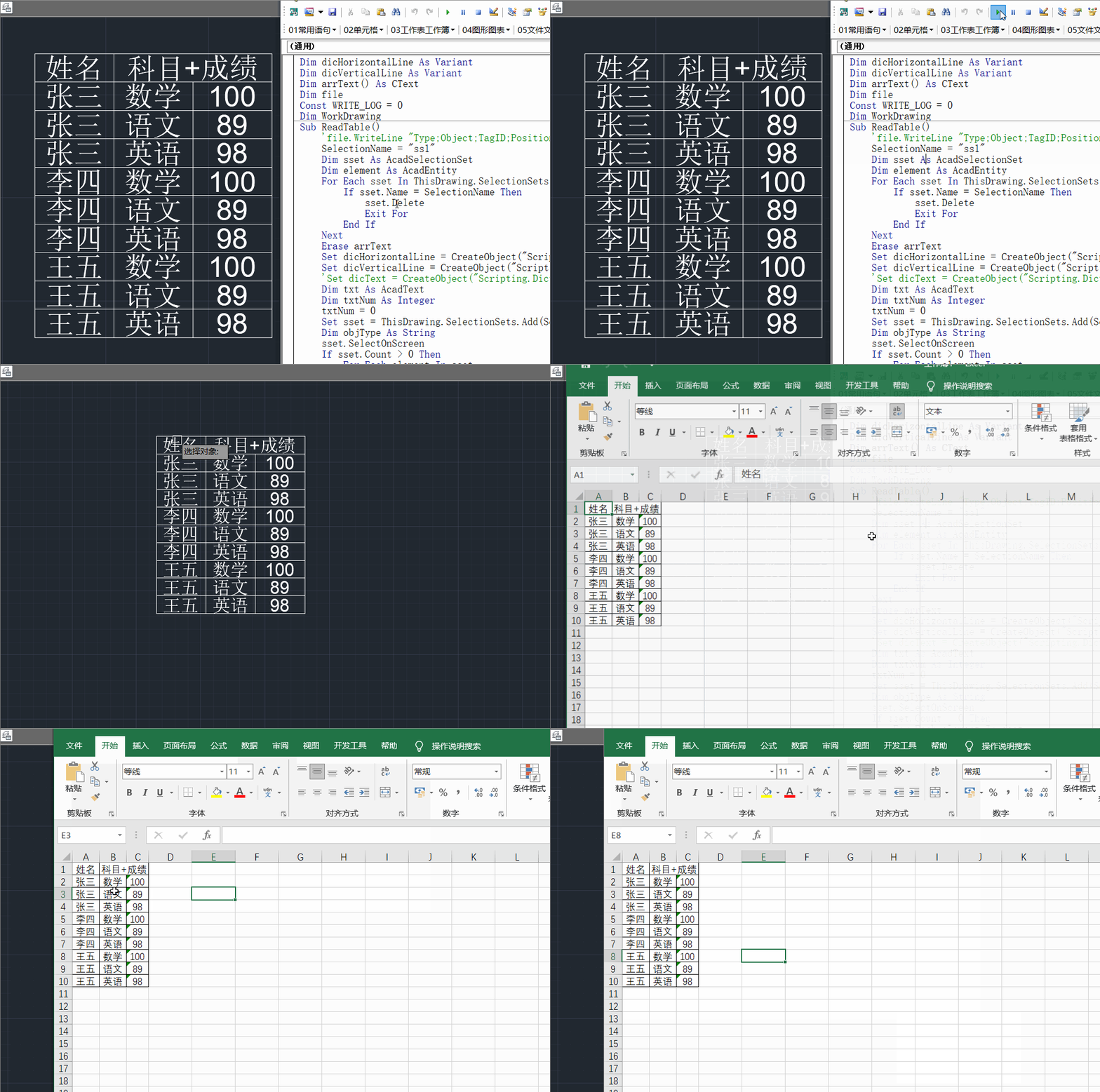
▎詳細(xì)源代碼(CAD表格導(dǎo)入Excel)
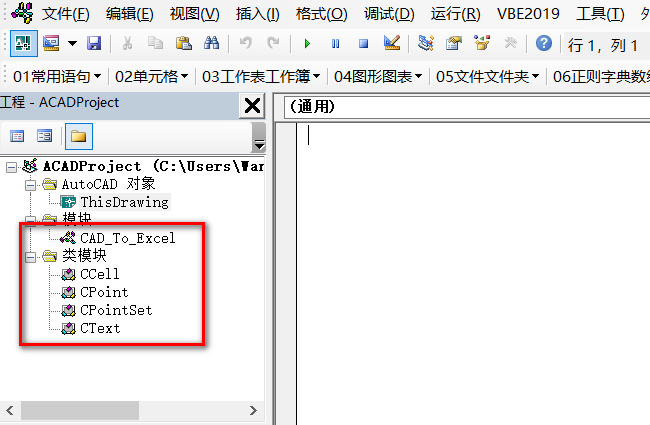
由于涉及到類代碼,這里放個(gè)代碼截圖。
Dim dicHorizontalLine As VariantDim dicVerticalLine As VariantDim arrText() As CTextDim fileConst WRITE_LOG = 0Dim WorkDrawingSub ReadTable()"Type;Object;TagID;Position;Track;Segment;Accuracy;Note;SetupOffset"SelectionName = "ss1"Dim sset As AcadSelectionSetDim element As AcadEntityFor Each sset In ThisDrawing.SelectionSetsIf sset.Name = SelectionName Thensset.DeleteExit ForEnd IfNextErase arrTextSet dicHorizontalLine = CreateObject("Scripting.Dictionary")Set dicVerticalLine = CreateObject("Scripting.Dictionary")dicText = CreateObject("Scripting.Dictionary")Dim txt As AcadTextDim txtNum As IntegertxtNum = 0Set sset = ThisDrawing.SelectionSets.Add(SelectionName)Dim objType As Stringsset.SelectOnScreenIf sset.Count > 0 ThenFor Each element In ssetobjType = element.ObjectNameSelect Case objTypeCase "AcDbLine"AddLine element.StartPoint, element.EndPointCase "AcDbText"Set txt = elementIf 1 ThenOn Error Resume NexttxtNum = UBound(arrText)End IftxtNum = txtNum + 1ReDim Preserve arrText(1 To txtNum)Set arrText(txtNum) = New CText= txt.TextStringDim MinPoint, MaxPointMinPoint, MaxPointMaxPointMinPoint'GetBoundingBoxEnd SelectNextIf WRITE_LOG = 1 ThenSaveLines dicHorizontalLine, "Horizontal"SaveLines dicVerticalLine, "Vertical"Dim fsObjSet fsObj = CreateObject("Scripting.FileSystemObject")Set file = fsObj.CreateTextFile(ThisDrawing.Path & "\debug.csv", True)"Remove Horizontal..."End IfRemoveShortLines dicHorizontalLine, dicVerticalLineIf WRITE_LOG = 1 Then"Remove Vertical..."End IfRemoveShortLines dicVerticalLine, dicHorizontalLinedicHorizontalLinedicVerticalLine, False'DrawTextsExportExcelIf WRITE_LOG = 1 Thenfile.CloseEnd IfEnd If'??????????"ttps asEach tps In dicHorizontalLine'NextEnd SubSub ExportExcel()Dim xlApp As Excel.ApplicationDim xlBook As Excel.WorkbookDim xlSheet As Excel.WorkSheetSet xlApp = CreateObject("Excel.Application")Set xlBook = xlApp.workbooks.AddSet xlsheet = xlBook.Worksheets(1)''dicVerticalLineDim dicHorizontalSortDim dicVerticalSortSet dicHorizontalSort = CreateObject("Scripting.Dictionary")Set dicVerticalSort = CreateObject("Scripting.Dictionary")SortDic dicHorizontalLine, dicHorizontalSortSortDic dicVerticalLine, dicVerticalSortDim dicCellsSet dicCells = CreateObject("Scripting.Dictionary")iHorizontal = dicHorizontalSort.CountiVertical = dicVerticalSort.CountDim downH, upHDim downV, upVDim x, yDim col_from, col_to, row_from, row_toDim strCell As StringDim aCell As CCellDim txt As CTextFor Each atxt In arrTextSet txt = atxtcol) = txt= col + 1x = txt.GetMidX()y = txt.GetMidY()GetScale dicHorizontalLine, y, x, downH, upHGetScale dicVerticalLine, x, y, downV, upVx, y, dicHorizontalSort(downH), dicHorizontalSort(upH), dicVerticalSort(downV), dicVerticalSort(upV)txt.TextString, downV, x, upV, downH, y, upHtxt.TextString, dicVerticalSort(downV), x, dicVerticalSort(upV), iHorizontal - dicHorizontalSort(downH), y, iHorizontal - dicHorizontalSort(upH)col_from = dicVerticalSort(downV) - 1col_to = dicVerticalSort(upV) - 1row_from = iHorizontal - dicHorizontalSort(upH)row_to = iHorizontal - dicHorizontalSort(downH)strCell = xlsheet.Cells(row_from + 1, col_from + 1)+ 1, col_from + 1), xlsheet.Cells(row_to, col_to)).MergeCells = True+ 1, col_from + 1).NumberFormat = "@"strCell = (col_from + 1) & "-" & (row_from + 1)If dicCells.exists(strCell) ThentxtElseSet aCell = New CCell= col_from + 1= row_from + 1txtstrCell, aCellEnd IfNextFor Each ecell In dicCellsSet aCell = dicCells(ecell)aCell.col) = aCell.GetStringNextIf Trim(strCell) <> "" ThenstrCell = strCell & Chr(10) & txt.TextStringElsestrCell = txt.TextStringEnd If+ 1, col_from + 1) = txt.TextString'//調(diào)整導(dǎo)出數(shù)據(jù)格式max_col = CNtoW(xlsheet.usedrange.Columns.Count, xlsheet)max_row = xlsheet.usedrange.Rows.Count:" & max_col).EntireColumn.AutoFitSet rng = xlsheet.range("a1:" & max_col & max_row)rngrng= TrueEnd SubSub GetScale(dic, y_x, x_y, down, up)down = -1up = 9999999For Each v In dicIf dic(v).IsWithin(x_y) ThenIf v > down And v < y_x Thendown = vEnd IfIf v < up And v > y_x Thenup = vEnd IfEnd IfNextEnd SubSub SortDic(dic, sort)= 0For Each num In dici = 1For Each num1 In dicIf num > num1 Theni = i + 1End IfNext= j + 1num, iNextEach num In sortDebug.Print num, dicHorizontalSort(num)'NextEnd SubSub SaveLines(dic, fn)If WRITE_LOG = 1 ThenDim fsObjSet fsObj = CreateObject("Scripting.FileSystemObject")Set file = fsObj.CreateTextFile(ThisDrawing.Path & "\" & fn & ".csv", True)fn & ";Min;Max"For Each tp In dicFor Each ctp In dic(tp).GetPointstp & ";" & ctp.MinP & ";" & ctp.MaxPNextNextfile.CloseEnd IfEnd SubSub DrawLines(dic, Optional Horizontal As Boolean = True)Dim ctp As CPointFor Each tps In dicFor Each tp In dic(tps).GetPointsSet ctp = tpDrawLine tps, ctp.MinP, ctp.MaxP, HorizontalNextNextEnd SubSub DrawTexts()Dim MyText As AcadTextFor Each txt In arrTextMyText = ThisDrawing.ModelSpace.AddText(txt.TextString, txt.MinPoint, 1)NextEnd SubSub DrawLine(pc, p1, p2, Optional Horizontal As Boolean = True)Dim sp(0 To 2) As DoubleDim ep(0 To 2) As Doublex_offset = 0y_offset = 25If Horizontal Then= p1 + x_offset= pc + y_offset= 0= p2 + x_offset= pc + y_offset= 0Else= pc + x_offset= p1 + y_offset= 0= pc + x_offset= p2 + y_offset= 0End IfDim MyLine As AcadLineSet MyLine = ThisDrawing.ModelSpace.AddLine(sp, ep)End SubSub RemoveShortLines(ori, ref)Dim ctp As CPointDim dicRemove As VariantFor Each tps In oriSet dicRemove = CreateObject("Scripting.Dictionary")= 1For Each tp In ori(tps).GetPointsSet ctp = tp"Remove?", tps, tp.MinP, tp.MaxP=If WRITE_LOG = 1 Then"Remove?" & ";" & tps & ";" & tp.MinP & ";" & tp.MaxPEnd IfIf Not IsBorder(ctp, ref) Thenctp, ""End IfNext(dicRemove)Set dicRemove = NothingNextFor Each tps In oriIf ori(tps).Count = 0 ThentpsEnd IfNextEnd SubFunction IsBorder(ByVal tp As CPoint, ByVal ref) As BooleanIsBorder = FalseFor Each tps In refIf tps = tp.MinP Or _tps = tp.MaxP ThenIsBorder = TrueExit FunctionEnd IfNextEnd FunctionSub AddLine(StartPoint, EndPoint)NumDigits = 1ShortestLine = 0.3line_len = ((StartPoint(0) - EndPoint(0)) ^ 2 + (StartPoint(1) - EndPoint(1)) ^ 2) ^ 0.5If line_len < ShortestLine Then Exit Sub= Round(StartPoint(0), NumDigits)= Round(StartPoint(1), NumDigits)= Round(EndPoint(0), NumDigits)= Round(EndPoint(1), NumDigits)If StartPoint(0) = EndPoint(0) ThenAddLineTo dicVerticalLine, StartPoint(0), StartPoint(1), EndPoint(1)End IfIf StartPoint(1) = EndPoint(1) ThenAddLineTo dicHorizontalLine, StartPoint(1), StartPoint(0), EndPoint(0)End IfEnd SubSub AddLineTo(dicLine, x_y, sp, ep)If dicLine.exists(x_y) Thensp, epElseDim tps As CPointSetSet tps = New CPointSetsp, epx_y, tpsEnd IfEnd Sub'/////////////////////////////////////////////////////////////////////調(diào)整格式'/////////////////////////////////////////////////////////////////////'列數(shù)轉(zhuǎn)字母Function CNtoW(ByVal num As Long, sht) As StringCNtoW = Replace(sht.Cells(1, num).Address(False, False), "1", "")End FunctionSub 調(diào)整邊框(rng)With rng.Borders(7)= 1= 0= 0= 2End WithWith rng.Borders(8)= 1= 0= 0= 2End WithWith rng.Borders(9)= 1= 0= 0= 2End WithWith rng.Borders(10)= 1= 0= 0= 2End WithWith rng.Borders(11)= 1= 0= 0= 2End WithWith rng.Borders(12)= 1= 0= 0= 2End WithEnd SubSub 居中對(duì)齊(rng)With rng= -4108= -4108= True= 0= False= 0= False= -5002End WithEnd?Sub
類模塊相關(guān)代碼:
模塊名:CCell
Private?TextList()?As?CTextPublic col As IntegerPublic row As IntegerPublic Sub AddText(txt As CText)Count = 0If 1 ThenOn Error Resume NextCount = UBound(TextList)End IfCount = Count + 1ReDim Preserve TextList(1 To Count)Set TextList(Count) = txtEnd SubPublic Function GetString()On Error Resume NextCount = UBound(TextList)If Count = 1 ThenGetString = TextList(1).TextStringExit FunctionEnd IfGetString = ""Dim strList() As String, strTemp As StringDim yList() As Double, yTemp As DoubleReDim strList(1 To Count)ReDim yList(1 To Count)For i = 1 To Count'For Each txt In TextList'GetString = GetString & Chr(10) & txt.TextStringstrList(i) = TextList(i).TextStringyList(i) = TextList(i).GetMidYNextFor i = 1 To Count - 1For j = i + 1 To CountIf yList(i) < yList(j) ThenyTemp = yList(i)yList(i) = yList(j)yList(j) = yTempstrTemp = strList(i)strList(i) = strList(j)strList(j) = strTempEnd IfNextNextGetString = strList(1)For i = 2 To CountGetString = GetString & Chr(10) & strList(i)NextEnd?Function
模塊名:CPoint
Public MinP As DoublePublic?MaxP?As?Double
模塊名:CPointSet
Public Count As IntegerPrivate arrPoints() As CPointPublic Function GetPoints()GetPoints = arrPointsEnd FunctionPublic Function IsWithin(v) As BooleanIsWithin = FalseFor Each p In arrPointsIf p.MinP <= v And p.MaxP >= v ThenIsWithin = TrueExit FunctionEnd IfNextEnd FunctionPublic Function RemoveShortLines(dicRemove) As IntegerRemoveShortLines = CountIf Count < 1 Then Exit FunctionDim arrP() As CPointReDim arrP(1 To Count)j = 0Dim bRemove As BooleanFor i = 1 To CountbRemove = FalseFor Each p In dicRemoveIf p.MinP = arrPoints(i).MinP And p.MaxP = arrPoints(i).MaxP ThenbRemove = TrueEnd IfNextIf Not bRemove Thenj = j + 1Set arrP(j) = arrPoints(i)End IfNextIf j > 0 ThenReDim Preserve arrP(1 To j)arrPoints = arrPEnd IfCount = jRemoveShortLines = CountEnd FunctionPublic Function RemoveWith(ByVal cpt As CPoint) As IntegerIf Count = 0 ThenCount = 0RemoveWith = 0Exit FunctionEnd IfiRemoveAt = 0For i = 1 To CountIf arrPoints(i).MaxP = cpt.MaxP And arrPoints(i).MinP = cpt.MinP TheniRemoveAt = iExit ForEnd IfNextIf iRemoveAt > 0 ThenCount = Count - 1If Count > 0 Then'If iRemoveAt <= Count ThenFor j = iRemoveAt To CountarrPoints(j).MaxP = arrPoints(j + 1).MaxParrPoints(j).MinP = arrPoints(j + 1).MinPNext'End IfReDim Preserve arrPoints(1 To Count)ElseCount = 0'ReDim arrPoints()End IfEnd IfRemoveWith = CountEnd FunctionPublic Sub Add(Point1, Point2)If Point1 > Point2 ThenMinP = Point2MaxP = Point1ElseMinP = Point1MaxP = Point2End IfIf Count > 0 ThenFor Each point In arrPointsIf point.MaxP = MinP Thenpoint.MaxP = MaxPExit SubEnd IfIf point.MinP = MaxP Thenpoint.MinP = MinPExit SubEnd IfIf point.MaxP = MaxP And point.MinP = MinP Then Exit SubNextEnd IfCount = Count + 1ReDim Preserve arrPoints(1 To Count)Set arrPoints(Count) = New CPointarrPoints(Count).MinP = MinParrPoints(Count).MaxP = MaxPEnd Sub
模塊名:CText
Private MinPoint(0 To 2) As DoublePrivate MaxPoint(0 To 2) As DoublePublic TextString As StringPublic Sub SetMinPoint(p)MinPoint(0) = p(0)MinPoint(1) = p(1)MinPoint(2) = p(2)End SubPublic Sub SetMaxPoint(p)MaxPoint(0) = p(0)MaxPoint(1) = p(1)MaxPoint(2) = p(2)End SubPublic Function GetMinPoint()GetMinPoint = MinPointEnd FunctionPublic Function GetMaxPoint()GetMaxPoint = MaxPoint()End FunctionPublic Function GetMidX()GetMidX = (MinPoint(0) + MaxPoint(0)) / 2End FunctionPublic Function GetMidY()GetMidY = (MinPoint(1) + MaxPoint(1)) / 2End?Function
【建議收藏】VBA說歷史文章匯總 ?速碼工具箱2.0發(fā)布,更強(qiáng)大的功能等你來體驗(yàn)! ?VBA會(huì)被Python代替嗎? ?代碼存儲(chǔ)美化工具測(cè)評(píng)-【VBE2019】 ?Excel和Word數(shù)據(jù)交互讀取(生成合同)
評(píng)論
圖片
表情