
Python 神器 Celery 源碼解析(6):不同啟動(dòng)模式的分析

Celery是一款非常簡單、靈活、可靠的分布式系統(tǒng),可用于處理大量消息,并且提供了一整套操作此系統(tǒng)的工具。Celery 也是一款消息隊(duì)列工具,可用于處理實(shí)時(shí)數(shù)據(jù)以及任務(wù)調(diào)度。
本文是是celery源碼解析的第六篇,在前五篇里分別介紹了:
神器 celery 源碼解析- vine實(shí)現(xiàn)Promise功能 神器 celery 源碼解析- py-amqp實(shí)現(xiàn)AMQP協(xié)議 神器 celery 源碼解析- kombu,一個(gè)python實(shí)現(xiàn)的消息庫 神器 celery 源碼解析- kombu的企業(yè)級算法 神器 celery 源碼解析- celery啟動(dòng)流程分析
本章我們跟著日志一起看看一次完整的任務(wù)調(diào)度流程,從另外一個(gè)角度了解啟動(dòng)過程中celery都做了什么。
worker模式啟動(dòng)流程
我們啟動(dòng)celery的worker, 啟動(dòng)大概分成3個(gè)階段,先看第一階段創(chuàng)建藍(lán)圖:
??celery?-A?myapp?worker?-l?DEBUG
[2021-11-24?15:53:12,984:?DEBUG/MainProcess]?|?Worker:?Preparing?bootsteps.
[2021-11-24?15:53:12,988:?DEBUG/MainProcess]?|?Worker:?Building?graph...
[2021-11-24?15:53:12,988:?DEBUG/MainProcess]?|?Worker:?New?boot?order:?{StateDB,?Timer,?Hub,?Pool,?Autoscaler,?Beat,?Consumer}
[2021-11-24?15:53:13,005:?DEBUG/MainProcess]?|?Consumer:?Preparing?bootsteps.
[2021-11-24?15:53:13,005:?DEBUG/MainProcess]?|?Consumer:?Building?graph...
[2021-11-24?15:53:13,038:?DEBUG/MainProcess]?|?Consumer:?New?boot?order:?{Connection,?Events,?Mingle,?Tasks,?Control,?Gossip,?Agent,?Heart,?event?loop}
這一階段主要啟動(dòng)了worker和consumer2個(gè)藍(lán)圖, 下面是藍(lán)圖的創(chuàng)建和日志可以完整對應(yīng):
class?Blueprint:
????def?apply(self,?parent,?**kwargs):
????????#?創(chuàng)建藍(lán)圖
????????self._debug('Preparing?bootsteps.')
????????order?=?self.order?=?[]
????????steps?=?self.steps?=?self.claim_steps()

????????self._debug('Building?graph...')
????????for?S?in?self._finalize_steps(steps):
????????????step?=?S(parent,?**kwargs)
????????????steps[step.name]?=?step
????????????order.append(step)
????????self._debug('New?boot?order:?{%s}',
????????????????????',?'.join(s.alias?for?s?in?self.order))
????????for?step?in?order:
????????????step.include(parent)
????????return?self
第一個(gè)Worker藍(lán)圖在WorkController中,包括了下面一些步驟:
class?WorkController:

????class?Blueprint(bootsteps.Blueprint):
????"""Worker?bootstep?blueprint."""

????name?=?'Worker'
????default_steps?=?{
????????'celery.worker.components:Hub',
????????'celery.worker.components:Pool',
????????'celery.worker.components:Beat',
????????'celery.worker.components:Timer',
????????'celery.worker.components:StateDB',
????????'celery.worker.components:Consumer',
????????'celery.worker.autoscale:WorkerComponent',
????}
第二個(gè)Consumer藍(lán)圖在Consumer中,包括了下面一些步驟:
class?Consumer:
????"""Consumer?blueprint."""
????class?Blueprint(bootsteps.Blueprint):
????"""Consumer?blueprint."""

????name?=?'Consumer'
????default_steps?=?[
????????'celery.worker.consumer.connection:Connection',
????????'celery.worker.consumer.mingle:Mingle',
????????'celery.worker.consumer.events:Events',
????????'celery.worker.consumer.gossip:Gossip',
????????'celery.worker.consumer.heart:Heart',
????????'celery.worker.consumer.control:Control',
????????'celery.worker.consumer.tasks:Tasks',
????????'celery.worker.consumer.consumer:Evloop',
????????'celery.worker.consumer.agent:Agent',
????]
創(chuàng)建完2個(gè)藍(lán)圖后,并沒有立即啟動(dòng)藍(lán)圖,轉(zhuǎn)而進(jìn)入第二階段創(chuàng)建啟動(dòng)worker,日志輸出如下:
...
[email protected]?v5.1.2?(sun-harmonics)

macOS-10.16-x86_64-i386-64bit?2021-11-24?11:04:09

[config]
.>?app:?????????myapp:0x7fc898739ac0
.>?transport:???redis://localhost:6379/0
.>?results:?????redis://localhost:6379/0
.>?concurrency:?12?(prefork)
.>?task?events:?OFF?(enable?-E?to?monitor?tasks?in?this?worker)

[queues]
.>?celery???????????exchange=celery(direct)?key=celery


[tasks]
??.?celery.accumulate
??.?celery.backend_cleanup
??.?celery.chain
??.?celery.chord
??.?celery.chord_unlock
??.?celery.chunks
??.?celery.group
??.?celery.map
??.?celery.starmap
??.?myapp.add

...
這個(gè)過程app創(chuàng)建完成,把當(dāng)前的配置信息,task列表都展示出來。展示信息的模版:
BANNER?=?"""\
{hostname}?v{version}

{platform}?{timestamp}

[config]
.>?app:?????????{app}
.>?transport:???{conninfo}
.>?results:?????{results}
.>?concurrency:?{concurrency}
.>?task?events:?{events}

[queues]
{queues}
"""

EXTRA_INFO_FMT?=?"""
[tasks]
{tasks}
"""
task信息來自app的tasks,在上篇我們介紹過,其實(shí)就是TaskRegistry;并發(fā)模式默認(rèn)使用的prefork,多進(jìn)程模式;然后是AMQP的消費(fèi)者,queue,exchange等信息:
def?extra_info(self):
????if?self.loglevel?<=?logging.INFO:
????????include_builtins?=?self.loglevel?<=?logging.DEBUG
????????tasklist?=?sep.join(
????????????f'??.?{task}'?for?task?in?sorted(self.app.tasks)
????????????if?(not?task.startswith(int_)?if?not?include_builtins?else?task)
????????)
????????return?EXTRA_INFO_FMT.format(tasks=tasklist)
????????????
def?startup_info(self,?artlines=True):
????app?=?self.app
????concurrency?=?str(self.concurrency)
????appr?=?'{}:{:#x}'.format(app.main?or?'__main__',?id(app))
????...
????banner?=?BANNER.format(
????????app=appr,
????????hostname=safe_str(self.hostname),
????????timestamp=datetime.now().replace(microsecond=0),
????????version=VERSION_BANNER,
????????conninfo=self.app.connection().as_uri(),
????????results=self.app.backend.as_uri(),
????????concurrency=concurrency,
????????platform=safe_str(_platform.platform()),
????????events=events,
????????queues=app.amqp.queues.format(indent=0,?indent_first=False),
????).splitlines()
????...
我們可以查看celery的進(jìn)程數(shù),確認(rèn)總共創(chuàng)建了12個(gè)進(jìn)程(進(jìn)程數(shù)是通過cpu核數(shù)計(jì)算出來):
???~?ps?-ef?|?grep?celery
??501?72465?68316???0??3:53下午?ttys003????0:10.17?/Library/Frameworks/Python.framework/Versions/3.8/Resources/Python.app/Contents/MacOS/Python?/Users/yoo/work/yuanmahui/python/.venv/bin/celery?-A?myapp?worker?-l?DEBUG
??...
??501?72479?72465???0??3:53下午?ttys003????0:00.01?/Library/Frameworks/Python.framework/Versions/3.8/Resources/Python.app/Contents/MacOS/Python?/Users/yoo/work/yuanmahui/python/.venv/bin/celery?-A?myapp?worker?-l?DEBUG
??501?80540?71485???0??5:33下午?ttys005????0:00.00?grep?--color=auto?--exclude-dir=.bzr?--exclude-dir=CVS?--exclude-dir=.git?--exclude-dir=.hg?--exclude-dir=.svn?celery
除了默認(rèn)的多進(jìn)程方式,celery還支持下面這些并發(fā)模式:
ALIASES?=?{
????'prefork':?'celery.concurrency.prefork:TaskPool',
????'eventlet':?'celery.concurrency.eventlet:TaskPool',
????'gevent':?'celery.concurrency.gevent:TaskPool',
????'solo':?'celery.concurrency.solo:TaskPool',
????'processes':?'celery.concurrency.prefork:TaskPool',??#?XXX?compat?alias
????'threads':?'celery.concurrency.thread:TaskPool'
}

def?get_implementation(cls):
????"""Return?pool?implementation?by?name."""
????return?symbol_by_name(cls,?ALIASES)
threads 需要concurrent.futures支持,也就是python3.2版本以上
worker啟動(dòng)的第3階段就是啟動(dòng)藍(lán)圖,日志如下:
[2021-11-24?15:53:13,062:?DEBUG/MainProcess]?|?Worker:?Starting?Hub
[2021-11-24?15:53:13,062:?DEBUG/MainProcess]?^--?substep?ok
[2021-11-24?15:53:13,062:?DEBUG/MainProcess]?|?Worker:?Starting?Pool
[2021-11-24?15:53:13,410:?DEBUG/MainProcess]?^--?substep?ok
[2021-11-24?15:53:13,411:?DEBUG/MainProcess]?|?Worker:?Starting?Consumer
[2021-11-24?15:53:13,411:?DEBUG/MainProcess]?|?Consumer:?Starting?Connection
[2021-11-24?15:53:15,902:?INFO/MainProcess]?Connected?to?redis://localhost:6379/0
[2021-11-24?15:53:15,902:?DEBUG/MainProcess]?^--?substep?ok
[2021-11-24?15:53:15,902:?DEBUG/MainProcess]?|?Consumer:?Starting?Events
[2021-11-24?15:53:15,918:?DEBUG/MainProcess]?^--?substep?ok
[2021-11-24?15:53:15,918:?DEBUG/MainProcess]?|?Consumer:?Starting?Mingle
[2021-11-24?15:53:15,918:?INFO/MainProcess]?mingle:?searching?for?neighbors
[2021-11-24?15:53:16,966:?INFO/MainProcess]?mingle:?all?alone
[2021-11-24?15:53:16,966:?DEBUG/MainProcess]?^--?substep?ok
[2021-11-24?15:53:16,967:?DEBUG/MainProcess]?|?Consumer:?Starting?Tasks
[2021-11-24?15:53:16,975:?DEBUG/MainProcess]?^--?substep?ok
[2021-11-24?15:53:16,975:?DEBUG/MainProcess]?|?Consumer:?Starting?Control
[2021-11-24?15:53:16,988:?DEBUG/MainProcess]?^--?substep?ok
[2021-11-24?15:53:16,988:?DEBUG/MainProcess]?|?Consumer:?Starting?Gossip
[2021-11-24?15:53:17,001:?DEBUG/MainProcess]?^--?substep?ok
[2021-11-24?15:53:17,002:?DEBUG/MainProcess]?|?Consumer:?Starting?Heart
[2021-11-24?15:53:17,008:?DEBUG/MainProcess]?^--?substep?ok
[2021-11-24?15:53:17,008:?DEBUG/MainProcess]?|?Consumer:?Starting?event?loop
[2021-11-24?15:53:17,008:?DEBUG/MainProcess]?|?Worker:?Hub.register?Pool...
[2021-11-24?15:53:17,009:?INFO/MainProcess][email protected]?ready.
[2021-11-24?15:53:17,010:?DEBUG/MainProcess]?basic.qos:?prefetch_count->48
在worker啟動(dòng)中,我們需要關(guān)注worker藍(lán)圖的hub,pool二步(step),consumer藍(lán)圖的connection,events,mingle,task,control,gossip,heart和Evloop七步(step)。
beat模式啟動(dòng)流程
beat模式的啟動(dòng)和worker模式不一樣。beat模式主要是定時(shí)處理,并且beat模式不執(zhí)行具體的任務(wù),只是負(fù)責(zé)觸發(fā)定時(shí)任務(wù)。其啟動(dòng)日志如下:
??celery?-A?myapp?beat?-l?DEBUG
celery?beat?v5.0.5?(singularity)?is?starting.
__????-????...?__???-????????_
LocalTime?->?2021-12-05?15:40:39
Configuration?->
????.?broker?->?redis://localhost:6379/0
????.?loader?->?celery.loaders.app.AppLoader
????.?scheduler?->?celery.beat.PersistentScheduler
????.?db?->?celerybeat-schedule
????.?logfile?->?[stderr]@%DEBUG
????.?maxinterval?->?5.00?minutes?(300s)
[2021-12-05?15:40:39,639:?DEBUG/MainProcess]?Setting?default?socket?timeout?to?30
[2021-12-05?15:40:39,639:?INFO/MainProcess]?beat:?Starting...
[2021-12-05?15:40:39,667:?DEBUG/MainProcess]?Current?schedule:

[2021-12-05?15:40:39,668:?DEBUG/MainProcess]?beat:?Ticking?with?max?interval->5.00?minutes
[2021-12-05?15:40:39,668:?DEBUG/MainProcess]?beat:?Waking?up?in?5.00?minutes.
[2021-12-05?15:45:39,608:?DEBUG/MainProcess]?beat:?Synchronizing?schedule...
[2021-12-05?15:45:39,609:?DEBUG/MainProcess]?beat:?Waking?up?in?5.00?minutes.
從日志可以看到beat模式啟動(dòng)也大概可以分成2個(gè)階段。第一個(gè)階段就是創(chuàng)建和啟動(dòng)任務(wù)調(diào)度器,由beat命令提供:
class?Beat:
????"""Beat?as?a?service."""
????
????def?run(self):
????????print(str(self.colored.cyan(
????????????f'celery?beat?v{VERSION_BANNER}?is?starting.')))
????????self.init_loader()
????????self.set_process_title()
????????self.start_scheduler()
第二個(gè)階段,任務(wù)調(diào)度器開始時(shí)間循環(huán):
#?celery/beat.py

class?Service:
????"""Celery?periodic?task?service."""
????
????scheduler_cls?=?PersistentScheduler
????
????def?start(self,?embedded_process=False):
????????info('beat:?Starting...')
????????debug('beat:?Ticking?with?max?interval->%s',
??????????????humanize_seconds(self.scheduler.max_interval))

????????signals.beat_init.send(sender=self)
????????if?embedded_process:
????????????signals.beat_embedded_init.send(sender=self)
????????????platforms.set_process_title('celery?beat')

????????try:
????????????while?not?self._is_shutdown.is_set():
????????????????interval?=?self.scheduler.tick()
????????????????if?interval?and?interval?>?0.0:
????????????????????debug('beat:?Waking?up?%s.',
??????????????????????????humanize_seconds(interval,?prefix='in?'))
????????????????????time.sleep(interval)
????????????????????if?self.scheduler.should_sync():
????????????????????????self.scheduler._do_sync()
????????except?(KeyboardInterrupt,?SystemExit):
????????????self._is_shutdown.set()
????????finally:
????????????self.sync()
這里的時(shí)間循環(huán)使用一個(gè)while循環(huán)去完成,每次tick都會檢查是否有需要執(zhí)行的任務(wù),默認(rèn)5分鐘檢查一次。
如果到達(dá)任務(wù)執(zhí)行的時(shí)刻,則是通過下面的apply_async發(fā)送到worker(遠(yuǎn)程)去執(zhí)行:
def?apply_async(self,?entry,?producer=None,?advance=True,?**kwargs):
????#?Update?time-stamps?and?run?counts?before?we?actually?execute,
????#?so?we?have?that?done?if?an?exception?is?raised?(doesn't?schedule
????#?forever.)
????entry?=?self.reserve(entry)?if?advance?else?entry
????task?=?self.app.tasks.get(entry.task)

????try:
????????entry_args?=?[v()?if?isinstance(v,?BeatLazyFunc)?else?v?for?v?in?(entry.args?or?[])]
????????entry_kwargs?=?{k:?v()?if?isinstance(v,?BeatLazyFunc)?else?v?for?k,?v?in?entry.kwargs.items()}
????????return?task.apply_async(entry_args,?entry_kwargs,
????????????????????????????????????producer=producer,
????????????????????????????????????**entry.options)
multi模式啟動(dòng)流程
使用multi模式啟動(dòng)celery,可以讓celery以服務(wù)的形式在background執(zhí)行任務(wù),并且可以啟動(dòng)更多的celery的執(zhí)行進(jìn)程。使用下面命令啟動(dòng)2個(gè)node ,w1和w2。
??celery?multi?start?w1?w2?-A?myapp?-l?DEBUG
celery?multi?v5.0.5?(singularity)
>?Starting?nodes...
?>?w1@bogon:?OK
?>?w2@bogon:?OK
注意這個(gè)命令需要sudo權(quán)限
使用下面命令監(jiān)測celery服務(wù)的狀態(tài)。
??celery?-A?myapp?status
->??w1@bogon:?OK
->??w2@bogon:?OK

2?nodes?online.
w1的啟動(dòng)流程會寫入到日志,日志內(nèi)容如下:
??cat?/var/log/celery/w1.log
[2021-12-05?15:59:11,161:?DEBUG/MainProcess]?|?Worker:?Preparing?bootsteps.
[2021-12-05?15:59:11,162:?DEBUG/MainProcess]?|?Worker:?Building?graph...
[2021-12-05?15:59:11,163:?DEBUG/MainProcess]?|?Worker:?New?boot?order:?{Beat,?StateDB,?Timer,?Hub,?Pool,?Autoscaler,?Consumer}
[2021-12-05?15:59:11,175:?DEBUG/MainProcess]?|?Consumer:?Preparing?bootsteps.
[2021-12-05?15:59:11,175:?DEBUG/MainProcess]?|?Consumer:?Building?graph...
[2021-12-05?15:59:11,206:?DEBUG/MainProcess]?|?Consumer:?New?boot?order:?{Connection,?Events,?Mingle,?Tasks,?Control,?Agent,?Gossip,?Heart,?event?loop}
[2021-12-05?15:59:11,219:?DEBUG/MainProcess]?|?Worker:?Starting?Hub
[2021-12-05?15:59:11,219:?DEBUG/MainProcess]?^--?substep?ok
[2021-12-05?15:59:11,220:?DEBUG/MainProcess]?|?Worker:?Starting?Pool
[2021-12-05?15:59:11,517:?DEBUG/MainProcess]?^--?substep?ok
[2021-12-05?15:59:11,518:?DEBUG/MainProcess]?|?Worker:?Starting?Consumer
[2021-12-05?15:59:11,518:?DEBUG/MainProcess]?|?Consumer:?Starting?Connection
[2021-12-05?15:59:11,549:?INFO/MainProcess]?Connected?to?redis://localhost:6379/0
[2021-12-05?15:59:11,549:?DEBUG/MainProcess]?^--?substep?ok
[2021-12-05?15:59:11,549:?DEBUG/MainProcess]?|?Consumer:?Starting?Events
[2021-12-05?15:59:11,561:?DEBUG/MainProcess]?^--?substep?ok
[2021-12-05?15:59:11,561:?DEBUG/MainProcess]?|?Consumer:?Starting?Mingle
[2021-12-05?15:59:11,562:?INFO/MainProcess]?mingle:?searching?for?neighbors
[2021-12-05?15:59:12,602:?INFO/MainProcess]?mingle:?all?alone
[2021-12-05?15:59:12,602:?DEBUG/MainProcess]?^--?substep?ok
[2021-12-05?15:59:12,603:?DEBUG/MainProcess]?|?Consumer:?Starting?Tasks
[2021-12-05?15:59:12,609:?DEBUG/MainProcess]?^--?substep?ok
[2021-12-05?15:59:12,609:?DEBUG/MainProcess]?|?Consumer:?Starting?Control
[2021-12-05?15:59:12,621:?DEBUG/MainProcess]?^--?substep?ok
[2021-12-05?15:59:12,622:?DEBUG/MainProcess]?|?Consumer:?Starting?Gossip
[2021-12-05?15:59:12,632:?DEBUG/MainProcess]?^--?substep?ok
[2021-12-05?15:59:12,633:?DEBUG/MainProcess]?|?Consumer:?Starting?Heart
[2021-12-05?15:59:12,638:?DEBUG/MainProcess]?^--?substep?ok
[2021-12-05?15:59:12,638:?DEBUG/MainProcess]?|?Consumer:?Starting?event?loop
[2021-12-05?15:59:12,638:?DEBUG/MainProcess]?|?Worker:?Hub.register?Pool...
[2021-12-05?15:59:12,639:?INFO/MainProcess]?w1@bogon?ready.
[2021-12-05?15:59:12,639:?DEBUG/MainProcess]?basic.qos:?prefetch_count->48
[2021-12-05?15:59:18,039:?DEBUG/MainProcess]?pidbox?received?method?hello(from_node='w2@bogon',?revoked={})?[reply_to:{'exchange':?'reply.celery.pidbox',?'routing_key':?'196c0b68-a329-3e09-a1cf-54abb5e057db'}?ticket:e640e757-9514-436c-8548-0ddcbe15f9a4]
[2021-12-05?15:59:18,040:?INFO/MainProcess]?sync?with?w2@bogon
[2021-12-05?15:59:19,088:?DEBUG/MainProcess]?w2@bogon?joined?the?party
w1的啟動(dòng)方式和worker模式基本一致,特別的地方在日志的最后部分顯示w2啟動(dòng)完成后,w1和w2進(jìn)行了互聯(lián)。對應(yīng)可以在w2的日志中看到w1的連接信息:
??cat?/var/log/celery/w2.log
...
[2021-12-05?15:59:19,089:?INFO/MainProcess]?w2@bogon?ready.
[2021-12-05?15:59:19,089:?DEBUG/MainProcess]?basic.qos:?prefetch_count->48
[2021-12-05?15:59:20,663:?DEBUG/MainProcess]?w1@bogon?joined?the?party
所以multi模式的特點(diǎn)就是新增加了Cluster和Node的概念,用來管理所有的worker,主要代碼如下:
@splash
@using_cluster
def?start(self,?cluster):
????self.note('>?Starting?nodes...')
????return?int(any(cluster.start()))

def?start(self):
????return?[self.start_node(node)?for?node?in?self]

def?start_node(self,?node):
????maybe_call(self.on_node_start,?node)
????retcode?=?node.start(
????????????self.env,
????????????on_spawn=self.on_child_spawn,
????????????on_signalled=self.on_child_signalled,
????????????on_failure=self.on_child_failure,
????????)
????maybe_call(self.on_node_status,?node,?retcode)
????return?retcode
Node直接同步是在Gossip的step中:
class?Gossip(bootsteps.ConsumerStep):
????...
????def?on_node_join(self,?worker):
????????debug('%s?joined?the?party',?worker.hostname)
????????self._call_handlers(self.on.node_join,?worker)
完成測試后,可以使用命令?
celery multi stop w1 w2?關(guān)閉node
worker接收任務(wù)流程
worker接收任務(wù)并執(zhí)行的日志如下:
[2021-11-24?21:33:50,535:?INFO/MainProcess]?Received?task:?myapp.add[e9bb4aa0-8280-443f-a5ed-3deb0a0b99c2]
[2021-11-24?21:33:50,535:?DEBUG/MainProcess]?TaskPool:?Apply?<function?_trace_task_ret?at?0x7fe6086ac280>?(args:('myapp.add',?'e9bb4aa0-8280-443f-a5ed-3deb0a0b99c2',?{'lang':?'py',?'task':?'myapp.add',?'id':?'e9bb4aa0-8280-443f-a5ed-3deb0a0b99c2',?'shadow':?None,?'eta':?None,?'expires':?None,?'group':?None,?'group_index':?None,?'retries':?0,?'timelimit':?[None,?None],?'root_id':?'e9bb4aa0-8280-443f-a5ed-3deb0a0b99c2',?'parent_id':?None,?'argsrepr':?'(16,?16)',?'kwargsrepr':?'{}',?'origin':?'[email protected]',?'reply_to':?'63862dbb-9d82-3bdd-b7fb-03580941362a',?'correlation_id':?'e9bb4aa0-8280-443f-a5ed-3deb0a0b99c2',?'hostname':?'[email protected]',?'delivery_info':?{'exchange':?'',?'routing_key':?'celery',?'priority':?0,?'redelivered':?None},?'args':?[16,?16],?'kwargs':?{}},?b'[[16,?16],?{},?{"callbacks":?null,?"errbacks":?null,?"chain":?null,?"chord":?null}]',?'application/json',?'utf-8')?kwargs:{})
[2021-11-24?21:33:50,536:?DEBUG/MainProcess]?Task?accepted:?myapp.add[e9bb4aa0-8280-443f-a5ed-3deb0a0b99c2]?pid:83086
[2021-11-24?21:33:50,537:?INFO/ForkPoolWorker-8]?Task?myapp.add[e9bb4aa0-8280-443f-a5ed-3deb0a0b99c2]?succeeded?in?0.000271957000000711s:?32
從日志信息可以看到,主進(jìn)程MainProcess收到task執(zhí)行的請求,然后從任務(wù)池中獲取到任務(wù),然后調(diào)度任務(wù)到一個(gè)子進(jìn)程ForkPoolWorker-9中執(zhí)行。
任務(wù)的接收是在默認(rèn)的策略函數(shù)中開始:
#?celery/worker/strategy.py

def?default(task,?app,?consumer,
????????????info=logger.info,?error=logger.error,?task_reserved=task_reserved,
????????????to_system_tz=timezone.to_system,?bytes=bytes,
????????????proto1_to_proto2=proto1_to_proto2):
????"""Default?task?execution?strategy.

????Note:
????????Strategies?are?here?as?an?optimization,?so?sadly
????????it's?not?very?easy?to?override.
????"""
????...
????info('Received?task:?%s',?req)
????...
任務(wù)池是由并發(fā)模型提供:
#?celery/concurrency/base.py

def?apply_async(self,?target,?args=None,?kwargs=None,?**options):
????"""Equivalent?of?the?:func:`apply`?built-in?function.

????Callbacks?should?optimally?return?as?soon?as?possible?since
????otherwise?the?thread?which?handles?the?result?will?get?blocked.
????"""
????kwargs?=?{}?if?not?kwargs?else?kwargs
????args?=?[]?if?not?args?else?args
????if?self._does_debug:
????????logger.debug('TaskPool:?Apply?%s?(args:%s?kwargs:%s)',
?????????????????????target,?truncate(safe_repr(args),?1024),
?????????????????????truncate(safe_repr(kwargs),?1024))

????return?self.on_apply(target,?args,?kwargs,
?????????????????????????waitforslot=self.putlocks,
?????????????????????????callbacks_propagate=self.callbacks_propagate,
?????????????????????????**options)
小結(jié)
我們通過對worker,beat和multi三種啟動(dòng)模式的日志跟蹤分析,對celery的啟動(dòng)流程和模塊功能有更進(jìn)一步的了解。
三個(gè)模式都需要?jiǎng)?chuàng)建app,所以啟動(dòng)時(shí)候通過參數(shù)-A myapp參數(shù),由app創(chuàng)建/查找各種task。不同的地方首先是beat和worker/multi不同,beat實(shí)際上就是一個(gè)生產(chǎn)者,通過配置定時(shí)的產(chǎn)生任務(wù),然后發(fā)送給worker/multi具體執(zhí)行。
其次不同的是worker和multi的運(yùn)作方式,multi以服務(wù)方式運(yùn)行,并且可以跨機(jī)器。在worker模式下,本機(jī)創(chuàng)建多個(gè)工作進(jìn)程,是一個(gè)多進(jìn)程模型。multi則是多個(gè)機(jī)器Node形成一個(gè)Cluster集群,任務(wù)在集群內(nèi)部進(jìn)行調(diào)度。
celery的分布式模型大概可以如下圖:
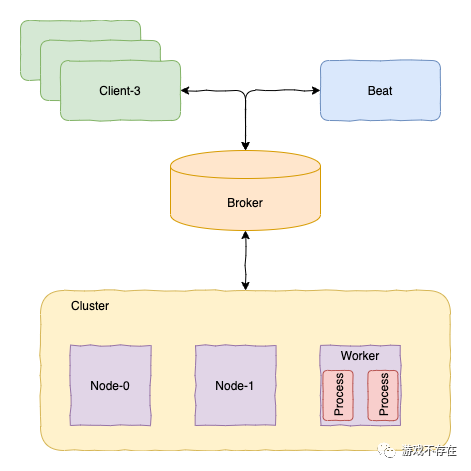
同時(shí)通過運(yùn)行日志分析,我們可以知道celery的啟動(dòng)過程通過不同的Blueprint的不同Step過程實(shí)現(xiàn);定時(shí)功能主要在beat和schedule模塊實(shí)現(xiàn);而分布式功能主要在concurrency模塊,這樣對各個(gè)模塊的主體功能分工會有更清晰的認(rèn)知。

還不過癮?試試它們
▲Python最會變魔術(shù)的魔術(shù)方法,我覺得是它!