
.NET開源推薦:簡單、高效、避免OOM的Excel工具
前言
最近晚輩嘗試做一個.NET簡單、高效、避免OOM的Excel工具 MiniExcel。
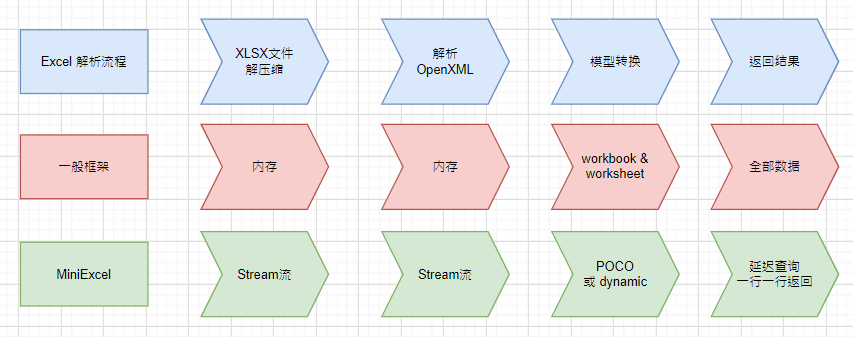
主要目前主流框架大多將資料全載入到內(nèi)存方便操作,但這會導(dǎo)致內(nèi)存消耗問題,MiniExcel 嘗試以 Stream 角度寫底層算法邏輯,能讓原本1000多MB占用降低到幾MB,避免內(nèi)存不夠情況。適合像是低規(guī)格 azure app service 或是讀取大文件等情境。
特點
低內(nèi)存耗用,避免OOM(out of memoery)、頻繁 Full GC 情況 支持 即時操作每行數(shù)據(jù)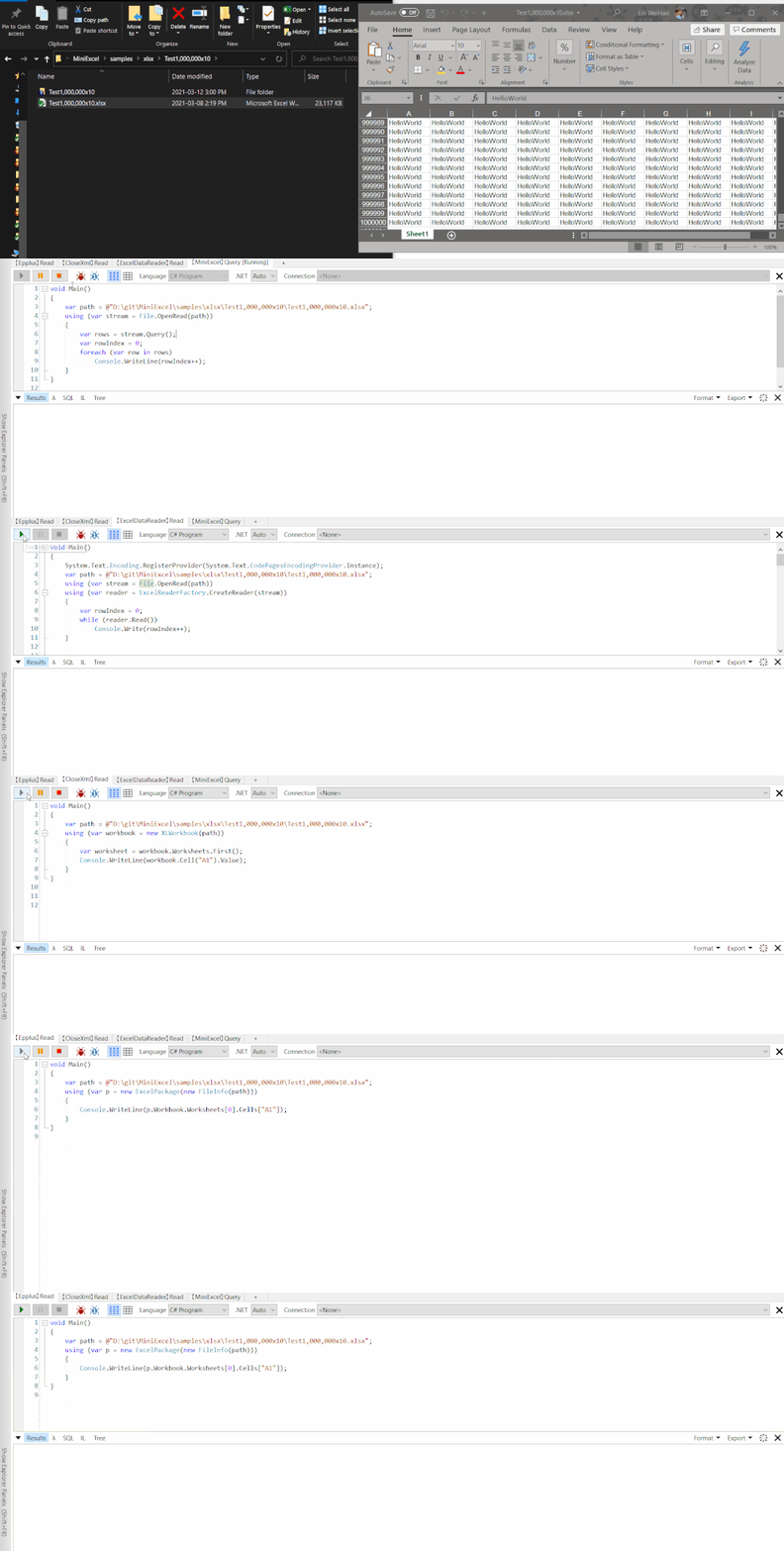
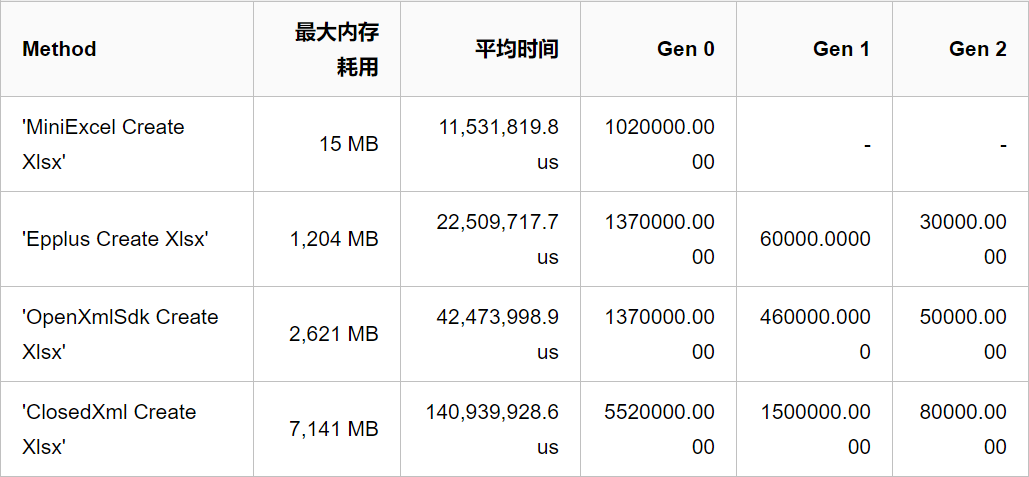
兼具搭配 LINQ 延遲查詢特性,能辦到低消耗、快速分頁等復(fù)雜查詢 圖片:與主流框架對比的消耗、效率差 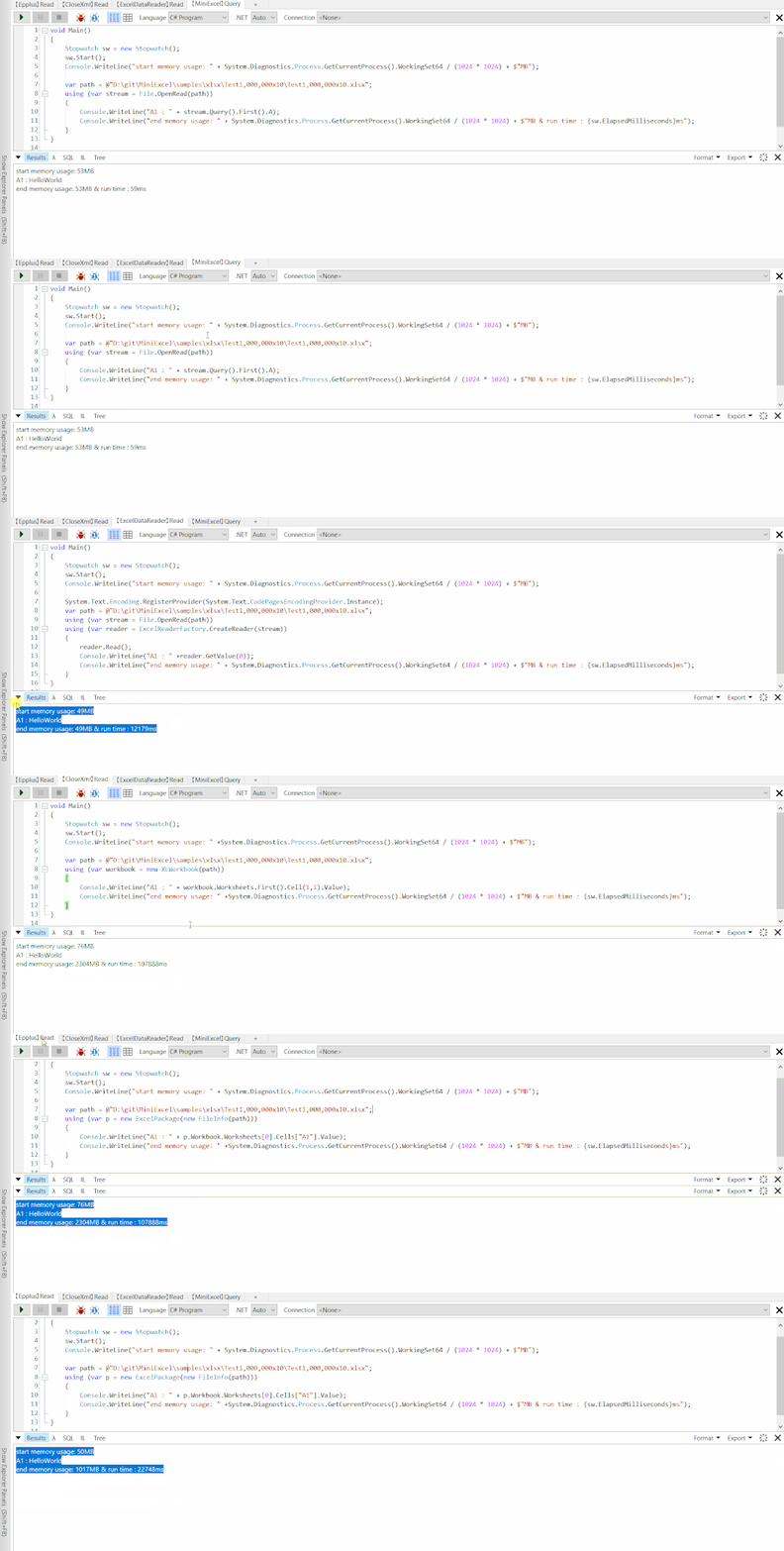
輕量,不依賴任何套件,DLL小于100KB 簡便操作的 Dapper API 風(fēng)格
性能測試
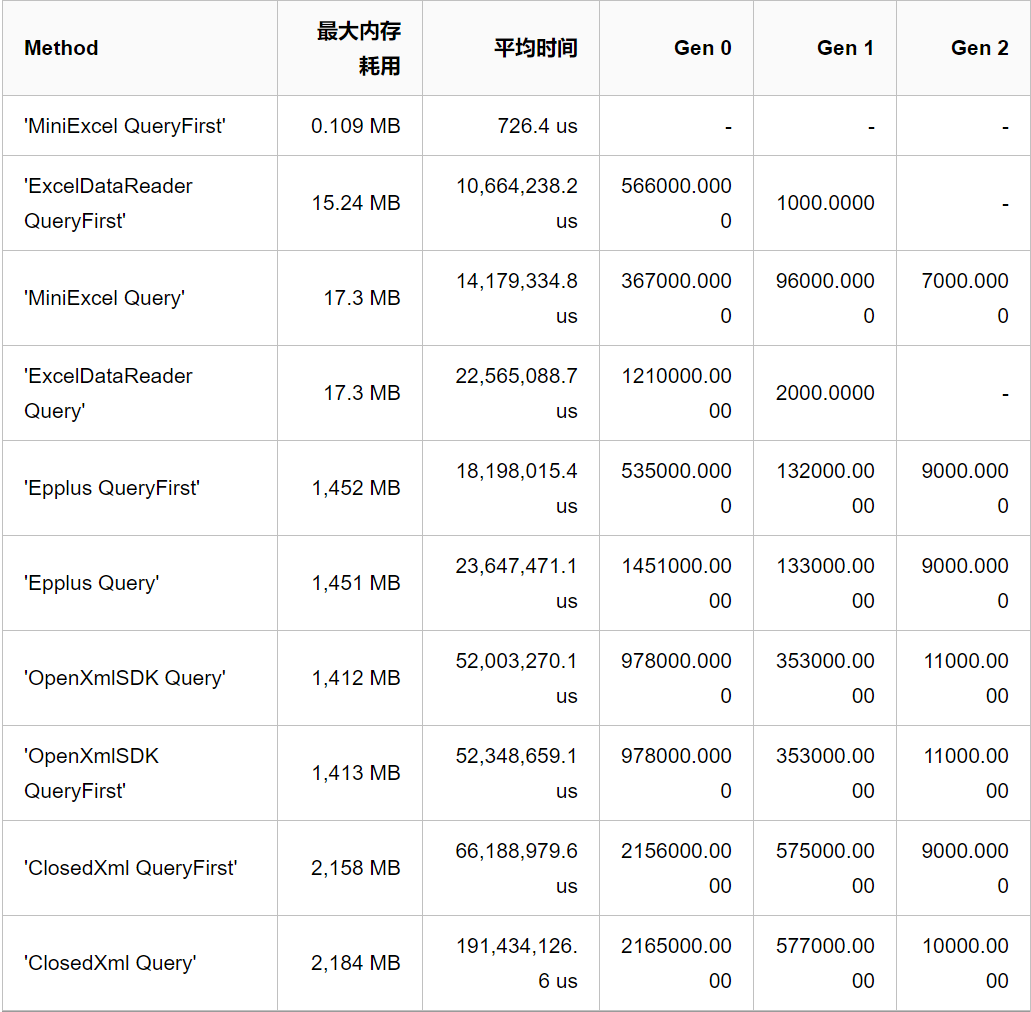
以 Test1,000,000x10.xlsx 做基準與主流框架做性能測試,總共 1千萬筆 "HelloWorld",文件大小 23 MB
Benchmarks 邏輯可以在 MiniExcel.Benchmarks 查看或是提交 PR,運行指令
dotnet run -p .\benchmarks\MiniExcel.Benchmarks\ -c Release -f netcoreapp3.1 -- -f * --join
最后一次運行結(jié)果 :
BenchmarkDotNet=v0.12.1, OS=Windows 10.0.19042
Intel Core i7-7700 CPU 3.60GHz (Kaby Lake), 1 CPU, 8 logical and 4 physical cores
  [Host]     : .NET Framework 4.8 (4.8.4341.0), X64 RyuJIT
  Job-ZYYABG : .NET Framework 4.8 (4.8.4341.0), X64 RyuJIT
IterationCount=3  LaunchCount=3  WarmupCount=3
安裝
Install-Package MiniExcel -Version 0.10.0
# or
dotnet add package MiniExcel --version 0.10.0
其他請查看 from NuGet
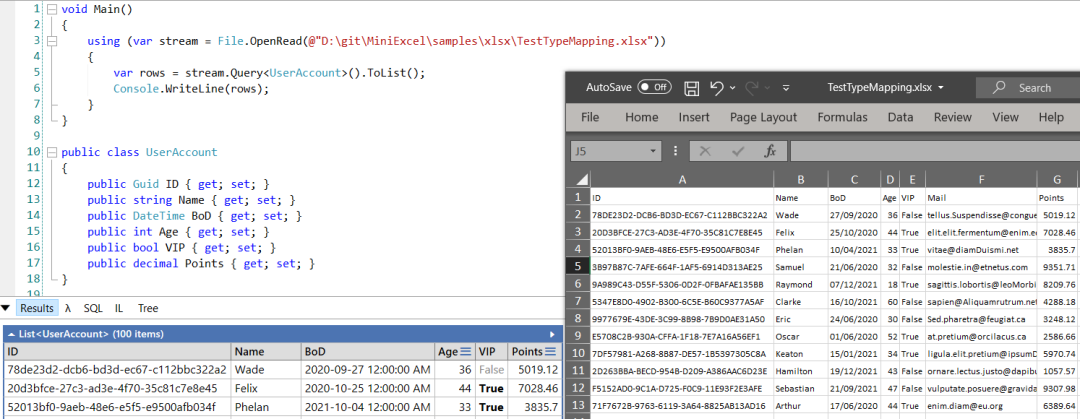
Query 查詢 Excel 返回強型別 IEnumerable 數(shù)據(jù) [Try it]
推薦使用 Stream.Query 效率會相對較好。
public class UserAccount
{
    public Guid ID { get; set; }
    public string Name { get; set; }
    public DateTime BoD { get; set; }
    public int Age { get; set; }
    public bool VIP { get; set; }
    public decimal Points { get; set; }
}

var rows = MiniExcel.Query<UserAccount>(path);

// or

using (var stream = File.OpenRead(path))
    var rows = stream.Query<UserAccount>();
Query 查詢 Excel 返回Dynamic IEnumerable 數(shù)據(jù) [Try it]
Key 系統(tǒng)預(yù)設(shè)為 A,B,C,D...Z
| MiniExcel | 1 |
|---|---|
| Github | 2 |
var rows = MiniExcel.Query(path).ToList();

// or
using (var stream = File.OpenRead(path))
{
    var rows = stream.Query().ToList();

    Assert.Equal("MiniExcel", rows[0].A);
    Assert.Equal(1, rows[0].B);
    Assert.Equal("Github", rows[1].A);
    Assert.Equal(2, rows[1].B);
}
查詢數(shù)據(jù)以第一行數(shù)據(jù)當Key [Try it]
note : 同名以右邊數(shù)據(jù)為準
Input Excel :
| Column1 | Column2 |
|---|---|
| MiniExcel | 1 |
| Github | 2 |
var rows = MiniExcel.Query(useHeaderRow:true).ToList();

// or

using (var stream = File.OpenRead(path))
{
    var rows = stream.Query(useHeaderRow:true).ToList();

    Assert.Equal("MiniExcel", rows[0].Column1);
    Assert.Equal(1, rows[0].Column2);
    Assert.Equal("Github", rows[1].Column1);
    Assert.Equal(2, rows[1].Column2);
}
Query 查詢支援延遲加載(Deferred Execution),能配合LINQ First/Take/Skip辦到低消耗、高效率復(fù)雜查詢
Query First
var row = MiniExcel.Query(path).First();
Assert.Equal("HelloWorld", row.A);

// or

using (var stream = File.OpenRead(path))
{
    var row = stream.Query().First();
    Assert.Equal("HelloWorld", row.A);
}
建立 Excel 文件 [Try it]
必須是 non-abstract 類別有 public parameterless constructor MiniExcel SaveAs 支援 IEnumerable參數(shù)``延遲查詢,除非必要請不要使用 ToList 等方法讀取全部數(shù)據(jù)到內(nèi)存
圖片 : 是否呼叫 ToList 的內(nèi)存差別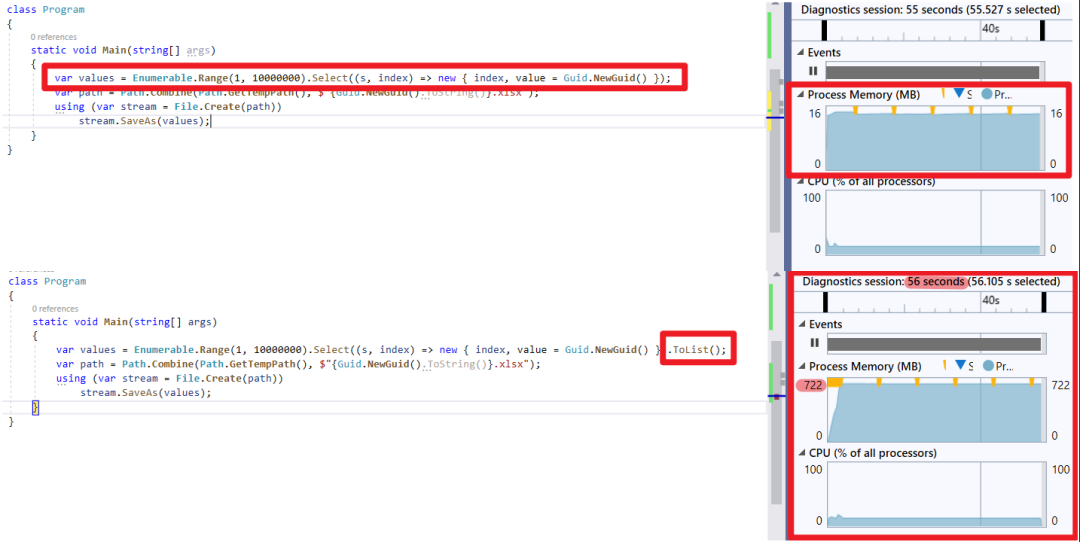
Anonymous or strongly type:
var path = Path.Combine(Path.GetTempPath(), $"{Guid.NewGuid()}.xlsx");
MiniExcel.SaveAs(path, new[] {
    new { Column1 = "MiniExcel", Column2 = 1 },
    new { Column1 = "Github", Column2 = 2}
});
Datatable:
var path = Path.Combine(Path.GetTempPath(), $"{Guid.NewGuid()}.xlsx");
var table = new DataTable();
{
    table.Columns.Add("Column1", typeof(string));
    table.Columns.Add("Column2", typeof(decimal));
    table.Rows.Add("MiniExcel", 1);
    table.Rows.Add("Github", 2);
}

MiniExcel.SaveAs(path, table);
Dapper:
using (var connection = GetConnection(connectionString))
{
    var rows = connection.Query(@"select 'MiniExcel' as Column1,1 as Column2 union all select 'Github',2");
    MiniExcel.SaveAs(path, rows);
}
IEnumerable<IDictionary<string, object>>
var values = new List<Dictionary<string, object>>()
{
    new Dictionary<string,object>{{ "Column1", "MiniExcel" }, { "Column2", 1 } },
    new Dictionary<string,object>{{ "Column1", "Github" }, { "Column2", 2 } }
};
MiniExcel.SaveAs(path, values);
output :
| Column1 | Column2 |
|---|---|
| MiniExcel | 1 |
| Github | 2 |
SaveAs 支援 Stream [Try it]
using (var stream = File.Create(path))
{
    stream.SaveAs(values);
}
Excel Column Name/Ignore Attribute
e.g
input excel :

public class ExcelAttributeDemo
{
    [ExcelColumnName("Column1")]
    public string Test1 { get; set; }
    [ExcelColumnName("Column2")]
    public string Test2 { get; set; }
    [ExcelIgnore]
    public string Test3 { get; set; }
    public string Test4 { get; set; }
    public string Test5 { get; }
    public string Test6 { get; private set; }
}

var rows = MiniExcel.Query<ExcelAttributeDemo>(path).ToList();
Assert.Equal("Column1", rows[0].Test1);
Assert.Equal("Column2", rows[0].Test2);
Assert.Null(rows[0].Test3);
Assert.Equal("Test4", rows[0].Test4);
Assert.Null(rows[0].Test5);
Assert.Null(rows[0].Test6);
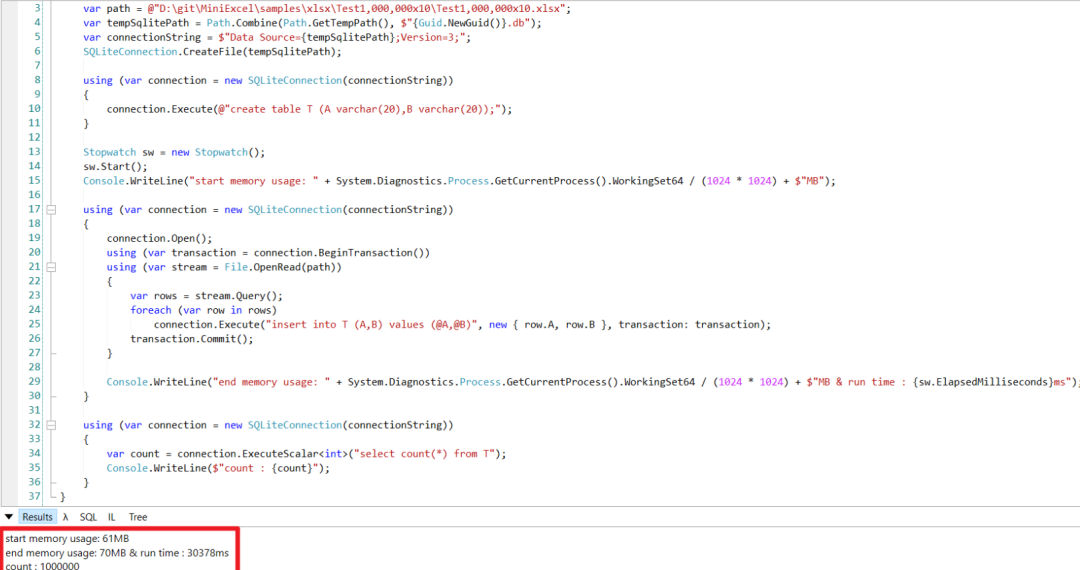
例子 : SQLite & Dapper 讀取大數(shù)據(jù)新增到數(shù)據(jù)庫
note : 請不要呼叫 call ToList/ToArray 等方法,這會將所有數(shù)據(jù)讀到內(nèi)存內(nèi)
using (var connection = new SQLiteConnection(connectionString))
{
    connection.Open();
    using (var transaction = connection.BeginTransaction())
    using (var stream = File.OpenRead(path))
    {
    var rows = stream.Query();
    foreach (var row in rows)
    connection.Execute("insert into T (A,B) values (@A,@B)", new { row.A, row.B }, transaction: transaction);
    transaction.Commit();
    }
}
效能:
例子 : ASP.NET Core 3.1 or MVC 5 下載 Excel Xlsx API Demo
public class ExcelController : Controller
{
    public IActionResult Download()
    {
        var values = new[] {
            new { Column1 = "MiniExcel", Column2 = 1 },
            new { Column1 = "Github", Column2 = 2}
        };
        var stream = new MemoryStream();
        stream.SaveAs(values);
        return File(stream,
            "application/vnd.openxmlformats-officedocument.spreadsheetml.sheet",
            "demo.xlsx");
    }
}
Excel 類別自動判斷
MiniExcel 預(yù)設(shè)會根據(jù)擴展名或是 Stream 類別判斷是 xlsx 還是 csv,但會有失準時候,請自行指定。
stream.SaveAs(excelType:ExcelType.CSV);
//or
stream.SaveAs(excelType:ExcelType.XLSX);
//or
stream.Query(excelType:ExcelType.CSV);
//or
stream.Query(excelType:ExcelType.XLSX);
Dynamic Query 轉(zhuǎn)換 IDictionary<string,object> 數(shù)據(jù)
foreach(IDictionary<string,object> row = MiniExcel.Query(path))
{
    //..
}
Github : https://github.com/shps951023/MiniExcel
轉(zhuǎn)自:暐翰
鏈接:cnblogs.com/ITWeiHan/p/14612821.html


人人影視字幕組涼了,這款美劇APP不能錯過!

谷歌靈魂插件,98%的程序員都好評!