
從Vue源碼角度深挖Watch、Computed

作者:Naice
https://segmentfault.com/a/1190000023196603
關(guān)注Vue中文社區(qū),每日精選好文
這篇文章將帶大家全面理解vue的watcher、computed和user watcher,其實computed和user watcher都是基于Watcher來實現(xiàn)的,我們通過一個一個功能點去敲代碼,讓大家全面理解其中的實現(xiàn)原理和核心思想。所以這篇文章將實現(xiàn)以下這些功能點:
實現(xiàn)數(shù)據(jù)響應(yīng)式 基于渲染 wather實現(xiàn)首次數(shù)據(jù)渲染到界面上數(shù)據(jù)依賴收集和更新 實現(xiàn)數(shù)據(jù)更新觸發(fā)渲染 watcher執(zhí)行,從而更新ui界面基于 watcher實現(xiàn)computed基于 watcher實現(xiàn)user watcher
廢話不要多說,先看下面的最終例子。
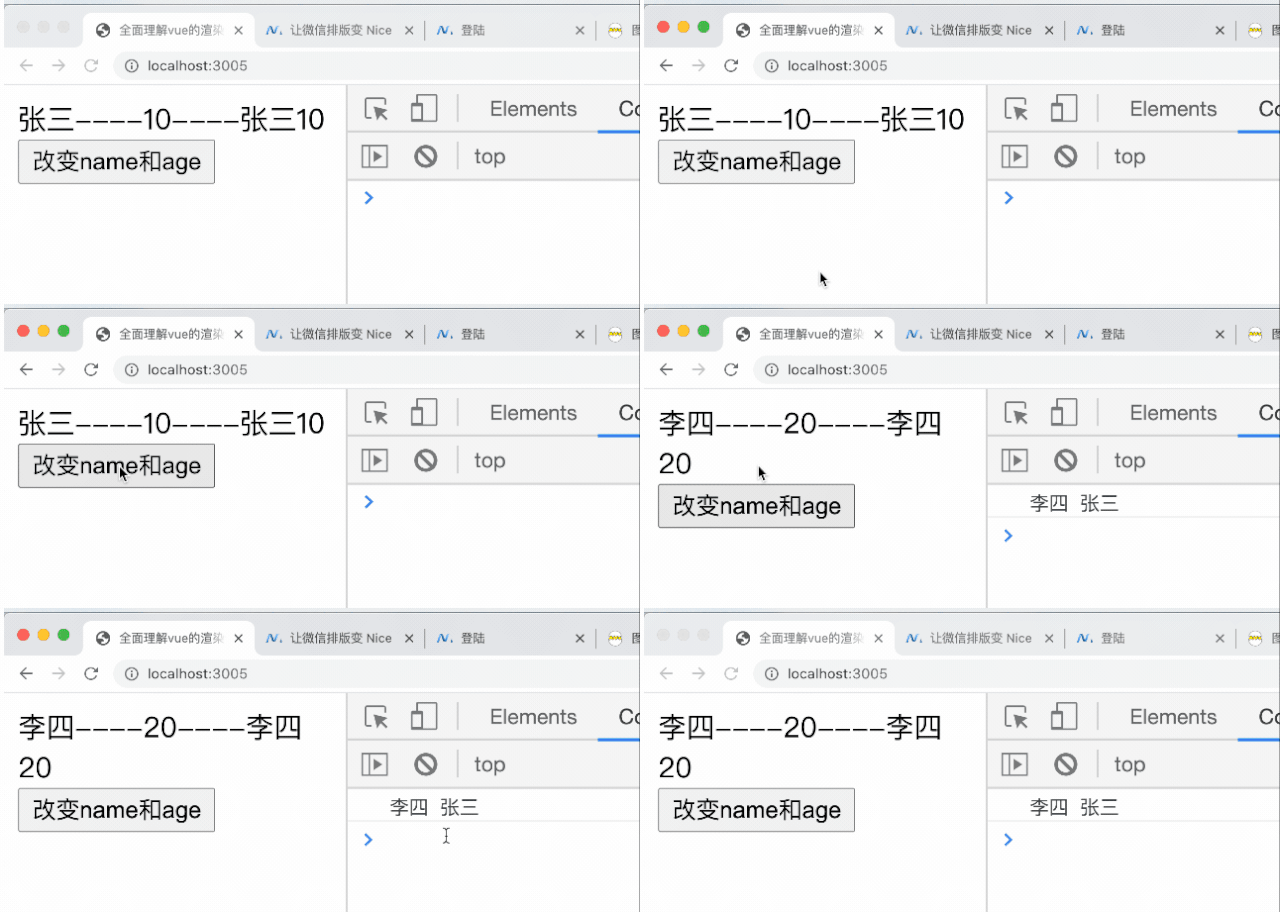
例子看完之后我們就直接開工了。
準備工作
首先我們準備了一個index.html文件和一個vue.js文件,先看看index.html的代碼
"en">
??"UTF-8">
??全面理解vue的渲染watcher、computed和user?atcher
??"root">
??
??
index.html里面分別有一個id是root的div節(jié)點,這是跟節(jié)點,然后在script標簽里面,引入了vue.js,里面提供了Vue構(gòu)造函數(shù),然后就是實例化Vue,參數(shù)是一個對象,對象里面分別有data 和 render 函數(shù)。然后我們看看vue.js的代碼:
function?Vue?(options)?{
??this._init(options)?//?初始化
??this.$mount()?//?執(zhí)行render函數(shù)
}
Vue.prototype._init?=?function?(options)?{
??const?vm?=?this
??vm.$options?=?options?//?把options掛載到this上
??if?(options.data)?{
????initState(vm)?//?數(shù)據(jù)響應(yīng)式
??}
??if?(options.computed)?{
????initComputed(vm)?//?初始化計算屬性
??}
??if?(options.watch)?{
????initWatch(vm)?//?初始化watch
??}
}
vue.js代碼里面就是執(zhí)行this._init()和this.$mount(),this._init的方法就是對我們的傳進來的配置進行各種初始化,包括數(shù)據(jù)初始化initState(vm)、計算屬性初始化initComputed(vm)、自定義watch初始化initWatch(vm)。this.$mount方法把render函數(shù)渲染到頁面中去、這些方法我們后面都寫到,先讓讓大家了解整個代碼結(jié)構(gòu)。下面我們正式去填滿我們上面寫的這些方法。
實現(xiàn)數(shù)據(jù)響應(yīng)式
要實現(xiàn)這些watcher首先去實現(xiàn)數(shù)據(jù)響應(yīng)式,也就是要實現(xiàn)上面的initState(vm)這個函數(shù)。相信大家都很熟悉響應(yīng)式這些代碼,下面我直接貼上來。
function?initState(vm)?{
??let?data?=?vm.$options.data;?//?拿到配置的data屬性值
??//?判斷data?是函數(shù)還是別的類型
??data?=?vm._data?=?typeof?data?===?'function'???data.call(vm,?vm)?:?data?||?{};
??const?keys?=?Object.keys(data);
??let?i?=?keys.length;
??while(i--)?{
????//?從this上讀取的數(shù)據(jù)全部攔截到this._data到里面讀取
????//?例如?this.name?等同于??this._data.name
????proxy(vm,?'_data',?keys[i]);
??}
??observe(data);?//?數(shù)據(jù)觀察
}
//?數(shù)據(jù)觀察函數(shù)
function?observe(data)?{
??if?(typeof?data?!==?'object'?&&?data?!=?null)?{
????return;
??}
??return?new?Observer(data)
}
//?從this上讀取的數(shù)據(jù)全部攔截到this._data到里面讀取
//?例如?this.name?等同于??this._data.name
function?proxy(vm,?source,?key)?{
??Object.defineProperty(vm,?key,?{
????get()?{
??????return?vm[source][key]?//?this.name?等同于??this._data.name
????},
????set(newValue)?{
??????return?vm[source][key]?=?newValue
????}
??})
}
class?Observer{
??constructor(value)?{
????this.walk(value)?//?給每一個屬性都設(shè)置get?set
??}
??walk(data)?{
????let?keys?=?Object.keys(data);
????for?(let?i?=?0,?len?=?keys.length;?i???????let?key?=?keys[i]
??????let?value?=?data[key]
??????defineReactive(data,?key,?value)?//?給對象設(shè)置get?set
????}
??}
}
function?defineReactive(data,?key,?value)?{
??Object.defineProperty(data,?key,?{
????get()?{
??????return?value
????},
????set(newValue)?{
??????if?(newValue?==?value)?return
??????observe(newValue)?//?給新的值設(shè)置響應(yīng)式
??????value?=?newValue
????}
??})
??observe(value);?//?遞歸給數(shù)據(jù)設(shè)置get?set
}
重要的點都在注釋里面,主要核心就是給遞歸給data里面的數(shù)據(jù)設(shè)置get和set,然后設(shè)置數(shù)據(jù)代理,讓?this.name?等同于?this._data.name。設(shè)置完數(shù)據(jù)觀察,我們就可以看到如下圖的數(shù)據(jù)了。

console.log(vue.name)?//?張三
console.log(vue.age)?//?10
ps: 數(shù)組的數(shù)據(jù)觀察大家自行去完善哈,這里重點講的是watcher的實現(xiàn)。
首次渲染
數(shù)據(jù)觀察搞定了之后,我們就可以把render函數(shù)渲染到我們的界面上了。在Vue里面我們有一個this.$mount()函數(shù),所以要實現(xiàn)Vue.prototype.$mount函數(shù):
//?掛載方法
Vue.prototype.$mount?=?function?()?{
??const?vm?=?this
??new?Watcher(vm,?vm.$options.render,?()?=>?{},?true)
}
以上的代碼終于牽扯到我們Watcher這個主角了,這里其實就是我們的渲染wather,這里的目的是通過Watcher來實現(xiàn)執(zhí)行render函數(shù),從而把數(shù)據(jù)插入到root節(jié)點里面去。下面看最簡單的Watcher實現(xiàn)
let?wid?=?0
class?Watcher?{
??constructor(vm,?exprOrFn,?cb,?options)?{
????this.vm?=?vm?//?把vm掛載到當前的this上
????if?(typeof?exprOrFn?===?'function')?{
??????this.getter?=?exprOrFn?//?把exprOrFn掛載到當前的this上,這里exprOrFn?等于?vm.$options.render
????}
????this.cb?=?cb?//?把cb掛載到當前的this上
????this.options?=?options?//?把options掛載到當前的this上
????this.id?=?wid++
????this.value?=?this.get()?//?相當于運行?vm.$options.render()
??}
??get()?{
????const?vm?=?this.vm
????let?value?=?this.getter.call(vm,?vm)?//?把this?指向到vm
????return?value
??}
}
通過上面的一頓操作,終于在render中終于可以通過this.name?讀取到data的數(shù)據(jù)了,也可以插入到root.innerHTML中去。階段性的工作我們完成了。如下圖,完成的首次渲染??

數(shù)據(jù)依賴收集和更新
首先數(shù)據(jù)收集,我們要有一個收集的地方,就是我們的Dep類,下面呢看看我們?nèi)ピ趺磳崿F(xiàn)這個Dep。
//?依賴收集
let?dId?=?0
class?Dep{
??constructor()?{
????this.id?=?dId++?//?每次實例化都生成一個id
????this.subs?=?[]?//?讓這個dep實例收集watcher
??}
??depend()?{
????//?Dep.target?就是當前的watcher
????if?(Dep.target)?{
??????Dep.target.addDep(this)?//?讓watcher,去存放dep,然后里面dep存放對應(yīng)的watcher,兩個是多對多的關(guān)系
????}
??}
??notify()?{
????//?觸發(fā)更新
????this.subs.forEach(watcher?=>?watcher.update())
??}
??addSub(watcher)?{
????this.subs.push(watcher)
??}
}
let?stack?=?[]
//?push當前watcher到stack?中,并記錄當前watcer
function?pushTarget(watcher)?{
??Dep.target?=?watcher
??stack.push(watcher)
}
//?運行完之后清空當前的watcher
function?popTarget()?{
??stack.pop()
??Dep.target?=?stack[stack.length?-?1]
}
Dep收集的類是實現(xiàn)了,但是我們怎么去收集了,就是我們數(shù)據(jù)觀察的get里面實例化Dep然后讓Dep收集當前的watcher。下面我們一步步來:
1、在上面 this.$mount()的代碼中,我們運行了new Watcher(vm, vm.$options.render, () => {}, true),這時候我們就可以在Watcher里面執(zhí)行this.get(),然后執(zhí)行pushTarget(this),就可以執(zhí)行這句話Dep.target = watcher,把當前的watcher掛載Dep.target上。下面看看我們怎么實現(xiàn)。
class?Watcher?{
??constructor(vm,?exprOrFn,?cb,?options)?{
????this.vm?=?vm
????if?(typeof?exprOrFn?===?'function')?{
??????this.getter?=?exprOrFn
????}
????this.cb?=?cb
????this.options?=?options
????this.id?=?wid++
????this.id?=?wId++
+????this.deps?=?[]
+????this.depsId?=?new?Set()?//?dep?已經(jīng)收集過相同的watcher?就不要重復(fù)收集了
????this.value?=?this.get()
??}
??get()?{
????const?vm?=?this.vm
+???pushTarget(this)
????let?value?=?this.getter.call(vm,?vm)?//?執(zhí)行函數(shù)
+???popTarget()
????return?value
??}
+??addDep(dep)?{
+????let?id?=?dep.id
+????if?(!this.depsId.has(id))?{
+??????this.depsId.add(id)
+??????this.deps.push(dep)
+??????dep.addSub(this);
+????}
+??}
+??update(){
+????this.get()
+??}
}
2、知道 Dep.target是怎么來之后,然后上面代碼運行了this.get(),相當于運行了vm.$options.render,在render里面回執(zhí)行this.name,這時候會觸發(fā)Object.defineProperty·get方法,我們在里面就可以做些依賴收集(dep.depend)了,如下代碼
function?defineReactive(data,?key,?value)?{
??let?dep?=?new?Dep()
??Object.defineProperty(data,?key,?{
????get()?{
+??????if?(Dep.target)?{?//?如果取值時有watcher
+????????dep.depend()?//?讓watcher保存dep,并且讓dep?保存watcher,雙向保存
+??????}
??????return?value
????},
????set(newValue)?{
??????if?(newValue?==?value)?return
??????observe(newValue)?//?給新的值設(shè)置響應(yīng)式
??????value?=?newValue
+??????dep.notify()?//?通知渲染watcher去更新
????}
??})
??//?遞歸給數(shù)據(jù)設(shè)置get?set
??observe(value);
}
3、調(diào)用的 dep.depend()?實際上是調(diào)用了?Dep.target.addDep(this), 此時Dep.target等于當前的watcher,然后就會執(zhí)行
addDep(dep)?{
??let?id?=?dep.id
??if?(!this.depsId.has(id))?{
????this.depsId.add(id)
????this.deps.push(dep)?//?當前的watcher收集dep
????dep.addSub(this);?//?當前的dep收集當前的watcer
??}
}
這里雙向保存有點繞,大家可以好好去理解一下。下面我們看看收集后的des是怎么樣子的。

4、數(shù)據(jù)更新,調(diào)用 this.name = '李四'的時候回觸發(fā)Object.defineProperty.set方法,里面直接調(diào)用dep.notify(),然后循環(huán)調(diào)用所有的watcer.update方法更新所有watcher,例如:這里也就是重新執(zhí)行vm.$options.render方法。
有了依賴收集個數(shù)據(jù)更新,我們也在index.html增加修改data屬性的定時方法:
//?index.html
//?-----
//?.....省略代碼
function?changeData()?{
??vue.name?=?'李四'
??vue.age?=?20
}
運行效果如下圖

到這里我們渲染watcher就全部實現(xiàn)了。
實現(xiàn)computed
首先我們在index.html里面配置一個computed,script標簽的代碼就如下:
const?root?=?document.querySelector('#root')
var?vue?=?new?Vue({
??data()?{
????return?{
??????name:?'張三',
??????age:?10
????}
??},
??computed:?{
????info()?{
??????return?this.name?+?this.age
????}
??},
??render()?{
????root.innerHTML?=?`${this.name}----${this.age}----${this.info}`
??}
})
function?changeData()?{
??vue.name?=?'李四'
??vue.age?=?20
}
上面的代碼,注意computed是在render里面使用了。
在vue.js中,之前寫了下面這行代碼。
if?(options.computed)?{
??//?初始化計算屬性
??initComputed(vm)
}
我們現(xiàn)在就實現(xiàn)這個initComputed,代碼如下
//?初始化computed
function?initComputed(vm)?{
??const?computed?=?vm.$options.computed?//?拿到computed配置
??const?watchers?=?vm._computedWatchers?=?Object.create(null)?//?給當前的vm掛載_computedWatchers屬性,后面會用到
??//?循環(huán)computed每個屬性
??for?(const?key?in?computed)?{
????const?userDef?=?computed[key]
????//?判斷是函數(shù)還是對象
????const?getter?=?typeof?userDef?===?'function'???userDef?:?userDef.get
????//?給每一個computed創(chuàng)建一個computed?watcher?注意{?lazy:?true?}
????//?然后掛載到vm._computedWatchers對象上
????watchers[key]?=?new?Watcher(vm,?getter,?()?=>?{},?{?lazy:?true?})
????if?(!(key?in?vm))?{
??????defineComputed(vm,?key,?userDef)
????}
??}
}
大家都知道computed是有緩存的,所以創(chuàng)建watcher的時候,會傳一個配置{ lazy: true },同時也可以區(qū)分這是computed watcher,然后到watcer里面接收到這個對象
class?Watcher?{
??constructor(vm,?exprOrFn,?cb,?options)?{
????this.vm?=?vm
????if?(typeof?exprOrFn?===?'function')?{
??????this.getter?=?exprOrFn
????}
+????if?(options)?{
+??????this.lazy?=?!!options.lazy?//?為computed?設(shè)計的
+????}?else?{
+??????this.lazy?=?false
+????}
+????this.dirty?=?this.lazy
????this.cb?=?cb
????this.options?=?options
????this.id?=?wId++
????this.deps?=?[]
????this.depsId?=?new?Set()
+????this.value?=?this.lazy???undefined?:?this.get()
??}
??//?省略很多代碼
}
從上面這句this.value = this.lazy ? undefined : this.get()代碼可以看到,computed創(chuàng)建watcher的時候是不會指向this.get的。只有在render函數(shù)里面有才執(zhí)行。
現(xiàn)在在render函數(shù)通過this.info還不能讀取到值,因為我們還沒有掛載到vm上面,上面defineComputed(vm, key, userDef)這個函數(shù)功能就是讓computed掛載到vm上面。下面我們實現(xiàn)一下。
//?設(shè)置comoputed的?set個set
function?defineComputed(vm,?key,?userDef)?{
??let?getter?=?null
??//?判斷是函數(shù)還是對象
??if?(typeof?userDef?===?'function')?{
????getter?=?createComputedGetter(key)
??}?else?{
????getter?=?userDef.get
??}
??Object.defineProperty(vm,?key,?{
????enumerable:?true,
????configurable:?true,
????get:?getter,
????set:?function()?{}?//?又偷懶,先不考慮set情況哈,自己去看源碼實現(xiàn)一番也是可以的
??})
}
//?創(chuàng)建computed函數(shù)
function?createComputedGetter(key)?{
??return?function?computedGetter()?{
????const?watcher?=?this._computedWatchers[key]
????if?(watcher)?{
??????if?(watcher.dirty)?{//?給computed的屬性添加訂閱watchers
????????watcher.evaluate()
??????}
??????//?把渲染watcher?添加到屬性的訂閱里面去,這很關(guān)鍵
??????if?(Dep.target)?{
????????watcher.depend()
??????}
??????return?watcher.value
????}
??}
}
上面代碼有看到在watcher中調(diào)用了watcher.evaluate()和watcher.depend(),然后去watcher里面實現(xiàn)這兩個方法,下面直接看watcher的完整代碼。
class?Watcher?{
??constructor(vm,?exprOrFn,?cb,?options)?{
????this.vm?=?vm
????if?(typeof?exprOrFn?===?'function')?{
??????this.getter?=?exprOrFn
????}
????if?(options)?{
??????this.lazy?=?!!options.lazy?//?為computed?設(shè)計的
????}?else?{
??????this.lazy?=?false
????}
????this.dirty?=?this.lazy
????this.cb?=?cb
????this.options?=?options
????this.id?=?wId++
????this.deps?=?[]
????this.depsId?=?new?Set()?//?dep?已經(jīng)收集過相同的watcher?就不要重復(fù)收集了
????this.value?=?this.lazy???undefined?:?this.get()
??}
??get()?{
????const?vm?=?this.vm
????pushTarget(this)
????//?執(zhí)行函數(shù)
????let?value?=?this.getter.call(vm,?vm)
????popTarget()
????return?value
??}
??addDep(dep)?{
????let?id?=?dep.id
????if?(!this.depsId.has(id))?{
??????this.depsId.add(id)
??????this.deps.push(dep)
??????dep.addSub(this);
????}
??}
??update(){
????if?(this.lazy)?{
??????this.dirty?=?true
????}?else?{
??????this.get()
????}
??}
??//?執(zhí)行g(shù)et,并且?this.dirty?=?false
+??evaluate()?{
+????this.value?=?this.get()
+????this.dirty?=?false
+??}
??//?所有的屬性收集當前的watcer
+??depend()?{
+????let?i?=?this.deps.length
+????while(i--)?{
+??????this.deps[i].depend()
+????}
+??}
}
代碼都實現(xiàn)王完成之后,我們說下流程,
1、首先在 render函數(shù)里面會讀取this.info,這個會觸發(fā)createComputedGetter(key)中的computedGetter(key);2、然后會判斷 watcher.dirty,執(zhí)行watcher.evaluate();3、進到 watcher.evaluate(),才真想執(zhí)行this.get方法,這時候會執(zhí)行pushTarget(this)把當前的computed watcher?push到stack里面去,并且把Dep.target 設(shè)置成當前的computed watcher`;4、然后運行 this.getter.call(vm, vm)?相當于運行computed的info: function() { return this.name + this.age },這個方法;5、 info函數(shù)里面會讀取到this.name,這時候就會觸發(fā)數(shù)據(jù)響應(yīng)式Object.defineProperty.get的方法,這里name會進行依賴收集,把watcer收集到對應(yīng)的dep上面;并且返回name = '張三'的值,age收集同理;6、依賴收集完畢之后執(zhí)行 popTarget(),把當前的computed watcher從棧清除,返回計算后的值('張三+10'),并且this.dirty = false;7、 watcher.evaluate()執(zhí)行完畢之后,就會判斷Dep.target?是不是true,如果有就代表還有渲染watcher,就執(zhí)行watcher.depend(),然后讓watcher里面的deps都收集渲染watcher,這就是雙向保存的優(yōu)勢。8、此時 name都收集了computed watcher?和?渲染watcher。那么設(shè)置name的時候都會去更新執(zhí)行watcher.update()9、如果是 computed watcher的話不會重新執(zhí)行一遍只會把this.dirty?設(shè)置成?true,如果數(shù)據(jù)變化的時候再執(zhí)行watcher.evaluate()進行info更新,沒有變化的的話this.dirty?就是false,不會執(zhí)行info方法。這就是computed緩存機制。
實現(xiàn)了之后我們看看實現(xiàn)效果:

這里conputed的對象set配置沒有實現(xiàn),大家可以自己看看源碼
watch實現(xiàn)
先在script標簽配置watch配置如下代碼:
const?root?=?document.querySelector('#root')
var?vue?=?new?Vue({
??data()?{
????return?{
??????name:?'張三',
??????age:?10
????}
??},
??computed:?{
????info()?{
??????return?this.name?+?this.age
????}
??},
??watch:?{
????name(oldValue,?newValue)?{
??????console.log(oldValue,?newValue)
????}
??},
??render()?{
????root.innerHTML?=?`${this.name}----${this.age}----${this.info}`
??}
})
function?changeData()?{
??vue.name?=?'李四'
??vue.age?=?20
}
知道了computed實現(xiàn)之后,自定義watch實現(xiàn)很簡單,下面直接實現(xiàn)initWatch
function?initWatch(vm)?{
??let?watch?=?vm.$options.watch
??for?(let?key?in?watch)?{
????const?handler?=?watch[key]
????new?Watcher(vm,?key,?handler,?{?user:?true?})
??}
}
然后修改一下Watcher,直接看Wacher的完整代碼。
let?wId?=?0
class?Watcher?{
??constructor(vm,?exprOrFn,?cb,?options)?{
????this.vm?=?vm
????if?(typeof?exprOrFn?===?'function')?{
??????this.getter?=?exprOrFn
????}?else?{
+??????this.getter?=?parsePath(exprOrFn)?//?user?watcher?
????}
????if?(options)?{
??????this.lazy?=?!!options.lazy?//?為computed?設(shè)計的
+??????this.user?=?!!options.user?//?為user?wather設(shè)計的
????}?else?{
+??????this.user?=?this.lazy?=?false
????}
????this.dirty?=?this.lazy
????this.cb?=?cb
????this.options?=?options
????this.id?=?wId++
????this.deps?=?[]
????this.depsId?=?new?Set()?//?dep?已經(jīng)收集過相同的watcher?就不要重復(fù)收集了
????this.value?=?this.lazy???undefined?:?this.get()
??}
??get()?{
????const?vm?=?this.vm
????pushTarget(this)
????//?執(zhí)行函數(shù)
????let?value?=?this.getter.call(vm,?vm)
????popTarget()
????return?value
??}
??addDep(dep)?{
????let?id?=?dep.id
????if?(!this.depsId.has(id))?{
??????this.depsId.add(id)
??????this.deps.push(dep)
??????dep.addSub(this);
????}
??}
??update(){
????if?(this.lazy)?{
??????this.dirty?=?true
????}?else?{
+??????this.run()
????}
??}
??//?執(zhí)行g(shù)et,并且?this.dirty?=?false
??evaluate()?{
????this.value?=?this.get()
????this.dirty?=?false
??}
??//?所有的屬性收集當前的watcer
??depend()?{
????let?i?=?this.deps.length
????while(i--)?{
??????this.deps[i].depend()
????}
??}
+??run?()?{
+????const?value?=?this.get()
+????const?oldValue?=?this.value
+????this.value?=?value
????//?執(zhí)行cb
+????if?(this.user)?{
+??????try{
+????????this.cb.call(this.vm,?value,?oldValue)
+??????}?catch(error)?{
+????????console.error(error)
+??????}
+????}?else?{
+??????this.cb?&&?this.cb.call(this.vm,?oldValue,?value)
+????}
+??}
}
function?parsePath?(path)?{
??const?segments?=?path.split('.')
??return?function?(obj)?{
????for?(let?i?=?0;?i???????if?(!obj)?return
??????obj?=?obj[segments[i]]
????}
????return?obj
??}
}
最后看看效果
當然很多配置沒有實現(xiàn),比如說options.immediate?或者options.deep等配置都沒有實現(xiàn)。篇幅太長了。自己也懶~~~ 完結(jié)撒花
詳細代碼:https://github.com/naihe138/write-vue
專注分享當下最實用的前端技術(shù)。關(guān)注前端達人,與達人一起學(xué)習(xí)進步!
長按關(guān)注"前端達人"

