
Nacos10# 健康檢查類型與場(chǎng)景
引言
Nacos支持眾多健康檢查類型,心跳、HTTP、TCP、MySQL等類型,這些都作用于什么場(chǎng)景?他們又是如何實(shí)現(xiàn)的呢?本文就擼一擼這個(gè)。
臨時(shí)節(jié)點(diǎn)續(xù)約
臨時(shí)節(jié)點(diǎn)續(xù)約通過gRPC連接保鮮實(shí)現(xiàn) 執(zhí)行頻率5秒一次 檢查結(jié)果健康刷新保鮮時(shí)間 檢查結(jié)果不可用標(biāo)記節(jié)點(diǎn)不健康 當(dāng)節(jié)點(diǎn)不健康時(shí)重新連接時(shí)會(huì)從server列表選擇下一個(gè)節(jié)點(diǎn)連接
持久節(jié)點(diǎn)心跳檢測(cè)
心跳執(zhí)行器通過每隔五秒中向Nacos Server發(fā)起HTTP請(qǐng)求 如果返回的server not found會(huì)向Nacos Server發(fā)起注冊(cè)請(qǐng)求重新注冊(cè)
持久節(jié)點(diǎn)探活
Nacos探活只有在持久節(jié)點(diǎn)注冊(cè)時(shí)才會(huì)支持 探活支持HTTP、TCP、Mysql三種探活類型 HTTP通過檢測(cè)返回200狀態(tài)碼標(biāo)記是否健康 TPC通過Channel連接方式標(biāo)記是否健康 Mysql則保證當(dāng)前節(jié)點(diǎn)為主節(jié)點(diǎn),可用于主從切換場(chǎng)景
在《Nacos2# 服務(wù)注冊(cè)與發(fā)現(xiàn)客戶端示例與源碼解析(二)》分析gRPC Client啟動(dòng)邏輯時(shí)有分析連接健康檢查邏輯。具體代碼在RpcClient#start()中,下面再次聚焦下。
client連接心跳檢查
clientEventExecutor.submit(new Runnable() {
    @Override
    public void run() {
        while (true) {
            try {
                // 獲取重定向連接上下文,指重新連接到其他server節(jié)點(diǎn)
                ReconnectContext reconnectContext = reconnectionSignal
                        .poll(keepAliveTime, TimeUnit.MILLISECONDS);
                if (reconnectContext == null) {
                    // check alive time.
                    // client活動(dòng)時(shí)間超過5秒鐘,向Nacos Server發(fā)起健康檢測(cè)
                    if (System.currentTimeMillis() - lastActiveTimeStamp >= keepAliveTime) {
                        // 發(fā)送健康檢查
                        boolean isHealthy = healthCheck();
                        // 非健康節(jié)點(diǎn)
                        if (!isHealthy) {
                            if (currentConnection == null) {
                                continue;
                            }
                            LoggerUtils.printIfInfoEnabled(LOGGER,
                                    "[{}]Server healthy check fail,currentConnection={}", name,
                                    currentConnection.getConnectionId());
                            // 標(biāo)記客戶端狀態(tài)為unhealthy
                            rpcClientStatus.set(RpcClientStatus.UNHEALTHY);
                            // 重置ReconnectContext移除serverInfo
                            reconnectContext = new ReconnectContext(null, false);

                            // 健康連接更新時(shí)間戳
                            lastActiveTimeStamp = System.currentTimeMillis();
                            continue;
                        }
                    } else {
                        // 心跳保鮮未過期,跳過本次檢測(cè)
                        continue;
                    }

                }
               // ...
            } catch (Throwable throwable) {
                //Do nothing
            }
        }
    }
});
服務(wù)端響應(yīng)
代碼翻到GrpcRequestAcceptor#request部分,執(zhí)行RequestHandler邏輯。
Response response = requestHandler.handleRequest(request, requestMeta);
@TpsControl(pointName = "HealthCheck")
public HealthCheckResponse handle(HealthCheckRequest request, RequestMeta meta) {
    return new HealthCheckResponse();
}
當(dāng)服務(wù)端收到健康檢查請(qǐng)求時(shí),通過HealthCheckRequestHandler#handle返回HealthCheckResponse。
節(jié)點(diǎn)選擇
while (startUpRetryTimes > 0 && connectToServer == null) {
    try {
        startUpRetryTimes--;
        ServerInfo serverInfo = nextRpcServer(); // 需連接的節(jié)點(diǎn)

        LoggerUtils.printIfInfoEnabled(LOGGER, "[{}] Try to connect to server on start up, server: {}", name,
                serverInfo);

        connectToServer = connectToServer(serverInfo); // 發(fā)起rpc連接,連接到集群中其他節(jié)點(diǎn)
    } catch (Throwable e) {
        LoggerUtils.printIfWarnEnabled(LOGGER,
                "[{}]Fail to connect to server on start up, error message={}, start up retry times left: {}",
                name, e.getMessage(), startUpRetryTimes);
    }

}
在選擇節(jié)點(diǎn)時(shí)從server地址列表中自增選擇下一個(gè)。
@Override
public String genNextServer() {
    int index = currentIndex.incrementAndGet() % getServerList().size(); // 獲取集群中下一個(gè)節(jié)點(diǎn)
    return getServerList().get(index);
}
清理無(wú)效連接
詳見:RpcScheduledExecutor#start();定時(shí)任務(wù)會(huì)清理無(wú)效連接
// 定時(shí)任務(wù)每3秒執(zhí)行一次
RpcScheduledExecutor.COMMON_SERVER_EXECUTOR.scheduleWithFixedDelay(new Runnable() {
    @Override
    public void run() {
     // 超過保鮮時(shí)間的連接,重新異步發(fā)起連接
        connection.asyncRequest(clientDetectionRequest, new RequestCallBack() {

        // 刷新激活時(shí)間
        connection.freshActiveTime();
        successConnections.add(outDateConnectionId);

        //當(dāng)失效時(shí)(保鮮時(shí)間超過20秒),注銷關(guān)閉connection
        unregister(outDateConnectionId);
    }
 }, 1000L, 3000L, TimeUnit.MILLISECONDS);
小結(jié): 在臨時(shí)節(jié)點(diǎn)注冊(cè)時(shí),客戶端gRPC啟動(dòng)時(shí)會(huì)啟動(dòng)一個(gè)守護(hù)線程用戶健康檢查;健康檢查的頻率為5秒執(zhí)行一次;當(dāng)檢查結(jié)果健康則刷新保鮮時(shí)間;檢查結(jié)果不可用標(biāo)記gRPC客戶端狀態(tài)為unhealthy;不健康節(jié)點(diǎn)在發(fā)起連接時(shí)會(huì)從server地址列表中選擇下一個(gè)發(fā)起連接;服務(wù)端也會(huì)定時(shí)清理超過保鮮時(shí)間連接。
永久節(jié)點(diǎn)心跳檢測(cè)在《Nacos2# 服務(wù)注冊(cè)與發(fā)現(xiàn)客戶端示例與源碼解析(二)》HTTP心跳檢測(cè)器有詳細(xì)分析,這里把內(nèi)容要點(diǎn)摘錄如下:
HTTP心跳檢測(cè)只適用于注冊(cè)的節(jié)點(diǎn)持久節(jié)點(diǎn),臨時(shí)節(jié)點(diǎn)會(huì)使用grpc代理 心跳執(zhí)行器通過每隔五秒中向Nacos Server發(fā)起HTTP請(qǐng)求 如果返回的server not found會(huì)向Nacos Server發(fā)起注冊(cè)請(qǐng)求重新注冊(cè)
持久節(jié)點(diǎn)探活支持HTTP、TCP和Mysql幾種類型,下面以HTTP為例分析其運(yùn)行邏輯。
探活示例
當(dāng)注冊(cè)時(shí)節(jié)點(diǎn)設(shè)置為不健康即Healthy設(shè)置為false,當(dāng)服務(wù)端探活正常后將節(jié)點(diǎn)設(shè)置為健康即Healthy為true。
@SpringBootApplication
public class BootApplication {
public static void main(String[] args) throws Exception {
  SpringApplication.run(BootApplication.class, args);
  System.setProperty("serverAddr", "127.0.0.1:8848");
  System.setProperty("namespace", "public");


  Properties properties = new Properties();
  properties.setProperty("serverAddr", System.getProperty("serverAddr"));
  properties.setProperty("namespace", System.getProperty("namespace"));

  Instance instance = new Instance();
  instance.setClusterName("clusterDemo3");
  instance.setHealthy(false);//默認(rèn)健康檢查通過后,才認(rèn)為是真正的健康
  instance.setIp(getIpAddress());
  instance.setPort(8282);
  instance.setWeight(100);
  instance.setServiceName("AppNacosDemo3");
  instance.setEphemeral(false);

  Map<String, String> map = new HashMap<String, String>();
  map.put("unit", "shunit");
  instance.setMetadata(map);

  NamingService naming = NamingFactory.createNamingService(properties);
  naming.registerInstance("AppNacosDemo3", instance);

}

private static String getIpAddress() throws SocketException {
  Enumeration<NetworkInterface> allNetInterfaces = NetworkInterface.getNetworkInterfaces();
  while (allNetInterfaces.hasMoreElements()) {
    NetworkInterface netInterface = allNetInterfaces.nextElement();
    if (!netInterface.isLoopback() && !netInterface.isVirtual() && netInterface.isUp()) {
      Enumeration<InetAddress> addresses = netInterface.getInetAddresses();
      while (addresses.hasMoreElements()) {
        InetAddress ip = addresses.nextElement();
        final String hostAddress = ip.getHostAddress();
        if (ip instanceof Inet4Address) {
          return hostAddress;
        }
      }
    }
  }
  return "";
}
}

@RestController
public class HelloController {
    @RequestMapping(value = "/bike",method = RequestMethod.GET)
    public void hello(){
        System.out.println("receive message from server.");
    }
}
探活地址設(shè)置
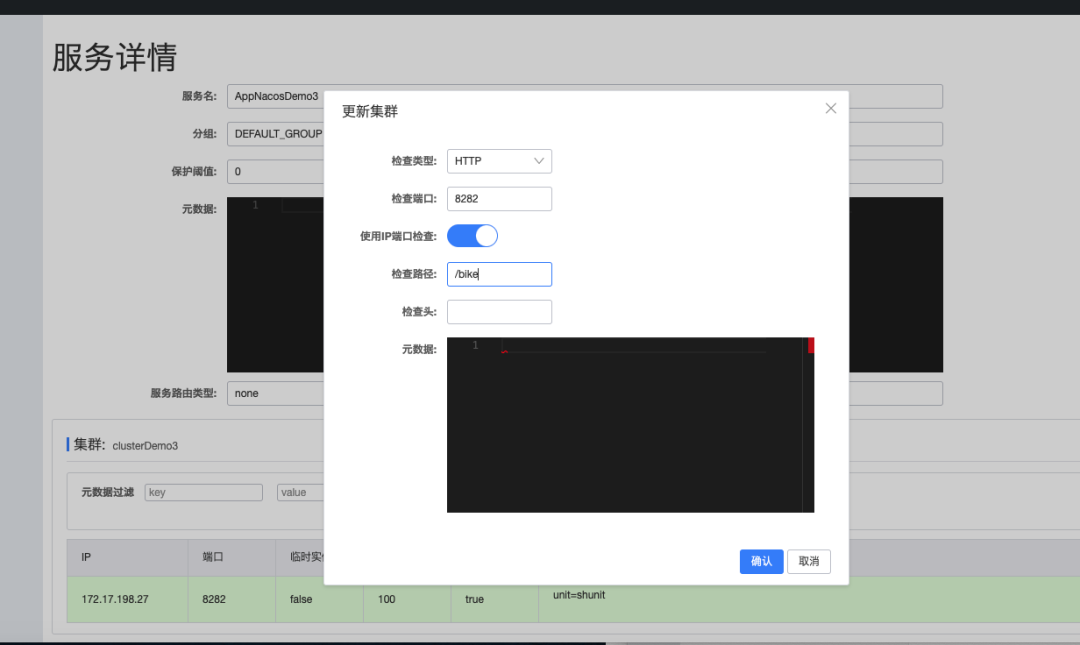
探活輸出
receive message from server.
receive message from server.
小結(jié): 啟動(dòng)時(shí)注冊(cè)節(jié)點(diǎn)為非健康節(jié)點(diǎn),Nacos通過檢查路徑請(qǐng)求返回200正確后將節(jié)點(diǎn)設(shè)置為健康狀態(tài)。
源碼分析
當(dāng)持久節(jié)點(diǎn)注冊(cè)時(shí),會(huì)請(qǐng)求到InstanceController#register方法。
@Override
public void registerInstance(String namespaceId, String serviceName, Instance instance){
  boolean ephemeral = instance.isEphemeral();
  String clientId = IpPortBasedClient.getClientId(instance.toInetAddr(), ephemeral);
  createIpPortClientIfAbsent(clientId, ephemeral); // 創(chuàng)建IpPortClient
  Service service = getService(namespaceId, serviceName, ephemeral);
  clientOperationService.registerInstance(service, instance, clientId);
}
public IpPortBasedClient(String clientId, boolean ephemeral) {
    this.ephemeral = ephemeral;
    this.clientId = clientId;
    this.responsibleId = getResponsibleTagFromId();
    if (ephemeral) {
        beatCheckTask = new ClientBeatCheckTaskV2(this);
        HealthCheckReactor.scheduleCheck(beatCheckTask);
    } else {
       // 持久節(jié)點(diǎn)創(chuàng)建HealthCheckTaskV2并定時(shí)任務(wù)調(diào)度
        healthCheckTaskV2 = new HealthCheckTaskV2(this);
        HealthCheckReactor.scheduleCheck(healthCheckTaskV2);
    }
}
@Override
public void doHealthCheck() {
  try {
    // 獲取Client的service列表
    for (Service each : client.getAllPublishedService()) {
      // 開啟健康檢查
      if (switchDomain.isHealthCheckEnabled(each.getGroupedServiceName())) {
        // 注冊(cè)節(jié)點(diǎn)信息
        InstancePublishInfo instancePublishInfo = client.getInstancePublishInfo(each);
        ClusterMetadata metadata = getClusterMetadata(each, instancePublishInfo);
        // 調(diào)用
        ApplicationUtils.getBean(HealthCheckProcessorV2Delegate.class).process(this, each, metadata);
        // ...
      }
    }
  } catch (Throwable e) {

  } finally {
    if (!cancelled) {
      // 下一輪調(diào)度
      HealthCheckReactor.scheduleCheck(this);
      if (this.getCheckRtWorst() > 0) {
          // ...
          }
        }
      }
    }
  }
}
備注:定時(shí)任務(wù)調(diào)度,不斷向服務(wù)的注冊(cè)節(jié)點(diǎn)發(fā)送探活請(qǐng)求。
探活處理器選擇
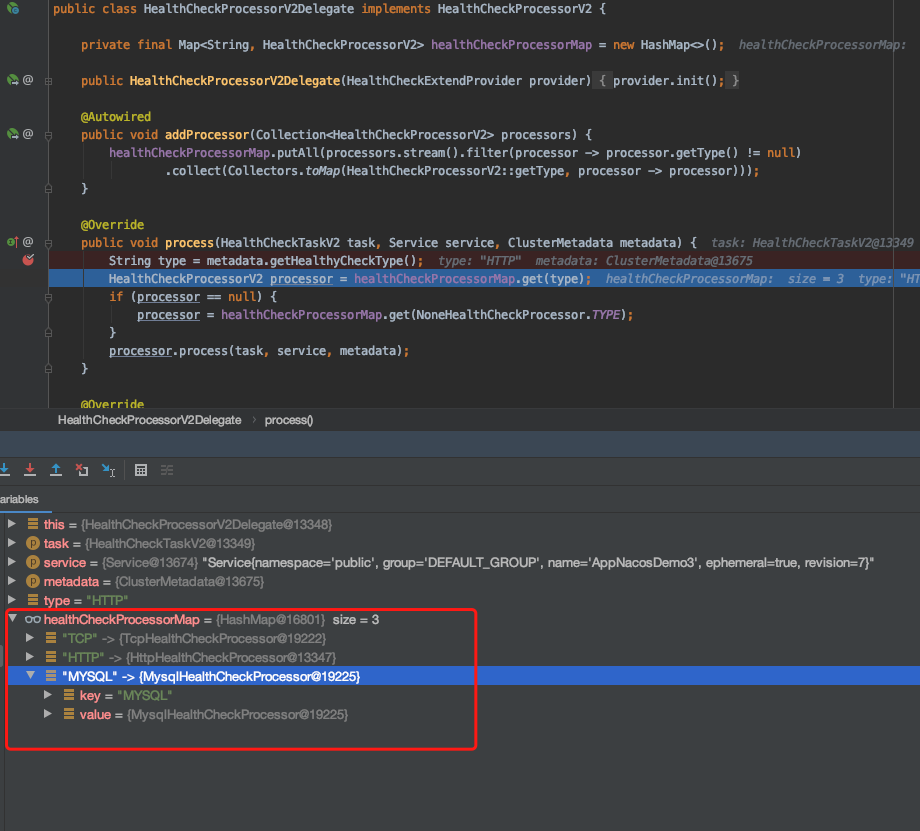
備注:由運(yùn)行時(shí)緩存情況可以看出,支持TPC、HTTP、MYSQL三種類型探活處理。
HTTP探活
代碼坐標(biāo)HttpHealthCheckProcessor#process
@Override
public void process(HealthCheckTaskV2 task, Service service, ClusterMetadata metadata) {
    HealthCheckInstancePublishInfo instance = (HealthCheckInstancePublishInfo) task.getClient()
            .getInstancePublishInfo(service);
    if (null == instance) {
        return;
    }
    try {
        // TODO handle marked(white list) logic like v1.x.
        if (!instance.tryStartCheck()) {
            // ...
            return;
        }
        Http healthChecker = (Http) metadata.getHealthChecker();
        // 默認(rèn)使用注冊(cè)實(shí)例端口
        int ckPort = metadata.isUseInstancePortForCheck() ? instance.getPort() : metadata.getHealthyCheckPort();
        // 組織url請(qǐng)求
        URL host = new URL("http://" + instance.getIp() + ":" + ckPort);
        URL target = new URL(host, healthChecker.getPath());
        Map<String, String> customHeaders = healthChecker.getCustomHeaders();
        Header header = Header.newInstance();
        header.addAll(customHeaders);
        // 發(fā)送HTTP請(qǐng)求
        ASYNC_REST_TEMPLATE.get(target.toString(), header, Query.EMPTY, String.class,
                new HttpHealthCheckCallback(instance, task, service));
        MetricsMonitor.getHttpHealthCheckMonitor().incrementAndGet();
    } catch (Throwable e) {
        instance.setCheckRt(switchDomain.getHttpHealthParams().getMax());
        healthCheckCommon.checkFail(task, service, "http:error:" + e.getMessage());
        healthCheckCommon.reEvaluateCheckRT(switchDomain.getHttpHealthParams().getMax(), task,
                switchDomain.getHttpHealthParams());
    }
}
@Override
public void onReceive(RestResult<String> result) {
    instance.setCheckRt(System.currentTimeMillis() - startTime);
    int httpCode = result.getCode();
    // 返回200
    if (HttpURLConnection.HTTP_OK == httpCode) {
        // 將節(jié)點(diǎn)變更為健康
        healthCheckCommon.checkOk(task, service, "http:" + httpCode);
        healthCheckCommon.reEvaluateCheckRT(System.currentTimeMillis() - startTime, task,
                switchDomain.getHttpHealthParams());
    } else if (HttpURLConnection.HTTP_UNAVAILABLE == httpCode
            || HttpURLConnection.HTTP_MOVED_TEMP == httpCode) {

    } else {

    }
}

 public void checkOk(HealthCheckTaskV2 task, Service service, String msg) {
   // 節(jié)點(diǎn)設(shè)置為健康狀態(tài)
   healthStatusSynchronizer.instanceHealthStatusChange(true, task.getClient(), service, instance);
 }
備注:向節(jié)點(diǎn)發(fā)起HTTP請(qǐng)求,返回狀態(tài)碼為200表示,將節(jié)點(diǎn)標(biāo)志為健康狀態(tài);否則標(biāo)記非健康狀態(tài)。
TCP探活
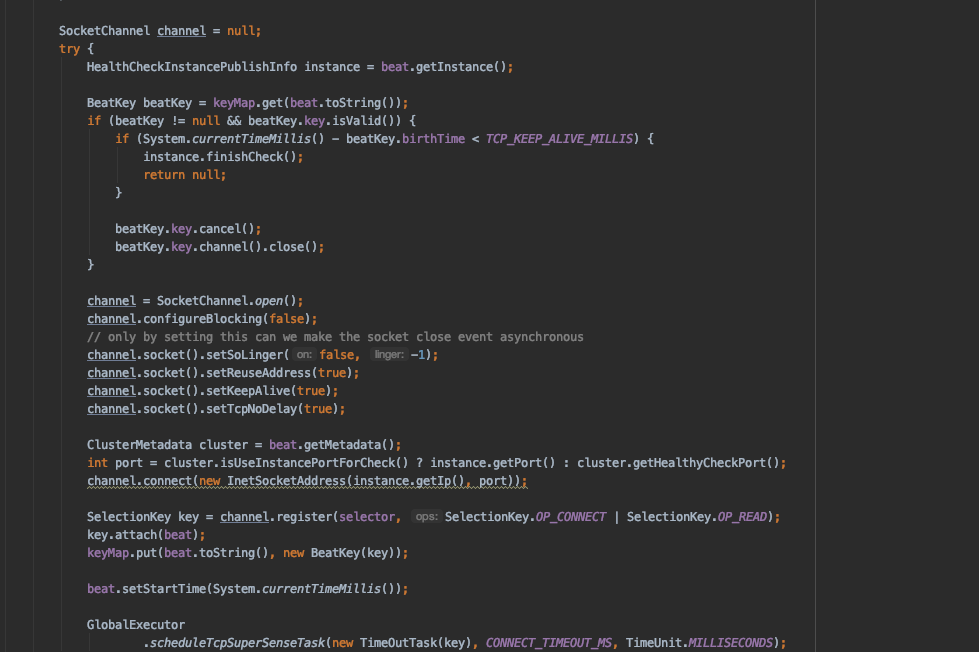
TPC探活的代碼詳見TcpHealthCheckProcessor,不再詳細(xì)分析。大體邏輯為通過與注冊(cè)實(shí)例建立channel,不斷ping 注冊(cè)實(shí)例的端口是否可用,從而判斷服務(wù)是否健康。
MYSQL探活
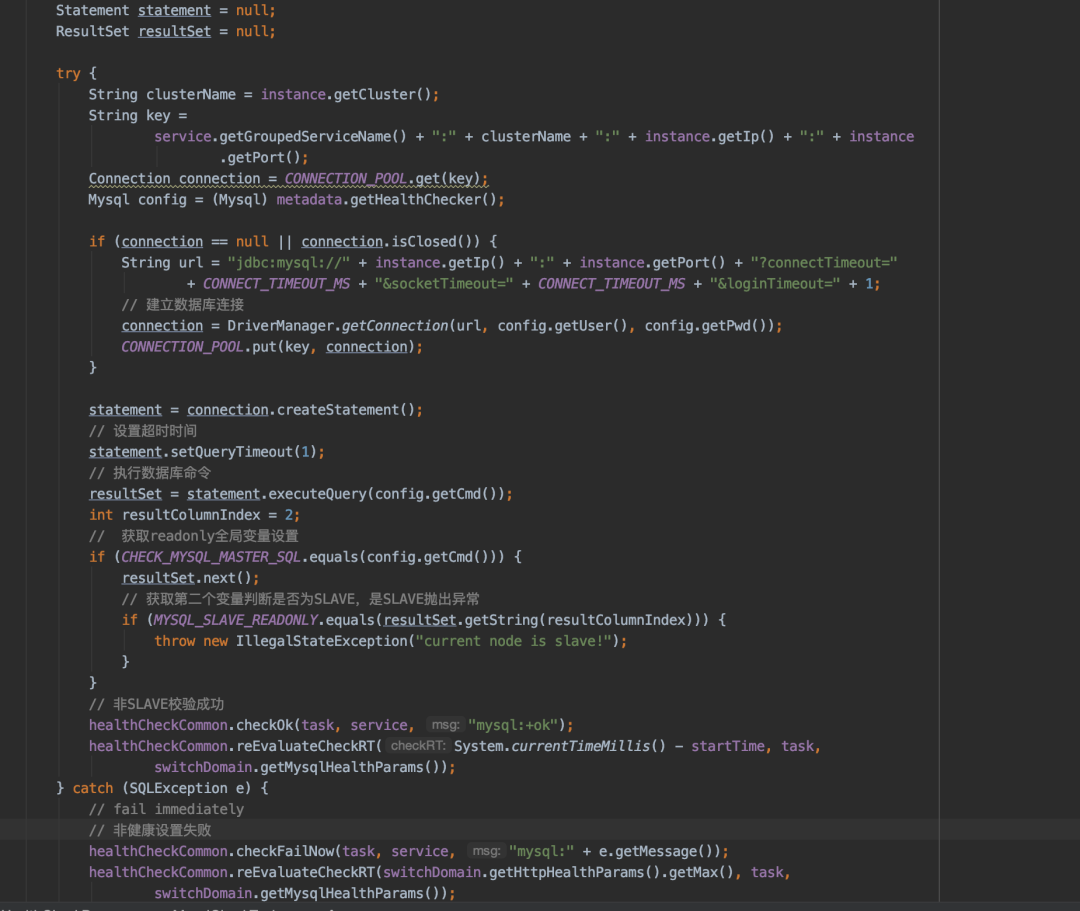
備注:主要檢查當(dāng)前節(jié)點(diǎn)為主庫(kù),不能訪問到從庫(kù),可能在主從切換中使用。
總結(jié): 本文就臨時(shí)節(jié)點(diǎn)續(xù)約、持久節(jié)點(diǎn)心跳、持久節(jié)點(diǎn)的探活代碼實(shí)現(xiàn)做了熟練。相信通過代碼走查,對(duì)其使用場(chǎng)景和實(shí)現(xiàn)不再陌生。