
真贊!IDEA中這么玩MyBatis,讓編碼速度飛起!
IDEA 逆向 MyBatis 工程時,不像支持 Hibernate 那樣有自帶插件,需要集成第三方的 MyBatis Generator。
MyBatis Generator的詳細介紹 http://mybatis.github.io/generator/index.html
本篇博客圖解 MyBatis Generator 的使用過程,并結(jié)合實戰(zhàn)說明逆向工程的使用方式。
# 搭建 MyBatis Generator 插件環(huán)境
a. 添加插件依賴 pom.xml
<!--mybatis 逆向生成插件--><plugin><groupId>org.mybatis.generator</groupId><artifactId>mybatis-generator-maven-plugin</artifactId><version>1.3.2</version><configuration><configurationFile>src/main/resources/generatorConfig.xml</configurationFile><verbose>true</verbose><overwrite>true</overwrite></configuration><executions><execution><id>Generate MyBatis Artifacts</id></execution></executions><dependencies><dependency><groupId>org.mybatis.generator</groupId><artifactId>mybatis-generator-core</artifactId><version>1.3.2</version></dependency></dependencies></plugin>
b.配置文件 generatorConfig.xml
<?xml version="1.0" encoding="UTF-8"?><!DOCTYPE generatorConfigurationPUBLIC "-//mybatis.org//DTD MyBatis Generator Configuration 1.0//EN""http://mybatis.org/dtd/mybatis-generator-config_1_0.dtd"><generatorConfiguration><properties resource="jdbc.properties"/><classPathEntry location="${jdbc_driverLocation}"/><!--指定特定數(shù)據(jù)庫的jdbc驅(qū)動jar包的位置--><context id="default" targetRuntime="MyBatis3"><!-- optional,旨在創(chuàng)建class時,對注釋進行控制 --><commentGenerator><property name="suppressDate" value="true"/><property name="suppressAllComments" value="true"/></commentGenerator><!--jdbc的數(shù)據(jù)庫連接 --><jdbcConnectiondriverClass="${jdbc_driverClass}"connectionURL="${jdbc_url}"userId="${jdbc_user}"password="${jdbc_pwd}"></jdbcConnection><!-- 非必需,類型處理器,在數(shù)據(jù)庫類型和java類型之間的轉(zhuǎn)換控制--><javaTypeResolver><property name="forceBigDecimals" value="false"/></javaTypeResolver><!-- Model模型生成器,用來生成含有主鍵key的類,記錄類 以及查詢Example類targetPackage 指定生成的model生成所在的包名targetProject 指定在該項目下所在的路徑--><javaModelGenerator targetPackage="com.rambo.sdm.dao.pojo" targetProject="src/main/java"><!-- 是否允許子包,即targetPackage.schemaName.tableName --><property name="enableSubPackages" value="false"/><!-- 是否對model添加 構(gòu)造函數(shù) --><property name="constructorBased" value="true"/><!-- 是否對類CHAR類型的列的數(shù)據(jù)進行trim操作 --><property name="trimStrings" value="true"/><!-- 建立的Model對象是否 不可改變 即生成的Model對象不會有 setter方法,只有構(gòu)造方法 --><property name="immutable" value="false"/></javaModelGenerator><!--Mapper映射文件生成所在的目錄 為每一個數(shù)據(jù)庫的表生成對應的SqlMap文件 --><sqlMapGenerator targetPackage="com.rambo.sdm.dao.mapper" targetProject="src/main/java"><property name="enableSubPackages" value="false"/></sqlMapGenerator><!-- 客戶端代碼,生成易于使用的針對Model對象和XML配置文件 的代碼type="ANNOTATEDMAPPER",生成Java Model 和基于注解的Mapper對象type="MIXEDMAPPER",生成基于注解的Java Model 和相應的Mapper對象type="XMLMAPPER",生成SQLMap XML文件和獨立的Mapper接口--><javaClientGenerator targetPackage="com.rambo.sdm.dao.inter" targetProject="src/main/java" type="XMLMAPPER"><property name="enableSubPackages" value="true"/></javaClientGenerator><table tableName="user" domainObjectName="UserPO"><generatedKey column="uuid" sqlStatement="SELECT REPLACE(UUID(),'-','') UUID FROM DUAL"/></table></context></generatorConfiguration>
c.數(shù)據(jù)庫配置文件 jdbc.properties
jdbc_driverLocation=D:\\Program Files\\Repository\\mysql\\mysql-connector-java\\5.1.38\\mysql-connector-java-5.1.38.jarjdbc_driverClass=com.mysql.jdbc.Driverjdbc_url=jdbc:mysql://localhost:3306/db_test?useUnicode=true&characterEncoding=utf-8jdbc_user=rootjdbc_pwd=123456validationQuery = select 1
d. 配置插件啟動項
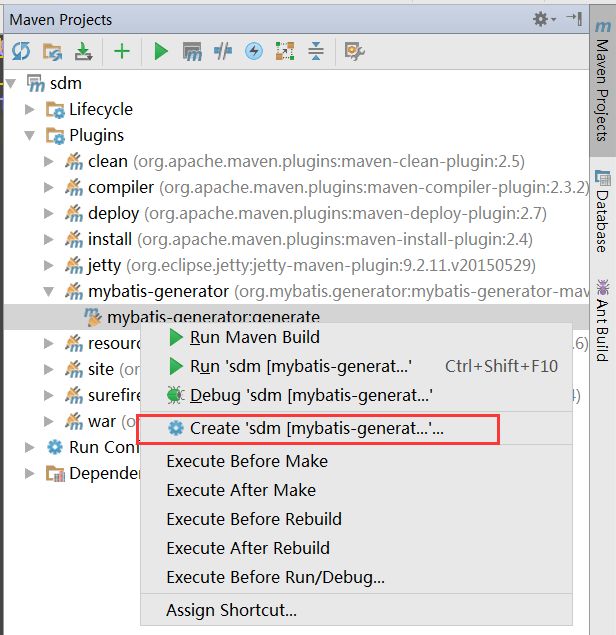
# 項目實戰(zhàn)
User類就是普通的實體類,定義了數(shù)據(jù)庫對應的字段,以及set/get方法。
Mybatis 引入了 Example 類,用來封裝數(shù)據(jù)庫查詢條件。
a.比如在一個項目 我們要刪除某個小組下某個用戶的信息
public int deleteUserApplyInfo(long user_id,long team_id){StudyTeamUserApplyInfoExample ue = new StudyTeamUserApplyInfoExample();ue.createCriteria().andUserIdEqualTo(new BigDecimal(user_id)).andTeamIdEqualTo(new BigDecimal(team_id));return studyTeamUserApplyInfoDAO.deleteByExample(ue);}
b.根據(jù)小組ID(非主鍵 更新小組信息)
public int updateStudyTeamInfo(StudyTeamInfo st){StudyTeamInfoExample ste = new StudyTeamInfoExample();ste.createCriteria().andTeamIdEqualTo(st.getTeamId());return studyTeamInfoDAO.updateByExampleSelective(st,ste);}
c.其它
(1)模糊查詢并且排序
public List<StudyTeamInfo> getStudyTeamInfoByName(String team_name){StudyTeamInfoExample se = new StudyTeamInfoExample();se.createCriteria().andTeamNameLike("%"+team_name+"%").andEnableEqualTo((short)1);se.setOrderByClause("team_score desc");List<StudyTeamInfo> ls = studyTeamInfoDAO.selectByExample(se);if(ls!=null&&ls.size()>0){return ls;}return null;}
(2)大于等于某個分數(shù) 并且小于某個分數(shù)的查詢
public StudyTeamLevel getStudyTeamLevel(long score){StudyTeamLevelExample le = new StudyTeamLevelExample();le.createCriteria().andNeedScoreLessThanOrEqualTo(score).andUpScoreGreaterThan(score);List<StudyTeamLevel> ls = studyTeamLevelDAO.selectByExample(le);if(ls!=null&&ls.size()>0){return ls.get(0);}return null;}
作者:Orson
來源:cnblogs.com/java-class/p/6237564.html
推薦閱讀:
喜歡我可以給我設(shè)為星標哦
好文章,我“在看”

評論
圖片
表情