
Alluxio源碼編譯適配CDH
一、源碼編譯
確保你安裝了Java(JDK 8或更高版本)以及Maven3.3.9及以上
[root@song build]# git clone https://github.com/Alluxio/alluxio.git
[root@song build]# cd alluxio/
[root@song alluxio]# git checkout v2.4.1-1
[root@song alluxio]# mvn clean install -Phadoop-3 -Dhadoop.version=3.0.0-cdh6.3.2 -DskipTests
編譯成功:
[INFO] Alluxio Under File System - Tencent Cloud COSN ..... SUCCESS [ 27.366 s]
[INFO] Alluxio UI ......................................... SUCCESS [05:49 min]
[INFO] ------------------------------------------------------------------------
[INFO] BUILD SUCCESS
[INFO] ------------------------------------------------------------------------
[INFO] Total time: 35:53 min
[INFO] Finished at: 2021-01-26T21:38:17+08:00
[INFO] Final Memory: 213M/682M
[INFO] ------------------------------------------------------------------------
官方提供的二進(jìn)制包是根據(jù)hadoop3.3進(jìn)行編譯的,里面包含了適配多個hdfs版本的包
自己編譯的話,里面沒有包含適配hdfs版本的包,需要自己在根據(jù)hdfs版本重新編譯
如下圖所示,官方提供的二級制包下包含了適配多個hdfs版本的包:
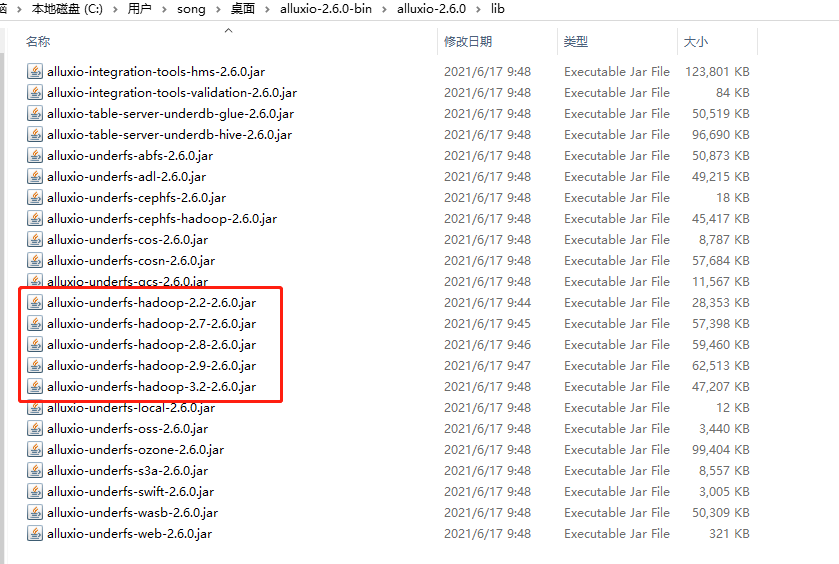
比如,你的大數(shù)據(jù)安裝環(huán)境的hadoop版本是3.0.0-cdh6.3.2,因?yàn)楣俜降亩M(jìn)制包是根據(jù)apache hadoop3.3進(jìn)行編譯的,如果適配hadoop3.0.0-cdh6.3.2的話,可能會有兼容問題。故,需要根據(jù)自己的hadoop版本進(jìn)行編譯。
唯一的區(qū)別是lib目錄下,少了很多適配hadoop版本的包,需要自己編譯
二、編譯適配多Hadoop版本
比如適配apache hadoop 2.8.0,則需要進(jìn)行如下步驟:
編譯生成
alluxio-shaded-hadoop-2.8.0.jar[song@k8s-node-02 Alluxio]$ cd shaded/hadoop/
[song@k8s-node-02 Alluxio]$ mvn -T 4C clean install -Dmaven.javadoc.skip=true -DskipTests \
-Dlicense.skip=true -Dcheckstyle.skip=true -Dfindbugs.skip=true \
-Pufs-hadoop-2 -Dufs.hadoop.version=2.8.0
[song@k8s-node-02 hadoop]$ ll target/
total 28836
-rw-rw-r-- 1 song song 29523360 Jul 7 09:42 alluxio-shaded-hadoop-2.8.0.jar
drwxrwxr-x 2 song song 28 Jul 7 09:41 maven-archiver
-rw-rw-r-- 1 song song 3244 Jul 7 09:41 original-alluxio-shaded-hadoop-2.8.0.jar如果不進(jìn)行此步驟,則第2步maven會報找不到alluxio-shaded-hadoop-2.8.0.jar
編譯生成
alluxio-underfs-hdfs jar[song@k8s-node-02 Alluxio]$ cd underfs/
[song@k8s-node-02 Alluxio]$ mvn -T 4C clean install -Dmaven.javadoc.skip=true -DskipTests \
-Dlicense.skip=true -Dcheckstyle.skip=true -Dfindbugs.skip=true \
-Pufs-hadoop-2 -Dufs.hadoop.version=2.8.0
[song@k8s-node-02 underfs]$ ll hdfs/target/
total 59688
-rw-rw-r-- 1 song song 26432 Jul 8 11:14 alluxio-underfs-hdfs-2.5.0-RC2.jar
-rw-rw-r-- 1 song song 61061280 Jul 8 11:14 alluxio-underfs-hdfs-2.5.0-RC2-jar-with-dependencies.jar
-rw-rw-r-- 1 song song 26533 Jul 8 11:14 alluxio-underfs-hdfs-2.5.0-RC2-sources.jar
drwxrwxr-x 4 song song 37 Jul 8 11:14 classes
drwxrwxr-x 3 song song 25 Jul 8 11:14 generated-sources
drwxrwxr-x 3 song song 30 Jul 8 11:14 generated-test-sources
drwxrwxr-x 2 song song 28 Jul 8 11:14 maven-archiver
drwxrwxr-x 3 song song 35 Jul 8 11:13 maven-status
drwxrwxr-x 3 song song 45 Jul 8 11:14 test-classes
[song@k8s-node-02 underfs]$ cd hdfs/target/
[song@k8s-node-02 target]$ cp alluxio-underfs-hdfs-2.5.0-RC2-jar-with-dependencies.jar alluxio-underfs-hdfs-2.8.0-2.5.0-RC2.jar
[song@k8s-node-02 target]$ ll
total 119320
-rw-rw-r-- 1 song song 26432 Jul 8 11:14 alluxio-underfs-hdfs-2.5.0-RC2.jar
-rw-rw-r-- 1 song song 61061280 Jul 8 11:14 alluxio-underfs-hdfs-2.5.0-RC2-jar-with-dependencies.jar
-rw-rw-r-- 1 song song 26533 Jul 8 11:14 alluxio-underfs-hdfs-2.5.0-RC2-sources.jar
-rw-rw-r-- 1 song song 61061280 Jul 8 11:22 alluxio-underfs-hdfs-2.8.0-2.5.0-RC2.jar復(fù)制
alluxio-underfs-hdfs-2.8.0-2.5.0-RC2.jar到第一步源碼編譯的 lib目錄下即可。
三、HA安裝
1、大數(shù)據(jù)集群信息
namenode節(jié)點(diǎn):
dn75,dn76
zookeeper節(jié)點(diǎn):
dn75,dn76,dn78
datanode/nodemaneger節(jié)點(diǎn):
nn41,dn42-dn55,dn63-dn67,nn71-nn74
2、Alluxio集群規(guī)劃
master:
與zookerper節(jié)點(diǎn)相同:dn75,dn76,dn78
worker節(jié)點(diǎn):
與datanode/nodemanager節(jié)點(diǎn)相同:nn41,dn42-dn55,dn63-dn67,nn71-nn74
3、安裝
前置條件: dn75節(jié)點(diǎn)hadoop用戶已經(jīng)做免密登錄,且具有sudo免密權(quán)限
3.1 上傳安裝包
將編譯好的Alluxio包上傳到dn75節(jié)點(diǎn)上,如下:
[hadoop@dn75 app]$ ls
alluxio  pssh
[hadoop@dn75 app]$ pwd
/home/hadoop/app
3.2 分發(fā)安裝包
將dn75上的安裝包使用pscp命令分發(fā)到各主機(jī)節(jié)點(diǎn):
[hadoop@dn75 pssh]$ pssh -h other mkdir /home/hadoop/app
[hadoop@dn75 app]$ pscp -r -h pssh/other alluxio/ /home/hadoop/app/
3.3 修改配置文件
修改
alluxio-site.properties[hadoop@dn75 conf]$ cp alluxio-site.properties.template alluxio-site.properties
[hadoop@dn75 conf]$ vim alluxio-site.properties配置如下:
# Common properties
# alluxio.master.hostname=localhost
alluxio.master.mount.table.root.ufs=hdfs://nameservice1/user/hadoop/alluxio

# ha zk properties
alluxio.zookeeper.enabled=true
alluxio.zookeeper.address=dn75:2181,dn76:2181,dn78:2181
alluxio.master.journal.type=UFS
alluxio.master.journal.folder=hdfs://nameservice1/user/hadoop/alluxio/journal
alluxio.zookeeper.session.timeout=120s
alluxio.zookeeper.leader.connection.error.policy=SESSION

# hdfs properties
alluxio.underfs.hdfs.configuration=/etc/hadoop/conf/hdfs-site.xml:/etc/hadoop/conf/core-site.xml

# Worker properties
# alluxio.worker.ramdisk.size=1GB
# alluxio.worker.tieredstore.levels=1
alluxio.worker.tieredstore.level0.alias=MEM
alluxio.worker.tieredstore.level0.dirs.mediumtype=MEM,HDD,HDD
alluxio.worker.tieredstore.level0.dirs.path=/mnt/ramdisk,/data2/alluxio/data,/data3/alluxio/data
alluxio.worker.tieredstore.level0.dirs.quota=50GB,1024GB,1024GB
配置
master[hadoop@dn75 conf]$ vim masters
dn75
dn76
dn78配置
workers[hadoop@dn75 conf]$ vim workers
nn41
dn42
dn43
dn44
dn45
dn46
dn47
dn48
dn49
dn50
dn51
dn52
dn53
dn54
dn55
dn63
dn64
dn65
dn66
dn67
nn71
nn72
nn73
nn74配置環(huán)境變量(可選)
[hadoop@dn75 conf]$ vim alluxio-env.sh
export JAVA_HOME=/usr/java/jdk1.8.0_181-cloudera
3.4 分發(fā)配置文件到各節(jié)點(diǎn)
[hadoop@dn75 alluxio]$ ./bin/alluxio copyDir conf/
RSYNC'ing /home/hadoop/app/alluxio/conf to masters...
dn75
dn76
dn78
RSYNC'ing /home/hadoop/app/alluxio/conf to workers...
nn41
dn42
dn43
dn44
dn45
dn46
dn47
dn48
dn49
dn50
dn51
dn52
dn53
dn54
dn55
dn63
dn64
dn65
dn66
dn67
nn71
nn72
nn73
nn74
3.5 配置master節(jié)點(diǎn)alluxio.master.hostname
[hadoop@dn75 alluxio]$ cat conf/alluxio-site.properties
# Common properties
alluxio.master.hostname=dn75

[hadoop@dn76 alluxio]$ cat conf/alluxio-site.properties
# Common properties
alluxio.master.hostname=dn76

[hadoop@dn78 alluxio]$ cat conf/alluxio-site.properties
# Common properties
alluxio.master.hostname=dn78
4、啟動
4.1 格式化Alluxio
[hadoop@dn75 alluxio]$ ./bin/alluxio format
4.2 啟動Alluxio
[hadoop@dn75 alluxio]$ ./bin/alluxio-start.sh all SudoMount
四、掛載HDFS目錄
1、主目錄掛載
alluxio.master.mount.table.root.ufs=hdfs://<NAMENODE>:<PORT>
alluxio.master.mount.table.root.option.alluxio.underfs.version=<HADOOP VERSION>
2、子目錄掛載
$ ./bin/alluxio fs mount \
  --option alluxio.underfs.version=2.8.0 \
  /mnt/hdfs27 hdfs://namenode2:8020/