
【Docker】項(xiàng)目實(shí)戰(zhàn),部署自己的APP
之前我們介紹了 Docker 命令使用大全,今天就來(lái)進(jìn)行實(shí)戰(zhàn)一下
目標(biāo):
編寫自己的 Dockerfile 鏡像 創(chuàng)建一個(gè)簡(jiǎn)單的 Web 界面 使用鏡像創(chuàng)建一個(gè) Flask APP
有關(guān) Dockerfile 的相關(guān)知識(shí),我在后面的文章會(huì)進(jìn)行講解,今天主要是實(shí)際操作
所需工具:安裝好 Docker 的服務(wù)器或者本地電腦,筆者使用的是服務(wù)器:Ubuntu 系統(tǒng)
創(chuàng)建一個(gè) Flask APP
首先創(chuàng)建一個(gè) Flask app
app.py
from?flask?import?Flask,?render_template
import?random

app?=?Flask(__name__)

#?list?of?fox?images,用來(lái)進(jìn)行頁(yè)面展示的
images?=?[
?"https://media0.giphy.com/media/Ko5dZRMv9uJFu/giphy.gif",
?"https://media.tenor.com/images/6461359b4205a95bf1f4374a3aa2acec/tenor.gif",
?"https://i.imgur.com/dUBv79d.gif",
?"https://media2.giphy.com/media/dvBgr7pA6FTJOMOALY/giphy.gif",
?"https://images-wixmp-ed30a86b8c4ca887773594c2.wixmp.com/f/45dfcad0-23ff-4af4-8c3f-b4b68f6edab4/d5hxh3z-aac8f004-e5db-4030-8e0c-62b899b4d0ce.gif"
????]

@app.route('/')
def?index():
????url?=?random.choice(images)
????return?render_template('index.html',?url=url)

if?__name__?==?"__main__":
????app.run(host="0.0.0.0")
創(chuàng)建一個(gè) requestment.txt 文件,把 Python 需要的包及其版本放進(jìn)去,方便后續(xù)安裝
requestment.txt
Flask==0.10.1
創(chuàng)建一個(gè)簡(jiǎn)單的 Web 頁(yè)面
templates/index.html
創(chuàng)建一個(gè) templates 的文件夾,并在此文件夾下創(chuàng)建 index.html 文件
<html>
??<head>
????<style?type="text/css">
??????body?{
????????background:?black;
????????color:?white;
??????}
??????div.container?{
????????max-width:?500px;
????????margin:?100px?auto;
????????border:?20px?solid?white;
????????padding:?10px;
????????text-align:?center;
??????}
??????h4?{
????????text-transform:?uppercase;
??????}
????style>
??head>
??<body>
????<div?class="container">
??????<h4>Fox?Gif?of?the?dayh4>
??????<img?src="{{url}}"?/>
??????<p><small>Courtesy:?<a?href="https://leonglearnai.com/">AICVa>small>p>
????div>
??body>
html>
Dockerfile
我們基于 ?Alpine 構(gòu)建一個(gè)鏡像 Alpine:Alpine Linux 的最小 Docker 映像,具有完整的包索引,大小只有 5mb,非常實(shí)用。
對(duì)命令的含義進(jìn)行了注釋
#?基礎(chǔ)鏡像
FROM?alpine:3.9
#因?yàn)槲覀冃枰\(yùn)行 Python,所以需要配置環(huán)境:安裝 Python 和 pip 到Apline Linux 中,該命令不僅會(huì)安裝 pip 包,也會(huì)安裝其他的依賴(如 Python 的解釋器)
#?RUN?是?Docker?的命令,?apk?add?--update?py2-pip?類似于?Linux?命令
RUN?apk?add?--update?py2-pip
#?拷貝本地文件?requirements.txt(默認(rèn)與?Dockerfile?同一文件夾)到?容器的?/usr/src/app/?文件夾下,會(huì)自動(dòng)創(chuàng)建
COPY?requirements.txt?/usr/src/app/
#?安裝?所需要的?python?包
RUN?pip?install?--no-cache-dir?-r?/usr/src/app/requirements.txt
#?拷貝其他文件
COPY?app.py?/usr/src/app/
COPY?templates/index.html?/usr/src/app/templates/
#?容器需要暴露端口,F(xiàn)lask?程序運(yùn)行的端口
EXPOSE?5000
#?運(yùn)行?python程序,該命令的意思是?python?/usr/src/app/app.py
CMD?["python",?"/usr/src/app/app.py"]
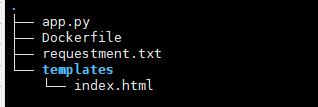
目錄結(jié)構(gòu)如下所示:
編譯鏡像
編寫完 Dockerfile,接下來(lái)就是進(jìn)行編譯了,使用 docker bulid
. 不要漏了,其代表的含義是 Dockerfile 所在的路徑
docker?build?-t?/myapp?.?
下面是編譯過(guò)程中的一些輸出:
Sending?build?context?to?Docker?daemon??6.656kB
Step?1/8?:?FROM?alpine:3.9
?--->?78a2ce922f86
Step?2/8?:?RUN?apk?add?--update?py2-pip
?--->?Using?cache
?--->?ba2fa67ca853
Step?3/8?:?COPY?requirements.txt?/usr/src/app/
?--->?Using?cache
?--->?43511e5ced4b
Step?4/8?:?RUN?pip?install?--no-cache-dir?-r?/usr/src/app/requirements.txt
?--->?Running?in?97289c7eda9d
Collecting?Flask==0.10.1?(from?-r?/usr/src/app/requirements.txt?(line?1))
??Downloading?https://files.pythonhosted.org/packages/db/9c/149ba60c47d107f85fe52564133348458f093dd5e6b57a5b60ab9ac517bb/Flask-0.10.1.tar.gz?(544kB)
Collecting?Werkzeug>=0.7?(from?Flask==0.10.1->-r?/usr/src/app/requirements.txt?(line?1))
??Downloading?https://files.pythonhosted.org/packages/cc/94/5f7079a0e00bd6863ef8f1da638721e9da21e5bacee597595b318f71d62e/Werkzeug-1.0.1-py2.py3-none-any.whl?(298kB)
Collecting?Jinja2>=2.4?(from?Flask==0.10.1->-r?/usr/src/app/requirements.txt?(line?1))
??Downloading?https://files.pythonhosted.org/packages/30/9e/f663a2aa66a09d838042ae1a2c5659828bb9b41ea3a6efa20a20fd92b121/Jinja2-2.11.2-py2.py3-none-any.whl?(125kB)
Collecting?itsdangerous>=0.21?(from?Flask==0.10.1->-r?/usr/src/app/requirements.txt?(line?1))
??Downloading?https://files.pythonhosted.org/packages/76/ae/44b03b253d6fade317f32c24d100b3b35c2239807046a4c953c7b89fa49e/itsdangerous-1.1.0-py2.py3-none-any.whl
Collecting?MarkupSafe>=0.23?(from?Jinja2>=2.4->Flask==0.10.1->-r?/usr/src/app/requirements.txt?(line?1))
??Downloading?https://files.pythonhosted.org/packages/b9/2e/64db92e53b86efccfaea71321f597fa2e1b2bd3853d8ce658568f7a13094/MarkupSafe-1.1.1.tar.gz
Installing?collected?packages:?Werkzeug,?MarkupSafe,?Jinja2,?itsdangerous,?Flask
??Running?setup.py?install?for?MarkupSafe:?started
????Running?setup.py?install?for?MarkupSafe:?finished?with?status?'done'
??Running?setup.py?install?for?Flask:?started
????Running?setup.py?install?for?Flask:?finished?with?status?'done'
Successfully?installed?Flask-0.10.1?Jinja2-2.11.2?MarkupSafe-1.1.1?Werkzeug-1.0.1?itsdangerous-1.1.0
Removing?intermediate?container?97289c7eda9d
?--->?9dbc17abb6f7
Step?5/8?:?COPY?app.py?/usr/src/app/
?--->?0c69faca84cb
Step?6/8?:?COPY?templates/index.html?/usr/src/app/templates/
?--->?a0e7ce10250b
Step?7/8?:?EXPOSE?5000
?--->?Running?in?f570b863937d
Removing?intermediate?container?f570b863937d
?--->?ba48b6b1c4bd
Step?8/8?:?CMD?["python",?"/usr/src/app/app.py"]
?--->?Running?in?2a73d498ea52
Removing?intermediate?container?2a73d498ea52
?--->?b64a5a0d5dd0
Successfully?built?b64a5a0d5dd0
Successfully?tagged?aicv/myfirstapp:latest
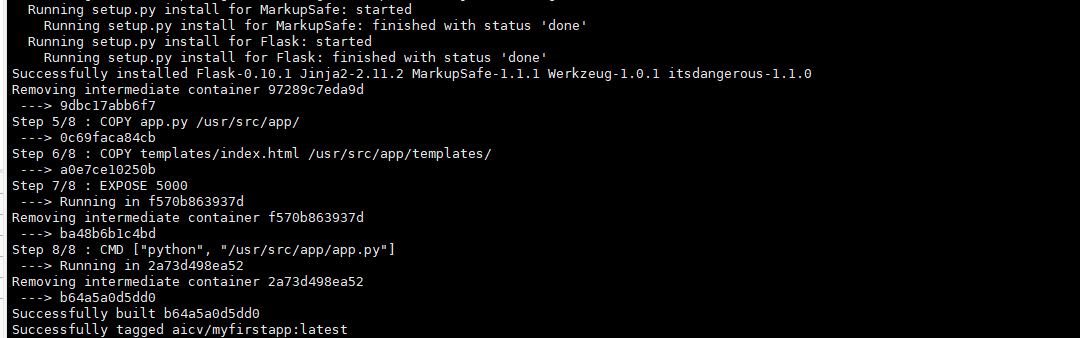
編譯完成后,我們可以看到鏡像出現(xiàn)了

運(yùn)行鏡像為容器
我們使用創(chuàng)建的鏡像運(yùn)行一個(gè)容器,將容器中的 5000?端口映射到宿主機(jī)的 8899 端口
docker?run?-p?-d?8899:5000?--name?myfirstapp?aicv/myfirstapp

打開(kāi) http://localhost:8899?或者 http://ip:8899?就能看到頁(yè)面了,刷新頁(yè)面可以看到不同的畫面。

推送到遠(yuǎn)程倉(cāng)庫(kù)
要推送到遠(yuǎn)程倉(cāng)庫(kù),首先需要登錄你自己的 Docker hub 賬號(hào)
docker?login

dokcker?push?YOUR_USERNAME/myfirstapp
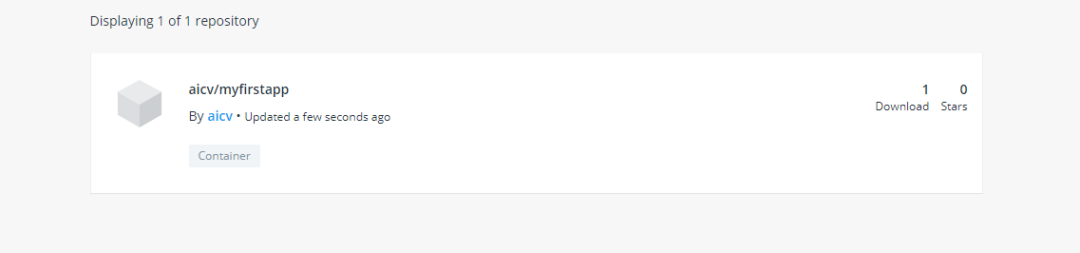
本節(jié)我們完成了一個(gè)簡(jiǎn)單的 Flask APP 的部署工作,了解了 Dockerfile 的基本使用,并將鏡像推送到我們的遠(yuǎn)程倉(cāng)庫(kù)中。
后續(xù)我將會(huì)講解 Docker 的更多運(yùn)用,包括結(jié)合深度學(xué)習(xí)項(xiàng)目的部署,歡迎持續(xù)關(guān)注。

機(jī)器視覺(jué) CV
與你分享 AI 和 CV 的樂(lè)趣
分享數(shù)據(jù)集、電子書、免費(fèi)GPU
長(zhǎng)按二維碼關(guān)注我們
