
實(shí)戰(zhàn)-從零開始實(shí)現(xiàn)VS Code基金插件(上班摸魚可用)
寫在前面
隨著7月一波牛市行情,越來越多的人投身A股行列,但是股市的風(fēng)險(xiǎn)巨大,有人一夜暴富,也有人血本無歸,所以對于普通人來說基金定投是個(gè)不錯(cuò)的選擇,本人也是基金定投的一枚小韭菜。
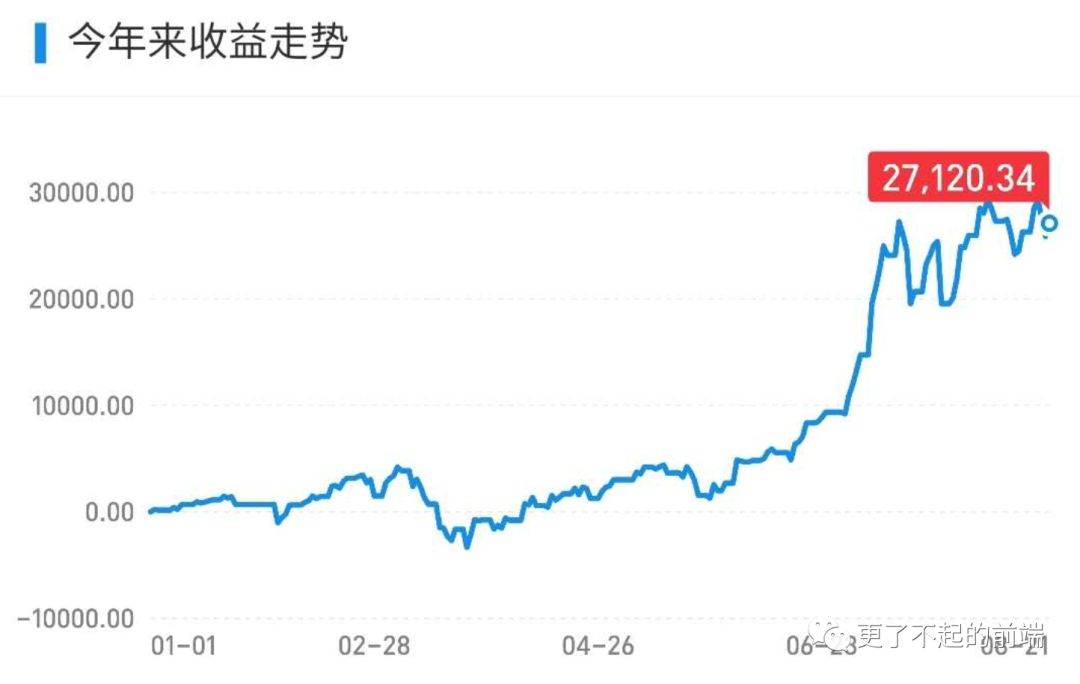
上班的時(shí)候經(jīng)常心理癢癢,想看看今天的基金又賺(ge)了多少錢,拿出手機(jī)打開支付寶的步驟過于繁瑣,而且我也不太關(guān)心其他的指標(biāo),只是想知道今天的凈值與漲幅。VS Code 做為一個(gè)編碼工具,提供了強(qiáng)大的插件機(jī)制,我們可以好好利用這個(gè)能力,可以一邊編碼的時(shí)候一邊看看行情。
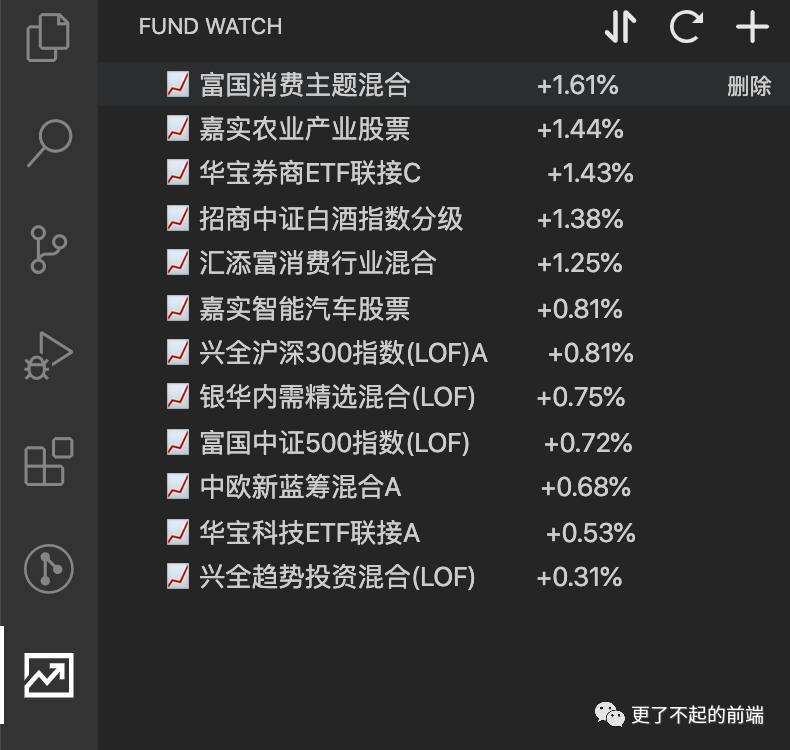
實(shí)現(xiàn)插件
初始化
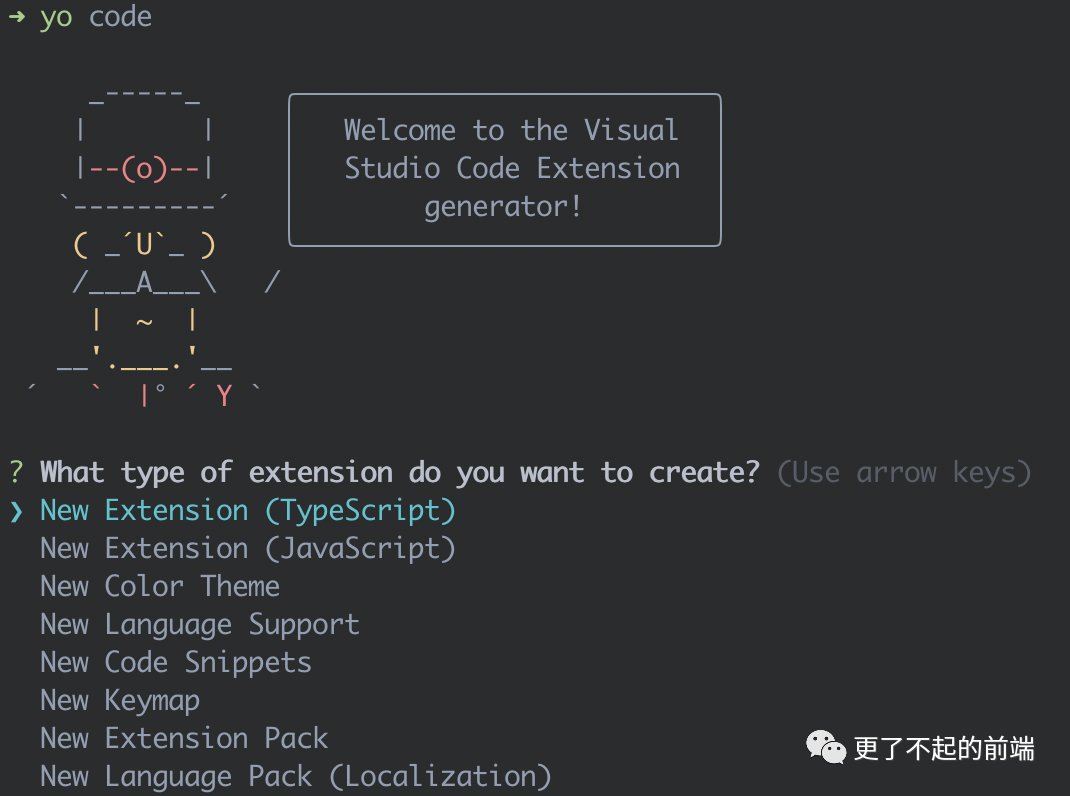
VSCode 官方提供了非常方便的插件模板,我們可以直接通過 Yeoman 來生成 VS Code 插件的模板。
先全局安裝 yo 和 generator-code,運(yùn)行命令 yo code。
#?全局安裝?yo?模塊
npm?install?-g?yo?generator-code
這里我們使用 TypeScript 來編寫插件。
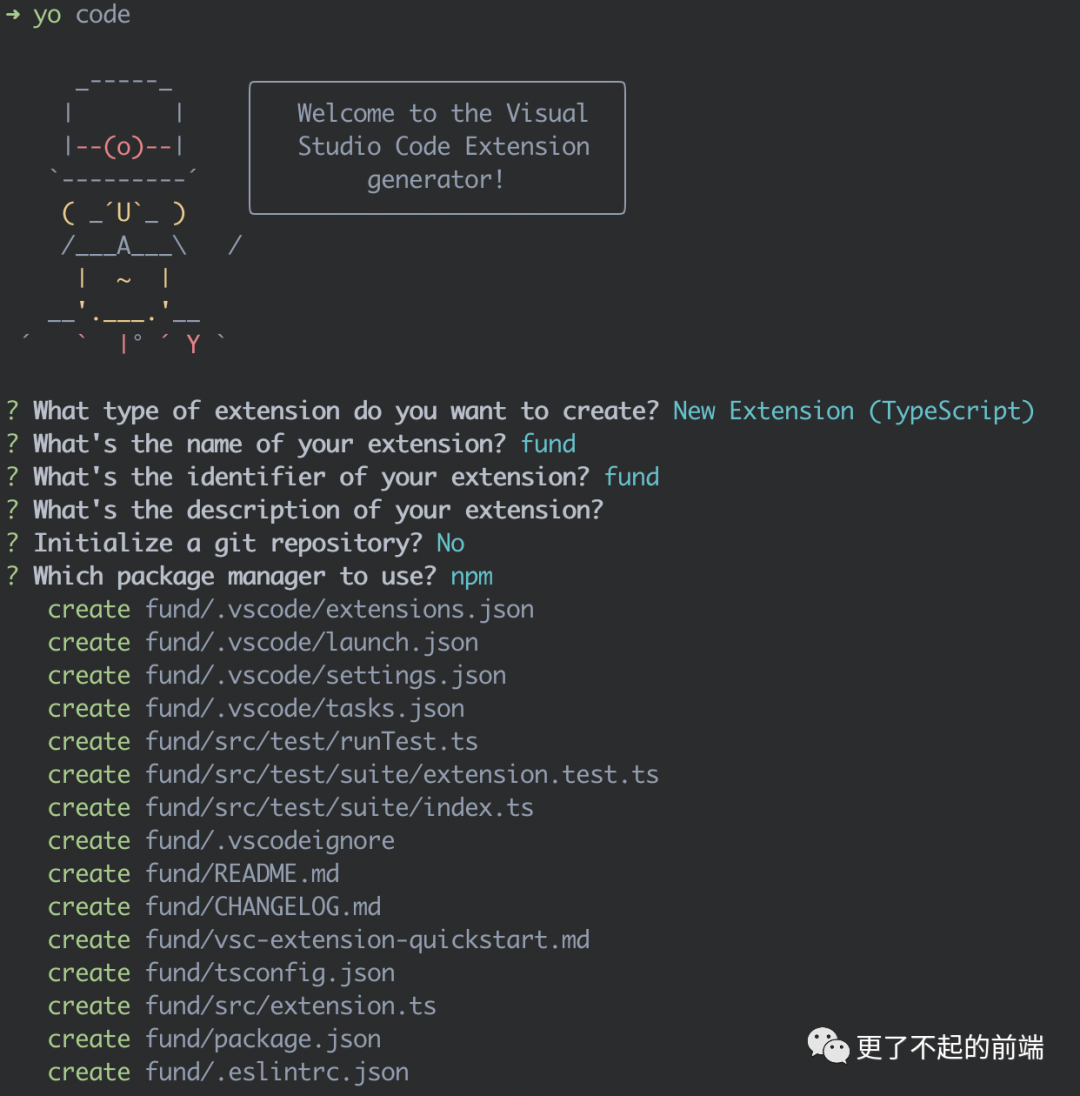
生成后的目錄結(jié)構(gòu)如下:
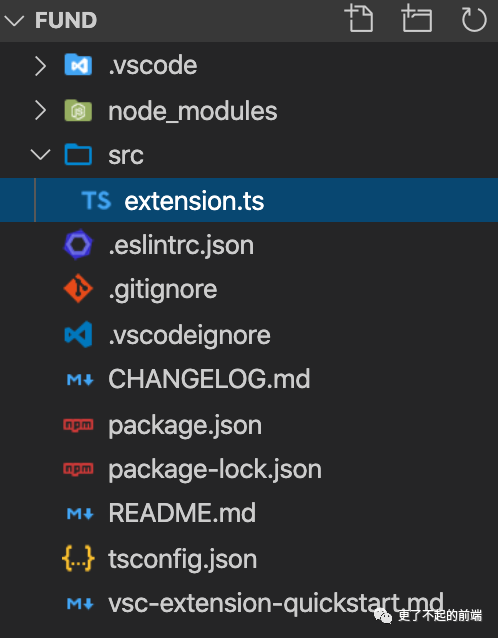
VS Code 插件可以簡單理解為一個(gè) Npm 包,也需要一個(gè) package.json 文件,屬性與 Npm 包的基本一致。
{
??//?名稱
??"name":?"fund-watch",
??//?版本
??"version":?"1.0.0",
??//?描述
??"description":?"實(shí)時(shí)查看基金行情",
??//?發(fā)布者
??"publisher":?"shenfq",
??//?版本要求
??"engines":?{
????"vscode":?"^1.45.0"
??},
??//?入口文件
??"main":?"./out/extension.js",
??"scripts":?{
????"compile":?"tsc?-p?./",
????"watch":?"tsc?-watch?-p?./",
??},
??"devDependencies":?{
????"@types/node":?"^10.14.17",
????"@types/vscode":?"^1.41.0",
????"typescript":?"^3.9.7"
??},
??//?插件配置
??"contributes":?{},
??//?激活事件
??"activationEvents":?[],
}
簡單介紹下其中比較重要的配置。
contributes:插件相關(guān)配置。activationEvents:激活事件。main:插件的入口文件,與 Npm 包表現(xiàn)一致。name、publisher:name 是插件名,publisher 是發(fā)布者。${publisher}.${name}構(gòu)成插件 ID。
比較值得關(guān)注的就是 contributes 和 activationEvents 這兩個(gè)配置。
創(chuàng)建視圖
我們首先在我們的應(yīng)用中創(chuàng)建一個(gè)視圖容器,視圖容器簡單來說一個(gè)單獨(dú)的側(cè)邊欄,在 package.json 的 contributes.viewsContainers 中進(jìn)行配置。
{
??"contributes":?{
????"viewsContainers":?{
??????"activitybar":?[
????????{
??????????"id":?"fund-watch",
??????????"title":?"FUND?WATCH",
??????????"icon":?"images/fund.svg"
????????}
??????]
????}
??}
}
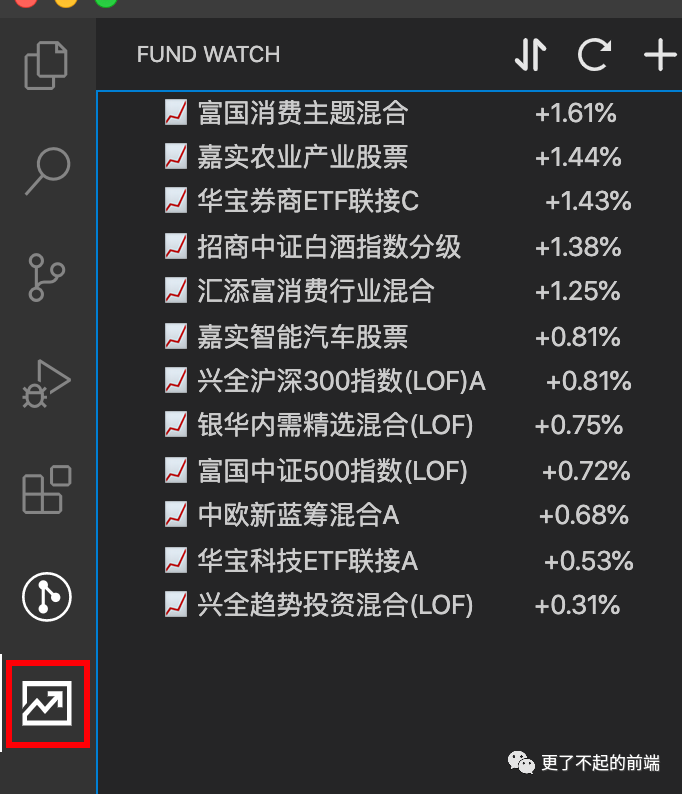
然后我們還需要添加一個(gè)視圖,在 package.json 的 contributes.views 中進(jìn)行配置,該字段為一個(gè)對象,它的 Key 就是我們視圖容器的 id,值為一個(gè)數(shù)組,表示一個(gè)視圖容器內(nèi)可添加多個(gè)視圖。
{
??"contributes":?{
????"viewsContainers":?{
??????"activitybar":?[
????????{
??????????"id":?"fund-watch",
??????????"title":?"FUND?WATCH",
??????????"icon":?"images/fund.svg"
????????}
??????]
????},
????"views":?{
??????"fund-watch":?[
????????{
??????????"name":?"自選基金",
??????????"id":?"fund-list"
????????}
??????]
????}
??}
}
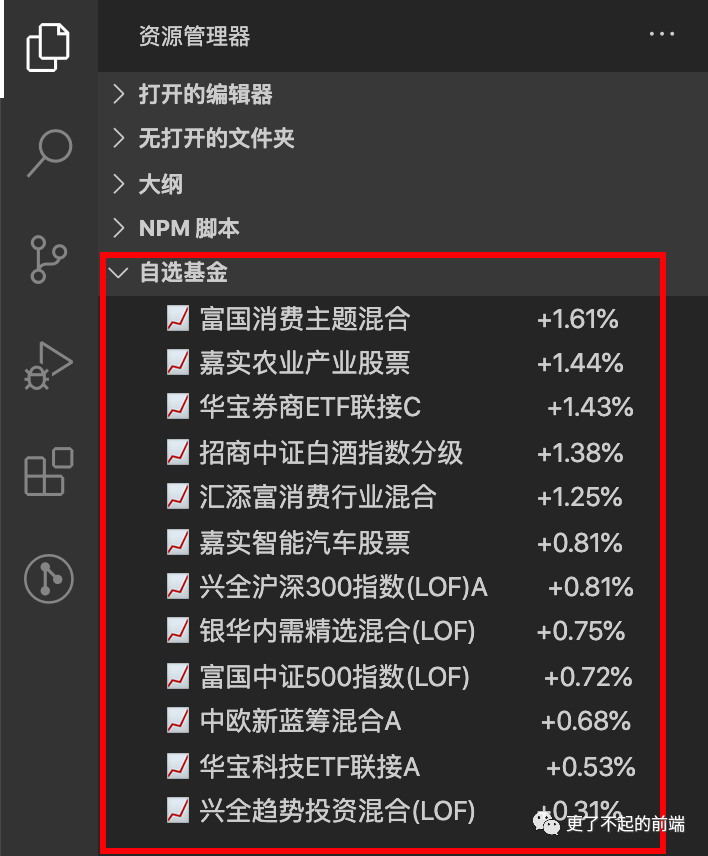
如果你不希望在自定義的視圖容器中添加,可以選擇 VS Code 自帶的視圖容器。
explorer: 顯示在資源管理器側(cè)邊欄debug: 顯示在調(diào)試側(cè)邊欄scm: 顯示在源代碼側(cè)邊欄
{
??"contributes":?{
????"views":?{
??????"explorer":?[
????????{
??????????"name":?"自選基金",
??????????"id":?"fund-list"
????????}
??????]
????}
??}
}
運(yùn)行插件
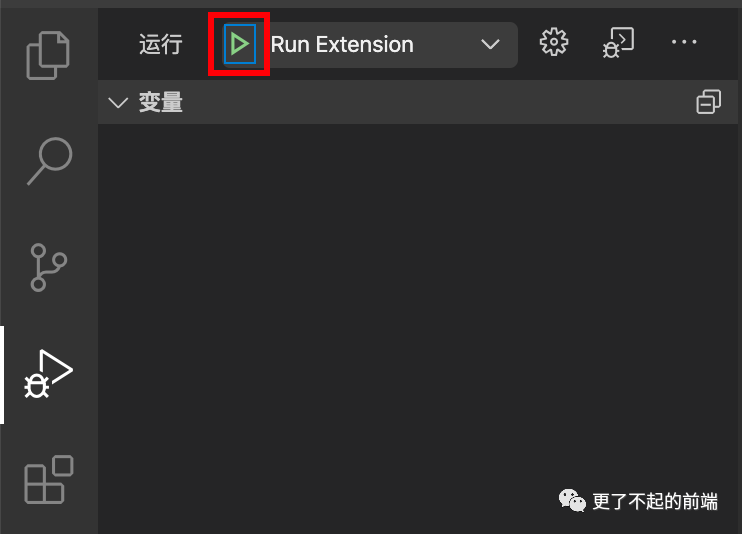
使用 Yeoman 生成的模板自帶 VS Code 運(yùn)行能力。
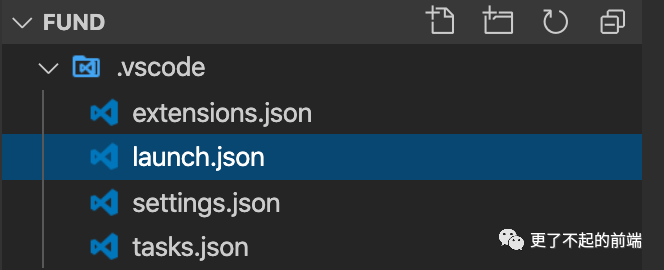
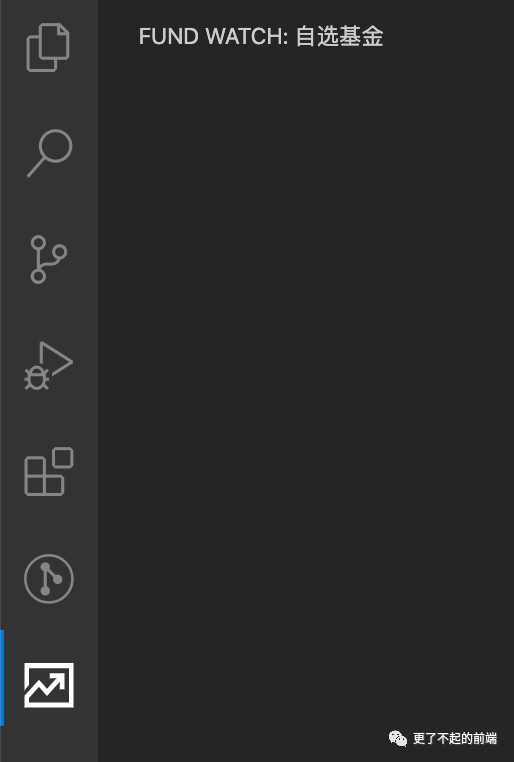
切換到調(diào)試面板,直接點(diǎn)擊運(yùn)行,就能看到側(cè)邊欄多了個(gè)圖標(biāo)。
添加配置
我們需要獲取基金的列表,當(dāng)然需要一些基金代碼,而這些代碼我們可以放到 VS Code 的配置中。
{
??"contributes":?{
????//?配置
????"configuration":?{
??????//?配置類型,對象
??????"type":?"object",
??????//?配置名稱
??????"title":?"fund",
??????//?配置的各個(gè)屬性
??????"properties":?{
????????//?自選基金列表
????????"fund.favorites":?{
??????????//?屬性類型
??????????"type":?"array",
??????????//?默認(rèn)值
??????????"default":?[
????????????"163407",
????????????"161017"
??????????],
??????????//?描述
??????????"description":?"自選基金列表,值為基金代碼"
????????},
????????//?刷新時(shí)間的間隔
????????"fund.interval":?{
??????????"type":?"number",
??????????"default":?2,
??????????"description":?"刷新時(shí)間,單位為秒,默認(rèn)?2?秒"
????????}
??????}
????}
??}
}
視圖數(shù)據(jù)
我們回看之前注冊的視圖,VS Code 中稱為樹視圖。
"views":?{
??"fund-watch":?[
????{
??????"name":?"自選基金",
??????"id":?"fund-list"
????}
??]
}
我們需要通過 vscode 提供的 registerTreeDataProvider 為視圖提供數(shù)據(jù)。打開生成的 src/extension.ts 文件,修改代碼如下:
//?vscode?模塊為?VS?Code?內(nèi)置,不需要通過?npm?安裝
import?{?ExtensionContext,?commands,?window,?workspace?}?from?'vscode';
import?Provider?from?'./Provider';

//?激活插件
export?function?activate(context:?ExtensionContext)?{
??//?基金類
??const?provider?=?new?Provider();

??//?數(shù)據(jù)注冊
??window.registerTreeDataProvider('fund-list',?provider);
}

export?function?deactivate()?{}
這里我們通過 VS Code 提供的 window.registerTreeDataProvider 來注冊數(shù)據(jù),傳入的第一個(gè)參數(shù)表示視圖 ID,第二個(gè)參數(shù)是 TreeDataProvider 的實(shí)現(xiàn)。
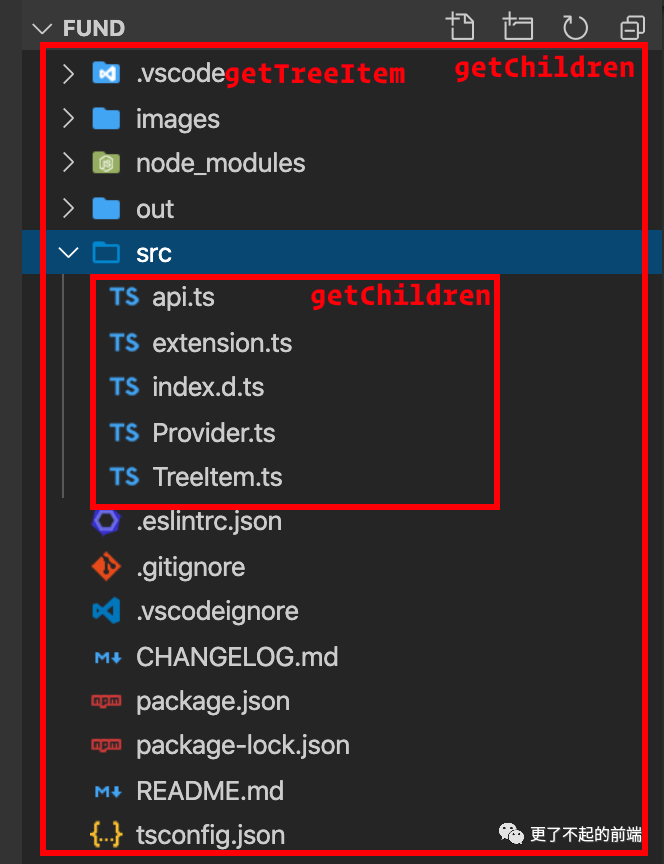
TreeDataProvider 有兩個(gè)必須實(shí)現(xiàn)的方法:
getChildren:該方法接受一個(gè) element,返回 element 的子元素,如果沒有element,則返回的是根節(jié)點(diǎn)的子元素,我們這里因?yàn)槭菃瘟斜恚圆粫?huì)接受 element 元素;getTreeItem:該方法接受一個(gè) element,返回視圖單行的 UI 數(shù)據(jù),需要對TreeItem進(jìn)行實(shí)例化;
我們通過 VS Code 的資源管理器來展示下這兩個(gè)方法:
有了上面的知識,我們就可以輕松為樹視圖提供數(shù)據(jù)了。
import?{?workspace,?TreeDataProvider,?TreeItem?}?from?'vscode';

export?default?class?DataProvider?implements?TreeDataProvider<string>?{
??refresh()?{
????//?更新視圖
??}

??getTreeItem(element:?string):?TreeItem?{
????return?new?TreeItem(element);
??}

??getChildren():?string[]?{
????const?{?order?}?=?this;
????//?獲取配置的基金代碼
????const?favorites:?string[]?=?workspace
??????.getConfiguration()
??????.get('fund-watch.favorites',?[]);
????
????//?依據(jù)代碼排序
??return?favorites.sort((prev,?next)?=>?(prev?>=?next???1?:?-1)?*?order);
??}
}
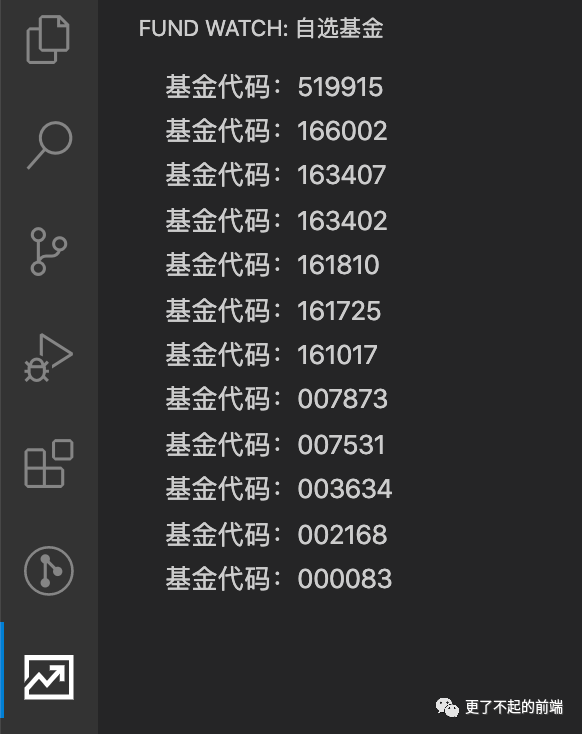
現(xiàn)在運(yùn)行之后,可能會(huì)發(fā)現(xiàn)視圖上沒有數(shù)據(jù),這是因?yàn)闆]有配置激活事件。
{
?"activationEvents":?[
????//?表示?fund-list?視圖展示時(shí),激活該插件
??"onView:fund-list"
?]
}
請求數(shù)據(jù)
我們已經(jīng)成功將基金代碼展示在視圖上,接下來就需要請求基金數(shù)據(jù)了。網(wǎng)上有很多基金相關(guān) api,這里我們使用天天基金網(wǎng)的數(shù)據(jù)。
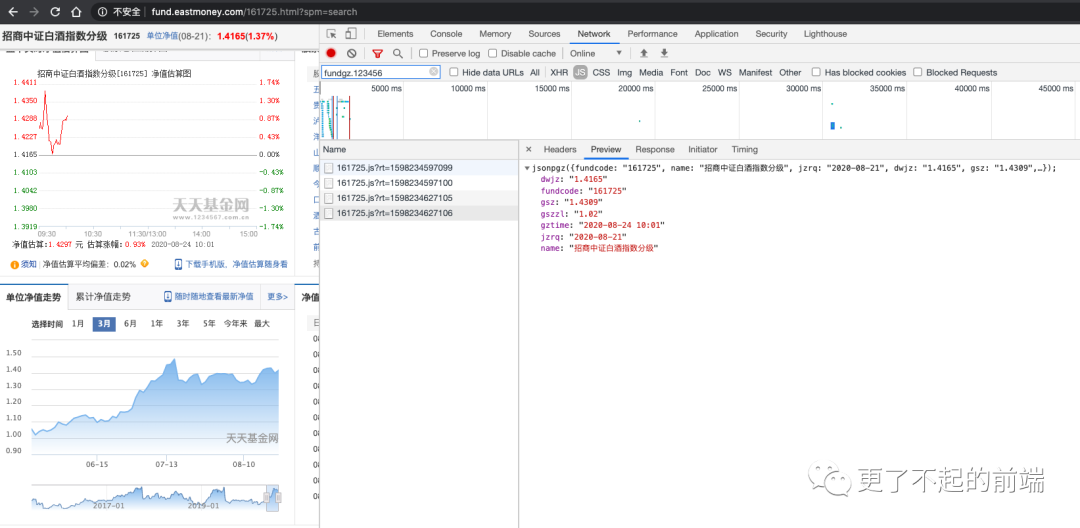
通過請求可以看到,天天基金網(wǎng)通過 JSONP 的方式獲取基金相關(guān)數(shù)據(jù),我們只需要構(gòu)造一個(gè) url,并傳入當(dāng)前時(shí)間戳即可。
const?url?=?`https://fundgz.1234567.com.cn/js/${code}.js?rt=${time}`
VS Code 中請求數(shù)據(jù),需要使用內(nèi)部提供的 https 模塊,下面我們新建一個(gè) api.ts。
import?*?as?https?from?'https';

//?發(fā)起?GET?請求
const?request?=?async?(url:?string):?Promise<string>?=>?{
??return?new?Promise((resolve,?reject)?=>?{
????https.get(url,?(res)?=>?{
??????let?chunks?=?'';
??????if?(!res?||?res.statusCode?!==?200)?{
????????reject(new?Error('網(wǎng)絡(luò)請求錯(cuò)誤!'));
????????return;
??????}
??????res.on('data',?(chunk)?=>?chunks?+=?chunk.toString('utf8'));
??????res.on('end',?()?=>?resolve(chunks));
????});
??});
};

interface?FundInfo?{
??now:?string
??name:?string
??code:?string
??lastClose:?string
??changeRate:?string
??changeAmount:?string
}

//?根據(jù)基金代碼請求基金數(shù)據(jù)
export?default?function?fundApi(codes:?string[]):?Promise<FundInfo[]>?{
??const?time?=?Date.now();
?//?請求列表
??const?promises:?Promise<string>[]?=?codes.map((code)?=>?{
????const?url?=?`https://fundgz.1234567.com.cn/js/${code}.js?rt=${time}`;
????return?request(url);
??});
??return?Promise.all(promises).then((results)?=>?{
????const?resultArr:?FundInfo[]?=?[];
????results.forEach((rsp:?string)?=>?{
??????const?match?=?rsp.match(/jsonpgz\((.+)\)/);
??????if?(!match?||?!match[1])?{
????????return;
??????}
??????const?str?=?match[1];
??????const?obj?=?JSON.parse(str);
??????const?info:?FundInfo?=?{
????????//?當(dāng)前凈值
????????now:?obj.gsz,
????????//?基金名稱
????????name:?obj.name,
????????//?基金代碼
????????code:?obj.fundcode,
????????//?昨日凈值
????????lastClose:?obj.dwjz,
????????//?漲跌幅
????????changeRate:?obj.gszzl,
????????//?漲跌額
????????changeAmount:?(obj.gsz?-?obj.dwjz).toFixed(4),
??????};
??????resultArr.push(info);
????});
????return?resultArr;
??});
}
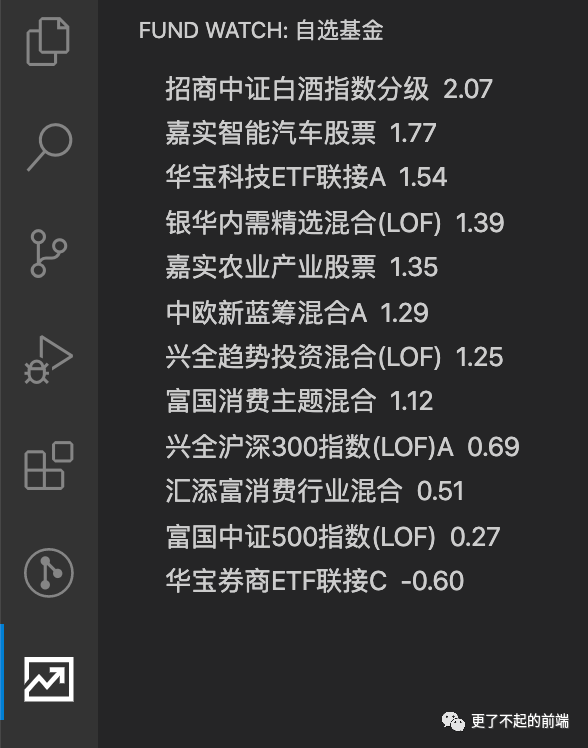
接下來修改視圖數(shù)據(jù)。
import?{?workspace,?TreeDataProvider,?TreeItem?}?from?'vscode';
import?fundApi?from?'./api';

export?default?class?DataProvider?implements?TreeDataProvider<FundInfo>?{
??//?省略了其他代碼
??getTreeItem(info:?FundInfo):?TreeItem?{
????//?展示名稱和漲跌幅
???const?{?name,?changeRate?}?=?info
????return?new?TreeItem(`${name}??${changeRate}`);
??}

??getChildren():?Promise?{
????const?{?order?}?=?this;
????//?獲取配置的基金代碼
????const?favorites:?string[]?=?workspace
??????.getConfiguration()
??????.get('fund-watch.favorites',?[]);
????
????//?獲取基金數(shù)據(jù)
??return?fundApi([...favorites]).then(
??????(results:?FundInfo[])?=>?results.sort(
???????(prev,?next)?=>?(prev.changeRate?>=?next.changeRate???1?:?-1)?*?order
?????)
????);
??}
}
美化格式
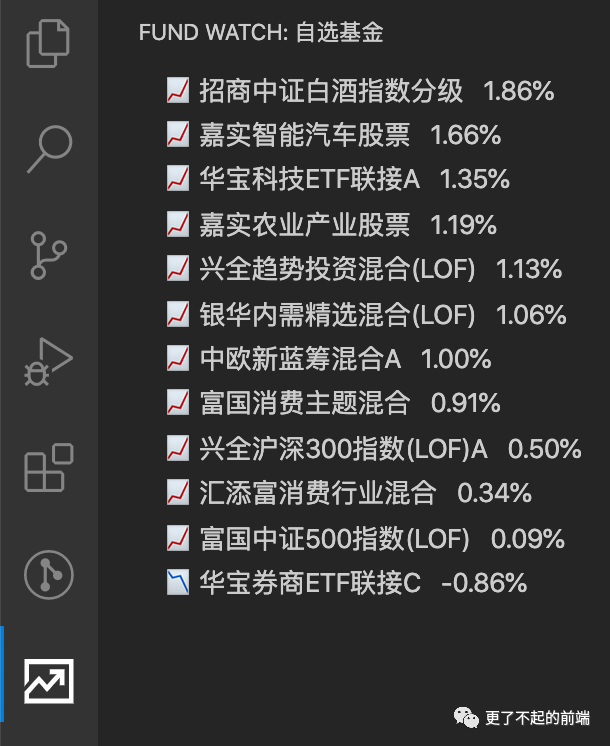
前面我們都是通過直接實(shí)例化 TreeItem 的方式來實(shí)現(xiàn) UI 的,現(xiàn)在我們需要重新構(gòu)造一個(gè) TreeItem。
import?{?workspace,?TreeDataProvider,?TreeItem?}?from?'vscode';
import?FundItem?from?'./TreeItem';
import?fundApi?from?'./api';

export?default?class?DataProvider?implements?TreeDataProvider<FundInfo>?{
??//?省略了其他代碼
??getTreeItem(info:?FundInfo):?FundItem?{
????return?new?FundItem(info);
??}
}
//?TreeItem
import?{?TreeItem?}?from?'vscode';

export?default?class?FundItem?extends?TreeItem?{
??info:?FundInfo;

??constructor(info:?FundInfo)?{
????const?icon?=?Number(info.changeRate)?>=?0???'?'?:?'?';

????//?加上?icon,更加直觀的知道是漲還是跌
????super(`${icon}${info.name}???${info.changeRate}%`);

????let?sliceName?=?info.name;
????if?(sliceName.length?>?8)?{
??????sliceName?=?`${sliceName.slice(0,?8)}...`;
????}
????const?tips?=?[
??????`代碼:?${info.code}`,
??????`名稱:?${sliceName}`,
??????`--------------------------`,
??????`單位凈值:????${info.now}`,
??????`漲跌幅:?????${info.changeRate}%`,
??????`漲跌額:?????${info.changeAmount}`,
??????`昨收:??????${info.lastClose}`,
????];

????this.info?=?info;
????//?tooltip?鼠標(biāo)懸停時(shí),展示的內(nèi)容
????this.tooltip?=?tips.join('\r\n');
??}
}
更新數(shù)據(jù)
TreeDataProvider 需要提供一個(gè) onDidChangeTreeData 屬性,該屬性是 EventEmitter 的一個(gè)實(shí)例,然后通過觸發(fā) EventEmitter 實(shí)例進(jìn)行數(shù)據(jù)的更新,每次調(diào)用 refresh 方法相當(dāng)于重新調(diào)用了 getChildren 方法。
import?{?workspace,?Event,?EventEmitter,?TreeDataProvider?}?from?'vscode';
import?FundItem?from?'./TreeItem';
import?fundApi?from?'./api';

export?default?class?DataProvider?implements?TreeDataProvider<FundInfo>?{
??private?refreshEvent:?EventEmitternull>?=?new?EventEmitternull>();
??readonly?onDidChangeTreeData:?Eventnull>?=?this.refreshEvent.event;

??refresh()?{
????//?更新視圖
????setTimeout(()?=>?{
??????this.refreshEvent.fire(null);
????},?200);
??}
}
我們回到 extension.ts,添加一個(gè)定時(shí)器,讓數(shù)據(jù)定時(shí)更新。
import?{?ExtensionContext,?commands,?window,?workspace?}?from?'vscode'
import?Provider?from?'./data/Provider'

//?激活插件
export?function?activate(context:?ExtensionContext)?{
??//?獲取?interval?配置
??let?interval?=?workspace.getConfiguration().get('fund-watch.interval',?2)
??if?(interval?2)?{
????interval?=?2
??}

??//?基金類
??const?provider?=?new?Provider()

??//?數(shù)據(jù)注冊
??window.registerTreeDataProvider('fund-list',?provider)

??//?定時(shí)更新
??setInterval(()?=>?{
????provider.refresh()
??},?interval?*?1000)
}

export?function?deactivate()?{}
除了定時(shí)更新,我們還需要提供手動(dòng)更新的能力。修改 package.json,注冊命令。
{
??"contributes":?{
??"commands":?[
???{
????"command":?"fund.refresh",
????"title":?"刷新",
????"icon":?{
?????"light":?"images/light/refresh.svg",
?????"dark":?"images/dark/refresh.svg"
????}
???}
??],
??"menus":?{
???"view/title":?[
????{
?????"when":?"view?==?fund-list",
?????"group":?"navigation",
?????"command":?"fund.refresh"
????}
???]
??}
?}
}
commands:用于注冊命令,指定命令的名稱、圖標(biāo),以及 command 用于 extension 中綁定相應(yīng)事件;menus:用于標(biāo)記命令展示的位置;when:定義展示的視圖,具體語法可以查閱官方文檔;group:定義菜單的分組; command:定義命令調(diào)用的事件;
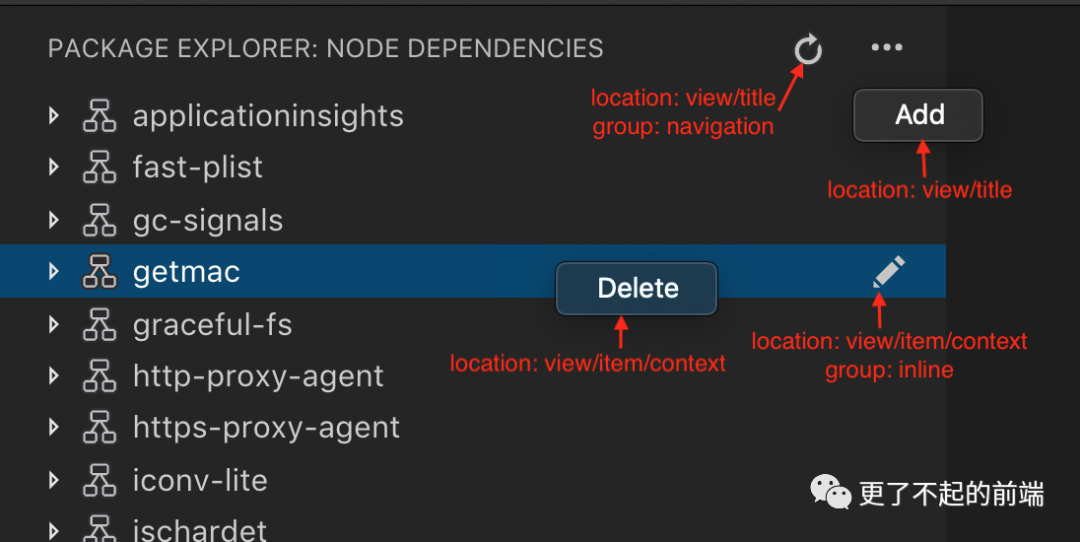
配置好命令后,回到 extension.ts 中。
import?{?ExtensionContext,?commands,?window,?workspace?}?from?'vscode';
import?Provider?from?'./Provider';

//?激活插件
export?function?activate(context:?ExtensionContext)?{
??let?interval?=?workspace.getConfiguration().get('fund-watch.interval',?2);
??if?(interval?2)?{
????interval?=?2;
??}

??//?基金類
??const?provider?=?new?Provider();

??//?數(shù)據(jù)注冊
??window.registerTreeDataProvider('fund-list',?provider);

??//?定時(shí)任務(wù)
??setInterval(()?=>?{
????provider.refresh();
??},?interval?*?1000);

??//?事件
??context.subscriptions.push(
????commands.registerCommand('fund.refresh',?()?=>?{
??????provider.refresh();
????}),
??);
}

export?function?deactivate()?{}
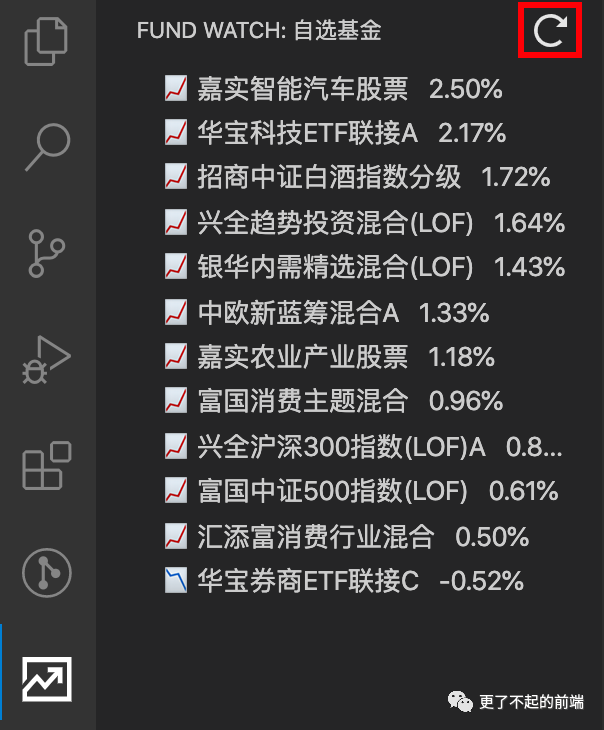
現(xiàn)在我們就可以手動(dòng)刷新了。
新增基金
我們新增一個(gè)按鈕用了新增基金。
{
??"contributes":?{
??"commands":?[
??????{
????????"command":?"fund.add",
????????"title":?"新增",
????????"icon":?{
??????????"light":?"images/light/add.svg",
??????????"dark":?"images/dark/add.svg"
????????}
??????},
???{
????"command":?"fund.refresh",
????"title":?"刷新",
????"icon":?{
?????"light":?"images/light/refresh.svg",
?????"dark":?"images/dark/refresh.svg"
????}
???}
??],
??"menus":?{
???"view/title":?[
????????{
??????????"command":?"fund.add",
??????????"when":?"view?==?fund-list",
??????????"group":?"navigation"
????????},
????{
?????"when":?"view?==?fund-list",
?????"group":?"navigation",
?????"command":?"fund.refresh"
????}
???]
??}
?}
}
在 extension.ts 中注冊事件。
import?{?ExtensionContext,?commands,?window,?workspace?}?from?'vscode';
import?Provider?from?'./Provider';

//?激活插件
export?function?activate(context:?ExtensionContext)?{
??//?省略部分代碼?...
??
??//?基金類
??const?provider?=?new?Provider();

??//?事件
??context.subscriptions.push(
????commands.registerCommand('fund.add',?()?=>?{
??????provider.addFund();
????}),
????commands.registerCommand('fund.refresh',?()?=>?{
??????provider.refresh();
????}),
??);
}

export?function?deactivate()?{}
實(shí)現(xiàn)新增功能,修改 Provider.ts。
import?{?workspace,?Event,?EventEmitter,?TreeDataProvider?}?from?'vscode';
import?FundItem?from?'./TreeItem';
import?fundApi?from?'./api';

export?default?class?DataProvider?implements?TreeDataProvider<FundInfo>?{
??//?省略部分代碼?...

??//?更新配置
??updateConfig(funds:?string[])?{
????const?config?=?workspace.getConfiguration();
????const?favorites?=?Array.from(
??????//?通過?Set?去重
??????new?Set([
????????...config.get('fund-watch.favorites',?[]),
????????...funds,
??????])
????);
????config.update('fund-watch.favorites',?favorites,?true);
??}

??async?addFund()?{
????//?彈出輸入框
????const?res?=?await?window.showInputBox({
??????value:?'',
??????valueSelection:?[5,?-1],
??????prompt:?'添加基金到自選',
??????placeHolder:?'Add?Fund?To?Favorite',
??????validateInput:?(inputCode:?string)?=>?{
????????const?codeArray?=?inputCode.split(/[\W]/);
????????const?hasError?=?codeArray.some((code)?=>?{
??????????return?code?!==?''?&&?!/^\d+$/.test(code);
????????});
????????return?hasError???'基金代碼輸入有誤'?:?null;
??????},
????});
????if?(!!res)?{
??????const?codeArray?=?res.split(/[\W]/)?||?[];
??????const?result?=?await?fundApi([...codeArray]);
??????if?(result?&&?result.length?>?0)?{
????????//?只更新能正常請求的代碼
????????const?codes?=?result.map(i?=>?i.code);
????????this.updateConfig(codes);
????????this.refresh();
??????}?else?{
????????window.showWarningMessage('stocks?not?found');
??????}
????}
??}
}


刪除基金
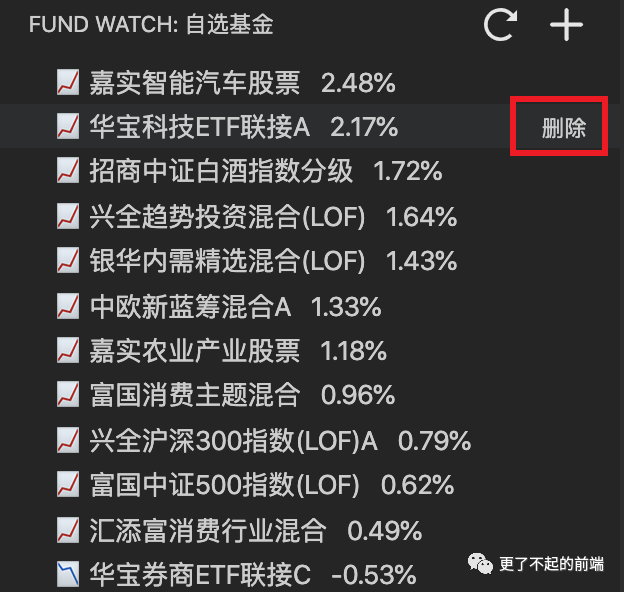
最后新增一個(gè)按鈕,用來刪除基金。
{
?"contributes":?{
??"commands":?[
???{
????"command":?"fund.item.remove",
????"title":?"刪除"
???}
??],
??"menus":?{
??????//?這個(gè)按鈕放到?context?中
??????"view/item/context":?[
????????{
??????????"command":?"fund.item.remove",
??????????"when":?"view?==?fund-list",
??????????"group":?"inline"
????????}
??????]
??}
??}
}
在 extension.ts 中注冊事件。
import?{?ExtensionContext,?commands,?window,?workspace?}?from?'vscode';
import?Provider?from?'./Provider';

//?激活插件
export?function?activate(context:?ExtensionContext)?{
??//?省略部分代碼?...
??
??//?基金類
??const?provider?=?new?Provider();

??//?事件
??context.subscriptions.push(
????commands.registerCommand('fund.add',?()?=>?{
??????provider.addFund();
????}),
????commands.registerCommand('fund.refresh',?()?=>?{
??????provider.refresh();
????}),
????commands.registerCommand('fund.item.remove',?(fund)?=>?{
??????const?{ code }?=?fund;
??????provider.removeConfig(code);
??????provider.refresh();
????})
??);
}

export?function?deactivate()?{}
實(shí)現(xiàn)新增功能,修改 Provider.ts。
import?{?window,?workspace,?Event,?EventEmitter,?TreeDataProvider?}?from?'vscode';
import?FundItem?from?'./TreeItem';
import?fundApi?from?'./api';

export?default?class?DataProvider?implements?TreeDataProvider<FundInfo>?{
??//?省略部分代碼?...

??//?刪除配置
??removeConfig(code:?string)?{
????const?config?=?workspace.getConfiguration();
????const?favorites:?string[]?=?[...config.get('fund-watch.favorites',?[])];
????const?index?=?favorites.indexOf(code);
????if?(index?===?-1)?{
??????return;
????}
????favorites.splice(index,?1);
????config.update('fund-watch.favorites',?favorites,?true);
??}
}
總結(jié)
實(shí)現(xiàn)過程中也遇到了很多問題,遇到問題可以多翻閱 VSCode 插件中文文檔。該插件已經(jīng)發(fā)布的了 VS Code 插件市場,感興趣的可以直接下載該插件,或者在 github 上下載完整代碼。
??愛心三連擊
1.看到這里了就點(diǎn)個(gè)在看支持下吧,你的「點(diǎn)贊,在看」是我創(chuàng)作的動(dòng)力。
2.關(guān)注公眾號
程序員成長指北,回復(fù)「1」加入Node進(jìn)階交流群!「在這里有好多 Node 開發(fā)者,會(huì)討論 Node 知識,互相學(xué)習(xí)」!3.也可添加微信【ikoala520】,一起成長。
“在看轉(zhuǎn)發(fā)”是最大的支持