
使用croc命令在Linux系統(tǒng)電腦之間傳輸文件和文件夾
croc 的命令行工具,可以讓你輕松、快速、安全地在計算機之間傳輸文件和文件夾。croc 工具傳輸數(shù)據(jù)的速度很快,因為它充當(dāng)系統(tǒng)之間的中繼服務(wù)器。它在兩臺計算機之間創(chuàng)建了全雙工實時通信層,因此「上傳」和「下載」任務(wù)在兩臺計算機之間同時發(fā)生。croc 使用密碼驗證密鑰交換(PAKE)庫提供端到端加密。PAKE庫允許兩個人使用雙方都知道的弱密鑰來生成強密鑰。然后將此密鑰用于進一步加密。由于密鑰僅由發(fā)送者和接收者知道,因此即使第三者知道原始密碼,也沒有辦法知道秘鑰。croc 能夠一次在計算機之間傳輸多個文件。如果數(shù)據(jù)傳輸由于任何原因而中斷,下次傳輸?shù)臅r候它可以從上次中斷的地方繼續(xù)進行文件傳輸。croc 使用中繼,因此你不需要中央服務(wù)器或端口轉(zhuǎn)發(fā)。它是一個跨平臺的應(yīng)用程序,因此你可以在 Linux,Mac 和 Windows 平臺之間傳輸數(shù)據(jù)。croc 執(zhí)行以下操作:使用中繼在兩臺計算機之間傳輸數(shù)據(jù), 使用 PAKE 庫提供 端到端加密, 一次傳輸多個文件 , 斷點續(xù)傳, 不需要中央服務(wù)器端口轉(zhuǎn)發(fā), ipv6-first 和 ipv4 后備, 零依賴性, 跨平臺 免費和開源。
croc 使用 Go 編程語言所編寫,并遵從 MIT 許可免費提供。在Linux上安裝Croc工具
Bash 上使用以下命令將 croc 安裝在所支持的任何 Linux 和 Unix 發(fā)行版上:$?curl?https://getcroc.schollz.com?|?bash
croc 源碼下載到本地并安裝在 /usr/local/bin/ 目錄下。Shell,可以從**發(fā)行版頁面**下載預(yù)編譯的二進制文件,并使用發(fā)行版的軟件包管理器進行安裝。$?sudo?apt?install?gdebi
$?sudo?gdebi?croc_8.3.2_Linux-64bit.deb
pacman 將 croc 安裝在 Arch Linux 及其衍生版本中:$?pacman?-S?croc
$?nix-env?-i?croc
croc 也可用 snap 方式進行安裝:$?snap?install?croc
croc ?。$?GO111MODULE=on?go?get?-v?github.com/schollz/croc/v8
使用Croc在計算機之間傳輸文件和文件夾
croc 。croc 傳輸文件/文件夾,只需運行:$?croc?send?<文件或文件夾路徑>
$?croc?send?file.txt
croc 將生成如下的隨機代碼短語,相當(dāng)于暗號。Sending?'file.txt'?(116?B)
Code?is:?slow-tomato-almond
On?the?other?computer?run
croc?slow-tomato-almond
slow-tomato-almond。該代碼短語用于建立經(jīng)過密碼驗證的密鑰協(xié)議(PAKE),該協(xié)議會生成供發(fā)送方和接收方用于端到端加密的秘鑰。$?croc?slow-tomato-almond
y,然后按回車鍵來接收文件。Accept?'file.txt'?(116?B)??(y/n)?y
Receiving?(<-192.168.225.37:9009)
file.txt?100%?|████████████████████|?(116/116?B,?32.966?kB/s)?[0s:0s]?
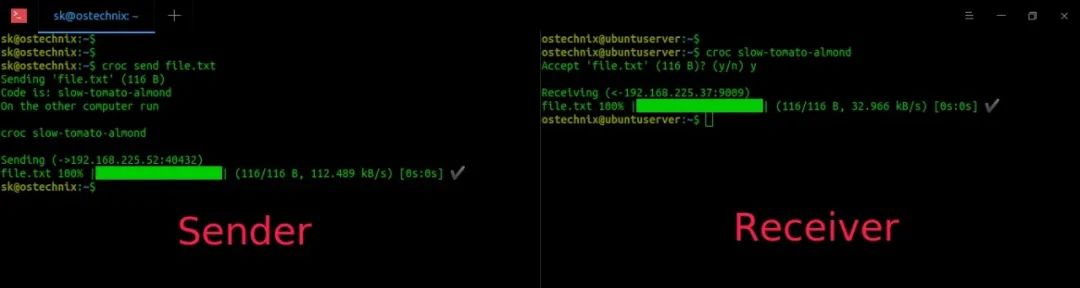
設(shè)置自定義代碼短語
croc 都會生成一個隨機代碼短語,但因為每次都不一樣,使用起來還是不太方便。所以我們可以自定義一個代碼短語,提高效率。可以使用 --code 參數(shù)來設(shè)置自定義代碼短語來發(fā)送文件/文件夾。$?croc?send?--code?download-this?file.txt
download-this 就是我們自定義的代碼短語。Sending?'file.txt'?(116?B)
Code?is:?download-this
On?the?other?computer?run
croc?download-this
$?croc?download-this

發(fā)送文本
croc 發(fā)送文本,可以運行以下命令:$?croc?send?--text?"Hello!!"
Sending?'text'?
Code?is:?natural-roof-clock
On?the?other?computer?run

croc?natural-roof-clock

Sending?(->[fe80::a00:27ff:fe10:7cc1%wlp9s0]:39916)
$?croc?natural-roof-clock
Accept?'text'???(y/n)?y

Receiving?(<-[fe80::d710:cf4:bb49:8b20%enp0s8]:9009)
Hello!!

使用管道
croc 作為它的輸入,如下所示。$?cat?file.txt?|?croc?send
Sending?'stdin'?(116?B)
Code?is:?dexter-cowboy-soprano
On?the?other?computer?run

croc?dexter-cowboy-soprano
croc 將自動使用 stdin 數(shù)據(jù)并發(fā)送文件,分配文件名,例如“ croc-stdin-728899651”。$?croc?dexter-cowboy-soprano
$?croc?--yes?dexter-cowboy-soprano?>?out
--yes 選項不會要求任何確認,并自動同意所有提示。設(shè)置輸出文件夾
croc 會將數(shù)據(jù)下載到當(dāng)前工作目錄中。您可以使用 --out 選項使其使用不同的下載位置。$?croc?send?file.txt
Sending?'file.txt'?(116?B)
Code?is:?program-public-mystery
On?the?other?computer?run

croc?program-public-mystery
$?croc?--out?~/Downloads
獲得幫助
$?croc?--help
NAME:
???croc?-?easily?and?securely?transfer?stuff?from?one?computer?to?another

USAGE:
???Send?a?file:
??????croc?send?file.txt

???Send?a?file?with?a?custom?code:
??????croc?send?--code?secret-passphrase?file.txt

VERSION:
???v8.3.2-7d155ad

COMMANDS:
???send?????send?a?file?(see?options?with?croc?send?-h)
???relay????start?your?own?relay?(optional)
???help,?h??Shows?a?list?of?commands?or?help?for?one?command

GLOBAL?OPTIONS:
???--remember??????save?these?settings?to?reuse?next?time?(default:?false)
???--debug?????????toggle?debug?mode?(default:?false)
???--yes???????????automatically?agree?to?all?prompts?(default:?false)
???--stdout????????redirect?file?to?stdout?(default:?false)
???--no-compress???disable?compression?(default:?false)
???--ask???????????make?sure?sender?and?recipient?are?prompted?(default:?false)
???--relay?value???address?of?the?relay?(default:?"142.93.177.120:9009")?[$CROC_RELAY]
???--relay6?value??ipv6?address?of?the?relay?(default:?"[2604:a880:800:c1::14c:1]:9009")?[$CROC_RELAY6]
???--out?value?????specify?an?output?folder?to?receive?the?file?(default:?".")
???--pass?value????password?for?the?relay?(default:?"pass123")?[$CROC_PASS]
???--help,?-h??????show?help?(default:?false)
???--version,?-v???print?the?version?(default:?false)
評論
圖片
表情