
Python標準圖形化界面GUI庫入門指南– Tkinter
Tkinter概述
執(zhí)行
1.導包
import tkinter
import random
from random import randint
from tkinter import Button
import matplotlib.pyplot as plt
import numpy as np
2.創(chuàng)建一個GUI窗口和全局變量聲明
root = tkinter.Tk()
root.title("Are you smart!!")
root.geometry("400x200")
correct_result=0
correct_answers=0
total_questions=0
incorrect_answer=0
3.評估結果的函數
def evaluate(event):
    global correct_result
    global user_input
    user_input_given = user_input.get()
    if str(user_input_given) == str(correct_result):
        global correct_answers
        correct_answers += 1
        nextQuestion()
    else:
        global incorrect_answer
        incorrect_answer += 1
        result = tkinter.Label(root, text="Hard Luck!!nThe correct answer is : "+str(correct_result), font=('Helvetica', 10))
        result.pack()
        nextQuestion()
        root.after(1500, result.destroy)
4.創(chuàng)建問題的函數
def nextQuestion():
    user_input.focus_set()
    user_input.delete(0, tkinter.END)
    global first_num
    first_num = randint(1,15)
    global second_num
    second_num = randint(1,15)
    global character
    character = random.choice("+-*")
    global correct_result
    if character == '*':
        correct_result = first_num*second_num
    if character == '+':
        correct_result = first_num+second_num
    if character == '-':
        correct_result = first_num-second_num
    text="Enter the value of "+str(first_num)+" "+character+" "+str(second_num)
    global total_questions
    total_questions += 1
    user_question.config(text=text)
    user_question.pack()
5.退出函數
def exitThis():
    print("Total Questions attended : "+str(total_questions))
    print("Total Correct Answers : "+str(correct_answers))
    print("Total Incorrect Answers : "+str(incorrect_answer))
    root.destroy()
6.最初的問題
first_num = randint(1,15)
second_num = randint(1,15)
character = random.choice("+-*")
if character == '*':
    correct_result = first_num*second_num
if character == '+':
    correct_result = first_num+second_num
if character == '-':
    correct_result = first_num-second_num
7.標簽創(chuàng)建
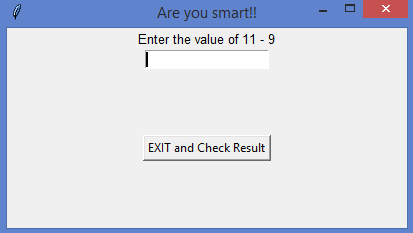
user_question = tkinter.Label(root, text="Enter the value of "+str(first_num)+" "+character+" "+str(second_num), font=('Helvetica', 10))
user_question.pack()
user_input = tkinter.Entry(root)
root.bind('<Return>',evaluate)
user_input.pack()
user_input.focus_set()
exitButton = Button(root, text="EXIT and Check Result", command=exitThis)
exitButton.pack(side="top", expand=True, padx=4, pady=4)
8.啟動GUI
root.mainloop()
9.結果可視化
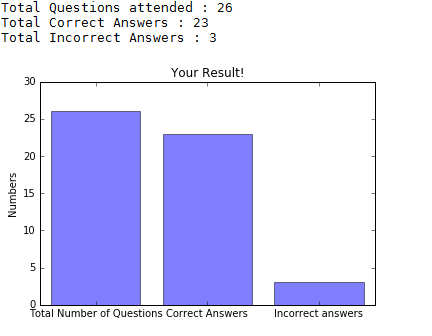
#Plotting the bar graph
plt.figure(0)
objects = ('Total Number of Questions','Correct Answers','Incorrect answers')
y_pos = np.arange(len(objects))
stats = [total_questions,correct_answers,incorrect_answer]
plt.bar(y_pos, stats, align='center', alpha=0.5)
plt.xticks(y_pos, objects)
plt.ylabel('Numbers')
plt.title('Your Result!')
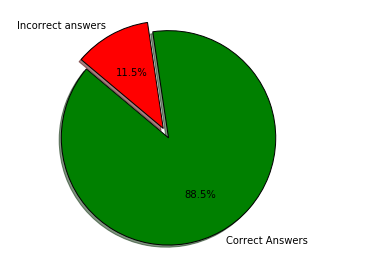
#Plotting the pie chart
if str(total_questions) != "0":
plt.figure(1)
labels = 'Correct Answers','Incorrect answers'
sizes = [correct_answers,incorrect_answer]
colors = ['green', 'red']
explode = (0.1, 0) # explode 1st slice
plt.pie(sizes, explode=explode, labels=labels, colors=colors,
autopct='%1.1f%%', shadow=True, startangle=140)
plt.axis('equal')

#Show both the graphs
plt.show()
結論

10000+人已加入「大毛CV」


敬正在努力的我們! 
評論
圖片
表情