
14個(gè)每個(gè)前端開(kāi)發(fā)人員都需要知道的正則表達(dá)式技巧
前言
如何看待正則表達(dá)式?我猜你會(huì)說(shuō)它太晦澀難懂,我對(duì)它根本不感興趣。是的,我曾經(jīng)和你一樣,認(rèn)為我這輩子都學(xué)不會(huì)。
但我們不能否認(rèn)它真的很強(qiáng)大,我在工作中經(jīng)常使用它,我總結(jié)了 15 個(gè)小竅門(mén)與大家分享。
如果你對(duì)它們是如何實(shí)現(xiàn)的感興趣,非常歡迎你在評(píng)論區(qū)告訴我,我會(huì)再寫(xiě)一篇文章單獨(dú)分析。
1、格式化貨幣
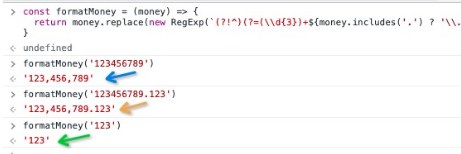
我經(jīng)常需要格式化貨幣,它需要遵循以下規(guī)則:
123456789 => 123,456,789
123456789.123 => 123,456,789.123
const formatMoney = (money) => {
  return money.replace(new RegExp(`(?!^)(?=(\\d{3})+${money.includes('.') ? '\\.' : '$'})`, 'g'), ',')
}

formatMoney('123456789') // '123,456,789'
formatMoney('123456789.123') // '123,456,789.123'
formatMoney('123') // '123'
你可以想象如果沒(méi)有正則表達(dá)式我們將如何做到這一點(diǎn)?
2、實(shí)現(xiàn)trim功能的兩種方式
有時(shí)候我們需要去掉字符串的前導(dǎo)和尾隨空格,使用正則表達(dá)式會(huì)很方便,我想和大家分享至少兩種方式。
方式一
const trim1 = (str) => {
  return str.replace(/^\s*|\s*$/g, '')
}

const string = '   hello medium   '
const noSpaceString = 'hello medium'
const trimString = trim1(string)

console.log(string)
console.log(trimString, trimString === noSpaceString)
console.log(string)
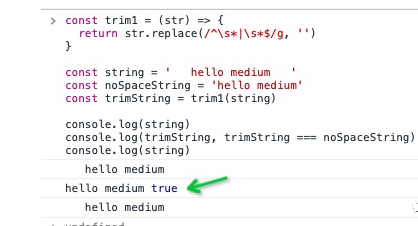
太好了,我們刪除了字符串 'string' 的前導(dǎo)和尾隨空格。
方式二
const trim2 = (str) => {
  return str.replace(/^\s*(.*?)\s*$/g, '$1')
}

const string = '   hello medium   '
const noSpaceString = 'hello medium'
const trimString = trim2(string)

console.log(string)
console.log(trimString, trimString === noSpaceString)
console.log(string)
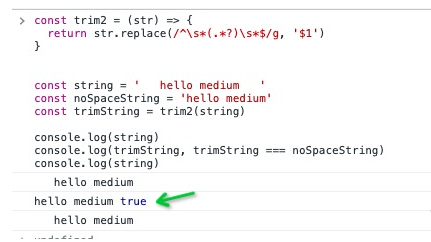
第二種方式,我們也實(shí)現(xiàn)了我們的目標(biāo)。
3、解析鏈接上的搜索參數(shù)
我們還必須經(jīng)常需要從鏈接中獲取參數(shù),對(duì)吧?
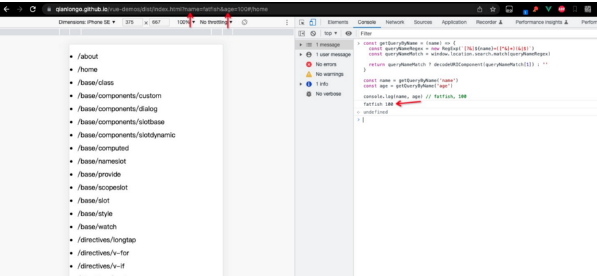
// For example, there is such a link, I hope to get fatfish through getQueryByName('name')
// url https://qianlongo.github.io/vue-demos/dist/index.html?name=fatfish&age=100#/home

const name = getQueryByName('name') // fatfish
const age = getQueryByName('age') // 100
用正則表達(dá)式解決這個(gè)問(wèn)題非常簡(jiǎn)單。
const getQueryByName = (name) => {
  const queryNameRegex = new RegExp(`[?&]${name}=([^&]*)(&|$)`)
  const queryNameMatch = window.location.search.match(queryNameRegex)
  // Generally, it will be decoded by decodeURIComponent
  return queryNameMatch ? decodeURIComponent(queryNameMatch[1]) : ''
}

const name = getQueryByName('name')
const age = getQueryByName('age')

console.log(name, age) // fatfish, 100
4、駝峰式字符串
請(qǐng)將字符串轉(zhuǎn)換為駝峰式,如下所示:
1. foo Bar => fooBar
2. foo-bar---- => fooBar
3. foo_bar__ => fooBar
我的朋友們,沒(méi)有什么比正則表達(dá)式更適合這個(gè)了。
const camelCase = (string) => {
  const camelCaseRegex = /[-_\s]+(.)?/g
  return string.replace(camelCaseRegex, (match, char) => {
    return char ? char.toUpperCase() : ''
  })
}

console.log(camelCase('foo Bar')) // fooBar
console.log(camelCase('foo-bar--')) // fooBar
console.log(camelCase('foo_bar__')) // fooBar
5、將字符串的首字母轉(zhuǎn)換為大寫(xiě)
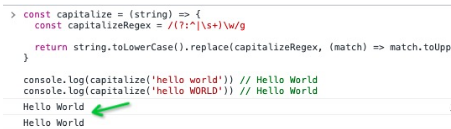
請(qǐng)將 hello world 轉(zhuǎn)換為 Hello World。
const capitalize = (string) => {
  const capitalizeRegex = /(?:^|\s+)\w/g
  return string.toLowerCase().replace(capitalizeRegex, (match) => match.toUpperCase())
}

console.log(capitalize('hello world')) // Hello World
console.log(capitalize('hello WORLD')) // Hello World
6、Escape HTML
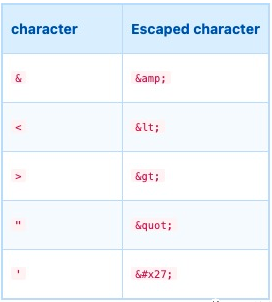
防止 XSS 攻擊的方法之一是進(jìn)行 HTML 轉(zhuǎn)義。規(guī)則如下:
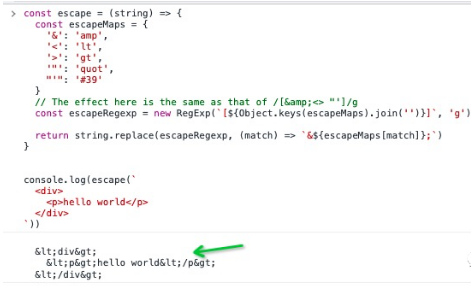
const escape = (string) => {
const escapeMaps = {
'&': 'amp',
'<': 'lt',
'>': 'gt',
'"': 'quot',
"'": '#39'
}
// The effect here is the same as that of /[&<> "']/g
const escapeRegexp = new RegExp(`[${Object.keys(escapeMaps).join('')}]`, 'g')
return string.replace(escapeRegexp, (match) => `&${escapeMaps[match]};`)
}
console.log(escape(`
<div>
<p>hello world</p>
</div>
`))
/*
<div>
<p>hello world</p>
</div>
*/
7、Unescape HTML
const unescape = (string) => {
const unescapeMaps = {
'amp': '&',
'lt': '<',
'gt': '>',
'quot': '"',
'#39': "'"
}
const unescapeRegexp = /&([^;]+);/g
return string.replace(unescapeRegexp, (match, unescapeKey) => {
return unescapeMaps[ unescapeKey ] || match
})
}
console.log(unescape(`
<div>
<p>hello world</p>
</div>
`))
/*
<div>
<p>hello world</p>
</div>
*/
8、24小時(shí)制時(shí)間
請(qǐng)判斷時(shí)間是否符合24小時(shí)制。
匹配規(guī)則如下:
01:14 1:14 1:1 23:59
const check24TimeRegexp = /^(?:(?:0?|1)\d|2[0-3]):(?:0?|[1-5])\d$/
console.log(check24TimeRegexp.test('01:14')) // true
console.log(check24TimeRegexp.test('23:59')) // true
console.log(check24TimeRegexp.test('23:60')) // false
console.log(check24TimeRegexp.test('1:14')) // true
console.log(check24TimeRegexp.test('1:1')) // true
9、比賽日期格式
請(qǐng)匹配日期格式,例如 (yyyy-mm-dd, yyyy.mm.dd, yyyy/mm/dd),例如 2021-08-22、2021.08.22、2021/08/22。
const checkDateRegexp = /^\d{4}([-\.\/])(?:0[1-9]|1[0-2])\1(?:0[1-9]|[12]\d|3[01])$/

console.log(checkDateRegexp.test('2021-08-22')) // true
console.log(checkDateRegexp.test('2021/08/22')) // true
console.log(checkDateRegexp.test('2021.08.22')) // true
console.log(checkDateRegexp.test('2021.08/22')) // false
console.log(checkDateRegexp.test('2021/08-22')) // false
10、以十六進(jìn)制匹配顏色值
請(qǐng)從字符串中獲取十六進(jìn)制顏色值。
const matchColorRegex = /#(?:[\da-fA-F]{6}|[\da-fA-F]{3})/g
const colorString = '#12f3a1 #ffBabd #FFF #123 #586'

console.log(colorString.match(matchColorRegex))
// [ '#12f3a1', '#ffBabd', '#FFF', '#123', '#586' ]
11、檢查URL的前綴是HTTPS還是HTTP
const checkProtocol = /^https?:/

console.log(checkProtocol.test('https://medium.com/')) // true
console.log(checkProtocol.test('http://medium.com/')) // true
console.log(checkProtocol.test('//medium.com/')) // false
12、請(qǐng)檢查版本號(hào)是否正確
版本號(hào)必須采用 x.y.z 格式,其中 XYZ 至少為一位。
// x.y.z
const versionRegexp = /^(?:\d+\.){2}\d+$/

console.log(versionRegexp.test('1.1.1'))
console.log(versionRegexp.test('1.000.1'))
console.log(versionRegexp.test('1.000.1.1'))
13、獲取網(wǎng)頁(yè)上所有img標(biāo)簽的圖片地址
const matchImgs = (sHtml) => {
  const imgUrlRegex = /<img[^>]+src="((?:https?:)?\/\/[^"]+)"[^>]*?>/gi
  let matchImgUrls = []

  sHtml.replace(imgUrlRegex, (match, $1) => {
    $1 && matchImgUrls.push($1)
  })
  return matchImgUrls
}

console.log(matchImgs(document.body.innerHTML))
14、按照3-4-4格式劃分電話(huà)號(hào)碼
let mobile = '18379836654'
let mobileReg = /(?=(\d{4})+$)/g

console.log(mobile.replace(mobileReg, '-')) // 183-7983-6654
- End -
往期干貨: 26個(gè)經(jīng)典微信小程序+35套微信小程序源碼+微信小程序合集源碼下載(免費(fèi)) 干貨~~~2021最新前端學(xué)習(xí)視頻~~速度領(lǐng)取
 前端書(shū)籍-前端290本高清pdf電子書(shū)打包下載
點(diǎn)贊和在看就是最大的支持??