
<kbd id="afajh"><form id="afajh"></form></kbd>
<strong id="afajh"><dl id="afajh"></dl></strong>
    <del id="afajh"><form id="afajh"></form></del>
        1. <th id="afajh"><progress id="afajh"></progress></th>
          <b id="afajh"><abbr id="afajh"></abbr></b>
          <th id="afajh"><progress id="afajh"></progress></th>

          webpack項(xiàng)目接入 Vite 通用方案介紹

          共 4650字,需瀏覽 10分鐘

           ·

          2022-02-19 03:04

          愿景

          希望通過(guò)本文,能給讀者提供一個(gè)存/增量項(xiàng)目接入Vite的點(diǎn)子,起拋磚引玉的作用,減少這方面能力的建設(shè)成本

          在闡述過(guò)程中同時(shí)也會(huì)逐漸完善webpack-vite-serve[1]這個(gè)工具

          讀者可直接fork這個(gè)工具倉(cāng)庫(kù),針對(duì)個(gè)人/公司項(xiàng)目場(chǎng)景進(jìn)行定制化的二次開(kāi)發(fā)

          背景

          在當(dāng)下的業(yè)務(wù)開(kāi)發(fā)中處處可見(jiàn)webpack[2]的身影,大部分的業(yè)務(wù)項(xiàng)目采用的構(gòu)建工具也都是它。

          隨著時(shí)間的推移,存量老項(xiàng)目體積越來(lái)越大,開(kāi)發(fā)啟動(dòng)(dev)/構(gòu)建(build) 需要的時(shí)間越來(lái)越長(zhǎng)。針對(duì)webpack的優(yōu)化手段越來(lái)越有限。

          于是乎某些場(chǎng)景出現(xiàn)了用其它語(yǔ)言寫(xiě)的工具,幫助構(gòu)建/開(kāi)發(fā)提效。如SWC(Rust)[3],esbuild(Go)[4]

          當(dāng)然上述工具并不是一個(gè)完整的構(gòu)建工具,不能取代webpack直接使用,只是通過(guò)plugin,為webpack工作提效

          當(dāng)下另一種火熱的方案是bundleless,利用瀏覽器原生支持ES Module的特性,讓瀏覽器接管"打包"工作,工具只負(fù)責(zé)對(duì)瀏覽器請(qǐng)求的資源進(jìn)行相應(yīng)的轉(zhuǎn)換,從而極大的減少服務(wù)的啟動(dòng)時(shí)間,提升開(kāi)發(fā)體驗(yàn)與開(kāi)發(fā)幸福感

          比較出名的兩個(gè)產(chǎn)品就是snowpack[5]Vite[6]

          本文的主角就是Vite下一代前端開(kāi)發(fā)與構(gòu)建工具

          由于Vite的周邊還處于建設(shè)期,要完全替代webpack,還需要一定時(shí)日,為了保證存量線上項(xiàng)目的穩(wěn)定性,Vite作為一個(gè)開(kāi)發(fā)時(shí)可選的能力接入是比較推薦的一個(gè)做法。

          #?webpack?devServer
          npm?run?dev

          #?Vite?devServer
          npm?run?vite

          目標(biāo)

          為webpack項(xiàng)目開(kāi)發(fā)環(huán)境提供最簡(jiǎn)單的Vite接入方案

          待接入項(xiàng)目只需要做極小的變動(dòng)就能享受到Vite帶來(lái)的開(kāi)發(fā)樂(lè)趣

          方案

          1. 做一個(gè)CLI工具,封裝Vite啟動(dòng)項(xiàng)目的能力
          2. 將Vite相關(guān)的配置全部收斂于插件內(nèi),自動(dòng)將webpack配置轉(zhuǎn)化為Vite配置
          3. 對(duì)外提供一些可選參數(shù),用于手動(dòng)指定配置文件的位置

          demo效果

          Vue SPA

          圖片

          React SPA

          圖片

          在最簡(jiǎn)單的Demo工程中,Vite的啟動(dòng)/HMR速度也是明顯比webpack快不少的

          其它常見(jiàn)項(xiàng)目類型的demo也會(huì)逐漸的完善到源碼倉(cāng)庫(kù)中

          實(shí)現(xiàn)

          1. 初始化工程

          完整的工程結(jié)構(gòu)移步倉(cāng)庫(kù)[7]

          注冊(cè)一個(gè)啟動(dòng)方法start

          src/bin.ts

          #!/usr/bin/env?node
          import?{?Command?}?from?'commander';
          import?{?startCommand?}?from?'./command';
          program.command('start')
          ??.alias('s')
          ??.action(startCommand);

          program.parse(process.argv);
          export?default?function?startCommand()?{
          ??console.log('hello?vite');
          }

          package.json中添加指令

          • 其中wvs為自定義的指令
          • npm run dev:利用typescript依賴提供的指令,監(jiān)聽(tīng)文件變動(dòng),自動(dòng)將其轉(zhuǎn)換js文件
          {
          ??"bin":?{
          ????"wvs":?"./dist/bin.js"
          ??},
          ??"scripts":?{
          ????"dev":?"tsc?-w?-p?.",
          ????"build":?"rimraf?dist?&&?tsc?-p?."
          ??},
          }

          項(xiàng)目根目錄執(zhí)行npm link,注冊(cè)指令

          npm?link

          測(cè)試

          wvs?start

          圖片

          緊接著我們用Vue-CLI[8]Create React App[9]分別創(chuàng)建兩個(gè)webpack的SPA應(yīng)用進(jìn)行接下來(lái)的實(shí)驗(yàn)

          vue?create?vue-spa
          圖片
          npx?create-react-app?react-spa

          2. 收斂Vite啟動(dòng)

          Vite的啟動(dòng)比較簡(jiǎn)單,只需要執(zhí)行vite這個(gè)指令就行s

          圖片

          在我們的CLI工具里使用spawn[10]創(chuàng)建子進(jìn)程啟動(dòng)Vite

          • 其中cwd用于指定子進(jìn)程的工作目錄
          • stdio[11]:子進(jìn)程的標(biāo)準(zhǔn)輸入輸出配置
          import?{?spawn?}?from?'child_process';

          export?default?function?startCommand()?{
          ??const?viteService?=?spawn('vite',?['--host',?'0.0.0.0'],?{
          ????cwd:?process.cwd(),
          ????stdio:?'inherit',
          ??});

          ??viteService.on('close',?(code)?=>?{
          ????process.exit(code);
          ??});
          }

          這里為了方便調(diào)試,咱們?nèi)职惭b一下Vite

          npm?i?-g?vite

          在啟動(dòng)模板public/index.html里添加一個(gè)

          Hello Vite

          在demo項(xiàng)目里運(yùn)行wvs start
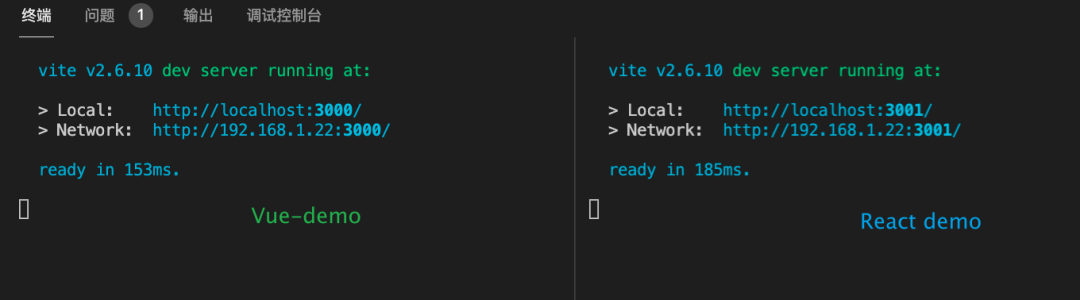
          圖片

          打開(kāi)對(duì)應(yīng)地址

          #?vue
          http://localhost:3000/
          #?react
          http://localhost:3001/

          得到了如下的結(jié)果,提示找不到頁(yè)面(意料之中)

          圖片

          通過(guò)文檔得知,Vite會(huì)默認(rèn)尋找index.html作為項(xiàng)目的入口文件

          圖片

          這就帶來(lái)了第一個(gè)要處理的問(wèn)題,多頁(yè)應(yīng)用下可能有多個(gè)模板文件

          如何根據(jù)訪問(wèn)路由動(dòng)態(tài)的指定這個(gè)x.html的入口

          在解決問(wèn)題之前,咱們?cè)俸?jiǎn)單完善一下啟動(dòng)指令,為其指定一個(gè)vite.config.js 配置文件

          通過(guò)vite --help,可以看到通過(guò)--config參數(shù)指定配置文件位置

          圖片
          export?default?function?startCommand()?{
          ??const?configPath?=?require.resolve('./../config/vite.js');
          ??const?viteService?=?spawn('vite',?['--host',?'0.0.0.0',?'--config',?configPath],?{
          ????cwd:?process.cwd(),
          ????stdio:?'inherit',
          ??});
          }

          這里指向配置文件的絕對(duì)路徑

          config/vite.ts

          import?{?defineConfig?}?from?'vite';

          module.exports?=?defineConfig({
          ??plugins:?[],
          ??optimizeDeps:?{},
          });

          3. html模板處理

          拓展Vite的能力就是定制各種的插件,根據(jù)插件文檔[12]

          編寫(xiě)一個(gè)簡(jiǎn)單的plugin,利用configServer鉤子,讀取瀏覽器發(fā)起的資源請(qǐng)求

          import?type?{?PluginOption?}?from?'vite';

          export?default?function?HtmlTemplatePlugin():?PluginOption?{
          ??return?{
          ????name:?'wvs-html-tpl',
          ????apply:?'serve',
          ????configureServer(server)?{
          ??????const?{?middlewares:?app?}?=?server;
          ??????app.use(async?(req,?res,?next)?=>?{
          ????????const?{?url?}?=?req;
          ????????console.log(url);
          ????????next();
          ??????});
          ????},
          ??};
          }

          在上述的配置文件中引入

          import?{?htmlTemplatePlugin?}?from?'../plugins/index';
          module.exports?=?defineConfig({
          ??plugins:?[
          ????htmlTemplatePlugin(),
          ??]
          });

          再次啟動(dòng)服務(wù)觀察

          • 訪問(wèn)http://localhost:3000,終端中輸出/
          • 訪問(wèn)http://localhost:3000/path1/path2,終端中輸出/path1/path2
          • 訪問(wèn)http://localhost:3000/path1/path2?param1=123,終端中輸出/path1/path2?param1=123

          在 devTools面板內(nèi)容中可以看到,第一個(gè)資源請(qǐng)求頭上的Accept字段中帶有text/html,application/xhtml+xml等內(nèi)容,咱們就以這個(gè)字段表明請(qǐng)求的是html文檔
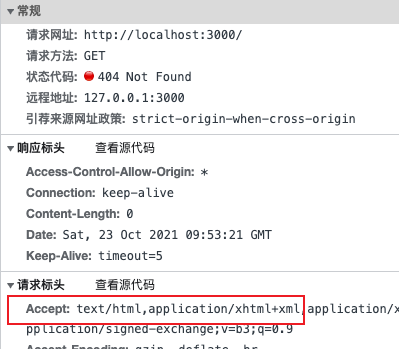
          圖片

          再次修改一下處理資源請(qǐng)求的代碼

          import?{?readFileSync?}?from?'fs';
          import?path?from?'path';
          import?{?URL?}?from?'url';

          function?loadHtmlContent(reqPath)?{
          ??//?單頁(yè)默認(rèn)?public/index.html
          ??const?tplPath?=?'public/index.html';
          ??//?可以根據(jù)請(qǐng)求的path:reqPath 作進(jìn)一步的判斷
          ??return?readFileSync(path.resolve(process.cwd(),?tplPath));
          }

          //?省略了前面出現(xiàn)過(guò)的代碼
          app.use(async?(req,?res,?next)?=>?{
          ??const?{?pathname?}?=?new?URL(req.url,?`http://${req.headers.host}`);
          ??const?htmlAccepts?=?['text/html',?'application/xhtml+xml'];
          ??const?isHtml?=?!!htmlAccepts.find((a)?=>?req.headers.accept.includes(a));
          ??if?(isHtml)?{
          ????const?html?=?loadHtmlContent(pathname);
          ????res.end(html);
          ????return;
          ??}
          ??next();
          });

          再次在demo中啟動(dòng)服務(wù),訪問(wèn)就能正確看到Hello Vite

          在終端中會(huì)發(fā)現(xiàn)一個(gè)報(bào)錯(cuò)

          UnhandledPromiseRejectionWarning:?URIError:?URI?malformed

          打開(kāi)模板可以發(fā)現(xiàn)是由于有一些其它的內(nèi)容,里面包含一些變量,這部分在webpack中是由 html-webpack-plugin[13]插件處理

          <link?rel="manifest"?href="%PUBLIC_URL%/manifest.json"?/>
          <link?rel="apple-touch-icon"?href="%PUBLIC_URL%/logo192.png"?/>
          <link?rel="icon"?href="<%=?BASE_URL?%>favicon.ico">
          <title>
          ??<%=?htmlWebpackPlugin.options.title?%>
          title>

          這里編寫(xiě)一個(gè)簡(jiǎn)單的方法對(duì)模板先做一些簡(jiǎn)單處理(這個(gè)方法只處理了當(dāng)前遇到的這種情況)

          /**
          ?*?初始化模板內(nèi)容(替換?<%=?varName?%>?一些內(nèi)容)
          ?*/

          function?initTpl(tplStr:string,?data?=?{},?ops?:{
          ??backup?:string
          ??matches?:RegExp[]
          }
          )?
          {
          ??const?{?backup?=?'',?matches?=?[]?}?=?ops?||?{};
          ??//?match?%Name%?<%Name%>
          ??return?[/?/g].concat(matches).reduce((tpl,?r)?=>?tpl.replace(r,?(_,?$1)?=>?{
          ????const?keys?=?$1.trim().split('.');
          ????const?v?=?keys.reduce((pre,?k)?=>?(pre?instanceof?Object???pre[k]?:?pre),?data);
          ????return?(v?===?null?||?v?===?undefined)???backup?:?v;
          ??}),?tplStr);
          }

          如果模板中還有復(fù)雜的ejs語(yǔ)法可以使用 ejs 庫(kù)做進(jìn)一步處理

          import?ejs?from?'ejs';

          /**
          ?*?ejs渲染
          ?*/

          function?transformEjsTpl(html:string,?data?=?{})?{
          ??return?ejs.render(html,?data);
          }

          當(dāng)然如果還有其它未考慮到的case,可根據(jù)特定情況,再對(duì)模板做進(jìn)一步的處理

          下面將上述編寫(xiě)的方法集成到插件中

          export?default?function?HtmlTemplatePlugin():?PluginOption?{
          ??return?{
          ????configureServer(server)?{
          ??????const?{?middlewares:?app?}?=?server;
          ??????app.use(async?(req,?res,?next)?=>?{
          ????????//?省略代碼
          ????????if?(isHtml)?{
          ??????????const?originHtml?=?loadHtmlContent(pathname);
          ??????????//?調(diào)用插件中的transformIndexHtml?鉤子對(duì)模板做進(jìn)一步處理
          ??????????const?html?=?await?server.transformIndexHtml(req.url,?originHtml,?req.originalUrl);
          ??????????res.end(html);
          ??????????return;
          ????????}
          ????????next();
          ??????});
          ????},
          ????transformIndexHtml(html)?{
          ??????//?data可以傳入模板中包含的一些變量
          ??????//?可以再此處獲取webpack配置,做自動(dòng)轉(zhuǎn)換
          ??????return?initTpl(html,?{
          ????????PUBLIC_URL:?'.',
          ????????BASE_URL:?'./',
          ????????htmlWebpackPlugin:?{
          ??????????options:?{
          ????????????title:?'App',
          ??????????},
          ????????},
          ??????});
          ????},
          ??};
          }

          到此再次在demo中運(yùn)行,頁(yè)面跑起來(lái)了,終端中也無(wú)報(bào)錯(cuò),頁(yè)面的模板到此算是處理完畢

          有了初始的模板,就意味著我們已經(jīng)為Vite提供了頁(yè)面的入口,但其中還沒(méi)有處理的js/ts的依賴即 entry

          下面將介紹往模板中插入entry

          4. 指定entry入口

          入口文件名(entryName)通常為(main|index).js|ts|jsx|tsx

          • 單頁(yè)應(yīng)用(SPA)中entryBase通常為:src
          • 多頁(yè)應(yīng)用(MPA)中entryBase通常為:src/pages/${pageName}

          利用transformIndexHtml鉤子往模板中插入

          export?default?function?pageEntryPlugin():?PluginOption?{
          ??return?{
          ????name:?'wvs-page-entry',
          ????apply:?'serve',
          ????transformIndexHtml(html,?ctx)?{
          ??????return?html.replace('',?`
          ????????
          ????????`
          );
          ????},
          ??};
          }

          這里以SPA為例

          function?getPageEntry(reqUrl)?{
          ??//?SPA
          ??const?SPABase?=?'src';
          ??return?getEntryFullPath(SPABase);
          }

          getEntryFullPath 實(shí)現(xiàn)如下

          • 先判斷目錄是否存在
          • 讀取目錄,遍歷文件利用正則/(index|main)\.[jt]sx?$/判斷文件是否為目標(biāo)文件
          const?resolved?=?(...p)?=>?path.resolve(getCWD(),?...p);
          const?getEntryFullPath?=?(dirPath)?=>?{
          ??if?(!existsSync(resolved(dirPath)))?{
          ????return?false;
          ??}
          ??//?main|index.js|ts|jsx|tsx
          ??const?entryName?=?/(index|main)\.[jt]sx?$/;
          ??const?entryNames?=?readdirSync(resolved(dirPath),?{?withFileTypes:?true?})
          ????.filter((v)?=>?{
          ??????entryName.lastIndex?=?0;
          ??????return?v.isFile()?&&?entryName.test(v.name);
          ????});
          ??return?entryNames.length?>?0???path.join(dirPath,?entryNames[0].name)?:?false;
          };

          將這個(gè)插件加入到配置里

          import?{?pageEntryPlugin?}?from?'../plugins/index';
          module.exports?=?defineConfig({
          ??plugins:?[
          ????pageEntryPlugin(),
          ??]
          });

          啟動(dòng)demo查看效果,拋出了一堆錯(cuò)誤

          wvs?start

          下面是針對(duì)框架特定的處理

          React

          1. React: the content contains invalid JS syntax

          React中將帶有jsx語(yǔ)法的js文件后綴改為jsx,關(guān)于直接在js中使用jsx語(yǔ)法的處理方案,見(jiàn)文章:解決Vite-React項(xiàng)目中.js使用jsx語(yǔ)法報(bào)錯(cuò)的問(wèn)題[14]

          1. Uncaught ReferenceError: React is not defined

          在 react組件頂部引入React,或引入@vitejs/plugin-react插件,同下3處理方案

          import?React?from?'react';
          1. HMR支持

          引入@vitejs/plugin-react[15]插件

          import?react?from?'@vitejs/plugin-react'

          module.exports?=?defineConfig({
          ??plugins:?[
          ????react(),
          ??]
          });

          Vue

          需要添加插件處理.vue文件

          引入@vitejs/plugin-vue[16]插件

          import?vue?from?'@vitejs/plugin-vue'

          module.exports?=?defineConfig({
          ??plugins:?[
          ????vue(),
          ??]
          });

          同時(shí) @vitejs/plugin-vue 需要 vue (>=3.2.13)

          由于前面采用的是npm link創(chuàng)建軟連接進(jìn)行的調(diào)試,配置文件中會(huì)在開(kāi)發(fā)目錄下去查找Vue依賴,不會(huì)在指令運(yùn)行目錄下查找,會(huì)不斷的拋出上述問(wèn)題

          這里在demo項(xiàng)目里本地安裝我們的依賴,然后在package.json添加相關(guān)指令

          yarn?add?file:webpack-vite-service-workspace-path
          {
          ??"scripts":?{
          ????"vite":?"wvs?start?-f?vue"
          ??},
          }

          Vue項(xiàng)目中并沒(méi)有React相關(guān)依賴,所以在Vue項(xiàng)目中不能引入@vitejs/plugin-react插件

          可以在指令入口添加框架相關(guān)參數(shù)判斷處理一下,只引入對(duì)應(yīng)框架的插件

          //?src/bin.ts
          program.command('start')
          ??.option('-f,?--framework?',?'set?project?type?[vue/react]')
          ??.action(startCommand);

          //?src/command/start.ts
          export?default?function?startCommand(options:{[key:string]:string})?{
          ??const?{?framework?=?''?}?=?options;
          ??process.env.framework?=?framework.toUpperCase();
          }

          //?src/config/vite.ts
          import?react?from?'@vitejs/plugin-react';
          import?vue?from?'@vitejs/plugin-vue';

          const?extraPlugins:?any[]?=?[
          ??process.env.framework?===?'REACT'???[react()]?:?[],
          ??process.env.framework?===?'VUE'???[vue()]?:?[],
          ];
          module.exports?=?defineConfig({
          ??plugins:?[
          ????htmlTemplatePlugin(),
          ????pageEntryPlugin(),
          ????...extraPlugins,
          ??],
          });

          到此最關(guān)鍵的兩個(gè)步驟就算完成了

          5. 其它工程能力

          目前針對(duì)webpack常見(jiàn)的能力,社區(qū)已經(jīng)有了許多插件和方案,下面只做簡(jiǎn)單介紹

          這些插件當(dāng)然也有些場(chǎng)景可能處理不了,還是期望廣大開(kāi)發(fā)者,勇于實(shí)驗(yàn),然后向插件作者提交PR/issues

          • Sass/Less:在依賴中安裝Sass/Less即可
          • 組件庫(kù)按需引入:vite-plugin-style-import[17]
          • process.env:vite-plugin-env-compatible[18]
          • window.xx/xx undefined:使用transformIndexHtml鉤子開(kāi)發(fā)插件,在模板中提前引入這個(gè)方法的polyfill或者兜底處理
          • ...

          總結(jié)

          企業(yè):大部分是擁有自己的研發(fā)框架,在研發(fā)框架中只需要加入一個(gè)Vite啟動(dòng)的CLI指令,這樣對(duì)接入方的影響與使用成本是最小的

          個(gè)人:喜歡折騰/不想改動(dòng)原來(lái)的代碼,可以按上述流程自己接一下,新項(xiàng)目可以直接使用Vite官方模板開(kāi)發(fā)

          總之:開(kāi)發(fā)中使用Vite還是很香的

          由于篇幅與時(shí)間都有限,文中部分地方只介紹了實(shí)現(xiàn)思路,并沒(méi)粘貼完整代碼,完整代碼可在源碼倉(cāng)庫(kù)[19]中查看,也可fork直接進(jìn)行二次開(kāi)發(fā)

          webpackvite配置的轉(zhuǎn)換這部分的內(nèi)容將放在下期做介紹

          參考資料

          [1]

          webpack-vite-serve: https://github.com/ATQQ/webpack-vite-serve

          [2]

          webpack: https://webpack.docschina.org/concepts/

          [3]

          SWC(Rust): https://github.com/swc-project/swc

          [4]

          esbuild(Go): https://github.com/evanw/esbuild

          [5]

          snowpack: https://github.com/snowpackjs/snowpack

          [6]

          Vite: https://github.com/vitejs/vite

          [7]

          倉(cāng)庫(kù): https://github.com/ATQQ/webpack-vite-serve

          [8]

          Vue-CLI: https://cli.vuejs.org/zh/

          [9]

          Create React App: https://www.html.cn/create-react-app/

          [10]

          spawn: http://nodejs.cn/api/child_process.html#child_process_child_process_spawn_command_args_options

          [11]

          stdio: http://nodejs.cn/api/child_process.html#child_process_options_stdio

          [12]

          插件文檔: https://cn.vitejs.dev/guide/api-plugin.html

          [13]

          html-webpack-plugin: https://github.com/jantimon/html-webpack-plugin

          [14]

          解決Vite-React項(xiàng)目中.js使用jsx語(yǔ)法報(bào)錯(cuò)的問(wèn)題: https://juejin.cn/post/7018128782225571853

          [15]

          @vitejs/plugin-react: https://github.com/vitejs/vite/tree/main/packages/plugin-react

          [16]

          @vitejs/plugin-vue: https://github.com/vitejs/vite/tree/main/packages/plugin-vue

          [17]

          vite-plugin-style-import: https://www.npmjs.com/package/vite-plugin-style-import

          [18]

          vite-plugin-env-compatible: https://github.com/IndexXuan/vite-plugin-env-compatible

          [19]

          源碼倉(cāng)庫(kù): https://github.com/ATQQ/webpack-vite-serve


          瀏覽 124
          點(diǎn)贊
          評(píng)論
          收藏
          分享

          手機(jī)掃一掃分享

          分享
          舉報(bào)
          評(píng)論
          圖片
          表情
          推薦
          點(diǎn)贊
          評(píng)論
          收藏
          分享

          手機(jī)掃一掃分享

          分享
          舉報(bào)
          <kbd id="afajh"><form id="afajh"></form></kbd>
          <strong id="afajh"><dl id="afajh"></dl></strong>
            <del id="afajh"><form id="afajh"></form></del>
                1. <th id="afajh"><progress id="afajh"></progress></th>
                  <b id="afajh"><abbr id="afajh"></abbr></b>
                  <th id="afajh"><progress id="afajh"></progress></th>
                  久久国内| 高清无码国产内射在线观看 | 青娱乐自拍视频地址 | AV无码免费电影 | 无码在线直播 |