
TestNG測試框架初探
環(huán)境搭建
1. 需要lib包
httpclient-4.2.5.jar         -- http請求
jettison.jar                 -- 組裝解析Json
ojdbc7.jar                   -- 數(shù)據(jù)庫操作
testng.jar                   -- 測試用例執(zhí)行與結(jié)果斷言,無需單獨(dú)下載,安裝eclipse插件即可
reportng-1.1.4.jar           -- testng測試報(bào)告美化插件
velocity-dep-1.4.jar         -- reportng-1.1.4.jar的依賴庫
guice-4.0.jar                -- reportng-1.1.4.jar的依賴庫
2. 相關(guān)配置安裝
2.1 Eclipse安裝testng插件:
安裝:Eclipse --> Help --> Install NewSoftWare --> Add
2.2 美化測試報(bào)告插件Reportng配置:
配置:Eclipse --> Window --> Preferences --> testng
勾選Disable default listeners
PreDefinedListeners輸入框中輸入
org.uncommons.reportng.HTMLReporter
2.3 使用Reportng后測試報(bào)告結(jié)果路徑:
test-output --> html
TestNG簡介與實(shí)例
1. TestNG與Junit對比
1.1 Junit缺點(diǎn):
●?最初的設(shè)計(jì),使用于單元測試,現(xiàn)在只用于各種測試;
● 不能依賴測試;
●?配置控制欠佳(安裝/拆卸);
●?侵入性(強(qiáng)制擴(kuò)展類,并以某種方式命名方法);
●?靜態(tài)編程模型(不必要的重新編譯);
●?不適合管理復(fù)雜項(xiàng)目應(yīng)用,JUnit復(fù)雜項(xiàng)目中測試非常棘手。
1.2 TestNG是什么?
TestNG按照其文檔的定義是:
●?TestNG是一個(gè)測試框架,其靈感來自Junit和NUnit的,但引入了一些新功能,使其功能更強(qiáng)大,使用更方便。
●?TestNG是一個(gè)開源自動(dòng)化測試框架,TestNG表示下一代。TestNG是類似于Junit(特別是Junit4),但它不是一個(gè)Junit擴(kuò)展。它的靈感來源于Junit。它的目的是優(yōu)于Junit的,尤其是當(dāng)測試集成的類。
●?TestNG消除了大部分的舊框架的限制,使開發(fā)人員能夠編寫更加靈活和強(qiáng)大的測試。因?yàn)樗诤艽蟪潭壬辖梃b了Java注解(JDK5.0引入的)來定義的測試,它也可以告訴你如何使用這個(gè)新功能在真實(shí)的Java語言生產(chǎn)環(huán)境中。
1.3 TestNG特點(diǎn)
●?注解
●?TestNG使用Java和面向?qū)ο蟮墓δ埽?/span>
●?支持綜合類測試(例如,默認(rèn)情況下,不用創(chuàng)建一個(gè)新的測試每個(gè)測試方法的類的實(shí)例);
●?獨(dú)立的編譯時(shí)測試代碼和運(yùn)行時(shí)配置/數(shù)據(jù)信息
●?靈活的運(yùn)行時(shí)配置;
●?主要介紹“測試組”。當(dāng)編譯測試,只要要求TestNG運(yùn)行所有的“前端”的測試,或“快”,“慢”,“數(shù)據(jù)庫”等;
●?支持依賴測試方法,并行測試,負(fù)載測試,局部故障;
●?靈活的插件API;
●?支持多線程測試。
2. TestNG注解與基礎(chǔ)實(shí)例
2.1 注解
| 注解 | 描述 |
|---|---|
| @BeforeSuite | 注解的方法將只運(yùn)行一次,運(yùn)行所有測試前此套件中。 |
| @AfterSuite | 注解的方法將只運(yùn)行一次此套件中的所有測試都運(yùn)行之后。 |
| @BeforeClass | 注解的方法將只運(yùn)行一次先行先試在當(dāng)前類中的方法調(diào)用。 |
| @AfterClass | 注解的方法將只運(yùn)行一次后已經(jīng)運(yùn)行在當(dāng)前類中的所有測試方法。 |
| @BeforeTest | 注解的方法將被運(yùn)行之前的任何測試方法屬于內(nèi)部類的標(biāo)簽的運(yùn)行。 |
| @AfterTest | 注解的方法將被運(yùn)行后,所有的測試方法,屬于內(nèi)部類的標(biāo)簽的運(yùn)行。 |
| @BeforeGroups | 按組( @Test(groups= "findyou") )運(yùn)行時(shí),此注解在組(findyou組)執(zhí)行之前運(yùn)行,可做組(findyou組)執(zhí)行之前,初始化數(shù)據(jù)準(zhǔn)備類工作。 |
| @AfterGroups | 按組( @Test(groups= "findyou") )運(yùn)行時(shí),此注解在組(findyou組)執(zhí)行之后運(yùn)行,可做組(findyou)執(zhí)行之后,數(shù)據(jù)還原類工作。 |
| @BeforeMethod | 注解的方法將每個(gè)測試方法之前運(yùn)行。 |
| @AfterMethod | 被注釋的方法將被運(yùn)行后,每個(gè)測試方法。 |
| @DataProvider | 標(biāo)志著一個(gè)方法,提供數(shù)據(jù)的一個(gè)測試方法。注解的方法必須返回一個(gè)Object[] [],其中每個(gè)對象[]的測試方法的參數(shù)列表中可以分配。該@Test 方法,希望從這個(gè)DataProvider的接收數(shù)據(jù),需要使用一個(gè)dataProvider名稱等于這個(gè)注解的名字。 |
| @Factory | 作為一個(gè)工廠,返回TestNG的測試類的對象將被用于標(biāo)記的方法。該方法必須返回Object[]。 |
| @Listeners | 定義一個(gè)測試類的監(jiān)聽器。 |
| @Parameters | 介紹如何將參數(shù)傳遞給@Test方法。 |
| @Test | 標(biāo)記一個(gè)類或方法作為測試的一部分。 |
2.2 基礎(chǔ)實(shí)例-1
2.2.1 新建java工程
1.新建:NEW-->JAVA Project-->輸入工程名稱-->Finish
2.引入lib庫
2.2.2 編寫測試用例
package a.testcase;

import org.testng.annotataions.Test;
public class TestCaseStudy{
  //testcase1
  @Test
  public void testCase1(){
    System.out.println("in testcase1")}
}
2.2.3 執(zhí)行用例
執(zhí)行:右鍵java文件-->Run as-->TestNG
2.2.4 查看測試報(bào)告
在項(xiàng)目文件的test-output文件內(nèi)查看測試報(bào)告
2.3 基礎(chǔ)實(shí)例-2
2.3.1 編寫測試用例
package a.testcase;

import org.testng.annotations.AfterClass;
import org.testng.annotations.AfterSuite;
import org.testng.annotations.AfterTest;
import org.testng.annotations.BeforeClass;
import org.testng.annotations.BeforeSuite;
import org.testng.annotations.BeforeTest;
import org.testng.annotations.Test;
import org.testng.annotations.AfterMethod;
import org.testng.annotations.BeforeMethod;

public class TestngStudy{
  //test case 1
  @Test
  public void testcase1(){
    System.out.println("This is a test case 1")}
  //test case 2
  @Test
  public void testcase2(){
    System.out.println("This is a test case 2")}}
  @BeforeMethod
  public void beforeMethod(){
    System.out.println("This is beforeMethod")}
  @AfterMethod
  public void afterMethod(){
    System.out.println("This is afterMethod")}
  @BeforeClass
  public void beforeClass(){
    System.out.println("This is beforeClass")}
  @AfterClass
  public void afterClass(){
    System.out.println("This is afterClass")}
  @BeforeTest
  public void beforeTest(){
    System.out.println("This is beforeTest")}
  @AfterTest
  public void afterTest(){
    System.out.println("This is afterTest")}
  @BeforeSuite
  public void beforeSuite(){
    System.out.println("This is beforeSuite")}
  @AfterSuite
  public void afterSuite(){
    System.out.println("This is afterSuite")}
}
2.3.2 執(zhí)行用例結(jié)果

3. 實(shí)例應(yīng)用
3.1 待測接口說明
例:北京市天氣
1. 接口地址:http://www.weather.com.cn/data/cityinfo/101010100.html
2. 請求方式:get
3. 請求結(jié)果:
{
    "weatherinfo": {
    "city": "北京",
    "cityid": "101010100",
    "temp1": "18℃",
    "temp2": "31℃",
    "weather": "多云轉(zhuǎn)陰",
    "img1": "n1.gif",
    "img2": "d2.gif",
    "ptime": "18:00"
    }
}
4. 請求對應(yīng)cityid代碼,返回城市是否為預(yù)期城市。
3.2 新建java工程
3.2.1 工程結(jié)構(gòu)說明
--httpAPITest
    --src
        --m.Interface
           --Common.java               --公共方法:JSON解析
           --getCityWeather.java       --請求接口進(jìn)行封裝,根據(jù)傳入CityID組裝不同的請求地址,進(jìn)行請求,并返回結(jié)果數(shù)據(jù)
           --URLConnection.java        --HTTP請求頭封裝
3.2 Common.java代碼
package m.Interface

import org.codehaus.jettison.json.JSONException;
import org.codehaus.jettison.json.JSONObject;
public class Common{
    public static String getJsonValue(String JsonString, String JsonId){
    String JsonValue = "";
    if(JsonString == null || JsonString.trim().length() < 1){
      return null;
    }
    try{
        JSONObject obj1 = new JSONObject(JsonString);
        JsonValue = (String) object1.getString(JsonId);
        } catch(JSONException e){
          e.printStackTrace();
        }
    }
}
3.3 getCityWeather.java代碼
package m.Interface;

import java.io.BufferedReader;
import java.io.IOException;
import java.io.InputStreamReader;
import java.net.HttpURLConnection;
public class getCityWeather{
    private String url = "";

    public String geturl(){
        return url;
    }
    public String getHttpResponse(String cityCode) thorws IOException{
        String line = "";
        String httpResults = "";
        url = ("http://www.weather.com.cn/data/cityinfo/" + cityCode + ".html");
        try{
            HttpURLConnection connection = URLConnection.getConnection(url);
            connection.connect();
            BufferedReader reader = new BufferedReader(new InputStreamReader(connection.getInputStream(),"UTF-8"));
            while((line = reader.readLine()) != null){
                httpResults = httpResults + line.toString();
            }
            reader.close();
            // 斷開連接
            connection.disconnect();
        }catch(Execption e ){
            e.printStackTrace();
        }
        return httpResults;
    }
}
3.4 URLConnection.java代碼
package m.Interface;

import java.net.HttpURLConnection;
import java.net.URL;
public class URLConnection{
    public static HttpURLConnection getConnection(String url){
        HttpURLConnection connection = null;
        try{
            //打開和URL之間的連續(xù)
            URL postUrl = new URL(url);
            connection = (HttpURLConnection) postUrl.openConnection();
            //設(shè)置通用的請求屬性
            connection.setDoOutput(true);
            connection.setDoInput(true);
            connection.setRequestMethod("GET");
            connection.setUseCaches(false);
            connection.setInstanceFollowRedirets(true);
            connection.setRequestProperty("Content-Type", "application/json");
            connection.setRequestProperty("Charset","utf-8");
            connection.setRequestProperty("Accept-Charset", "utf-8");
        } catch(Exception e ){
            e.printStackTrace();
        }
        return connection;
    }
}
3.5 測試用例編寫
package m.testcase;

import java.io.IOException;
import org.testng.Assert;
import org.testng.Reporter;
import org.testng.annotation.Test;
import m.Interface.Common;
import m.Interface.getCityWeather;
public class test{
    public String httpResult = null, weatherinfo = null, city = null, exp_city = null;
    public static String cityCode = "";
    getCityWeather weather = new getCityWeather();

    @Test(group = {"BaseCase"})
    public void getShenZhen_Succ() throws IOException{
        exp_city = "深圳";
        cityCode = "101280601"
        resultCheck(cityCode, exp_city);

    @Test(group = {"BaseCase"})
    public void getBeiJing_Succ() throws IOException{
        exp_city = "北京";
        cityCode = "101010100";
        resultCheck(cityCode, exp_city);
    }
    @Test(group = {"BaseCase"})
    public void getShangHai_Succ() throws IOException{
        exp_city = "上海";
        cityCode = "101020100";
        resultCheck(cityCode, exp_city);
    }
    public void resultCheck(String cityCode_str, String exp_city_str) throws IOException{
        Reporter.log("【正常用例】:獲取" + exp_city_str + "天氣成功!");
        httpResult = weather.getHttpResponse(cityCode_str);
        Reporter.log("請求地址:" + weather.geturl());
        Reporter.log("返回結(jié)果:" + httpResult);
        weatherinfo = Common.getJsonValue(httpResult, "weatherinfo");
        city = Common.getJsonValue(weatherinfo, "city");
        Reporter.log("用例結(jié)果:resultCode=>expected:" + exp_city_str + " ,actual:" + city);
        Assert.assertEquals(city,exp_city_str
    }
}
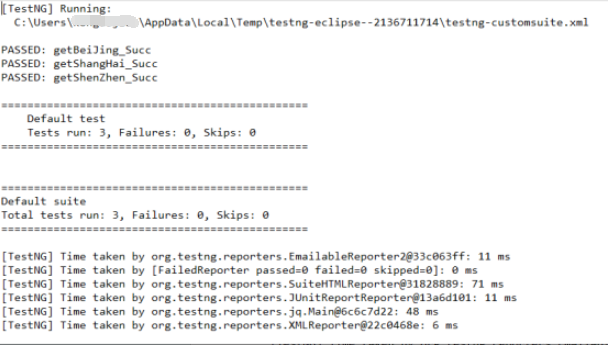
3.6 測試結(jié)果
留言主題:你用過TestNG嗎?還用過哪些框架?
Appium移動(dòng)端自動(dòng)化測試--基礎(chǔ)預(yù)熱 Appium移動(dòng)端自動(dòng)化測試--搭建測試環(huán)境 Appium移動(dòng)端自動(dòng)化測試--錄制測試用例并運(yùn)行 Appium移動(dòng)端自動(dòng)化測試--使用IDE編輯并強(qiáng)化腳本 Appium移動(dòng)端自動(dòng)化測試--控件定位方法 Appium移動(dòng)端自動(dòng)化測試--元素操作與觸摸動(dòng)作 Appium移動(dòng)端自動(dòng)化測試--搭建模擬器和真機(jī)環(huán)境 Appium移動(dòng)端自動(dòng)化測試--測試用例改造 Appium移動(dòng)端自動(dòng)化測試--capability使用和常用設(shè)備交互命令
軟件自動(dòng)化測試交流群已創(chuàng)建,公號回復(fù)入群即可獲取入群二維碼。