
【Python基礎(chǔ)】Python中讀取圖片的6種方式
Python進(jìn)行圖片處理,第一步就是讀取圖片,這里給大家整理了6種圖片的讀取方式,并將讀取的圖片裝換成numpy.ndarray()格式。首先需要準(zhǔn)備一張照片,假如你有女朋友的話,可以用女朋友的,沒有的話,那還學(xué)啥Python,趕緊找對象去吧!

一、OpenCV讀取圖片
OpenCV讀取的圖片,直接就是numpy.ndarray格式,無需轉(zhuǎn)換
import cv2img_cv???=?cv2.imread(dirpath)#讀取數(shù)據(jù)print("img_cv:",img_cv.shape)img_cv:?(1856,?2736,?3)print("img_cv:",type(img_cv))img_cv:#看下讀取的數(shù)據(jù)怎么樣img_cvarray([[[ 0, 3, 0],[ 11, 20, 17],...,[ 5, 23, 16]],[[ 0, 2, 0],...,[ 5, 23, 16]]]
?
二、PIL讀取圖片
PIL讀取的圖片并不是直接的numpy.ndarray格式,需要進(jìn)行轉(zhuǎn)換
from PIL import Imageimport numpy as npimg_PIL = Image.open(dirpath)#讀取數(shù)據(jù)print("img_PIL:",img_PIL)img_PIL:print("img_PIL:",type(img_PIL))img_PIL:#將圖片轉(zhuǎn)換成np.ndarray格式img_PIL = np.array(img_PIL)print("img_PIL:",img_PIL.shape)img_PIL: (1856, 2736, 3)print("img_PIL:",type(img_PIL))img_PIL:
?
三、keras讀取圖片
keras深度學(xué)習(xí)的框架,里面也是內(nèi)置了讀取圖片的模塊,該模塊讀取的也不是數(shù)組格式,需要進(jìn)行轉(zhuǎn)換。
from?keras.preprocessing.image?import?array_to_img,?img_to_arrayload_imgimg_keras?=?load_img(dirpath)#讀取數(shù)據(jù)print("img_keras:",img_keras)img_keras:print("img_keras:",type(img_keras))img_keras:#使用keras里的img_to_array()img_keras = img_to_array(img_keras)print("img_keras:",img_keras.shape)img_keras: (1856, 2736, 3)print("img_keras:",type(img_keras))img_keras:#可以使用使用np.array()進(jìn)行轉(zhuǎn)換mg_keras=?np.array(img_keras)
?
四、skimage讀取圖片
scikit-image是基于scipy的一款圖像處理包,它將圖片作為numpy數(shù)組進(jìn)行處理,讀取的數(shù)據(jù)正好是numpy.ndarray格式。
import skimage.io as ioimg_io = io.imread(dirpath)#讀取數(shù)據(jù)print("img_io :",img_io .shape)img_io : (1856, 2736, 3)print("img_io :",type(img_io ))img_io :
?
五、matplotlib.image讀取圖片
利用matplotlib.image讀取的圖片,直接就生成了數(shù)組格式
import matplotlib.image as mpig
img_mpig = mpig.imread(dirpath)#讀取數(shù)據(jù)print("img_mpig :",img_mpig .shape)img_mpig : (1856, 2736, 3)print("img_mpig :",type(img_mpig ))img_mpig :
?
六、matplotlib.pyplot讀取圖片
利用matplotlib.pyplot讀取的圖片,同樣也是直接就生成了數(shù)組格式
import matplotlib.pyplot as pltimg_plt = plt.imread(dirpath)print("img_plt :",img_plt .shape)img5: (1856, 2736, 3)print("img_plt :",type(img_plt ))img5:
?
七、顯示讀取的圖片
同樣,使用matplotlib 包可以打印出來讀取的照片,要打印上述案例中讀取的照片,只需要下面兩行代碼就行了。
plt.imshow(img_plt , cmap=plt.cm.binary)
plt.show()
? ? ? ? ? ? ? ?
圖片三通道的,打印其中一個通道
plt.imshow(img_plt[:,:,1] , cmap=plt.cm.binary)
plt.show()? ? ? ?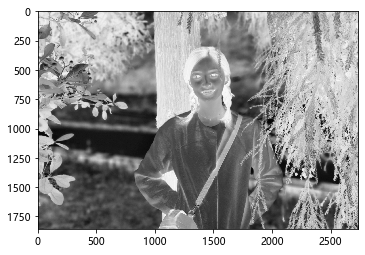 ?
?
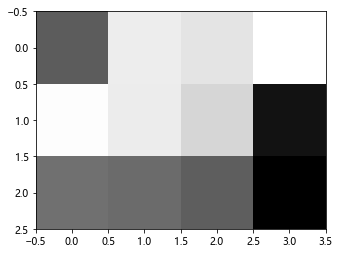
當(dāng)然,我們可以隨便構(gòu)造一個數(shù)組,可以顯示出來
digit ?= ?[[135,26,33,12],[14,27,43,190],[120,124,134,205]]
plt.imshow(digit, cmap=plt.cm.binary)
plt.show()
往期精彩回顧
獲取一折本站知識星球優(yōu)惠券,復(fù)制鏈接直接打開:
https://t.zsxq.com/y7uvZF6
本站qq群704220115。
加入微信群請掃碼: