
Google App ANR 優(yōu)化案例

和你一起終身學(xué)習(xí),這里是程序員Android
經(jīng)典好文推薦,通過閱讀本文,您將收獲以下知識點(diǎn):
一、開機(jī)向?qū)r(shí) Google DUO 概率ANR
二、開機(jī)向?qū)r(shí) Google Calendar 概率 ANR
三、開機(jī)向?qū)r(shí) ANR 彈框不show的解決方案
四、開機(jī)向?qū)r(shí) Google Music 概率 ANR
五、開機(jī)向?qū)r(shí) Google Play Store 概率 ANR
六、 Google play Store 下載apk 概率性閃退
一、開機(jī)向?qū)r(shí) DUO 概率ANR
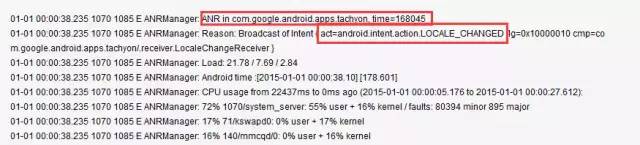
從Log中分析主要原因是android.intent.action.LOCALE_CHANGED?廣播接收超時(shí)導(dǎo)致的ANR。
1.ANR Log 如下:
ANR Log
2.ANR 規(guī)避方案如下:
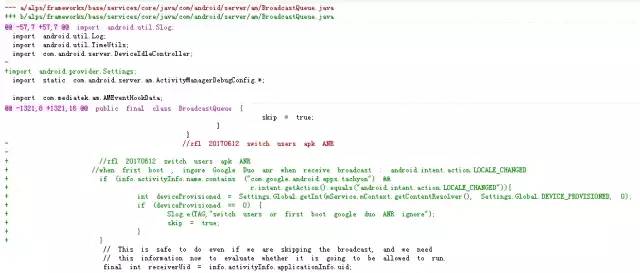
在BroadcastQueue類的?processNextBroadcast方法中,當(dāng)?shù)谝淮伍_機(jī)時(shí)候,跳過此Action。
3.修改類路徑如下:
/alps/frameworks/base/services/core/java/com/android/server/am/BroadcastQueue.java
public final class BroadcastQueue {
  ... ...
    final void processNextBroadcastLocked(boolean fromMsg, boolean skipOomAdj) {
        BroadcastRecord r;
          ... ...
         // import android.provider.Settings;
         //when frist boot , ingore Google Duo anr when receive broadcast : android.intent.action.LOCALE_CHANGED
            if (info.activityInfo.name.contains ("com.google.android.apps.tachyon") &&
                               r.intent.getAction().equals("android.intent.action.LOCALE_CHANGED")){
                 int deviceProvisioned = Settings.Global.getInt(mService.mContext.getContentResolver(), Settings.Global.DEVICE_PROVISIONED, 0);
                 if (deviceProvisioned == 0) {
                     Slog.e(TAG,"switch users or first boot google duo ANR ignore");
                     skip = true;
                 }
            }

        // This is safe to do even if we are skipping the broadcast, and we need
        // this information now to evaluate whether it is going to be allowed to run.
        final int receiverUid = info.activityInfo.applicationInfo.uid;
        // If it's a singleton, it needs to be the same app or a special app
          ... ...
  }
    ... ...
}
4. git diff 修改如下:
git 修改記錄
二、開機(jī)向?qū)r(shí) Calendar 概率 ANR
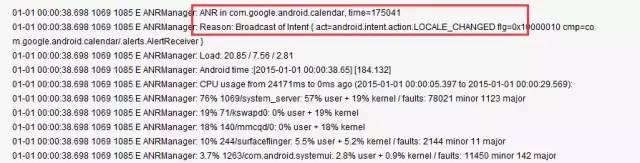
1.ANR Log 如下:
Calendar ANR log
2.ANR 規(guī)避方案如下:
主要原因是?android.intent.action.LOCALE_CHANGED?廣播接收超時(shí)導(dǎo)致的ANR。
3.修改方案
請參考修改一
三、 開機(jī)向?qū)r(shí),ANR 彈框不show的解決方案
刷機(jī)或者恢復(fù)出廠設(shè)置是,開機(jī)向?qū)н^程中不應(yīng)該顯示ANR。
修改文件路徑如下:frameworks/base/services/core/java/com/android/server/am/AppErrors.java
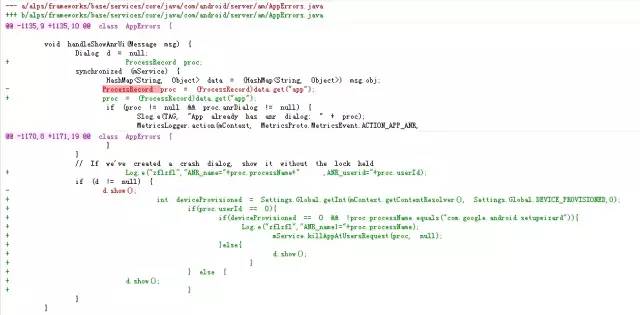
修改AppErrors?類中?handleShowAnrUi方法,控制在開機(jī)向?qū)r(shí)ANR彈窗。
class AppErrors {
        ... ...
        void handleShowAppErrorUi(Message msg) {
                             ... ...
                // If we've created a crash dialog, show it without the lock held

                if (d != null) {
                    int deviceProvisioned = Settings.Global.getInt(mContext.getContentResolver(), Settings.Global.DEVICE_PROVISIONED,0);
                        if(proc.userId == 0){
                            if(deviceProvisioned == 0 && !proc.processName.equals("com.google.android.setupwizard")){

                               mService.killAppAtUsersRequest(proc, null);
                            }else{
                             d.show();
                           }
                        } else {
                          d.show();
                        }
                }
            ... ...
        }
        ... ...
}
1. git 解決方案
git 修改差別的
四、開機(jī)向?qū)r(shí) Google Music 概率 ANR
開機(jī)向?qū)r(shí)候 接收android.intent.action.LOCALE_CHANGED 廣播超時(shí)導(dǎo)致的ANR。
1.ANR Log 如下:

ANR Log
2. 修改方案
請參考修改一
五、開機(jī)向?qū)r(shí) Google Play Store 概率 ANR
開機(jī)向?qū)r(shí)候 接收android.intent.action.LOCALE_CHANGED 廣播超時(shí)導(dǎo)致的ANR。
1.ANR Log 如下:

ANR Log
2.ANR 規(guī)避方案如下:
請參考修改一
六、Google play Store 下載apk 概率性閃退
低內(nèi)存情況下,使用play Store下載多個(gè)apk,Playstore?概率性ANR。
閃退 Log 信息
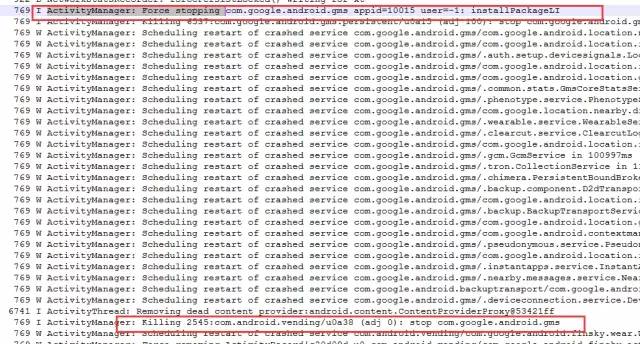
Google Play Store 被kill Log信息
1.解決閃退問題方法
在ActivityManagerService中的applyOomAdjLocked方法中修改adj值,防止apk?低內(nèi)存情況下被殺掉。
修改類如下:frameworks/base/services/core/java/com/android/server/am/ActivityManagerService.java
public class ActivityManagerService extends IActivityManager.Stub
        implements Watchdog.Monitor, BatteryStatsImpl.BatteryCallback {
        ... ...
        protected boolean applyOomAdjLocked(ProcessRecord app, boolean doingAll, long now,
            long nowElapsed) {
              ... ...
            // add by  for google play store was killed in sometime
            if(app.curAdj>3){
                if( app.processName.equals("com.android.vending") ||app.processName.equals("com.google.android.gms")){
                    app.curAdj = 3;
                }
            }
            // add by for google play store was killed in sometime
            ... ...
         }
        ... ...
}
2. 解決方案如下
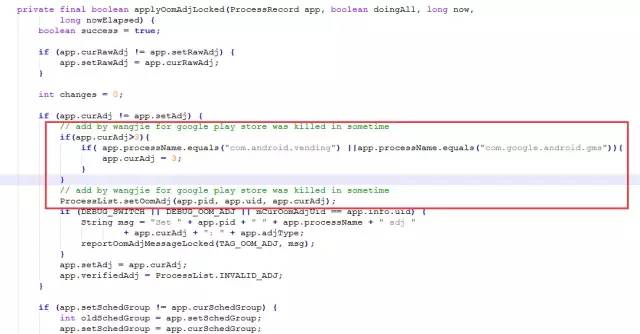
解決閃退方案
至此,本篇已結(jié)束。轉(zhuǎn)載網(wǎng)絡(luò)的文章,小編覺得很優(yōu)秀,歡迎點(diǎn)擊閱讀原文,支持原創(chuàng)作者,如有侵權(quán),懇請聯(lián)系小編刪除。同時(shí)感謝您的閱讀,期待您的關(guān)注。
點(diǎn)個(gè)在看,方便您使用時(shí)快速查找!