
MediaPipe實(shí)現(xiàn)手指關(guān)鍵點(diǎn)檢測及追蹤,人臉識別及追蹤
OpenCV 是一個用于計(jì)算機(jī)視覺應(yīng)用程序的庫。在 OpenCV 的幫助下,我們可以構(gòu)建大量實(shí)時運(yùn)行更好的應(yīng)用程序。主要用于圖像和視頻處理。
除了 OpenCV,我們將使用 MediaPipe 庫。
1.MediaPipe簡介
MediaPipe是一個主要用于構(gòu)建音頻、視頻或任何時間序列數(shù)據(jù)的框架。在 MediaPipe 框架的幫助下,我們可以為不同的媒體處理功能構(gòu)建管道。
MediaPipe 的一些主要應(yīng)用。
多手追蹤 - ?人臉檢測 - ?對象檢測和跟蹤 - ?Objection:3D 對象檢測和跟蹤 - ?AutoFlip:自動視頻裁剪管道等。MediaPipe 使用單次手掌檢測模型,一旦完成,它會對檢測到的手部區(qū)域中的 21 個 3D 手掌坐標(biāo)執(zhí)行精確的關(guān)鍵點(diǎn)定位。
MediaPipe 管道使用多個模型,例如,從完整圖像返回定向手邊界框的手掌檢測模型。裁剪后的圖像區(qū)域被饋送到由手掌檢測器定義的手部標(biāo)志模型,并返回高保真 3D 手部關(guān)鍵點(diǎn)。
現(xiàn)在讓我們實(shí)現(xiàn)手部跟蹤模型。
安裝所需的模塊
–> pip install opencv-python
–> pip install mediapipe
注意:這里的python版本盡量在3.8以上,不然會報(bào)各種錯誤!!
首先,讓我們檢查網(wǎng)絡(luò)攝像頭的工作情況。
import?cv2
import?mediapipe?as?mp
import?time

cap?=?cv2.VideoCapture(0)

mpHands?=?mp.solutions.hands
hands?=?mpHands.Hands(static_image_mode=False,
??????????????????????max_num_hands=2,
??????????????????????min_detection_confidence=0.5,
??????????????????????min_tracking_confidence=0.5)
mpDraw?=?mp.solutions.drawing_utils

pTime?=?0
cTime?=?0

while?True:
????success,?img?=?cap.read()
????img?=?cv2.flip(img,?1)
????imgRGB?=?cv2.cvtColor(img,?cv2.COLOR_BGR2RGB)
????results?=?hands.process(imgRGB)
????#print(results.multi_hand_landmarks)

????if?results.multi_hand_landmarks:
????????for?handLms?in?results.multi_hand_landmarks:
????????????for?id,?lm?in?enumerate(handLms.landmark):
????????????????#print(id,lm)
????????????????h,?w,?c?=?img.shape
????????????????cx,?cy?=?int(lm.x?*w),?int(lm.y*h)
????????????????#if?id?==0:
????????????????cv2.circle(img,?(cx,cy),?3,?(255,0,255),?cv2.FILLED)

????????????mpDraw.draw_landmarks(img,?handLms,?mpHands.HAND_CONNECTIONS)


????cTime?=?time.time()
????fps?=?1/(cTime-pTime)
????pTime?=?cTime

????cv2.putText(img,str(int(fps)),?(10,70),?cv2.FONT_HERSHEY_PLAIN,?3,?(255,0,255),?3)

????cv2.imshow("Image",?img)
????cv2.waitKey(1)
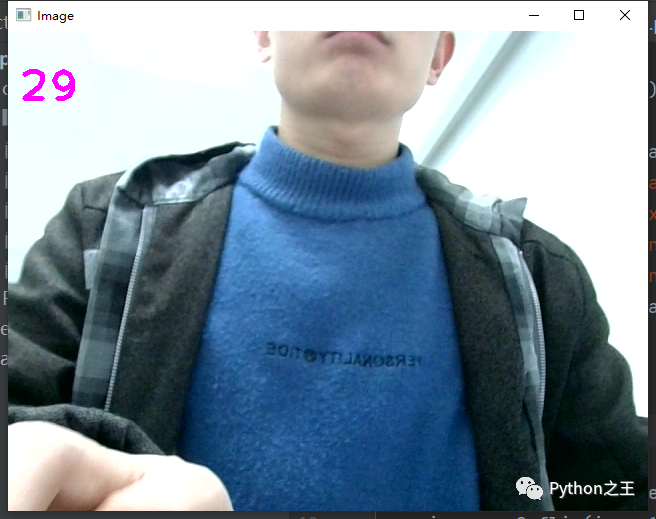
結(jié)果見圖示:
2.mediapipe實(shí)現(xiàn)手掌拖拽屏幕中的方塊(轉(zhuǎn)載于恩培大佬)
效果如示:
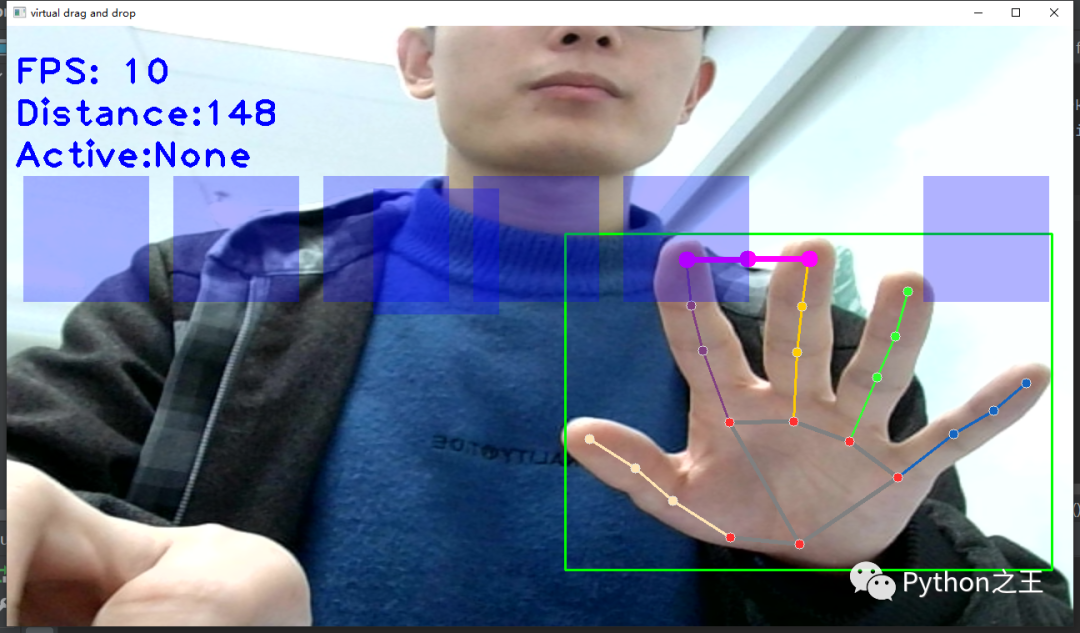

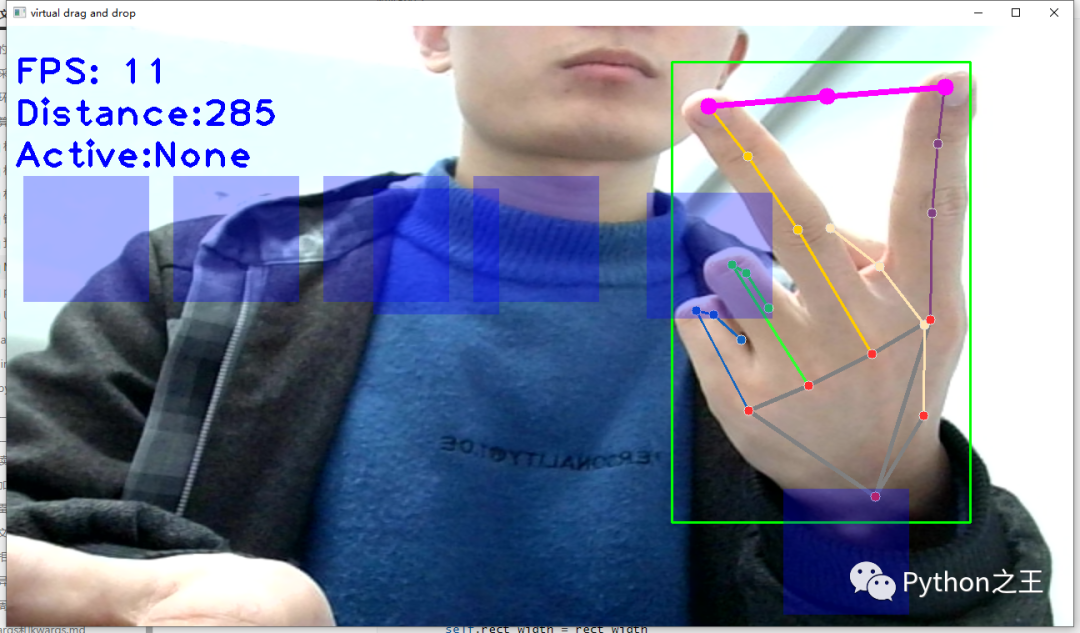
源碼如下:
"""
功能:手勢虛擬拖拽
1、使用OpenCV讀取攝像頭視頻流;
2、識別手掌關(guān)鍵點(diǎn)像素坐標(biāo);
3、根據(jù)食指和中指指尖的坐標(biāo),利用勾股定理計(jì)算距離,當(dāng)距離較小且都落在矩形內(nèi),則觸發(fā)拖拽(矩形變色);
4、矩形跟著手指動;
5、兩指放開,則矩形停止移動
"""


#?導(dǎo)入OpenCV
import?cv2
#?導(dǎo)入mediapipe
import?mediapipe?as?mp

#?導(dǎo)入其他依賴包
import?time
import?math


#?方塊管理類
class?SquareManager:
????def?__init__(self,?rect_width):
????????
????????
????????#?方框長度
????????self.rect_width?=?rect_width
????????
????????#?方塊list
????????self.square_count?=?0
????????self.rect_left_x_list?=?[]
????????self.rect_left_y_list?=?[]
????????self.alpha_list?=?[]

????????#?中指與矩形左上角點(diǎn)的距離
????????self.L1?=?0
????????self.L2?=?0

????????#?激活移動模式
????????self.drag_active?=?False

????????#?激活的方塊ID
????????self.active_index?=?-1
????????
????
????#?創(chuàng)建一個方塊,但是沒有顯示
????def?create(self,rect_left_x,rect_left_y,alpha=0.4):
????????self.rect_left_x_list.append(rect_left_x)
????????self.rect_left_y_list.append(rect_left_y)
????????self.alpha_list.append(alpha)
????????self.square_count+=1
????????

????#?更新位置
????def?display(self,class_obj):
????????for?i?in?range(0,self.square_count):
????????????x=?self.rect_left_x_list[i]
????????????y=?self.rect_left_y_list[i]
????????????alpha??=?self.alpha_list[i]

????????????overlay?=?class_obj.image.copy()

????????????if(i?==?self.active_index):
????????????????cv2.rectangle(overlay,(x,y),(x+self.rect_width,y+self.rect_width),(255,?0,?255),-1)
????????????else:
????????????????cv2.rectangle(overlay,(x,y),(x+self.rect_width,y+self.rect_width),(255,?0,?0),-1)
????????????
????????????#?Following?line?overlays?transparent?rectangle?over?the?self.image
????????????class_obj.image?=?cv2.addWeighted(overlay,?alpha,?class_obj.image,?1?-?alpha,?0)
????????????


????#?判斷落在哪個方塊上,返回方塊的ID
????def?checkOverlay(self,check_x,check_y):
????????for?i?in?range(0,self.square_count):
????????????x=?self.rect_left_x_list[i]
????????????y=?self.rect_left_y_list[i]

????????????if?(x?<??check_x?<?(x+self.rect_width)?)?and?(?y?<?check_y?<?(y+self.rect_width)):
????????????????
????????????????#?保存被激活的方塊ID
????????????????self.active_index?=?i

????????????????return?i
????????
????????return?-1

????#?計(jì)算與指尖的距離
????def?setLen(self,check_x,check_y):
????????#?計(jì)算距離
????????self.L1?=?check_x?-?self.rect_left_x_list[self.active_index]?
????????self.L2?=?check_y?-?self.rect_left_y_list[self.active_index]

????#?更新方塊????
????def?updateSquare(self,new_x,new_y):
????????#?print(self.rect_left_x_list[self.active_index])
????????self.rect_left_x_list[self.active_index]?=?new_x?-?self.L1?
????????self.rect_left_y_list[self.active_index]?=?new_y?-?self.L2


#?識別控制類
class?HandControlVolume:
????def?__init__(self):
????????#?初始化medialpipe
????????self.mp_drawing?=?mp.solutions.drawing_utils
????????self.mp_drawing_styles?=?mp.solutions.drawing_styles
????????self.mp_hands?=?mp.solutions.hands

????????
????????#?中指與矩形左上角點(diǎn)的距離
????????self.L1?=?0
????????self.L2?=?0

????????#?image實(shí)例,以便另一個類調(diào)用
????????self.image=None

????????

????#?主函數(shù)
????def?recognize(self):
????????#?計(jì)算刷新率
????????fpsTime?=?time.time()

????????#?OpenCV讀取視頻流
????????cap?=?cv2.VideoCapture(0)
????????#?視頻分辨率
????????resize_w?=?1280
????????resize_h?=?720

????????#?畫面顯示初始化參數(shù)
????????rect_percent_text?=?0


????????#?初始化方塊管理器
????????squareManager?=?SquareManager(150)

????????#?創(chuàng)建多個方塊
????????for?i?in?range(0,?7):
????????????squareManager.create(180*i+20,?180,?0.3)?##原來是0.6


????????with?self.mp_hands.Hands(min_detection_confidence=0.7,
?????????????????????????????????min_tracking_confidence=0.5,
?????????????????????????????????max_num_hands=2)?as?hands:
????????????while?cap.isOpened():

????????????????#?初始化矩形
????????????????success,?self.image?=?cap.read()
????????????????self.image?=?cv2.resize(self.image,?(resize_w,?resize_h))

????????????????if?not?success:
????????????????????print("空幀.")
????????????????????continue

????????????????#?提高性能
????????????????self.image.flags.writeable?=?False
????????????????#?轉(zhuǎn)為RGB
????????????????self.image?=?cv2.cvtColor(self.image,?cv2.COLOR_BGR2RGB)
????????????????#?鏡像
????????????????self.image?=?cv2.flip(self.image,?1)
????????????????#?mediapipe模型處理
????????????????results?=?hands.process(self.image)

????????????????self.image.flags.writeable?=?True
????????????????self.image?=?cv2.cvtColor(self.image,?cv2.COLOR_RGB2BGR)
????????????????#?判斷是否有手掌
????????????????if?results.multi_hand_landmarks:
????????????????????#?遍歷每個手掌
????????????????????for?hand_landmarks?in?results.multi_hand_landmarks:
????????????????????????#?在畫面標(biāo)注手指
????????????????????????self.mp_drawing.draw_landmarks(
????????????????????????????self.image,
????????????????????????????hand_landmarks,
????????????????????????????self.mp_hands.HAND_CONNECTIONS,
????????????????????????????self.mp_drawing_styles.get_default_hand_landmarks_style(),
????????????????????????????self.mp_drawing_styles.get_default_hand_connections_style())


????????????????????????#?解析手指,存入各個手指坐標(biāo)
????????????????????????landmark_list?=?[]

????????????????????????#?用來存儲手掌范圍的矩形坐標(biāo)
????????????????????????paw_x_list?=?[]
????????????????????????paw_y_list?=?[]
????????????????????????for?landmark_id,?finger_axis?in?enumerate(
????????????????????????????????hand_landmarks.landmark):
????????????????????????????landmark_list.append([
????????????????????????????????landmark_id,?finger_axis.x,?finger_axis.y,
????????????????????????????????finger_axis.z
????????????????????????????])
????????????????????????????paw_x_list.append(finger_axis.x)
????????????????????????????paw_y_list.append(finger_axis.y)
????????????????????????if?landmark_list:
????????????????????????????#?比例縮放到像素
????????????????????????????ratio_x_to_pixel?=?lambda?x:?math.ceil(x?*?resize_w)
????????????????????????????ratio_y_to_pixel?=?lambda?y:?math.ceil(y?*?resize_h)
????????????????????????????
????????????????????????????#?設(shè)計(jì)手掌左上角、右下角坐標(biāo)
????????????????????????????paw_left_top_x,paw_right_bottom_x?=?map(ratio_x_to_pixel,[min(paw_x_list),max(paw_x_list)])
????????????????????????????paw_left_top_y,paw_right_bottom_y?=?map(ratio_y_to_pixel,[min(paw_y_list),max(paw_y_list)])

????????????????????????????#?給手掌畫框框
????????????????????????????cv2.rectangle(self.image,(paw_left_top_x-30,paw_left_top_y-30),(paw_right_bottom_x+30,paw_right_bottom_y+30),(0,?255,0),2)

????????????????????????????#?獲取中指指尖坐標(biāo)
????????????????????????????middle_finger_tip?=?landmark_list[12]
????????????????????????????middle_finger_tip_x?=ratio_x_to_pixel(middle_finger_tip[1])
????????????????????????????middle_finger_tip_y?=ratio_y_to_pixel(middle_finger_tip[2])

????????????????????????????#?獲取食指指尖坐標(biāo)
????????????????????????????index_finger_tip?=?landmark_list[8]
????????????????????????????index_finger_tip_x?=ratio_x_to_pixel(index_finger_tip[1])
????????????????????????????index_finger_tip_y?=ratio_y_to_pixel(index_finger_tip[2])
????????????????????????????#?中間點(diǎn)
????????????????????????????between_finger_tip?=?(middle_finger_tip_x+index_finger_tip_x)//2,?(middle_finger_tip_y+index_finger_tip_y)//2
????????????????????????????#?print(middle_finger_tip_x)
????????????????????????????thumb_finger_point?=?(middle_finger_tip_x,middle_finger_tip_y)
????????????????????????????index_finger_point?=?(index_finger_tip_x,index_finger_tip_y)
????????????????????????????#?畫指尖2點(diǎn)
????????????????????????????circle_func?=?lambda?point:?cv2.circle(self.image,point,10,(255,0,255),-1)
????????????????????????????self.image?=?circle_func(thumb_finger_point)
????????????????????????????self.image?=?circle_func(index_finger_point)
????????????????????????????self.image?=?circle_func(between_finger_tip)
????????????????????????????#?畫2點(diǎn)連線
????????????????????????????self.image?=?cv2.line(self.image,thumb_finger_point,index_finger_point,(255,0,255),5)
????????????????????????????#?勾股定理計(jì)算長度
????????????????????????????line_len?=?math.hypot((index_finger_tip_x-middle_finger_tip_x),(index_finger_tip_y-middle_finger_tip_y))
????????????????????????????#?將指尖距離映射到文字
????????????????????????????rect_percent_text?=?math.ceil(line_len)

????????????????????????????#?激活模式,需要讓矩形跟隨移動
????????????????????????????if?squareManager.drag_active:
????????????????????????????????#?更新方塊
????????????????????????????????squareManager.updateSquare(between_finger_tip[0],between_finger_tip[1])
????????????????????????????????if(line_len>100):
????????????????????????????????????#?取消激活
????????????????????????????????????squareManager.drag_active?=False
????????????????????????????????????squareManager.active_index?=?-1

????????????????????????????elif?(line_len<100)?and?(squareManager.checkOverlay(between_finger_tip[0],between_finger_tip[1])?!=?-1?)and(?squareManager.drag_active??==?False):
????????????????????????????????????#?激活
????????????????????????????????????squareManager.drag_active?=True
????????????????????????????????????#?計(jì)算距離
????????????????????????????????????squareManager.setLen(between_finger_tip[0],between_finger_tip[1])

????????????????#?顯示方塊,傳入本實(shí)例,主要為了半透明的處理
????????????????squareManager.display(self)
????????????????
????????????????#?顯示距離
????????????????cv2.putText(self.image,?"Distance:"+str(rect_percent_text),?(10,?120),cv2.FONT_HERSHEY_PLAIN,?3,?(255,?0,?0),?3)

????????????????#?顯示當(dāng)前激活
????????????????cv2.putText(self.image,?"Active:"+(?"None"?if?squareManager.active_index?==?-1?else?str(squareManager.active_index)),?(10,?170),cv2.FONT_HERSHEY_PLAIN,?3,?(255,?0,?0),?3)

????????????????#?顯示刷新率FPS
????????????????cTime?=?time.time()
????????????????fps_text?=?1/(cTime-fpsTime)
????????????????fpsTime?=?cTime
????????????????cv2.putText(self.image,?"FPS:?"?+?str(int(fps_text)),?(10,?70),
????????????????????????????cv2.FONT_HERSHEY_PLAIN,?3,?(255,?0,?0),?3)
????????????????#?顯示畫面
????????????????#?self.image?=?cv2.resize(self.image,?(resize_w//2,?resize_h//2))
????????????????cv2.imshow('virtual?drag?and?drop',?self.image)
????????????????
????????????????if?cv2.waitKey(5)?&?0xFF?==?27:
????????????????????break
????????????cap.release()


#?開始程序
control?=?HandControlVolume()
control.recognize()
3.mediapipe實(shí)現(xiàn)手勢控制音量大小(轉(zhuǎn)載于恩培大佬)
效果如示:

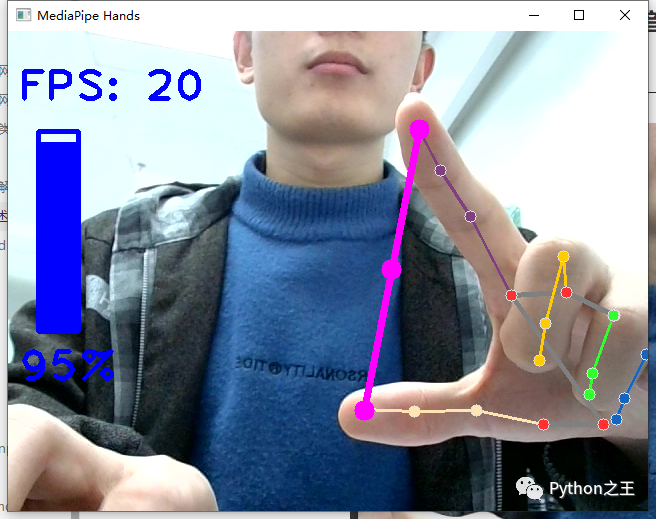
源碼如下:
"""
功能:手勢操作電腦音量
1、使用OpenCV讀取攝像頭視頻流;
2、識別手掌關(guān)鍵點(diǎn)像素坐標(biāo);
3、根據(jù)拇指和食指指尖的坐標(biāo),利用勾股定理計(jì)算距離;
4、將距離等比例轉(zhuǎn)為音量大小,控制電腦音量
"""


#?導(dǎo)入OpenCV
import?cv2
#?導(dǎo)入mediapipe
import?mediapipe?as?mp
#?導(dǎo)入電腦音量控制模塊
from?ctypes?import?cast,?POINTER
from?comtypes?import?CLSCTX_ALL
from?pycaw.pycaw?import?AudioUtilities,?IAudioEndpointVolume

#?導(dǎo)入其他依賴包
import?time
import?math
import?numpy?as?np

class?HandControlVolume:
????def?__init__(self):
????????#?初始化medialpipe
????????self.mp_drawing?=?mp.solutions.drawing_utils
????????self.mp_drawing_styles?=?mp.solutions.drawing_styles
????????self.mp_hands?=?mp.solutions.hands

????????#?獲取電腦音量范圍
????????devices?=?AudioUtilities.GetSpeakers()
????????interface?=?devices.Activate(
????????????IAudioEndpointVolume._iid_,?CLSCTX_ALL,?None)
????????self.volume?=?cast(interface,?POINTER(IAudioEndpointVolume))
????????self.volume_range?=?self.volume.GetVolumeRange()

????#?主函數(shù)
????def?recognize(self):
????????#?計(jì)算刷新率
????????fpsTime?=?time.time()

????????#?OpenCV讀取視頻流
????????cap?=?cv2.VideoCapture(0)
????????#?視頻分辨率
????????resize_w?=?640
????????resize_h?=?480

????????#?畫面顯示初始化參數(shù)
????????rect_height?=?0
????????rect_percent_text?=?0

????????with?self.mp_hands.Hands(min_detection_confidence=0.7,
?????????????????????????????????min_tracking_confidence=0.5,
?????????????????????????????????max_num_hands=2)?as?hands:
????????????while?cap.isOpened():
????????????????success,?image?=?cap.read()
????????????????image?=?cv2.resize(image,?(resize_w,?resize_h))

????????????????if?not?success:
????????????????????print("空幀.")
????????????????????continue

????????????????#?提高性能
????????????????image.flags.writeable?=?False
????????????????#?轉(zhuǎn)為RGB
????????????????image?=?cv2.cvtColor(image,?cv2.COLOR_BGR2RGB)
????????????????#?鏡像
????????????????image?=?cv2.flip(image,?1)
????????????????#?mediapipe模型處理
????????????????results?=?hands.process(image)

????????????????image.flags.writeable?=?True
????????????????image?=?cv2.cvtColor(image,?cv2.COLOR_RGB2BGR)
????????????????#?判斷是否有手掌
????????????????if?results.multi_hand_landmarks:
????????????????????#?遍歷每個手掌
????????????????????for?hand_landmarks?in?results.multi_hand_landmarks:
????????????????????????#?在畫面標(biāo)注手指
????????????????????????self.mp_drawing.draw_landmarks(
????????????????????????????image,
????????????????????????????hand_landmarks,
????????????????????????????self.mp_hands.HAND_CONNECTIONS,
????????????????????????????self.mp_drawing_styles.get_default_hand_landmarks_style(),
????????????????????????????self.mp_drawing_styles.get_default_hand_connections_style())

????????????????????????#?解析手指,存入各個手指坐標(biāo)
????????????????????????landmark_list?=?[]
????????????????????????for?landmark_id,?finger_axis?in?enumerate(
????????????????????????????????hand_landmarks.landmark):
????????????????????????????landmark_list.append([
????????????????????????????????landmark_id,?finger_axis.x,?finger_axis.y,
????????????????????????????????finger_axis.z
????????????????????????????])
????????????????????????if?landmark_list:
????????????????????????????#?獲取大拇指指尖坐標(biāo)
????????????????????????????thumb_finger_tip?=?landmark_list[4]
????????????????????????????thumb_finger_tip_x?=?math.ceil(thumb_finger_tip[1]?*?resize_w)
????????????????????????????thumb_finger_tip_y?=?math.ceil(thumb_finger_tip[2]?*?resize_h)
????????????????????????????#?獲取食指指尖坐標(biāo)
????????????????????????????index_finger_tip?=?landmark_list[8]
????????????????????????????index_finger_tip_x?=?math.ceil(index_finger_tip[1]?*?resize_w)
????????????????????????????index_finger_tip_y?=?math.ceil(index_finger_tip[2]?*?resize_h)
????????????????????????????#?中間點(diǎn)
????????????????????????????finger_middle_point?=?(thumb_finger_tip_x+index_finger_tip_x)//2,?(thumb_finger_tip_y+index_finger_tip_y)//2
????????????????????????????#?print(thumb_finger_tip_x)
????????????????????????????thumb_finger_point?=?(thumb_finger_tip_x,thumb_finger_tip_y)
????????????????????????????index_finger_point?=?(index_finger_tip_x,index_finger_tip_y)
????????????????????????????#?畫指尖2點(diǎn)
????????????????????????????image?=?cv2.circle(image,thumb_finger_point,10,(255,0,255),-1)
????????????????????????????image?=?cv2.circle(image,index_finger_point,10,(255,0,255),-1)
????????????????????????????image?=?cv2.circle(image,finger_middle_point,10,(255,0,255),-1)
????????????????????????????#?畫2點(diǎn)連線
????????????????????????????image?=?cv2.line(image,thumb_finger_point,index_finger_point,(255,0,255),5)
????????????????????????????#?勾股定理計(jì)算長度
????????????????????????????line_len?=?math.hypot((index_finger_tip_x-thumb_finger_tip_x),(index_finger_tip_y-thumb_finger_tip_y))

????????????????????????????#?獲取電腦最大最小音量
????????????????????????????min_volume?=?self.volume_range[0]
????????????????????????????max_volume?=?self.volume_range[1]
????????????????????????????#?將指尖長度映射到音量上
????????????????????????????vol?=?np.interp(line_len,[50,300],[min_volume,max_volume])
????????????????????????????#?將指尖長度映射到矩形顯示上
????????????????????????????rect_height?=?np.interp(line_len,[50,300],[0,200])
????????????????????????????rect_percent_text?=?np.interp(line_len,[50,300],[0,100])

????????????????????????????#?設(shè)置電腦音量
????????????????????????????self.volume.SetMasterVolumeLevel(vol,?None)

????????????????#?顯示矩形
????????????????cv2.putText(image,?str(math.ceil(rect_percent_text))+"%",?(10,?350),
????????????????????????????cv2.FONT_HERSHEY_PLAIN,?3,?(255,?0,?0),?3)
????????????????image?=?cv2.rectangle(image,(30,100),(70,300),(255,?0,?0),3)
????????????????image?=?cv2.rectangle(image,(30,math.ceil(300-rect_height)),(70,300),(255,?0,?0),-1)

????????????????#?顯示刷新率FPS
????????????????cTime?=?time.time()
????????????????fps_text?=?1/(cTime-fpsTime)
????????????????fpsTime?=?cTime
????????????????cv2.putText(image,?"FPS:?"?+?str(int(fps_text)),?(10,?70),
????????????????????????????cv2.FONT_HERSHEY_PLAIN,?3,?(255,?0,?0),?3)
????????????????#?顯示畫面
????????????????cv2.imshow('MediaPipe?Hands',?image)
????????????????if?cv2.waitKey(5)?&?0xFF?==?27:
????????????????????break
????????????cap.release()

#?開始程序
control?=?HandControlVolume()
control.recognize()
reference:
源碼來源:恩培大佬


Python“寶藏級”公眾號【Python之王】專注于Python領(lǐng)域,會爬蟲,數(shù)分,C++,tensorflow和Pytorch等等。
近 2年共原創(chuàng) 100+ 篇技術(shù)文章。創(chuàng)作的精品文章系列有:
日常收集整理了一批不錯的?Python?學(xué)習(xí)資料,有需要的小伙可以自行免費(fèi)領(lǐng)取。
獲取方式如下:公眾號回復(fù)資料。領(lǐng)取Python等系列筆記,項(xiàng)目,書籍,直接套上模板就可以用了。資料包含算法、python、算法小抄、力扣刷題手冊和 C++ 等學(xué)習(xí)資料!