
徹底搞懂 Nginx 的五大應(yīng)用場景
點擊上方藍(lán)色字體,選擇“標(biāo)星公眾號”
優(yōu)質(zhì)文章,第一時間送達(dá)
一:HTTP服務(wù)器
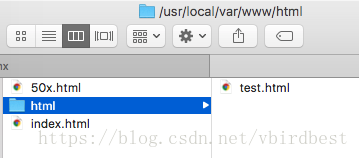
user mengday staff;

http {
    server {
        listen       80;
        server_name  localhost;
        client_max_body_size 1024M;

        # 默認(rèn)location
        location / {
            root   /usr/local/var/www/html;
            index  index.html index.htm;
        }
    }
}
. : 匹配除換行符以外的任意字符
? : 重復(fù)0次或1次
+ : 重復(fù)1次或更多次
* : 重復(fù)0次或更多次
\d :匹配數(shù)字
^ : 匹配字符串的開始
$ : 匹配字符串的結(jié)束
{n} : 重復(fù)n次
{n,} : 重復(fù)n次或更多次
[c] : 匹配單個字符c
[a-z] : 匹配a-z小寫字母的任意一個
(a|b|c) : 屬線表示匹配任意一種情況,每種情況使用豎線分隔,一般使用小括號括括住,匹配符合a字符 或是b字符 或是c字符的字符串
\ 反斜杠:用于轉(zhuǎn)義特殊字符

小括號()之間匹配的內(nèi)容,可以在后面通過$1來引用,$2表示的是前面第二個()里的內(nèi)容。正則里面容易讓人困惑的是\轉(zhuǎn)義特殊字符。
二:靜態(tài)服務(wù)器
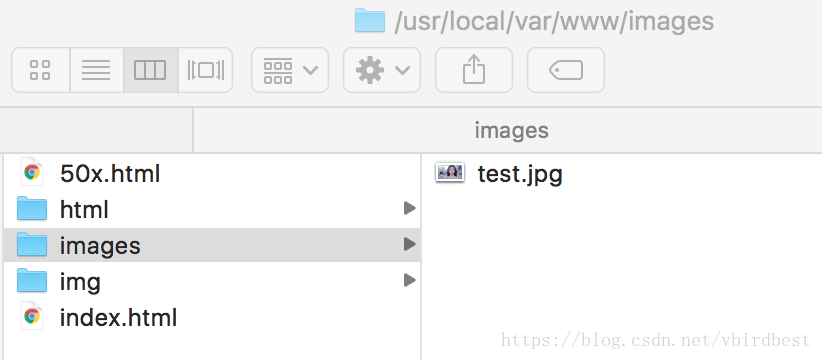
http {
    server {
        listen       80;
        server_name  localhost;


        set $doc_root /usr/local/var/www;

        # 默認(rèn)location
        location / {
            root   /usr/local/var/www/html;
            index  index.html index.htm;
        }

        location ^~ /images/ {
            root $doc_root;
       }

       location ~* \.(gif|jpg|jpeg|png|bmp|ico|swf|css|js)$ {
           root $doc_root/img;
       }
    }
}
=       進(jìn)行普通字符精確匹配。也就是完全匹配。
^~         前綴匹配。如果匹配成功,則不再匹配其他location。
~      表示執(zhí)行一個正則匹配,區(qū)分大小寫
~*         表示執(zhí)行一個正則匹配,不區(qū)分大小寫
/xxx/   常規(guī)字符串路徑匹配
/       通用匹配,任何請求都會匹配到
location優(yōu)先級
location = / {
    # 精確匹配/,主機(jī)名后面不能帶任何字符串 /
    [ configuration A ]
}
location / {
    # 匹配所有以 / 開頭的請求。
    # 但是如果有更長的同類型的表達(dá)式,則選擇更長的表達(dá)式。
    # 如果有正則表達(dá)式可以匹配,則優(yōu)先匹配正則表達(dá)式。
    [ configuration B ]
}
location /documents/ {
    # 匹配所有以 /documents/ 開頭的請求,匹配符合以后,還要繼續(xù)往下搜索。
    # 但是如果有更長的同類型的表達(dá)式,則選擇更長的表達(dá)式。
    # 如果有正則表達(dá)式可以匹配,則優(yōu)先匹配正則表達(dá)式。
    [ configuration C ]
}
location ^~ /images/ {
    # 匹配所有以 /images/ 開頭的表達(dá)式,如果匹配成功,則停止匹配查找,停止搜索。
    # 所以,即便有符合的正則表達(dá)式location,也不會被使用
    [ configuration D ]
}

location ~* \.(gif|jpg|jpeg)$ {
    # 匹配所有以 gif jpg jpeg結(jié)尾的請求。
    # 但是 以 /images/開頭的請求,將使用 Configuration D,D具有更高的優(yōu)先級
    [ configuration E ]
}

location /images/ {
    # 字符匹配到 /images/,還會繼續(xù)往下搜索
    [ configuration F ]
}


location = /test.htm {
    root   /usr/local/var/www/htm;
    index  index.htm;
}


注意:location的優(yōu)先級與location配置的位置無關(guān)
三:反向代理
server {
    listen       80;
    server_name  localhost;

    location / {
        proxy_pass http://localhost:8081;
        proxy_set_header Host $host:$server_port;
        # 設(shè)置用戶ip地址
         proxy_set_header X-Forwarded-For $remote_addr;
         # 當(dāng)請求服務(wù)器出錯去尋找其他服務(wù)器
         proxy_next_upstream error timeout invalid_header http_500 http_502 http_503;
    }

}
四:負(fù)載均衡
1. RR(round robin :輪詢 默認(rèn)):
upstream web_servers {
   server localhost:8081;
   server localhost:8082;
}

server {
    listen       80;
    server_name  localhost;
    #access_log  logs/host.access.log  main;


    location / {
        proxy_pass http://web_servers;
        # 必須指定Header Host
        proxy_set_header Host $host:$server_port;
    }
 }
2. 權(quán)重
upstream test {
    server localhost:8081 weight=1;
    server localhost:8082 weight=3;
    server localhost:8083 weight=4 backup;
}
3. ip_hash
upstream test {
    ip_hash;
    server localhost:8080;
    server localhost:8081;
}
4. fair(第三方)
upstream backend {
    fair;
    server localhost:8080;
    server localhost:8081;
}
5. url_hash(第三方)
upstream backend {
    hash $request_uri;
    hash_method crc32;
    server localhost:8080;
    server localhost:8081;
}
五:動靜分離
upstream web_servers {
       server localhost:8081;
       server localhost:8082;
}

server {
    listen       80;
    server_name  localhost;

    set $doc_root /usr/local/var/www;

    location ~* \.(gif|jpg|jpeg|png|bmp|ico|swf|css|js)$ {
       root $doc_root/img;
    }

    location / {
        proxy_pass http://web_servers;
        # 必須指定Header Host
        proxy_set_header Host $host:$server_port;
    }

    error_page 500 502 503 504  /50x.html;
    location = /50x.html {
        root $doc_root;
    }

 }
六:其他
1.return指令
location /permanently/moved/url {
    return 301 http://www.example.com/moved/here;
}
2. rewrite指令
location /users/ {
    rewrite ^/users/(.*)$ /show?user=$1 break;
}
3. error_page指令
error_page 404 /404.html;
4. 日志
log_format  main  '$remote_addr - $remote_user [$time_local] "$request" '
                      '$status $body_bytes_sent "$http_referer" '
                      '"$http_user_agent" "$http_x_forwarded_for"';

access_log  /usr/local/etc/nginx/logs/host.access.log  main;

gzip  on;
5. deny 指令
# 禁止訪問某個目錄
location ~* \.(txt|doc)${
    root $doc_root;
    deny all;
}
6. 內(nèi)置變量
- $args : #這個變量等于請求行中的參數(shù),同$query_string
- $content_length : 請求頭中的Content-length字段。
- $content_type : 請求頭中的Content-Type字段。
- $document_root : 當(dāng)前請求在root指令中指定的值。
- $host : 請求主機(jī)頭字段,否則為服務(wù)器名稱。
- $http_user_agent : 客戶端agent信息
- $http_cookie : 客戶端cookie信息
- $limit_rate : 這個變量可以限制連接速率。
- $request_method : 客戶端請求的動作,通常為GET或POST。
- $remote_addr : 客戶端的IP地址。
- $remote_port : 客戶端的端口。
- $remote_user : 已經(jīng)經(jīng)過Auth Basic Module驗證的用戶名。
- $request_filename : 當(dāng)前請求的文件路徑,由root或alias指令與URI請求生成。
- $scheme :HTTP方法(如http,https)。
- $server_protocol : 請求使用的協(xié)議,通常是HTTP/1.0或HTTP/1.1。
- $server_addr : 服務(wù)器地址,在完成一次系統(tǒng)調(diào)用后可以確定這個值。
- $server_name : 服務(wù)器名稱。
- $server_port : 請求到達(dá)服務(wù)器的端口號。
- $request_uri : 包含請求參數(shù)的原始URI,不包含主機(jī)名,如:”/foo/bar.php?arg=baz”。
- $uri : 不帶請求參數(shù)的當(dāng)前URI,$uri不包含主機(jī)名,如”/foo/bar.html”。
- $document_uri : 與$uri相同
作者 | vbirdbest
來源 | https://blog.csdn.net/vbirdbest/article/details/80913319

評論
圖片
表情