
快速實現(xiàn)微信圖片裁剪功能
來源 | https://juejin.im/post/6844904006649987085
最近和小伙伴 @anotheren 一起在搞事情,打算把微信的圖片選擇器那一套給做出來。于是就有了 AnyImageKit 這個框架,現(xiàn)在已經(jīng)完成圖片選擇和編輯功能了。在做圖片編輯功能的時候,裁剪這個功能做了很久,想到一個思路去做,做到一半發(fā)現(xiàn)不行,推翻重做,反復(fù)經(jīng)歷了這個過程兩三次之后,最終給做出來了。這個功能的坑還是挺多的,而且網(wǎng)上關(guān)于這一塊的資料不多,于是就想寫一篇文章記錄一下。
首先我們要先來解決三個小問題。
問題一:如何將圖片完整的展示出來
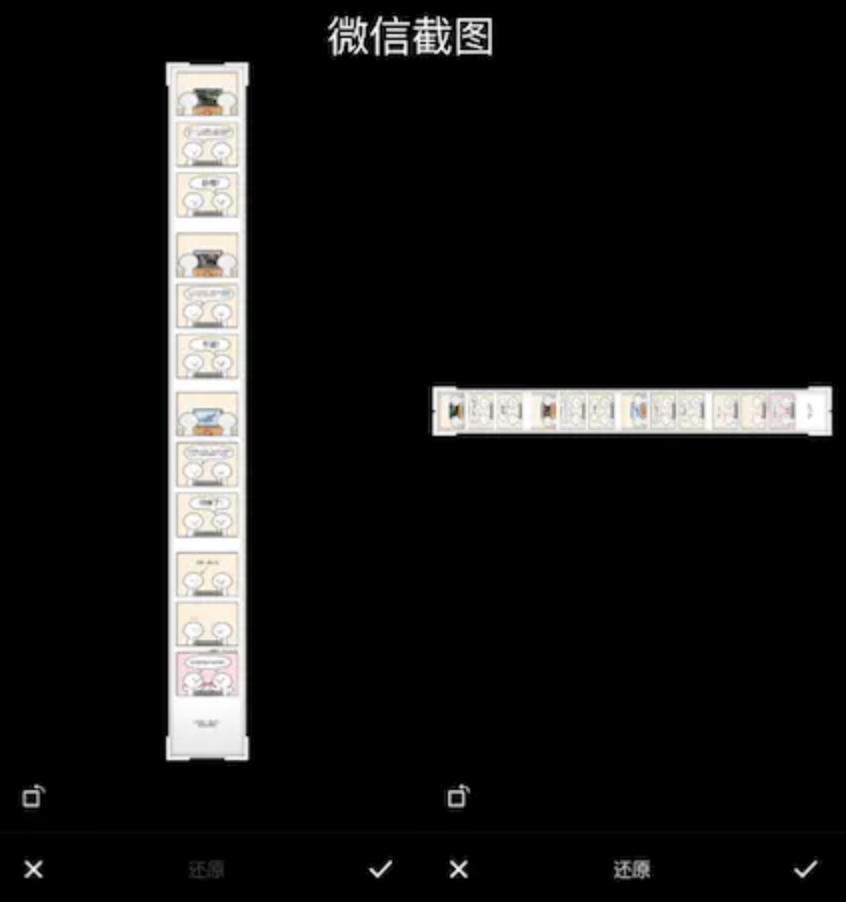
先來考慮橫圖(第二張圖)的情況,設(shè)圖片寬度為 scrollView.bounds.width,再將圖片的高度進行等比縮放。
width = scrollView.bounds.width
height = image.width * scrollView.bounds.height / scrollView.bounds.width
接下來考慮豎圖(第一張圖)的情況,在上一步的基礎(chǔ)上進行判斷。
// 如果圖片高度超過 scrollView.bounds.height 就是豎圖,將圖片高度縮放到 scrollView.bounds.height,再根據(jù)比例計算寬度。
if height > scrollView.bounds.height {
    height = scrollView.bounds.height
    width = image.height * scrollView.bounds.width / scrollView.bounds.height
}
最后根據(jù) size 計算一下 imageView.frame 這個問題就解決了。
注:灰色的部分是 scrollView
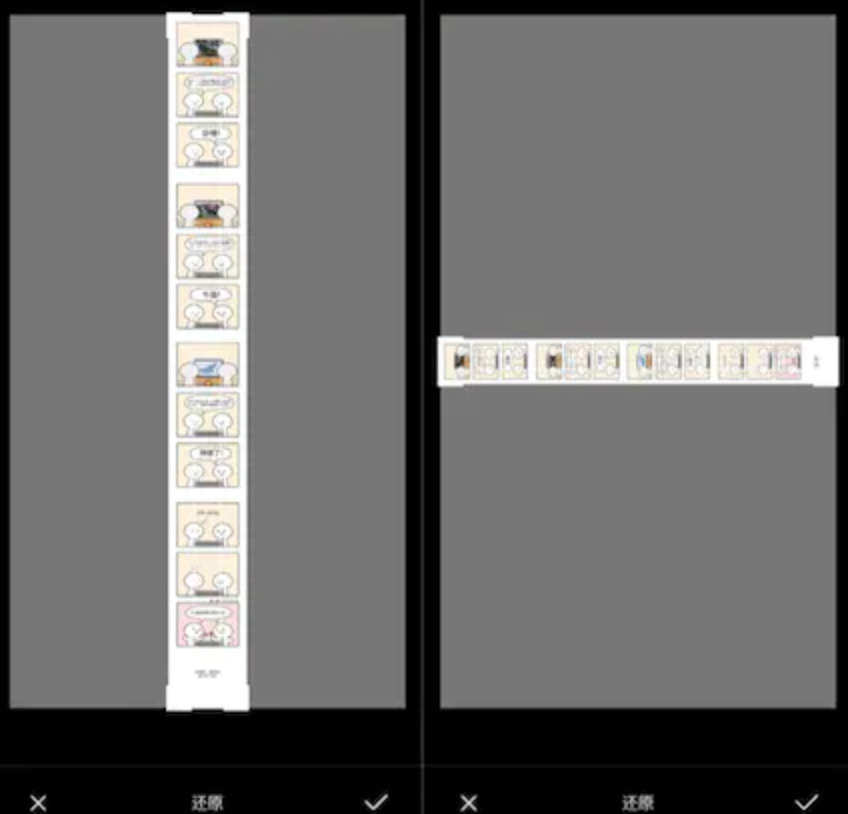
問題二:圖片縮放后,如何展示超出 scrollView 的部分
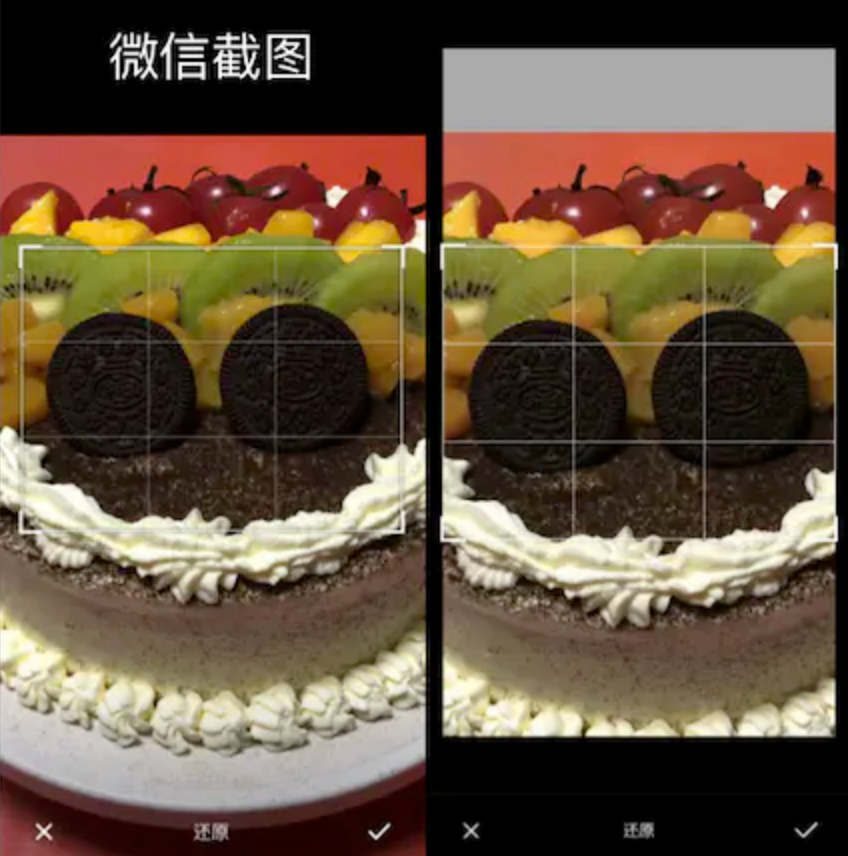
看到這個問題就會很自然的想到,scrollView 可能是全屏的,所以才能全部展示出來。但是全屏的 scrollView 會有一些問題無法解決,下面的第三個問題會講到,我們暫時不考慮這個解決方案。
第二個方案就相對簡單多了,只需要設(shè)置 scrollView.clipsToBounds = false 就解決這個問題了。
問題三:無縮放比例時,如何使圖片可以拉動
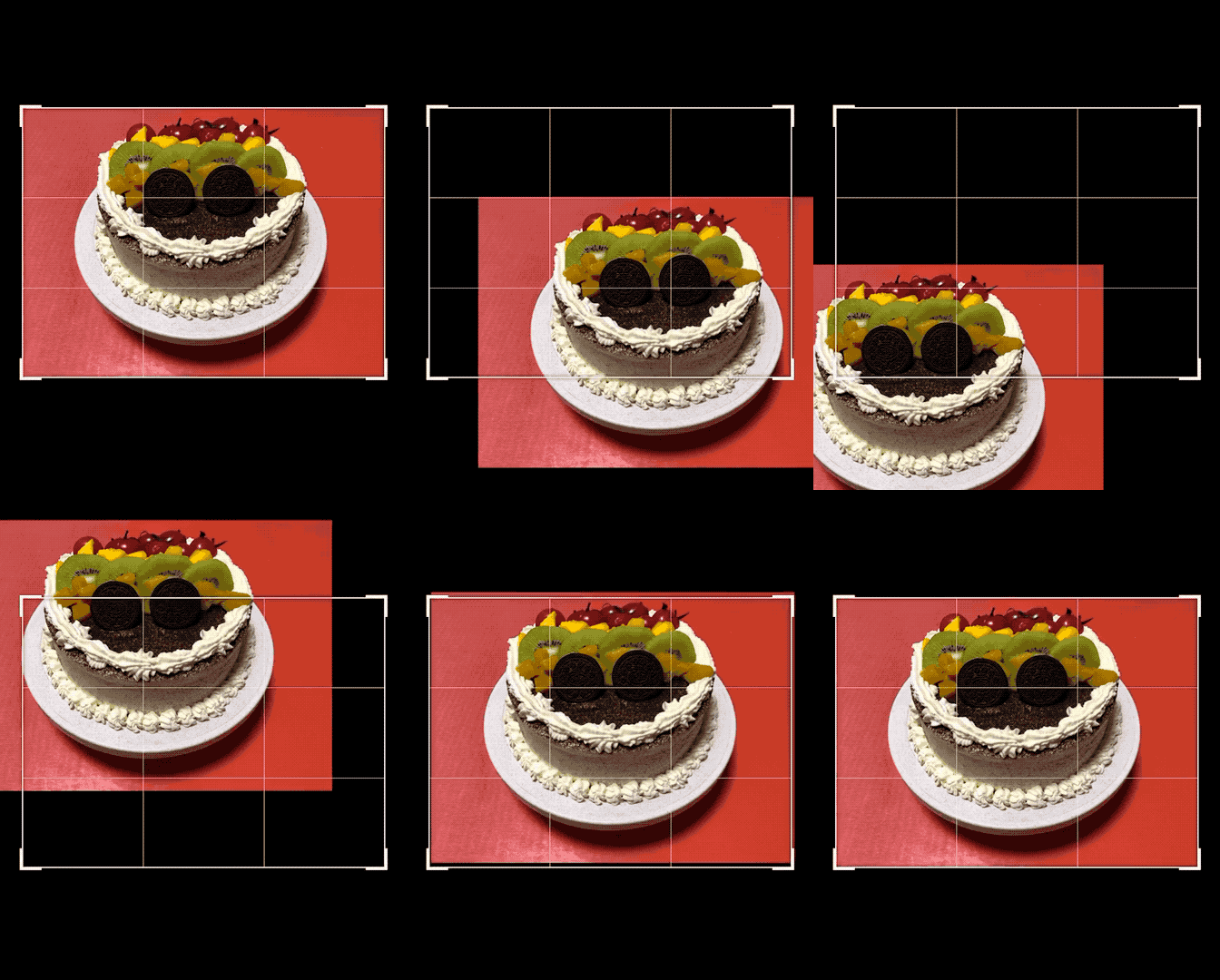
眾所周知當 scrollView.contentSize < scrollView.bounds.size,scrollView 是無法滾動的,那么要怎么做才能使 scrollView 可滾動呢,答案是 contentInset。
在日常開發(fā)中,contentInset 這個 API 幾乎用不到,可能有一些朋友對這個屬性有點陌生,所以特別說明一下。contentInset 是 UIEdgeInsets,它的作用是給 scrollView 額外增加一段滾動區(qū)域。舉個例子 MJRefresh 中的下拉刷新相信大家都用過,當正在刷新的時候,你會發(fā)現(xiàn) scrollView 的頂部多出了一段可滾動區(qū)域,這個就是用 contentInset 這個 API 實現(xiàn)的。
了解了 contentInset 之后,我們要先更正一下 scrollView 可滾動的條件:
scrollView.contentSize + scrollView.contentInset > scrollView.bounds.size
下面我們設(shè)置 contentInset 的值為 0.1(肉眼無感知)
scrollView.contentInset = UIEdgeInsets(top: 0.1, left: 0.1, bottom: 0.1, right: 0.1)
這么設(shè)置完之后,圖片可以左右滾動了,但是無法上下滾動,因為圖片的寬和 scrollView 是相等的,但是高度不是,所以我們要針對高度進行一下計算:
let bottomInset = scrollView.bounds.height - cropRect.height + 0.1
對于豎圖來說就是處理寬度的問題,整合一下代碼:
let rightInset = scrollView.bounds.width - cropRect.width + 0.1
let bottomInset = scrollView.bounds.height - cropRect.height + 0.1
scrollView.contentInset = UIEdgeInsets(top: 0.1, left: 0.1, bottom: bottomInset, right: rightInset)
到這里問題三就解決了,現(xiàn)在我們反過來看問題二,如果在問題二中采用全屏 scrollView,那要第三個問題是不是就不好解決了呢~
裁剪
關(guān)于裁剪的 UI 部分這里就不展開說了,主要說明一下裁剪框的四個角是用 UIView 畫出來的,他們的層級與 scrollView 相同,他們的位置可以用一個 CGRect 的變量 cropRect 來描述。
裁剪核心的內(nèi)容就是當裁剪框移動時,如何將圖片移動到正確的位置上,示例如下。
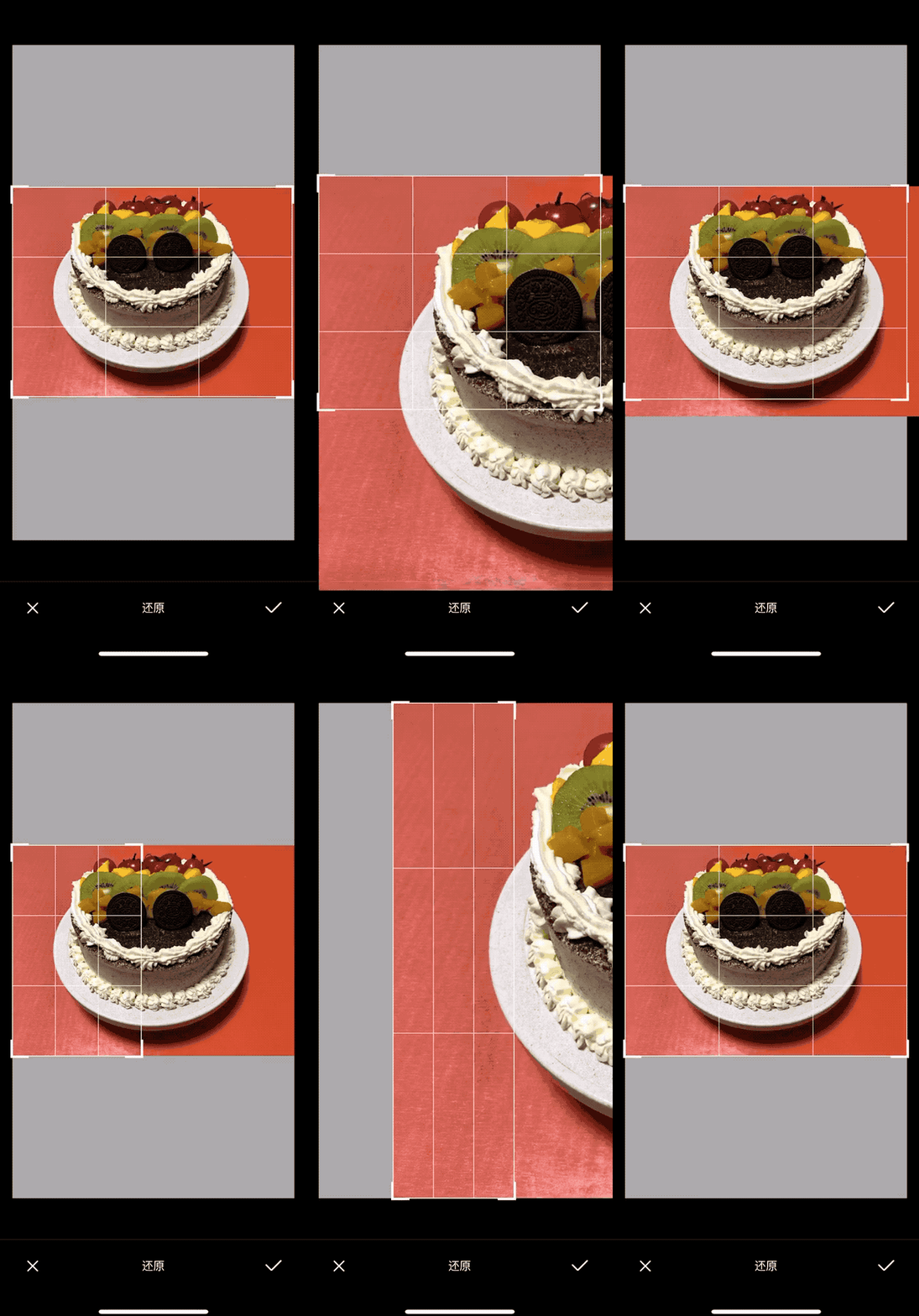
根據(jù)動圖所展示的效果,可以得出:
scrollView 的縮放有變化
scrollView 的偏移量有變化
裁剪框的位置移動了
下面我們一步一步來看怎么解決這些問題。
ZoomScale
從動圖中我們可以看到移動裁剪框之后要對 scrollView 進行縮放,而且有兩種情況,一種是橫圖,一種是豎圖,所以我們需要計算兩種情況的縮放比例,再選擇使用其中的一種。
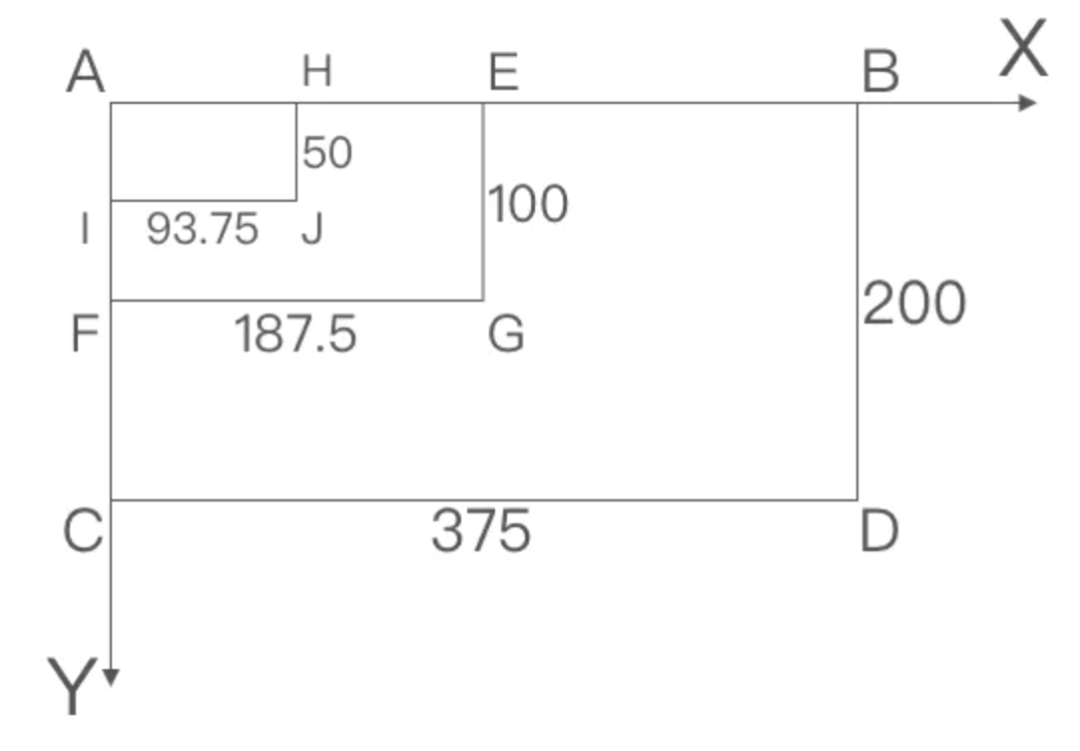
我們假設(shè)圖片的大小是 ABCD,我們移動點 D 到點 G 的位置,即裁剪框的位置是 AEFG。當用戶松手后,AEFG 要放大到 ABCD 的位置,由此我們可以得出縮放比例為:AB/AE = 375/187.5 = 2.0
但是還沒有結(jié)束,想象一下,當 AEFG 放大到 ABCD 后,再次將點 D 到點 G 的位置。這個操作相當于,圖片未縮放前從點 G 移動到點 J。
根據(jù)之前的結(jié)論我們可以得知縮放比例是:AB/AH,在實際代碼中 AB = scrollView.bounds.width,下面要求出 AH 的數(shù)值。
AEFG 放大 2.0 倍到 ABCD
從點 D 到點 G,即 cropRect.width = 187.5
AH = cropRect.width/scrollView.zoomScale = 187.5/2.0 = 93.75
現(xiàn)在我們得出了橫圖縮放比例的公式,豎圖也是一樣的,代碼如下:
let zoomH = scrollView.bounds.width / (cropRect.width / scrollView.zoomScale)
let zoomV = scrollView.bounds.height / (cropRect.height / scrollView.zoomScale)
接下來我們要分析該用橫圖的縮放比例還是豎圖的。我們將裁剪框的寬,即 cropRect.width,縮放到 scrollView.bounds.width,根據(jù)縮放比例可計算出縮放后 cropRect.height,如果 cropRect.height > scrollView.bounds.height,意味著高度過高了,我們就要用豎圖的縮放公式,反之用橫圖的,代碼如下:
let maxZoom = scrollView.maximumZoomScale
let zoomH = scrollView.bounds.width / (cropRect.width / scrollView.zoomScale)
let zoomV = scrollView.bounds.height / (cropRect.height / scrollView.zoomScale)
let isVertical = cropRect.height * (scrollView.bounds.width / cropRect.width) > scrollView.bounds.height
let zoom: CGFloat
if !isVertical {
    zoom = zoomH > maxZoom ? maxZoom : zoomH
} else {
    zoom = zoomV > maxZoom ? maxZoom : zoomV
}
ContentOffset
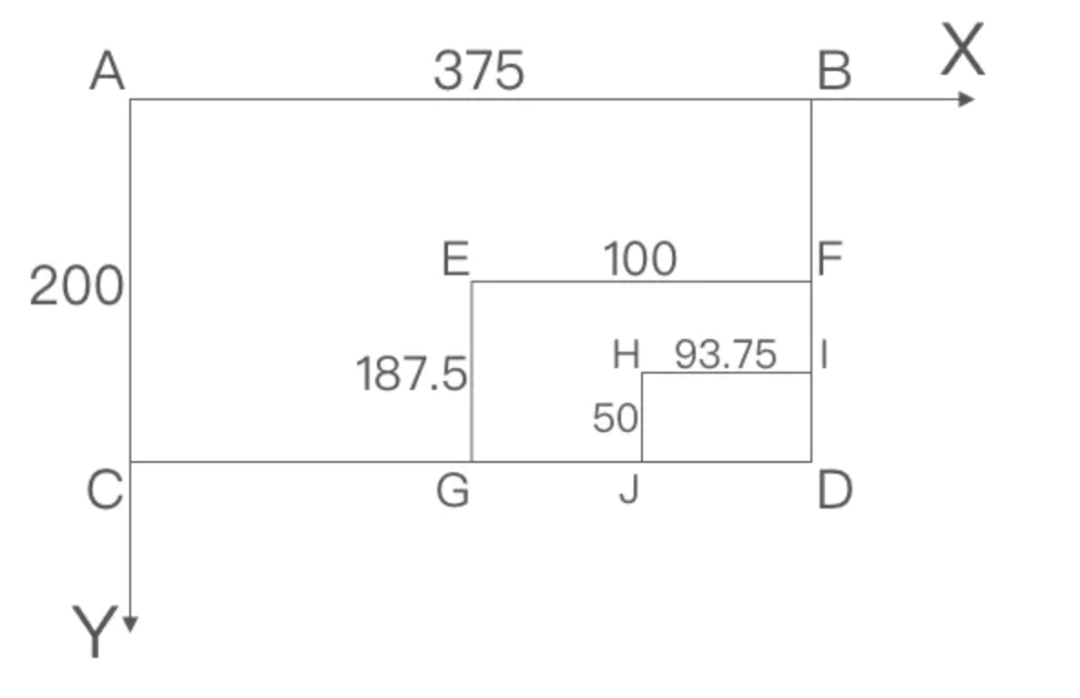
現(xiàn)在我們來計算 contentOffset,設(shè)圖片為 ABCD,將點 A 移動到點 E,EFGD 放大 2.0 倍到 ABCD。由此可得:
注:? 表示縮放前,? 表示縮放一次后;cropStartPanRect 是手勢開始前裁剪框的位置

E(x) = CG?
     = CG? * zoom
     = (cropRect.origin.x - cropStartPanRect.origin.x) * zoom
上述這個公式并不是最終的公式,接下來基于當前縮放比例,再次把點 A 移動到點 E,這個操作相當于,圖片未縮放前從點 E 移動到點 H,由此可得:
注:? 表示縮放前,? 表示縮放一次后,? 表示縮放兩次后

// 計算本次縮放的比例
let zoomScale = zoom / scrollView.zoomScale

H(x) = CJ?
     = CG? + GJ?
     = CG? * zoom + GJ? * zoomScale
     = scrollView.contentOffset.x * zoomScale + (cropRect.origin.x - cropStartPanRect.origin.x) * zoomScale
最后我們根據(jù)移動的角,計算最終的 contentOffset
let zoomScale = zoom / scrollView.zoomScale
let offsetX = (scrollView.contentOffset.x * zoomScale) + ((cropRect.origin.x - cropStartPanRect.origin.x) * zoomScale)
let offsetY = (scrollView.contentOffset.y * zoomScale) + ((cropRect.origin.y - cropStartPanRect.origin.y) * zoomScale)
let offset: CGPoint
switch position {  // 一個枚舉,標志角的位置
case .topLeft:     // 移動左上角,contentOffset x 和 y 都要改變
    offset = CGPoint(x: offsetX, y: offsetY)
case .topRight:    // 移動右上角,contentOffset y 要改變
    offset = CGPoint(x: scrollView.contentOffset.x * zoomScale, y: offsetY)
case .bottomLeft:  // 移動左下角,contentOffset x 要改變
    offset = CGPoint(x: offsetX, y: scrollView.contentOffset.y * zoomScale)
case .bottomRight: // 移動右下角,contentOffset 不變
    offset = CGPoint(x: scrollView.contentOffset.x * zoomScale, y: scrollView.contentOffset.y * zoomScale)
}
NewCropRect
最后拖動裁剪框松手后,我們需要把裁剪框放大并居中,這段邏輯和第一個問題計算圖片的縮放比例中使用橫圖豎圖的計算邏輯是一樣的,就不再贅述了。
let newCropRect: CGRect
if (zoom == maxZoom && !isVertical) || zoom == zoomH {
    let scale = scrollView.bounds.width / cropRect.width
    let height = cropRect.height * scale
    let y = (scrollView.bounds.height - height) / 2 + scrollView.frame.origin.y
    newCropRect = CGRect(x: scrollView.frame.origin.x, y: y, width: scrollView.bounds.width, height: height)
} else {
    let scale = scrollView.bounds.height / cropRect.height
    let width = cropRect.width * scale
    let x = (scrollView.bounds.width - width + scrollView.frame.origin.x) / 2
    newCropRect = CGRect(x: x, y: scrollView.frame.origin.y, width: width, height: scrollView.frame.height)
}
結(jié)語
關(guān)于裁剪還有一些內(nèi)容沒講,比如說完成裁剪,裁剪后再次進入裁剪的邏輯等。但是剩下這些裁剪邏輯的難度和上面這些內(nèi)容差不多,如果你能理解上面的內(nèi)容,相信剩下的邏輯對你來說也沒有難度了。關(guān)注公眾號 逆鋒起筆,回復(fù) pdf,下載你需要的各種學(xué)習(xí)資料。
mini Project 微信小程序 120.50G 教程分享
贊+在看,小編感恩大家??