
Node+Redis進(jìn)行API速率限制的方法介紹
為什么要速率限制?

保障服務(wù)和資源不被“淹沒(méi)”。
緩和暴力攻擊
防止分布式拒絕服務(wù)(DDOS)攻擊
如何實(shí)施限速?
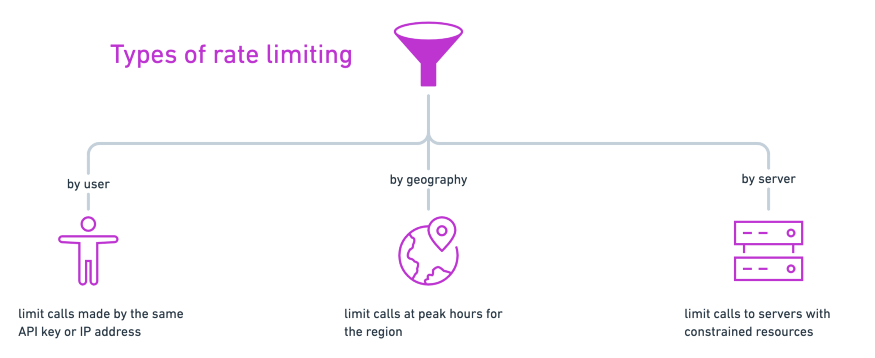
按用戶(hù):跟蹤用戶(hù)使用API密鑰、訪問(wèn)令牌或IP地址進(jìn)行的調(diào)用
按地理區(qū)域劃分:例如降低每個(gè)地理區(qū)域在一天的高峰時(shí)段的速率限制
按服務(wù)器:如果你有多個(gè)服務(wù)器處理對(duì)API的不同調(diào)用,你可能會(huì)對(duì)訪問(wèn)更昂貴的資源實(shí)施更嚴(yán)格的速率限制。
創(chuàng)建一個(gè)Node應(yīng)用
使用Redis添加速率限制器
在Postman中測(cè)試
步驟1:建立Node應(yīng)用程序
$ npm init --yes
$ touch index.js
index.js?中初始化服務(wù)器。const express = require('express')const app = express()const port = process.env.PORT || 3000app.get('/', (req, res) => res.send('Hello World!'))app.listen(port, () => console.log(`Example app listening at http://localhost:${port}`))
$ node index.js
app.post('/', async (req, res) => {async function isOverLimit(ip) {// to define}// 檢查率限制let overLimit = await isOverLimit(req.ip)if (overLimit) {res.status(429).send('Too many requests - try again later')return}// 允許訪問(wèn)資源res.send("Accessed the precious resources!")})
步驟2:使用Redis添加速率限制器
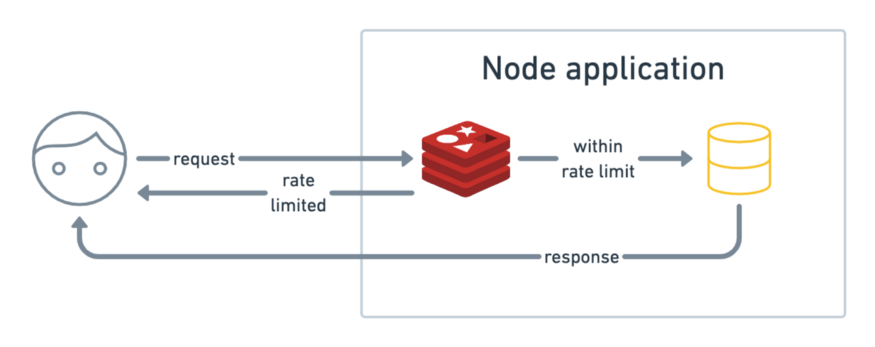
存儲(chǔ)一個(gè)像用戶(hù)IP地址一樣的key。
增加從該IP發(fā)出的調(diào)用數(shù)量
在指定時(shí)間段后使記錄過(guò)期

npm install ioredis
redis-server
const redis = require('ioredis')const client = redis.createClient({port: process.env.REDIS_PORT || 6379,host: process.env.REDIS_HOST || 'localhost',})client.on('connect', function () {console.log('connected');});
async function isOverLimit(ip) {let restry {res = await client.incr(ip)} catch (err) {console.error('isOverLimit: could not increment key')throw err}console.log(`${ip} has value: ${res}`)if (res > 10) {return true}client.expire(ip, 10)}
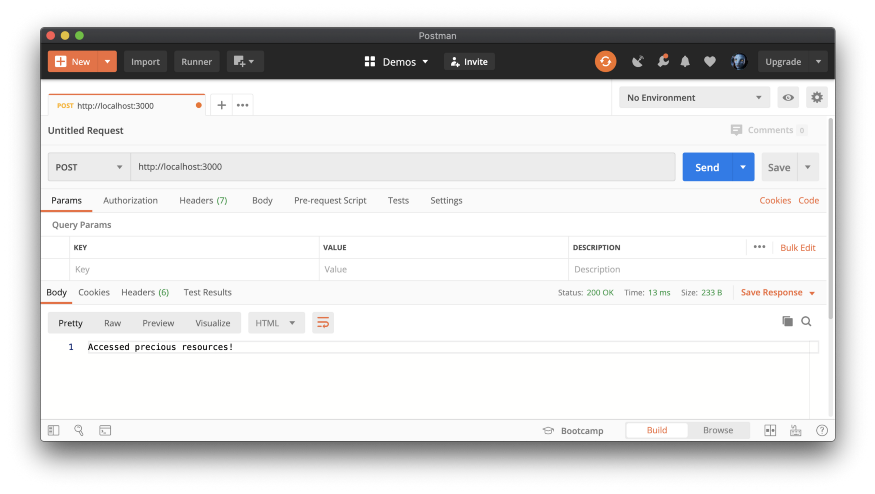
步驟3:在Postman中進(jìn)行測(cè)試

關(guān)于限速的最終想法
在響應(yīng)正文或作為?Retry-after?標(biāo)頭中,讓用戶(hù)知道在重試之前應(yīng)該等待多少時(shí)間
記錄達(dá)到速率限制的請(qǐng)求,以了解用戶(hù)行為并警告惡意攻擊
嘗試使用其他速率限制算法或其他中間件
??愛(ài)心三連擊 1.看到這里了就點(diǎn)個(gè)在看支持下吧,你的「點(diǎn)贊,在看」是我創(chuàng)作的動(dòng)力。
2.關(guān)注公眾號(hào)
程序員成長(zhǎng)指北,回復(fù)「1」加入高級(jí)前端交流群!「在這里有好多 前端?開(kāi)發(fā)者,會(huì)討論?前端 Node 知識(shí),互相學(xué)習(xí)」!3.也可添加微信【ikoala520】,一起成長(zhǎng)。
“在看轉(zhuǎn)發(fā)”是最大的支持