
高斯分類器-水果識別
點(diǎn)擊下方卡片,關(guān)注“新機(jī)器視覺”公眾號
重磅干貨,第一時(shí)間送達(dá)
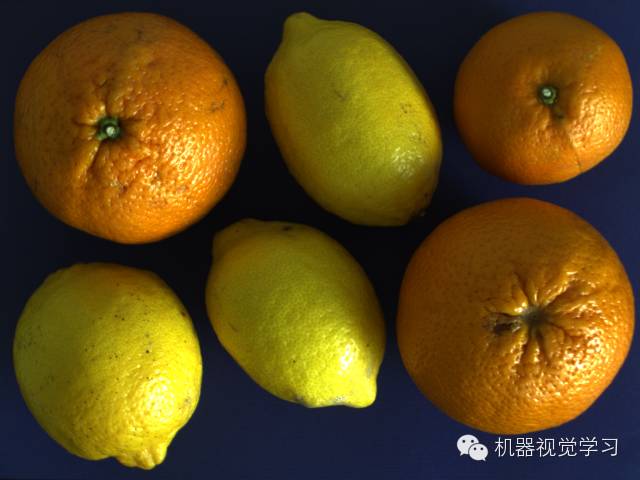
原圖:
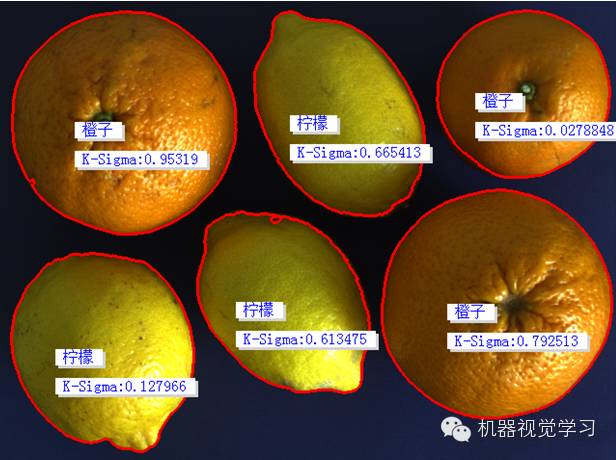
結(jié)果:
代碼如下(Halcon實(shí)現(xiàn)):
*讀取圖片ImageFiles := []ImageFiles[0] := 'F:/HALCON/fruits/citrus_fruits_01.png'ImageFiles[1] := 'F:/HALCON/fruits/citrus_fruits_02.png'ImageFiles[2] := 'F:/HALCON/fruits/citrus_fruits_03.png'ImageFiles[3] := 'F:/HALCON/fruits/citrus_fruits_04.png'ImageFiles[4] := 'F:/HALCON/fruits/citrus_fruits_05.png'ImageFiles[5] := 'F:/HALCON/fruits/citrus_fruits_06.png'ImageFiles[6] := 'F:/HALCON/fruits/citrus_fruits_07.png'ImageFiles[7] := 'F:/HALCON/fruits/citrus_fruits_08.png'ImageFiles[8] := 'F:/HALCON/fruits/citrus_fruits_09.png'ImageFiles[9] := 'F:/HALCON/fruits/citrus_fruits_10.png'ImageFiles[10] := 'F:/HALCON/fruits/citrus_fruits_11.png'ImageFiles[11] := 'F:/HALCON/fruits/citrus_fruits_12.png'ImageFiles[12] := 'F:/HALCON/fruits/citrus_fruits_13.png'ImageFiles[13] := 'F:/HALCON/fruits/citrus_fruits_14.png'ImageFiles[14] := 'F:/HALCON/fruits/citrus_fruits_15.png'*關(guān)閉窗口dev_close_window ( )*讀圖片read_image (Image, ImageFiles[0])*獲取圖片大小get_image_size (Image, Width, Height)*新建窗口dev_open_window (0, 0, Width, Height, 'black', WindowHandle)*設(shè)置填充模式-邊緣填充dev_set_draw ('margin')*設(shè)置線寬dev_set_line_width (3)*名稱變量FeaturName :=['橙子','檸檬']**創(chuàng)建分類器create_class_gmm (2, 2, 1, 'spherical', 'normalization', 10, 42, GMMHandle)*for循環(huán)for i := 0 to 3 by 1*讀圖片read_image (Image, ImageFiles[i])*轉(zhuǎn)換3通道圖像為3個(gè)單通道圖像decompose3 (Image, Image1, Image2, Image3)*閾值處理threshold (Image1, Region, 50, 255)*填充區(qū)域fill_up (Region, RegionFillUp)*連通區(qū)域connection (RegionFillUp, ConnectedRegions)*區(qū)域選擇-面積select_shape (ConnectedRegions, SelectedRegions, 'area', 'and', 150, 99999)*對象計(jì)數(shù)count_obj (SelectedRegions, Number)*for循環(huán)for j := 1 to Number by 1{*選擇對象select_obj (SelectedRegions, ObjectSelected, j)*計(jì)算對象圓度circularity (ObjectSelected, Circularity)*計(jì)算對象面積和中心坐標(biāo)area_center (ObjectSelected, Area, Row, Column)*特征轉(zhuǎn)換實(shí)數(shù)FeaturesVector :=real([Circularity, Area])*特征向量分別增加到不同的類訓(xùn)練樣本if (i<2){*橘子的面積和圓度特征增加到橘子的類別中add_sample_class_gmm (GMMHandle, FeaturesVector, 0, 0)}else{*檸檬的面積和圓度特征增加到檸檬的類別中add_sample_class_gmm (GMMHandle, FeaturesVector, 1, 0)}endif}endforendfor*訓(xùn)練分類器train_class_gmm (GMMHandle, 100, 0.001, 'training', 0.0001, Centers, Iter)*提取圖片的特征,使用前面已經(jīng)訓(xùn)練好的分類器進(jìn)行分類*for循環(huán)for Index := 0 to |ImageFiles| - 1 by 1*讀圖片read_image (Image, ImageFiles[Index])*轉(zhuǎn)換3通道圖像為3個(gè)單通道圖像decompose3 (Image, Image1, Image2, Image3)*閾值處理threshold (Image1, Region, 50, 255)*填充區(qū)域fill_up (Region, RegionFillUp)*連通區(qū)域connection (RegionFillUp, ConnectedRegions)*區(qū)域選擇-面積select_shape (ConnectedRegions, SelectedRegions, 'area', 'and', 150, 99999)*對象計(jì)數(shù)count_obj (SelectedRegions, Number)*顯示圖像-Imagedev_display (Image)*for循環(huán)for j := 1 to Number by 1{*選擇區(qū)域select_obj (SelectedRegions, ObjectSelected, j)*計(jì)算區(qū)域圓度circularity (ObjectSelected, Circularity)*計(jì)算區(qū)域的面積和中心坐標(biāo)area_center (ObjectSelected, Area, Row, Column)*特征轉(zhuǎn)換實(shí)數(shù)-圓度、面積FeaturesVector :=real([Circularity, Area])*使用分類器進(jìn)行分類classify_class_gmm (GMMHandle, FeaturesVector, 1, ClassID, ClassProb, Density, KSigmaProb)*顯示識別到的名稱disp_message (WindowHandle, FeaturName[ClassID], 'window', Row, Column-50, 'blue', 'true')*顯示K-Sigma值disp_message (WindowHandle, 'K-Sigma:'+KSigmaProb, 'window', Row+30, Column-50, 'blue', 'true')endforstop ( )endfor*清除分類器,釋放內(nèi)存clear_class_gmm (GMMHandle)注:
1>.分類器的創(chuàng)建.
2>.增加特征到分類器中.
3>.訓(xùn)練分類器.
4>.使用分類器進(jìn)行分類 -識別.
5>.本例中分類特征是圓度和面積(也可以增加顏色特征).
來源:小白學(xué)視覺
本文僅做學(xué)術(shù)分享,如有侵權(quán),請聯(lián)系刪文。
評論
圖片
表情