
Linux教程 - 在Shell腳本中聲明和使用布爾變量示例


作者:Linux迷
鏈接:https://www.linuxmi.com/shell-boolean-variables.html
jobdone=1 # True
## 更具可讀性的語法 ##
failed=false
jobdone=true
if [ $failed -eq 1 ]
then
    echo "Job failed"
else
    echo "Job done"
fi
就這樣。
如何在Shell腳本中聲明和使用布爾變量(例如“ true”和“ false”)
當然,我們可以將它們定義為字符串,并使我們的代碼更具可讀性:
#!/bin/bash
# Declare it as string
failed="false"

if [ "$failed" == "true" ]
then
    echo "Job failed"
else
    echo "Job done"
fi
或者
# set it to true
email_sent=true
# ...do your stuff and flip email_sent to 'false' if needed ...
if [ "$email_sent" = true ]
then
    echo 'Data logged and email sent too.'
else
    echo 'ALERT: Operation failed.'
    logger 'ALERT: Operation failed.'
fi
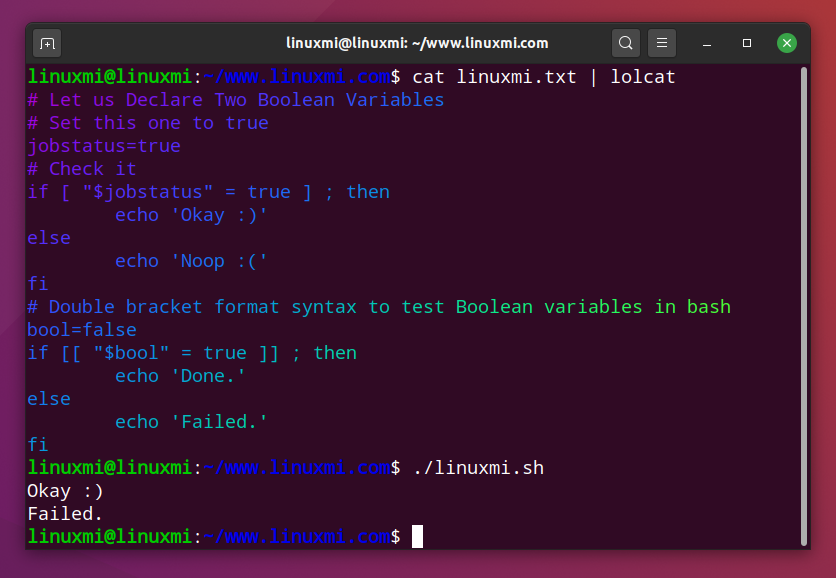
# Let us Declare Two Boolean Variables
# Set this one to true
jobstatus=true
# Check it
if [ "$jobstatus" = true ] ; then
echo 'Okay :)'
else
echo 'Noop :('
fi
# Double bracket format syntax to test Boolean variables in bash
bool=false
if [[ "$bool" = true ]] ; then
echo 'Done.'
else
echo 'Failed.'
fi
#!/bin/bash
# Purpose: Backup stuff from /data/apps
# Tested on : AWS EC2 with EFS and Ubuntu 20.04 Pro servers
# ---------------------------------------------------------
source "/apps/.keychain/$HOSTNAME-sh"
source "/apps/scripts/cli_app.sh"

# Set failed to 'False'
failed=0

D="/nfsefs/ec2mum/prodwwwroot"
log="/tmp/server.log.$$.txt"

# Log everything to our file
exec 3>&1 4>&2
trap 'exec 2>&4 1>&3' 0 1 2 3
exec 1>"${log}" 2>&1

# Backup all web servers
for s in www-0{1..8}
do
        /usr/bin/rsync -az --delete backupt@${s}:/data/apps/ ${D}/${s}/
        # set to 'true' when rsync failed and continue loop
        [ $? -ne 0 ] && failed=1
done

# See if rsync failed in loop
if [ $failed -eq 1 ]
then
        echo "$0 script error: rsync backup failed. See attached log file." | mail -A ${log} -s "$HOSTNAME - LXD backup failed" -r sysuser@my-corp-tld alert@somewhere-tld
        push_to_mobile "$0" "Dear sysadmin,

        Backup failed at $HOSTNAME at $(date).

        ---- log:start ---

        $(<${log})

        --- log:end --

        --
        Yours faithfully,
        $0"
fi
[ -f "${log}" ] && rm -f "${log}"
if [ $status -ne 0 ] ||  [ "$alogs" != "" ]; then
        sub="Backup job failed at $HOSTNAME"
        mail -A "$log" -s "$sub" -r sys@somewhere-tld sysadmin@gmail-tld <<< "$0 script ended with errors when we ran /usr/bin/rsnapshot \"$1\" $alogs"
        push_to_mobile "$0" "$sub

        $0 script ended with errors when we ran /usr/bin/rsnapshot \"$1\"

        $alogs

        See email for detailed log."

else
        sub="Backup successful at $HOSTNAME"
        #push_to_mobile "$0" "$sub. See email for detailed backup log." >/dev/null
        #mail -A "$log" -s "$sub" -r sys@somewhere-tld sysadmin@gmail-tld <<< "$0 /usr/bin/rsnapshot ran successfully\"$1\" $alogs"
fi
$ help test
$ help if
推薦閱讀:
記住看小電影前一定要檢查一下域名是不是 ?HTTPS 的,不然……
5T技術(shù)資源大放送!包括但不限于:C/C++,Linux,Python,Java,PHP,人工智能,單片機,樹莓派,等等。在公眾號內(nèi)回復(fù)「1024」,即可免費獲取!!
評論
圖片
表情