
基于k8s集群部署Nexus與舊數(shù)據(jù)的遷移
目錄
1、環(huán)境介紹
1.1 kubernetes集群環(huán)境
1.2 存儲環(huán)境
1.3 nexus版本
2、部署nexus
3、訪問檢查
4、舊數(shù)據(jù)的遷移
4.1 同版本部署及數(shù)據(jù)同步
4.2 版本升級
本文是對之前舊博客文章的豐富,添加了一些當(dāng)時(shí)實(shí)操的筆記分享出來~
Nexus是一個(gè)強(qiáng)大的Maven倉庫管理器,通過 nexus 可以搭建 Maven倉庫。它極大地簡化了自己內(nèi)部倉庫的維護(hù)和外部倉庫的訪問,利用Nexus你可以只在一個(gè)地方就能夠完全控制訪問和部署在你所維護(hù)倉庫中的每個(gè)Artifact。Nexus是一套“開箱即用”的系統(tǒng)不需要數(shù)據(jù)庫,并且還提供強(qiáng)大的倉庫管理、構(gòu)建、搜索等功能。它使用文件系統(tǒng)加Lucene來組織數(shù)據(jù)。Nexus使用ExtJS來開發(fā)界面,利用Restlet來提供完整的REST APIs,通過m2eclipse與Eclipse集成使用。Nexus支持WebDAV與LDAP安全身份認(rèn)證。
1、環(huán)境介紹
1.1 kubernetes集群環(huán)境
# kubectl version
Client Version: version.Info{Major:"1", Minor:"15", GitVersion:"v1.15.0", GitCommit:"e8462b5b5dc2584fdcd18e6bcfe9f1e4d970a529", GitTreeState:"clean", BuildDate:"2019-06-19T16:40:16Z", GoVersion:"go1.12.5", Compiler:"gc", Platform:"linux/amd64"}
Server Version: version.Info{Major:"1", Minor:"15", GitVersion:"v1.15.0", GitCommit:"e8462b5b5dc2584fdcd18e6bcfe9f1e4d970a529", GitTreeState:"clean", BuildDate:"2019-06-19T16:32:14Z", GoVersion:"go1.12.5", Compiler:"gc", Platform:"linux/amd64"}
# kubectl get nodes
NAME           STATUS                     ROLES    AGE    VERSION
k8s-master-01   Ready,SchedulingDisabled   master   198d   v1.15.0
k8s-master-02   Ready,SchedulingDisabled   master   198d   v1.15.0
k8s-node-01     Ready                      node     198d   v1.15.0
k8s-node-02     Ready                      node     155d   v1.15.0
k8s-node-03     Ready                      node     133d   v1.15.0
k8s-node-04     Ready                      node     198d   v1.15.0
1.2 存儲環(huán)境
本集群中kubernetes底層存儲使用的是nfs,并且以nfs作為存儲創(chuàng)建了storageclass便于動(dòng)態(tài)創(chuàng)建pv
# kubectl get sc
NAME                            PROVISIONER      AGE
managed-nfs-storage (default)   fuseim.pri/ifs   198d
1.3 nexus版本
nexus版本:3.20.1
2、部署nexus
部署nexus使用官方的docker鏡像,并且這里先對官方的dockerfile進(jìn)行了分析,官方的dockerfile在github上
dockerfile中指定運(yùn)行容器進(jìn)程的用戶是nexus,聲明了nexus的數(shù)據(jù)目錄是/nexus-data,聲明了jvm的參數(shù)是INSTALL4J_ADD_VM_PARAMS,容器暴露8081端口。內(nèi)容如下:
FROM registry.access.redhat.com/ubi8/ubi

LABEL vendor=Sonatype \
      maintainer="Sonatype <[email protected]>" \
      com.sonatype.license="Apache License, Version 2.0" \
      com.sonatype.name="Nexus Repository Manager base image"

ARG NEXUS_VERSION=3.20.1-01
ARG NEXUS_DOWNLOAD_URL=https://download.sonatype.com/nexus/3/nexus-${NEXUS_VERSION}-unix.tar.gz
ARG NEXUS_DOWNLOAD_SHA256_HASH=fba9953e70e2d53262d2bd953e5fbab3e44cf2965467df14a665b0752de30e51

# configure nexus runtime
ENV SONATYPE_DIR=/opt/sonatype
ENV NEXUS_HOME=${SONATYPE_DIR}/nexus \
    NEXUS_DATA=/nexus-data \
    NEXUS_CONTEXT='' \
    SONATYPE_WORK=${SONATYPE_DIR}/sonatype-work \
    DOCKER_TYPE='rh-docker'

ARG NEXUS_REPOSITORY_MANAGER_COOKBOOK_VERSION="release-0.5.20190212-155606.d1afdfe"
ARG NEXUS_REPOSITORY_MANAGER_COOKBOOK_URL="https://github.com/sonatype/chef-nexus-repository-manager/releases/download/${NEXUS_REPOSITORY_MANAGER_COOKBOOK_VERSION}/chef-nexus-repository-manager.tar.gz"

ADD solo.json.erb /var/chef/solo.json.erb

# Install using chef-solo
# Chef version locked to avoid needing to accept the EULA on behalf of whomever builds the image
RUN yum install -y --disableplugin=subscription-manager hostname procps \
    && curl -L https://www.getchef.com/chef/install.sh | bash -s -- -v 14.12.9 \
    && /opt/chef/embedded/bin/erb /var/chef/solo.json.erb > /var/chef/solo.json \
    && chef-solo \
       --recipe-url ${NEXUS_REPOSITORY_MANAGER_COOKBOOK_URL} \
       --json-attributes /var/chef/solo.json \
    && rpm -qa *chef* | xargs rpm -e \
    && rm -rf /etc/chef \
    && rm -rf /opt/chefdk \
    && rm -rf /var/cache/yum \
    && rm -rf /var/chef \
    && yum clean all

VOLUME ${NEXUS_DATA}

EXPOSE 8081
USER nexus

ENV INSTALL4J_ADD_VM_PARAMS="-Xms1200m -Xmx1200m -XX:MaxDirectMemorySize=2g -Djava.util.prefs.userRoot=${NEXUS_DATA}/javaprefs"

CMD ["sh", "-c", "${SONATYPE_DIR}/start-nexus-repository-manager.sh"]
根據(jù)上面的dockerfile文件,編寫部署在k8s集群中的資源清單,通過nfs的storageclass來動(dòng)態(tài)提供pv,將nexus的數(shù)據(jù)做持久化存儲,并且以NodePort方式暴露服務(wù)。
# cat nexus3/nexus3.yaml
apiVersion: apps/v1
kind: Deployment
metadata:
  labels:
    k8s-app: nexus3
  name: nexus3
  namespace: kube-system
spec:
  replicas: 1
  selector:
    matchLabels:
      k8s-app: nexus3
  template:
    metadata:
      labels:
        k8s-app: nexus3
      name: nexus3
      namespace: kube-system
    spec:
      containers:
      - name: nexus3
        image: sonatype/nexus3:3.20.1
        imagePullPolicy: IfNotPresent
        ports:
          - containerPort: 8081
            name: web
            protocol: TCP
        livenessProbe:
          httpGet:
            path: /
            port: 8081
          initialDelaySeconds: 540
          periodSeconds: 30
          failureThreshold: 6
        readinessProbe:
          httpGet:
            path: /
            port: 8081
          initialDelaySeconds: 540
          periodSeconds: 30
          failureThreshold: 6
        resources:
          limits:
            cpu: 1000m
            memory: 2Gi
          requests:
            cpu: 500m
            memory: 512Mi
        volumeMounts:
        - name: nexus-data
          mountPath: /nexus-data
      volumes:
        - name: nexus-data
          persistentVolumeClaim:
            claimName: nexus-data-pvc

---
apiVersion: v1
kind: PersistentVolumeClaim
metadata:
  name: nexus-data-pvc
  namespace: kube-system
spec:
  accessModes:
    - ReadWriteMany
  storageClassName: "managed-nfs-storage"
  resources:
    requests:
      storage: 10Gi

---
apiVersion: v1
kind: Service
metadata:
  name: nexus3
  namespace: kube-system
  labels:
    k8s-app: nexus3
spec:
  selector:
    k8s-app: nexus3
  type: NodePort
  ports:
    - name: web
      protocol: TCP
      port: 8081
      targetPort: 8081
      nodePort: 30005
執(zhí)行kubectl apply創(chuàng)建資源,并檢查對應(yīng)的pv,pvc以及日志
# kubectl apply -f nexus3.yaml
deployment.apps/nexus3 created
persistentvolumeclaim/nexus-data-pvc created
service/nexus3 created
# kubectl -n kube-system get pv,pvc|grep nexus
persistentvolume/pvc-70f810b4-824a-4c4c-8582-6253afe1a350   10Gi       RWX            Delete           Bound    kube-system/nexus-data-pvc                 managed-nfs-storage            1m

persistentvolumeclaim/nexus-data-pvc                 Bound    pvc-70f810b4-824a-4c4c-8582-6253afe1a350   10Gi       RWX            managed-nfs-storage   1m
# kubectl -n kube-system get pods|grep nexus
nexus3-59c8f8759-sktfv                    0/1     Running   0          2m
第一次部署nexus時(shí)需要初始化數(shù)據(jù)等,消耗的時(shí)間比較長,直到在日志中能看到如下字樣表示nexus容器啟動(dòng)完成了,因此上面的部署yaml文件中的健康檢查時(shí)間設(shè)置為經(jīng)過測試的540s
2020-02-06 10:41:52,109+0000 INFO  [jetty-main-1] *SYSTEM org.eclipse.jetty.server.Server - Started @437947ms
2020-02-06 10:41:52,110+0000 INFO  [jetty-main-1] *SYSTEM org.sonatype.nexus.bootstrap.jetty.JettyServer -
-------------------------------------------------

Started Sonatype Nexus OSS 3.20.1-01

-------------------------------------------------
3、訪問檢查
當(dāng)pod通過健康檢查之后,可以通過NodePort方式訪問到nexus
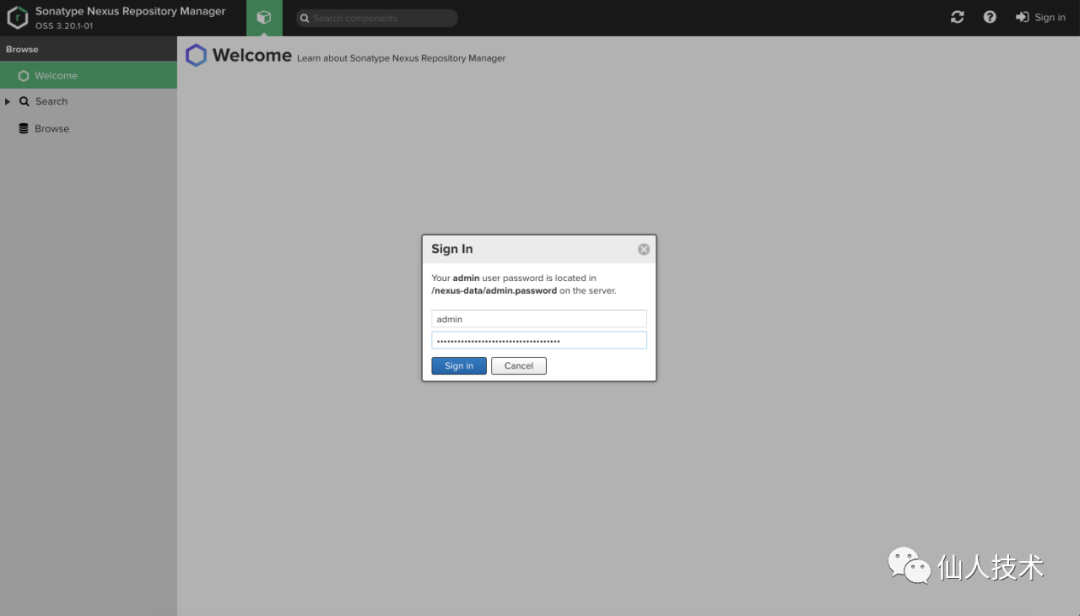
第一次點(diǎn)擊登錄會(huì)提示修改密碼,且默認(rèn)的初始密碼在服務(wù)器的/nexus-data/admin.password文件中
# kubectl -n kube-system exec nexus3-59c8f8759-sktfv -it cat /nexus-data/admin.password
fe8da3fb-b35b-4a8b-95f4-e39ccdc7f760
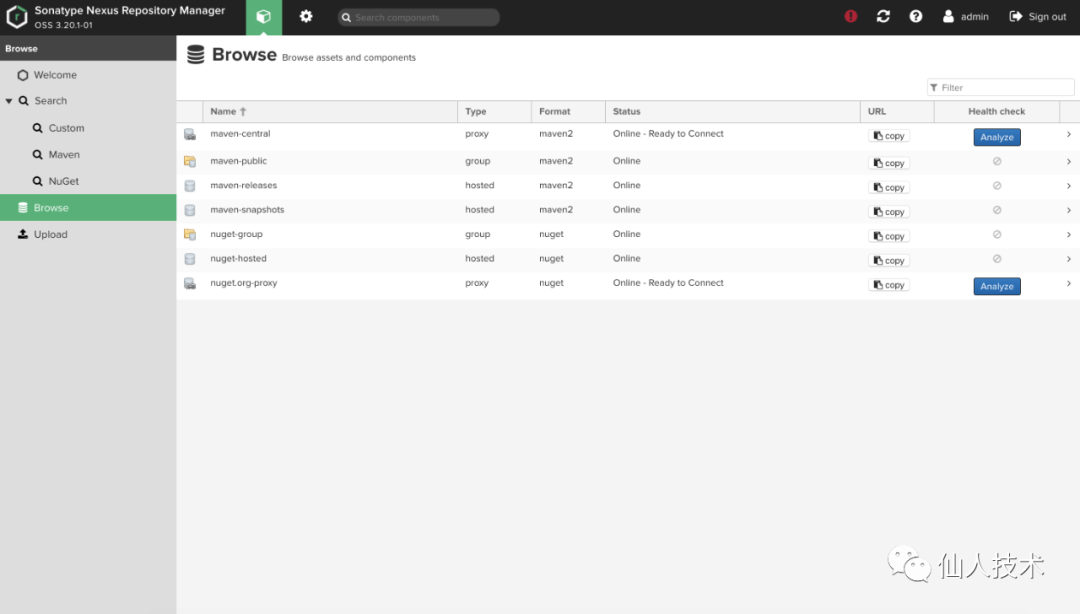
登錄后進(jìn)入到頁面
4、舊數(shù)據(jù)的遷移
這里記錄的是經(jīng)過實(shí)際驗(yàn)證的遷移主要流程以及遇到的坑
目標(biāo):docker安裝的nexus3.14.0遷移到k8s安裝的3.20.1
至于為什么要部署相同版本的
nexus,是通過踩坑的結(jié)論。發(fā)現(xiàn)只有部署一個(gè)同版本的nexus,然后平滑自動(dòng)升級才能成功
4.1 同版本部署及數(shù)據(jù)同步
部署相同版本的nexus到k8s中并做數(shù)據(jù)同步
部署過程就不用重復(fù)了,在本文的前面內(nèi)容中修改下鏡像的版本就可以了
記錄下備份和數(shù)據(jù)同步的主要流程:
step1 在遷出機(jī)器,備份databases
在管理界面System-Tasks界面,點(diǎn)擊“Create task” 選擇Admin-Export databases for backup 填寫好名稱,保存路徑,Task frequency可以選擇Manual,保存之后,立即執(zhí)行一次
step2 在遷出機(jī)器,備份blobs
進(jìn)入 /nexus-data/blobs 將所有文件夾打包
step3 遷入機(jī)器,導(dǎo)入databases
停止NEXUS服務(wù)
cd /opt/nesus/bin
nexus /stop
刪除 /nexus-data/db 下的如下目錄
accesslog
analytics
audit
component
config
security
將步驟一中,選擇的路徑下的所有文件,拷貝到這個(gè)目錄
/nexus-data/restore-from-backup
step4 在遷入機(jī),導(dǎo)入blobs
將步驟二中,打包的所有文件,按照原樣,解壓到遷入機(jī)的
/nexus-data/blobs重啟遷入機(jī)的nexus
cd /opt/nesus/bin
nexus /start
同步完成后啟動(dòng),然而并不能正常啟動(dòng)運(yùn)行,提示
es version 1.3
but the latest supported by this version of nexus is 1.2
4.2 版本升級
將k8s中部署的nexus切換鏡像,由3.14.0滾動(dòng)更新為3.20.1,解決上面的報(bào)錯(cuò) 啟動(dòng)日志中會(huì)發(fā)現(xiàn)相關(guān)升級日志
Begin upgrade
- - - - - - - - - - - - - - - - - - - - - - - - -
2020-02-07 07:09:38,289+0000 INFO  [FelixStartLevel] *SYSTEM org.sonatype.nexus.upgrade.internal.UpgradeServiceImpl - Checkpoint security
2020-02-07 07:09:39,018+0000 INFO  [FelixStartLevel] *SYSTEM org.sonatype.nexus.upgrade.internal.UpgradeServiceImpl - Checkpoint component
2020-02-07 07:09:40,659+0000 INFO  [FelixStartLevel] *SYSTEM org.sonatype.nexus.upgrade.internal.UpgradeServiceImpl - Checkpoint config
2020-02-07 07:09:41,708+0000 INFO  [FelixStartLevel] *SYSTEM org.sonatype.nexus.upgrade.internal.UpgradeServiceImpl -
- - - - - - - - - - - - - - - - - - - - - - - - -
Apply upgrade
- - - - - - - - - - - - - - - - - - - - - - - - -
2020-02-07 07:09:41,709+0000 INFO  [FelixStartLevel] *SYSTEM org.sonatype.nexus.upgrade.internal.UpgradeServiceImpl - Upgrade security from 1.0 to 1.1
2020-02-07 07:09:41,710+0000 INFO  [FelixStartLevel] *SYSTEM org.sonatype.nexus.upgrade.internal.UpgradeServiceImpl - Upgrade component from 1.12 to 1.13
2020-02-07 07:09:46,835+0000 INFO  [FelixStartLevel] *SYSTEM org.sonatype.nexus.upgrade.internal.UpgradeServiceImpl - Upgrade component from 1.13 to 1.14
2020-02-07 07:09:51,597+0000 INFO  [FelixStartLevel] *SYSTEM org.sonatype.nexus.upgrade.internal.UpgradeServiceImpl - Upgrade config from 1.5 to 1.6
2020-02-07 07:09:51,602+0000 INFO  [FelixStartLevel] *SYSTEM org.sonatype.nexus.upgrade.internal.UpgradeServiceImpl - Upgrade config from 1.6 to 1.7
2020-02-07 07:09:51,714+0000 INFO  [FelixStartLevel] *SYSTEM org.sonatype.nexus.upgrade.internal.UpgradeServiceImpl - Upgrade config from 1.7 to 1.8
2020-02-07 07:09:51,906+0000 INFO  [FelixStartLevel] *SYSTEM org.sonatype.nexus.upgrade.internal.UpgradeServiceImpl - Upgrade pypi from 1.0 to 1.1
2020-02-07 07:09:52,012+0000 INFO  [FelixStartLevel] *SYSTEM org.sonatype.nexus.upgrade.internal.UpgradeServiceImpl - Upgrade security from 1.1 to 1.2
2020-02-07 07:09:52,027+0000 INFO  [FelixStartLevel] *SYSTEM org.sonatype.nexus.upgrade.internal.UpgradeServiceImpl - Upgrade security from 1.2 to 1.3
2020-02-07 07:09:52,032+0000 INFO  [FelixStartLevel] *SYSTEM org.sonatype.nexus.upgrade.internal.UpgradeServiceImpl -
- - - - - - - - - - - - - - - - - - - - - - - - -
Commit upgrade
- - - - - - - - - - - - - - - - - - - - - - - - -
2020-02-07 07:09:52,033+0000 INFO  [FelixStartLevel] *SYSTEM org.sonatype.nexus.upgrade.internal.UpgradeServiceImpl - Commit security
2020-02-07 07:09:52,034+0000 INFO  [FelixStartLevel] *SYSTEM org.sonatype.nexus.upgrade.internal.UpgradeServiceImpl - Commit component
2020-02-07 07:09:52,034+0000 INFO  [FelixStartLevel] *SYSTEM org.sonatype.nexus.upgrade.internal.UpgradeServiceImpl - Commit config
2020-02-07 07:09:52,034+0000 INFO  [FelixStartLevel] *SYSTEM org.sonatype.nexus.upgrade.internal.UpgradeServiceImpl - Cleaning up security
2020-02-07 07:09:52,074+0000 INFO  [FelixStartLevel] *SYSTEM org.sonatype.nexus.upgrade.internal.UpgradeServiceImpl - Cleaning up component
2020-02-07 07:09:52,216+0000 INFO  [FelixStartLevel] *SYSTEM org.sonatype.nexus.upgrade.internal.UpgradeServiceImpl - Cleaning up config
2020-02-07 07:09:52,241+0000 INFO  [FelixStartLevel] *SYSTEM org.sonatype.nexus.upgrade.internal.UpgradeServiceImpl -
- - - - - - - - - - - - - - - - - - - - - - - - -
Upgrade complete
有了這些日志,表示基于docker部署的低版本已經(jīng)順利遷移到了基于k8s部署的較新版本了