
Mybatis-Plus 開發(fā)提速器:mybatis-plus-generator-ui 你確定不了解一下?
在基于Mybatis的開發(fā)模式中,很多開發(fā)者還會選擇Mybatis-Plus來輔助功能開發(fā),以此提高開發(fā)的效率。雖然Mybatis也有代碼生成的工具,但Mybatis-Plus由于在Mybatis基礎(chǔ)上做了一些調(diào)整,因此,常規(guī)的生成工具生成的代碼還有一些不太符合預(yù)期。而且對于多數(shù)據(jù)庫的支持不是很好。
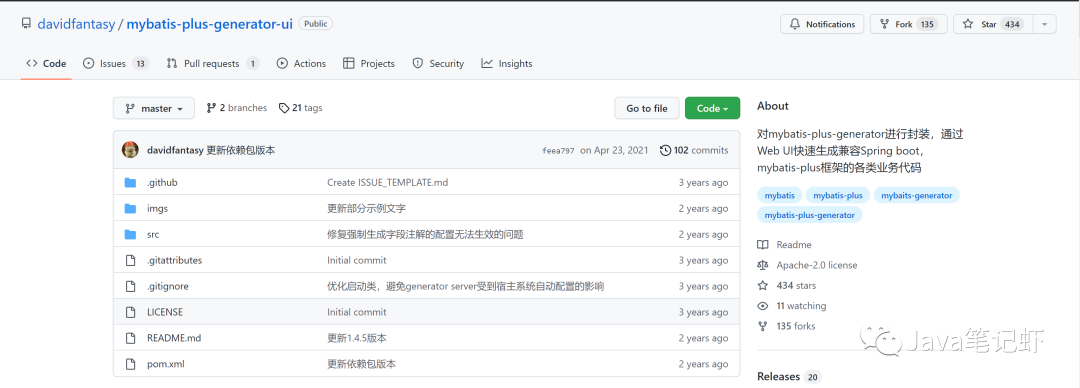
因此,我們需要一款支持高度定制化,帶圖形UI頁面,能適配多數(shù)數(shù)據(jù)庫的基礎(chǔ)程序生成框架。本文就介紹這款基于Mybatis-Plus的代碼自助生成器,github地址:mybatis-plus-generator-ui。
文章通過實(shí)例集成的方式來詳細(xì)講解
mybatis-plus-generator-ui,感興趣的朋友可以自己clone下來,也可以自己進(jìn)行擴(kuò)展自定義。
一、mybatis-plus-generator-ui是什么?
它是對mybatis-plus-generator進(jìn)行封裝,通過Web UI快速生成兼容Spring boot,mybatis-plus框架的各類業(yè)務(wù)代碼。提供交互式的Web UI用于生成兼容mybatis-plus框架的相關(guān)功能代碼,包括Entity、Mapper、Mapper.xml、Service、Controller等,可以自定義模板以及各類輸出參數(shù),也可通過SQL查詢語句直接生成代碼。
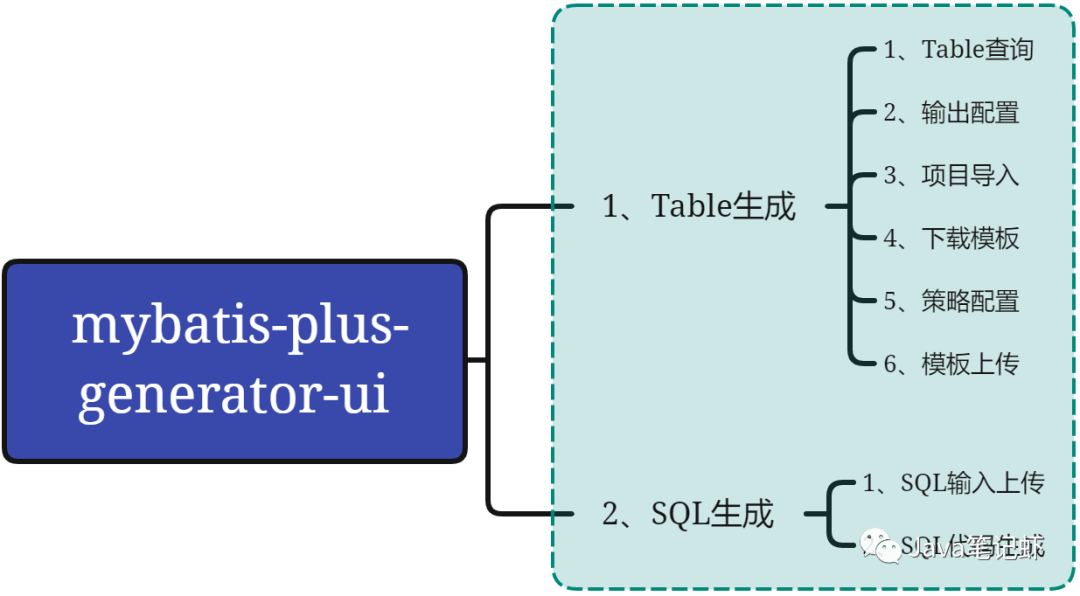
功能列表:
Table查詢: 查詢配置的關(guān)系型數(shù)據(jù)庫表的列表查詢。 輸出配置: 對需要生成的相關(guān)代碼,比如 Entity、Mapper、Servcie、Controller等代碼模板信息進(jìn)行配置,用于在轉(zhuǎn)換時(shí)調(diào)用。項(xiàng)目導(dǎo)入: 可以導(dǎo)入其它項(xiàng)目配置好的信息給本項(xiàng)目使用。 下載模板: 支持本項(xiàng)目配置的模板信息下載后共享。 策略配置: 直接定義各種文件的生成策略。 模板上傳: 支持從別的項(xiàng)目中下載模板,同上傳供本項(xiàng)目使用。 SQL輸入上傳: 支持將查詢語句直接上傳或者復(fù)制到輸入框中。 SQL代碼生成: 基于SQL腳本生成相應(yīng)的代碼。
二、 mybatis-plus-generator-ui怎么用?
mybatis-plus-generator-ui提供以jar包的形式為外部項(xiàng)目提供服務(wù),通過配置的數(shù)據(jù)庫配置去讀取數(shù)據(jù)庫的配置信息,并通過Web UI的方式提供給開發(fā)者使用。mybatis-plus-generator-ui支持POSTGRE_SQL、ORACLE、DB2、MySQL、SQLSERVER等常見的關(guān)系型數(shù)據(jù)庫。
1、maven pom引入
<project xmlns="http://maven.apache.org/POM/4.0.0"
 xmlns:xsi="http://www.w3.org/2001/XMLSchema-instance"
 xsi:schemaLocation="http://maven.apache.org/POM/4.0.0 http://maven.apache.org/xsd/maven-4.0.0.xsd">
 <modelVersion>4.0.0</modelVersion>
 <groupId>com.yelang</groupId>
 <artifactId>mybatis-plus-generator-ui-case</artifactId>
 <version>0.0.1-SNAPSHOT</version>

 <dependencies>
  <dependency>
   <groupId>com.github.davidfantasy</groupId>
   <artifactId>mybatis-plus-generator-ui</artifactId>
   <version>1.4.5</version>
  </dependency>

  <dependency>
   <groupId>org.postgresql</groupId>
   <artifactId>postgresql</artifactId>
   <version>42.2.25</version>
  </dependency>
 </dependencies>
</project>
2、新建程序入口,以main函數(shù)的方式運(yùn)行
mybatis-plus-generator-ui在1.4.0版本之后,可支持將GeberatorUIServer獨(dú)立部署為一個單獨(dú)的spring boot項(xiàng)目,通過頁面指定目標(biāo)項(xiàng)目根目錄的方式為多個項(xiàng)目提供源碼生成服務(wù)。這種方式適用于有多個項(xiàng)目庫需要獨(dú)立進(jìn)行開發(fā)的模式。實(shí)例關(guān)鍵代碼如下:
package com.yelang;

import com.github.davidfantasy.mybatisplus.generatorui.GeneratorConfig;
import com.github.davidfantasy.mybatisplus.generatorui.MybatisPlusToolsApplication;
import com.github.davidfantasy.mybatisplus.generatorui.mbp.NameConverter;

public class GeneratorMain {

 public static void main(String[] args) {
  GeneratorConfig config = GeneratorConfig.builder().jdbcUrl("jdbc:postgresql://127.0.0.1:5432/ghyapp")
    .userName("ghy01").password("ghy01").driverClassName("org.postgresql.Driver")
    // 數(shù)據(jù)庫schema,POSTGRE_SQL,ORACLE,DB2類型的數(shù)據(jù)庫需要指定
    // .schemaName("myBusiness")
    // 如果需要修改各類生成文件的默認(rèn)命名規(guī)則,可自定義一個NameConverter實(shí)例,覆蓋相應(yīng)的名稱轉(zhuǎn)換方法:
    .nameConverter(new NameConverter() {
     /**
      * 自定義Service類文件的名稱規(guī)則
      */
     public String serviceNameConvert(String tableName) {
      return this.entityNameConvert(tableName) + "Service";
     }

     /**
      * 自定義Controller類文件的名稱規(guī)則
      */
     public String controllerNameConvert(String tableName) {
      return this.entityNameConvert(tableName) + "Action";
     }
    }).basePackage("com.github.davidfantasy.mybatisplustools.example").port(8068).build();

  MybatisPlusToolsApplication.run(config);

 }

}
在上面的配置中,我們連接的示例數(shù)據(jù)庫是PostgerSQL,需要在Maven中定義相應(yīng)的驅(qū)動程序,并且在上述代碼中正確配置相應(yīng)的類。最后指定了程序的運(yùn)行端口為8086,這種運(yùn)行方式跟SpringBoot非常相似。
3、實(shí)例運(yùn)行
運(yùn)行以上的main方法,在控制臺可以看到以下輸出即為成功部署。
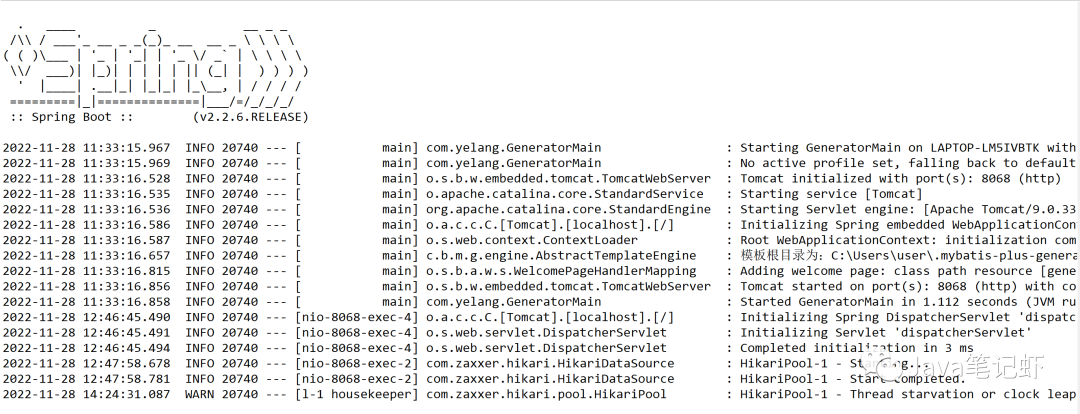
在輸出的日志中,可以看到程序的運(yùn)行端口,以及默認(rèn)的模板目錄地址。在瀏覽器中輸入訪問地址http://localhost:8068/,即可進(jìn)行配置生成。
三、mybatis-plus-generator-ui代碼生成
1、Table的查詢和瀏覽
可以直接瀏覽和查詢配置的數(shù)據(jù)源的數(shù)據(jù)表信息,可選擇一個或多個生成模板代碼。
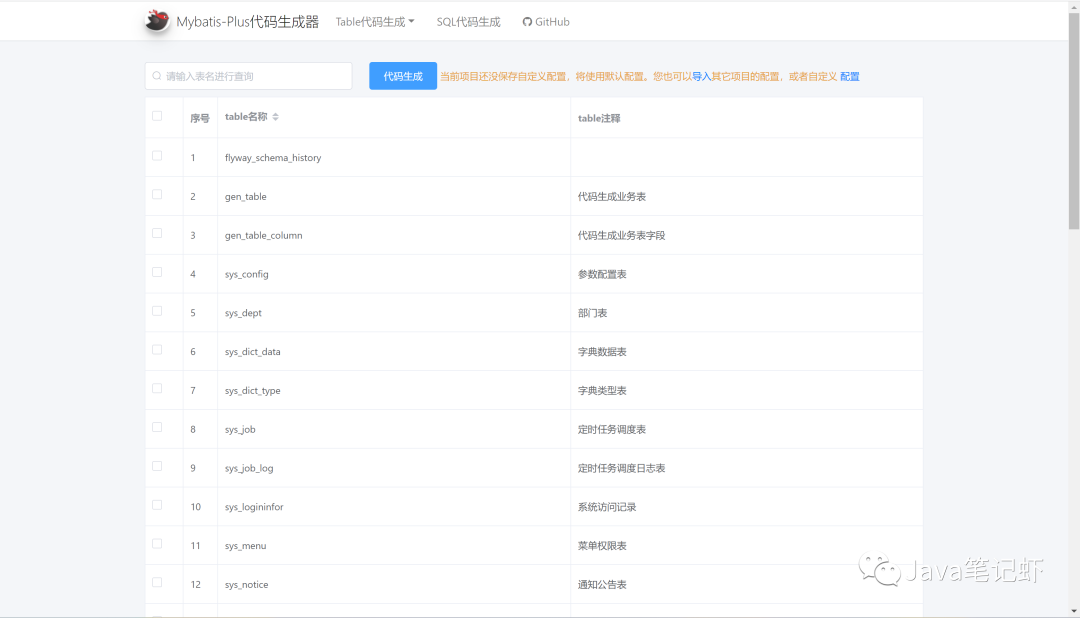
2、輸出配置
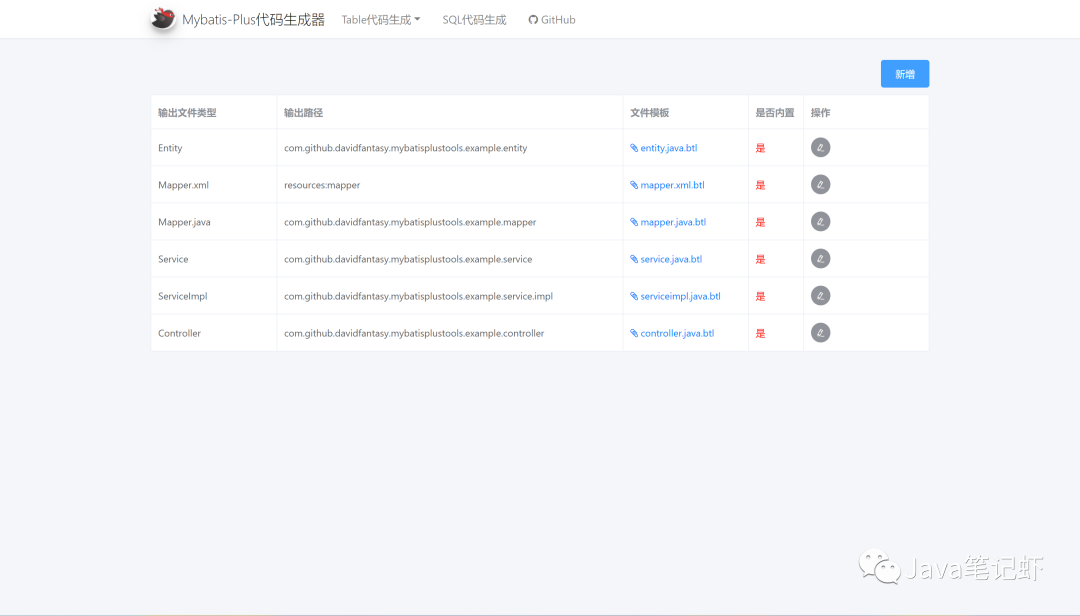
內(nèi)置Entity、Mapper、Service、Controller等6種類型代碼的模板配置,可以上傳模板進(jìn)行替換,并修改各類參數(shù),配置參數(shù)已經(jīng)按照影響的文件類型重新進(jìn)行了分類,并加入了部分文本說明;也可以自行添加其它類型的自定義輸出文件。所有的配置項(xiàng)都會按照項(xiàng)目包名進(jìn)行保存,只需一次性設(shè)置就可以了。
3、策略配置
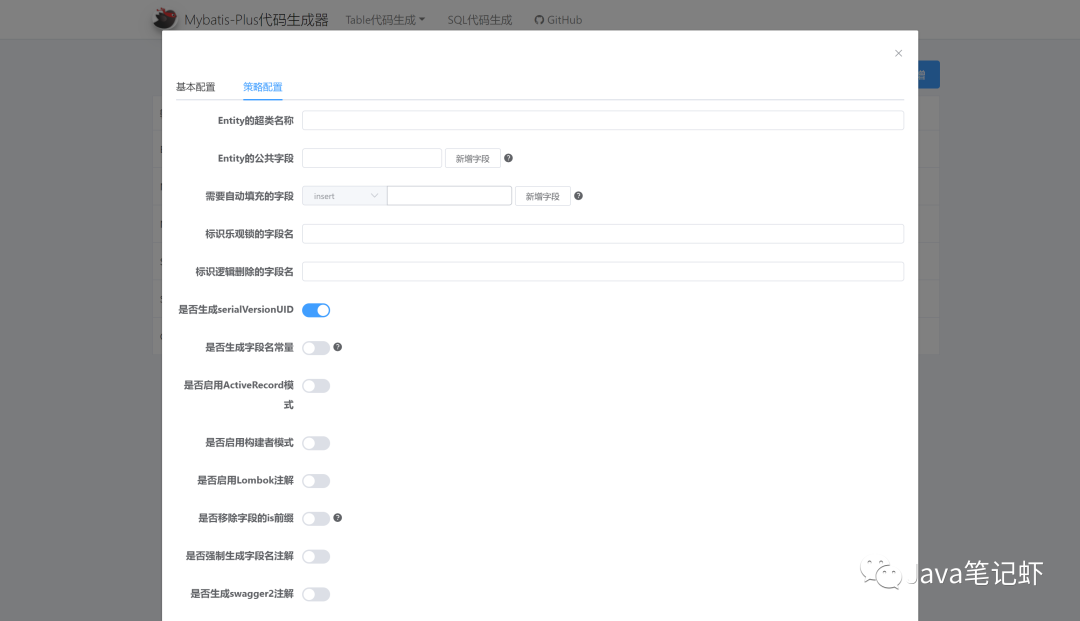
將每次生成代碼時(shí)可能變動的內(nèi)容加入到代碼生成選項(xiàng)中,方便調(diào)整每次的生成策略,比如:是否覆蓋原文件,生成文件的種類等等:
4、SQL配置生成
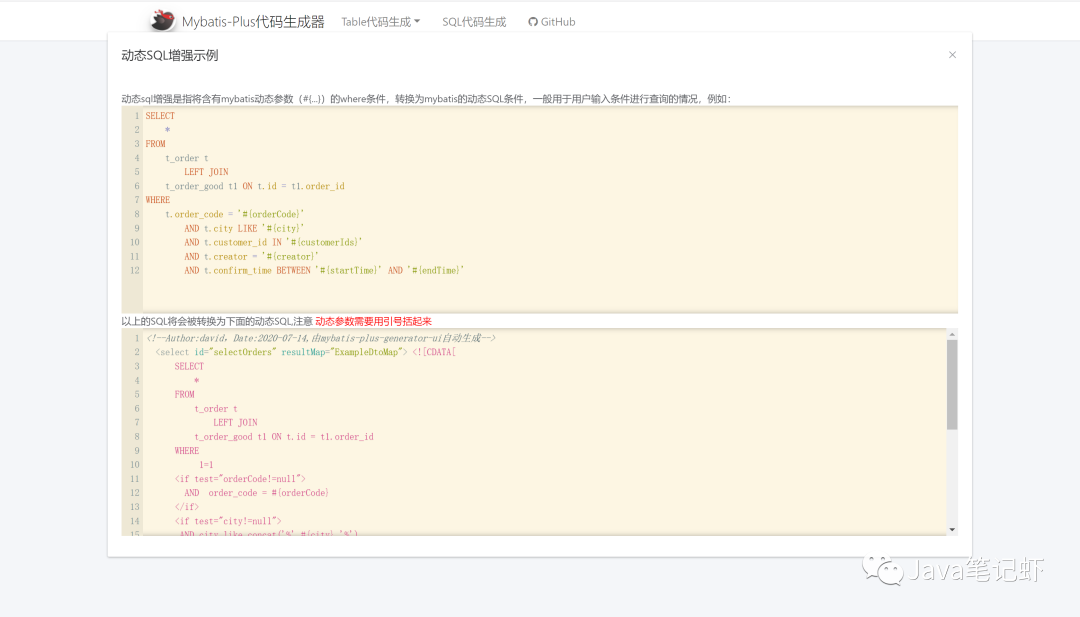
通過輸入查詢SQL,可自動在Mapper(Xml及Java)中生成對應(yīng)的查詢方法,DTO對象和ResultMap(結(jié)果集映射配置)
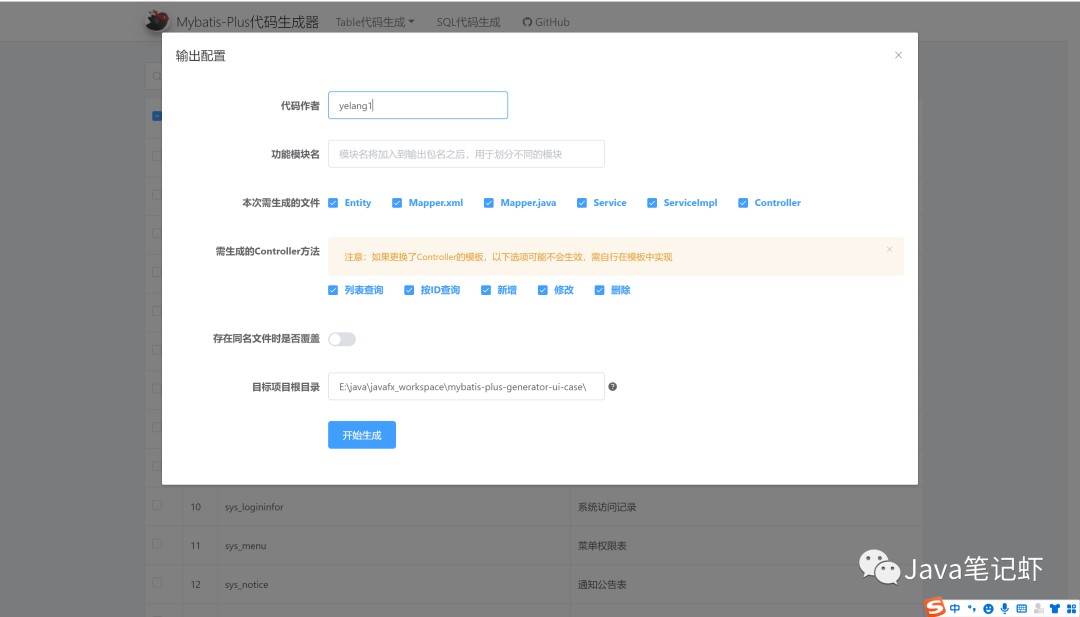
5、代碼生成
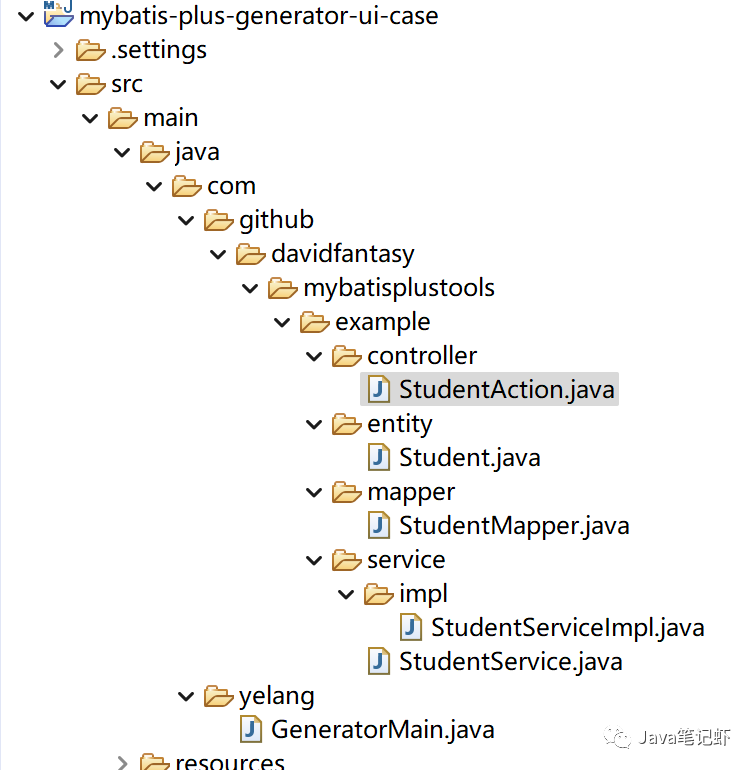
四、自定義擴(kuò)展
1、相關(guān)模板調(diào)整
在相關(guān)的頁面中,可以進(jìn)行相應(yīng)的調(diào)整,在對應(yīng)的btl模板中下載對應(yīng)文件的具體模板,使用文本工具打開,直接修改源代碼,文中取一種方式示例,其它方式一樣。
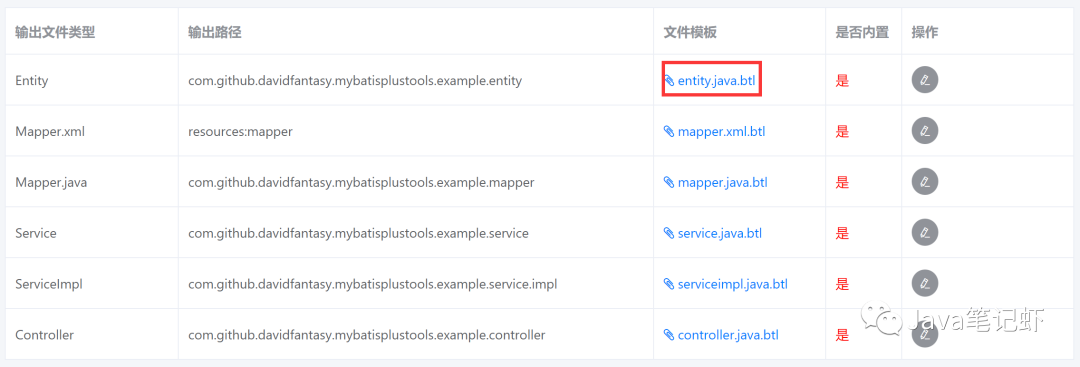
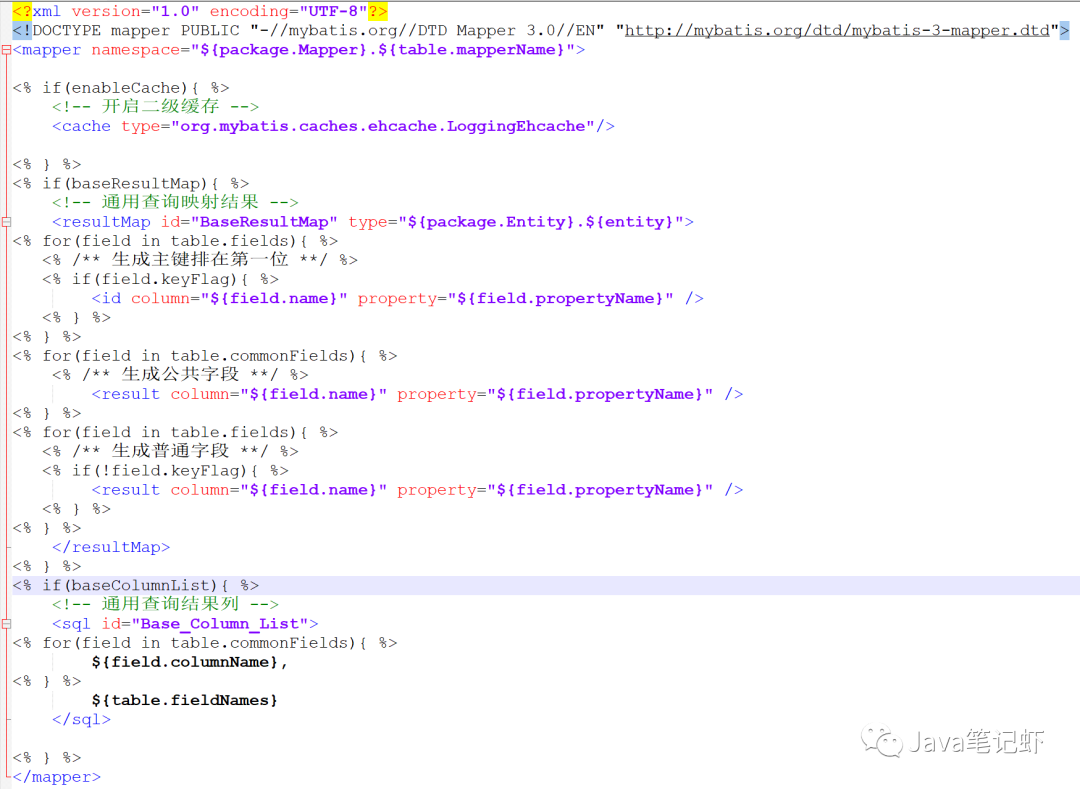
2、代碼層級的配置
在一些團(tuán)隊(duì)中,肯定對Mapper的定義為Dao,Controller層需要定義為Action,通過修改代碼模板btl的方式是可以的,還有一種方式是通過調(diào)整內(nèi)部映射的方式來進(jìn)行修改。主要使用的類是NameConverter。
/**
* 自定義Service類文件的名稱規(guī)則
*/
public String serviceNameConvert(String tableName) {
 return this.entityNameConvert(tableName) + "Service";
}

/**
* 自定義Controller類文件的名稱規(guī)則
*/
public String controllerNameConvert(String tableName) {
  return this.entityNameConvert(tableName) + "Action";
}
除了Service、Controller、Entity、FieldName都可以實(shí)現(xiàn)自定義的擴(kuò)展。下面是NameConverter類的核心代碼,這里有詳細(xì)的定義。
package com.github.davidfantasy.mybatisplus.generatorui.mbp;

import cn.hutool.core.util.StrUtil;
import com.github.davidfantasy.mybatisplus.generatorui.dto.Constant;
import com.google.common.base.Strings;

import static com.github.davidfantasy.mybatisplus.generatorui.dto.Constant.DOT_JAVA;
import static com.github.davidfantasy.mybatisplus.generatorui.dto.Constant.DOT_XML;

/**
 * 自定義各類名稱轉(zhuǎn)換的規(guī)則
 */
public interface NameConverter {

    /**
     * 自定義Entity.java的類名稱
     *
     * @param tableName 表名稱
     * @return
     */
    default String entityNameConvert(String tableName) {
        if (Strings.isNullOrEmpty(tableName)) {
            return "";
        }
        tableName = tableName.substring(tableName.indexOf(StrUtil.UNDERLINE) + 1, tableName.length());
        return StrUtil.upperFirst(StrUtil.toCamelCase(tableName.toLowerCase()));
    }

    /**
     * 自定義表字段名到實(shí)體類屬性名的轉(zhuǎn)換規(guī)則
     *
     * @param fieldName 表字段名稱
     * @return
     */
    default String propertyNameConvert(String fieldName) {
        if (Strings.isNullOrEmpty(fieldName)) {
            return "";
        }
        if (fieldName.contains("_")) {
            return StrUtil.toCamelCase(fieldName.toLowerCase());
        }
        return fieldName;
    }

    /**
     * 自定義Mapper.java的類名稱
     */
    default String mapperNameConvert(String tableName) {
        return entityNameConvert(tableName) + "Mapper";
    }

    /**
     * 自定義Mapper.xml的文件名稱
     */
    default String mapperXmlNameConvert(String tableName) {
        return entityNameConvert(tableName) + "Mapper";
    }

    /**
     * 自定義Service.java的類名稱
     */
    default String serviceNameConvert(String tableName) {
        return "I" + entityNameConvert(tableName) + "Service";
    }

    /**
     * 自定義ServiceImpl.java的類名稱
     */
    default String serviceImplNameConvert(String tableName) {
        return entityNameConvert(tableName) + "ServiceImpl";
    }

    /**
     * 自定義Controller.java的類名稱
     */
    default String controllerNameConvert(String tableName) {
        return entityNameConvert(tableName) + "Controller";
    }

    /**
     * 自定義其它生成文件的文件名(不包括entity,mapper.java,mapper.xml,service,serviceImpl,controller這6種)
     *
     * @param fileType  在頁面上輸入的輸出文件標(biāo)識
     * @param tableName 關(guān)聯(lián)的數(shù)據(jù)表名稱名稱
     * @return 生成文件的名稱,帶后綴
     */
    default String outputFileNameConvert(String fileType, String tableName) {
        if (fileType.equals(Constant.FILE_TYPE_ENTITY)) {
            return this.entityNameConvert(tableName) + DOT_JAVA;
        } else if (fileType.equals(Constant.FILE_TYPE_MAPPER)) {
            return this.mapperNameConvert(tableName) + DOT_JAVA;
        } else if (fileType.equals(Constant.FILE_TYPE_MAPPER_XML)) {
            return this.mapperXmlNameConvert(tableName) + DOT_XML;
        } else if (fileType.equals(Constant.FILE_TYPE_SERVICE)) {
            return this.serviceNameConvert(tableName) + DOT_JAVA;
        } else if (fileType.equals(Constant.FILE_TYPE_SERVICEIMPL)) {
            return this.serviceImplNameConvert(tableName) + DOT_JAVA;
        } else if (fileType.equals(Constant.FILE_TYPE_CONTROLLER)) {
            return this.controllerNameConvert(tableName) + DOT_JAVA;
        }
        return this.entityNameConvert(tableName) + fileType;
    }

}
mybatis-plus-generator-ui的功能非常豐富,甚至針對ui都是可以自定義修改的。如果需要定制UI的話,將代碼clone下來后,進(jìn)入到frontend目錄下,進(jìn)行相應(yīng)的擴(kuò)展開發(fā)。
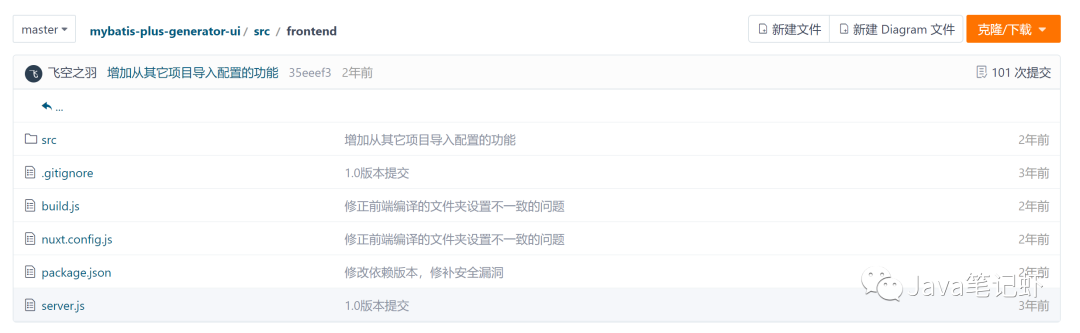
修改完成后,需要另行編譯src\frontend中的靜態(tài)資源(源碼中不包含已編譯的頁面),在src\frontend文件夾中執(zhí)行:
yarn install
yarn run build
五、總結(jié)
以上就是今天要講的內(nèi)容,本文簡要介紹一款基于Mybatis-Plus的代碼自助生成器,地址:
https://github.com/davidfantasy/mybatis-plus-generator-ui
文章通過實(shí)例集成的方式來詳細(xì)講解mybatis-plus-generator-ui,從相關(guān)概念到實(shí)際集成案例,以及具體的擴(kuò)展開發(fā)介紹。如果在工作中有這種需要,不妨采用這種方式。希望本文對您有所幫助,歡迎指導(dǎo)交流。
blog.csdn.net/yelangkingwuzuhu/article/details/128077533
往期推薦:
EasyExcel 帶格式多線程導(dǎo)出百萬數(shù)據(jù)(實(shí)測好用)
用上這幾個開源管理系統(tǒng)做項(xiàng)目,領(lǐng)導(dǎo)看了直呼專業(yè)!