
自定義View實(shí)現(xiàn)字母導(dǎo)航控件

PS:如果不能嚴(yán)格內(nèi)化自己,就沒有足夠的心理能量進(jìn)行深度工作。
完成列表數(shù)據(jù)與字母之間的相互聯(lián)動(dòng);
支持布局文件屬性配置;
在布局文件中能夠配置相關(guān)屬性,如字母顏色、字母字體大小、字母指示器顏色等屬性。
自定義屬性
Measure測(cè)量
坐標(biāo)計(jì)算
繪制
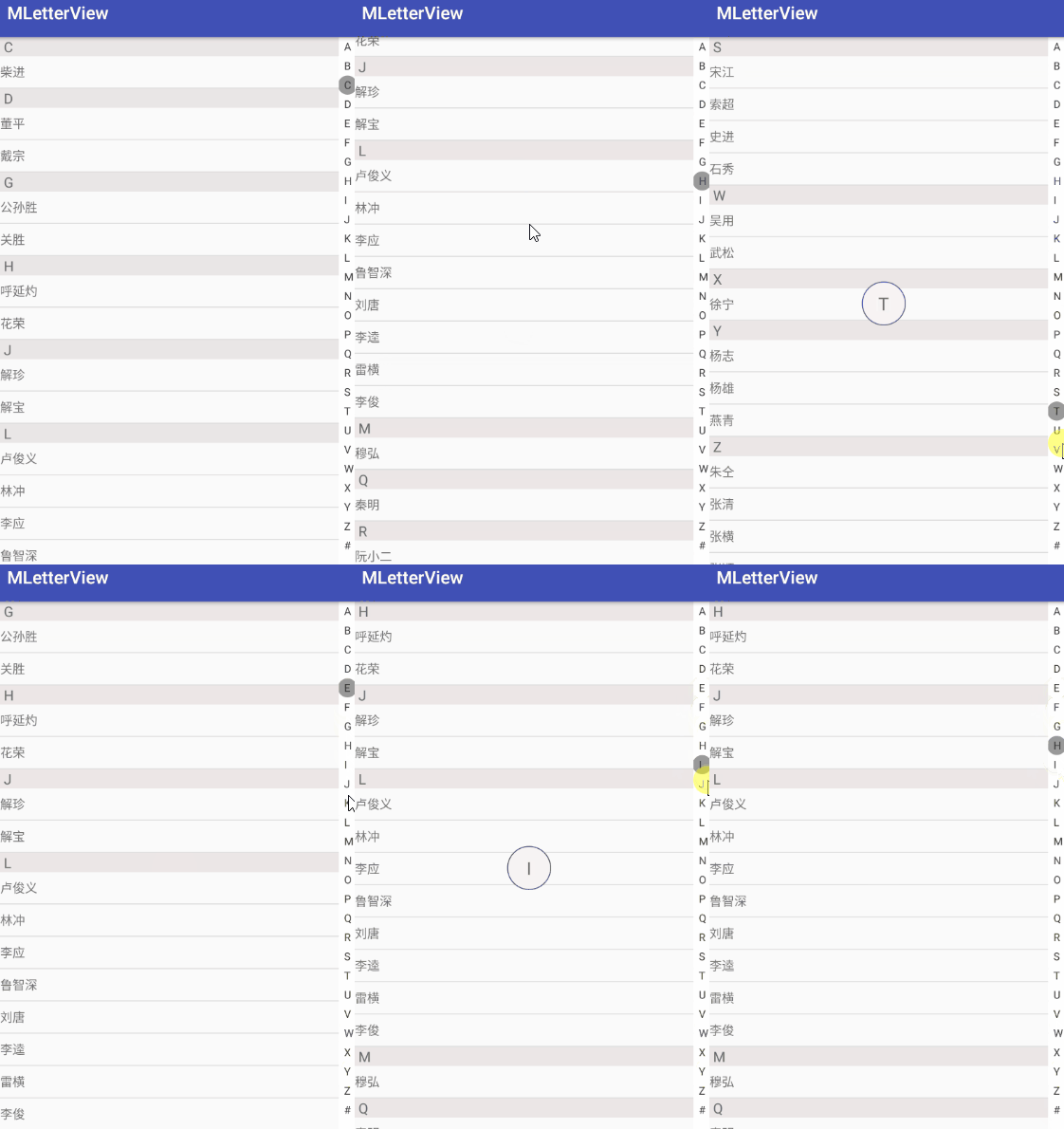
顯示效果
自定義屬性
<resources>
????<declare-styleable?name="LetterView">
????????
????????<attr?name="letterTextColor"?format="color"?/>
????????
????????<attr?name="letterTextSize"?format="dimension"?/>
????????
????????<attr?name="letterTextBackgroundColor"?format="color"?/>
????????
????????<attr?name="letterEnableIndicator"?format="boolean"?/>
????????
????????<attr?name="letterIndicatorColor"?format="color"?/>
????declare-styleable>
resources>
public?LetterView(Context?context,?@Nullable?AttributeSet?attrs)?{
????super(context,?attrs);
????//獲取屬性
????TypedArray?array?=?context.obtainStyledAttributes(attrs,?R.styleable.LetterView);
????int?letterTextColor?=?array.getColor(R.styleable.LetterView_letterTextColor,?Color.RED);
????int?letterTextBackgroundColor?=?array.getColor(R.styleable.LetterView_letterTextBackgroundColor,?Color.WHITE);
????int?letterIndicatorColor?=?array.getColor(R.styleable.LetterView_letterIndicatorColor,?Color.parseColor("#333333"));
????float?letterTextSize?=?array.getDimension(R.styleable.LetterView_letterTextSize,?12);
????enableIndicator?=?array.getBoolean(R.styleable.LetterView_letterEnableIndicator,?true);

????//默認(rèn)設(shè)置
????mContext?=?context;
????mLetterPaint?=?new?Paint();
????mLetterPaint.setTextSize(letterTextSize);
????mLetterPaint.setColor(letterTextColor);
????mLetterPaint.setAntiAlias(true);

????mLetterIndicatorPaint?=?new?Paint();
????mLetterIndicatorPaint.setStyle(Paint.Style.FILL);
????mLetterIndicatorPaint.setColor(letterIndicatorColor);
????mLetterIndicatorPaint.setAntiAlias(true);

????setBackgroundColor(letterTextBackgroundColor);

????array.recycle();
}
Measure測(cè)量
@Override
protected?void?onMeasure(int?widthMeasureSpec,?int?heightMeasureSpec)?{
????super.onMeasure(widthMeasureSpec,?heightMeasureSpec);
????//獲取寬高的尺寸大小
????int?widthSize?=?MeasureSpec.getSize(widthMeasureSpec);
????int?heightSize?=?MeasureSpec.getSize(heightMeasureSpec);
????//wrap_content默認(rèn)寬高
????@SuppressLint("DrawAllocation")?Rect?mRect?=?new?Rect();
????mLetterPaint.getTextBounds("A",?0,?1,?mRect);
????mWidth?=?mRect.width()?+?dpToPx(mContext,?12);
????int?mHeight?=?(mRect.height()?+?dpToPx(mContext,?5))?*?letters.length;

????if?(getLayoutParams().width?==?ViewGroup.LayoutParams.WRAP_CONTENT?&&
????????????getLayoutParams().height?==?ViewGroup.LayoutParams.WRAP_CONTENT)?{
????????setMeasuredDimension(mWidth,?mHeight);
????}?else?if?(getLayoutParams().width?==?ViewGroup.LayoutParams.WRAP_CONTENT)?{
????????setMeasuredDimension(mWidth,?heightSize);
????}?else?if?(getLayoutParams().height?==?ViewGroup.LayoutParams.WRAP_CONTENT)?{
????????setMeasuredDimension(widthSize,?mHeight);
????}

????mWidth?=?getMeasuredWidth();
????int?averageItemHeight?=?getMeasuredHeight()?/?28;
????int?mOffset?=?averageItemHeight?/?30;?//界面調(diào)整
????mItemHeight?=?averageItemHeight?+?mOffset;
}
坐標(biāo)計(jì)算
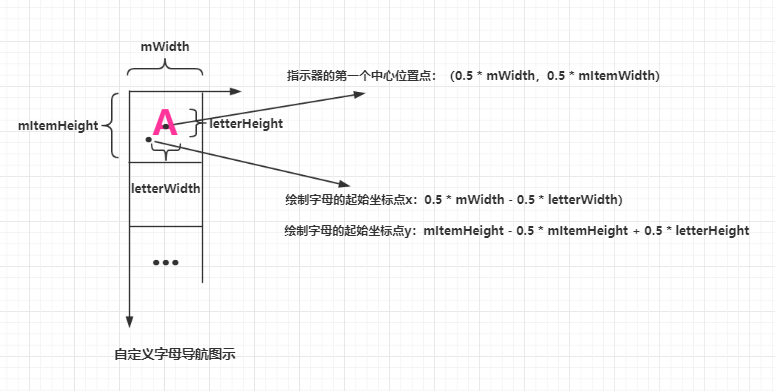
繪制
@Override
protected?void?onDraw(Canvas?canvas)?{
????//獲取字母寬高
????@SuppressLint("DrawAllocation")?Rect?rect?=?new?Rect();
????mLetterPaint.getTextBounds("A",?0,?1,?rect);
????int?letterWidth?=?rect.width();
????int?letterHeight?=?rect.height();

????//繪制指示器
????if?(enableIndicator){
????????for?(int?i?=?1;?i?1;?i++)?{
????????????if?(mTouchIndex?==?i)?{
????????????????canvas.drawCircle(0.5f?*?mWidth,?i?*?mItemHeight?-?0.5f?*?mItemHeight,?0.5f?*?mItemHeight,?mLetterIndicatorPaint);
????????????}
????????}
????}
????//繪制字母
????for?(int?i?=?1;?i?1;?i++)?{
????????canvas.drawText(letters[i?-?1],?(mWidth?-?letterWidth)?/?2,?mItemHeight?*?i?-?0.5f?*?mItemHeight?+?letterHeight?/?2,?mLetterPaint);
????}
}
Touch事件處理
@Override
public?boolean?onTouchEvent(MotionEvent?event)?{
????switch?(event.getAction())?{
????????case?MotionEvent.ACTION_DOWN:
????????case?MotionEvent.ACTION_MOVE:
????????????isTouch?=?true;
????????????int?y?=?(int)?event.getY();
????????????Log.i("onTouchEvent","--y->"?+?y?+?"-y-dp-->"?+?DensityUtil.px2dp(getContext(),?y));
????????????int?index?=?y?/?mItemHeight;

????????????if?(index?!=?mTouchIndex?&&?index?28?&&?index?>?0)?{
????????????????mTouchIndex?=?index;
????????????????Log.i("onTouchEvent","--mTouchIndex->"?+?mTouchIndex?+?"--position->"?+?mTouchIndex);
????????????}

????????????if?(mOnLetterChangeListener?!=?null?&&?mTouchIndex?>?0)?{
????????????????mOnLetterChangeListener.onLetterListener(letters[mTouchIndex?-?1]);
????????????}

????????????invalidate();
????????????break;
????????case?MotionEvent.ACTION_UP:
????????????isTouch?=?false;
????????????if?(mOnLetterChangeListener?!=?null?&&?mTouchIndex?>?0)?{
????????????????mOnLetterChangeListener.onLetterDismissListener();
????????????}
????????????break;
????}
????return?true;
}
數(shù)據(jù)組裝
//漢字轉(zhuǎn)換為拼音
public?static?String?getChineseToPinyin(String?chinese)?{
????StringBuilder?builder?=?new?StringBuilder();
????HanyuPinyinOutputFormat?format?=?new?HanyuPinyinOutputFormat();
????format.setCaseType(HanyuPinyinCaseType.UPPERCASE);
????format.setToneType(HanyuPinyinToneType.WITHOUT_TONE);

????char[]?charArray?=?chinese.toCharArray();
????for?(char?aCharArray?:?charArray)?{
????????if?(Character.isSpaceChar(aCharArray))?{
????????????continue;
????????}
????????try?{
????????????String[]?pinyinArr?=?PinyinHelper.toHanyuPinyinStringArray(aCharArray,?format);
????????????if?(pinyinArr?!=?null)?{
????????????????builder.append(pinyinArr[0]);
????????????}?else?{
????????????????builder.append(aCharArray);
????????????}
????????}?catch?(BadHanyuPinyinOutputFormatCombination?badHanyuPinyinOutputFormatCombination)?{
????????????badHanyuPinyinOutputFormatCombination.printStackTrace();
????????????builder.append(aCharArray);
????????}
????}
????return?builder.toString();
}
顯示效果
評(píng)論
圖片
表情
<b id="afajh"><abbr id="afajh"></abbr></b>