
記一次Apache HTTP Client問(wèn)題排查
你知道的越多,不知道的就越多,業(yè)余的像一棵小草!
你來(lái),我們一起精進(jìn)!你不來(lái),我和你的競(jìng)爭(zhēng)對(duì)手一起精進(jìn)!
編輯:業(yè)余草
來(lái)源:juejin.cn/post/7260458223236775992
推薦:https://t.zsxq.com/11sCBGccJ
自律才能自由
現(xiàn)象
通過(guò)日志查看,存在兩種異常情況。
第一種:開(kāi)始的時(shí)候HTTP請(qǐng)求會(huì)報(bào)超時(shí)異常。
?762663363 [2023-07-21 06:04:25] [executor-64] ERROR - com.xxl.CucmTool - CucmTool|sendRisPortSoap error,url:
?https://10.65.0.173:8443/realtimeservice/services/RisPortorg.apache.http.conn.HttpHostConnectException: Connect to xxx [/xxx] failed: 連接超時(shí)
第二種:突然沒(méi)有新的HTTP請(qǐng)求日志了,現(xiàn)象就是HTTP請(qǐng)求后,一直卡主,等待響應(yīng)。
HTTP Client代碼
先查看一下HTTP的請(qǐng)求代碼。
HTTP Client設(shè)置。
private static CloseableHttpClient getHttpClient() {
    SSLContextBuilder builder = new SSLContextBuilder();
    CloseableHttpClient httpClient = null;
    try {
        builder.loadTrustMaterial(null, new TrustStrategy() {
            @Override
            public boolean isTrusted(X509Certificate[] chain, String authType) throws CertificateException {
                return true;
            }
        });
        SSLConnectionSocketFactory sslsf = new SSLConnectionSocketFactory(builder.build(),
            SSLConnectionSocketFactory.ALLOW_ALL_HOSTNAME_VERIFIER);
        httpClient = HttpClients.custom().setSSLSocketFactory(sslsf).build();
    } catch (Exception e) {
        log.error("getHttpClient error:{}", e.getMessage(), e);
    }
    return httpClient;
}
「請(qǐng)求方式(未設(shè)置http connection timeout 和 socket timeout)」
HttpPost httpPost = new HttpPost(url);
try(CloseableHttpResponse response = getHttpClient().execute(httpPost)) {
    HttpEntity httpEntity = response.getEntity();
    if (httpEntity != null) {
        System.out.println(EntityUtils.toString(httpEntity, "UTF-8"));
    }
} catch (Exception e) {
    log.error("test,url:" + url, e);
}
進(jìn)一步分析。
連接超時(shí)
通過(guò)本地debug先找到了socket連接處的代碼,如下所示。
socket連接請(qǐng)求在java.net.Socket#connect(java.net.SocketAddress, int)這里。
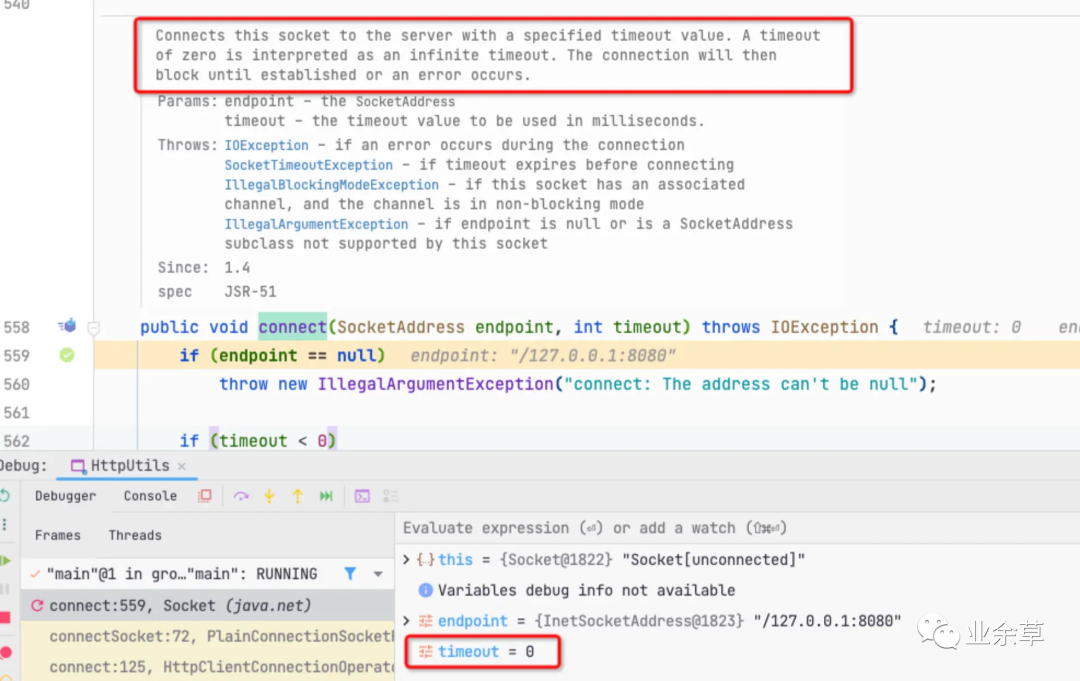
可以看到如果不設(shè)置connect timeout,在java層面默認(rèn)是無(wú)限超時(shí),那實(shí)際是要受系統(tǒng)層面影響的。我們都知道TCP建立連接的第一步是發(fā)送syn,實(shí)際這一步系統(tǒng)層面會(huì)有一些控制。
Linux環(huán)境
linux下通過(guò)net.ipv4.tcp_syn_retries控制sync的超時(shí)情況
?Number of times initial SYNs for an active TCP connection attempt will be retransmitted. Should not be higher than 127. Default value is 6, which corresponds to 63seconds till the last retransmission with the current initial RTO of 1second. With this the final timeout for an active TCP connection attempt will happen after 127seconds.
?
默認(rèn)重試次數(shù)為6次,重試的間隔時(shí)間從1s開(kāi)始每次都翻倍,6次的重試時(shí)間間隔為1s, 2s, 4s, 8s, 16s,32s, 總共63s,第6次發(fā)出后還要等64s都知道第6次也超時(shí)了,所以,總共需要 1s + 2s + 4s+ 8s+ 16s + 32s + 64 = 127 s,TCP才會(huì)把斷開(kāi)這個(gè)連接。
第 1 次發(fā)送 SYN 報(bào)文后等待 1s(2 的 0 次冪),如果超時(shí),則重試
第 2 次發(fā)送后等待 2s(2 的 1 次冪),如果超時(shí),則重試
第 3 次發(fā)送后等待 4s(2 的 2 次冪),如果超時(shí),則重試
第 4 次發(fā)送后等待 8s(2 的 3 次冪),如果超時(shí),則重試
第 5 次發(fā)送后等待 16s(2 的 4 次冪),如果超時(shí),則重試
第 6 次發(fā)送后等待 32s(2 的 5 次冪),如果超時(shí),則重試
第 7 次發(fā)送后等待 64s(2 的 6 次冪),如果超時(shí),則斷開(kāi)這個(gè)連接。
mac環(huán)境
mac場(chǎng)景下是通過(guò)net.inet.tcp.keepinit參數(shù)控制syn超時(shí)(默認(rèn)是75s)。
可以通過(guò)下面的命令查看
sysctl -A |grep net.inet.tcp.keepinit
net.inet.tcp.keepinit: 75000。
通過(guò)telnet驗(yàn)證,確實(shí)是75s超時(shí)。

tcpdump抓包也可以看到一直進(jìn)行syn重試。

讀取超時(shí)
Apache Http Client 默認(rèn)的socket read timeout 是0。
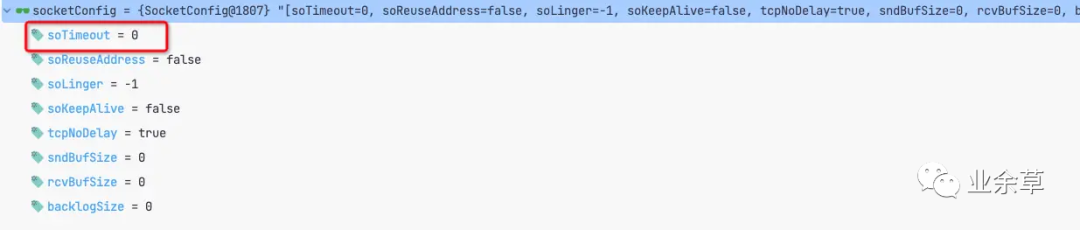
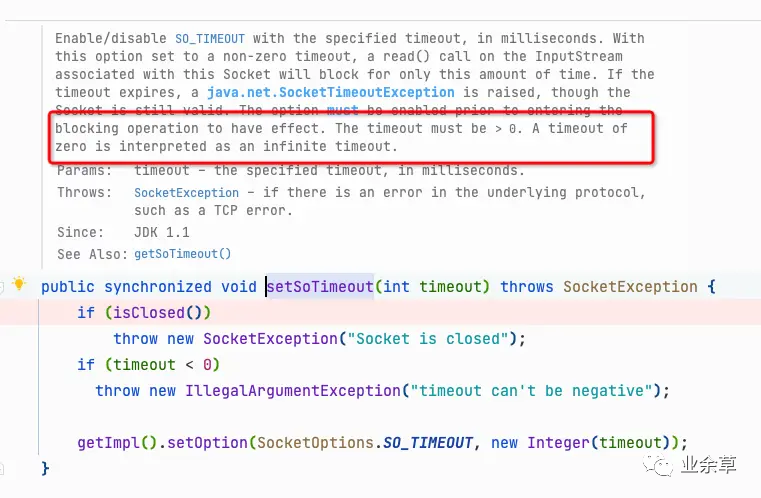
通過(guò)代碼注釋可以看到,如果soTimeout是0的話,就意味著讀取超時(shí)不受限制,但是實(shí)際上這里也會(huì)有系統(tǒng)層面的控制,下面從HTTP層面和TCP層面做一下分析。
HTTP Keep-alive
首先,Apache httpClient 4.3版本中,如果請(qǐng)求中未做制定,那么默認(rèn)會(huì)使用HTTP 1.1,代碼如下。
public static ProtocolVersion getVersion(HttpParams params) {
    Args.notNull(params, "HTTP parameters");
    Object param = params.getParameter("http.protocol.version");
    return (ProtocolVersion)(param == null ? HttpVersion.HTTP_1_1 : (ProtocolVersion)param);
}
對(duì)于HTTP 1.1版本來(lái)說(shuō),默認(rèn)會(huì)開(kāi)啟Keep-alive,并使用默認(rèn)的keep-alive策略。
public class DefaultConnectionKeepAliveStrategy implements ConnectionKeepAliveStrategy {

    public static final DefaultConnectionKeepAliveStrategy INSTANCE = new DefaultConnectionKeepAliveStrategy();

    public long getKeepAliveDuration(final HttpResponse response, final HttpContext context) {
        Args.notNull(response, "HTTP response");
        final HeaderElementIterator it = new BasicHeaderElementIterator(
            response.headerIterator(HTTP.CONN_KEEP_ALIVE));
        while (it.hasNext()) {
            final HeaderElement he = it.nextElement();
            final String param = he.getName();
            final String value = he.getValue();
            if (value != null && param.equalsIgnoreCase("timeout")) {
                try {
                    return Long.parseLong(value) * 1000;
                } catch(final NumberFormatException ignore) {
                }
            }
        }
        return -1;
    }

}
其基本原理就是HTTP場(chǎng)景下,當(dāng)客戶端與服務(wù)端建立TCP連接以后,Httpd守護(hù)進(jìn)程會(huì)通過(guò)keep-alive timeout時(shí)間設(shè)置參數(shù),一個(gè)http產(chǎn)生的tcp連接在傳送完最后一個(gè)響應(yīng)后,如果守護(hù)進(jìn)程在這個(gè)keepalive_timeout里,一直沒(méi)有收到瀏覽器發(fā)過(guò)來(lái)http請(qǐng)求,則關(guān)閉這個(gè)http連接。
這里有兩點(diǎn)要注意:
-
可以看到keep-alive的超時(shí)時(shí)間是服務(wù)端返回時(shí),http client在響應(yīng)頭中解析到的。如果一直未收到服務(wù)端響應(yīng),那么客戶端會(huì)認(rèn)為keep-alive一直有效;-1的返回值也是如此。 -
如果服務(wù)端有響應(yīng),如果服務(wù)端有響應(yīng),那么就會(huì)按照服務(wù)端的返回設(shè)置keep-alive的timeout,當(dāng)timeout到期后,就會(huì)從http client pool中移除,服務(wù)端關(guān)閉該TCP連接。
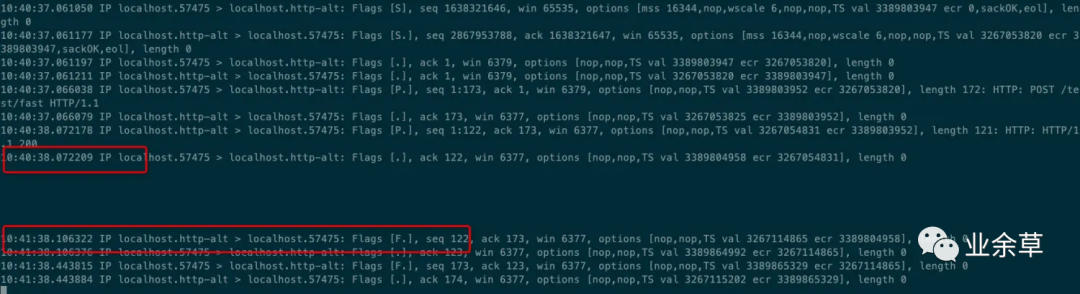
下面是一個(gè)成功的HTTP client響應(yīng)信息,可以看到服務(wù)端給出的keep-alive時(shí)間是60s。


后續(xù)對(duì)于這個(gè)連接不做任何處理,可以看到60s以后斷開(kāi)了連接。
TCP下的keep-alive機(jī)制
TCP連接建立之后,如果某一方一直不發(fā)送數(shù)據(jù),或者隔很長(zhǎng)時(shí)間才發(fā)送一次數(shù)據(jù),當(dāng)連接很久沒(méi)有數(shù)據(jù)報(bào)文傳輸時(shí)如何去確定對(duì)方還在線,到底是掉線了還是確實(shí)沒(méi)有數(shù)據(jù)傳輸,連接還需不需要保持,這種情況在TCP協(xié)議設(shè)計(jì)中keep-alive的目的。
TCP協(xié)議中,當(dāng)超過(guò)一段時(shí)間之后,TCP自動(dòng)發(fā)送一個(gè)數(shù)據(jù)為空的報(bào)文(偵測(cè)包)給對(duì)方,如果對(duì)方回應(yīng)了這個(gè)報(bào)文,說(shuō)明對(duì)方還在線,連接可以繼續(xù)保持,如果對(duì)方?jīng)]有報(bào)文返回,并且重試了多次之后則認(rèn)為連接丟失,沒(méi)有必要保持連接。
在Linux系統(tǒng)中有以下配置用于TCP的keep-alive。
?tcp_keepalive_time=7200:表示保活時(shí)間是 7200 秒(2小時(shí)),也就 2 小時(shí)內(nèi)如果沒(méi)有任何連接相關(guān)的活動(dòng),則會(huì)啟動(dòng)保活機(jī)制
?
tcp_keepalive_intvl=75:表示每次檢測(cè)間隔 75 秒;
tcp_keepalive_probes=9:表示檢測(cè) 9 次無(wú)響應(yīng),認(rèn)為對(duì)方是不可達(dá)的,從而中斷本次的連接。
也就是說(shuō)在 Linux 系統(tǒng)中,最少需要經(jīng)過(guò) 2 小時(shí) 11 分 15 秒才可以發(fā)現(xiàn)一個(gè)「死亡」連接。
在MAC下對(duì)應(yīng)的配置如下(單位為ms)
?net.inet.tcp.keepidle: 7200000
?
net.inet.tcp.keepintvl: 75000
net.inet.tcp.keepcnt: 3
也就是說(shuō)在Mac系統(tǒng)中,最少經(jīng)過(guò)2小時(shí)3分鐘45秒才可以發(fā)現(xiàn)一個(gè)「死亡」連接。
對(duì)于TCP的keep-alive是默認(rèn)關(guān)閉的,可以通過(guò)應(yīng)用層面打開(kāi)。
對(duì)于Java應(yīng)用程序,默認(rèn)是關(guān)閉的,后面我們模擬在客戶端開(kāi)啟該配置。
?public static final SocketOption SO_KEEPALIVE Keep connection alive. The value of this socket option is a Boolean that represents whether the option is enabled or disabled. When the SO_KEEPALIVE option is enabled the operating system may use a keep-alive mechanism to periodically probe the other end of a connection when the connection is otherwise idle. The exact semantics of the keep alive mechanism is system dependent and therefore unspecified. The initial value of this socket option is FALSE. The socket option may be enabled or disabled at any time.
?
首先,修改mac的keep-alive設(shè)置,將時(shí)間調(diào)短一些。
sysctl -w net.inet.tcp.keepidle=60000 net.inet.tcp.keepcnt=3 net.inet.tcp.keepintvl=10000
?net.inet.tcp.keepidle: 60000
?
net.inet.tcp.keepintvl: 10000
net.inet.tcp.keepcnt: 3
依然通過(guò)HTTP Client開(kāi)啟keep alive配置
SocketConfig socketConfig = SocketConfig.DEFAULT;
SocketConfig keepAliveConfig = SocketConfig.copy(socketConfig).setSoKeepAlive(true).build();
httpClient = HttpClients.custom().setSSLSocketFactory(sslsf).setDefaultSocketConfig(keepAliveConfig).build();
通過(guò)HTTP Client請(qǐng)求服務(wù)端一個(gè)耗時(shí)很長(zhǎng)的接口,并通過(guò)TCP抓包可以看到以下內(nèi)容
每隔60s,客戶端會(huì)向服務(wù)端發(fā)送保活的連接。

再來(lái)驗(yàn)證一下,如果服務(wù)端此時(shí)不可用的情況。
使用pfctl工具,模擬服務(wù)端不可達(dá)。
可以看到客戶端每隔10s,累計(jì)嘗試3次,然后就會(huì)關(guān)閉該連接。



回歸問(wèn)題
連接超時(shí)問(wèn)題
此時(shí)服務(wù)器因?yàn)閭€(gè)別原因,無(wú)法正常連接。
由于HTTP Client未設(shè)置對(duì)應(yīng)的超時(shí)時(shí)間,所以會(huì)依據(jù)系統(tǒng)的net.ipv4.tcp_syn_retries進(jìn)行重試。
該異常客戶端可以感知到。
請(qǐng)求卡主問(wèn)題
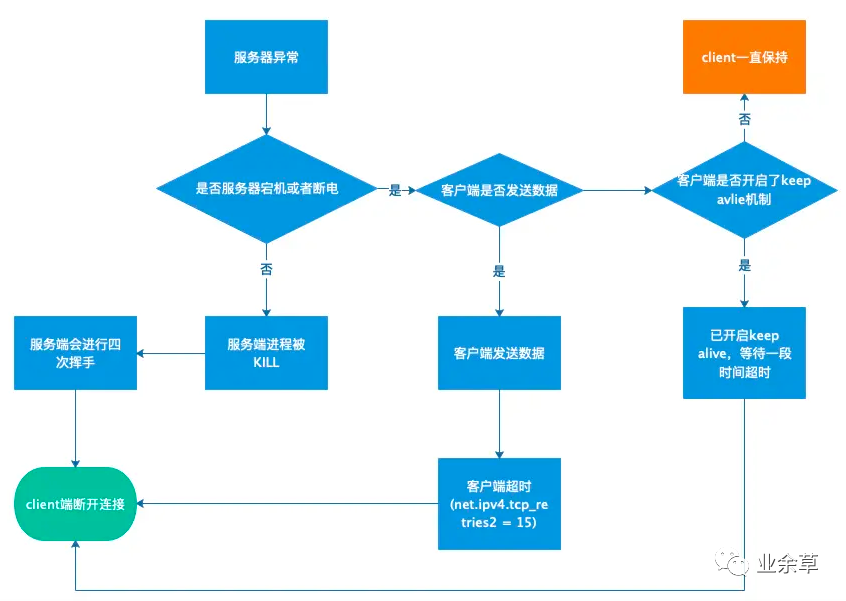
當(dāng)某個(gè)時(shí)間HTTP Client與服務(wù)器建立的正常的TCP連接后,服務(wù)器發(fā)生了異常,此時(shí)由于以下原因疊加
-
HTTP Client未設(shè)置socket讀取超時(shí)時(shí)間 -
HTTP keep-alive也由于服務(wù)端未響應(yīng)默認(rèn)不受限制 -
另外TCP層面的keep alive也沒(méi)有手動(dòng)開(kāi)啟
所以此時(shí)客戶端會(huì)一直持有該TCP連接等待服務(wù)器響應(yīng)。對(duì)應(yīng)到下圖的話,也就是橙色部分。
當(dāng)然最直接的解決方案就是設(shè)置socket read timeout時(shí)間即可。
RequestConfig requestConfig = RequestConfig.custom()
    .setConnectionRequestTimeout(1000)
    .setSocketTimeout(1000)
    .setConnectTimeout(1000).build();
httpPost.setConfig(requestConfig);
當(dāng)時(shí)間到了會(huì)報(bào)read timeout 異常。

總結(jié)
-
當(dāng)我們使用HTTP Client的時(shí)候,需要結(jié)合業(yè)務(wù)需要合理設(shè)置connect timeout和 socket timeout參數(shù)。 -
當(dāng)進(jìn)行問(wèn)題追蹤時(shí),需要利用HTTP和TCP的一些知識(shí),以及tcpdump等抓包工具進(jìn)行問(wèn)題驗(yàn)證。