
一份 Spring Boot 項目搭建模板
點擊上方藍色字體,選擇“設(shè)置星標”
優(yōu)質(zhì)文章,第一時間送達

前言
建立一個全新的項目,或者把舊的龐大的項目,進行拆分成多個項目。在建立新的項目中,經(jīng)常需要做一些重復的工作,比如說拷貝一下常用的工具類,通用代碼等等。所以就可以做一個基礎(chǔ)的項目方便使用,在經(jīng)歷新項目的時候,直接在基礎(chǔ)項目上進行簡單配置就可以開發(fā)業(yè)務(wù)代碼了。
基礎(chǔ)項目該包含哪些東西。
Swagger在線接口文檔。 CodeGenerator 代碼生成器。 統(tǒng)一返回。 通用的分頁對象。 常用工具類。 全局異常攔截。 錯誤枚舉。 自定義異常。 多環(huán)境配置文件。 Maven多環(huán)境配置。 日志配置。 JenkinsFile。
Swagger
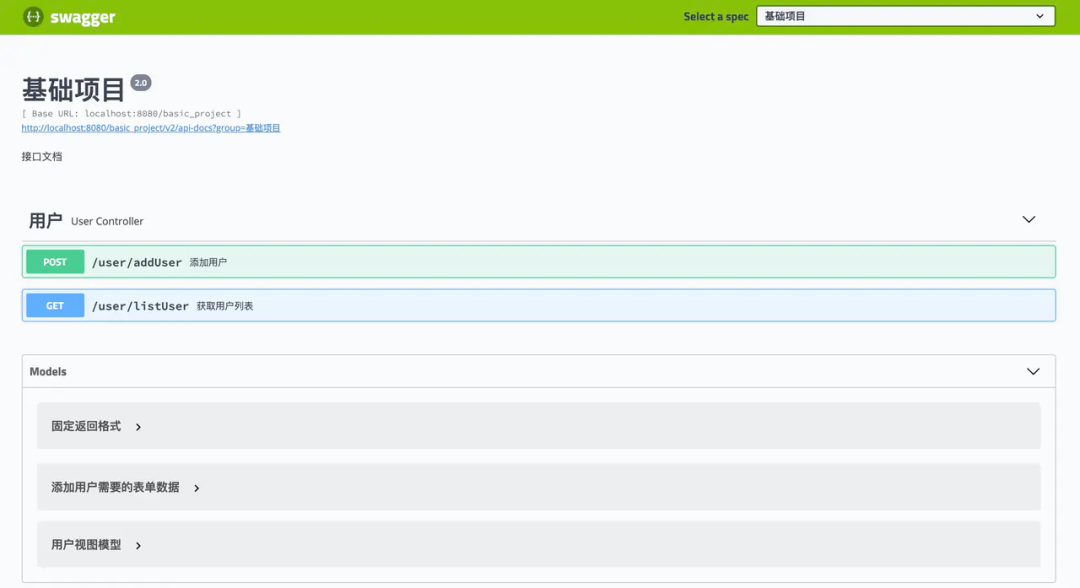
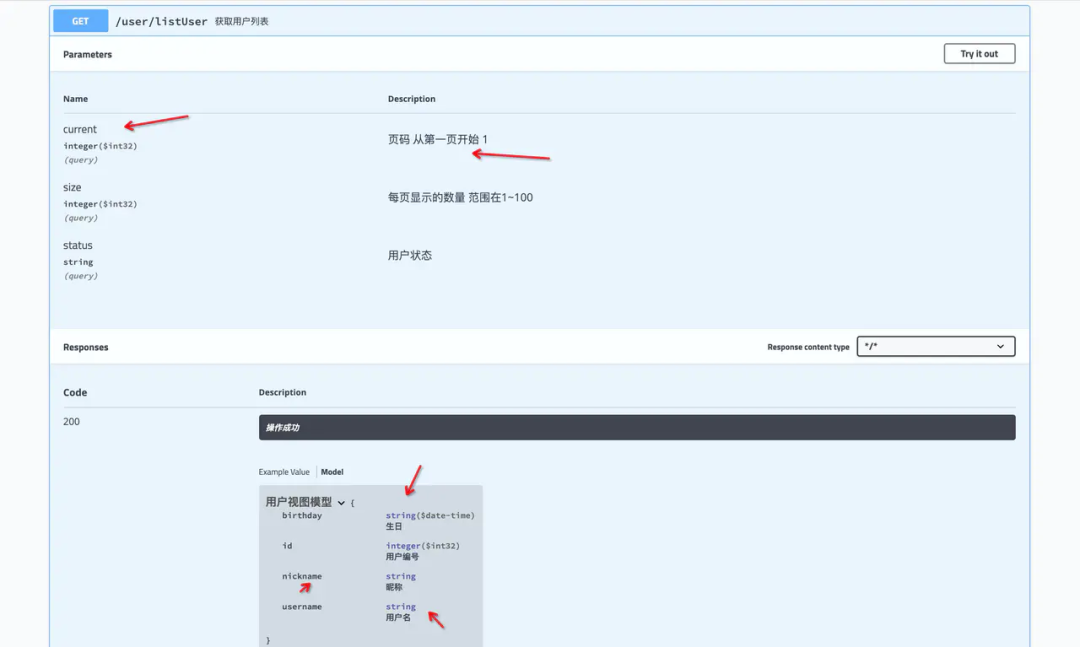 注意的點:接口文檔只能在測試/開發(fā)環(huán)境開啟,其他環(huán)境請關(guān)閉。
常用的Swagger注解
@Api用于Controller@ApiOperation用于Controller內(nèi)的方法。@ApiResponses用于標識接口返回數(shù)據(jù)的類型。@ApiModel用于標識類的名稱@ApiModelProperty用于標識屬性的名稱
案例
@RestController
@Api(tags = "用戶")
@AllArgsConstructor
@RequestMapping("/user")
public class UserController {
????private?IUserService?userService;

????
????@ApiOperation("獲取用戶列表")
????@GetMapping("/listUser")
????@ApiResponses(
????????????@ApiResponse(code = 200, message = "操作成功", response = UserVo.class)
????)
????public?ResultVo?listUser(@Validated?ListUserForm listUserForm){
????????return?ResultVoUtil.success(userService.listUser(listUserForm));
????}

}
@Data
@ApiModel("獲取用戶列表需要的表單數(shù)據(jù)")
@EqualsAndHashCode(callSuper = false)
public class ListUserForm extends PageForm {
????
????@ApiModelProperty("用戶狀態(tài)")
????@NotEmpty(message = "用戶狀態(tài)不能為空")
????@Range(min = -1?, max = 1?, message = "用戶狀態(tài)有誤")
????private String status;
} SwaggerConfiguration.java.CodeGenerator代碼生成器。
entity,service,serviceImpl,mapper,mapper.xml。省去了建立一大堆實體類的麻煩。CodeGenerator.java.常用的封裝
統(tǒng)一返回 ResultVo
@Data
@ApiModel("固定返回格式")
public class ResultVo {
????
????@ApiModelProperty("錯誤碼")
????private Integer code;
????
????@ApiModelProperty("提示信息")
????private String message;
????
????@ApiModelProperty("響應(yīng)數(shù)據(jù)")
????private Object data;
}抽象表單 BaseForm
public?abstract?class?BaseForm<T> {
????
????public?abstract?T buildEntity();
}有小伙伴可能有疑問了,這個類有啥用呢。先看一下,下面的代碼。
@Override
public?boolean?addUser(AddUserForm userForm)?{
????????User user = new?User();
????????user.setNickname(userForm.getNickname());
????????user.setBirthday(userForm.getBirthday());
????????user.setUsername(userForm.getUsername());
????????user.setPassword(userForm.getPassword());
????????return?save(user);
????}@Override
public?boolean?addUser(AddUserForm userForm)?{
????User user = new?User();
????BeanUtils.copyProperties(this,user);
????return?save(user);
}@Data
@EqualsAndHashCode(callSuper = false)
public?class?AddUserForm extends?BaseForm{
????
????private?String?nickname;
????private?Date?birthday;
????
????private?String?username;
????
????private?String?password;
????
????@Override
????public?User buildEntity() {
????????User user = new?User();
????????BeanUtils.copyProperties(this,user);
????????return?user;
????}
}
@Override
public?boolean?addUser(AddUserForm userForm)?{
????return?save(userForm.buildEntity());
}
上面的代碼有沒有種似曾相識的感覺,很多情況都是將接受到的參數(shù),轉(zhuǎn)變成對應(yīng)的實體類然后保存或者更新。所以對于這類的form可以繼承baseform并實現(xiàn)buildEntity()這樣可以更加符合面向?qū)ο螅?/span>service不需要關(guān)心form如何轉(zhuǎn)變成entity,只需要在使用的時候調(diào)用buildEntity()即可,尤其是在form -> entity相對復雜的時候,這樣做可以減少service內(nèi)的代碼。讓代碼邏輯看起來更加清晰。
通用的分頁對象
PageForm.calcCurrent()、PageVo.setCurrentAndSize()、PageVo.setTotal()這個幾個方法。PageForm
@Data
@ApiModel(value = "分頁數(shù)據(jù)", description = "分頁需要的表單數(shù)據(jù)")
public?class?PageForm<T?extends?PageForm>{
????
????@ApiModelProperty(value = "頁碼 從第一頁開始 1")
????@Min(value = 1, message = "頁碼輸入有誤")
????private?Integer current;
????
????@ApiModelProperty(value = "每頁顯示的數(shù)量 范圍在1~100")
????@Range(min = 1, max = 100, message = "每頁顯示的數(shù)量輸入有誤")
????private?Integer size;
????
????@ApiModelProperty(hidden = true)
????public?T calcCurrent(){
????????current = (current - 1?) * size;
????????return?(T) this;
????}
}PageVo
@Data
public?class?PageVo<T> {
????@ApiModelProperty(value = "分頁數(shù)據(jù)")
????private?Listrecords;
????@ApiModelProperty(value = "總條數(shù)")
????private?Integer total;
????@ApiModelProperty(value = "總頁數(shù)")
????private?Integer pages;
????@ApiModelProperty(value = "當前頁")
????private?Integer current;
????@ApiModelProperty(value = "查詢數(shù)量")
????private?Integer size;
????@ApiModelProperty(hidden = true)
????public?PageVosetCurrentAndSize(PageForm pageForm) {
????????BeanUtils.copyProperties(pageForm,this);
????????return?this;
????}
????@ApiModelProperty(hidden = true)
????public?void?setTotal(Integer total)?{
????????this.total = total;
????????this.setPages(this.total % this.size > 0?? this.total / this.size + 1?: this.total / this.size);
????}
}案例
ListUserForm
@Data
@ApiModel("獲取用戶列表需要的表單數(shù)據(jù)")
@EqualsAndHashCode(callSuper = false)
public class ListUserForm extends PageForm {
????
????@ApiModelProperty("用戶狀態(tài)")
????@NotEmpty(message = "用戶狀態(tài)不能為空")
????@Range(min = -1?, max = 1?, message = "用戶狀態(tài)有誤")
????private String status;

} UserServiceImpl
@Override
public?PageVo listUser(ListUserForm listUserForm)? {
????PageVo pageVo = new?PageVo().setCurrentAndSize(listUserForm);
????pageVo.setTotal(countUser(listUserForm.getStatus()));
????pageVo.setRecords(userMapper.listUser(listUserForm.calcCurrent()));
????return?pageVo;
}
private?Integer countUser(String status){
????return?count(new?QueryWrapper().eq("status",status));
} UserController
@ApiOperation("獲取用戶列表")
@GetMapping("/listUser")
@ApiResponses(
????????@ApiResponse(code = 200, message = "操作成功", response = UserVo.class)
)
public ResultVo listUser(@Validated?ListUserForm listUserForm){
????return?ResultVoUtil.success(userService.listUser(listUserForm));
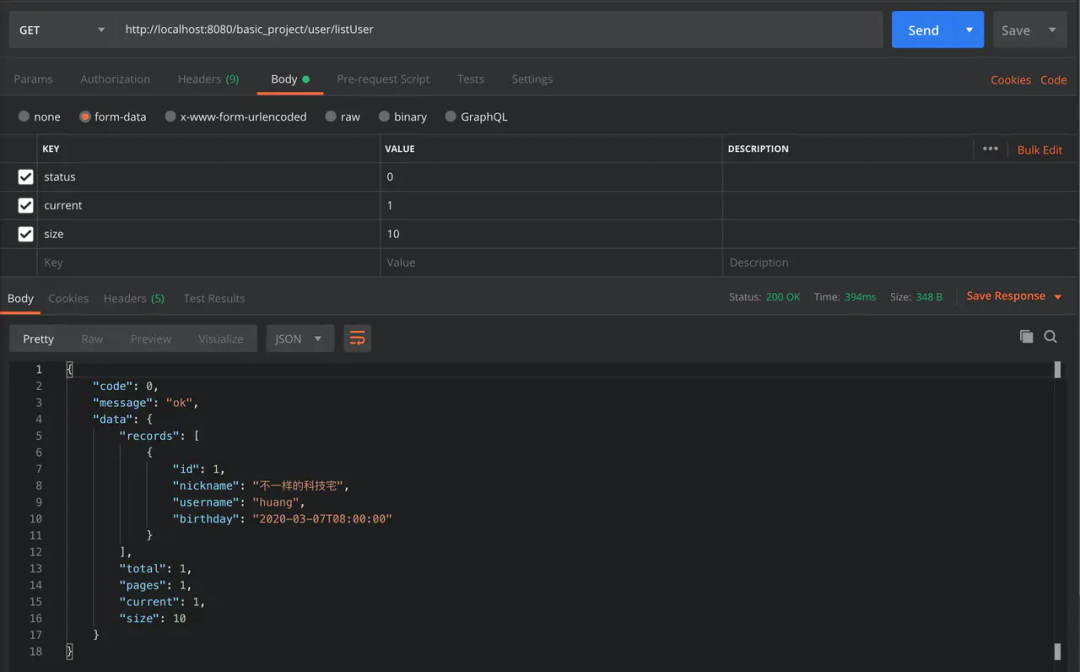
}
注意的點
PageVo在實例化的時候需要設(shè)置當前頁和每頁顯示的數(shù)量 可以調(diào)用 setCurrentAndSize()完成。進行分頁查詢的時候,需要計算偏移量。 listUserForm.calcCurrent()
假如查詢第1頁每頁顯示10條記錄,前端傳遞過來的參數(shù)是 current=1&&size=10,這個時候limit 1,10沒有問題。假如查詢第2頁每頁顯示10條記錄,前端傳遞過來的參數(shù)是 current=2&&size=10,這個時候limit 2,10就有問題,實際應(yīng)該是limit 10,10。calcCurrent()的作用就是如此。
常用工具類
異常處理
異常信息拋出 -> ControllerAdvice進行捕獲格式化輸出內(nèi)容手動拋出 CustomException并傳入ReulstEnum——> 進行捕獲錯誤信息輸出錯誤信息。
自定義異常
@Data
@EqualsAndHashCode(callSuper = false)
public?class?CustomException?extends?RuntimeException?{
????
????private?final?Integer code;

????
????private?final?String method;

????
????public?CustomException(ResultEnum resultEnum, String method)?{
????????super(resultEnum.getMsg());
????????this.code = resultEnum.getCode();
????????this.method = method;
????}

????
????public?CustomException(Integer code, String message, String method)?{
????????super(message);
????????this.code = code;
????????this.method = method;
????}

}
錯誤信息枚舉
@Getter
public?enum?ResultEnum {
????
????UNKNOWN_EXCEPTION(100, "未知異常"),
????
????ADD_ERROR(103, "添加失敗"),
????
????UPDATE_ERROR(104, "更新失敗"),
????
????DELETE_ERROR(105, "刪除失敗"),
????
????GET_ERROR(106, "查找失敗"),
????;

????private?Integer code;

????private?String?msg;

????ResultEnum(Integer code, String?msg) {
????????this.code = code;
????????this.msg = msg;
????}

????
????public?static?ResultEnum getByCode(int code){
????????for?(ResultEnum resultEnum : ResultEnum.values()) {
????????????if(code == resultEnum.getCode()){
????????????????return?resultEnum;
????????????}
????????}
????????return?null;
????}

}
全局異常攔截
@ControllerAdvice進行實現(xiàn),常用的異常攔截配置可以查看 GlobalExceptionHandling。@Slf4j
@RestControllerAdvice
public class GlobalExceptionHandling {
????
????@ExceptionHandler(value?= CustomException.class)
????public ResultVo processException(CustomException e) {
????????log.error("位置:{} -> 錯誤信息:{}", e.getMethod() ,e.getLocalizedMessage());
????????return?ResultVoUtil.error(Objects.requireNonNull(ResultEnum.getByCode(e.getCode())));
????}
????
????@ResponseStatus(HttpStatus.OK)
????@ExceptionHandler(Exception.class)
????public ResultVo exception(Exception e) {
????????e.printStackTrace();
????????return?ResultVoUtil.error(ResultEnum.UNKNOWN_EXCEPTION);
????}
}案例
Controller
@ApiOperation("刪除用戶")
@DeleteMapping("/deleteUser/{id}")
public ResultVo deleteUser(@PathVariable("id") String id){
????userService.deleteUser(id);
????return?ResultVoUtil.success();
}
Service
@Override
public?void?deleteUser(String?id) {
????
????if(!removeById(id)){
????????throw?new?CustomException(ResultEnum.DELETE_ERROR, MethodUtil.getLineInfo());
????}
}
結(jié)果
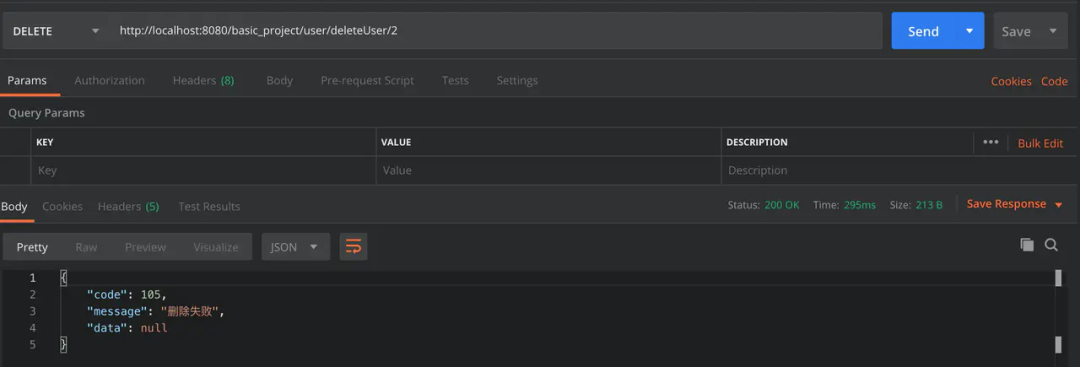

注意的點
ResultEnum進行統(tǒng)一維護。不同的業(yè)務(wù)使用不同的錯誤碼。方便在報錯時進行分辨。快速定位問題。多環(huán)境配置
SpringBoot 多環(huán)境配置
dev,test,pre,prod,對于SpringBoot項目多建立幾個配置文件就可以了。然后啟動的時候可以通過配置?spring.profiles.active? 來選擇啟動的環(huán)境。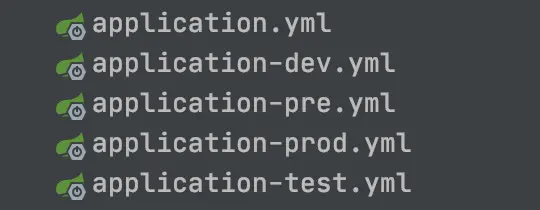
java?-jar?BasicProject.jar?--spring.profiles.active=prod??
Maven多環(huán)境配置
配置XML
<profiles>
????<profile>
????????
????????<id>devid>
????????<activation>
????????????<activeByDefault>trueactiveByDefault>
????????activation>
????????<properties>
????????????<activatedProperties>devactivatedProperties>
????????properties>
????profile>
????<profile>
????????
????????<id>testid>
????????<properties>
????????????<activatedProperties>testactivatedProperties>
????????properties>
????profile>
????<profile>
????????
????????<id>preid>
????????<properties>
????????????<activatedProperties>preactivatedProperties>
????????properties>
????profile>
????<profile>
????????
????????<id>prodid>
????????<properties>
????????????<activatedProperties>prodactivatedProperties>
????????properties>
????profile>
profiles>
更改application.yml
spring:
??profiles:
????# 選擇環(huán)境
????active: @activatedProperties@
使用案例
mvn clean package?-P prod
mvn clean package?-P pre
mvn clean package?-P testapplication.yml 會發(fā)現(xiàn)spring.profiles.active=@activatedProperties@ 發(fā)生了改變。日志配置
JenkinsFile
代碼地址
作者:?不一樣的科技宅?
鏈接:juejin.im/post/6844904083942277127
-END-
springboot開發(fā)基礎(chǔ)腳手架零基礎(chǔ)到項目實戰(zhàn)?
加我微信回復“springboot腳手架”即可獲取
點個在看!?
謝謝支持喲 (*^__^*)