
vue3的composition-api實踐總結(jié)
點擊上方 前端Q,關(guān)注公眾號
回復(fù)加群,加入前端Q技術(shù)交流群
因為向往已久vue3的開發(fā)方式,但是組內(nèi)有很多歷史項目,并且我們受制于ie的支持,所以我們決定在vue2中引入composition-api,來使用他的新特性。在使用過程中,我們遇到了很多問題,也積累了一些經(jīng)驗,所以記錄下。
composition-api
首先給大家介紹一下composition-api,他是通過函數(shù)的形式,將vue的功能特性暴露給我們使用
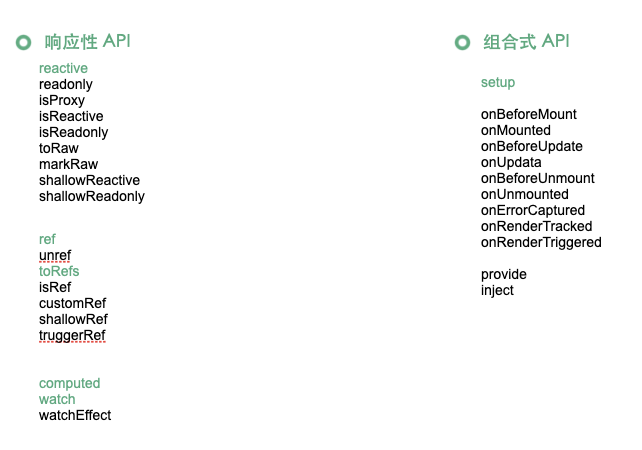
雖然一下子看上去很多,但是只需要先掌握加粗的這一部分,就可以體驗到組合式api的魅力了,其他的可以先做了解等到你真的需要使用它們的時候在做深入。
reactive 用來將對象轉(zhuǎn)變?yōu)轫憫?yīng)式的,與vue2的observable類似,ref用來獲得單獨或者為基礎(chǔ)數(shù)據(jù)類型獲得響應(yīng)性。為什會會有兩個獲得響應(yīng)性的api呢稍后我們將具體說明。computed、watch,provide、inject不用懷疑和vue2中做的是一樣的事情。
你一定注意到下面這些加了on開頭的生命周期鉤子函數(shù),沒錯在組合式api中,這就是他們注冊的方式。但是為什么不見了beforeCreate和created呢?因為setup就是在這個階段執(zhí)行的,而setup就是打開組合式api世界的大門。你可以把setup理解為class的constructor,在vue組件的創(chuàng)建階段,把我們的相關(guān)邏輯執(zhí)行,并且注冊相關(guān)的副作用函數(shù)。
現(xiàn)在我們說回ref和reactive。
reactive在官網(wǎng)中的說明,接受一個對象,返回對象的響應(yīng)式副本。ref在官網(wǎng)中的描述"接受一個內(nèi)部值并返回一個響應(yīng)式且可變的 ref 對象。 ref 對象具有指向內(nèi)部值的單個 property.value"。
聽著很繞口,簡單來講就是reactive可以為對象創(chuàng)建響應(yīng)式而ref除了對象,還可以接收基礎(chǔ)數(shù)據(jù)類型,比如string、boolean等。
那為什么會有這種差異呢?在vue3當(dāng)中響應(yīng)式是基于proxy實現(xiàn)的,而proxy的target必須是復(fù)雜數(shù)據(jù)類型,也就是存放在堆內(nèi)存中,通過指針引用的對象。其實也很好理解,因為基礎(chǔ)數(shù)據(jù)類型,每一次賦值都是全新的對象,所以根本無法代理。那么如果我們想取得簡單類型的響應(yīng)式怎么辦呢?這時候就需要用到ref。
class RefImpl<T> {
  private _value: T

  public readonly __v_isRef = true

  constructor(private _rawValue: T, public readonly _shallow = false) {
    this._value = _shallow ? _rawValue : convert(_rawValue)
  }

  get value() {
    track(toRaw(this), TrackOpTypes.GET, 'value')
    return this._value
  }

  set value(newVal) {
    if (hasChanged(toRaw(newVal), this._rawValue)) {
      this._rawValue = newVal
      this._value = this._shallow ? newVal : convert(newVal)
      trigger(toRaw(this), TriggerOpTypes.SET, 'value', newVal)
    }
  }
}
...
const convert = <T extends unknown>(val: T): T =>
  isObject(val) ? reactive(val) : val
...
ref通過創(chuàng)建內(nèi)部狀態(tài),將值掛在value上,所以ref生成的對象,要通過value使用。重寫get/set獲得的監(jiān)聽,同時對對象的處理,也依賴了reactive的實現(xiàn)。
由此,ref并不只是具有對基本數(shù)據(jù)類型的響應(yīng)式處理能力,他也是可以處理對象的。所以我認為ref和reactive的區(qū)分并不應(yīng)該只是簡單/復(fù)雜對象的區(qū)分,而是應(yīng)該用編程思想?yún)^(qū)分的。我們應(yīng)該避免,把reactive 當(dāng)作data在頂部將所有變量聲明的想法,而是應(yīng)該結(jié)合具體的邏輯功能,比如一個控制灰度的Flag那他就應(yīng)該是一個ref,而分頁當(dāng)中的頁碼,pageSize,total等就應(yīng)該是一個reactive聲明的對象。也就是說一個setup當(dāng)中可以有多出響應(yīng)變量的聲明,而且他們應(yīng)當(dāng)是與邏輯緊密結(jié)合的.
接下來我先用一個分頁的功能,用選項式和組合式api給大家對比一下。
一些例子
<template>
    <div>
        <ul class="article-list">
            <li v-for="item in articleList" :key="item.id">
                <div>
                    <div class="title">{{ item.title }}</div>
                    <div class="content">{{ item.content }}</div>
                </div>
            </li>
        </ul>
        <el-pagination
            @size-change="handleSizeChange"
            @current-change="handleCurrentChange"
            :current-page="currentPage"
            :page-sizes="pageSizes"
            :page-size="pageSize"
            layout="total, sizes, prev, pager, next, jumper"
            :total="total"
        >
        </el-pagination>
    </div>
</template>

<script>
import { getArticleList } from '@/mock/index';
export default {
    data() {
        return {
            articleList: [],
            currentPage: 1,
            pageSizes: [5, 10, 20],
            pageSize: 5,
            total: 0,
        };
    },
    created() {
        this.getList();
    },
    methods: {
        getList() {
            const param = {
                currentPage: this.currentPage,
                pageSizes: this.pageSizes,
                pageSize: this.pageSize,
            };
            getArticleList(param).then((res) => {
                this.articleList = res.data;
                this.total = res.total;
            });
        },
        handleSizeChange(val) {
            this.pageSize = val;
            this.getList();
        },
        handleCurrentChange(val) {
            this.currentPage = val;
            this.getList();
        },
    },
};
</script>
這還是我們熟悉到不能在熟悉的分頁流程,在data中聲明數(shù)據(jù),在method中提供修分頁的方法。當(dāng)我們用composition-api實現(xiàn)的時候他就成了下面的樣子。
<script>
import { defineComponent, reactive, ref, toRefs } from "@vue/composition-api";
import { getArticleList } from "@/mock/index";
export default defineComponent({
  setup() {
    const page = reactive({
      currentPage: 1,
      pageSizes: [5, 10, 20],
      pageSize: 5,
      total: 0,
    });
    function handleSizeChange(val) {
      page.pageSize = val;
      getList();
    }
    function handleCurrentChange(val) {
      page.currentPage = val;
      getList();
    }

    const articleList = ref([]);
    function getList() {
      getArticleList(page).then((res) => {
        articleList.value = res.data;
        page.total = res.total;
      });
    }
    getList();
    return {
      ...toRefs(page),
      articleList,
      getList,
      handleSizeChange,
      handleCurrentChange,
    };
  },
});
</script>
這是以composition-api的方式實現(xiàn)的分頁,你會發(fā)現(xiàn)原本的data,method,還有聲明周期等選項都不見了,所有的邏輯都放到了setup當(dāng)中。通過這一個簡單的例子,我們可以發(fā)現(xiàn)原本分散在各個選項中的邏輯,在這里得到了聚合。這種變化在復(fù)雜場景下更為明顯。在復(fù)雜組件中,這種情況更加明顯。而且當(dāng)邏輯完全聚集在一起,這時候,將他們抽離出來,而且抽離邏輯的可以在別處復(fù)用,至此hook就形成了。
hook形態(tài)的分頁組件
// hooks/useArticleList.js
import { ref } from "@vue/composition-api";
import { getArticleList } from "@/mock/index"; // mock ajax請求

function useArticleList() {
  const articleList = ref([]);
  function getList(page) {
    getArticleList(page).then((res) => {
      articleList.value = res.data;
      page.total = res.total;
    });
  }
  return {
    articleList,
    getList,
  };
}
export default useArticleList;

// hooks/usePage.js
import { reactive } from "@vue/composition-api";

function usePage(changeFn) {
  const page = reactive({
    currentPage: 1,
    pageSizes: [5, 10, 20],
    pageSize: 5,
    total: 0,
  });
  function handleSizeChange(val) {
    page.pageSize = val;
    changeFn(page);
  }
  function handleCurrentChange(val) {
    page.currentPage = val;
    changeFn(page);
  }
  return {
    page,
    handleSizeChange,
    handleCurrentChange,
  };
}
export default usePage;

// views/List.vue
import { defineComponent, toRefs } from "@vue/composition-api";
import usePage from "@/hooks/usePage";
import useArticleList from "@/hooks/useArticleList";
export default defineComponent({
  setup() {
    const { articleList, getList } = useArticleList();
    const { page, handleSizeChange, handleCurrentChange } = usePage(getList);
    getList(page);
    return {
      ...toRefs(page),
      articleList,
      getList,
      handleSizeChange,
      handleCurrentChange,
    };
  },
});
在hook使用過程中我們也踩過很多坑
hook中的異步問題
因為hook本質(zhì)上就是函數(shù),所以靈活度非常高,尤其是在涉及異步的邏輯中,考慮不全面就很有可能造成很多問題。hook是可以覆蓋異步情況的,但是必須在setup當(dāng)中執(zhí)行時返回有效對象不能被阻塞。
我們總結(jié)了兩種異步的風(fēng)格,通過一個簡單的hook為例
外部沒有其他依賴,只是交付渲染的響應(yīng)變量 對于這種情況,可以通過聲明、對外暴露響應(yīng)變量,在hook中異步修改的方式
// hooks/useWarehouse.js
import { reactive,toRefs } from '@vue/composition-api';
import { queryWarehouse } from '@/mock/index';  // 查詢倉庫的請求
import getParam from '@/utils/getParam'; // 獲得一些參數(shù)的方法
function useWarehouse(admin) {
    const warehouse = reactive({ warehouseList: [] });
    const param = { id: admin.id, ...getParam() };
    const queryList = async () => {
        const { list } = await queryWarehouse(param);
        list.forEach(goods=>{
        // 一些邏輯...
          return goods
        })
        warehouse.warehouseList = list;
    };
    return { ...toRefs(warehouse), queryList };
}
export default useWarehouse;// components/Warehouse.vue
<template>
    <div>
        <button @click="queryList">queryList</button>
        <ul>
            <li v-for="goods in warehouseList" :key="goods.id">
                {{goods}}
            </li>
        </ul>
    </div>
</template>

<script>
import { defineComponent } from '@vue/composition-api';
import useWarehouse from '@/hooks/useWarehouse';
export default defineComponent({
    setup() {
        // 倉庫保管員
        const admin = {
            id: '1234',
            name: '張三',
            age: 28,
            sex: 'men',
        };
        const { warehouseList, queryList } = useWarehouse(admin);
        return { warehouseList, queryList };
    },
});
</script>
外部具有依賴,需要在使用側(cè)進行加工的 可以通過對外暴露Promise的方式,使外部獲得同步操作的能力 在原有例子上拓展,增加一個需要處理的更新時間屬性
// hooks/useWarehouse.js
function useWarehouse(admin) {
    const warehouse = reactive({ warehouseList: [] });
    const param = { id: admin.id, ...getParam() };
    const queryList = async () => {
        const { list, updateTime } = await queryWarehouse(param);
            list.forEach(goods=>{
        // 一些邏輯...
          return goods
        })
        warehouse.warehouseList = list;
        return updateTime;
    };
    return { ...toRefs(warehouse), queryList };
}
export default useWarehouse;// components/Warehouse.vue
<template>
    <div>
       ...
        <span>nextUpdateTime:{{nextUpdateTime}}</span>
    </div>
</template>

<script>
...
import dayjs from 'dayjs';
export default defineComponent({
    setup() {
    ...
       // 倉庫保管員
        const admin = {
            id: '1234',
            name: '張三',
            age: 28,
            sex: 'men',
        };
        const { warehouseList, queryList } = useWarehouse(admin);
        const nextUpdateTime = ref('');
        const interval = 7; // 假設(shè)更新倉庫的時間間隔是7天
        const queryHandler = async () => {
            const updateTime = await queryList();
            nextUpdateTime.value = dayjs(updateTime).add(interval, 'day');
        };
        return { warehouseList, nextUpdateTime, queryHandler };
    },
});
</script>
this的問題
因為setup是beforecreate階段,不能獲取到this,雖然通過setup的第二個參數(shù)context可以獲得一部分的能力。是我們想要操作諸如路由,vuex這樣的能力就收到了限制,最新的router@4、vuex@4都提供了組合式的api。
但是由于vue2的底層限制我們沒有辦法使用這些hook,但是我們可以通過引用實例的方式獲得一定的操縱能力,也可以通過getCurrentInstance獲得組件實例,上面掛載的對象。
由于composition-api中的響應(yīng)式雖然底層原理與vue相同都是通過object.defineproperty改寫屬性實現(xiàn)的,但是具體實現(xiàn)方式存在差異,所以在setup當(dāng)中與vue原生的響應(yīng)式并不互通。這也導(dǎo)致即使我們拿到了相應(yīng)的實例,也沒有辦法監(jiān)聽它們的響應(yīng)式。如果有這方面的需求,只能在選項配置中使用。
總結(jié)
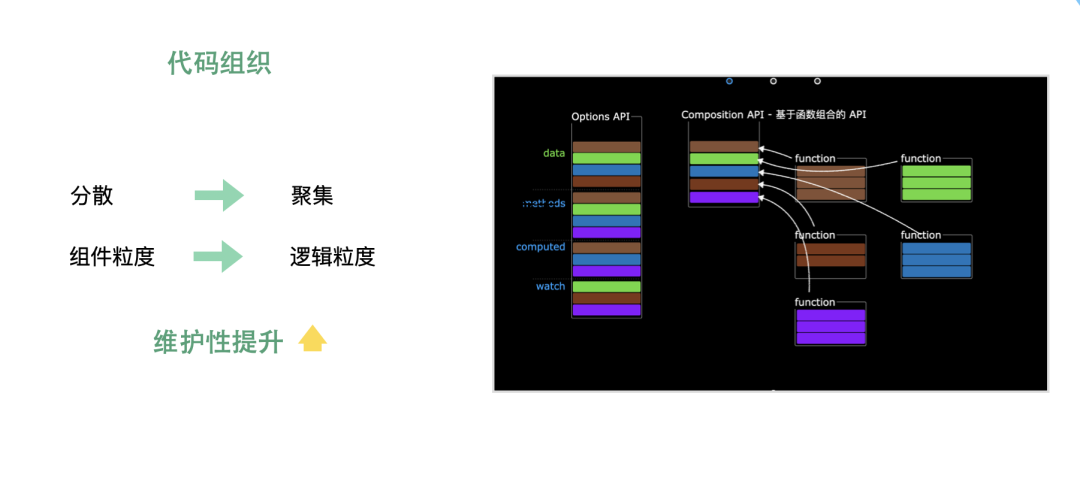
通過vue3組合式、與hook的能力。我們的代碼風(fēng)格有了很大的轉(zhuǎn)變,邏輯更加聚合、純粹。復(fù)用性能力得到了提升。項目整體的維護性有了顯著的提高。這也是我們即便在vue2的項目中,也要使用composition-api引入vue3新特性的原因。若有收獲,就點個贊吧
內(nèi)推社群
我組建了一個氛圍特別好的騰訊內(nèi)推社群,如果你對加入騰訊感興趣的話(后續(xù)有計劃也可以),我們可以一起進行面試相關(guān)的答疑、聊聊面試的故事、并且在你準備好的時候隨時幫你內(nèi)推。下方加 winty 好友回復(fù)「面試」即可。