
curl 用法簡介
點(diǎn)擊關(guān)注,與你共同成長!

curl 用法簡介
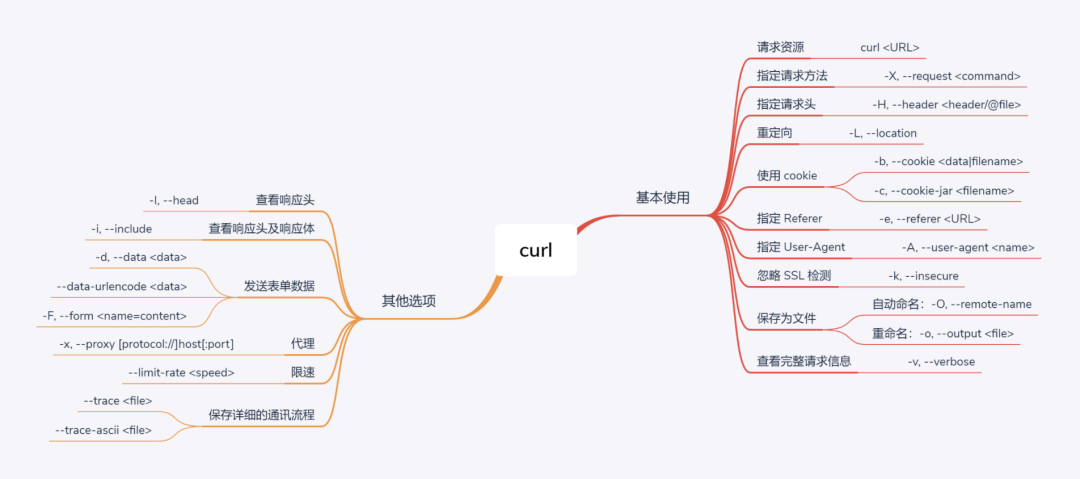
簡介
curl is a tool to transfer data from or to a server, using one of the supported protocols (DICT, FILE, FTP, FTPS, GOPHER, HTTP, HTTPS, IMAP, IMAPS, LDAP, LDAPS, POP3, POP3S, RTMP, RTSP, SCP, SFTP, SMB, SMBS, SMTP, SMTPS, TELNET and TFTP). The command is designed to work without user interaction.
curl 是一個命令行客戶端,支持多種傳輸協(xié)議,最經(jīng)常使用的場景就是在終端請求服務(wù)器資源。
curl 命令非常強(qiáng)大,熟練掌握情況下,相當(dāng)于一個微型終端瀏覽器。
基本使用
請求資源:curl 直接使用的效果就是發(fā)送 Get請求服務(wù)器資源:
??$?curl?'http://httpbin.org/get'
指定請求方法:使用選項 -X, --request:
??$?curl?-X?GET?'http://httpbin.org/get'??#?默認(rèn)即使用?GET?請求,故可忽略?-X?GET
??$?curl?-X?POST?'http://httpbin.org/post'?#?發(fā)送?POST?請求
??
該選項的參數(shù)有:GET、POST、HEAD、PUT、DELETE、FTP、POP3、IMAP、SMTP...
注:一般情況下,-X/--request選項都無需攜帶,因?yàn)楹芏嗥渌x項都默認(rèn)帶有請求方法的語義。雖如此,但還是推薦請求時攜帶該選項。
發(fā)送請求頭:使用選項 -H, --header:
??#?發(fā)送請求頭:accept: application/json
??$?curl?-X?GET?'http://httpbin.org/headers'?-H?'accept:?application/json'
??
??#?發(fā)送?JSON?數(shù)據(jù)
??$?curl?-X?POST?-d?'{"login":?"emma","password":?123}'?-H?'Content-Type:?application/json'?'http://httpbin.org/post'
??
重定向:使用選項 -L, --location:
??#?curl?默認(rèn)不會自動重定向
??$?curl?-X?GET?"http://httpbin.org/absolute-redirect/1"?-H?"accept:?text/html"
??
??#?使用?-L?選項使能重定向
??$?curl?-X?GET?"http://httpbin.org/absolute-redirect/1"?-H?"accept:?text/html"?-L
??
使用 cookie:使用選項 -b, --cookie、-c, --cookie-jar:
??#?請求頭攜帶:Cookie: key1=value1;key2=value2
??$?curl?'http://httpbin.org/cookies'?-b?'key1=value1;key2=value2'
??
??#?保存?Cookie:?name=whyn?到文件?cookies.txt
??$?curl?'http://httpbin.org/cookies/set/name/whyn'?-c?cookies.txt
??
??#?從文件中讀取?Cookie?信息
??$?curl?'http://httpbin.org/cookies'?-b?cookies.txt
??
指定 Referer:使用選項 -e, --referer:
??#?請求頭添加:Referer: http://www.baidu.com
??$?curl?'http://httpbin.org/get'?-e?'http://www.baidu.com'
??
??#?當(dāng)然同樣可以直接指定請求頭:Referer
??$?curl?'http://httpbin.org/get'?-H?'Referer:?http://www.baidu.com'
??
??#?重定向時,加上?;auto,則會自動將第二次請求的 Referer 設(shè)置為重定向頁面,即:
??#?首次請求:Referer: http://www.baidu.com
??#?第二次請求(重定向):Referer: http://httpbin.org/redirect/1
??$?curl?-L?'http://httpbin.org/redirect/1'?-e?'http://www.baidu.com;auto'
??
指定 User-Agent:使用選項 -A, --user-agent:
??#?添加請求頭:User-Agent: xxxx
??$?curl?'http://httpbin.org/get'?-A?'Mozilla/5.0?(Windows?NT?10.0;?Win64;?x64)?AppleWebKit/537.36?(KHTML,?like?Gecko)?Chrome/81.0.4044.138?Safari/537.36'
??
??#?當(dāng)然同樣可以直接指定請求頭:User-Agent
??$?curl?'http://httpbin.org/get'?-H?'User-Agent:?Mozilla/5.0?(Windows?NT?10.0;?Win64;?x64)?AppleWebKit/537.36?(KHTML,?like?Gecko)?Chrome/81.0.4044.138?Safari/537.36'
??
忽略 SSL 檢測:使用選項 -k, --insecure:
??#?跳過?www.baidu.com?的證書驗(yàn)證
??$?curl?-k?'https://www.baidu.com'
??
保存為文件:使用選項 -O, --remote-name、-o, --output:
??#?保存網(wǎng)頁,自動命名為?index.html
??$?curl?-O?'http://www.baidu.com/index.html'?
??
??#?保存網(wǎng)頁,手動命名為?baidu.html
??$?curl?-o?'baidu.html'?'http://www.baidu.com/index.html'?
??
??#?下載圖片
??$?curl?-X?GET?'https://upload-images.jianshu.io/upload_images/2222997-88ad51461e1e15ba.png?imageMogr2/auto-orient/strip|imageView2/2/w/1200/format/webp'?-o?nginx.webp
??
??#?自動斷點(diǎn)續(xù)傳,注:?-C?-?后面帶一個?-,表示自動續(xù)傳,否則需要手動指定斷點(diǎn)續(xù)傳字節(jié)位置
??$?curl?-X?GET?-C?-?'https://upload-images.jianshu.io/upload_images/2222997-88ad51461e1e15ba.png?imageMogr2/auto-orient/strip|imageView2/2/w/1200/format/webp'?-o?nginx.webp
??url?
??
注:-O/-o選項將 curl 結(jié)果重定向到文件,相當(dāng)于下載資源,其效果等同于wget。
查看完整請求信息:使用選項 -v, --verbose:
??$?curl?'http:/httpbin.org/get'?-v
??
注:-v/--verbose選項會顯示完整的請求通訊過程,其顯示內(nèi)容包含如下幾方面:
以** ***開頭的行:表示 curl 提供的額外信息以** >**開頭的行:表示 請求頭 內(nèi)容以** <**開頭的行:表示響應(yīng)頭內(nèi)容
其它選項
查看響應(yīng)頭:使用選項 -I, --head:
??#?相當(dāng)于?head?請求
??$?curl?'http://httpbin.org/get'?-I
??
查看響應(yīng)頭及響應(yīng)體:使用選項 -i, --include:
??$?curl?'http://httpbin.org/get'?-i
??
發(fā)送表單數(shù)據(jù):對應(yīng)選項有如下幾個:
-d, --data:以ContentType:application/x-www-form-urlencoded的格式發(fā)送表單數(shù)據(jù),即key1=value1&key2=value2形式:
??#?-d?默認(rèn)攜帶?POST?請求語義,故?-X?POST?在此可省略
??$?curl?-X?POST?-d?'login=emma&password=123'?'http://httpbin.org/post'
??
??#?可多次使用?-d,數(shù)據(jù)會自動合并,相當(dāng)于`login=emma&password=123`
??$?curl?-X?POST?-d?'login=emma'?-d?'password=123'?'http://httpbin.org/post'
??
??$?curl?-X?POST?-d?"[email protected]"?-d?"password=-"
??
注:對于GET請求的參數(shù),有如下兩種格式:
??#?直接拼接到?URL?后面作為參數(shù)傳遞
??$?curl?'http://httpbin.org/anything?name=whyn'
??
??#?使用?-d?選項時,需加上?-G?選項將請求方式設(shè)置為?GET?
??#?curl?'http://httpbin.org/anything'?-G?-d?'name=whyn'
??
--data-urlencode:如果表單數(shù)據(jù)需要進(jìn)行 URL 編碼,則使用該選項:
??$?curl?-X?POST?--data-urlencode?'name=emma?wild'?'http://httpbin.org/post'
??
-F, --form:以ContentType: multipart/form-data的格式發(fā)送表單數(shù)據(jù),一般用于上傳文件:
??#?以文件表單進(jìn)行上傳:發(fā)送文件 portrait.png,對應(yīng)表單字段為 profile(?@?用于指定上傳文件)
[email protected]?https://example.com/upload.cgi
??
??#?以文本表單進(jìn)行上傳:先讀取 hugefile.txt 內(nèi)容,然后作為字段 story 進(jìn)行上傳(?
??$?curl?-F?"story=?https://example.com/
??
??#?從標(biāo)準(zhǔn)輸入流中讀取內(nèi)容進(jìn)行上傳(-?表示讀取標(biāo)準(zhǔn)輸入流,此時使用?@?或?
??$?echo?'Whyn'?|?curl?-X?POST?-F?"name=@-"?'http://httpbin.org/post'
??
??#?發(fā)送表單字段 name 和文件 profile,多字段,會產(chǎn)生格式:boundary=------------------------d74496d66958873e
[email protected]?https://example.com/upload.cgi
??
??#?使用 type 指定上傳文件 MIME 類型,默認(rèn)使用的 MIME 為:application/octet-stream
??$?curl?-F?"[email protected];type=text/html"?example.com
??
??#?使用?filename?修改上傳文件名,本地使用文件?portrait.jpg,服務(wù)器接受到的為?me.jgp
??$?curl?-F?'[email protected];filename=me.jpg'?https://example.com/upload.cgi
??
代理:使用選項 -x, --proxy [protocol://]host[:port]
??#?使用?HTTP?代理(本地使用?Nginx?搭建一個正向代理,通過?-I?選項可以看到響應(yīng)頭`Server:?nginx/1.18.0`,結(jié)果由?Nginx?返回,則表示代理成功)
??$?curl?-x?'http://localhost:80'?'http://httpbin.org/get'?-I
??
??#?使用?socks5?代理
??$?curl?-x?"socks5://localhost:10808"?"https://www.google.com"?
??
注:-x, --proxy選項默認(rèn)使用 HTTP 協(xié)議,默認(rèn)使用端口 1080。
限速:使用選項: --limit-rate:
??#?帶寬限制為?200k
??$?curl?--limit-rate?200k?http://www.badiu.com
??
保存詳細(xì)的通訊流程:使用選項 --trace,--trace-ascii:
??# 16 進(jìn)制 dump 文件:顯示完整通訊過程
??$?curl?'http://httpbin.org/get'?--trace?trace.txt
??
??#?ascii?碼?dump?文件,更加易讀
??$?curl?'http://httpbin.org/get'?--trace-ascii?trace-ascii.txt
??
認(rèn)證:使用選項: -u, --user:
??#?basic?authentication
??$?curl?-X?GET?'https://httpbin.org/basic-auth/admin/this.is.the.password'?-u?'admin:this.is.the.password'?--header?'accept:?application/json;?charset=utf-8'
??
更多其他選項內(nèi)容,請查看:curl --help、man curl、curl-manpage

以上,便是今天的分享,希望大家喜歡,覺得內(nèi)容不錯的,歡迎「分享」「贊」或者點(diǎn)擊「在看」支持,謝謝各位。